
7 Payment Friction Points That Quietly Kill Conversions
Last Updated on October 1, 2026 by Dimitri Akhrin
These are the checkout friction points that turn legitimate buyers into lost revenue — and most of them look like fraud
Examines false declines through the customer experience lens rather than the fraud-prevention lens, connecting approval rate signals to cart abandonment patterns that eCommerce managers already track
TL;DR
- Checkout friction and fraud flags overlap – Many behaviors that cause cart abandonment (hesitation, card switching, duplicate submissions) also trigger processor-side declines, creating a hidden revenue leak.
- Transparent pricing reduces both abandonment and chargebacks – Surfacing all costs before the payment step addresses the top reason 48% of shoppers leave, and cuts “amount differs” chargeback disputes.
- Decline code visibility is a growth tool – Mapping processor decline codes to actionable customer messages can recover 5 to 15% of soft-declined transactions that generic error pages lose.
- Deposit speed directly affects reinvestment capacity – Next-day funding turns daily revenue into next-day operating capital, replacing the hidden cost of financing your processor’s multi-day float.
- Start where you have data – Pick one or two friction points where your chargeback reason codes, decline logs, or abandonment funnel already show a clear signal, and fix those first.
The Checkout Problem Hiding in Plain Sight

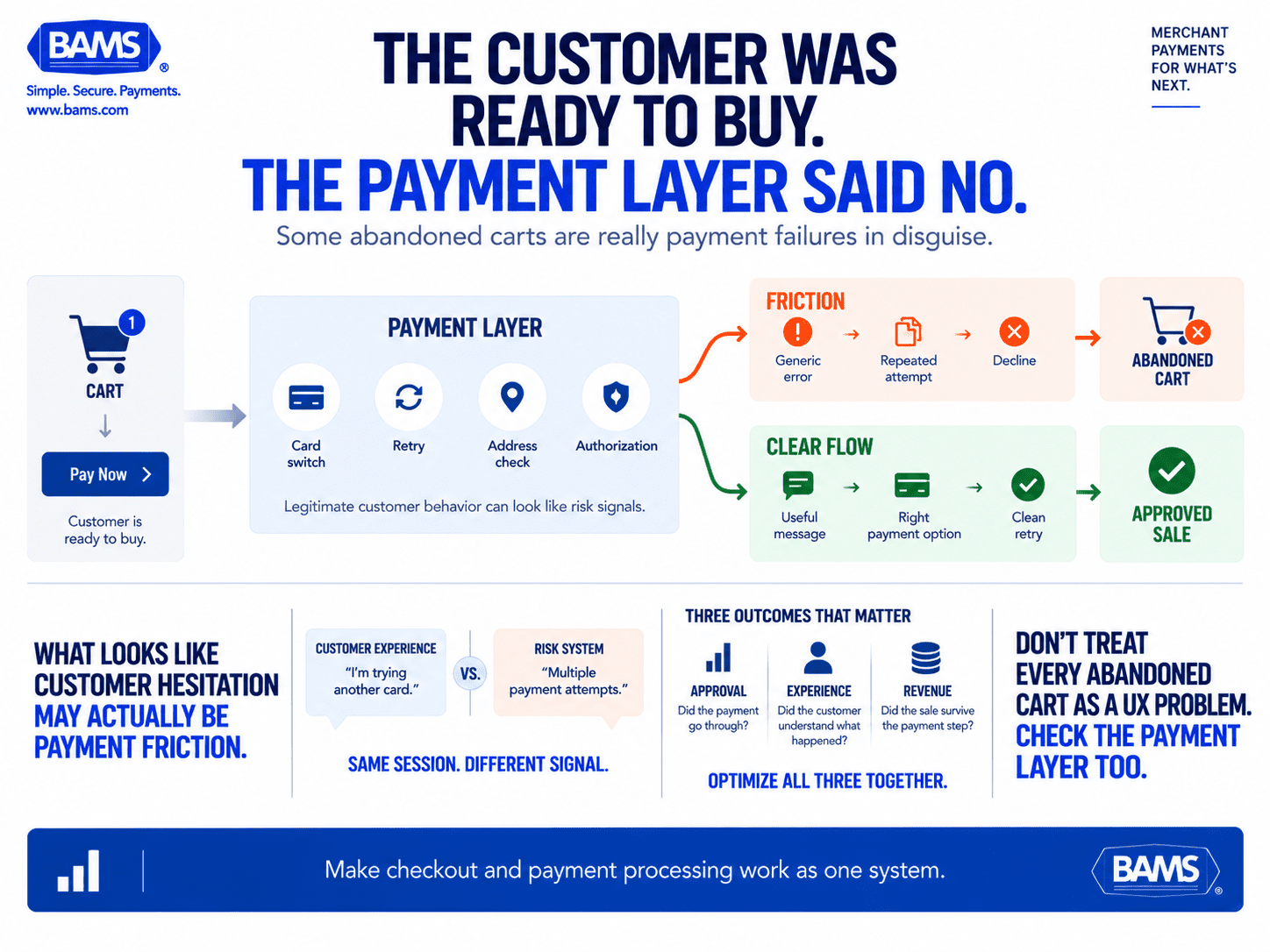
Not every abandoned checkout starts with a customer changing their mind. Sometimes the customer is ready to buy, but payment friction turns a legitimate transaction into a decline or dead end.
Your analytics dashboard shows the cart abandonment number. PwC reports that 40% of shoppers abandon purchases after facing a rejection. You’ve tested button colors, shortened forms, and added trust badges. Yet revenue keeps leaking at the moment of payment.
Here’s what most checkout process optimization guides miss: many of the friction points that push legitimate buyers away look identical to fraud signals on the processor side. A customer hesitates, re-enters card details, or tries a second payment method. Your processor flags the behavior. The transaction gets declined. The customer leaves, and your dashboard records another abandonment.
The result is a feedback loop where cautious fraud prevention quietly erodes your growth. And because these false declines never show up as “processor errors” in your reporting, they get buried under generic abandonment metrics you’ve learned to accept.
What This Guide Covers (and What It Doesn’t)
This is for eCommerce managers at established online businesses who already understand their funnel but suspect the payment layer is costing them more than processing fees alone. If you manage a team of 10 to 50 people and feel the operational drag of delayed deposits, opaque pricing, or unexplained declines, this list targets your specific reality.
We’re not covering enterprise payment orchestration or multi-acquirer routing strategies. Instead, these are seven concrete friction points you can evaluate this week, each connecting a customer experience signal to a revenue outcome you can measure.
How We Selected These Friction Points
Each item meets three criteria: it appears in checkout abandonment research as a documented driver, it intersects with processor-side behavior that affects approval rates, and it’s actionable for a mid-size eCommerce operation without requiring a dedicated payments engineering team. Priority went to friction points where fixing the customer experience simultaneously improves your processing outcomes.
7 Cart Abandonment Solutions That Start at the Payment Layer
Checkout UX and payment processing are often optimized separately even though customers experience them as one system. These seven friction points show where customer behavior, processor rules and payment visibility can collide.
1. Surprise Costs That Trigger Both Abandonment and Chargebacks
Why it matters: Surprise costs can create more than a conversion problem. Mastercard reports that 48% of consumers have mistakenly disputed a legitimate charge, showing how purchase confusion can extend beyond checkout into the dispute process.
What it looks like today: Shipping costs, taxes, and handling fees that only appear on the final checkout screen. Some merchants also pass through payment processing surcharges without clear labeling, which compounds the trust gap.
How to apply it: Surface all costs by the cart summary stage, before customers enter payment details. If you use transparent pricing at checkout, your chargeback rate drops alongside your abandonment rate. Audit your last 30 days of chargebacks for “not as described” or “amount differs” reason codes to quantify this overlap.
2. Forced Account Creation at the Payment Boundary
Why it matters: Requiring account creation right before payment introduces a decision point that has nothing to do with the purchase. The customer has already committed to buying. Forcing registration reframes the interaction from “complete your order” to “join our platform,” which is a fundamentally different ask.
What it looks like today: Many eCommerce platforms default to mandatory registration. Some position it as a security measure, but from the processor’s perspective, new accounts with no transaction history actually increase the risk profile of the order.
How to apply it: Offer guest checkout as the default path. Move account creation to the post-purchase confirmation page, where conversion to registration is higher because trust has already been established through a successful transaction. Track the change in approval rates for guest vs. registered checkouts over 60 days.
3. Limited Payment Methods That Force Card Switching
Why it matters: When a customer’s preferred payment method isn’t available, they either leave or try a secondary card. That secondary attempt, especially if it follows a brief delay or a page reload, can trigger velocity filters on the processor side. The customer looks like they’re testing stolen cards.
What it looks like today: Many mid-size merchants support Visa and Mastercard but underserve digital wallets, buy-now-pay-later options, or ACH for higher-ticket orders. Each missing method is both a conversion gap and a potential false-decline generator.
How to apply it: Review your transaction logs for sessions with multiple payment attempts. Cross-reference those with declined transactions. If you see a pattern, adding one or two payment methods (start with the wallet your mobile customers already use) can reduce both abandonment and false declines simultaneously. For guidance on optimizing mobile checkout flows, behavior tracking data can reveal which methods your customers actually attempt.
4. Slow Authorization Responses That Look Like Failures
Why it matters: Authorization speed shapes perception. A three-second delay feels like a technical error to a customer conditioned by instant digital interactions. Many customers will hit “submit” again, creating a duplicate authorization attempt that processors flag as suspicious. The original transaction may then get declined.
What it looks like today: Authorization latency varies by processor, card network, and issuing bank. Merchants on shared processing infrastructure often experience slower responses during peak traffic periods, which is precisely when transaction volume (and revenue impact) is highest.
How to apply it: Add a clear processing indicator (animated, with text like “Securing your payment”) that prevents duplicate submissions. Disable the submit button after the first click. Then measure your average authorization response time. If it consistently exceeds two seconds, the issue may sit with your processor’s infrastructure, not your site’s code.
5. Address Verification Mismatches on Legitimate Orders
Why it matters: Address Verification Service (AVS) checks compare billing addresses against issuer records. But customers move, use P.O. boxes, abbreviate street names differently, or ship to offices. Strict AVS settings decline these orders automatically. The customer sees a generic “payment failed” message and assumes their card has a problem.
What it looks like today: Many processors apply a one-size-fits-all AVS policy. eCommerce managers rarely see which specific AVS code triggered a decline because the reporting is buried in gateway logs, not surfaced in the dashboard.
How to apply it: Request AVS decline reporting from your processor, broken down by response code. Consider accepting partial AVS matches (zip code match, street mismatch) for orders under a defined dollar threshold. This recovers legitimate sales while maintaining fraud protection where it matters most, on high-value transactions.
6. Opaque Decline Messages That Kill Retry Behavior
Why it matters: “Transaction failed” tells the customer nothing. It doesn’t distinguish between an expired card, insufficient funds, or a processor-side fraud flag. Visa estimates that 30% to 65% of rejected online orders are actually legitimate, and 33% of customers say they won’t return to a merchant after a false decline. Without useful context, customers may assume the problem is on your end and shop elsewhere.
What it looks like today: Generic error handling is the default for most payment integrations. Processors return detailed decline codes, but the checkout page translates all of them into the same vague message.
How to apply it: Map your processor’s decline codes to customer-facing messages that guide next steps. “Your card issuer didn’t approve this transaction. Try a different card or contact your bank” is actionable. “Payment failed” is a dead end. This single change can recover 5 to 15% of soft-declined transactions. For a deeper look at abandoned cart recovery strategies, segmenting by decline type is one of the highest-leverage moves available.
7. Deposit Delays That Starve Your Reinvestment Cycle
Why it matters: This friction point doesn’t face the customer directly, but it shapes every decision you make about inventory, marketing spend, and checkout experience investment. When deposits take three to five business days, you’re financing your processor’s float instead of reinvesting in growth. Cash flow management becomes reactive rather than strategic.
What it looks like today: Many mid-size eCommerce merchants accept multi-day deposit timelines as standard. They compensate with credit lines or delayed vendor payments, both of which carry costs that rarely get attributed back to the payment processing layer.
How to apply it: Calculate the actual cost of your current deposit delay: what could you reinvest daily if funds arrived next-day? Merchants working with BAMS get next-day funding as a standard feature, which turns each day’s revenue into the next day’s operating capital. Pair that with transparent, interchange-plus pricing so you can see exactly what each transaction costs and forecast cash flow with precision.
The Pattern Across All Seven
Every friction point on this list shares a common structure: a customer experience gap that the processor interprets as risk, or a processor behavior that the customer experiences as rejection. The two systems (your checkout UX and your payment infrastructure) are supposed to work together, but they’re often optimized in isolation.
Fixing the customer-facing experience without examining processor-side settings leaves approval rates unchanged. Tuning processor settings without updating the checkout flow creates new confusion. The leverage is in the overlap. When you align what the customer sees with what the processor evaluates, you reduce abandonment and improve approval rates with the same set of changes.
Customer trust isn’t built by adding more badges to your footer. It’s built by removing the moments where your payment system contradicts the experience your site promises.
Where to Start This Week
You don’t need to address all seven simultaneously. Start with the friction points where you already have data: your chargeback reason codes, your decline logs, and your abandonment funnel by checkout step. Pick one or two items where the evidence is clear and the fix is within your team’s control.
If you lack visibility into decline codes or AVS responses, that’s a signal your processor isn’t giving you the transparency you need. The right merchant services partner surfaces this data proactively, through dedicated account management rather than a support ticket queue. For a broader toolkit to complement these payment-layer fixes, explore cart abandonment tools that address the behavioral side of the funnel.
Frequently Asked Questions
How do false declines impact customer relationships?
A false decline tells a legitimate customer their payment failed for no apparent reason. Most won’t retry or contact support. They’ll shop with a competitor and associate your brand with a broken experience. Over time, false declines erode repeat purchase rates and lifetime value in ways that don’t show up in fraud reports.
How can eCommerce businesses optimize payment processing to reduce declines?
Start by requesting detailed decline code reporting from your processor. Separate soft declines (temporary issues like insufficient funds) from hard declines (stolen card, invalid number). Adjust AVS sensitivity for low-risk order thresholds, add payment methods that reduce card-switching behavior, and map decline codes to actionable customer-facing messages that encourage retries.
When should merchants conduct a payment processing audit?
Audit quarterly at minimum, or immediately after noticing a spike in abandonment at the payment step, an increase in chargebacks with “not as described” reason codes, or a drop in approval rates without a corresponding change in traffic quality. Seasonal merchants should audit before their peak sales period to catch configuration issues before they cost revenue.
Which factors affect the speed of payment deposits?
Deposit speed depends on your processor’s settlement schedule, your merchant category code, your chargeback ratio, and your batch submission timing. Some processors hold funds for risk review, especially for newer accounts or higher-ticket transactions. Next-day funding, offered by processors like BAMS, eliminates multi-day float and gives you faster access to working capital.
Why is transparent pricing important for reducing cart abandonment?
Transparent pricing at checkout reduces surprise and helps customers understand the amount they’re agreeing to pay. Purchase confusion can also extend beyond checkout into disputes. On the merchant side, interchange-plus pricing from your processor lets you understand your true cost per transaction so you can price products honestly without hidden surcharges.
What are common payment challenges faced by small-to-midsize eCommerce merchants?
The most frequent challenges include delayed deposit timelines that restrict cash flow, opaque processing fees that make cost forecasting difficult, high false decline rates from overly aggressive fraud filters, limited visibility into why transactions fail, and reactive (rather than proactive) chargeback management. These issues compound when merchants lack a dedicated account manager who understands their business model.


