Transaction Fees: Configure Apple Pay Tokens for Lower Interchange
Last Updated on October 14, 2026 by Dimitri Akhrin
Use merchant tokens and MPAN data to qualify Apple Pay sales at reduced card-not-present interchange tiers
Learn how to configure your payment gateway to pass merchant tokens and MPAN data correctly on Apple Pay transactions. This step-by-step tutorial helps you qualify for lower interchange tiers and cut transaction fees by 20 to 40 basis points.
TL;DR
- Apple charges you nothing – Your Apple Pay costs come entirely from interchange, network assessments, and processor markup, typically 2% to 2.6% plus per-transaction fees.
- MPAN vs. DPAN determines your interchange tier – Configuring your gateway to pass merchant tokens (MPAN) instead of device tokens (DPAN) qualifies transactions for lower interchange rates, saving 20 to 40 basis points per transaction.
- Token data alone isn’t enough – You also need correct ECI values (05 for Visa, 02 for Mastercard) and Level 2/3 transaction data to hit the best interchange tiers.
- Monitor monthly or savings erode – Track your interchange qualification report each billing cycle. Configuration drift, expired certificates, or gateway updates can silently push transactions back to expensive default rates.
- Extend to all digital wallets – The same MPAN and data-quality principles apply to Google Pay and other tokenized payment methods, multiplying your savings across your entire digital wallet volume.
What You’ll Achieve: Lower Transaction Fees on Every Apple Pay Sale
By the end of this tutorial, you will have configured your payment gateway to pass merchant tokens and MPAN data correctly on Apple Pay transactions. The result: your Apple Pay volume qualifies at lower interchange tiers instead of defaulting to expensive card-not-present rates.
Your success criteria are concrete. After completing these steps, you should see Apple Pay transactions posting with the correct Electronic Commerce Indicator (ECI) and token type in your processor’s transaction detail reports. Over a billing cycle, properly configured merchant token passthrough can lower interchange fees by 20 to 40 basis points per transaction, turning fewer chargebacks and better data quality into real, measurable savings.
Prerequisites and Setup Checklist
Before you start, confirm you have the following in place. Missing any one item will block progress at a specific step, so audit now rather than mid-configuration.
- Active Apple Pay merchant integration through your payment gateway (Stripe, Braintree, Adyen, or similar)
- Apple Developer account with access to your Merchant ID and payment processing certificate (found in Apple’s developer portal)
- Gateway admin credentials with permission to edit tokenization and transaction data settings
- A recent processing statement (last 30 days) showing Apple Pay transaction detail, including ECI values and token types
- Access to your processor’s interchange qualification report (ask your account rep if you don’t see one in your portal)
Time estimate: 60 to 90 minutes for initial configuration, plus one billing cycle (roughly 30 days) to verify interchange qualification improvements. Potential blocker: some older gateway integrations don’t expose MPAN fields without a support ticket or API update.
Why MPAN Configuration Drives Your Apple Pay Costs
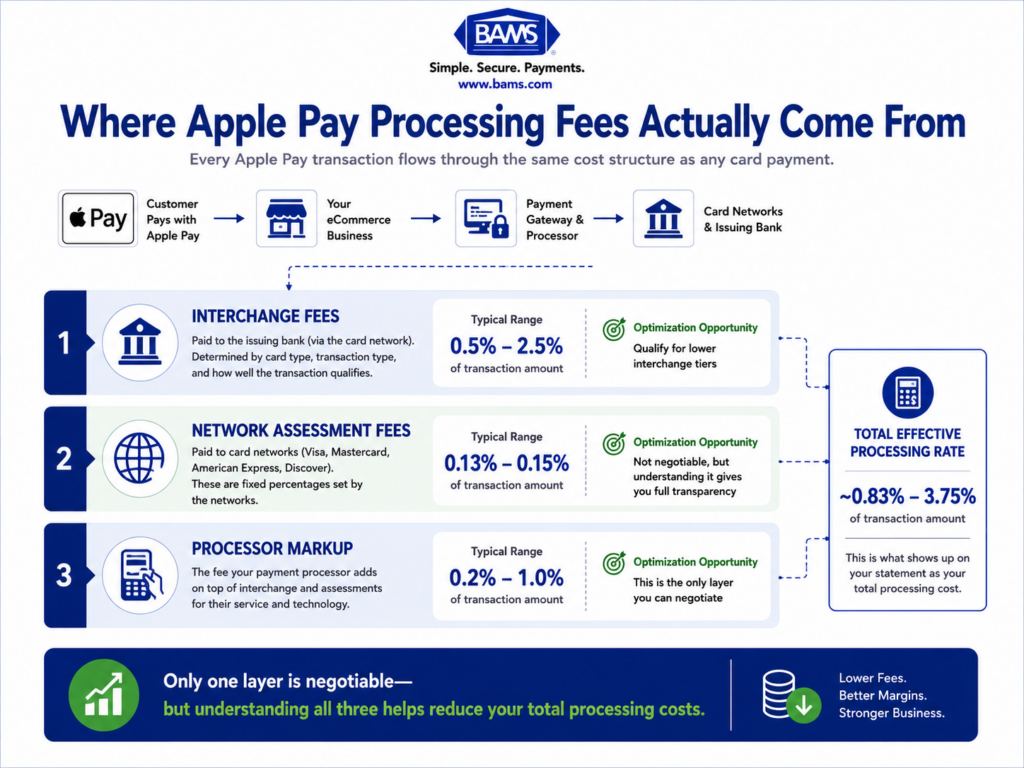
Apple does not charge merchants for Apple Pay. Apple’s own documentation confirms that costs come entirely from your processor and the card networks. That means the levers you control are interchange qualification, processor markup, and network assessment fees.
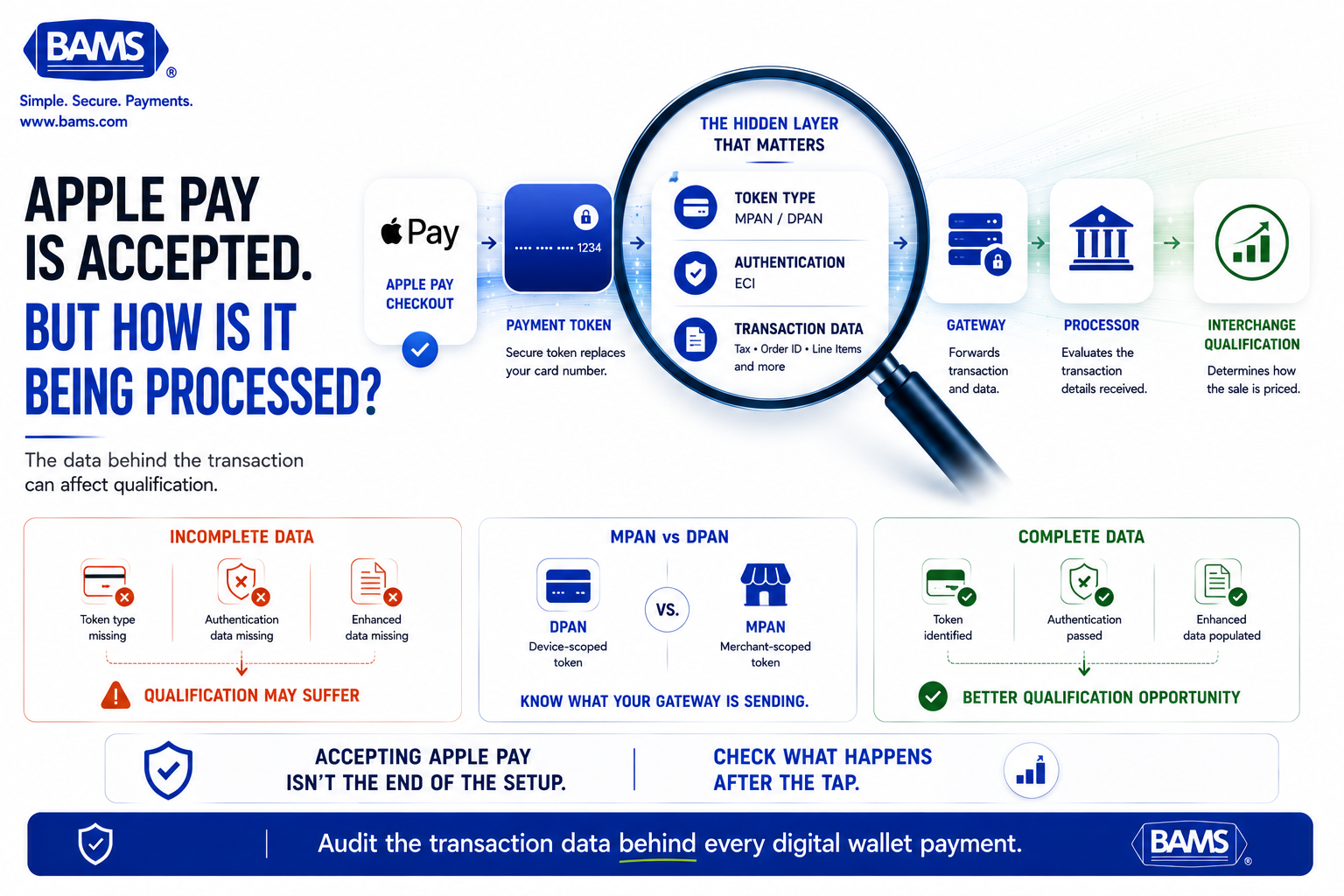
When Apple Pay generates a payment token, it can be either a Device Primary Account Number (DPAN) or a Merchant Primary Account Number (MPAN). The difference matters because processors and networks use token type to determine interchange tier. A correctly submitted MPAN signals a trusted, tokenized relationship, which networks reward with lower rates. A missing or misformatted token defaults your transaction to standard card-not-present pricing, the most expensive tier.
Most competitor guides stop at “Apple Pay is free for merchants.” This tutorial goes deeper, into the configuration layer where your actual costs are determined.
Step-by-Step: Configure Merchant Tokens and MPAN Data for Lower Interchange
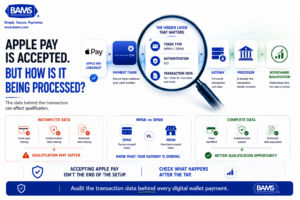
Apple Pay is only the first step. What your gateway sends with the transaction can affect how that payment is identified and ultimately priced.
Step 1: Audit Your Current Apple Pay Transaction Data
Pull your most recent processing statement and filter for Apple Pay transactions. Look for two fields: Token Type (should show MPAN or DPAN) and ECI value (should show 05 or 07 for authenticated wallet transactions, not 00 or blank).
If your statement doesn’t break out token type, request a transaction detail export from your processor. Many processors bury this data in downloadable CSV reports rather than the dashboard summary. If you’re unsure how to read your statement, this guide on why your processing rate is higher than you think walks through the hidden fee layers.
Checkpoint: You can identify what percentage of your Apple Pay transactions are posting as DPAN vs. MPAN, and what ECI values they carry.
Common failure: Statement shows all Apple Pay transactions as generic “card-not-present” with no token type. Fix: Contact your processor and ask them to enable token-type reporting on your merchant account.
Step 2: Enable Merchant Token Support in Your Apple Developer Account
Log into the Apple Developer portal and navigate to your Merchant ID configuration. Confirm that your payment processing certificate is current (not expired) and that your merchant domain is verified.
Under the Merchant Token section, enable merchant token support. Apple’s documentation specifies that merchant tokens enable recurring payments across a user’s devices on iOS, iPadOS, and macOS. This broader lifecycle coverage means a single token works across the customer’s Apple ecosystem, improving both authorization rates and interchange qualification.
Checkpoint: Your Apple Developer portal shows merchant token support as “Enabled” under your Merchant ID.
Common failure: The option is grayed out. Fix: Verify your payment processing certificate is active and your domain verification is complete. Regenerate the certificate if it expired.
Step 3: Configure Your Gateway to Pass MPAN Instead of DPAN
This is the most impactful step. In your payment gateway’s admin panel, locate the Apple Pay or tokenization settings. You need to ensure the gateway sends the MPAN (merchant-scoped token) rather than the DPAN (device-scoped token) in the authorization request.
The exact setting name varies by gateway. In Stripe, for example, Apple Pay transactions can surface as mpan or dpan in the token object. You may need to update your integration to request merchant tokens explicitly. For API-based integrations, this typically means adding a parameter to your payment session initialization:
// Example: Requesting merchant token in payment session
const paymentRequest = {
merchantCapabilities: [‘supports3DS’],
supportedNetworks: [‘visa’, ‘masterCard’, ‘amex’],
merchantIdentifier: ‘merchant.com.yourdomain’,
recurringPaymentRequest: {
paymentDescription: ‘Your Store Subscription’,
managementURL: ‘https://yourdomain.com/manage’,
regularBilling: {
label: ‘Monthly’,
amount: ‘29.99’
}
}
};
Checkpoint: Run a test transaction and inspect the raw gateway response. The token type field should show mpan or merchant_token rather than dpan or device_token.
Common failure: Gateway returns DPAN despite configuration change. Fix: Confirm your Apple payment processing certificate was generated after enabling merchant tokens. Some gateways cache the old certificate; clear the cache or re-upload the new certificate.
Step 4: Submit Level 2/3 Transaction Data Alongside Token Data
Merchant tokens alone improve qualification, but pairing them with enhanced transaction data pushes you into the best interchange tiers. Configure your gateway to pass Level 2 data (tax amount, customer code) and, where applicable, Level 3 data (line-item detail) on every Apple Pay transaction.
For eCommerce managers processing B2B orders, this step is especially valuable. If your processing statements show transactions qualifying at “Standard” or “Mid-Qualified” tiers, missing Level 2/3 data is likely the cause. This guide on signals your processing statement is leaking B2B margins explains exactly what to look for.
Checkpoint: Your test transactions include populated tax, order ID, and (for B2B) line-item fields in the gateway’s transaction detail view.
Common failure: Level 3 fields are available in the gateway but not mapped in your checkout code. Fix: Update your checkout integration to populate these fields from your order object before submitting the authorization.
Step 5: Verify ECI Values on Authenticated Transactions
The Electronic Commerce Indicator (ECI) tells the network how the cardholder was authenticated. Apple Pay transactions should carry ECI 05 (Visa) or ECI 02 (Mastercard) for fully authenticated wallet payments. These values qualify for the lowest interchange tiers and shift fraud liability away from you.
Check your gateway logs for the ECI value on recent Apple Pay test transactions. If you see ECI 07 (Visa) or ECI 01 (Mastercard), the transaction was attempted but not fully authenticated, which means a higher interchange rate. If you see ECI 00 or blank, authentication failed entirely.
Checkpoint: At least 95% of your Apple Pay transactions show ECI 05 (Visa) or ECI 02 (Mastercard).
Common failure: ECI values are inconsistent or frequently show 07/01. Fix: Review your gateway default settings for 3D Secure and tokenized authentication. A misconfigured fraud filter can downgrade authentication status.
Step 6: Enable Automatic Token Updates for Card-on-File Customers
Card networks offer token lifecycle management services that automatically update merchant tokens when a customer’s underlying card is reissued or replaced. Enable this in your gateway to prevent authorization declines on recurring charges and maintain your interchange qualification.
Without automatic updates, expired tokens trigger declines. Declines lead to retry attempts, which networks flag as lower-quality transactions. Over time, this degrades your merchant risk profile and can increase your effective interchange rate.
Checkpoint: Your gateway’s token management settings show “Automatic card updates” or “Account Updater” as enabled for Apple Pay merchant tokens.
Common failure: Feature is available but requires a separate enrollment or fee activation with your processor. Fix: Contact your processor’s account management team to activate the Account Updater service.
Step 7: Set Up Interchange Qualification Monitoring
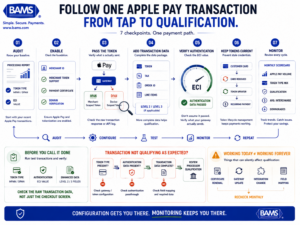
Apple Pay optimization is an end-to-end process. Check what enters the transaction, what your gateway passes, what the processor receives and how the payment ultimately qualifies.
Configuration is only half the job. You need ongoing monitoring to confirm your Apple Pay transactions continue qualifying at the target interchange tiers. Set up a monthly review cadence using your processor’s interchange qualification report.
Create a simple tracking spreadsheet with these columns: Month, Total Apple Pay Transactions, % Qualifying at Target Tier, Average Interchange Rate, Downgraded Transactions. Flag any month where downgraded transactions exceed 5% of volume for immediate investigation.
Checkpoint: You have a repeatable process for pulling and reviewing interchange data monthly.
Common failure: Processor doesn’t provide interchange-level detail. Fix: Request interchange-plus reporting. If your processor only offers tiered or bundled pricing, you can’t see qualification data at all, which is a strong signal to evaluate your processor relationship.
Configuration and Customization
Several variables in this setup depend on your specific business model. Here are the key ones to adjust.
- Recurring vs. one-time transactions: Merchant tokens (MPAN) provide the most interchange benefit for recurring and subscription billing. If your business is purely one-time purchases, DPAN may be acceptable, but MPAN still offers better qualification in most cases.
- Card network mix: Visa and Mastercard have different interchange schedules for tokenized transactions. If your volume skews heavily toward one network, prioritize reviewing that network’s specific token-based interchange tiers.
- Level 2/3 data requirements: Consumer transactions typically need only Level 2 data. B2B and government transactions benefit significantly from Level 3 line-item detail. Configure your checkout to conditionally populate Level 3 fields based on customer type.
- Safe defaults: Always enable merchant tokens, always pass tax amount and order ID. These are universally beneficial. Must-change: Your Apple Merchant ID, payment processing certificate, and domain verification are unique to your account and cannot use defaults.
Verification and Testing
Run a minimum of 10 test Apple Pay transactions across at least two card networks (Visa and Mastercard) after completing your configuration. For each transaction, verify three data points in your gateway’s raw transaction log:
- Token type shows MPAN (not DPAN or blank)
- ECI value shows 05 (Visa) or 02 (Mastercard)
- Level 2 data fields (tax amount, order ID) are populated
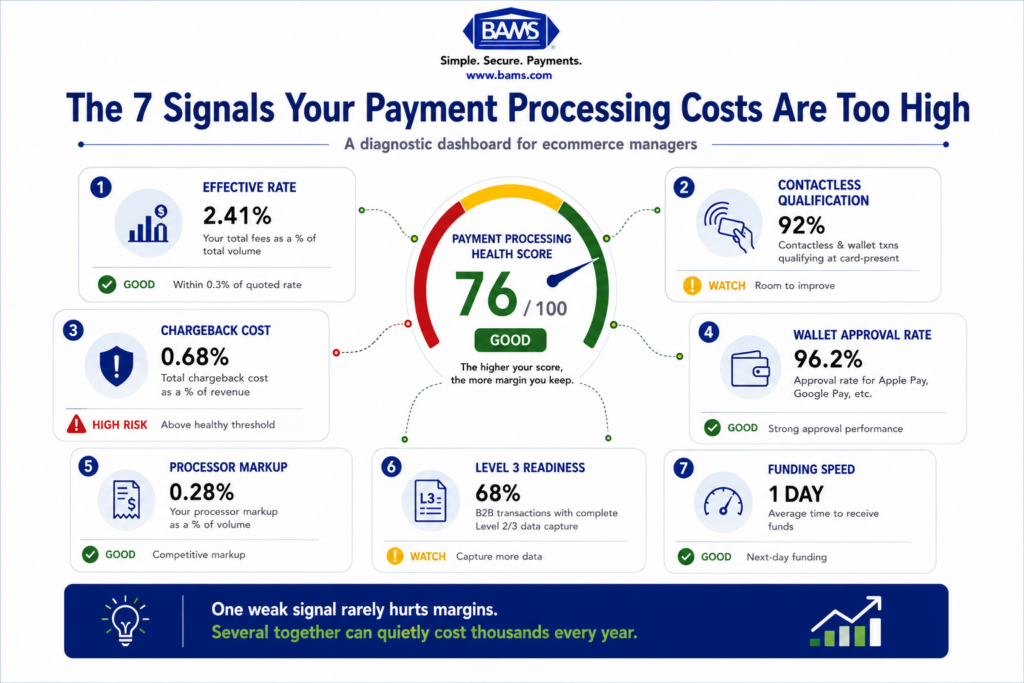
After one full billing cycle, pull your interchange qualification report. Compare your Apple Pay effective rate against your baseline from Step 1. A successful implementation should show a measurable reduction. Typical interchange sits between 0.5% and 2.5% per transaction, and proper token configuration should push your Apple Pay transactions toward the lower end of that range.
Edge cases to verify: Test a refund on a tokenized transaction, a recurring charge using a stored merchant token, and a transaction where the customer’s card was recently reissued. All three should process without manual intervention if your configuration is correct.
Common Errors and Fixes
Error: “Token type not recognized” in gateway response
Symptom: Gateway logs show an unrecognized or null token type. Cause: Your Apple payment processing certificate was generated before merchant tokens were enabled. Fix: Regenerate the certificate in your Apple Developer account after enabling merchant token support, then re-upload it to your gateway.
Error: Transactions qualifying at “Standard CNP” despite MPAN
Symptom: Interchange report shows Apple Pay transactions at card-not-present standard rates. Cause: Missing ECI value or Level 2 data. The token alone isn’t sufficient; networks require the full data package. Fix: Verify ECI passthrough and Level 2 field population per Steps 4 and 5.
Error: High decline rate on recurring Apple Pay charges
Symptom: Stored merchant tokens return authorization declines at rates above 5%. Cause: Account Updater is not enabled, so reissued cards invalidate stored tokens. Fix: Enable Account Updater per Step 6 and re-tokenize affected customer accounts.
Error: Chargebacks still occurring on tokenized transactions
Symptom: You expected tokenization to eliminate chargebacks, but disputes continue. Cause: Tokenization reduces fraud-related chargebacks but does not prevent service or product disputes. Fix: Pair your token configuration with proactive chargeback defense practices. For merchants needing hands-on support, BAMS offers proactive chargeback defense alongside dedicated account management, helping you address both the technical and operational sides of dispute prevention.
Error: Gateway doesn’t expose MPAN/DPAN fields
Symptom: You cannot find token type settings in your gateway admin panel. Cause: Older gateway versions or simplified integrations may not surface these fields. Fix: Contact your gateway provider and request API-level access to token type fields. If unavailable, consider a gateway that supports full Apple Pay merchant token passthrough.
Next Steps and Extensions
With your Apple Pay merchant token configuration in place, you have a foundation for broader cost optimization across all digital wallet transactions. Here are three ways to extend this work.
- Apply the same MPAN logic to Google Pay: Google Pay uses a similar tokenization framework. The interchange qualification principles you’ve implemented here translate directly.
- Audit your full processing statement: Now that you understand interchange qualification mechanics, review your entire transaction mix for downgrade patterns. Your non-Apple Pay volume likely has similar optimization opportunities.
- Benchmark your effective rate monthly: Track your blended effective rate (total processing fees divided by total volume) alongside your Apple Pay-specific rate. This gives you a clear picture of how configuration changes translate to real savings over time.
Frequently Asked Questions
What fees do merchants actually pay when accepting Apple Pay?
Apple charges merchants nothing for Apple Pay. Your costs come from three sources: interchange fees (0.5% to 2.5% per transaction), network assessment fees (around 0.13% to 0.15%), and your processor’s markup (0.2% to 1.0%). The total typically lands between 2% and 2.6% plus $0.10 to $0.30 per transaction, but proper configuration can push you toward the lower end of that range.
What is the difference between MPAN and DPAN in Apple Pay?
A DPAN (Device Primary Account Number) is a token tied to a specific Apple device. An MPAN (Merchant Primary Account Number) is a token scoped to your merchant account that works across all of a customer’s Apple devices. MPANs signal a trusted, ongoing merchant relationship to card networks, which can qualify your transactions for lower interchange tiers.
How much can proper merchant token configuration save on transaction fees?
Properly configured merchant token passthrough can lower interchange fees by 20 to 40 basis points per transaction. On a business processing $500,000 annually through Apple Pay, that translates to $1,000 to $2,000 in annual savings from interchange qualification alone, before accounting for reduced chargeback costs.
Why do my Apple Pay transactions qualify at card-not-present rates?
This usually happens when your gateway fails to pass the merchant token type (MPAN) or the correct ECI value in the authorization request. Without these data points, the card network treats the transaction as a standard online purchase and applies higher interchange rates. Reviewing your gateway’s tokenization settings and ensuring ECI passthrough typically resolves this.
Does Apple Pay reduce chargebacks?
Apple Pay’s tokenization and biometric authentication significantly reduce fraud-related chargebacks. However, it does not prevent chargebacks from product or service disputes. Combining proper token configuration with proactive chargeback defense practices gives you the best protection across both fraud and service dispute categories.
Which payment processors support Apple Pay merchant tokens?
Most major processors and gateways support Apple Pay merchant tokens, including Stripe, Braintree, Adyen, and others. However, the level of configuration control varies. Some gateways expose MPAN settings directly in the admin panel, while others require API-level integration or a support request to enable full merchant token passthrough.