7 Signs Corporate Purchasing Cards Are Hidden in Your Sales
Last Updated on June 1, 2026 by Dimitri Akhrin
A diagnostic guide to spotting commercial card transactions your processing statement was designed to obscure
Learn how to identify corporate purchasing card orders hiding in your eCommerce processing statements. This guide reveals the specific line items, fee patterns, and interchange clues that signal you’re missing potential savings.
TL;DR
-
- Your statement hides card types – Most processing statements don’t distinguish between consumer and corporate purchasing cards, so you can’t see which orders are costing you more at interchange.
- Downgrades are the silent cost driver – When corporate card transactions lack required data fields (tax, PO number, line-item detail), they downgrade to the highest interchange tier, and your statement may not flag this clearly.
- Commercial cards are more common than you think – 26% of all U.S. card payments in 2023 were commercial. If businesses buy what you sell, you’re likely processing corporate cards without knowing it.
- Three free steps reveal the problem – Request an interchange breakdown, run a BIN analysis on recent transactions, and check if your gateway supports Level 2/Level 3 data fields that aren’t enabled yet.
- Transparency is a feature, not a perk – A processor that won’t show you interchange-level detail is asking you to pay on faith. Visibility into your actual card mix and interchange tiers is the foundation for reducing processing costs.
Your Processing Statement Has Blind Spots. Here’s Where to Look.
You review your processing statement every month. You see totals, fees, and batch summaries. You assume the numbers reflect what you’re actually paying per transaction. But here’s what most eCommerce merchants miss: a meaningful share of your orders likely come from corporate purchasing cards, and your statement barely hints at it.
Commercial cards accounted for 26% of all U.S. card payments in 2023, with transaction volume reaching 11.9 billion. That means if you sell anything online that businesses also buy (office supplies, equipment, software, bulk goods), some of your “regular” credit card orders are almost certainly commercial card transactions. And those transactions carry different interchange economics than consumer cards.
The problem? Your processing statement wasn’t designed to make this obvious. It groups transactions in ways that obscure the card type, the interchange tier applied, and whether you qualified for lower rates you never knew existed. This isn’t a technical deep-dive. It’s a diagnostic guide for eCommerce managers who want to read between the lines of a document they already receive.
What This Guide Covers (and What It Doesn’t)
This is for eCommerce managers at small-to-midsize businesses who process a mix of consumer and business orders. You don’t need an ERP system. You don’t need to be a “B2B company” in the traditional sense. You just need a processing statement and a few minutes.
We’re not covering how to negotiate rates or overhaul your payment gateway. Instead, we’re identifying the specific signals on your existing statement that reveal whether you’re receiving corporate card orders, and whether your processor is handling them in a way that costs you more than it should. Think of this as a checklist for what to look for before you call anyone.
How We Selected These Signals
Each signal below meets two criteria: it’s visible (or conspicuously absent) on a standard processing statement, and it directly relates to whether commercial card transactions are being identified and processed at the correct interchange tier. We prioritized signals that require no special tools to spot, just a careful read of a document you already have.
7 Signals Your Processing Statement Is Hiding Corporate Purchasing Card Orders
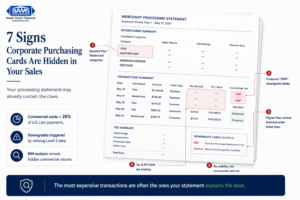 Most eCommerce merchants already process corporate purchasing cards. The problem is that their statements rarely make it obvious.
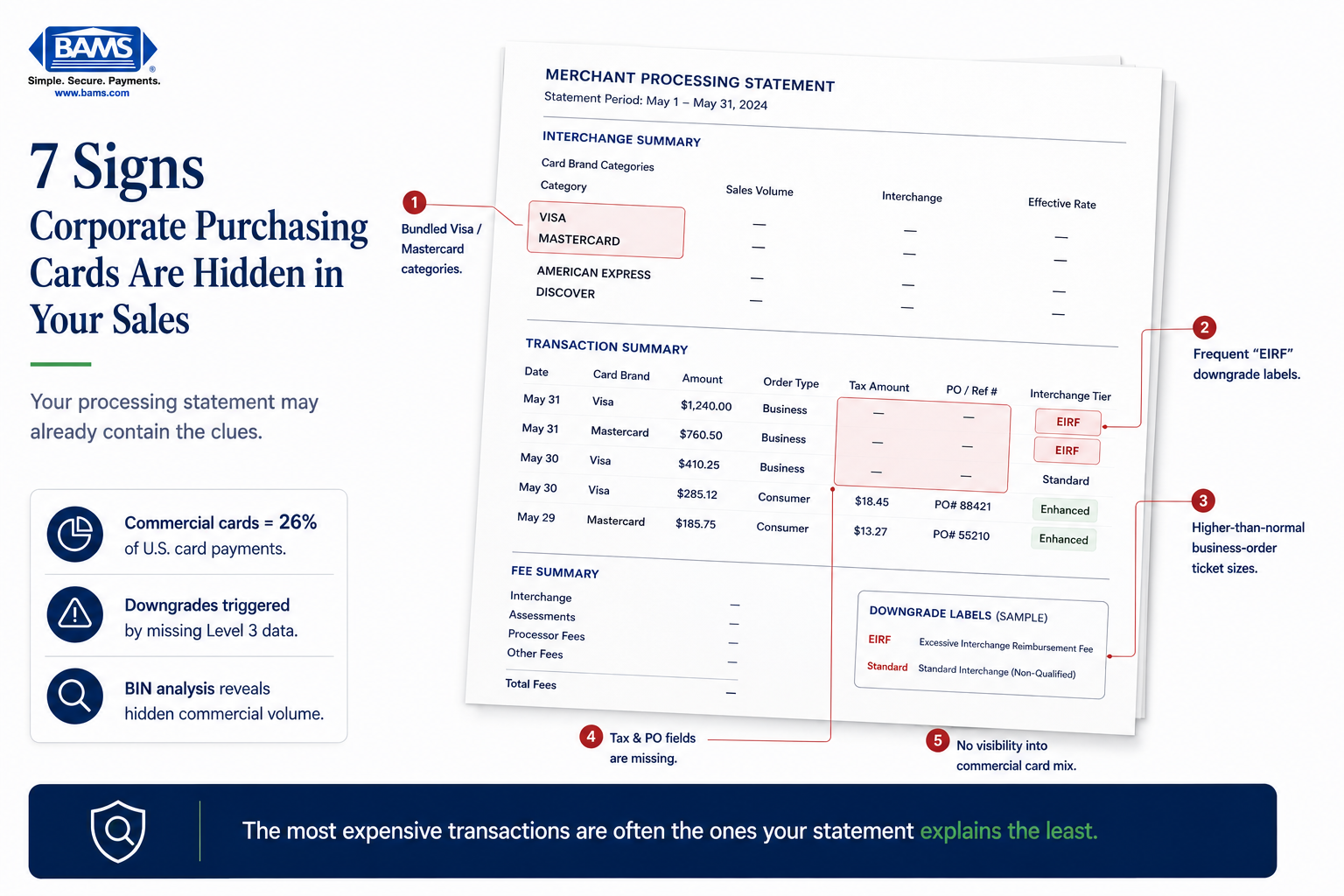
1. Your Statement Groups All Visa or Mastercard Transactions Into One Line
Why it matters: Consumer cards, rewards cards, corporate cards, and purchasing cards all carry different interchange rates. When your statement lumps them into a single “Visa” or “Mastercard” line, you can’t see what types of cards your customers actually used. This is the most common way commercial card volume hides in plain sight.
What it looks like today: Many processors use “bundled” or “tiered” pricing models that show one blended rate per card brand. You see “Visa: $14,200 | Rate: 2.45%” with no breakdown. A processor using interchange-plus pricing, by contrast, would show individual interchange categories.
How to apply it: Request a detailed interchange breakdown for the last three months. If your processor can’t or won’t provide one, that’s a signal in itself. Look for line items labeled “Commercial,” “Purchasing,” “Business,” or “Corporate” in the interchange category column.
2. You See “EIRF” or “Standard” Interchange Categories Appearing Frequently
Why it matters: EIRF (Electronic Interchange Reimbursement Fee) and “Standard” are downgrade categories. They mean a transaction failed to qualify for a lower interchange tier, often because required data fields were missing. When a corporate purchasing card transaction downgrades, you pay the highest possible rate for that card type instead of a reduced commercial rate.
What it looks like today: On an interchange-plus statement, you’ll see specific category codes. EIRF and Standard categories are red flags that transactions are not qualifying at their intended tier. For corporate cards, this often happens because Level 3 data (line-item detail like item descriptions, quantities, and tax amounts) wasn’t transmitted with the authorization.
How to apply it: Search your statement for any line containing “EIRF,” “Standard,” or “Non-Qualified.” Tally the dollar volume. If it represents more than 5-10% of your total volume, you likely have commercial card transactions downgrading due to missing data.
3. Your Average Ticket Size Has a Bimodal Pattern
Why it matters: Corporate purchasing card orders tend to be larger than consumer orders. If your business sells products that both individuals and companies buy, you likely have two clusters of order sizes. The larger cluster often represents commercial buyers, and those are the transactions most affected by interchange tier qualification.
What it looks like today: Your statement may show an average ticket, but it won’t show the distribution. You need to look at your order management system alongside your statement. A $45 average ticket that actually consists of many $20 orders and a handful of $300+ orders suggests mixed card types.
How to apply it: Export your last 90 days of transactions. Sort by amount. Flag orders above your typical consumer average. Cross-reference those with the interchange categories on your statement (if available). Larger orders processed at “Standard” or “EIRF” rates are strong candidates for commercial cards that downgraded.
4. Tax and PO Fields Are Blank in Your Transaction Records
Why it matters:Visa and Mastercard both require specific data fields to qualify transactions for lower commercial interchange tiers. Tax amount and purchase order number are among the most critical. If these fields are consistently empty in your transaction data, no commercial card transaction you process will ever qualify for reduced rates.
What it looks like today: Most eCommerce platforms have optional tax and PO fields at checkout, but they’re often not mapped to the payment gateway’s authorization message. The data exists in your order system but never reaches the card networks. Your processor may not even flag this gap.
How to apply it: Check your payment gateway settings for “Level 2” or “Level 3” data fields. If your gateway supports them but they’re not enabled, that’s a configuration fix, not a platform overhaul. If your gateway doesn’t support them, ask your processor what alternatives exist. Tools like BAMS can help identify whether your current setup supports Level 3 data reporting and where the gaps are.
5. Your “Qualified” Rate Applies to Almost Everything
Why it matters: In tiered pricing, processors define what counts as “Qualified,” “Mid-Qualified,” and “Non-Qualified.” The definitions are set by the processor, not the card networks. A processor can classify a downgraded commercial card transaction as “Qualified” at their own blended rate while pocketing the difference between what they pay at interchange and what they charge you. Your statement looks clean. Your costs are not.
What it looks like today: You see three tiers on your statement. Most transactions fall into “Qualified.” You assume this is good. But “Qualified” in tiered pricing doesn’t mean the transaction qualified for the lowest possible interchange rate. It means it met your processor’s internal threshold, which may be set well above the actual interchange floor.
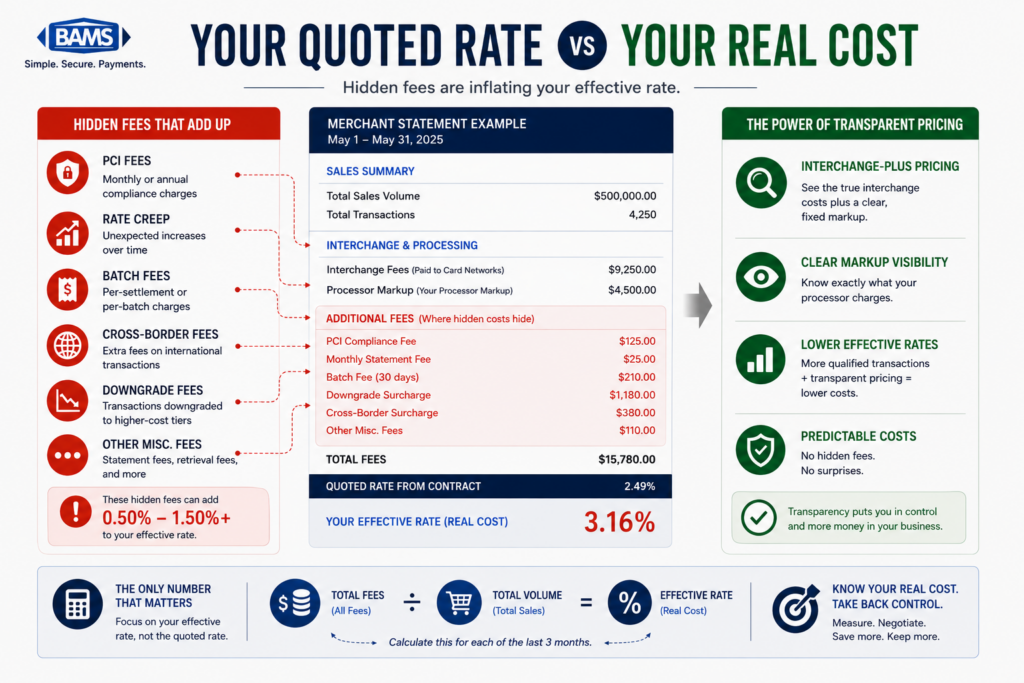
How to apply it: Compare your effective rate (total fees divided by total volume) against published interchange tables for the card types you accept. If the gap is significant, tiered pricing is likely masking the true cost of your commercial card transactions. Ask your processor to show you the actual interchange category for your 20 largest transactions last month.
6. You Have No Idea Which Customers Used Business Cards
Why it matters: If you can’t identify which orders were placed with corporate or purchasing cards, you can’t measure the potential savings from enhanced data processing. You also can’t make informed decisions about whether Level 2 or Level 3 processing is worth pursuing. This blind spot keeps you stuck in a reactive position.
What it looks like today: Most eCommerce platforms show the last four digits of a card and the brand (Visa, Mastercard). They don’t show whether it was a consumer, business, corporate, or purchasing card. That information exists in the BIN (Bank Identification Number), the first six to eight digits of the card number, but it’s rarely surfaced to merchants in standard dashboards.
How to apply it: Ask your processor if they can provide a BIN analysis of your transaction history. This report identifies the percentage of your volume coming from commercial card types. Even a rough estimate (say, 15% of volume is commercial) gives you a concrete number to evaluate whether enhanced B2B processing would reduce your costs meaningfully.
7. Your Processor Has Never Mentioned Interchange Savings on Commercial Cards
Why it matters:U.S. commercial card transaction value reached $4.3 trillion in 2023. The growth of virtual cards and AP automation means more business buyers are using purchasing cards for online orders every quarter. If your processor has never raised the topic of commercial card optimization, they’re either unaware of your card mix or not incentivized to help you reduce costs.
What it looks like today: Proactive processors flag commercial card volume during onboarding or annual reviews. They recommend Level 2 or Level 3 data configurations based on your actual transaction mix. If you’ve never had this conversation, you’re likely paying standard interchange on every commercial card order without knowing it.
How to apply it: Bring this up directly. Ask: “What percentage of my transactions are on commercial or purchasing cards, and are any of them qualifying for reduced interchange?” If your processor can’t answer, consider a statement audit from a merchant services partner like BAMS that provides transparent interchange-level reporting and identifies where you’re overpaying.
The Pattern Behind These Signals
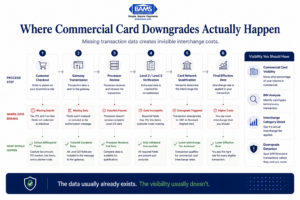
Most commercial card downgrade costs happen because transaction data never reaches the card networks correctly.
Every signal above points to the same underlying issue: your processing statement is a summary, not a diagnostic tool. It was designed to show you what you owe, not why you owe it. The gap between what you see and what’s actually happening at the interchange level is where unnecessary costs accumulate.
The signals also share a common thread of missing data. Whether it’s absent tax fields, invisible BIN information, or bundled interchange categories, the root cause is that transaction-level detail isn’t flowing where it needs to go. Fixing this doesn’t require replacing your eCommerce platform. It usually requires configuring what’s already there and working with a processor that surfaces the information instead of burying it.
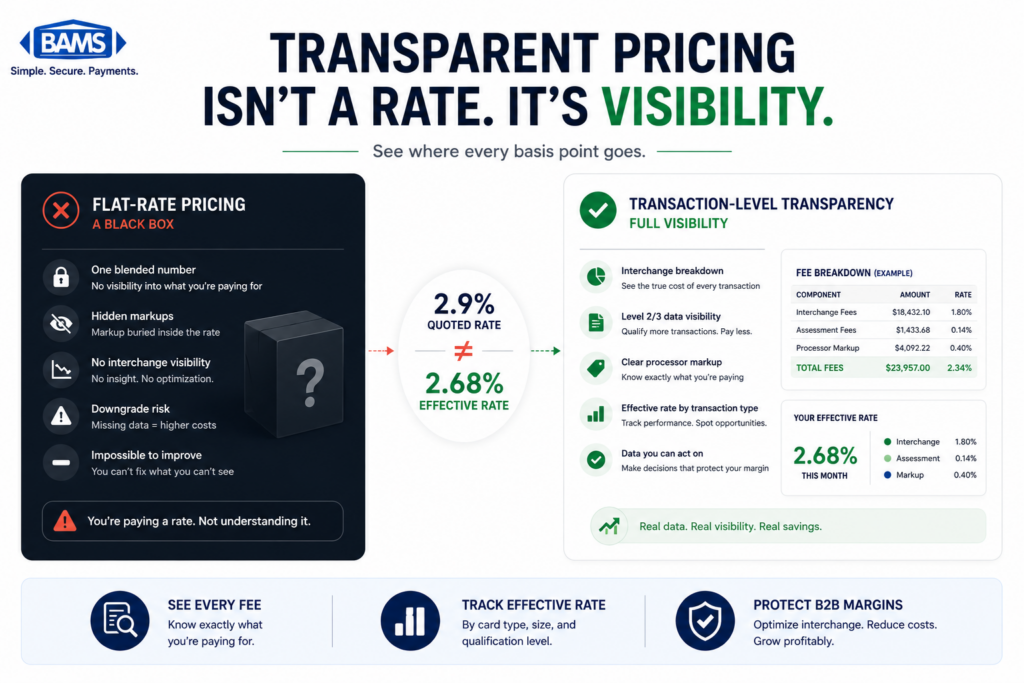
There’s a trust dimension here too. A processor that doesn’t show you interchange-level detail is asking you to take their pricing on faith. Transparency isn’t just a value statement. It’s a measurable feature of how your statement is structured.
Where to Start Without Overhauling Everything
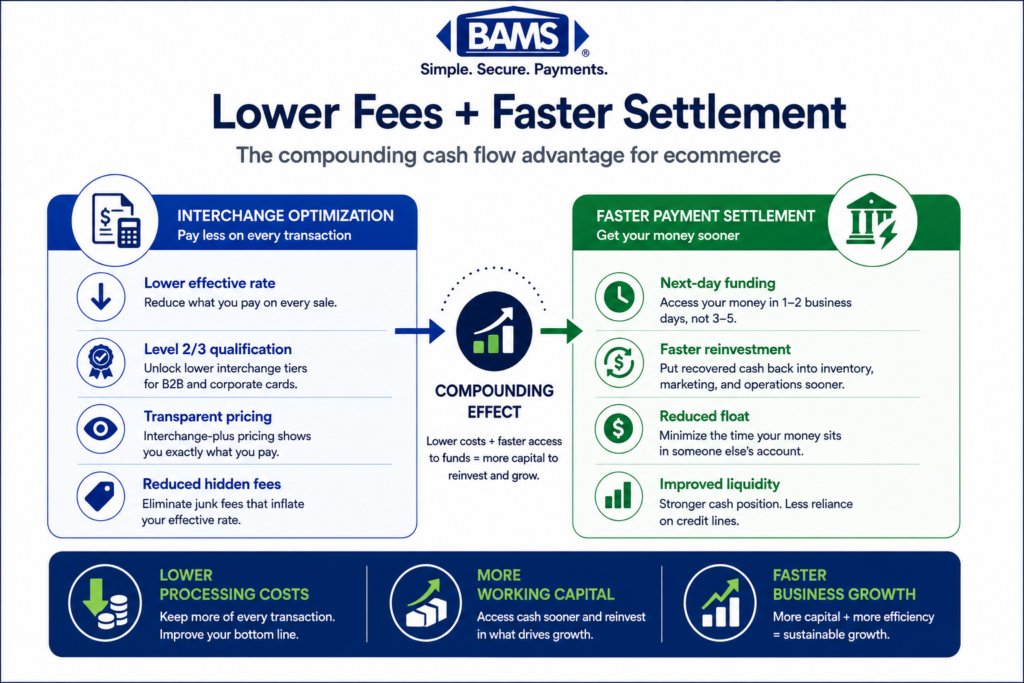
You don’t need to act on all seven signals at once. Start with three steps: request an interchange breakdown from your processor, run a BIN analysis on your last 90 days of transactions, and check whether your payment gateway has Level 2/Level 3 data fields that aren’t currently enabled.
These three actions cost nothing and take less than a week. They’ll tell you whether corporate purchasing cards are a meaningful part of your transaction mix and whether you’re leaving interchange savings on the table. From there, you can decide whether to push your current processor for better data handling or explore a partner that builds this into their standard service.
Frequently Asked Questions
What is Level 3 data in merchant services?
Level 3 data refers to detailed, line-item transaction information (product descriptions, quantities, unit costs, tax amounts, freight charges) that merchants transmit alongside a payment authorization. When this data is included for eligible corporate or purchasing card transactions, the transaction can qualify for lower interchange rates from Visa and Mastercard. Learn more in our guide to Level 3 credit card processing.
How can I tell if my customers are using corporate purchasing cards?
Your standard eCommerce dashboard won’t show card type. The most reliable method is a BIN (Bank Identification Number) analysis, which your processor can run against your transaction history. This identifies the percentage of your volume from consumer, business, corporate, and purchasing cards. You can also look for indirect signals like higher-than-average order values and downgraded interchange categories on your statement.
Why do corporate card transactions cost more if I don’t submit enhanced data?
Visa and Mastercard set lower interchange rates for commercial card transactions that include Level 2 or Level 3 data. Without that data, the transaction “downgrades” to a higher interchange tier (like EIRF or Standard). You pay more per transaction, and the difference can be significant on large orders.
Do I need to change my eCommerce platform to support Level 3 processing?
Usually not. Many modern payment gateways already support Level 2 and Level 3 data fields. The issue is often that these fields aren’t configured or mapped correctly. Check your gateway settings first. If your gateway doesn’t support enhanced data, your processor may offer middleware or integration options that don’t require a full platform change.
What’s the difference between tiered pricing and interchange-plus pricing?
Tiered pricing groups transactions into broad categories (Qualified, Mid-Qualified, Non-Qualified) defined by your processor. Interchange-plus pricing passes through the actual interchange rate set by the card networks and adds a fixed markup. Interchange-plus gives you visibility into what each transaction actually costs at the network level, which is essential for identifying commercial card downgrades.
How much can interchange savings from Level 3 data actually save?
Savings depend on your commercial card volume and average ticket size. Merchants with 10-20% commercial card volume and average tickets above $100 often see meaningful reductions. The exact amount varies by card type and data completeness, but the only way to estimate your specific savings is to get a BIN analysis and interchange breakdown for your current transactions.