7 Statement Signals Your B2B Store Overpays Fees
Last Updated on July 1, 2026 by Dimitri Akhrin
How interchange downgrades on commercial cards silently inflate your effective processing rate—and which line items prove it
Learn to spot the specific statement line items that reveal missing Level 3 data is downgrading your commercial-card transactions. This guide maps each downgrade signal to its qualified interchange equivalent so you can measure your exact savings gap.
TL;DR
- Missing tax and freight fields cause interchange downgrades – When your eCommerce platform doesn’t pass complete data to the payment gateway, commercial card transactions get routed to expensive default interchange tiers, costing you 0.30 to 1.15 extra percentage points per transaction.
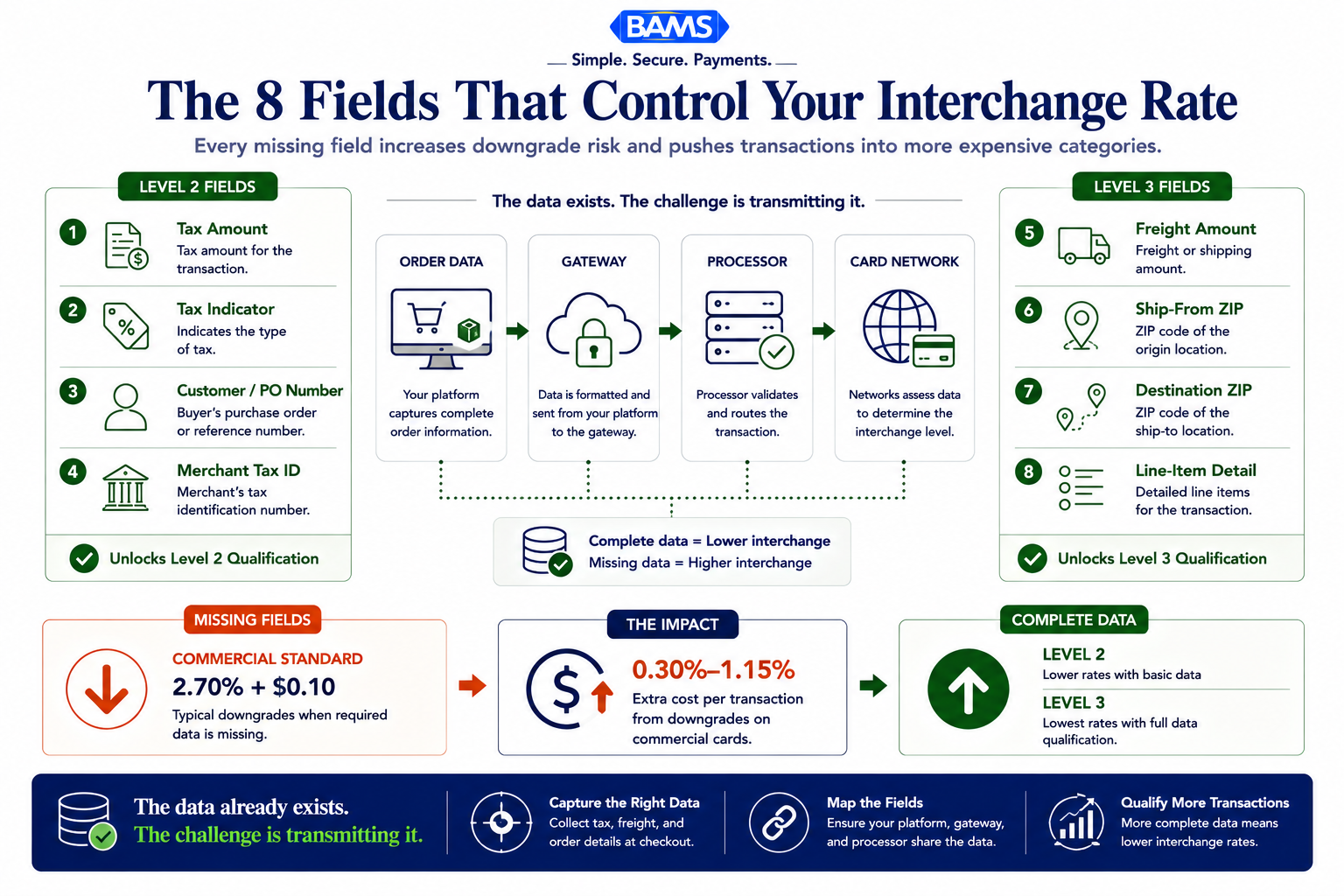
- Eight specific fields control your qualification – Tax amount, tax indicator, freight amount, ship-from ZIP, destination ZIP, line-item detail, customer/PO reference, and merchant tax ID each play a role in determining whether you pay Level 2, Level 3, or unqualified rates.
- The data exists but isn’t being transmitted – Most platforms store the right information for orders and fulfillment, but the payment message sent to your gateway often contains only the transaction total. Bridging that gap requires explicit field mapping between your platform, gateway, and processor.
- Start with three fields for immediate savings – Tax amount, tax indicator, and customer reference number unlock Level 2 qualification. Add freight and line-item fields later to reach Level 3 rates.
- Request a monthly downgrade report – This single document from your processor shows exactly which transactions failed qualification and why, turning your statement from an opaque bill into a diagnostic tool you can act on.
Why Tax and Freight Fields Are Costing You More Than You Think
If you accept commercial cards through your eCommerce store, your effective processing rate is probably higher than it needs to be. The reason isn’t your pricing model or your processor’s markup. It’s the data your platform sends (or fails to send) with each transaction.
Every time a B2B order processes without complete tax, freight, and line-item detail, the card networks classify it at a higher interchange tier. The result is a downgrade: a silent fee increase that shows up on your statement as an inflated rate, not as a separate charge you can easily spot. Mastercard downgrades can jump from 1.80% to 2.95%, a 1.15 percentage-point penalty on a single transaction. Multiply that across hundreds of monthly orders and you’re looking at thousands in avoidable cost.
The fix isn’t renegotiating rates. It’s mapping the right data fields across your eCommerce platform, gateway, and processor so transactions qualify for Level 2 and Level 3 interchange rates automatically. Merchant Payments Coalition resources continue to highlight how interchange qualification failures and payment inefficiencies increase merchant costs.
What This Guide Covers (and Who It’s For)
This is for ecommerce managers running established online businesses that accept commercial, purchasing, or corporate cards. If your monthly B2B volume is meaningful and you’re on interchange-plus pricing, the savings here are real and measurable.
This guide does not cover consumer card optimization, flat-rate pricing workarounds, or general fee negotiation tactics. Instead, it focuses on the specific tax and freight data fields that determine whether your commercial transactions qualify for lower interchange categories or get downgraded to expensive defaults. Each item maps a field, explains why it triggers downgrades when missing, and shows how to verify it across common platforms.
How We Selected These Fields
We evaluated each field against two criteria: Does its absence directly cause a measurable interchange downgrade on Visa or Mastercard commercial cards? And can an eCommerce manager verify or fix the mapping without rewriting platform code? Fields that meet both thresholds made the list. Fields that are technically part of L3 specs but rarely trigger downgrades in practice did not.
8 Tax and Freight Fields That Determine Your Interchange Rate
Most B2B merchants already collect these fields. The problem is they are not reaching the card networks.
1. Tax Amount (Total)
Why it matters: The total tax amount is the single most common missing field that causes Level 2 qualification failure. Without it, Visa and Mastercard cannot verify the transaction as a legitimate commercial purchase, and the entire order falls to the unqualified Commercial Standard tier. Visa’s Commercial Card Not Present rate sits at 2.70% + $0.10, but qualified commercial transactions can drop significantly below that.
What it looks like today: Most eCommerce platforms calculate tax for display and checkout purposes but don’t always pass it in the authorization or settlement message to the gateway. Shopify, WooCommerce, and BigCommerce each handle this differently. Some require tax modules or plugins that calculate but don’t transmit.
How to apply it: Pull a recent settlement file from your gateway and check whether the tax_amount field is populated (not zero, not blank). If your platform uses a third-party tax calculator like Avalara or TaxJar, confirm that the calculated value flows through to the payment authorization, not just the invoice.
2. Tax Indicator (Tax-Exempt Flag)
Why it matters: When a transaction is tax-exempt (common in B2B), the networks still need to see a tax indicator field set to “exempt” or “not provided.” A blank field is not the same as an exempt flag. Leaving it empty can disqualify the transaction from Level 2 entirely, even when every other field is present.
What it looks like today: Many platforms default to omitting the tax indicator when the tax amount is zero, assuming the processor will infer exemption. Processors rarely infer. The field must be explicitly set.
How to apply it: Ask your gateway provider for documentation on their tax indicator field options. Common values are “Y” (tax included), “N” (tax exempt), or “0” (not provided). For B2B exempt orders, ensure your checkout or ERP workflow sets this flag before the authorization request fires.
3. Freight/Shipping Amount
Why it matters: Freight amount is a required field for Level 3 qualification on both Visa and Mastercard. When it’s missing, your transaction may still qualify for Level 2 but will never reach Level 3, where the deepest commercial-card savings live. Providing only Level 2 data when a card is eligible for Level 3 can add 0.15 percentage points to each transaction. Mastercard commercial card acceptance research continues to highlight the growing importance of enriched transaction data and commercial card optimization for B2B merchants.
What it looks like today: eCommerce platforms separate shipping calculations from payment fields. Shipping is typically a line item in the cart, but the freight_amount field in the payment message is a distinct data point. Free shipping orders still need a freight value of $0.00 explicitly passed.
How to apply it: Map your platform’s shipping total to your gateway’s freight_amount field. If you use calculated shipping (UPS, FedEx integrations), verify the final shipping amount at checkout is the value transmitted in the payment message, not the pre-discount or estimated amount.
4. Ship-From Postal Code
Why it matters: The ship-from ZIP code is a Level 3 requirement that many eCommerce setups overlook because the platform doesn’t associate warehouse location with payment data. Without it, the network cannot validate the transaction’s geographic profile, and L3 qualification fails silently.
What it looks like today: Multi-warehouse merchants using fulfillment services or 3PLs often have dynamic ship-from locations. The payment gateway needs a static or dynamically mapped postal code, not the merchant’s billing address.
How to apply it: If you ship from a single location, hardcode the ship-from ZIP in your gateway configuration. If you use multiple warehouses, work with your fulfillment integration to pass the originating facility’s postal code into the payment message at the time of settlement.
5. Destination Postal Code
Why it matters: Paired with the ship-from code, the destination ZIP completes the shipping profile required for Level 3. Most platforms capture this at checkout, but not all pass it to the payment gateway in the correct field. The shipping address on the order confirmation is not the same as the destination_postal_code in the authorization message.
What it looks like today: Platforms like Shopify pass billing and shipping addresses to the gateway, but the specific postal code extraction for L3 fields depends on gateway-side configuration. Some gateways auto-map it; others require explicit field assignment.
How to apply it: Run a test transaction with a known shipping address. Then check the gateway’s transaction detail (not your platform’s order record) to confirm the destination postal code field is populated. If it’s blank, your gateway may need a configuration update or a middleware layer to extract it.
6. Line-Item Detail (Product Code, Description, Quantity, Unit Cost)
Why it matters: Line-item data is what separates Level 3 from Level 2. Each item in the order needs a product/commodity code, description, quantity, unit of measure, and unit cost. Without this granularity, even transactions with perfect tax and freight data cap out at Level 2 rates.
What it looks like today: Most eCommerce platforms store rich product data, but the payment message typically receives only a total amount. Bridging the gap requires either a gateway that supports L3 line-item passthrough or middleware that assembles the data before settlement. Tools like BAMS’ interchange optimization approach can help eCommerce merchants identify which fields their current setup is missing and route transactions to capture L3 qualification.
How to apply it: Export your product catalog’s SKU, description, and pricing fields. Then compare them against your gateway’s L3 line-item schema. Map each field explicitly. Pay attention to unit_of_measure (“each,” “case,” “lb”), which is required but often left blank because eCommerce platforms don’t use that terminology natively.
7. Customer/PO Reference Number
Why it matters: A customer code or purchase order number is a Level 2 requirement. B2B buyers frequently provide PO numbers during checkout, but the field often lives in an “order notes” text box rather than a structured data field that gets transmitted to the gateway. When it’s missing from the payment message, Level 2 qualification fails.
What it looks like today: Some eCommerce platforms offer custom checkout fields for PO numbers, but these fields are informational, stored in the order record for fulfillment purposes. They are not automatically mapped to the customer_reference field in the payment authorization.
How to apply it: Add a dedicated PO/reference number field to your checkout flow (not a freeform notes field). Then configure your gateway integration to map that field value to the customer_code or purchase_order parameter in the authorization request. Test with a real commercial card to verify it appears in the gateway’s transaction detail.
8. Merchant Tax ID
Why it matters: Your merchant tax identification number is a Level 2 field that most processors configure once during onboarding and then never revisit. If it was entered incorrectly, left blank, or if your business entity has changed, every commercial transaction you process may be failing L2 qualification without any visible error.
What it looks like today: This field is typically set at the processor or gateway account level, not at the platform level. It doesn’t change per transaction. But because it’s invisible in day-to-day operations, errors persist for months or years.
How to apply it: Contact your processor and request confirmation of the tax ID on file for your merchant account. Cross-reference it against your current EIN. If you’ve changed business entities, merged, or restructured, update it immediately. This is a five-minute fix that can unlock L2 rates across your entire transaction volume.
The Pattern: Data Quality Is a Fee Category
Across all eight fields, one theme is consistent: the card networks treat missing data as risk, and they price risk into interchange. Every blank field is a signal that the transaction might not be a legitimate commercial purchase, so it gets routed to a more expensive category. Your effective processing rate isn’t determined by what your processor charges on top of interchange. It’s determined by which interchange tier your transactions land in.
The second pattern is that these fields span three different systems: your eCommerce platform (where the data originates), your payment gateway (where the data is formatted), and your processor (where the data is evaluated). A breakdown at any point in that chain causes a downgrade. Auditing requires checking all three, not just your monthly statement.
The third pattern is that hidden fees in processing often aren’t fees at all. They’re the gap between the interchange rate you should be paying and the downgraded rate you’re actually paying. That gap is invisible on flat-rate pricing and difficult to spot even on interchange-plus unless you know which categories to compare.
Where to Start: Prioritizing Your Field Mapping
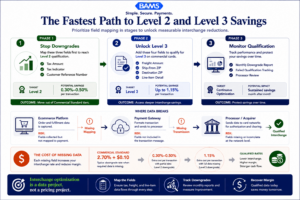
You do not need to fix all eight fields at once. Start with the fields that create the largest qualification gains.
You don’t need to fix all eight fields at once. Start with the three that unlock Level 2 qualification: tax amount, tax indicator, and customer reference number. These three fields alone can move commercial transactions from the unqualified tier (2.70%+ on Visa) down to qualified commercial rates, often saving 0.30 to 0.50 percentage points per transaction.
Once Level 2 is consistently qualifying, layer in the Level 3 fields: freight amount, ship-from and destination postal codes, and line-item detail. This second phase requires more integration work but unlocks the deepest savings. If your B2B volume justifies it, a partner like BAMS can audit your current field mapping and identify exactly where data is dropping off between your platform and processor.
Finally, request a downgrade report from your processor every month. It will show you which transactions failed qualification and why. That single report turns interchange from an opaque cost into a diagnostic tool you can act on.
Frequently Asked Questions
How does optimizing transaction data affect processing fees?
When your eCommerce platform passes complete tax, freight, and line-item data with each commercial card transaction, the card networks classify it at a lower interchange tier. This directly reduces the per-transaction cost. For example, Visa’s commercial card-not-present rate drops from 2.70% + $0.10 at the unqualified tier to significantly lower rates when Level 2 or Level 3 data is present. The savings compound across every B2B transaction you process each month.
Why is interchange-plus pricing more beneficial than flat-rate pricing for B2B merchants?
Interchange-plus pricing separates the network’s base cost (interchange) from your processor’s markup. This transparency matters because when you optimize your data fields and qualify for lower interchange tiers, those savings pass directly to you. On flat-rate pricing, you pay the same percentage regardless of data quality, so there’s no financial incentive to optimize and no visibility into downgrades.
How can I audit my payment processing statements for hidden fees from downgrades?
Request a downgrade report from your processor. This report lists every transaction that failed to qualify for its target interchange category and shows the rate it was assigned instead. Compare the downgraded rate against the qualified rate for that card type. The difference is your hidden cost. Look specifically for categories labeled “Commercial Standard” or “Commercial Data Rate II” as these indicate missing Level 2 or Level 3 data.
What’s the difference between Level 2 and Level 3 data?
Level 2 data includes the tax amount, tax indicator, customer/PO reference number, and merchant postal code. It’s the minimum required to move commercial transactions out of the default (most expensive) tier. Level 3 adds granular detail: line-item product codes, descriptions, quantities, unit costs, freight amount, and ship-to/ship-from postal codes. Level 3 unlocks the lowest available interchange rates for commercial and purchasing cards.
Do these data fields matter if most of my customers pay with consumer credit cards?
Level 2 and Level 3 interchange savings apply specifically to commercial, corporate, purchasing, and government cards. If your customer base is primarily consumer, the impact is smaller. However, if even 15-20% of your volume comes from business or purchasing cards, the savings from proper field mapping can be substantial. Check your transaction mix by card type to assess the opportunity.
Can my eCommerce platform pass Level 3 data automatically?
Most platforms (Shopify, WooCommerce, BigCommerce, Magento) store the necessary data but don’t automatically transmit it in the payment authorization message. You typically need a gateway that supports L3 passthrough, a plugin or middleware layer that maps platform fields to gateway fields, or a processor that can assemble L3 data from settlement files. The gap between “data exists in your store” and “data reaches the card network” is where most merchants lose qualification.