Apple Pay for Business: Speed Up Your Settlement
Last Updated on October 6, 2026 by Dimitri Akhrin
How the right merchant services setup converts mobile wallet sales into predictable next-day deposits
Learn why Apple Pay deposits get delayed and which merchant services decisions control settlement speed. This guide shows established businesses how to qualify for next-day funding on mobile wallet transactions.
TL;DR
- Deposit delays on Apple Pay aren’t Apple’s fault – They’re caused by how your payment processor batches, settles, and funds tokenized mobile wallet transactions. The fix is a merchant services decision, not a technology limitation.
- Audit your actual funding timeline first – Compare Apple Pay transaction dates against bank deposit dates for the last 30 days. Many merchants discover their mobile wallet deposits are one to three days slower than standard card payments without realizing it.
- Batch timing and gateway configuration matter – Aligning your daily batch cutoff with your processor’s settlement window, and ensuring your gateway doesn’t flag tokenized payments for extra review, can eliminate unnecessary delays without switching processors.
- Your processor choice is the biggest lever – If your current processor doesn’t offer next-day funding on mobile wallet transactions, no configuration change will fully solve the problem. Look for a processor that includes next-day funding as standard for all transaction types.
- Monitor funding speed continuously – Settlement policies, gateway updates, and volume changes can all reintroduce delays. Weekly reconciliation catches problems before they compound into cash flow gaps.
Guide Orientation: What This Covers and Who It’s For
This guide is about what happens after a customer pays with Apple Pay for business transactions. Specifically, it addresses the funding gap between when a mobile wallet sale clears and when that money actually lands in your bank account.
It’s written for eCommerce managers and business owners at established companies who already accept (or plan to accept) Apple Pay, and who are frustrated by deposit delays that choke cash flow. If you’re running a team of 10 to 50 people and every day of float matters to payroll, inventory, and growth, this is for you.
By the end, you’ll understand exactly why mobile wallet deposits get delayed, which merchant services decisions control settlement speed, and how to qualify for next-day funding on Apple Pay transactions. We won’t cover device compatibility checklists or step-by-step Apple Pay setup tutorials. Instead, we focus entirely on the post-transaction pipeline that most guides ignore.
Why Deposit Speed on Mobile Wallet Sales Matters Now
Apple Pay is no longer a novelty checkout option. The Consumer Financial Protection Bureau reported that roughly three in four U.S. iPhone users had activated Apple Pay, and an estimated 55.8 million U.S. consumers made an in-store payment using Apple Pay in April 2023. The CFPB also reported that U.S. consumers spent an estimated $199 billion at stores using Apple Pay in 2022, up from $91.7 billion in 2021.
Here’s the problem most content about Apple Pay doesn’t address: accepting the payment is only half the equation. The other half is how quickly that revenue converts to usable cash. Many merchants discover, after enabling Apple Pay, that deposits take two, three, or even five business days to arrive. That delay isn’t an Apple Pay limitation. It’s a merchant services configuration issue.
The cost of slow settlement compounds fast. Delayed deposits force businesses to rely on credit lines to cover operating expenses. They create uncertainty in cash flow forecasting. They make it harder to reorder inventory at the right time or meet payroll without stress. For eCommerce managers measured on operational efficiency and cost reduction, a two-day funding delay on a growing payment channel is a structural problem, not a minor inconvenience.
The good news: deposit timing is almost entirely within your control. It comes down to your payment processor, your merchant account configuration, and a few specific decisions you can make today.
Core Concepts: Settlement, Funding, and the Gap Between Them
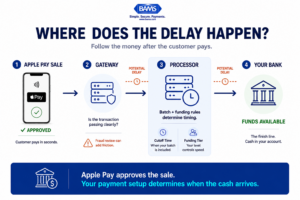
Apple Pay may approve the payment in seconds, but processor rules, batch timing, and gateway configuration determine when the money reaches your bank.
Transaction vs. Settlement vs. Funding
These terms describe different stages of the same payment process, and conflating them is where confusion begins. Visa describes a typical payment lifecycle as authentication, authorization, clearing, and settlement. Authorization determines whether the transaction is approved, clearing exchanges the transaction details between the relevant parties, and settlement transfers funds from the cardholder’s issuing bank to the merchant’s acquiring bank.
Apple Pay transactions settle through the same card networks as traditional card payments. Apple doesn’t hold your money. Your processor does. The delay lives between settlement and funding, and that window is determined by your merchant services agreement, not by Apple’s technology.
Why Mobile Wallet Sales Get Treated Differently
Mobile wallet transactions can introduce different data and integration requirements even though the underlying payment ultimately moves through established payment networks. Whether those differences affect funding time depends on your gateway, acquirer, processor, merchant account, batch configuration, and risk controls. Merchants should therefore verify their actual Apple Pay funding timeline instead of assuming wallet transactions will fund either faster or slower than other card transactions.
The practical question is not whether tokenization itself causes a delay. It’s whether your specific payment stack handles Apple Pay transactions differently at any point between checkout and deposit.
The Real Lever: Your Processor Agreement
Funding speed is partly a feature of your merchant services relationship. Visa explains that businesses accepting online payments typically use a merchant account that receives customer payments before funds are transferred to the business’s primary bank account. The exact funding arrangement can vary by provider, which is why merchants should confirm deposit timing, cutoff rules, and eligibility requirements directly in their processing agreement.
The Framework: Four Decisions That Control Your Deposit Speed
Eliminating deposit delays on mobile wallet sales comes down to four interconnected decisions. Each one either accelerates or slows down the path from customer tap to cash in your account.
- Decision 1: Processor Selection — Choose a payment processor with native next-day funding capabilities for all transaction types, including mobile wallets.
- Decision 2: Batch Timing Configuration — Set your daily batch cutoff to align with your processor’s settlement window.
- Decision 3: Gateway and Integration Alignment — Ensure your payment gateway passes mobile wallet transactions without adding unnecessary review layers.
- Decision 4: Account Structure and Risk Profile — Configure your merchant account to qualify for the fastest funding tier your processor offers.
These four decisions form a chain. Weakness in any single link adds delay. The steps below walk through each one with specific execution guidance.
Step-by-Step: How to Eliminate Deposit Delays on Apple Pay for Business Transactions
Step 1: Audit Your Current Funding Timeline
Objective: Establish a factual baseline of how long Apple Pay deposits currently take to reach your bank account, compared to standard card transactions.
Before changing anything, you need data. Pull your last 30 days of transaction records and match each Apple Pay transaction to its corresponding bank deposit. Most processors provide settlement reports that show batch dates, but these often don’t distinguish between transaction types. You may need to cross-reference your gateway logs with your bank statements manually.
Look for three things: the average number of business days between transaction and deposit for Apple Pay sales, whether that average differs from standard card transactions, and whether specific days of the week show longer delays (weekend batching is a common culprit).
Anti-patterns to avoid: Don’t assume your funding speed matches what your processor advertises. Marketing materials often quote best-case scenarios. Your actual timeline depends on your specific account tier, batch cutoff times, and whether your processor applies holds to mobile wallet transactions. Also, don’t rely solely on your processor’s dashboard. Verify against your actual bank account deposits.
Success indicators: You have a documented average funding time for Apple Pay transactions, a comparison against standard card funding times, and a clear picture of whether the gap is consistent or variable.
Step 2: Evaluate Your Processor’s Mobile Wallet Settlement Policies
Objective: Determine whether your current processor treats mobile wallet transactions differently in their settlement pipeline, and whether next-day funding is available for these transactions.
Call your processor’s support team (not sales) and ask three specific questions. First: “Are Apple Pay and other mobile wallet transactions batched separately from standard card-present or card-not-present transactions?” Second: “What is the funded settlement timeline for mobile wallet transactions on my current account?” Third: “What would I need to change to qualify for next-day funding on all transaction types, including digital wallets?”
Do not assume Apple Pay transactions follow a different funding schedule simply because they originate from a digital wallet. Ask your processor to identify exactly how those transactions are categorized on your account and whether that classification affects batching, settlement, funding eligibility, or fees. The goal is to determine whether the difference you observed in Step 1 is actually caused by processor policy or by another part of your payment stack.
Anti-patterns to avoid: Don’t accept vague answers like “funding is typically 1 to 3 business days.” Push for specifics about mobile wallet transactions on your account. Don’t assume that because your processor supports Apple Pay integration, they’ve optimized their settlement pipeline for it.
Success indicators: You have written confirmation of your processor’s mobile wallet settlement policy, a clear answer on next-day funding eligibility, and a list of any requirements or fees associated with faster funding.
Step 3: Optimize Your Batch Cutoff and Settlement Window
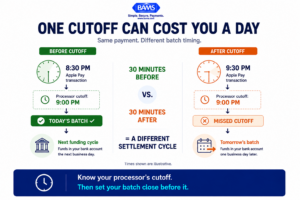
A transaction can miss the day’s settlement cycle simply because your gateway closes its batch after your processor’s cutoff.
Objective: Align your daily transaction batching with your processor’s settlement schedule to eliminate unnecessary overnight delays.
Every processor has a daily cutoff time after which transactions roll into the next day’s batch. If your batch closes at 11 PM Eastern but your processor’s settlement window closes at 9 PM Eastern, every transaction between 9 PM and 11 PM gets pushed to the following day’s settlement cycle. That’s an extra 24 hours of delay on potentially significant revenue.
For eCommerce businesses processing orders across time zones, this is particularly important. A West Coast customer placing an order at 7 PM Pacific (10 PM Eastern) might see their payment settle a full day later than a morning order, simply because of batch timing.
Contact your processor to confirm their settlement cutoff time, then adjust your batch close to fall 30 to 60 minutes before that cutoff. Most mobile payment solutions and gateway platforms allow you to configure automatic batch times through the admin dashboard.
Anti-patterns to avoid: Don’t set your batch cutoff too early in an attempt to “catch” the settlement window. You’ll end up splitting a single day’s transactions across two batches, which complicates reconciliation. Don’t ignore weekends and holidays. Transactions batched on Friday evening typically don’t fund until Tuesday, and no batch timing adjustment fixes that (only processor-level policies around weekend settlement can help).
Success indicators: Your batch cutoff aligns with your processor’s settlement window. You’ve verified the change by tracking a week of transactions against deposit dates. Morning-to-evening transactions within a single business day all land in the same batch.
Step 4: Ensure Your Gateway Doesn’t Add Friction to Mobile Wallet Transactions
Objective: Verify that your payment gateway passes Apple Pay transactions cleanly to your processor without triggering additional fraud review holds or manual approval queues.
Payment gateways sit between your checkout and your processor. Some gateways apply their own fraud scoring or review logic to transactions before passing them downstream. If your gateway flags tokenized mobile wallet payments for additional review (because the token format doesn’t match expected card data patterns, for example), those transactions can sit in a pending state for hours before even reaching your processor’s settlement queue.
Review your gateway’s fraud filter settings. Look for rules that might inadvertently catch Apple Pay transactions: mismatched AVS data (Apple Pay doesn’t always pass traditional address verification), unusual card number formats (tokenized PANs look different from standard card numbers), or velocity filters triggered by customers making multiple purchases in quick succession via their phone.
If you’re using a gateway that doesn’t natively support Apple Pay’s tokenization format, consider whether a gateway upgrade or switch is warranted. The goal is a clean pass-through where Apple Pay transactions flow to your processor with the same speed and priority as any standard card payment.
Anti-patterns to avoid: Don’t disable fraud filters entirely to speed up processing. Instead, create specific rules that whitelist tokenized mobile wallet transactions while maintaining protection on other transaction types. Don’t assume your gateway’s default Apple Pay integration is optimized. Many default configurations are conservative and prioritize caution over speed.
Success indicators: Zero Apple Pay transactions are sitting in manual review queues. Gateway logs show tokenized transactions passing through in under two seconds. No false-positive fraud holds on mobile wallet payments in the past 30 days.
Step 5: Switch to a Processor That Offers True Next-Day Funding
Objective: If your current processor can’t deliver next-day funding on mobile wallet transactions, move to one that can, without disrupting your existing checkout experience.
This is the step many guides avoid because it involves a harder decision. But if your audit (Step 1) revealed consistent multi-day delays and your processor (Step 2) confirmed that next-day funding isn’t available for your account tier or transaction types, no amount of batch optimization will solve the core problem. You need a processor whose settlement infrastructure supports next-day funding as a standard feature, not an upsell.
When evaluating processors, ask for specifics: Does next-day funding apply to all transaction types, including Apple Pay, Google Pay, and other digital wallets? Is there a volume threshold to qualify? Are there additional fees for next-day settlement? What is the cutoff time, and does it accommodate your business hours?
BAMS, for example, offers next-day funding as a standard feature for small-to-midsize merchants, including on mobile wallet transactions. This means Apple Pay sales processed before the batch cutoff arrive in your account the following business morning. For eCommerce managers tracking cash flow daily, that kind of predictability eliminates the guesswork around when revenue becomes available.
Anti-patterns to avoid: Don’t switch processors based solely on funding speed. Evaluate total processing cost, including interchange markups, monthly fees, and chargeback handling. A processor that funds next-day but charges significantly higher per-transaction fees may not improve your net cash position. Also, don’t overlook the migration process. Ensure your new processor supports your existing gateway and shopping cart integrations to avoid downtime.
Success indicators: You receive a written funding schedule from your new processor that specifies next-day deposits for mobile wallet transactions. Your first week of processing confirms deposits arriving the morning after batch close. Your total processing costs are equal to or lower than your previous arrangement.
Step 6: Monitor, Reconcile, and Maintain Funding Speed
Objective: Build an ongoing monitoring process that catches funding delays before they become cash flow problems.
Achieving next-day funding isn’t a one-time fix. Processors can change settlement policies, gateways can update fraud rules, and seasonal transaction volume spikes can trigger temporary holds. Build a simple weekly reconciliation process that compares your transaction batches against bank deposits.
Set up alerts for any Apple Pay transaction that takes more than one business day to fund. Most accounting platforms and bank dashboards support custom notifications. If you spot a delay, investigate immediately. Common causes include processor-initiated holds for unusual transaction amounts, gateway fraud filter updates that re-flag tokenized payments, or batch timing drift caused by daylight saving time changes (this catches more merchants than you’d expect).
Track your Apple Pay transaction volume as a percentage of total sales monthly. Apple Pay already has substantial adoption among U.S. iPhone users, so for many merchants the amount of revenue flowing through digital wallets may continue to become more meaningful. As that share grows, even relatively small differences in funding timing can have a larger effect on working capital.
Anti-patterns to avoid: Don’t treat reconciliation as a quarterly task. Weekly checks take 15 minutes and catch problems before they accumulate. Don’t ignore small delays. A consistent one-day overage on 10% of your transactions adds up to significant float over a year.
Success indicators: You have a documented weekly reconciliation process. Funding delays are caught within one week of occurring. Your average Apple Pay funding time remains at one business day or less over a rolling 90-day period.
Practical Examples: What This Looks Like in Action
Scenario A: The eCommerce Brand with a Legacy Processor
A mid-size online retailer processing $150,000 per month notices that Apple Pay transactions (about 12% of total volume) consistently fund two days later than standard card payments. Their processor batches tokenized transactions separately and applies a 48-hour review window. After auditing their funding timeline and confirming the delay, they switch to a processor offering next-day funding on all transaction types. Result: $18,000 in monthly Apple Pay revenue now arrives one business day faster, reducing their average accounts receivable cycle and eliminating the need for a $15,000 revolving credit line used to cover the float.
Scenario B: The Omnichannel Retailer with a Batch Timing Problem
A restaurant group accepting Apple Pay at the point of sale and through their online ordering platform discovers that evening transactions (6 PM to close) consistently fund one day later than daytime sales. The cause: their batch cutoff is set to midnight, but their processor’s settlement window closes at 10 PM Eastern. Adjusting the batch close to 9:30 PM Eastern captures all daily transactions in a single settlement cycle, eliminating the split-batch delay without changing processors.
Scenario C: The Gateway Friction Problem
An eCommerce manager at a DTC brand sees intermittent two-day delays on Apple Pay orders. Investigation reveals that their gateway’s fraud filter is flagging 8% of Apple Pay transactions for manual review because tokenized PANs trigger a “card number format mismatch” rule. After adding a whitelist rule for Apple Pay’s token format, flagged transactions drop to near zero and funding returns to next-day consistency.
Common Mistakes and Pitfalls
Blaming Apple Pay for processor problems. The most common mistake is assuming deposit delays are inherent to mobile wallet payments. They aren’t. Apple Pay transactions settle through the same card networks as any Visa or Mastercard payment. The delay lives in your processor’s funding pipeline.
Optimizing batch timing without checking processor policy. Adjusting your batch cutoff helps only if your processor actually offers next-day settlement. If their standard funding window is two business days, perfect batch timing still gets you two-day deposits.
Ignoring total cost when switching processors. Faster funding is valuable, but not if it comes with significantly higher interchange markups or hidden monthly fees. Evaluate the full cost picture, including transaction fees, statement fees, PCI compliance fees, and chargeback handling costs.
Setting and forgetting. Funding speed can change. Processor policy updates, gateway software changes, and seasonal volume spikes all affect settlement timing. Ongoing monitoring is essential, not optional.
What to Do Next
Start with Step 1. Pull your last 30 days of Apple Pay transactions and match them against your bank deposits. That single exercise will tell you whether you have a funding speed problem, how severe it is, and whether the fix is a configuration adjustment or a processor change.
If your current funding timeline is already one business day, focus on Steps 3 and 4 to protect that speed as your mobile wallet volume grows. If you’re seeing consistent multi-day delays, move through Steps 2 and 5 to identify whether the issue is solvable with your current processor or requires a switch.
Treat this guide as a reference you return to quarterly. As mobile wallet adoption accelerates and Apple Pay’s share of your transaction volume increases, the cash flow impact of even small funding delays will grow proportionally. The merchants who treat deposit speed as a strategic decision rather than an afterthought will have a meaningful operational advantage.
Frequently Asked Questions
Why are my Apple Pay deposits slower than regular card payments?
Apple Pay transactions use tokenized card data, which some processors batch separately or route through additional verification steps. The delay isn’t caused by Apple. It’s caused by how your payment processor handles tokenized transactions in their settlement pipeline. Reviewing your processor’s mobile wallet settlement policy (and comparing it against standard card settlement) will reveal the exact source of the delay.
Does Apple hold my money after an Apple Pay transaction?
No. Apple does not hold merchant funds. Apple Pay is a payment method that passes transaction data through existing card networks (Visa, Mastercard, Amex). Once the customer authorizes payment, the funds flow from the issuing bank to your acquiring bank through the card network. Your payment processor controls when those settled funds are released to your business bank account.
What is next-day funding, and how do I qualify?
Next-day funding means that transactions processed and batched on a given business day are deposited into your bank account the following business morning. Qualification depends on your payment processor. Some offer it as standard for all merchants, while others reserve it for accounts meeting volume thresholds or charge additional fees. Ask your processor directly whether next-day funding applies to mobile wallet transactions on your specific account.
Are Apple Pay transaction fees higher than standard card fees?
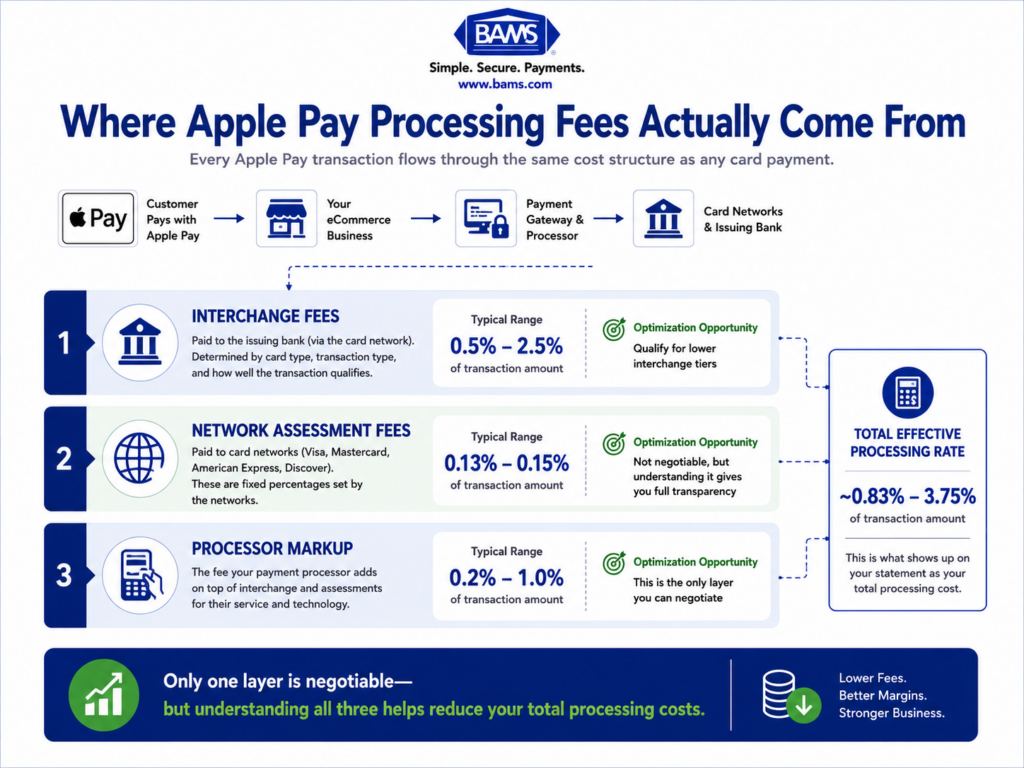
Apple Pay transactions are processed through the same card networks as traditional card payments, so interchange rates are generally the same. However, some processors apply different markups or categorize mobile wallet transactions differently, which can affect your effective rate. Review your processing statements to compare the per-transaction cost of Apple Pay sales against standard card sales.
How do I set up Apple Pay for my eCommerce website?
Apple Pay integration for eCommerce requires a compatible payment gateway that supports Apple Pay’s Web Payments API. Your payment processor and gateway provider can walk you through the technical setup. For a foundational overview of how Apple Pay works for merchants, including in-store and online acceptance, this Apple Pay basics guide covers the essentials.
Will switching processors disrupt my ability to accept Apple Pay?
Switching processors does not disable Apple Pay at the customer level. However, you’ll need to ensure your new processor supports Apple Pay and that your payment gateway is compatible with their integration. Plan for a brief testing period after migration to confirm that mobile wallet transactions process, settle, and fund correctly before fully decommissioning your old processor.
Sources
- https://www.consumerfinance.gov/data-research/research-reports/big-techs-role-in-contactless-payments-analysis-of-mobile-device-operating-systems-and-tap-to-pay-practices/full-report/
- https://corporate.visa.com/en/solutions/visa-protect/insights/3d-secure.html
- https://corporate.visa.com/en/sites/visa-perspectives/innovation/how-to-accept-payments-online.html