7 Merchant Services Fees Hiding on Your Statement
Last Updated on October 6, 2026 by Dimitri Akhrin
A line-by-line breakdown of the markup categories and junk fees NYC eCommerce brands consistently overlook
Learn how to read your monthly processing statement as a diagnostic tool, not just a total. This guide identifies the specific merchant services fee categories that quietly erode eCommerce revenue and shows you which charges you can negotiate or eliminate.
TL;DR
- Your effective rate tells the real story – Divide total monthly fees by total volume. If the number is climbing quarter over quarter, you’re experiencing rate creep or interchange downgrades that need attention.
- Interchange-plus pricing is non-negotiable for transparency – Tiered pricing lets processors hide markup. Switch to interchange-plus so you can see exactly what you’re paying the networks versus what you’re paying your processor.
- Faster deposits are a cash flow lever, not a perk – Next-day funding eliminates the 3-to-5-day gap that forces you onto credit lines or delays inventory restocks. Calculate the real cost of your current funding delay.
- Chargebacks cost far more than the dispute amount – Fees, lost product, staff time, and potential monitoring program penalties compound quickly. Proactive defense (pre-dispute alerts, dedicated account support) prevents most of this damage.
- Start with three quick wins – Calculate your effective rate, eliminate PCI non-compliance fees by completing your SAQ, and confirm your batch settles daily. These steps take under two hours and typically surface $200 to $800 in monthly savings.
Your Processing Statement Is Talking. Are You Listening?
Every month, your merchant services provider sends a statement with a dozen or more line items. Most eCommerce managers glance at the total, compare it to last month, and move on. That habit is expensive.
The numbers tell a different story when you read them closely. U.S. merchants paid $187.20 billion in card processing fees in 2024, according to Nilson Report data. That margin haircut compounds fast when you’re running a growing eCommerce operation in New York City, where ad costs, fulfillment and rent already squeeze your margins.
The real problem isn’t that payment processing fees exist. It’s that most operators treat them as a fixed cost instead of a diagnostic signal. Each line item on your statement reveals something about how your processor makes money from your business, and which of those charges you can actually change.
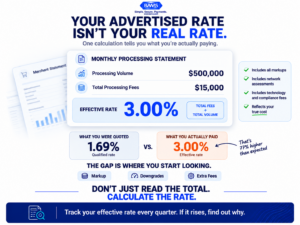
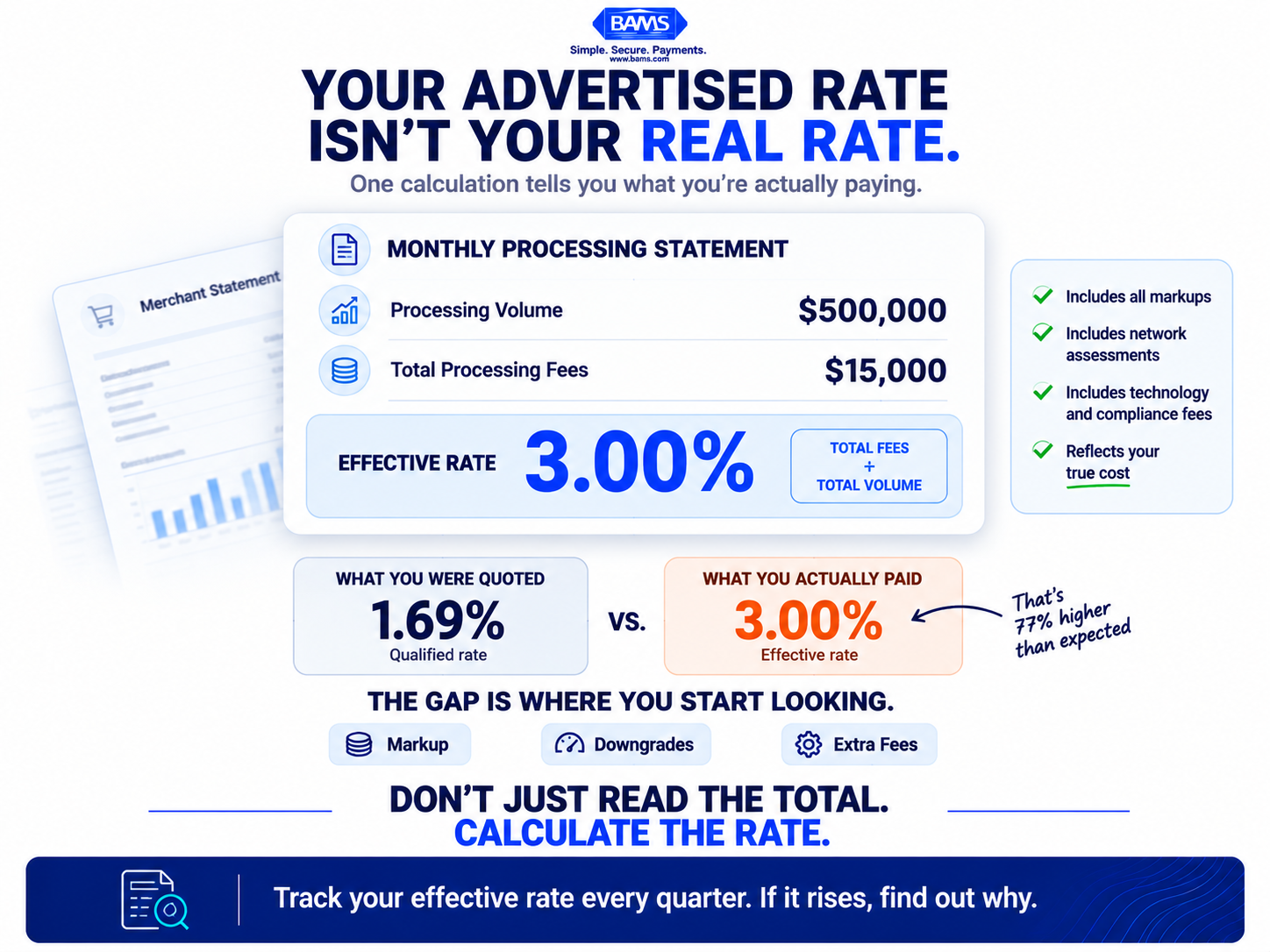
Your effective rate reveals what payment processing actually costs after markups, assessments, and additional fees are included.
What This List Covers (and What It Doesn’t)
This guide is for eCommerce managers at established online businesses (roughly 10 to 50 employees) who feel the drag of delayed deposits, opaque pricing, and fees that seem to creep upward without explanation. If you’re processing six figures monthly and can’t confidently explain every line on your statement, this is for you.
We’re not covering enterprise-scale payment orchestration or multi-gateway routing strategies. Instead, we’re focusing on the specific fee categories and cash flow levers that mid-market eCommerce brands consistently overlook. The goal: turn your processing statement from a bill you pay into a tool you use.
How We Selected These Levers
Each item below meets three criteria. First, it represents a real, recurring cost that appears on most eCommerce processing statements. Second, it’s a cost that operators frequently accept as fixed when it’s actually negotiable or avoidable. Third, acting on it produces measurable improvement in either eCommerce revenue retention or cash flow velocity within 30 to 90 days.
7 Processing Statement Line Items That Cost You Money (and How to Turn Them Around)
1. Interchange Markups Disguised as “Qualified” Rates
Why it matters: Many processors use tiered or “qualified/mid-qualified/non-qualified” pricing buckets. These labels obscure the actual interchange rate set by Visa and Mastercard, letting the processor pad margins by routing transactions into higher-cost tiers. You end up paying more without understanding why.
What it looks like today: Your statement may advertise a simple “qualified” rate, while your actual processing costs vary based on the card, transaction type, acceptance method, and other qualification criteria. Visa’s published U.S. interchange reimbursement fee schedule shows how interchange rates vary across numerous transaction and merchant categories. If your processor bundles these underlying costs into broad pricing tiers, it becomes harder to distinguish network costs from processor markup.
How to apply it: Request interchange-plus pricing from your processor. This model separates the non-negotiable interchange fee from the processor’s markup, giving you a clear view of what you’re actually paying for. If your current provider won’t offer it, that’s a signal worth paying attention to.
2. The Hidden Cost of 3-to-5-Day Funding Delays
Why it matters: Standard funding timelines mean the revenue you earned on Monday doesn’t hit your bank account until Thursday or Friday. For an eCommerce brand spending aggressively on ads and inventory, that delay creates a cash flow gap you fill with credit lines, delayed vendor payments, or missed restock windows. The cost isn’t on your statement. It’s in your opportunity cost.
What it looks like today: Most processors default to 2-to-3 business day funding. Some charge extra for “fast funding” as an add-on. Meanwhile, your ad spend debits daily and your suppliers want payment on receipt.
How to apply it: Evaluate next-day funding options as a cash flow tool, not a luxury. Calculate the actual cost of your current funding gap: credit card interest on bridge financing, lost early-payment vendor discounts, or delayed inventory restocks. Deposit timing is the most undervalued variable in eCommerce cash flow forecasting, and closing that gap by even one day compounds across every sales cycle.
3. Chargeback Fees That Punish You Twice
Why it matters: A chargeback doesn’t just cost you the sale. You lose the product, pay a chargeback fee ($15 to $100 per dispute depending on your processor), and your chargeback ratio climbs toward the threshold where card networks impose monitoring programs with even steeper penalties. Most eCommerce operators treat chargebacks as an unavoidable cost of doing business online. They’re not.
What it looks like today: Your statement shows a line for “chargeback fees” or “dispute fees.” What it doesn’t show is the revenue you lost from disputes you could have won with better evidence, or disputes you could have prevented entirely with pre-dispute alerts.
How to apply it: Invest in proactive chargeback defense before disputes reach the formal stage. Tools like Verifi and Ethoca alerts let you resolve issues before they become chargebacks. BAMS bundles proactive chargeback defense with dedicated account management, which means disputes get handled by someone who knows your business rather than a generic support queue. Even reducing your chargeback rate by 0.5% can save thousands monthly and keep you off network monitoring lists.
4. PCI Non-Compliance Fees You Forgot You’re Paying
Why it matters: If you haven’t completed your annual PCI DSS self-assessment questionnaire, your processor is likely charging you a monthly non-compliance fee, typically $19.95 to $49.95. It’s a small line item that adds up to $240 to $600 per year for doing nothing more than neglecting a form.
What it looks like today: Look for “PCI non-compliance,” “PCI monthly fee,” or “security fee” on your statement. Some processors bury this charge under vague labels. The compliance questionnaire itself usually takes 30 to 60 minutes for a standard eCommerce operation.
How to apply it: Confirm your PCI DSS validation requirements and complete the appropriate documentation for your business. The PCI Security Standards Council provides dedicated guidance for merchants on PCI DSS responsibilities, including resources for understanding validation and protecting payment account data. Once you’ve completed the requirements applicable to your business, verify with your processor whether any PCI non-compliance charge should be removed. If a separate PCI-related fee remains, ask exactly what service that fee covers.
5. Batch Processing Timing That Silently Raises Your Rates
Why it matters: Card networks impose higher interchange rates on transactions that aren’t settled within a specific window (typically 24 hours for Visa, 48 hours for Mastercard). If your batch doesn’t close daily, or if it closes at the wrong time relative to your transaction volume, you’re paying a “downgrade” surcharge on transactions that would otherwise qualify for lower rates.
What it looks like today: Your statement may show “EIRF” or “standard” interchange categories. These are downgrades, meaning transactions that were charged a higher rate because settlement data was missing or late. For eCommerce merchants processing card-not-present transactions, downgrades are common and preventable.
How to apply it: Set your batch to auto-close daily, ideally before your processor’s cutoff time. Ensure your gateway passes Level II data (tax amount, customer code) on B2B transactions. Optimizing batch submission timing is one of the simplest ways to reduce your effective rate without changing processors.
6. Gateway and Technology Fees That Stack Quietly
Why it matters: Your processing statement may include separate charges for gateway access, tokenization, fraud screening, virtual terminal access, and API usage. Individually, each looks minor ($10 to $25 per month). Together, they can add $100 to $300 monthly in technology fees that duplicate functionality your eCommerce platform already provides.
What it looks like today:Typical U.S. small-business payment acceptance costs range from 2.5% to 3.5% of revenue, and eCommerce merchants can see costs above 4% once these stacked fees are included. The problem isn’t any single fee. It’s that no one audits them collectively.
How to apply it: List every technology-related line item on your statement. Cross-reference each with your actual gateway and platform capabilities. If your Shopify or WooCommerce setup already handles tokenization and basic fraud screening, you may be paying your processor for redundant services. Ask your processor to itemize what each technology fee covers, then eliminate duplicates.
7. Rate Creep: The Fee Increase You Never Agreed To
Why it matters: Card acceptance costs can change over time, but not every increase on your statement necessarily comes from the card networks. Federal Reserve Bank of St. Louis analysis found that interchange fees collected by U.S. banks increased from about $60 billion in 2024 to nearly $66 billion in 2025. When your own effective processing rate rises, the important question is how much of the increase reflects underlying interchange and network costs versus changes in your processor’s markup.
What it looks like today: Compare your effective processing rate from 12 months ago to today. If it’s climbed by 0.1% to 0.3% without a corresponding change in your transaction mix, you’ve experienced rate creep. Many processors include language in their contracts allowing unilateral rate adjustments with 30 days’ notice (often sent as a paragraph buried in a multi-page statement).
How to apply it: Conduct a quarterly rate comparison. Pull your total fees and total volume for the current month and the same month last year. Divide fees by volume to get your effective rate. If it’s trending upward, call your processor and ask for a specific explanation. If they can’t provide one, or if the explanation is “network increases,” request documentation of the actual interchange changes versus their markup changes.
The Pattern Behind These Costs
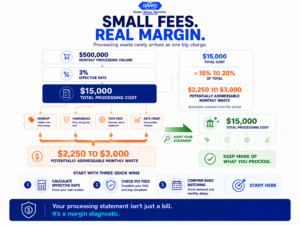
A small markup here and a minor monthly charge there can become meaningful margin loss when they compound across high transaction volume.
Every item on this list shares a common trait: opacity benefits the processor, not you. Tiered pricing obscures interchange. Slow funding hides opportunity cost. Stacked tech fees exploit the fact that no one audits $20 charges. Rate creep relies on your inattention.
The second pattern is that these costs compound. A 0.2% markup here, a $25 monthly fee there, and a few preventable chargebacks per month can quietly consume 15% to 20% of your total processing costs. For a business doing $500,000 in monthly volume at a 3% effective rate, that’s $2,250 to $3,000 per month in addressable waste.
The operators who treat their processing statement as a diagnostic tool for payment optimization rather than a bill consistently find margin they didn’t know they had. The ones who don’t keep funding their processor’s growth instead of their own.
Where to Start This Week
You don’t need to tackle all seven at once. Start with three actions. First, calculate your effective rate (total fees divided by total volume) and compare it to last quarter. Second, scan your statement for PCI non-compliance fees and eliminate them by completing your SAQ. Third, check your batch settlement schedule and confirm it closes daily.
These three steps take less than two hours and typically surface $200 to $800 in monthly savings for a mid-market eCommerce operation. From there, you can move into the larger conversations around interchange-plus pricing, next-day funding, and chargeback prevention with a clearer picture of what your processing costs actually are, and what they should be.
Frequently Asked Questions
What are the common payment challenges faced by NYC eCommerce merchants?
NYC eCommerce merchants frequently deal with high processing fees compounded by card-not-present surcharges, delayed deposit timelines that create cash flow gaps, and chargeback rates driven by high transaction volumes. The competitive cost environment in New York (advertising, rent, fulfillment) makes even small processing inefficiencies more painful than they would be in lower-cost markets.
When should merchants conduct a payment processing audit?
At minimum, conduct a quarterly review comparing your effective processing rate (total fees divided by total volume) to the prior quarter. You should also audit immediately after any processor notification about rate changes, after a spike in chargebacks, or when your monthly volume increases significantly, since volume changes can shift which interchange categories your transactions fall into.
How does interchange-plus pricing differ from tiered pricing?
Interchange-plus pricing separates the base interchange rate (set by Visa or Mastercard) from your processor’s markup, so you can see exactly what each party charges. Tiered pricing bundles everything into vague “qualified” and “non-qualified” categories, which lets processors route transactions into higher-cost tiers without your knowledge. Interchange-plus is almost always more transparent and typically less expensive for eCommerce merchants.
Which factors affect the speed of payment deposits for eCommerce businesses?
Deposit speed depends on your processor’s funding schedule, your batch settlement timing, your chargeback ratio and risk profile, and whether your processor holds reserves. Some processors offer next-day funding as a standard feature while others charge a premium for it. Your bank’s ACH processing schedule also plays a role in when funds actually appear in your account.
How do chargebacks impact eCommerce revenue beyond the disputed amount?
Each chargeback costs you the transaction amount, the product (if already shipped), a chargeback fee ($15 to $100), and staff time to manage the dispute. If your chargeback ratio exceeds card network thresholds (typically 0.9% to 1%), you can be placed in a monitoring program with additional monthly fees, higher processing rates, and potential account termination. Proactive chargeback defense prevents disputes before they reach this stage.
Why is payment optimization important for eCommerce profitability?
Payment processing fees typically consume 2.5% to 3.5% of revenue for U.S. small businesses, and eCommerce merchants can pay above 4%. On $500,000 in monthly volume, even a 0.3% reduction in your effective rate saves $1,500 per month. Combined with faster deposits that reduce bridge financing costs, payment optimization directly improves both margin and cash flow predictability.