
Apple Pay Transaction Fees: The Cost You Recover Then Lose
Last Updated on October 14, 2026 by Dimitri Akhrin
Why the real conversion-vs-cost tradeoff is a processor selection question, not a payment method decision
Learn why enabling Apple Pay without scrutinizing your processor’s fee structure can quietly erase the margin you recovered from lower cart abandonment. This piece reframes the Apple Pay ROI conversation around gateway and processor selection.
TL;DR
- Apple Pay charges merchants nothing – Every fee on an Apple Pay transaction comes from your payment processor and gateway, not from Apple.
- Conversion gains don’t equal margin gains – Reducing cart abandonment with Apple Pay only improves profitability if your processor’s fee structure and settlement speed support it.
- Deposit delays are a processor policy, not a technology limit – Next-day funding exists; if your processor doesn’t offer it, you’re leaving cash flow on the table.
- Reframe the question – Stop asking “should we accept Apple Pay?” and start asking “is our processor the right one to sit behind it?”
You Fixed the Checkout. You Didn’t Fix the Cash Flow.
Every eCommerce team celebrates the same win: you enable Apple Pay, watch cart abandonment dip, and pat yourself on the back. More customers are completing purchases. The conversion chart looks great in the Monday standup. But then deposits land two, three, sometimes four days later, and the per-transaction cost hasn’t budged. You recovered revenue at the front door and lost margin out the back.

Apple Pay can recover sales at checkout, but the processor behind it determines how much of that revenue you keep and how quickly you can use it.
The Checkout Obsession Everyone Agrees On
The prevailing logic is simple and, on its surface, hard to argue with. Global cart abandonment hit 81% in Q4 2024, with some markets like Canada reaching 87%. Friction kills sales. Digital wallets like Apple Pay reduce friction. Therefore, enabling Apple Pay is a growth lever.
This reasoning earned Apple Pay a spot in nearly every “how to reduce cart abandonment” playbook. And it works. Customers tap, authenticate with Face ID, and they’re done. No fumbling for card numbers. No typos in the billing address. The checkout experience genuinely improves.
But here’s where the conversation stops. Almost every guide you’ll find focuses on the setup, the compatibility matrix, the tokenization security story. Nobody talks about what happens after the customer taps “Pay.”
The Real Question Isn’t “Should We Accept Apple Pay?” It’s “Who Processes It?”
Here’s what we actually believe: the conversion-vs-cost tradeoff that eCommerce managers agonize over is not a payment method question. It’s a processor selection question. And conflating the two is costing businesses real money every single day.
Apple Pay Transaction Fees Are Your Processor’s Fees in Disguise
Let’s start with a fact that surprises most merchants. Apple does not charge merchants, developers, or users any fees for Apple Pay. Zero. No per-transaction cut, no API tier pricing, no subscription. Apple confirmed this directly in a submission to New Zealand’s Commerce Commission.
So when you see a 2.9% + $0.30 charge on an Apple Pay transaction, that’s not Apple’s fee. That’s your payment processor’s fee. And that’s your payment gateway’s fee. Apple Pay simply inherits whatever cost structure your processing stack imposes.
This distinction matters enormously. It means the margin you recover by reducing cart abandonment is determined not by your decision to accept Apple Pay, but by the processor and gateway sitting behind it.
The Math That Gets Ignored
Consider a mid-size eCommerce brand doing $500,000 per month in online sales. You enable Apple Pay and see a 5% lift in completed transactions. That’s $25,000 in recovered revenue. Impressive.
But recovered revenue still carries payment processing costs. Statista reports that merchant card fees vary across the major U.S. card networks and notes that processor fees are additional costs that vary by provider. Compare that with a processor offering transparent interchange-plus pricing and next-day funding. The same $25,000 in recovered sales may cost less to process and reach your account sooner.
Over a year, the difference in processing costs can reach five figures. The difference in cash flow availability compounds further, affecting your ability to reinvest in inventory, marketing, and operations.
Settlement Speed Is the Overlooked Variable
We’ve seen a pattern across eCommerce operations of all sizes: teams spend weeks optimizing the checkout funnel, A/B testing button colors and form fields, but never question why deposits from those optimized transactions take two or three business days to arrive.
Deposit delays on mobile wallet sales aren’t a technology limitation. They’re a processor policy. Some processors batch settlements once daily. Others hold funds as a risk buffer. A few, like BAMS, offer next-day funding as a standard feature, which means the revenue you capture today is available for use tomorrow. That’s not a minor operational detail. For a business managing inventory cycles, payroll, or ad spend, the difference between tomorrow and three days from now is the difference between reinvesting and waiting.
If you’ve already done the hard work of reducing cart abandonment, why would you accept a processor that delays the payoff?
Interchange Downgrades: The Silent Margin Killer
There’s another layer most merchants never see. When transaction data is incomplete or miscategorized, card networks push transactions into higher interchange tiers. This is called a downgrade, and it inflates your effective processing cost without any visible warning. Apple Pay transactions can be especially susceptible if your gateway doesn’t pass Level II or Level III data correctly. The result? You’re paying premium rates on transactions that should have qualified for lower interchange categories. BAMS addresses this through proactive interchange optimization and dedicated account management, helping merchants identify and fix downgrade patterns before they erode margin over months.
What Changes If You See It This Way
If Apple Pay transaction fees are really processor fees, then every conversation about “the cost of accepting Apple Pay” is misframed. The question isn’t whether Apple Pay is worth enabling. It almost certainly is. The question is whether your current processor deserves to sit behind it.
This reframe changes how you evaluate your payment stack. Instead of comparing wallet features, you compare settlement timelines. Instead of asking “does my gateway support Apple Pay,” you ask “what does my gateway charge me for the privilege, and how fast do I get paid?”
For eCommerce managers measured on both conversion rate and processing cost, this is the leverage point that actually moves both numbers. Ignoring it means celebrating a checkout improvement while quietly bleeding margin on the back end.
A New Way to Think About Your Payment Stack
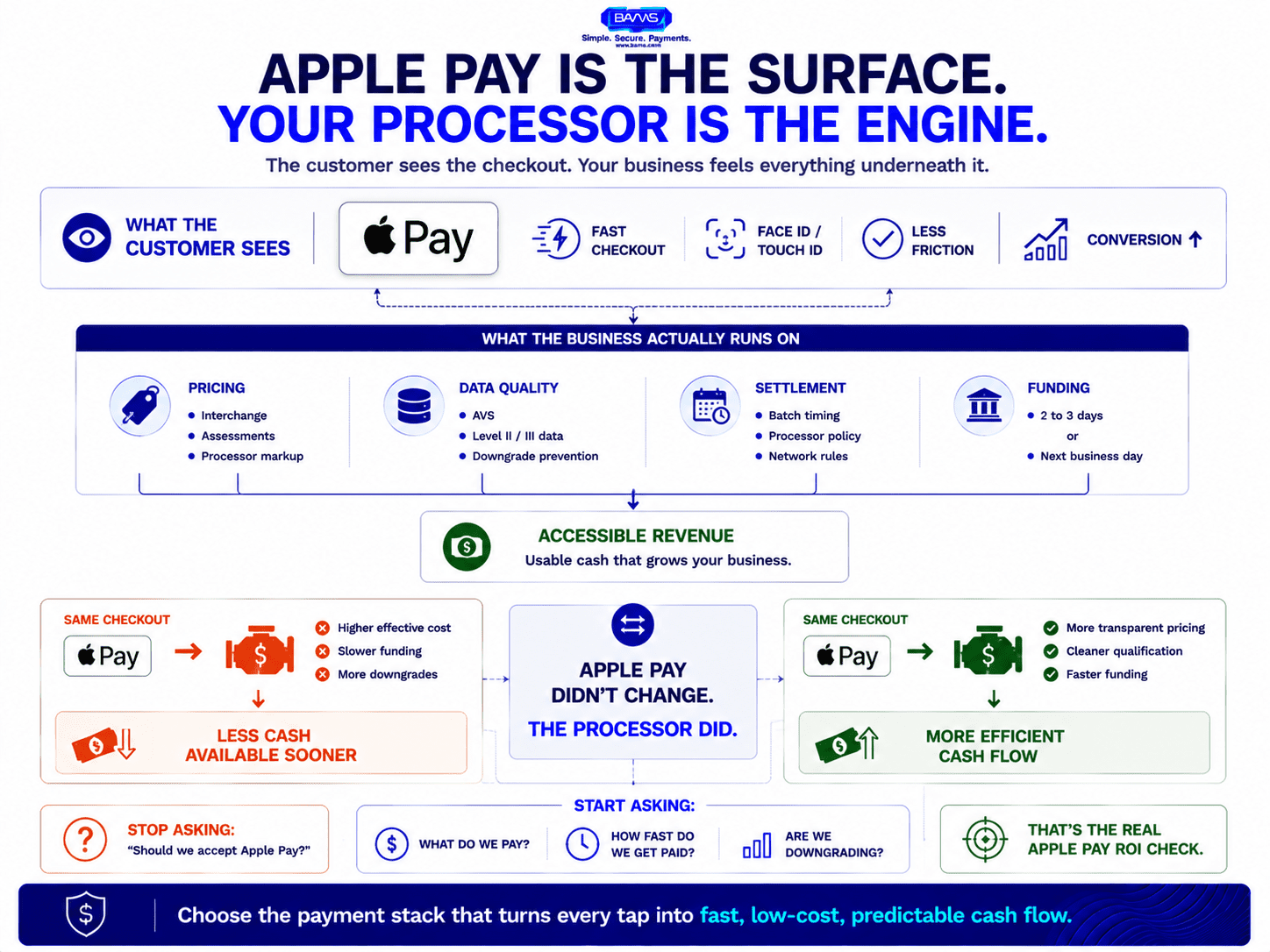
Apple Pay improves the customer-facing checkout experience. The processor underneath determines how efficiently that sale becomes usable cash.
Stop evaluating payment methods and start evaluating payment infrastructure. Apple Pay is a surface. Your processor is the engine. The surface gets the customer’s attention. The engine determines whether that attention turns into accessible, cost-efficient revenue.
Think of it like this: choosing Apple Pay is choosing the storefront window. Choosing your processor is choosing the plumbing, the wiring, and the lease terms. You can have the most beautiful window in the mall, but if the rent is too high and the utilities take three days to turn on, the window isn’t saving you.
The merchant who wins isn’t the one who accepts the most payment methods. It’s the one whose processing stack turns every accepted payment into fast, low-cost, predictable cash flow.
The Conversion Win Means Nothing If You Can’t Spend It Tomorrow
Apple Pay reduces friction for your customers. That’s settled. The unsettled question, the one that actually determines whether your business benefits, is what happens between the tap and the deposit. Get that wrong, and you’ve just made it easier for customers to pay you in a way that costs more and arrives later than it should.
Your checkout isn’t the problem anymore. Your processor might be.
Frequently Asked Questions
Does Apple Pay charge merchants any fees?
No. Apple has confirmed it charges no fees to merchants for Apple Pay transactions. Any fees you see come from your payment processor, gateway, or the card networks, not from Apple itself.
Why do deposits from Apple Pay transactions take so long?
Deposit speed is determined by your processor’s settlement policy, not by Apple Pay. Some processors batch settlements slowly or hold funds as a risk buffer, while others offer next-day funding as a standard feature.
How can I reduce Apple Pay transaction fees without disabling the payment method?
Focus on your processing stack rather than the wallet. Switch to a processor with interchange-plus pricing, ensure your gateway passes complete transaction data to avoid interchange downgrades, and negotiate settlement terms that include next-day funding.
Sources
- https://www.statista.com/statistics/1609244/online-cart-abandonment-rate-by-country/
- https://www.comcom.govt.nz/__data/assets/pdf_file/0029/363764/Apple-Submission-on-Retail-Payment-System-Consultation-on-Costs-to-businesses-and-consumers-of-card-payments-2-September-2024.pdf
- https://www.statista.com/statistics/1448730/credit-card-merchant-processing-fees-usa/


