Batch Submission Timing: Get Next-Day Deposits
Configure your batch close schedule to stop leaving working capital stuck in processing limbo
Learn how to audit your current batch submission timing, align it with your processor’s cutoff, and configure auto-close settings so deposits land a full business day sooner. Includes a step-by-step setup checklist and ongoing maintenance plan.
TL;DR
- Find your processor’s cutoff time – Your batch must close before this deadline (usually 4:00 to 7:00 PM ET) or you lose a full business day on every deposit.
- Set automatic batch close 30 minutes before the cutoff – This buffer protects against network lag and ensures consistent next-day settlement.
- Switch payout frequency to daily – Batch timing and payout schedule are separate settings. Daily batching with weekly payouts still means slow deposits.
- Check your bank for ACH holds – New business accounts often have automatic deposit holds that mimic processor delays.
- Track results for two weeks – Log batch close times against deposit arrivals to confirm your changes are working and catch any configuration drift early.
What You’ll Achieve: Faster Deposits Through Smarter Batch Submission Timing
Most ecommerce operators accept two- to three-day deposit timelines as a fixed reality. They’re not. By the end of this tutorial, you’ll know exactly how to configure your batch submission timing so funds land in your account the next business day instead of sitting in processing limbo. The difference often comes down to a single operational habit: when you close your daily batch relative to your processor’s cutoff.
Your success criteria are simple. After completing these steps, you should see deposits arriving one full business day sooner on a consistent basis. You’ll also have a repeatable audit process to catch timing drift before it costs you working capital.
Prerequisites and Setup Checklist
Before you start, confirm you have the following in place. Missing any of these will create blockers partway through.
- Admin access to your payment gateway dashboard (Stripe, Authorize.Net, Braintree, or equivalent)
- Your processor’s daily cutoff time (contact your processor or check your merchant agreement if you don’t know it)
- Access to your batch settlement logs for the last 30 days
- A spreadsheet or tracking tool to log deposit arrival times against batch close times
- Your current funding arrangement details (standard funding, next-day funding, or same-day funding)
Time estimate: Initial setup takes 60 to 90 minutes. Ongoing maintenance is 5 minutes per day for the first two weeks, then nearly zero once automated. The most common blocker is not knowing your processor’s cutoff time, so start there.
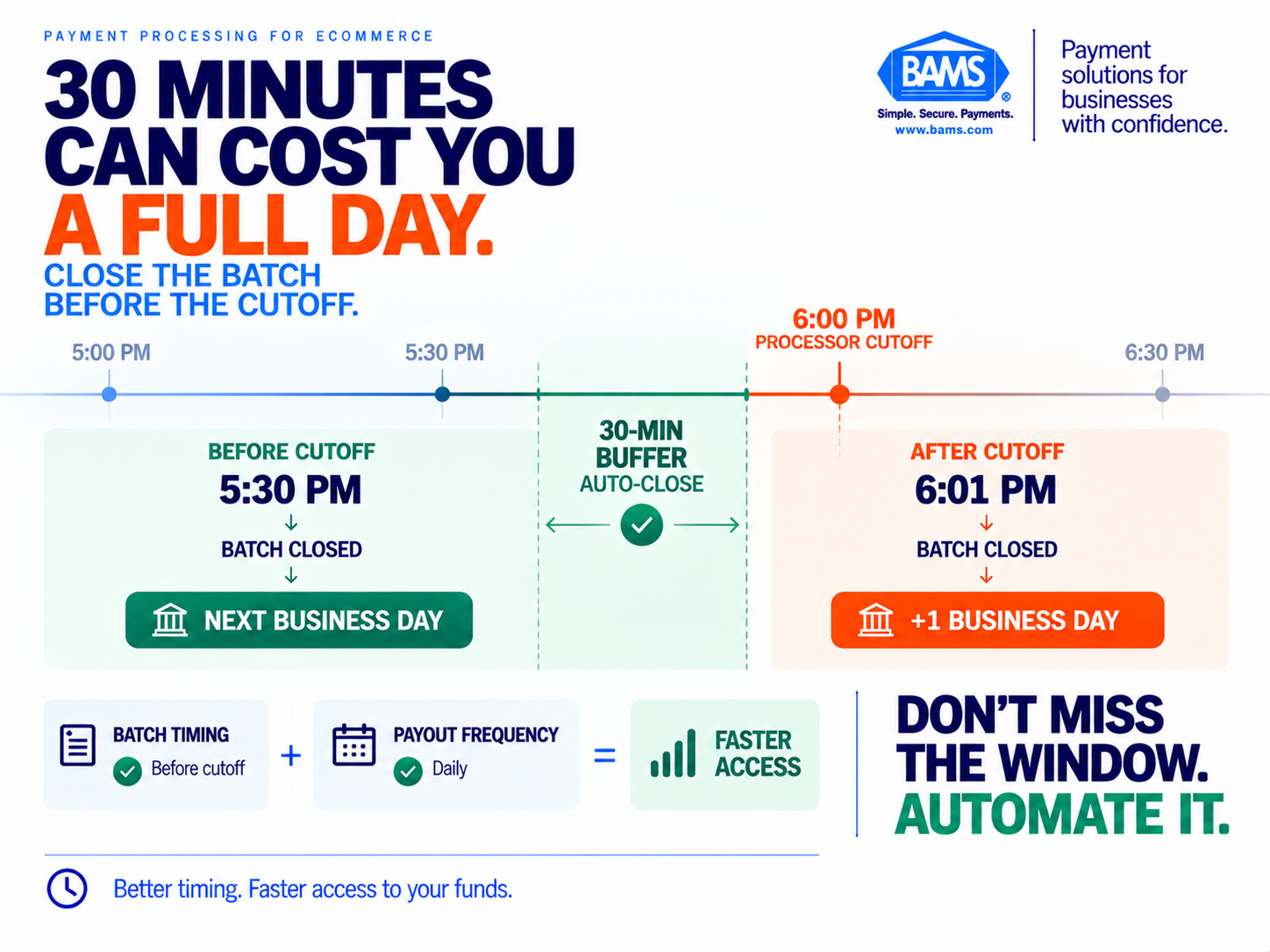
A batch submitted minutes after the processor cutoff can lose an entire business day. Setting automatic settlement before the deadline helps keep deposits moving on schedule.
Why Batch Submission Timing Is the Lever You Control
Most payment optimization advice focuses on processor selection, rate negotiation, or retry logic. Those matter, but they’re slow to change and often require contract renegotiation. Batch timing is different. It’s an operational behavior you can adjust today, and it directly determines whether your funds land tomorrow or the day after.
According to BAMS’s payment processing speed guide, if a platform batches after the processor’s daily cutoff, it adds a full business day of delay to funding. That’s not a processor limitation. That’s a configuration problem on your side.
Batch timing is one part of deposit speed, but it does not override the funding terms of your merchant agreement. The OCC explains that the timing of payments to merchants is specified in the agreement between the acquiring bank and the merchant. If you’re already eligible for next-day funding, closing batches before the applicable cutoff can help you avoid unnecessary delays. If your agreement uses a longer funding schedule, changing the batch time alone will not convert it into next-day funding.
Step-by-Step: Configure Your Batch Timing for Faster Deposits
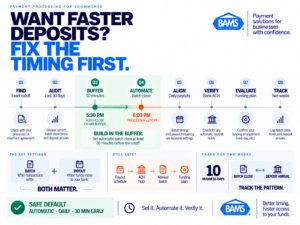
Faster deposits depend on more than processor speed. Batch close timing, automatic settlement, payout frequency and bank availability all have to work together.
Step 1: Find Your Processor’s Exact Daily Cutoff Time
Log in to your payment gateway or merchant services portal and look for a section labeled “Settlement,” “Batch Settings,” or “Funding Schedule.” The relevant cutoff determines which captured transactions are included in the next settlement batch. Authorize.Net, for example, automatically batches captured transactions every 24 hours after the account’s Transaction Cut-Off Time and states that transactions submitted after that cutoff are included in the following day’s batch. Cutoff times vary by gateway and processor, so verify the exact time and time zone for your account rather than relying on a standard industry hour.
Expected result: You have a specific time written down (for example, “6:00 PM ET”). If you can’t find it in your dashboard, call your processor’s support line and ask: “What is my daily batch settlement cutoff time, and what timezone is it in?”
Common failure: Assuming the cutoff is midnight. Most processors use an afternoon or early evening cutoff. This deposit setup guide explains why the assumption costs you a full day of float.
Step 2: Audit Your Current Batch Close Times
Pull your batch settlement logs for the last 30 days. For each day, record two data points: the time your batch actually closed and the time funds appeared in your bank account. A simple spreadsheet with columns for Date, Batch Close Time, and Deposit Arrival Date works fine.
Expected result: A clear pattern showing which days your batch closed before the cutoff (and funds arrived next day) versus which days it closed after (and funds arrived a day later). Most operators find that 30% to 50% of their batches are missing the cutoff.
Common failure: Only checking the last week. Settlement patterns shift with sales volume, promotional events, and seasonal traffic. Thirty days gives you a reliable baseline.
Step 3: Set Your Batch Close Time 30 Minutes Before the Cutoff
In your gateway settings, configure your automatic batch close time to at least 30 minutes before your processor’s cutoff. If your cutoff is 6:00 PM ET, set your batch to close at 5:30 PM ET. This buffer accounts for processing lag and any transmission delays between your gateway and the processor.
Expected result: Your gateway dashboard shows a scheduled batch close time with the buffer built in. BAMS recommends this 30-minute buffer as a stated success indicator for faster funding.
Common failure: Setting the batch close exactly at the cutoff. Even a few minutes of network latency can push your submission past the deadline. As noted in this eCommerce deposit optimization guide, missing a processor cutoff by minutes can add a full day to settlement time.
Step 4: Switch from Manual to Automatic Batch Settlement
If your gateway is set to manual batch settlement, switch it to automatic. Manual batching means someone on your team has to remember to close the batch every day. That’s a single point of failure that will eventually cost you a day of deposits, especially on weekends, holidays, or during staff transitions.
How to check: In your gateway dashboard, look for a setting labeled “Auto-settle” or “Automatic batch close.” Toggle it on and set the time from Step 3. On Authorize.Net, this is under Account > Settlement/Batch. On Stripe, batches are automatic by default, but your payout schedule settings still control when funds move.
Expected result: Batches close at the same time every day without human intervention.
Common failure: Leaving manual mode on because “we’ve always done it that way.” One forgotten Friday batch means your weekend transactions don’t start processing until Monday.
Step 5: Align Your Payout Schedule with Your Batch Timing
Your gateway’s batch close time and your payout schedule are two separate settings. Even if your batch closes on time, your payout schedule might be set to weekly or bi-weekly instead of daily. Check your payout frequency and set it to daily if your processor supports it.
Where to find it: Look for “Payout Settings,” “Deposit Schedule,” or “Funding Frequency” in your gateway or processor dashboard. Set it to “Daily” or “Every business day.”
Expected result: Each day’s settled batch triggers a deposit the following business day, rather than accumulating into a weekly lump sum.
Common failure: Confusing batch frequency with payout frequency. You can batch daily but still receive payouts weekly if the payout schedule isn’t updated separately.
Step 6: Verify Your Bank Account Setup Supports Fast Deposits
Some deposit delays come from the bank side, not the processor side. Confirm that the bank account linked to your merchant account is set up for ACH credits and that there are no holds or review periods on incoming deposits. Business checking accounts at major banks generally process ACH credits the same day they arrive.
Action: Call your bank and ask: “Is there any hold period on incoming ACH credits to this account?” If there is, ask what’s required to remove it (often just account age or a minimum balance).
Expected result: Your bank confirms same-day availability on incoming ACH credits.
Common failure: New business accounts often have automatic holds on deposits for the first 30 to 90 days. This creates the appearance of processor delays when the bottleneck is actually your bank.
Step 7: Evaluate Next-Day Funding Eligibility
If you’re still on standard two- to three-day funding after optimizing your batch timing, the next step is evaluating whether your processor offers a next-day funding program. Not all processors make this available, and some charge a premium for it. BAMS, for example, offers next-day funding as a core feature for small-to-midsize eCommerce brands, which eliminates the gap between batch settlement and deposit arrival without adding per-transaction surcharges.
Expected result: You know whether next-day funding is available on your current plan, what it costs (if anything), and whether switching processors would be worth the improvement. For operators managing cash flow forecasting for eCommerce, this single change can shift your entire working capital model.
Common failure: Assuming next-day funding is too expensive without checking. Some providers include it at no additional cost for qualifying merchants.
Step 8: Build a Two-Week Tracking Habit
For the first two weeks after making these changes, log your batch close time and deposit arrival date every business day. This confirms your new settings are working and catches any configuration drift early.
How to do it: Add a daily 5-minute calendar reminder. Open your gateway dashboard, confirm the batch closed at the expected time, then check your bank account the next morning for the deposit. Log both in your spreadsheet from Step 2.
Expected result: After 10 business days, you should see a consistent pattern of next-business-day deposits for batches closed before the cutoff.
Common failure: Skipping the tracking because “it seems to be working.” Configuration changes can revert after gateway updates, and seasonal volume spikes can expose timing issues you didn’t see during low-traffic periods.
Configuration and Customization
Every eCommerce operation has different traffic patterns, and your batch timing should reflect yours. Here are the key variables to adjust based on your business.
- High-volume evening sellers: If most of your orders come in after 6 PM, consider running two batches per day (if your gateway supports it). Close one batch before the cutoff for daytime transactions, and let evening transactions roll into the next day’s batch.
- Weekend-heavy businesses: Account for banking-day settlement when forecasting deposits. Nacha states that ACH payments are not currently settled on weekends or federal holidays and that ACH credits may settle the same day, the next banking day or up to two banking days later. Your processor’s funding schedule and bank posting practices determine when those funds ultimately become available, so verify Friday and holiday timing using your own settlement history.
- Multi-gateway setups: If you use separate gateways for domestic and international transactions, each gateway has its own batch settings. Configure them independently.
Safe defaults: Automatic daily batching, 30 minutes before cutoff, daily payout frequency. Must-change settings: Any manual batch mode and any payout frequency less than daily.
Verification and Testing
Your test procedure is straightforward. After configuring your new batch timing, process a small test transaction (or use a day’s worth of real transactions) and track the deposit through to your bank account.
Success definition: Funds from transactions captured before your batch close time appear in your bank account the next business day. If you’re on standard funding, funds should arrive no later than two business days after batch close.
Edge cases to verify:
- Transactions captured within 5 minutes of batch close (do they make it into the batch or roll to the next day?)
- Friday evening transactions (do they settle Monday or Tuesday?)
- Refund-heavy days (do net-negative batches delay the next deposit?)
Common Errors and Fixes for Batch Submission Timing
These are the failures eCommerce operators hit most often when optimizing deposit speed.
- Symptom: Deposits still arriving two days late despite correct batch timing. Cause: Your payout schedule is set to weekly or a bank hold is in place. Fix: Check payout frequency in your gateway settings and call your bank to confirm no ACH holds exist.
- Symptom: Batch close time keeps reverting to midnight. Cause: Gateway software update reset your custom settings. Fix: Re-apply your batch close time and set a monthly reminder to verify the setting hasn’t changed.
- Symptom: Some transactions missing from the daily batch. Cause: Transactions in “authorized but not captured” status don’t enter the batch. Fix: Enable auto-capture in your gateway or ensure your order management system captures payment at fulfillment, not just authorization.
- Symptom: Deposits arrive next day sometimes, two days later other times. Cause: Inconsistent batch close times, often due to manual batching. Fix: Switch to automatic settlement with a fixed daily time, as outlined in Step 4.
- Symptom: Friday deposits not arriving until Wednesday. Cause: Batch closed after Friday cutoff, pushing settlement to Monday, with deposit arriving Tuesday or Wednesday. Fix: Move your Friday batch close time 45 minutes before cutoff to account for end-of-week processing queues.
Next Steps and Extensions
Now that your batch timing is optimized, you’ve addressed the most common source of avoidable deposit delays. Here’s where to go next.
- Optimize authorization rates: Declined transactions never enter your batch. Improving your authorization rate toward 95%+ means more revenue settles each day.
- Audit your processing costs: Faster deposits and interchange-plus pricing together can meaningfully improve your net margin per transaction.
- Build chargeback prevention into your workflow: Every chargeback pulls money back out of your account days or weeks after deposit. Proactive chargeback defense (alerts, evidence automation, and rapid response) protects the cash flow gains you’ve just created.
Treat your merchant services configuration as a living system. Review your batch timing, payout schedule, and authorization rates quarterly. Small drift in any of these areas compounds into real cash flow drag over time.
Frequently Asked Questions
What is batch submission timing, and why does it affect my deposits?
Batch submission timing is the specific time your payment gateway sends the day’s settled transactions to your processor. If your batch closes after your processor’s daily cutoff, those transactions don’t begin settlement until the next business day. This single timing mismatch can add 24 hours of delay to every deposit.
How do I find my processor’s daily cutoff time?
Check your payment gateway dashboard under “Settlement” or “Batch Settings.” If it’s not listed there, contact your processor or merchant service provider and ask for the exact daily cutoff time and time zone. Cutoffs vary by provider. Authorize.Net, for example, lets merchants view and adjust their Transaction Cut-Off Time directly in the Merchant Interface.
Which factors affect the speed of payment deposits for eCommerce businesses?
Four main factors control deposit speed: your batch close time relative to the processor cutoff, your payout frequency setting (daily vs. weekly), your bank’s ACH hold policies, and whether you’re on a standard or next-day funding arrangement. Batch timing is the factor most operators overlook.
Can I run multiple batches per day?
Some gateways support multiple daily batch closes. This is useful if you have high evening transaction volume and want daytime sales to settle separately. Check your gateway documentation or contact support to confirm whether multi-batch is available on your plan.
Why is payment optimization important for eCommerce cash flow management?
Every day your funds sit in processing limbo is a day you can’t reinvest that money into inventory, marketing, or operations. For businesses processing significant daily volume, even one extra day of delay ties up thousands of dollars in working capital. Optimizing batch timing and payout frequency turns your payment infrastructure into a cash flow advantage rather than a drag.
When should merchants conduct a payment processing audit?
At minimum, audit your batch timing, payout schedule, and authorization rates quarterly. You should also audit after any gateway software update, after switching processors, or whenever you notice deposit arrival times becoming inconsistent. A quick 15-minute check can prevent weeks of avoidable delays.