
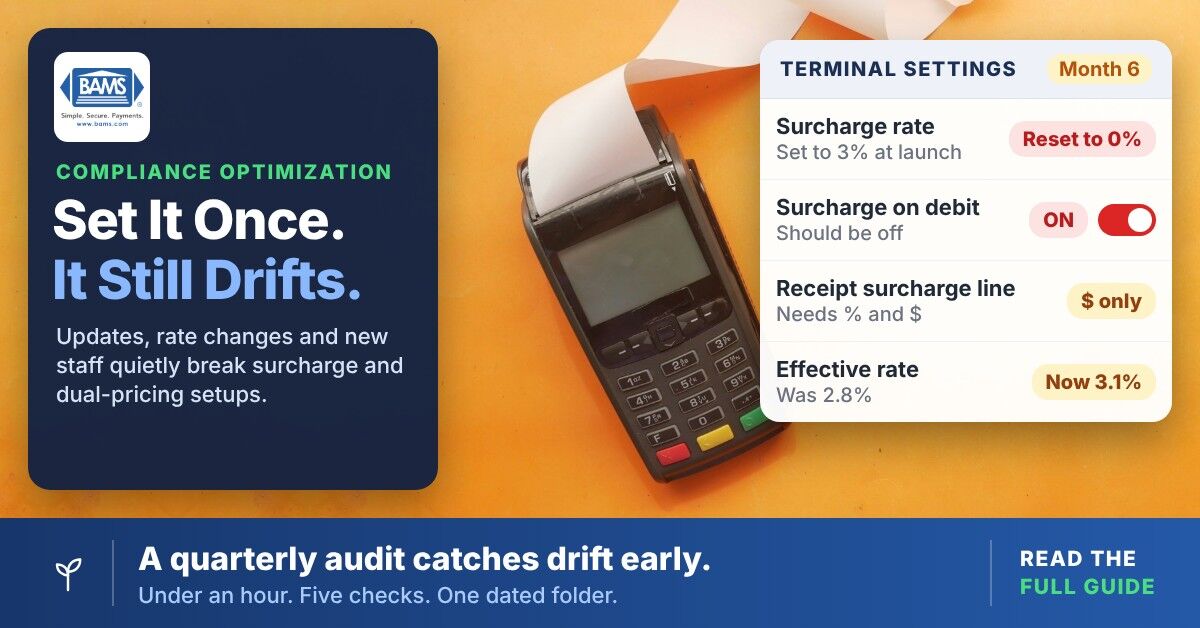
Compliance Optimization for Dual-Pricing Programs
TL;DR
- Configuration drift is the real threat – Software updates, processor rate changes and state law shifts silently erode your dual-pricing program’s savings and compliance status after launch.
- Build a quarterly audit habit, not an annual overhaul – Five focused steps (regulation check, terminal verification, rate table review, disclosure audit, documentation snapshot) take 30 to 60 minutes and protect your margins year-round.
- Don’t assume your processor monitors compliance for you – State surcharging laws, signage requirements and debit card exclusion rules are ultimately the merchant’s responsibility to track and verify.
- Document everything, every quarter – Timestamped screenshots of terminal settings, receipts, signage and rate calculations are your defense in any dispute, chargeback, or processor audit.
- Debit card surcharging is the highest-risk blind spot – Visa and Mastercard rules don’t allow surcharges on debit or prepaid cards and some POS systems and gateways don’t automatically distinguish credit from debit. Verify this first, every time.
Guide Orientation: What This Covers and Who It’s For
This guide is for small and midsize business owners who launched a dual-pricing or zero-fee payment program. You saw the savings on day one and haven’t looked at the configuration since. Compliance optimization for these programs isn’t a one-time event. It’s a recurring habit that protects the margins you set out to improve.
By the end, you’ll know the specific checkpoints where dual-pricing programs silently break. You’ll also see how state regulation changes can expose you to fines or chargebacks and how to build a lightweight quarterly audit routine that takes less than an hour. You’ll walk away with a repeatable framework, not a generic regulatory checklist.
This guide does not cover enterprise compliance programs, PCI-DSS deep dives, or industry-specific mandates like HIPAA or SOX. It focuses squarely on the payment compliance gaps that cost SMB owners real money when left unchecked.
Why Catching Regulation Changes Matters Now
Compliance optimization starts with one fact: dual-pricing and surcharging laws are not static. States regularly adjust surcharge caps, disclosure requirements and signage rules. When your program was configured six or twelve months ago, it reflected the rules at that moment. Today, those rules may have shifted and your terminal settings haven’t kept pace.
The cost of inaction is concrete. A misconfigured surcharge can trigger card brand violations. Visa says the acquirer of a merchant identified as surcharging improperly may be assessed an immediate $1,000 fine and that cost is often passed to the merchant. Customers who notice incorrect charges may dispute them and processors that detect non-compliant transactions can require changes or take action on the account.
For small businesses the principle is simple: if you only check compliance when something goes wrong, you’re already behind. The businesses that maintain their savings are the ones that treat audit readiness as a lightweight, recurring owner habit rather than an annual emergency.
Configuration drift is the silent threat. It happens when software updates reset terminal prompts or when rate changes from your processor go unnoticed. It also happens when a new employee processes a transaction type your program wasn’t designed to handle. None of these events announce themselves. They simply erode the savings your zero-fee program was built to deliver.
Core Concepts: The Language of Dual-Pricing Compliance
Dual Pricing vs. Surcharging
These terms are often used interchangeably, but they carry different legal and operational implications. Dual pricing displays two prices (cash and card) at the point of sale. Surcharging adds a fee on top of the listed price when a customer pays by credit card. Some states permit one but restrict the other. Card rules also draw the line: under Visa’s rules, a card price must be shown in full and an added fee at checkout may be treated as a surcharge. Knowing which model your program actually uses determines which regulations apply.
Configuration Drift
Configuration drift is the gradual, unnoticed departure of your payment system’s settings from their intended state. It’s not a hack or a failure. It’s the natural entropy that occurs when software updates, processor changes and human adjustments accumulate without review. A terminal that was correctly configured in January may be non-compliant by July without a single intentional change.
Rate Tables and Transaction Categories
Card networks set interchange rates by card type and transaction category and on tiered pricing your processor also groups transactions into buckets such as qualified, mid-qualified and non-qualified. When your card mix shifts, when transactions miss required data or when your processor changes its pricing, more of your volume can land in expensive categories. This is where default settings quietly inflate merchant processing fees without any visible alert.
Disclosure Requirements
Card brand rules and state laws mandate specific disclosures at the point of sale, on receipts and sometimes on websites. These include the exact surcharge percentage, signage placement and language. Disclosure details are easy to miss during routine operations, especially after a POS update or a new sign.
The Quarterly Audit Framework for Dual-Pricing Compliance Optimization
The compliance optimization method presented here is a five-step quarterly review cycle designed for business owners, not compliance departments. Each step targets a specific failure point in dual-pricing and surcharge programs and can usually be completed without specialized software. Bring in counsel when a rule is unclear.
The five stages are: Regulation Check, Terminal Verification, Rate Table Review, Receipt and Disclosure Audit and Documentation Snapshot. They follow a logical sequence: first confirm the rules, then verify your systems match them, then capture evidence that they do. The entire cycle should take 30 to 60 minutes once you’ve done it the first time.
Think of compliance optimization as a recurring calibration, not a compliance overhaul. Each quarter, you’re confirming that what your system does still matches what the law and card brands require.

Step-by-Step Breakdown: Building Audit Readiness as a Habit
Step 1: Regulation Check (Confirm the Current Rules)
Objective: Verify that the surcharging or dual-pricing rules in every state where you operate haven’t changed since your last review.
Start with the states where you have physical locations or where you ship goods and process card-present or card-not-present transactions. Surcharging laws vary significantly by state. Visa’s merchant guidance (current as of February 2024) lists Connecticut, Maine, Massachusetts, Oklahoma and Puerto Rico as prohibiting surcharges and Colorado, Minnesota, New Jersey and New York as having their own requirements. Some states cap surcharges at a flat percentage or the merchant’s cost. These rules change through legislative sessions, court rulings and card brand policy updates.
Check your state attorney general’s website for updated consumer protection statutes. Cross-reference with Visa and Mastercard’s published surcharging guidelines, which set their own caps. Visa caps surcharges at the lower of your merchant discount rate or 3% and Mastercard caps them at the lower of your average effective merchant discount rate or 4%. If you operate in multiple states, create a simple spreadsheet listing each state, its current rule, the date you last verified it and the source URL. This takes ten minutes and saves hours of confusion later.
Anti-patterns: Relying on your processor to notify you of state-level changes. Most processors don’t track state legislation for you. Assuming that because your program was compliant at launch, it remains compliant. Ignoring states where you only do eCommerce (card-not-present surcharging rules apply there too).
Success indicators: You have a dated record of each state’s current surcharge or dual-pricing rule and you can confirm your program’s percentage falls within every applicable cap.
Step 2: Terminal Verification (Confirm What Your Hardware Actually Does)
Objective: Confirm that every terminal, POS system and online checkout in your environment applies the correct surcharge or dual-price display and that no software update has altered the behavior.
Run a test transaction on every terminal type you use: countertop, mobile, virtual and eCommerce gateway. Compare the surcharge amount or dual-price display against your intended configuration. Software updates from terminal manufacturers or POS providers can reset custom settings to defaults. A firmware push that happened overnight may have changed your surcharge prompt from an explicit dollar amount to a generic message that doesn’t meet disclosure requirements.
Pay special attention to how debit transactions are handled. Visa’s rules state that debit and prepaid cards cannot be surcharged and Mastercard says the same for its debit and prepaid cards. That includes signature debit run as “credit.” If your terminal applies a surcharge to debit cards, you have an immediate compliance violation. Verify that your system correctly distinguishes credit from debit at the point of entry.
Anti-patterns: Testing only one terminal and assuming the rest match. Skipping eCommerce checkout flows (these are the most common source of disclosure failures). Ignoring mobile or tablet-based POS devices that may run different software versions.
Success indicators: Every terminal correctly applies the surcharge only to credit transactions, displays the correct percentage and shows the required disclosure language before the customer confirms payment.
Step 3: Rate Table Review (Confirm What You’re Actually Paying)
Objective: Identify whether your effective processing rate has drifted from the rate your dual-pricing program was designed to offset.
Pull your most recent monthly processing statement. Calculate your merchant discount rate by dividing total fees by total processing volume. Compare this effective rate to the surcharge percentage your program charges customers. If your effective rate has increased (due to transaction category shifts, new card types, or processor rate adjustments) but your surcharge percentage hasn’t, you’re absorbing the gap.
Look for transactions that have been downgraded to non-qualified categories. Common causes include missing address verification data on keyed-in transactions, late batch settlements and international card usage. Each downgrade increases your cost without changing the surcharge your customer sees. Signals like an effective rate that exceeds your quoted rate are early warnings that your rate table needs attention.
Anti-patterns: Looking only at the processor’s summary line instead of transaction-level detail. Ignoring small monthly increases that compound over a year. Assuming your surcharge percentage should remain static forever (it should track your actual cost).
Success indicators: Your surcharge percentage stays at or below your effective credit card rate and the card-brand caps, without leaving a large gap you’re absorbing. Any transaction downgrades are identified and you have a plan to address the root cause (batch timing, missing data fields, etc.).
Step 4: Receipt and Disclosure Audit (Confirm What Customers See)
Objective: Verify that every customer-facing touchpoint (signage, receipts, online checkout) meets current card brand and state disclosure requirements.
Card brands require that the surcharge amount appear as a separate line item on the receipt. State laws may require specific language at the point of entry (door signage, register signage) and on the receipt itself. Pull a sample receipt from each terminal and each online transaction type. Check for: the surcharge amount as a distinct line item, the surcharge percentage disclosed before payment confirmation and any state-required language. Mastercard requires the receipt to show both the percentage and the dollar amount.
Walk your physical location as a customer would. Is signage posted at the entrance? At the register? Is the language accurate (does it say “surcharge” when your program is technically “dual pricing,” or vice versa)? Mismatched terminology can create card brand issues and state consumer protection complaints. For eCommerce, review your checkout page, confirmation email and any payment-related FAQ page.
Anti-patterns: Assuming receipts haven’t changed since setup (POS updates frequently alter receipt templates). Checking signage only at the main register and missing secondary checkout points. Overlooking mobile payment flows where screen real estate compresses disclosure text.
Success indicators: Every receipt shows the surcharge as a separate line item with the correct percentage. All physical and digital signage is current, accurate and visible before the customer commits to payment.
Step 5: Documentation Snapshot (Capture Evidence of Compliance)
Objective: Create a timestamped record that proves your program was reviewed and compliant on a specific date.
This is the step small businesses skip most often and it’s the one that matters most if you ever face a dispute, chargeback or processor review. Many businesses wait for a triggering event. By the time that event arrives, reconstructing what your settings were three months ago is nearly impossible.
Take screenshots of your terminal configuration screens, your eCommerce checkout flow and your current signage. Save a copy of your monthly processing statement with your effective rate calculation noted. Store everything in a single folder named with the quarter and year. This folder becomes your audit defense file. If a customer disputes a surcharge, you can produce evidence that your program was correctly configured and disclosed on the date in question.
If you process with BAMS, your dedicated account representative can help you pull the statements and transaction reports this snapshot needs.
Anti-patterns: Relying on memory instead of screenshots. Saving documentation in scattered locations (email, desktop, shared drives) where it can’t be found under pressure. Skipping documentation because “nothing changed this quarter” (proving nothing changed is the point).
Success indicators: You have a single, dated folder containing terminal screenshots, receipt samples, signage photos, your rate calculation and your state regulation verification. The entire snapshot took less than 15 minutes.
Practical Examples: Where Configuration Drift Hits Hardest
Scenario 1: The Silent Firmware Update
Consider a restaurant in Ohio running a dual-pricing program on two countertop terminals, with card prices set 3% above cash prices. Six months in, a firmware update resets the card price adjustment to 0% while the menus still show two prices. For three weeks, every card customer pays the cash price. On $60,000 of card sales in that period, that’s about $1,800 in processing costs the program no longer recovers. A bookkeeper finally spots it during monthly reconciliation.
A quarterly terminal verification (Step 2) would have caught this within days of the update. Running a test transaction on each device takes under five minutes.
Scenario 2: The State Law Shift
Now consider a retailer in three states with a uniform 3% surcharge on credit cards. One state passes a law capping surcharges at 2% and the business keeps charging 3% there for four months. A customer complaint reaches the acquirer. The business now faces refunds on every overcharged transaction, possible fines passed through from the card brands and a suspended program, with no documentation showing when it last reviewed the rules.
A quarterly regulation check (Step 1) and documentation snapshot (Step 5) would have prevented both the violation and the inability to demonstrate good faith.
Scenario 3: The Debit Card Blind Spot
Finally, picture an online store that applies a surcharge to every card payment through its gateway, which doesn’t distinguish credit from debit. Suppose 30% of its card payments are debit. Over eight months, every one of those surcharges breaks card network rules. When the processor flags the pattern, the business has to refund all of them, which on about $400,000 in debit volume at 3% would be roughly $12,000.
A terminal verification focused on transaction type routing (Step 2) would have identified that the gateway lacked debit card detection. This is one of the most expensive blind spots in eCommerce surcharging programs.
Common Mistakes and Pitfalls in Ongoing Compliance Support
The most predictable failure is treating program launch as program completion. The second most predictable failure is assuming your processor monitors compliance on your behalf. Most processors don’t track state legislation, verify your signage or confirm your terminal settings after a software update.
Another common compliance optimization mistake is adjusting the surcharge percentage without updating all touchpoints simultaneously. Say you change the rate in your POS system but forget your eCommerce gateway, printed signage or website. Those inconsistencies can look intentional to auditors and card brands.
Finally, many owners treat compliance as binary: either you’re compliant or you’re not. In reality, compliance is a spectrum of risk. A minor disclosure formatting issue is different from surcharging debit cards. Prioritize the high-risk items (debit exclusion, state cap compliance, receipt line items) and address formatting details in sequence. Perfection isn’t the goal. Ongoing compliance support through consistent, informed review is.
For small businesses, the “technology” behind compliance optimization can be as simple as a calendar reminder and a shared folder.
What to Do Next
Start your compliance optimization routine with one quarter. Block 45 minutes on your calendar, walk through the five steps above and create your first documentation snapshot. You don’t need to overhaul your program. You need to verify it still works the way you intended.
If your effective rate has drifted significantly from your surcharge percentage, that’s your signal to contact your processor and recalibrate. If you find a state rule has changed, adjust your configuration before the next transaction. And if your terminals passed every check, you now have proof they did.
Treat this guide as a reference, not a one-time read. Bookmark the five-step framework and revisit it each quarter. The businesses that protect their dual-pricing savings long-term are the ones that build this review into their operating rhythm. The first audit takes the longest. Every one after that gets faster.
Frequently Asked Questions
Why is ongoing compliance important for businesses running dual-pricing programs?
Dual-pricing and surcharging regulations change at the state level without direct notification to merchants. Card brand rules also evolve. A program that was compliant at launch can become non-compliant within a single quarter due to legislative changes, firmware updates, or processor rate adjustments. Ongoing compliance prevents fines, chargebacks and forced program suspensions that directly erode the savings the program was designed to create.
How often should I audit my dual-pricing or zero-fee program?
A quarterly review is the recommended minimum. A quarterly cadence catches most state law, card brand and processor changes within one cycle. Each quarterly audit should take 30 to 60 minutes once you’ve established the routine. If you operate in states with active surcharging legislation, consider monthly regulation checks during legislative sessions.
Can my payment processor handle compliance monitoring for me?
Don’t count on it. Processors handle transaction routing, settlement and reporting. Most do not monitor state surcharging laws, verify your in-store signage, or confirm that a firmware update hasn’t reset your terminal settings. Some processors offer varying levels of support and accountability, but the legal responsibility for compliant surcharging rests with the merchant.
What happens if I surcharge debit card transactions by mistake?
Surcharging debit card transactions (including signature debit) violates Visa and Mastercard rules. If detected, you may be required to refund all affected surcharges, face card brand fines passed through by your acquirer and potentially lose the ability to surcharge. This is one of the highest-risk compliance failures and should be the first item verified during every terminal check.
How can technology improve ongoing compliance processes for small businesses?
For small businesses, compliance technology doesn’t need to mean enterprise software. A calendar reminder system, a shared documentation folder and your processor’s online dashboard can form an effective compliance stack. The key is consistent review cadence and timestamped evidence. Automated alerts from your POS system for configuration changes and rate table updates add an additional layer of protection without significant cost.
When should a business start focusing on compliance optimization?
Start compliance optimization immediately after program launch. The first 90 days are when configuration drift often begins, because the setup team has moved on and the business owner assumes everything is running as intended. Building the audit habit in the first quarter ensures you catch early drift before it compounds into significant financial exposure or regulatory risk.


