How to Choose an Apple Pay Processor for Faster Payouts
Last Updated on October 6, 2026 by Dimitri Akhrin
Evaluate funding timelines, hidden fees, and settlement logic before your first contactless payment tap
Learn how to evaluate payment processors based on the criteria that actually affect your Apple Pay revenue: deposit speed, fee structures, and account support. This guide gives eCommerce operators a decision framework for choosing or replacing the processor behind digital wallet acceptance.
TL;DR
- Your processor, not Apple Pay, controls deposit speed – Digital wallet transactions settle through the same card network rails as standard payments. The funding delay you experience is a processor decision, not a wallet limitation.
- Audit your actual funding timeline – Compare transaction timestamps against bank deposit records. Many processors advertise next-day funding but apply cutoff times, weekend exclusions, and account-tier restrictions that add one to three extra days.
- Fee transparency matters as much as funding speed – Calculate your effective processing rate by dividing total fees by total volume. Flat-rate pricing often hides overcharges on lower-risk transactions. Interchange-plus pricing gives you visibility and negotiating leverage.
- Reserve and hold policies can freeze your revenue without warning – Read your merchant agreement’s reserve clauses before a promotional spike triggers an automated hold. Proactive review prevents cash flow emergencies.
- Evaluate processors on four pillars – Funding speed, fee transparency, account support quality, and risk policies. Use a weighted scorecard with real data, not marketing claims, to make a defensible decision about staying or switching.
Guide Orientation: What This Covers and Who It’s For
This guide walks eCommerce managers through the processor-level decisions that determine how fast Apple Pay and digital wallet sales convert into spendable revenue. It does not cover device compatibility checklists, tokenization mechanics, or step-by-step integration tutorials. Those topics are well-documented elsewhere.
Instead, the focus is upstream: funding timelines, fee structures, settlement logic, and account support quality. These are the variables your payment processor controls, and they shape every downstream cash flow outcome your business experiences.
By the end, you’ll understand how to evaluate processors against the criteria that actually affect deposit speed, identify the hidden cost structures that inflate contactless payment expenses, and build a decision framework for choosing (or replacing) the processor behind your mobile wallet acceptance. If you manage payments for an established online business and deposit delays cost you real money, this guide is for you.
Why Eliminating Deposit Delays on Digital Wallet Sales Matters Now
The volume of contactless payments flowing through Apple Pay alone has reached a scale that makes settlement speed a genuine operational concern. U.S. consumers spent an estimated $199 billion at stores using Apple Pay in 2022, more than doubling the $91.7 billion spent in 2021. Online, the trajectory is similar. These are no longer edge-case transactions. They are a growing share of your daily revenue.
When a customer taps Apple Pay at checkout, the experience feels instant. But on the merchant side, that sale can sit in a settlement queue for two, three, or even five business days depending on your processor’s funding schedule. For a business processing $50,000 per month through digital wallets, a two-day funding delay means $3,000 to $5,000 is perpetually inaccessible. That gap compounds across payroll cycles, inventory purchases, and ad spend budgets.
The cost of inaction is not dramatic. It is erosive. Slow funding forces businesses into short-term credit, delays restocking, and creates cash flow unpredictability that makes growth harder to plan. The processor you chose (or defaulted into) when you first enabled Apple Pay for merchants has already set the ceiling on how fast your revenue becomes usable. This guide helps you raise that ceiling.
Core Concepts: Settlement, Funding, and the Processor’s Role in Apple Pay Cash Flow
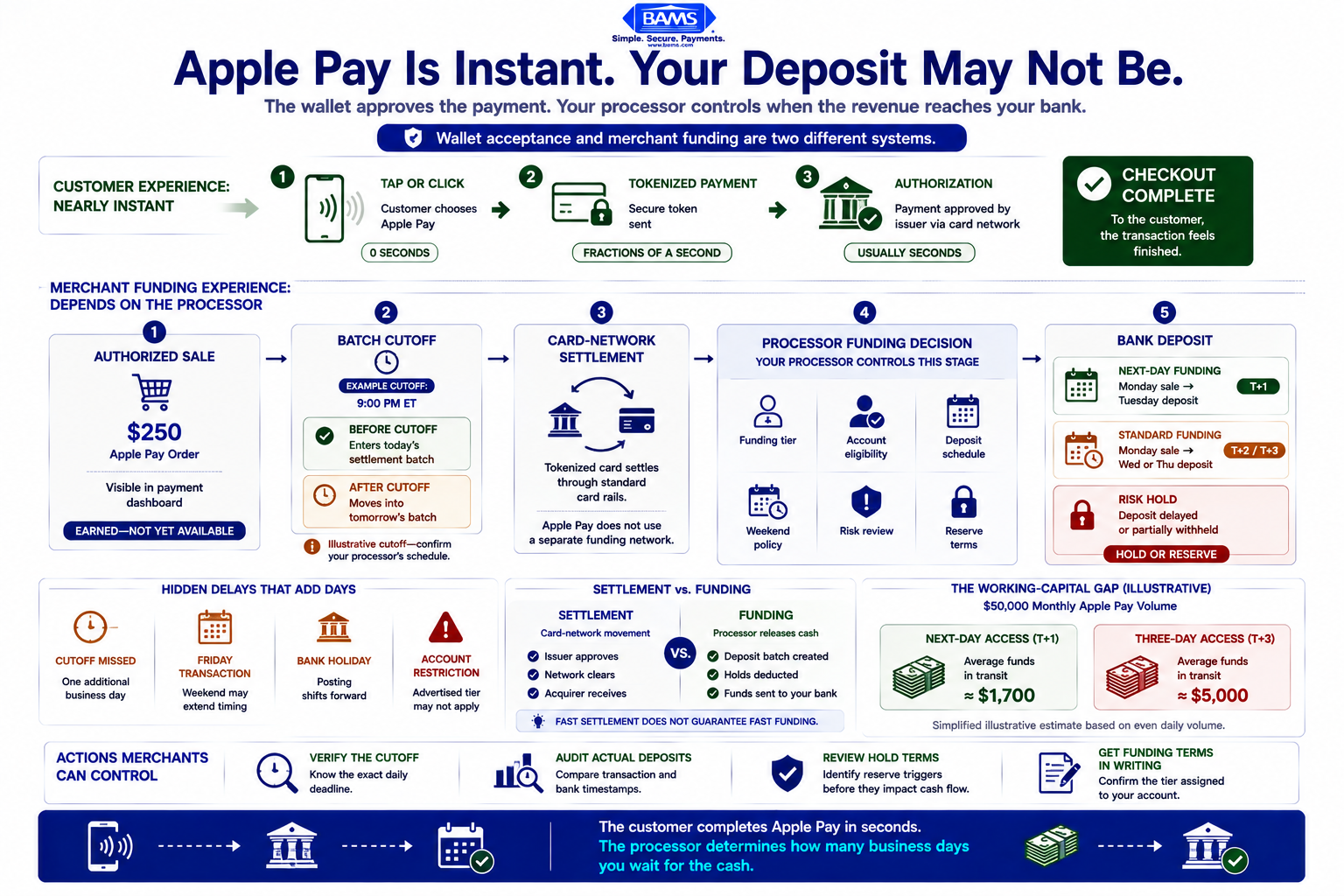
A payment-to-payout timeline explaining why Apple Pay feels instant to customers while processor rules, cutoffs, and holds can delay merchant deposits.
Settlement vs. Funding: The Distinction That Matters
Settlement is the process by which funds move from the card network (Visa, Mastercard, or in Apple Pay’s case, the tokenized card behind the wallet) through the acquiring bank to your processor. Funding is the separate step where your processor releases those settled funds into your business bank account. These are two different timelines, and your processor controls the second one.
Most card networks settle within 24 to 48 hours. But many processors batch deposits on their own schedule, adding an extra day or more. The result: a customer pays you on Monday, the network settles on Tuesday, and your processor funds you on Wednesday or Thursday. That extra lag is not a technical limitation. It is a business decision your processor made.
Settlement is the stage where approved funds move through the payment system toward the merchant account. Funding is the separate step in which your processor makes those funds available in your business bank account. These are two different timelines, and the processor’s funding arrangement affects when the merchant can actually use the money.
Visa explains that digital payments move through authentication, authorization, approval, and settlement before funds reach the merchant account. Depending on the payment setup, settlement may take one to two days or occur more quickly through real-time payment capabilities. Your processor’s batching rules, cutoff times, and account-specific funding schedule can add further time before the deposit appears in your bank.
Why Digital Wallet Transactions Are Not Treated Differently at Settlement
A common misconception is that Apple Pay or other digital wallet transactions follow a unique settlement path. They do not. Once tokenized and authorized, an Apple Pay transaction is processed through the same card rails as a standard Visa or Mastercard payment. The funding delay you experience is processor-dependent, not wallet-dependent. This means switching wallets will not fix slow deposits. Switching (or renegotiating with) your processor might.
Interchange-Plus vs. Flat Rate: Where Fees Hide
Contactless payments carry the same interchange rates as their card-present or card-not-present equivalents. But how your processor marks up those rates determines your true cost. Flat-rate processors simplify billing but often overcharge on lower-risk transactions. Interchange-plus pricing passes through the actual network cost and adds a transparent margin. For businesses with significant Apple Pay volume, the pricing model directly affects profitability per transaction.
The Processor Evaluation Framework for Faster Digital Wallet Funding
Evaluating a payment processor for mobile wallet performance comes down to four interconnected pillars. Each one influences how fast your Apple Pay revenue reaches your bank account and how much of it survives the journey.
- Funding Speed: The processor’s stated and actual deposit timeline, including cutoff times and weekend handling.
- Fee Transparency: How clearly the processor communicates interchange markups, monthly fees, and incidental charges on contactless payments.
- Account Support Quality: Whether you have access to a dedicated account manager or are routed through generic support queues when funding issues arise.
- Risk and Hold Policies: How the processor handles reserves, rolling holds, and flagged transactions, all of which can freeze funds without warning.
These four pillars form the evaluation spine for the step-by-step breakdown that follows. A processor that excels in one area but fails in another will still create cash flow friction. The goal is alignment across all four.
Step-by-Step: How to Evaluate and Optimize Your Processor for Apple Pay Deposit Speed
Step 1: Audit Your Current Funding Timeline
Objective: Establish a factual baseline of how long it currently takes for digital wallet sales to appear in your bank account.
Start by pulling three months of transaction records and matching them against your bank deposit timestamps. Identify the average gap between transaction authorization and fund availability. Do this separately for Apple Pay and standard card transactions to confirm whether your processor treats them identically at the funding stage.
Most eCommerce managers assume their processor delivers on its stated funding timeline. In practice, batch processing cutoffs, weekend exclusions, and holiday schedules introduce variability. A processor advertising “next-day funding” may define “next day” as the next business day after a 3:00 PM cutoff, meaning a Friday afternoon Apple Pay sale does not land until Tuesday.
Anti-patterns: Do not rely on your processor’s dashboard alone. Cross-reference with your actual bank statements. Dashboard timestamps often reflect settlement, not funding. Do not average across all payment types. Digital wallet transactions may batch separately depending on your gateway configuration.
Success indicators: You have a documented average funding time in business hours (not calendar days), broken out by payment method. You can identify whether Apple Pay transactions fund at the same speed as standard card payments or slower.
Step 2: Map Your Processor’s Fee Structure Against Contactless Payment Volume
Objective: Understand the true per-transaction cost of processing Apple Pay payments, including hidden fees that inflate your effective rate.
Request a complete fee schedule from your processor. Look beyond the headline rate. Identify interchange passthrough costs, processor markup percentages, per-transaction fixed fees, monthly minimums, PCI compliance fees, and any surcharges applied specifically to digital wallet or NFC payments. Roughly three in four U.S. iPhone users have activated Apple Pay, which means your contactless payment volume is likely growing. A fee structure that was acceptable at lower volumes may become expensive at scale.
Calculate your effective rate by dividing total processing fees by total transaction volume for a given month. Compare this against the interchange-plus rate you would pay with a transparent pricing model. The difference is your processor’s margin, and it is negotiable.
Anti-patterns: Do not accept a single blended rate as “your fee.” Blended rates obscure whether you are overpaying on debit transactions (which carry lower interchange) to subsidize the processor’s margin on credit. Do not ignore monthly fees, statement fees, or batch fees. These fixed costs reduce your effective margin on every Apple Pay transaction.
Success indicators: You have a documented effective rate per payment method. You can compare your current cost against at least one interchange-plus benchmark. You know exactly how much each Apple Pay transaction costs after all fees.
Step 3: Evaluate Funding Speed Commitments (and Verify Them)
Objective: Determine whether your processor offers genuine next-day or same-day funding and whether your account qualifies.
Not all merchant accounts receive the same funding speed. Many processors tier their funding timelines based on account age, chargeback ratio, average ticket size, and industry risk classification. A processor may advertise next-day funding broadly while restricting it to accounts that meet specific criteria.
Ask your processor directly: What is the funding timeline for my account? What are the cutoff times? Are there volume thresholds or chargeback ratios that would downgrade my funding speed? Get these answers in writing. Then verify them against your Step 1 audit. If the stated timeline does not match your actual experience, you have a concrete basis for renegotiation or a switch.
Processors like BAMS offer next-day funding as a standard feature for qualifying merchants, which can eliminate the multi-day deposit gaps that erode working capital. When evaluating alternatives, prioritize processors that make their funding criteria transparent rather than burying them in terms of service.
Anti-patterns: Do not assume “fast funding” marketing claims apply to your account without verification. Do not overlook cutoff times. A 2:00 PM cutoff versus a 10:00 PM cutoff can mean the difference between next-day and two-day funding for afternoon sales. Do not ignore weekend and holiday policies, as these create the longest gaps.
Success indicators: You have written confirmation of your account’s funding tier. You know the exact cutoff time. You have compared stated timelines against actual deposit records and confirmed alignment (or documented the discrepancy).
Step 4: Assess Risk Hold and Reserve Policies
Objective: Understand when and why your processor can freeze funds, and how to minimize exposure to unexpected holds.
Funding speed means nothing if your processor places rolling reserves or transaction holds on your account. Reserves are common in higher-risk industries, but they also appear in standard eCommerce accounts when processors detect volume spikes, elevated chargeback rates, or unusual transaction patterns. A sudden increase in Apple Pay volume during a promotional period, for example, can trigger automated holds that freeze a percentage of your deposits for 30 to 180 days.
Review your merchant agreement for reserve clauses. Identify the conditions under which your processor can impose holds, the percentage of funds subject to reserve, and the release timeline. If your agreement includes a “rolling reserve” provision, understand that this means a fixed percentage of every deposit is withheld and released on a delayed schedule, effectively reducing your funding speed regardless of the stated timeline.
Anti-patterns: Do not wait until funds are frozen to read your reserve terms. Do not assume that low chargeback rates exempt you from holds. Some processors apply reserves based on industry codes, not individual account performance. Do not ignore the difference between a “hold” (temporary) and a “reserve” (ongoing). They have different cash flow implications.
Success indicators: You have documented your processor’s reserve and hold policies. You know the trigger conditions and release timelines. You have confirmed whether your current account has any active reserves.
The Office of the Comptroller of the Currency’s Merchant Processing Handbook provides additional context on merchant underwriting, settlement risk, chargebacks, reserves, and the controls used by acquiring institutions to manage merchant-processing exposure.
Step 5: Test Account Support Responsiveness Before You Need It
Objective: Verify that your processor provides accessible, knowledgeable support for funding-related issues before a cash flow emergency forces the test.
When a deposit fails to arrive on schedule, the speed and quality of your processor’s support team determines how long your revenue stays inaccessible. This is not a theoretical concern. Batch processing errors, bank routing mismatches, and compliance flags can delay deposits without advance notice. The question is whether you reach a dedicated account manager who can investigate in real time, or whether you enter a support ticket queue with a 24 to 48 hour response window.
Test your support channel now. Submit a question about your funding timeline or fee structure and measure the response time and quality. Ask a specific question (“What is my account’s current funding cutoff time?”) rather than a generic one. Evaluate whether the response comes from someone familiar with your account or from a first-tier agent reading from a script.
BAMS, for instance, assigns dedicated account managers to merchant accounts, which means funding questions route to someone who already understands your processing history and account configuration. This model contrasts with aggregator-style processors where support is generalized and account-specific knowledge is limited.
Anti-patterns: Do not evaluate support quality based on sales interactions. Sales teams are incentivized to be responsive. Post-sale support is the relevant benchmark. Do not assume chat-based support is equivalent to phone or email support with a named contact. Chat agents often lack the access to resolve funding-level issues.
Success indicators: You have a named support contact or account manager. You have tested response time and documented it. You know the escalation path for funding-related issues.
Step 6: Compare Processor Options Using a Weighted Scorecard
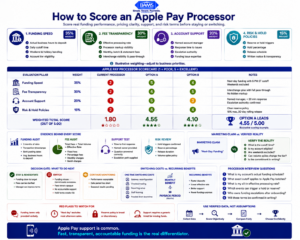
Apple Pay compatibility is only the starting point. The processor behind it should be measured by funding speed, fee clarity, support quality, and risk policies.
Objective: Make a structured, defensible decision about whether to stay with your current processor or switch, based on the data you’ve gathered.
Build a simple scorecard using the four evaluation pillars: funding speed, fee transparency, account support, and risk policies. Weight each pillar based on your business priorities. For most eCommerce operators processing significant Apple Pay volume, funding speed and fee transparency should carry the highest weight, followed by support quality and risk policies.
Score your current processor and at least two alternatives on a 1-to-5 scale for each pillar. Use the data from Steps 1 through 5, not marketing claims. A processor that scores a 5 on funding speed but a 2 on fee transparency may cost you more in hidden fees than the funding speed saves in working capital access.
Factor in switching costs. Processor migrations involve gateway reconfiguration, potential downtime, and a learning curve with new reporting tools. These costs are real but finite. A processor that saves you $500 per month in fees and delivers funds one day faster will recover migration costs within weeks, not months.
Anti-patterns: Do not make the decision based on a single criterion. Fastest funding with opaque fees is not a net improvement. Do not let inertia substitute for evaluation. “We’ve always used this processor” is not a strategic rationale. Do not compare more than three or four options. Beyond that, the evaluation becomes unwieldy without proportional benefit.
Success indicators: You have a completed scorecard with weighted scores for your current processor and at least two alternatives. You can articulate the financial impact of switching (or staying) in specific dollar terms.
Practical Examples: How Processor Decisions Play Out in Real Scenarios
Scenario A: The Seasonal eCommerce Store
A mid-size online retailer processes $80,000 per month, with 35% of transactions coming through Apple Pay and other mobile commerce channels. Their processor funds on a two-business-day cycle with a 2:00 PM cutoff. During a holiday promotion, daily volume triples. The processor’s risk algorithm flags the spike and places a 10% rolling reserve on all deposits for 90 days.
Result: The store loses access to roughly $24,000 in working capital during its highest-revenue quarter. Inventory reorders are delayed, and the business takes on a short-term credit line at 12% APR to cover the gap. The reserve was technically disclosed in the merchant agreement, but the store’s manager had never reviewed the trigger conditions.
Scenario B: The Subscription Brand That Switched
A subscription box company processing $120,000 monthly through a flat-rate processor at 2.9% + $0.30 per transaction conducts the audit described in Step 2. They discover their effective rate is 3.4% after accounting for monthly fees, PCI compliance charges, and batch fees. They switch to an interchange-plus processor with next-day funding. Their new effective rate is 2.6%, saving $960 per month. Deposits arrive one day faster, freeing approximately $4,000 in daily working capital.
Result: The migration took two weeks. The savings recovered switching costs within the first month. The subscription brand now uses the freed-up capital to prepay supplier invoices at a discount, compounding the financial benefit.
Scenario C: The Multi-Channel Retailer
A retailer selling through both a Shopify storefront and a physical location notices that in-store Apple Pay transactions fund one day faster than online Apple Pay transactions. After investigation, they learn their online gateway batches settlements separately from their in-store terminal, and the online batch has a later cutoff. By requesting a unified settlement batch from their processor, they align funding timelines across channels.
Result: Cash flow forecasting becomes simpler because the finance team no longer needs to track two separate deposit schedules. As contactless and mobile-wallet adoption continues to expand, aligning in-store and online settlement becomes increasingly valuable for retailers processing meaningful wallet volume across both channels.
Common Mistakes and Pitfalls When Optimizing Digital Wallet Deposit Speed
Assuming all processors fund at the same speed. Funding timelines vary significantly between processors and even between account tiers within the same processor. Default assumptions cost you real money in delayed access to revenue.
Ignoring the fine print on reserves and holds. Reserve clauses are standard in merchant agreements, but most eCommerce managers never read them until funds are frozen. Review these terms proactively, especially before high-volume periods.
Optimizing for fees alone. The cheapest processor is not the best processor if it funds two days slower or provides no support when deposits fail. Evaluate total cost of processing, including the opportunity cost of delayed capital.
Treating processor selection as a one-time decision. Your business volume, transaction mix, and contactless payment adoption rates change over time. The processor that fit your business two years ago may no longer be optimal. Schedule an annual review using the scorecard from Step 6.
Conflating wallet setup with processor optimization. Enabling Apple Pay at checkout is a technical task. Ensuring that Apple Pay revenue reaches your bank account quickly and affordably is a strategic one. They require different expertise and different conversations.
What to Do Next
Start with Step 1. Pull three months of transaction data and map your actual funding timeline. This single exercise will reveal whether your processor’s stated funding speed matches reality. If it does, you have a baseline to protect. If it does not, you have the evidence you need to renegotiate or evaluate alternatives.
You do not need to overhaul your entire payment stack at once. Incremental improvements, like negotiating a later batch cutoff or switching to interchange-plus pricing, can deliver measurable results within a single billing cycle. Use this guide as a reference document, not a checklist to complete in one sitting.
Apple Pay is already widely adopted in the United States. The Consumer Financial Protection Bureau reports that roughly three in four U.S. iPhone users have activated Apple Pay. As digital-wallet usage continues to influence more customer transactions, the processor decision you make today will affect the funding speed and cost structure applied to that volume. Make it deliberately.
Frequently Asked Questions
What is Apple Pay and how does it work for merchants?
Apple Pay is a digital wallet that lets customers pay using their iPhone, Apple Watch, or Mac. For merchants, an Apple Pay transaction is processed through the same card network rails as a standard Visa or Mastercard payment. The customer’s card number is replaced with a token for security, but settlement and funding follow the same path as any other card transaction. Your processor, not Apple, determines how fast those funds reach your bank account.
Why should my business accept Apple Pay as a payment method?
Roughly three in four U.S. iPhone users have activated Apple Pay, making it a mainstream checkout expectation rather than a niche feature. Accepting Apple Pay reduces checkout friction, which can improve conversion rates for eCommerce stores. It also positions your business to capture the growing share of consumer spending flowing through digital wallets.
Do Apple Pay transactions have different processing fees than regular card payments?
Apple Pay transactions carry the same interchange rates as the underlying card (Visa, Mastercard, etc.). Apple does not charge merchants a separate fee for Apple Pay acceptance. However, your processor’s markup, per-transaction fees, and monthly charges still apply. The total cost depends on your processor’s pricing model, not the wallet itself.
How can I get faster deposits from Apple Pay sales?
Deposit speed is controlled by your payment processor, not by Apple Pay. To get faster deposits, evaluate your processor’s funding timeline, batch cutoff times, and account qualification criteria. Processors offering next-day funding can eliminate multi-day deposit gaps. You may also need to ensure your account meets the processor’s criteria for the fastest funding tier, which often involves maintaining low chargeback ratios and consistent transaction volumes.
Which payment processors support Apple Pay integration?
Most major payment processors and gateways support Apple Pay, including Stripe, Square, Adyen, and merchant services providers like BAMS. The more important question is not whether a processor supports Apple Pay, but how that processor handles funding speed, fee transparency, and account support after the Apple Pay transaction is authorized. These post-transaction factors have a far greater impact on your cash flow than integration compatibility.
Can my processor freeze funds from Apple Pay transactions?
Yes. Processors can place holds or rolling reserves on any transaction type, including Apple Pay. Common triggers include sudden volume increases, elevated chargeback ratios, or industry risk classifications. These holds can freeze 5% to 10% of your deposits for 30 to 180 days. Review the reserve and hold clauses in your merchant agreement before a high-volume period, not after funds are already frozen.
Sources
- https://www.consumerfinance.gov/data-research/research-reports/big-techs-role-in-contactless-payments-analysis-of-mobile-device-operating-systems-and-tap-to-pay-practices/full-report/
- https://corporate.visa.com/en/solutions/acceptance/process-payments.html
- https://www.occ.treas.gov/publications-and-resources/publications/comptrollers-handbook/files/merchant-processing/pub-ch-merchant-processing.pdf