5 Signals Your Processing Statement Is Leaking B2B Margins
Last Updated on May 21, 2026 by Dimitri Akhrin
How to spot transaction cost savings hiding in your current processor data — no migration required
Learn to read five diagnostic indicators on your existing processing statement that reveal where B2B margins are leaking. Each signal doubles as a negotiation lever for lowering fees without switching platforms.
TL;DR
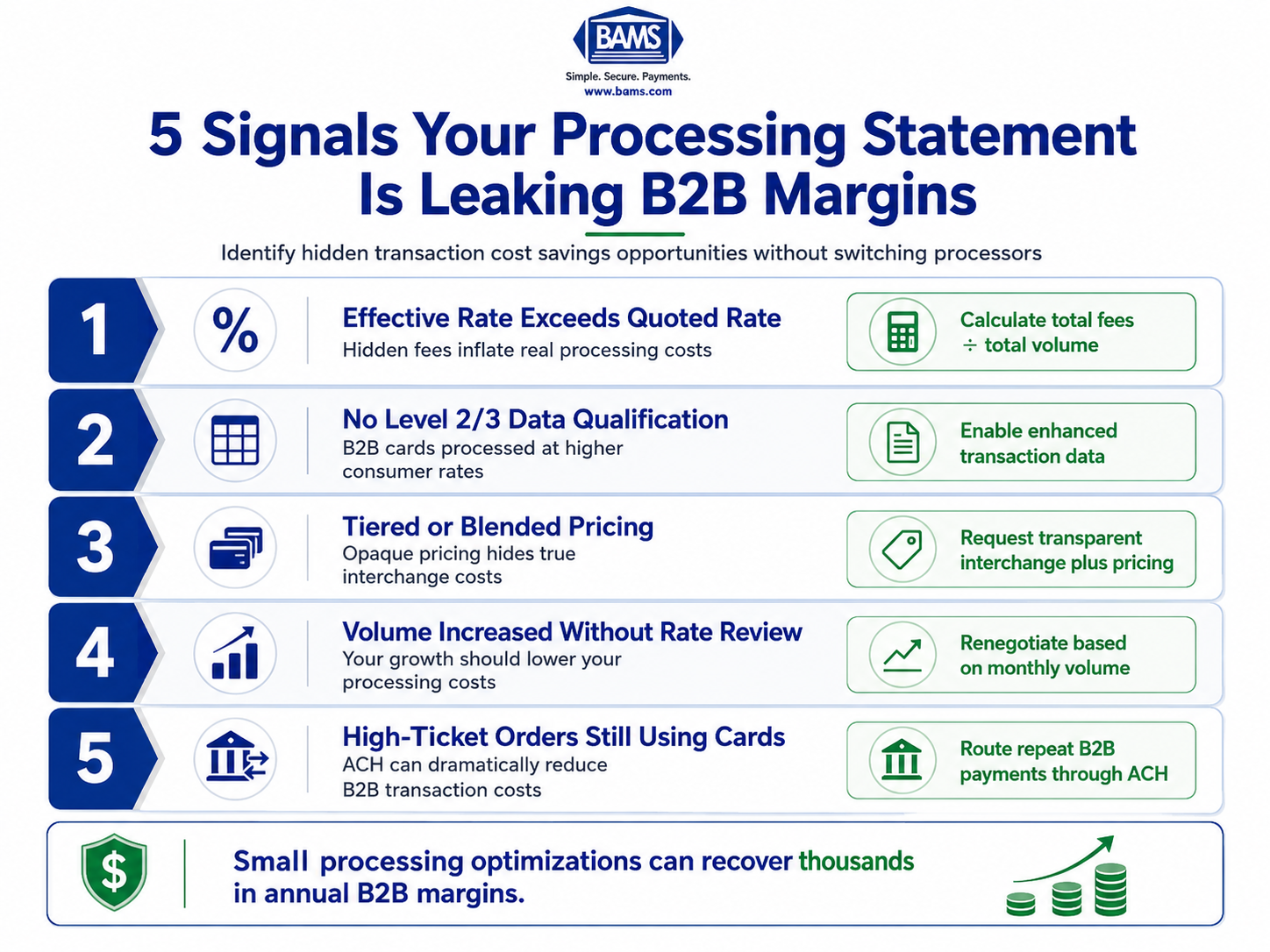
- Calculate your effective rate – Divide total fees by total volume on your statement. If it exceeds your quoted rate by more than 0.5%, hidden fees are inflating your costs.
- Check Level 2/3 data qualification – B2B transactions should qualify at lower interchange categories when enhanced data (tax, invoice, line-item) is passed. If they’re not, you’re paying consumer rates on business card transactions, potentially overpaying by 0.5% to 1% per transaction.
- Move from tiered to interchange-plus pricing – Tiered models obscure your true costs. Interchange-plus shows the actual card network fee plus your processor’s markup, enabling savings of up to 40% in some cases.
- Renegotiate based on volume growth – If your processing volume has increased since you signed your contract, your rate should reflect that. Bring the numbers and ask for a volume-based adjustment.
- Route high-ticket B2B orders through ACH – Card fees of 2.5% to 4% on large orders add up fast. ACH costs a flat fee under $1 per transaction, regardless of order size.
Your B2B Processing Statement Is Telling You Something
Credit card processing fees in B2B transactions commonly land between 2.5% and 4% per transaction. For an eCommerce business processing $10 million annually at 4%, that’s $400,000 walking out the door. Reducing that rate to 2.5% saves $150,000 a year. The problem is that most eCommerce managers don’t know where the leak starts, because the signals are buried in statement line items that look routine.
The conversation around transaction cost savings usually jumps straight to “switch processors.” But the most actionable fixes don’t require migration. They require reading your current data differently and using what you find as a negotiation lever. Your existing processor relationship already contains the evidence you need.
Who This Is For and What It Covers
This guide is for eCommerce managers at established online businesses (10 to 50 employees) who process a meaningful share of B2B or high-ticket orders. If you’re running on an existing processor and wondering whether you’re overpaying, this is your diagnostic checklist.
This is not a comparison of processors. It’s not a pitch to rebuild your payment stack. It covers five specific signals you can identify on your current statement, each one a lever for negotiating processing fees or triggering an optimization that lowers costs without a platform switch.
How These Signals Were Selected
Each signal meets three criteria: it’s visible on a standard monthly processing statement, it correlates directly with inflated B2B costs, and it can be acted on through renegotiation, configuration changes, or data optimization within your current setup. If it required a full migration to fix, it didn’t make the list.
5 Signals Your B2B Margins Are Leaking
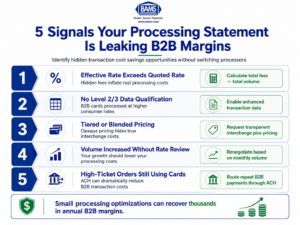
Five statement-level signals that reveal hidden B2B payment processing costs and negotiation opportunities.
1. Your Effective Rate Exceeds Your Quoted Rate by More Than 0.5%
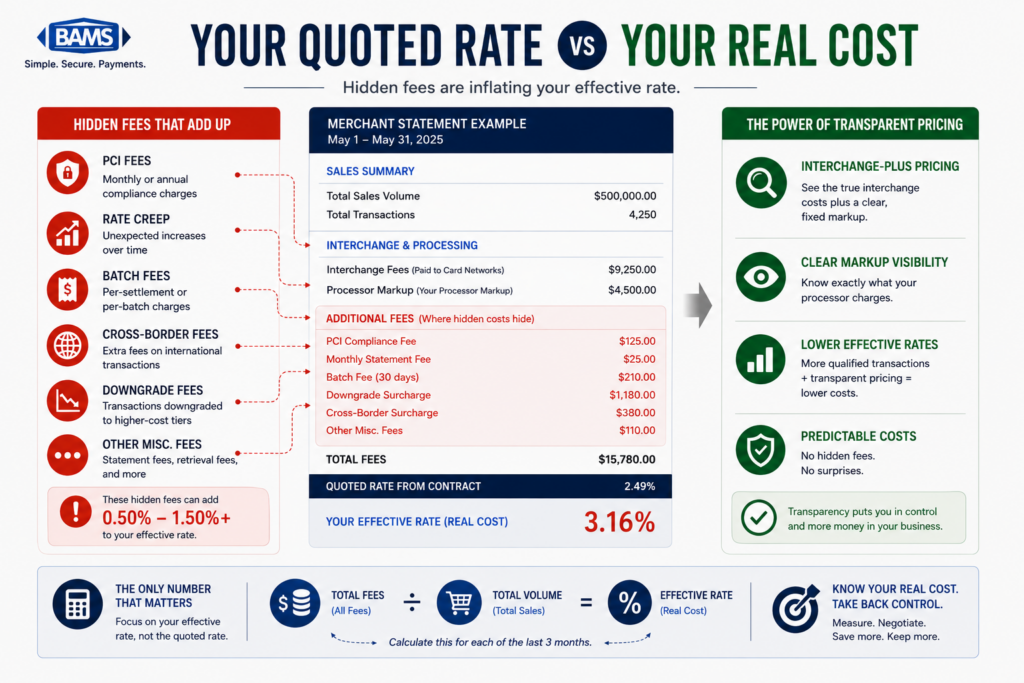
Why it matters: Your processor quotes you a rate. Your statement tells a different story. The effective rate (total fees divided by total volume) is the only number that reflects what you actually pay. A gap larger than 0.5% between your quoted rate and effective rate signals hidden fees in merchant services: PCI non-compliance charges, batch fees, statement fees, or inflated assessment markups. Most businesses underestimate their true processing costs by 20% to 40% because they focus on the quoted rate alone.
What it looks like today: Pull your last three monthly statements. Divide total fees charged by total processing volume. Compare that percentage to the rate your processor quoted in your agreement. If you’re on a blended or flat-rate model, the gap is often wider because those models obscure the actual interchange cost beneath a single number.
How to apply it: Calculate your effective rate for three consecutive months. Document the gap. Present it to your processor’s account manager as a specific question: “My quoted rate is X, but my effective rate is Y. What accounts for the difference?” This forces itemization and opens the door to fee removal or rate adjustment.
2. Your Statement Shows No Level 2/3 Data Qualification
Why it matters: In B2B transactions, passing enhanced purchase details (tax amounts, invoice numbers, line-item data, shipping information) qualifies transactions for lower interchange categories. Level 2/3 data can reduce B2B card processing costs by 0.5% to 1% per transaction, and B2B-friendly processing may fall in the 0.20% to 0.50% range when this data is used effectively on higher-ticket orders. If your statement doesn’t show transactions qualifying at Level 2 or Level 3, you’re paying standard consumer interchange rates on business card transactions.
Visa payment processing resources explain how enhanced transaction data improves interchange qualification handling for commercial and B2B card transactions.
What it looks like today: Look at the interchange detail section of your statement. B2B card transactions should appear under categories like “Commercial Data Rate” or “Business Level 3.” If they’re showing up under standard or mid-qualified tiers, your gateway or processor isn’t passing the required data fields, even if your platform collects them.
How to apply it: Ask your processor directly: “Are my B2B transactions qualifying at Level 2 or Level 3 interchange?” If the answer is no (or unclear), request a configuration review. Many modern gateways support Level 2/3 data pass-through, but it often needs to be explicitly enabled. This is a configuration fix, not a platform switch.
3. You’re on a Tiered or Blended Pricing Model
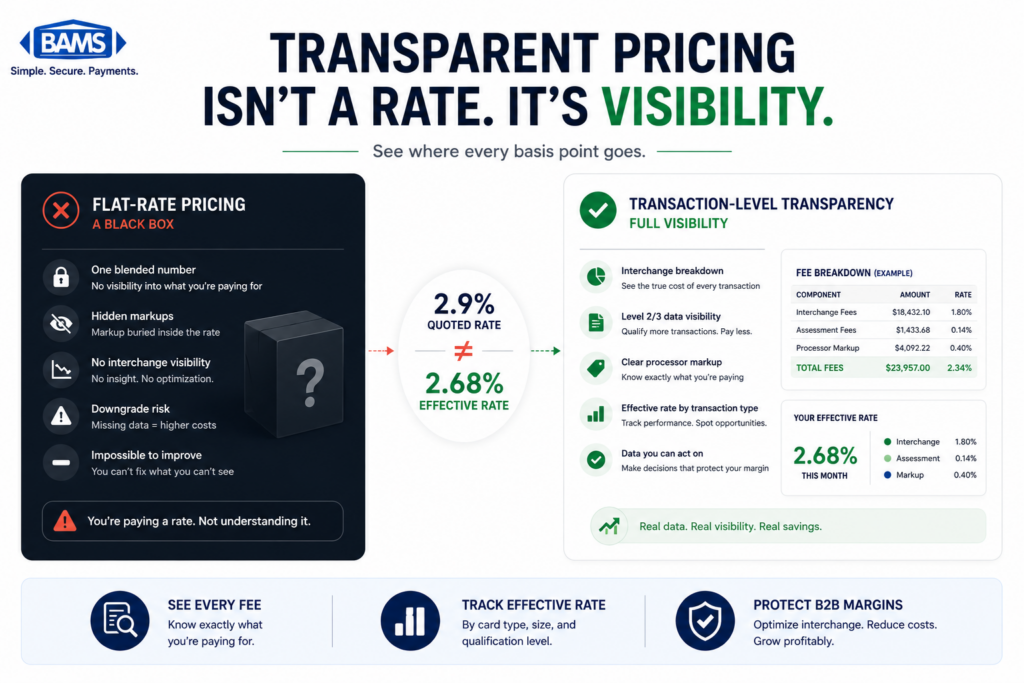
Why it matters: Tiered pricing bundles all transactions into qualified, mid-qualified, and non-qualified buckets. This structure lets processors assign higher-cost categories at their discretion, inflating your costs without transparency. An interchange-plus pricing model passes the actual interchange rate to you and adds a fixed markup, giving you visibility into exactly what you’re paying and why. Research shows businesses using transparent interchange-plus pricing can see effective rates significantly lower than blended models, with some guides estimating savings of up to 40% through optimized payment setup.
What it looks like today: Check whether your statement shows actual interchange categories (e.g., Visa Commercial Level III, Mastercard Data Rate II) or generic buckets (qualified, mid-qualified, non-qualified). If you see buckets, you’re on tiered pricing. A common comparison: blended models often charge around 2.9% + $0.30, while interchange-plus alternatives might show 2.2% + $0.10 on the same transactions.
How to apply it: Request a side-by-side comparison from your processor showing your current tiered costs versus what they’d look like on interchange-plus. Many processors offer both models and will convert existing accounts. If yours won’t, that’s a data point worth having. You can also reference strategies for lowering credit card processing fees to prepare for the conversation.
4. Your Volume Hasn’t Triggered a Rate Review
Why it matters:Volume-based pricing tiers exist in nearly every processor agreement, but they rarely activate automatically. If your monthly volume has grown since you signed your contract and your rate hasn’t changed, you’re leaving money on the table. Processors set initial rates based on projected volume. When actual volume exceeds projections, the economics shift in your favor, but only if you ask.
What it looks like today: Compare your current monthly processing volume to the volume listed in your original merchant agreement. If you’re processing 30%, 50%, or 100% more than your initial projection, your per-transaction cost should reflect that growth. Many eCommerce businesses scale gradually and never revisit their processing terms, paying rates designed for a smaller operation.
How to apply it: Pull your original agreement and note the projected monthly volume. Compare it to your actual average over the last six months. Contact your account manager with the data: “My volume has increased from $X to $Y per month. I’d like to discuss adjusting my rate to reflect current volume.” This is a standard renegotiation, and processors expect it from growing accounts. Partners like BAMS assign dedicated account managers who proactively surface these opportunities, but regardless of your processor, the leverage is yours if you bring the numbers.
5. You’re Paying Card Rates on Transactions That Could Use ACH
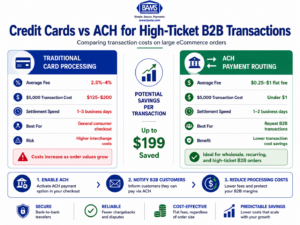
Why routing large B2B orders through ACH can significantly reduce transaction costs.
Why it matters: Credit card fees in B2B commonly run 2.5% to 4% per transaction. ACH or bank-to-bank payments cost materially less, often a flat fee of $0.25 to $1.00 per transaction regardless of size. For high-ticket B2B orders (wholesale, bulk, recurring), routing even a portion of volume through ACH can produce significant transaction cost savings without changing your card processing setup at all.
Nacha ACH Network resources also outline how bank-to-bank ACH transfers provide lower-cost alternatives to percentage-based card payment processing for businesses.
What it looks like today: Review your transaction log for repeat B2B customers who consistently pay by card. These are often businesses that would accept (or even prefer) ACH payment if offered. Many eCommerce platforms now support ACH as a checkout option alongside cards, but it’s frequently left disabled by default.
How to apply it: Identify your top 10 to 20 B2B customers by transaction volume. Calculate what you’d save by moving those transactions from card to ACH. Then enable ACH as a payment option in your checkout flow and communicate the availability to those customers directly. Some businesses offer a small discount for ACH payment to incentivize adoption, which still nets out significantly cheaper than card processing fees.
What These Signals Have in Common
All five signals share a root cause: information asymmetry. Your processor has the data. You have the statement. The gap between what’s possible and what you’re paying exists because most eCommerce managers weren’t trained to read processing statements as diagnostic tools. Each signal above converts a line item into a question, and each question creates negotiation leverage.
Federal Reserve payment systems resources continue to highlight the growing importance of payment efficiency, faster settlement infrastructure, and operational cost management across electronic payment systems.
Notice that none of these fixes are mutually exclusive. Level 2/3 optimization reduces interchange. Interchange-plus pricing makes those reductions visible. Volume renegotiation lowers the markup on top. ACH routing removes card fees entirely on qualifying transactions. Together, they form a layered cost-reduction system where each fix amplifies the others.
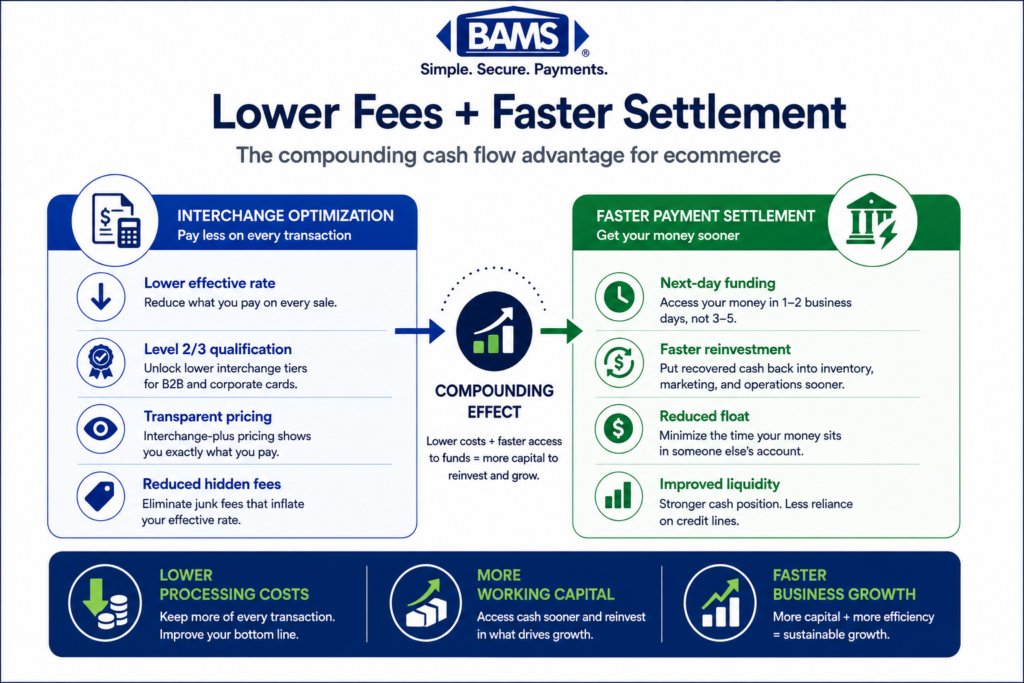
The second-order effect matters too: lower processing costs improve cash flow, which compounds when paired with faster settlement. A dollar saved on fees and received a day sooner is worth more than either benefit alone.
Where to Start
You don’t need to tackle all five at once. Start with Signal 1 (effective rate calculation) because it takes 10 minutes and immediately tells you how much room for improvement exists. If the gap is small, you may only need one or two additional optimizations. If the gap is large, you have a clear roadmap.
Signal 2 (Level 2/3 qualification) is the highest-impact fix for B2B-heavy eCommerce operations and should be your second priority. Signal 4 (volume renegotiation) requires the least technical effort and is purely a conversation.
The goal isn’t to overhaul your payment infrastructure. It’s to extract the value your current setup already supports but isn’t delivering. Every signal on this list is a conversation you can start this week with data you already have.
Frequently Asked Questions
What is interchange-plus pricing and how does it work?
Interchange-plus pricing separates the actual interchange fee (set by card networks like Visa and Mastercard) from your processor’s markup. You see both numbers on your statement, so you know exactly what the card network charges and what your processor adds. This transparency makes it easier to identify where costs can be reduced, unlike tiered or blended models that bundle everything into opaque categories. For a deeper comparison, see this breakdown of tiered pricing versus interchange-plus pricing.
Why should businesses consider Level 2/3 optimization for B2B transactions?
Level 2 and Level 3 data includes enhanced transaction details like tax amounts, invoice numbers, line-item descriptions, and shipping data. When this information is passed during authorization, card networks assign the transaction to a lower interchange category. For B2B merchants, this can reduce per-transaction costs by 0.5% to 1%. The data is often already collected by your eCommerce platform but needs to be explicitly configured to pass through to the processor.
How can I tell if my processor is actually qualifying my transactions at Level 3?
Check the interchange detail section of your monthly statement. Transactions qualifying at Level 3 appear under specific categories like “Commercial Data Rate III” or “Business Level 3.” If your B2B card transactions show up under standard, mid-qualified, or non-qualified tiers, they’re not qualifying. Ask your processor for a qualification report that shows exactly which interchange category each transaction landed in.
When is a good time to negotiate processing fees with my provider?
The strongest negotiation moments are when your processing volume has grown significantly beyond your original agreement, when your contract is approaching renewal, or when you can present data showing a gap between your quoted rate and effective rate. Processors expect these conversations from growing businesses. Come prepared with at least three months of statements and your original contract terms.
What are the most common hidden fees in merchant services?
Common hidden fees include PCI non-compliance charges (for not completing annual security questionnaires), batch processing fees, statement fees, gateway fees, and inflated assessment markups. Some processors also charge monthly minimums, early termination fees, or annual fees that aren’t prominently disclosed. Calculating your effective rate is the fastest way to surface these costs. This guide on true payment processing costs breaks down the most common fee layers.
Which payment method is more cost-effective for high-volume B2B transactions?
ACH (bank-to-bank) payments are significantly cheaper than credit card payments for high-ticket B2B transactions. While card fees run 2.5% to 4% per transaction, ACH typically costs a flat fee of $0.25 to $1.00 regardless of transaction size. For a $5,000 B2B order, that’s the difference between $125 to $200 in card fees versus under $1 in ACH fees. Many eCommerce platforms support ACH at checkout, but the option is often disabled by default.
Sources