Level 2/3 Optimization: A B2B Merchant Guide
Last Updated on July 1, 2026 by Dimitri Akhrin
How to audit your processing statements, catch silent downgrades, and verify what your processor claims
Learn how to identify Level 2/3 qualification failures hiding in your B2B processing statements. This guide walks you through auditing interchange downgrades, calculating lost dollars, and building a verification system that holds processors accountable.
TL;DR
- “Level 2/3 support” isn’t the same as Level 2/3 qualification — Your processor may accept enhanced data fields without actually qualifying your transactions at reduced interchange rates. The only way to know is to verify on your own statements.
- Silent downgrades cost 0.45% to 1.5% per B2B transaction — Commercial card transactions that fail to qualify at enhanced data tiers get routed to more expensive interchange categories without any notification. On meaningful B2B volume, this adds up to thousands annually.
- Interchange-plus pricing is the prerequisite — You cannot verify Level 2/3 qualification under tiered pricing. Switch to interchange-plus before attempting any optimization work.
- Visa now requires Level 3 (CEDP) data for commercial card savings — Visa retired its Level 2 program in January 2026, so processors still relying on basic Level 2 fields may deliver zero interchange savings on Visa commercial cards.
- Audit monthly, not once — Qualification can regress due to platform updates, gateway changes, or network rule shifts. Build a simple monthly tracking process to catch regressions before they compound.
Guide Orientation: What This Covers and Who It’s For
This guide shows you how to identify, measure, and eliminate the hidden credit card processing fees that silently inflate your B2B transaction costs. Specifically, it focuses on Level 2/3 data qualification: the mechanism that determines whether you pay standard interchange rates or reduced commercial-card rates on every B2B order.
It’s written for eCommerce managers at established online businesses (roughly 10 to 50 employees) who process a meaningful volume of B2B or high-ticket orders on commercial cards. If you’ve been told your processor handles Level 2/3 optimization but have never verified it in your own statements, this is for you.
By the end, you’ll be able to audit your current processing statements for qualification failures, calculate the dollar amount you’re losing to silent downgrades, and build a verification system that holds any processor accountable to measurable results. This guide does not cover ACH payment processing, surcharging strategies, or enterprise-scale multi-acquirer architectures.
Why Level 2/3 Optimization Matters for B2B Merchant Services
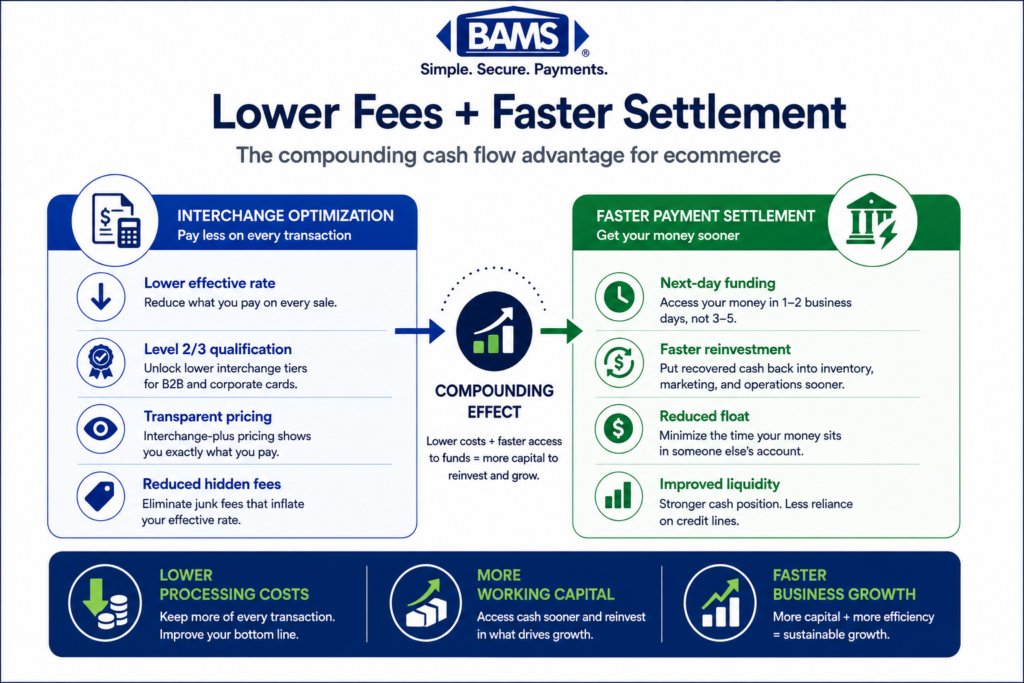
Commercial credit cards (purchasing cards, corporate cards, government cards) carry higher base interchange rates than standard consumer cards. The card networks designed Level 2 and Level 3 data programs to offset that cost: if you submit enhanced transaction data, you qualify for lower interchange categories. If you don’t, or if your data fails validation, the transaction “downgrades” to a more expensive tier. You pay the difference, and nobody tells you.
Federal Reserve interchange fee data continues to demonstrate how interchange qualification differences materially affect merchant processing costs over time. On meaningful B2B volume, even small qualification failures compound into significant annual margin leakage.
The landscape has also shifted recently. Visa payment rules and merchant guidance continue to evolve around commercial card optimization and enhanced transaction data requirements. If your processor is still referencing outdated Level 2 qualification methods for Visa commercial cards, that’s a red flag worth investigating.
The cost of inaction isn’t theoretical. It’s compounding on every B2B transaction you process today, and it shows up as margin erosion that’s invisible unless you know where to look.
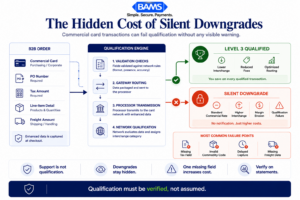
Most processors never notify merchants when commercial card transactions downgrade to more expensive interchange tiers.
Core Concepts: Understanding Interchange, Qualification, and Downgrades
Interchange Rates and Why They Vary
Interchange is the base fee the card-issuing bank charges on every transaction. It’s set by the card networks (Visa, Mastercard) and varies by card type, merchant category, and the data submitted with the transaction. Your processor doesn’t control interchange, but they do control whether the right data gets submitted to qualify for lower tiers.
What “Level 2” and “Level 3” Data Actually Means
Level 1 is standard transaction data: card number, amount, date. Level 2 generally includes enhanced transaction details like sales tax amount, customer reference or PO number, and merchant ZIP code. Level 3 adds deeper line-item detail such as product descriptions, quantities, unit costs, freight amounts, and commodity coding structures aligned with NAICS classification resources. The more structured transaction data submitted, the more likely the transaction is to qualify for reduced interchange categories.
The more data you submit, the lower the interchange rate the networks assign to that transaction. This isn’t optional generosity from the networks. It’s a risk-reduction exchange: detailed data reduces fraud and dispute risk, so the networks reward it with lower fees.
What a “Downgrade” Really Is
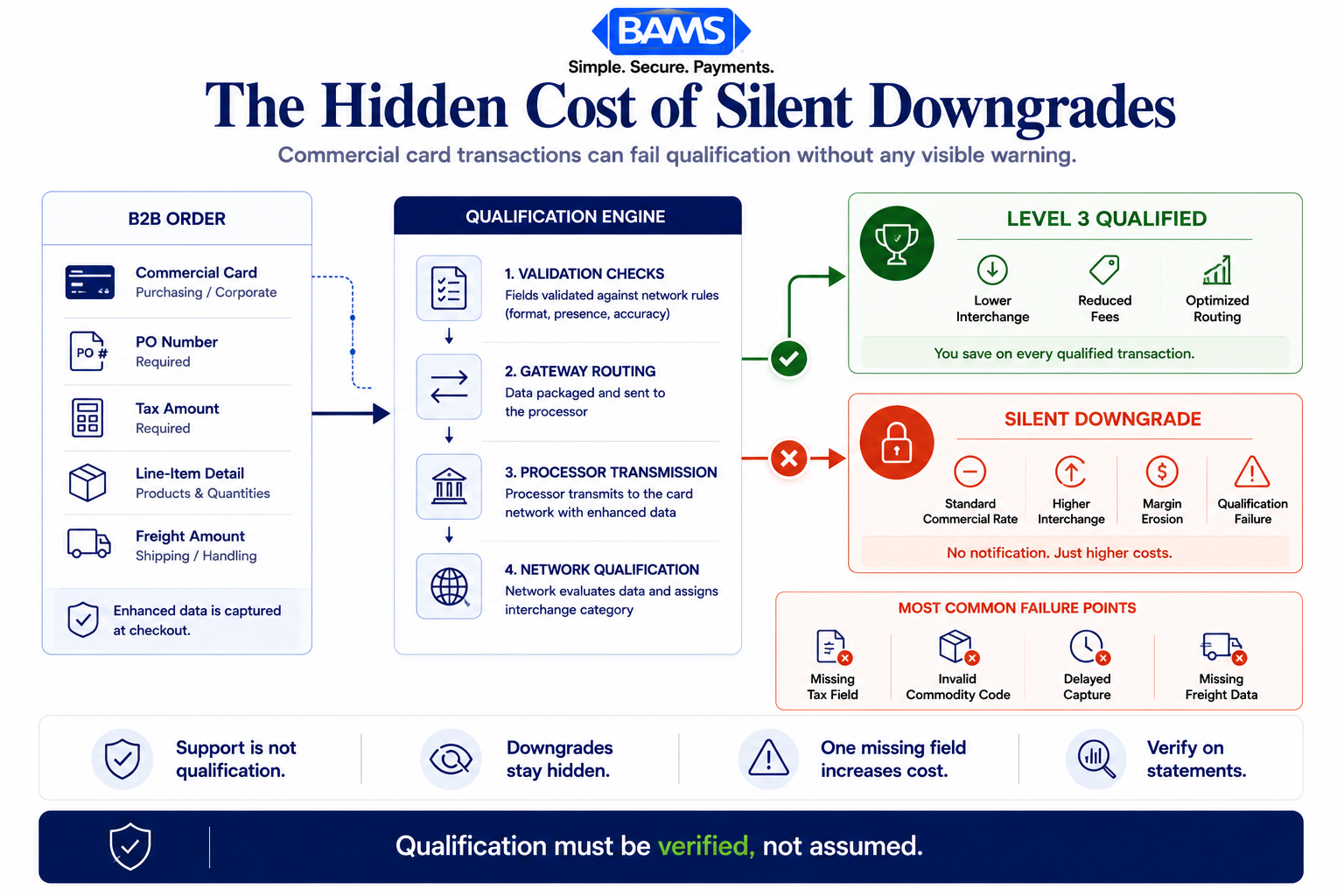
A downgrade happens when a transaction fails to meet the data requirements for its target interchange category. The transaction doesn’t get rejected. It processes normally. But it gets routed to a higher-cost interchange tier. The key problem: downgrades are silent. Your customer never sees them. Your order system doesn’t flag them. They only appear (if at all) buried in your monthly processing statement.
The Misconception That Matters Most
Many processors advertise “Level 2/3 support” as a feature. But support and qualification are different things. Support means the gateway can accept and transmit enhanced data fields. Qualification means the data actually passed validation and the transaction received the lower interchange rate. The gap between those two outcomes is where hidden fees in merchant services live.
The Verification Framework: From Claims to Confirmation
This guide follows a five-stage framework designed to move you from trusting processor claims to verifying actual results in your own data. The stages build on each other:
- Stage 1: Baseline Audit — Establish your current effective processing rate and identify where commercial card transactions land.
- Stage 2: Data Field Mapping — Confirm which Level 2/3 fields your system actually submits (not which it could submit).
- Stage 3: Qualification Verification — Cross-reference your statement against interchange qualification tables to find downgrades.
- Stage 4: Root Cause Analysis — Determine whether failures stem from missing data, formatting errors, or processor limitations.
- Stage 5: Ongoing Monitoring — Build a repeatable process to catch qualification failures before they compound.
Each stage produces a measurable output. Together, they transform Level 2/3 optimization from a processor’s marketing claim into a verifiable, auditable outcome you control.
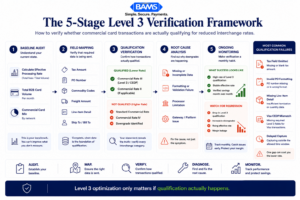
Processors may support Level 3 data without actually qualifying transactions at reduced interchange rates.
Step-by-Step: Eliminating Hidden Credit Card Processing Fees
Step 1: Calculate Your Effective Processing Rate
Objective: Establish a single number that tells you what you’re actually paying per dollar processed, so you have a baseline to measure improvements against.
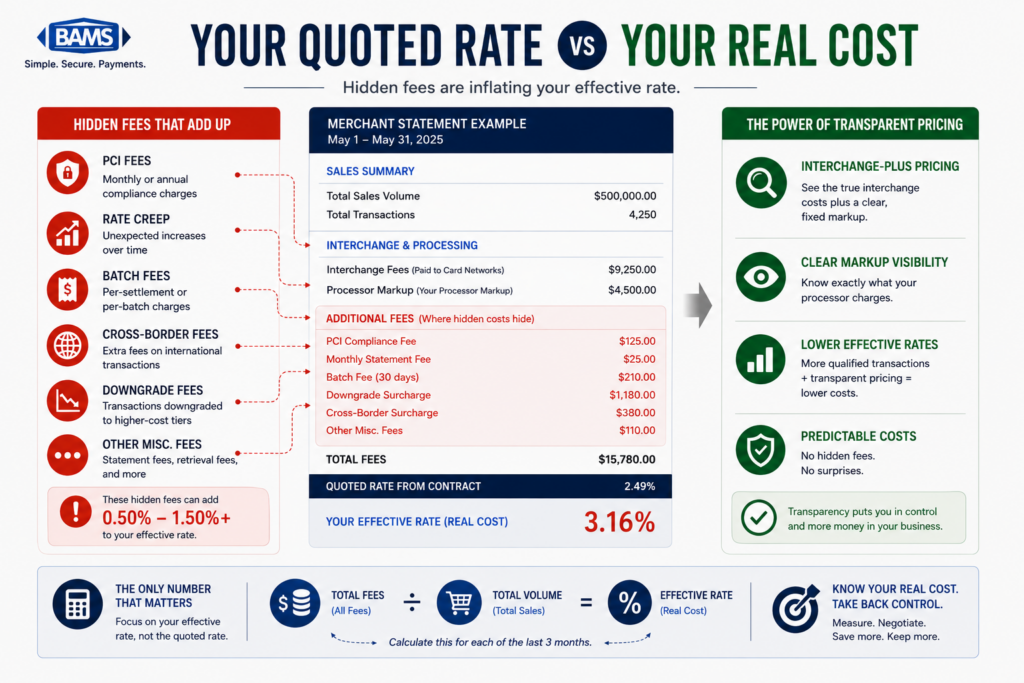
Pull your last three monthly processing statements. For each month, divide total fees (interchange, assessments, processor markup, and any miscellaneous charges) by total processing volume. The result is your effective processing rate. For example, $4,200 in total fees on $200,000 in volume equals a 2.10% effective rate.
Now separate your B2B transactions (commercial cards, purchasing cards, corporate cards) from consumer transactions. Calculate the effective rate for each segment independently. Merchant Payments Coalition resources continue to highlight how interchange inefficiencies and commercial card processing costs significantly affect B2B merchant margins, especially for businesses processing high-ticket transactions. If your B2B effective rate is significantly higher than your consumer rate, qualification failures are likely a contributing factor.
Anti-patterns: Don’t rely on the “rate” your processor quoted you. Quoted rates typically reflect only the markup, not interchange plus assessments. Don’t average across all card types. The signal you’re looking for is specific to commercial cards.
Success indicator: You have a documented effective rate for B2B transactions over a three-month period, with enough granularity to track changes month over month.
Step 2: Map Your Actual Data Submission
Objective: Identify exactly which Level 2 and Level 3 data fields your eCommerce platform and payment gateway are submitting on each transaction, not which fields they theoretically support.
Contact your gateway provider or access your gateway’s transaction logs. For a sample of recent B2B transactions, verify whether the following fields were populated and transmitted: sales tax amount, customer PO or reference number, merchant postal code (Level 2), plus item descriptions, quantities, unit costs, commodity codes, freight amounts, and line-item totals (Level 3). Many eCommerce platforms have the capability to pass these fields, but the integration may not be configured to do so.
Pay special attention to tax fields. A common failure point is submitting a tax amount of $0.00 on taxable orders, or omitting the tax indicator entirely. Both can trigger a downgrade even when all other fields are present. Similarly, commodity codes are frequently left blank because they require mapping to your product catalog, a step many integrations skip during setup.
Anti-patterns: Don’t accept a processor’s assurance that “we handle Level 3.” Ask for a sample transaction record showing the actual fields transmitted. If they can’t produce one, that’s your answer.
Success indicator: You have a field-by-field comparison between what Level 3 qualification requires and what your system actually submits, with gaps clearly identified.
Step 3: Cross-Reference Statements for Downgrades
Objective: Confirm whether your commercial card transactions are actually qualifying at the lowest available interchange tier, or silently downgrading to more expensive categories.
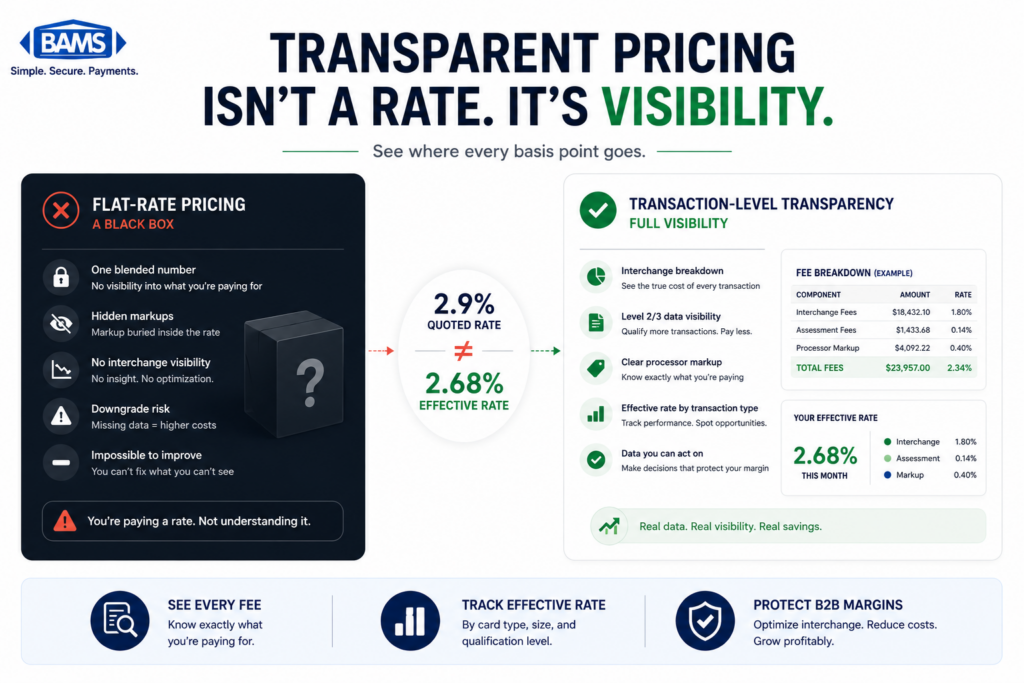
This step requires interchange-plus pricing. If your processor uses tiered (bundled) pricing, downgrades are invisible because all transactions are lumped into broad “qualified,” “mid-qualified,” and “non-qualified” buckets. You cannot verify Level 2/3 qualification under a tiered model. If you’re on tiered pricing, switching to interchange-plus is the prerequisite to everything else in this guide.
On an interchange-plus statement, each transaction (or batch of transactions) shows the specific interchange category it qualified under. Look for commercial card transactions landing in categories like “Commercial Data Rate I” (standard, no enhanced data) rather than “Commercial Data Rate III” (full Level 3 data).
Anti-patterns: Don’t assume that because some transactions qualify, all of them do. Qualification can fail intermittently based on missing fields, formatting inconsistencies, or specific card types. Check a representative sample, not just one or two transactions.
Success indicator: You can identify the interchange category for each commercial card transaction and flag which ones are qualifying at reduced rates versus which are downgrading.
Step 4: Diagnose the Root Cause of Failures
Objective: Determine whether qualification failures originate in your eCommerce platform, your payment gateway, your processor, or a combination, so you fix the right problem.
Qualification failures typically fall into three categories. First, missing data: your platform isn’t collecting or passing required fields (most common with tax amounts, PO numbers, and commodity codes). Second, formatting errors: the data exists but doesn’t meet network specifications (for example, tax amounts passed as percentages instead of dollar amounts, or postal codes in the wrong format). Third, processor limitations: your gateway accepts the data but your processor doesn’t transmit it to the network correctly, or doesn’t support the specific data program required.
This is especially relevant for Visa transactions now. Since Visa’s commercial card optimization path now requires CEDP-style data submission, processors that only supported the older Level 2 format for Visa may no longer deliver any interchange savings on Visa commercial cards. Ask your processor directly: “Are our Visa commercial transactions qualifying under the Commercial Enhanced Data Program?” If they can’t answer clearly, that’s diagnostic information.
Anti-patterns: Don’t blame a single point in the chain without evidence. A processor might claim your platform isn’t sending data, while your platform logs show it is. Verify at each handoff point.
Success indicator: You have a documented root cause for each category of qualification failure, with a clear owner (platform, gateway, or processor) responsible for the fix.
Step 5: Implement Fixes and Measure Results
Objective: Close the data gaps identified in Steps 2 and 4, then measure the actual interchange savings over a 60 to 90 day period.
Start with the highest-impact fixes first. If tax fields are missing, configure your platform to pass tax amounts on every transaction. If PO numbers aren’t being captured, add a reference field to your B2B checkout flow. For commodity codes, work with your developer to map your product catalog to the appropriate UNSPSC or merchant-specific codes the networks require.
If the root cause is your processor’s inability to transmit Level 3 data correctly, this is a harder fix. You may need to evaluate whether your current processor can actually deliver the savings they’ve claimed. A merchant services partner like BAMS, which supports Level 3 B2B processing alongside interchange-plus pricing, can provide the transparency needed to verify qualification results directly on your statements.
After implementing changes, re-run the effective rate calculation from Step 1 using 60 to 90 days of new data. Compare your B2B effective rate before and after. Industry sources indicate enhanced data can reduce commercial credit card interchange by up to 1.05%. Your actual savings will depend on your card mix, average transaction size, and how many transactions were previously downgrading.
Anti-patterns: Don’t measure too early. Interchange qualification data takes a full billing cycle to reflect accurately. Don’t assume one month of improvement is permanent; seasonal changes in your B2B card mix can shift results.
Success indicator: Your B2B effective processing rate has measurably decreased, and you can trace the improvement to specific interchange category upgrades on your statement.
Step 6: Build an Ongoing Monitoring System
Objective: Create a repeatable, low-effort process that catches qualification regressions before they compound into significant cost leakage.
Qualification isn’t a one-time fix. Platform updates, gateway changes, new product additions, and network rule changes (like Visa’s CEDP transition) can all reintroduce data gaps. Set a monthly review cadence where you or a team member checks three things: your B2B effective rate (has it drifted upward?), a sample of commercial card transactions for interchange category (are they still qualifying at the target tier?), and any new card network bulletins that affect data requirements.
Build a simple tracking spreadsheet or dashboard that logs your monthly B2B effective rate, total B2B volume, and the percentage of commercial card transactions qualifying at Level 3 rates. Over time, this becomes your single source of truth for whether your processor is delivering the savings they promised. It also gives you leverage in any pricing negotiation because you’re working from verified data, not estimates.
If your processor offers dedicated account management (as BAMS does), use those check-ins to review qualification rates together. A good account manager will proactively flag downgrade trends rather than waiting for you to discover them.
Anti-patterns: Don’t set up monitoring and then ignore it. The value compounds over time, but only if you act on regressions quickly. Don’t rely solely on your processor’s self-reported metrics. Always verify against your own statement data.
Success indicator: You have a documented monthly process, a tracking mechanism, and a clear escalation path when qualification rates drop.
Practical Examples: What Silent Downgrades Look Like in Real Statements
Scenario A: The “Level 2 Support” Processor
An eCommerce business processing $150,000 per month in B2B orders was told by their processor that Level 2/3 data was “fully supported.” When the eCommerce manager audited three months of interchange-plus statements, they found that 80% of Visa commercial card transactions were qualifying at the standard commercial rate, not the enhanced data rate. The processor’s gateway accepted Level 2 fields but wasn’t transmitting Level 3 line-item data. On $120,000 in affected monthly volume, the cost difference at 0.50% was $600 per month, or $7,200 per year, in avoidable interchange fees.
Scenario B: The Missing Tax Field
A B2B eCommerce company selling industrial supplies had Level 3 data configured correctly for most fields. But their platform was passing a tax amount of $0.00 on orders shipped to tax-exempt customers without including the proper tax-exempt indicator. This single missing flag caused roughly 30% of their commercial card transactions to downgrade. The fix took their development team two hours. The savings recovered over the following quarter exceeded $4,000.
Before and After Comparison
Consider a $1,000 Visa commercial card transaction. Without enhanced data, one documented example shows total fees of $29.60. With proper Level 3 data submission, that drops to $18.60. If your business processes 200 similar transactions per month, the difference is $2,200 monthly, or $26,400 annually. That’s not a rounding error. It’s a meaningful contribution to margin that’s recoverable without changing your pricing, your products, or your customers.
Common Mistakes and Pitfalls
Trusting “Level 2/3 support” as proof of qualification. This is the most common and most expensive mistake. Support is a capability. Qualification is an outcome. Always verify the outcome.
Staying on tiered pricing while trying to optimize interchange. Tiered pricing bundles interchange categories together, making it impossible to see whether enhanced data is working. Interchange-plus pricing is the minimum requirement for any meaningful optimization effort.
Auditing once and assuming the problem is solved. Network rules change, platforms update, and new product lines may lack proper commodity code mapping. Qualification is an ongoing process, not a project with a completion date.
Overlooking hidden fees beyond interchange. Downgrades are one source of cost leakage, but PCI non-compliance fees, batch fees, and statement fees can also inflate your effective rate. Audit the full picture, not just interchange.
Choosing a processor on price alone. The lowest quoted rate means nothing if your transactions consistently downgrade. A slightly higher markup with proper Level 3 qualification will almost always cost less in total.
What to Do Next
Start with Step 1. Pull your last three processing statements and calculate your B2B effective rate. That single number will tell you whether you have a problem worth solving, and roughly how large it is. You don’t need to overhaul your entire payment stack to begin.
If your effective rate on commercial cards is more than 0.40% higher than your consumer card rate, qualification failures are almost certainly contributing. Work through Steps 2 and 3 to confirm, then prioritize fixes based on the root cause analysis in Step 4.
Treat this guide as a reference you return to quarterly, not a checklist you complete once. The merchants who save the most on B2B processing are the ones who verify continuously, because the moment you stop checking is the moment silent downgrades start compounding again.
Frequently Asked Questions
What is interchange-plus pricing and how does it work?
Interchange-plus pricing separates the base interchange fee (set by the card network) from your processor’s markup. You see the exact interchange category each transaction qualifies under, plus a fixed markup on top. This transparency is essential for verifying Level 2/3 qualification because it lets you see whether individual transactions are landing in reduced-rate interchange categories or downgrading to more expensive ones. Without interchange-plus, optimization efforts are essentially blind.
Why should businesses consider Level 2/3 optimization for B2B transactions?
Commercial cards carry higher base interchange rates than consumer cards. Level 2/3 data programs reward merchants who submit enhanced transaction details (tax amounts, PO numbers, line-item data) with lower interchange rates. B2B merchants can save roughly 0.5% to 1.5% per transaction by qualifying at the enhanced data tier. For businesses processing significant B2B volume, this translates to thousands or tens of thousands of dollars in annual savings without changing pricing or customers.
How can I tell if my transactions are actually qualifying at Level 3?
You need interchange-plus pricing and access to detailed processing statements. On those statements, look for the specific interchange category assigned to each commercial card transaction. If transactions are landing in standard commercial tiers rather than enhanced data tiers, they’re downgrading. Your processor should be able to provide this detail. If they can’t, that’s a sign your qualification isn’t being tracked or prioritized.
What are the common hidden fees in merchant services that businesses should watch out for?
Beyond interchange downgrades, watch for PCI non-compliance fees (charged monthly if you haven’t completed your PCI questionnaire), batch processing fees, statement fees, early termination fees, and rate increase notifications buried in statement fine print. Tiered pricing models also obscure true costs by bundling transactions into vague “qualified” and “non-qualified” categories with undisclosed markups.
When is the best time to negotiate processing fees with your merchant services provider?
The best time to negotiate is after you’ve completed your own audit. When you can show your effective processing rate, identify specific downgrade patterns, and quantify the dollar amount of qualification failures, you negotiate from a position of verified data rather than guesswork. This is also the right time to evaluate whether your current provider can deliver the Level 3 qualification results you need, or whether a switch is warranted.
Did Visa eliminate Level 2 processing?
Yes. Visa retired its Level 2 program in January 2026. The primary path to commercial-card interchange savings on Visa is now through the Commercial Enhanced Data Program (CEDP), which requires Level 3 style data submission. If your processor still references “Level 2 support” for Visa transactions, your Visa commercial cards may not be qualifying for any interchange reduction at all. Mastercard still maintains its Level 2 and Level 3 programs separately.