Level 3 Data: A Practical Guide for eCommerce
Last Updated on October 7, 2026 by Dimitri Akhrin
How to find out if your order flow already captures invoice-quality data—or silently discards it
Learn what Level 3 data actually is and how to check whether your existing eCommerce setup already generates the fields needed to qualify. This guide walks you through identifying commercial card transactions and reducing interchange costs without overhauling your tech stack.
TL;DR
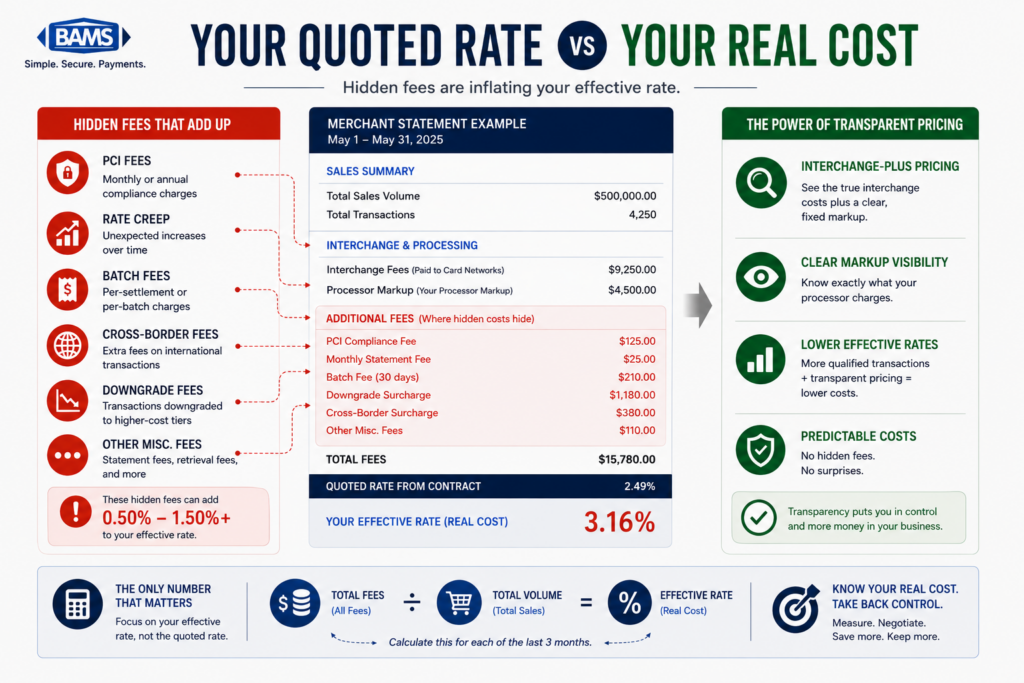
- Your processing statement hides qualification gaps — It shows the rate you paid, not the rate you could have qualified for. Transaction-level data is the only way to see what’s really happening with commercial card interchange.
- Level 3 data isn’t enterprise-only — Most eCommerce merchants already capture many of the data fields required for Level 3 qualification. The challenge is often configuration and data transmission rather than data collection itself.
- You’re probably processing commercial cards without knowing it — Business purchasing cards look identical to consumer cards at checkout. Without BIN-level reporting, you can’t identify them or optimize for them.
- The fix is usually a configuration change, not a platform overhaul — Check whether your gateway supports Level 3 data, confirm your processor submits it, and close any small field gaps (like commodity codes).
- Monitor ongoing, don’t set and forget — Platform updates, gateway changes, and new products can break Level 3 qualification. Build quarterly reviews into your operations to protect your savings.
Guide Orientation: What This Guide Covers and Who It’s For
This guide explains why your processing statement doesn’t tell the whole story about Level 3 data, and more importantly, how to figure out whether your eCommerce business is already capturing invoice-quality data or silently discarding it on every commercial card order.
It’s written for eCommerce managers at established online businesses (roughly 10 to 50 employees) who process a mix of consumer and commercial transactions. You don’t need an ERP system or a dedicated payments team to use this guide.
By the end, you’ll understand what Level 3 data actually is, how to identify whether your current order flow already generates the fields needed to qualify, and what steps to take to stop overpaying on commercial card interchange without overhauling your tech stack. This guide does not cover card-present retail or government procurement card programs in depth.
Why Level 3 Data Matters for eCommerce Merchants
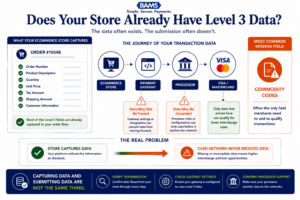
Most eCommerce merchants already collect most of the data needed for Level 3 qualification. The real question is whether it’s being submitted.
Level 3 data has a reputation problem. Most of the information available frames it as an enterprise-only optimization, something reserved for large corporations with dedicated procurement departments and ERP integrations. That framing is outdated and, for many eCommerce merchants, expensive.
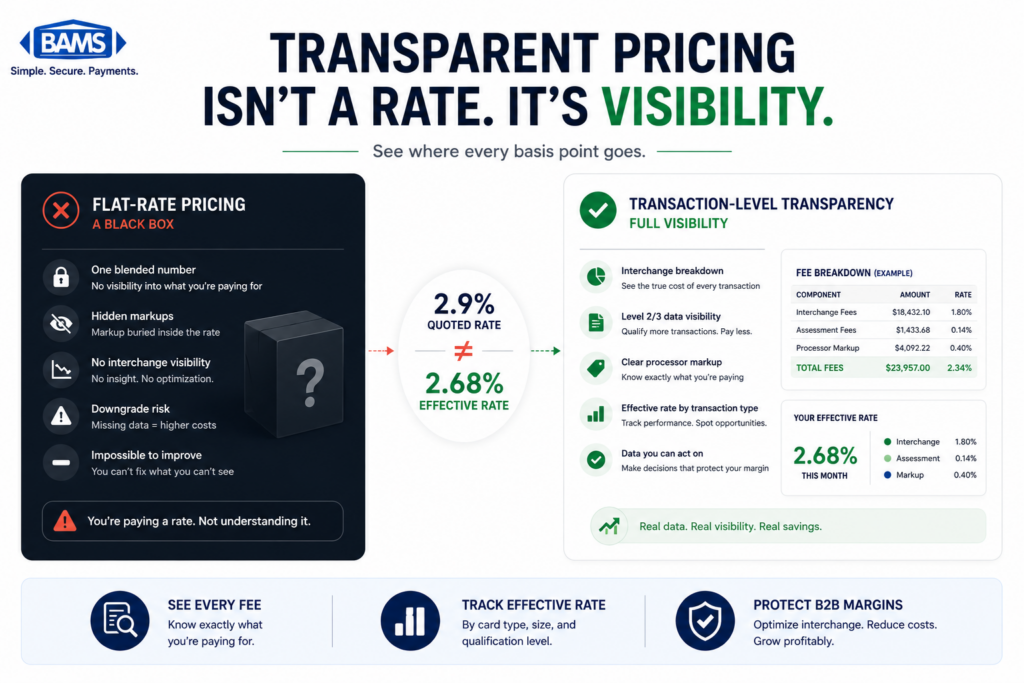
Here’s the reality: if your online store sells to other businesses, even occasionally, you’re likely processing commercial purchasing cards without knowing it. These transactions look identical to consumer credit card orders in your dashboard. But behind the scenes, they’re subject to different interchange rate tiers. When the right data fields aren’t passed with those transactions, they get “downgraded” to a higher interchange category. You pay more, and your processing statement never flags it.
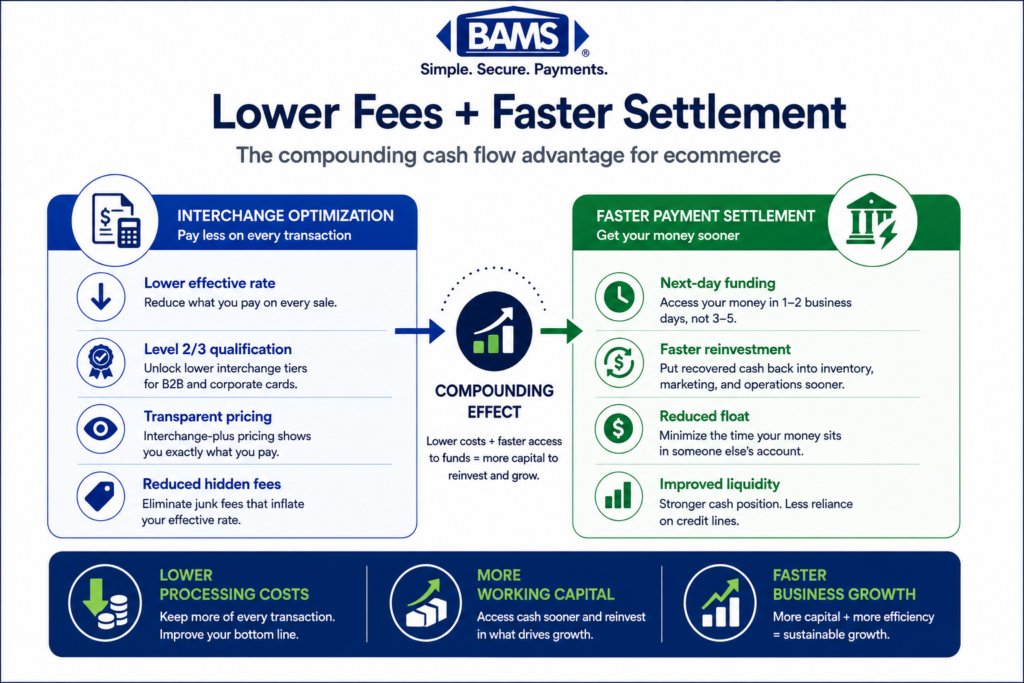
The cost of inaction isn’t dramatic on any single transaction. It’s the cumulative effect across hundreds or thousands of orders per month that creates a persistent, invisible margin leak. Modern payment guidance confirms that Level 2 and Level 3 data enhance transparency and reduce disputes, which is why they’re tied to B2B and B2G card acceptance. But the savings only materialize when the data is actually submitted.
Visa interchange reimbursement fee schedules demonstrate how commercial transactions qualify for different interchange categories depending on the quality and completeness of transaction data submitted.
The industry is also moving in this direction. Visa and Mastercard continue to expand their enhanced data programs, and the gap between merchants who pass rich transaction data and those who don’t will only widen in terms of processing costs. Understanding where you stand today is the first step toward closing that gap.
Core Concepts: What Level 3 Data Actually Means
The Three Levels of Transaction Data
Every credit card transaction carries data. The card networks (Visa and Mastercard) classify this data into three tiers, each progressively richer in detail:
- Level 1: Basic transaction information. Merchant name, transaction amount, date. This is what every consumer swipe or online purchase transmits by default.
- Level 2: Adds tax amount, merchant tax ID, and customer code (often a PO number). This is the minimum threshold for reduced commercial card rates.
- Level 3: Full invoice-quality data. Line-item detail including item descriptions, quantities, unit costs, commodity codes, freight amounts, and more. This is what unlocks the lowest available interchange rates on qualifying commercial card transactions. Mastercard commercial card acceptance research highlights the increasing importance of enriched transaction data and commercial card optimization for merchants serving business buyers.
Key Distinctions Most Content Gets Wrong
Level 3 data is not a separate product you buy. It’s a qualification standard. If your transaction includes the right fields and your processor submits them to the card network, you qualify for lower rates. If those fields are missing or your processor doesn’t pass them, you pay the default (higher) rate.
Another common misconception: Level 3 processing is only for B2G (business-to-government) transactions. In reality, Visa and Mastercard enhanced commercial card programs are relevant to a broad range of businesses, including many midsize eCommerce merchants that regularly accept commercial card payments. That range includes many midsize eCommerce operations.
One important exception: American Express does not offer Level 3 commercial card processing. So this optimization applies to Visa and Mastercard commercial cards only.
The “Silent Discard” Problem
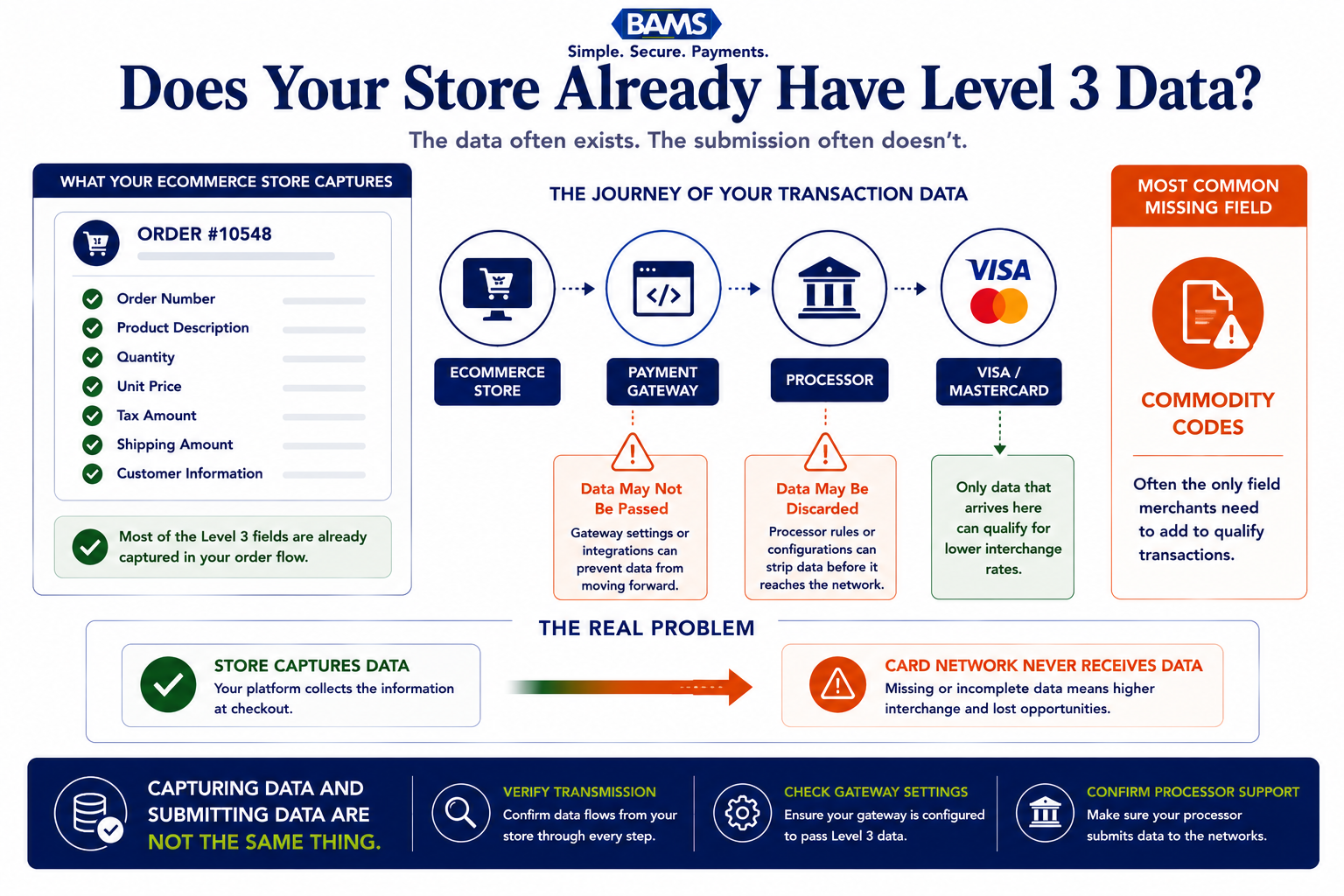
Here’s what makes this tricky for eCommerce managers. Your order management system likely already captures most of the data fields required for Level 3 qualification: item descriptions, quantities, unit prices, tax amounts, shipping costs. But your payment gateway or processor may not be configured to pass that data along with the transaction. The data exists in your system. It just never reaches the card network. Your statement won’t show you what data was submitted or omitted. It only shows you the rate you were charged.
The Framework: From Statement to Savings
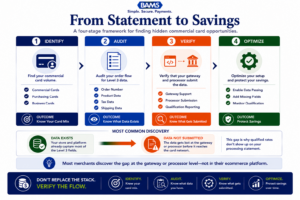
Level 3 optimization is usually a diagnostic process, not a technology overhaul.
Instead of treating Level 3 data as a technical overhaul, think of it as a four-stage diagnostic process that starts with what you already have:
- Stage 1: Identify — Determine whether you’re receiving commercial card transactions at all.
- Stage 2: Audit — Check what data your current order flow captures versus what Level 3 requires.
- Stage 3: Verify — Confirm whether your processor and gateway are actually submitting enhanced data.
- Stage 4: Optimize — Close the gaps, either through configuration changes or by working with a processor that handles automated data capture.
Each stage builds on the previous one. Most merchants discover their biggest opportunity at Stage 2 or 3, where the data exists but isn’t being transmitted. The following step-by-step breakdown walks you through each stage in detail.
Step-by-Step: How to Evaluate and Capture Level 3 Data
Step 1: Identify Your Commercial Card Volume
Objective: Determine what percentage of your transactions come from commercial purchasing cards, corporate cards, or business credit cards.
Most eCommerce merchants have no idea how many commercial card transactions they process. Merchant Payments Coalition resources continue to highlight how interchange qualification and transaction routing decisions can materially impact merchant processing costs. Your checkout page doesn’t distinguish between a consumer Visa and a corporate Visa purchasing card. They both process the same way from the shopper’s perspective. But the interchange rates they’re subject to are very different.
Start by requesting a transaction-level report from your processor that includes card type identifiers (sometimes called BIN data or card product codes). Look for designations like “commercial,” “purchasing,” “corporate,” or “business.” If your processor can’t provide this breakdown, that’s itself a red flag about what your statement isn’t showing you.
Anti-patterns: Don’t assume commercial cards are irrelevant because you sell to consumers. Many small businesses, nonprofits, and schools use purchasing cards to buy supplies, equipment, and services online. If you sell anything that could be a business expense, you’re likely processing commercial cards.
Success indicators: You can state, with confidence, the approximate percentage of your monthly transactions that involve commercial cards. Even a modest amount of commercial card volume can create a meaningful opportunity for interchange optimization when enhanced transaction data is submitted correctly.
Step 2: Map Your Existing Data Fields Against Level 3 Requirements
Objective: Identify which of the required Level 3 data fields your order flow already captures.
For Level 3 card data, merchants may need to submit invoice or order numbers, item codes, item descriptions, freight amounts, and duty amounts to qualify for enhanced commercial card processing. That sounds like a lot. But look at what a typical eCommerce order already contains:
- Invoice/order number: Generated automatically by your platform.
- Item descriptions: Already in your product catalog.
- Item quantities and unit prices: Core to every line item.
- Tax amount: Calculated at checkout.
- Freight/shipping amount: Displayed and charged at checkout.
- Commodity codes: This is often the only field merchants need to add. These are standardized product classification codes (like UNSPSC codes) that categorize what you sell.
Create a simple spreadsheet. List every Level 3 required field in one column. In the next column, note where that data lives in your current system (cart platform, order management, ERP, or nowhere). Most eCommerce merchants find they already capture 70 to 90 percent of what’s needed.
Anti-patterns: Don’t get paralyzed by the commodity code requirement. Many payment gateways and processors can map default commodity codes based on your merchant category code (MCC). You don’t necessarily need to assign a unique code to every SKU.
Success indicators: You have a clear gap analysis showing which fields are already captured, which are missing, and where each one lives in your tech stack.
Step 3: Verify What Your Processor Actually Submits
Objective: Confirm whether your processor is passing enhanced data to the card networks, or silently discarding it.
This is where most merchants discover the real problem. Your eCommerce platform captures the data. Your gateway might even accept it. But your processor may not be configured to submit Level 2 or Level 3 fields to Visa and Mastercard. The result: your transactions default to Level 1 processing, and you pay the highest applicable interchange rate on every commercial card order.
Ask your processor three direct questions:
- Are you currently submitting Level 2 data (tax amount and customer code) on my transactions?
- Are you submitting Level 3 line-item data on any of my transactions?
- Can you show me which transactions qualified for enhanced interchange rates in the last 90 days?
If the answer to any of these is “no” or “I’m not sure,” you’ve identified the gap. Your processing statement hides these transaction downgrades because it only shows the rate charged, not the rate you could have received.
Anti-patterns: Don’t accept vague assurances like “we optimize your rates.” Optimization without data submission is meaningless. You need confirmation that specific fields are being transmitted at the transaction level.
Success indicators: You have written confirmation from your processor about exactly what data levels they submit, and you can see transaction-level qualification data (not just aggregate rates) in your reporting.
Step 4: Assess Your Gateway’s Data-Passing Capabilities
Objective: Determine whether your payment gateway supports Level 3 data transmission, and whether it’s currently enabled.
Your payment gateway sits between your eCommerce platform and your processor. Even if your processor supports Level 3 submission, your gateway needs to pass the data through. Not all gateways support this. And among those that do, the feature is often disabled by default or requires specific API configurations.
Check your gateway’s documentation or contact their support team. Ask whether they support Level 2 and Level 3 data fields for Visa and Mastercard commercial transactions. If they do, ask whether the feature is active on your account and what integration steps are required to enable it.
For merchants on platforms like Shopify, WooCommerce, or BigCommerce, the answer depends on which payment gateway plugin you’re using. Some native payment solutions handle Level 2 data automatically but don’t support Level 3. Third-party gateway integrations may offer more flexibility but require configuration.
Anti-patterns: Don’t assume that because your platform is “modern” or “enterprise-grade,” it automatically handles Level 3 data. Platform marketing and actual data transmission are two different things. Verify at the transaction level.
Success indicators: You know definitively whether your gateway supports Level 3 data, whether it’s currently enabled, and what steps (if any) are needed to activate it.
Step 5: Close the Gaps Without Overhauling Your Stack
Objective: Implement the minimum changes needed to start qualifying for enhanced interchange rates on commercial card transactions.
Based on your audit, you’ll fall into one of three scenarios:
- Scenario A: Data exists, gateway supports it, processor submits it. You’re in good shape. Verify that qualification rates match expectations and monitor ongoing.
- Scenario B: Data exists, but gateway or processor isn’t passing it. This is the most common scenario. You need either a configuration change (if your current stack supports it) or a conversation with your processor about enabling automated data capture on commercial transactions.
- Scenario C: Key data fields are missing from your order flow. You need to add commodity codes or other missing fields. This is typically a one-time setup task, not an ongoing burden.
For Scenario B, which is where most eCommerce merchants land, the fix is often simpler than expected. A merchant services partner like BAMS can evaluate your current transaction data and identify where Level 3 qualification gaps exist, then handle the data submission on your behalf without requiring you to change platforms or integrate new software.
Anti-patterns: Don’t pursue a full ERP integration or platform migration just to capture Level 3 data. The ROI rarely justifies it for midsize eCommerce. Focus on configuration and processor capabilities first.
Success indicators: You have a concrete action plan with specific changes (configuration toggles, processor conversations, or field additions) and a timeline for implementation.
Step 6: Monitor Qualification Rates and Measure Savings
Objective: Establish ongoing visibility into how many transactions qualify for enhanced interchange rates and quantify the cost reduction.
Once you’ve enabled Level 3 data submission, the work isn’t done. You need to verify it’s actually working. Request monthly reporting from your processor that shows the interchange qualification level for each transaction. Look specifically at commercial card transactions and confirm they’re qualifying at Level 2 or Level 3 rates rather than defaulting to standard commercial rates.
Calculate your savings by comparing the interchange rate on qualified transactions versus what you were paying before. For context, the difference between a standard commercial card rate and a Level 3 qualified rate can range from 0.30% to over 1.00% per transaction, depending on card type and network. On a $500 B2B order, that’s $1.50 to $5.00 per transaction. Multiply that across your monthly commercial card volume.
If you’re seeing signals that you’re still overpaying on Level 2 processing, revisit Steps 3 and 4. Common culprits include intermittent data submission failures, gateway updates that reset configurations, or new product SKUs missing commodity codes.
Anti-patterns: Don’t set it and forget it. Payment processing configurations can drift over time, especially after platform updates or gateway changes. Build a quarterly review into your operations calendar.
Success indicators: You have a monthly report showing transaction-level qualification rates, and you can calculate the dollar savings attributable to enhanced data submission.
Practical Examples: What This Looks Like in the Real World
Scenario 1: The Office Supply eCommerce Store
An online retailer selling office supplies processes about 3,000 orders per month. Roughly 15% of orders come from small businesses using corporate purchasing cards. That’s 450 commercial card transactions monthly, with an average order value of $200.
Before Level 3 optimization, these transactions process at standard commercial interchange (approximately 2.65%). After enabling Level 3 data submission (the store already had item descriptions, quantities, unit prices, tax, and shipping in their platform), the qualified rate drops to approximately 2.05%. The savings: about $0.60 per $100 in transaction volume, or roughly $540 per month. Over a year, that’s $6,480 recovered without changing a single product, price, or platform.
Scenario 2: The B2B-Adjacent SaaS Accessories Store
A merchant selling software accessories and peripherals assumes their customer base is entirely consumer. A transaction-level audit reveals that 8% of their Visa and Mastercard volume comes from corporate or purchasing cards, primarily from IT departments at small companies. Because their gateway wasn’t configured to pass Level 2 or Level 3 data, every one of those transactions was downgraded to the highest commercial interchange tier. The merchant didn’t even know commercial cards were in their mix until they requested BIN-level reporting.
The fix required no new software. Their existing gateway supported Level 2 data natively. Enabling it took a support ticket and a configuration change. For Level 3, they worked with their processor to map default commodity codes and pass line-item detail. Total implementation time: about two weeks.
Common Mistakes and Pitfalls
Assuming you don’t process commercial cards. This is the most expensive assumption in eCommerce payments. Without BIN-level data, you simply can’t know. Always verify.
Confusing your platform’s data capture with data submission. Your eCommerce platform stores rich order data. That doesn’t mean it’s being transmitted to the card network. These are two separate systems with two separate capabilities.
Relying on your processing statement for diagnostics. Statements show aggregate rates, not qualification details. You need transaction-level payment analytics to understand what’s actually happening.
Over-engineering the solution. Many merchants hear “Level 3 data” and assume they need an ERP integration or a new platform. In most cases, the fix is a configuration change and a processor that supports automated data capture. Start with what you have.
Treating this as a one-time project. Payment configurations drift. Platform updates can reset gateway settings. New products may lack commodity codes. Build monitoring into your routine.
What to Do Next
Start with Step 1. Request a transaction-level report from your processor that identifies commercial card volume. If they can’t provide one, that tells you something important about the visibility you’re currently getting.
From there, work through the audit at your own pace. You don’t need to complete every step in a single week. Even identifying your commercial card percentage gives you a concrete number to work with when evaluating whether Level 3 optimization is worth pursuing for your business.
If you discover gaps between the data your platform captures and what your processor submits, you’re not alone. That’s the most common finding. The good news is that closing those gaps is usually a matter of configuration, not construction. Use this guide as a reference point, revisit it as your processing volume or platform changes, and treat your processing statement as a starting point for investigation, not a final answer.
Frequently Asked Questions
What is Level 3 data in merchant services?
Level 3 data is the most detailed tier of transaction information submitted to card networks like Visa and Mastercard. It includes invoice-quality details such as line-item descriptions, quantities, unit costs, commodity codes, tax amounts, and shipping costs. When this data is submitted with commercial card transactions, merchants can qualify for lower interchange rates.
How can Level 3 data reduce interchange rates for B2B transactions?
Visa and Mastercard offer reduced interchange rate tiers for transactions that include enhanced data. When a commercial card transaction is submitted with full Level 3 detail, it qualifies for a lower rate category than the same transaction submitted with only basic Level 1 data. The difference between standard commercial card qualification and enhanced data qualification can be significant enough to materially impact processing costs over time.
What specific data fields are required for Level 3 processing?
Required fields typically include invoice or order numbers, item commodity codes, item descriptions, item quantities, unit prices, extended amounts, freight or shipping amounts, duty amounts (if applicable), and tax details. Most eCommerce platforms already capture the majority of these fields as part of normal order processing. Commodity codes are often the only field that needs to be added.
Do I need an ERP system or special software to submit Level 3 data?
No. While ERP integrations can automate Level 3 data submission for large enterprises, most midsize eCommerce merchants can achieve qualification through proper configuration of their existing payment gateway and processor. The key requirement is that your processor supports Level 3 data submission and your gateway is configured to pass the relevant fields.
Which types of transactions are eligible for Level 3 interchange rates?
Level 3 rates apply to commercial card transactions on Visa and Mastercard networks. This includes corporate purchasing cards, business credit cards, and government procurement cards. Consumer credit and debit card transactions are not eligible. American Express does not currently offer Level 3 commercial card processing.
How do I know if my processor is already submitting Level 3 data?
Ask your processor directly whether they submit Level 2 and Level 3 data on your transactions, and request a report showing which transactions qualified for enhanced interchange rates in the last 90 days. If they can’t provide this information, your transactions are likely defaulting to standard (higher) commercial interchange rates.