Mobile Payment Solutions: The Hidden Cost You’re Ignoring
Last Updated on October 27, 2026 by Dimitri Akhrin
Why your Apple Pay chargeback exposure matters more than the processing rate you negotiated
Learn why comparing mobile payment solutions on headline fees alone leaves you exposed to chargeback losses that quietly erode margins. This piece reframes processor selection around dispute defense quality and total cost of acceptance.
TL;DR
- Your Apple Pay cost isn’t the rate – It’s the rate plus chargeback losses, deposit delays, and dispute management hours your processor doesn’t help with.
- Processor selection is a chargeback variable – Proactive defense and dedicated support reduce back-end losses that dwarf front-end fee differences.
- Evaluate total cost of acceptance – Compare processors on chargeback win rates, funding speed, and dispute support quality, not just headline transaction fees.
- Deposit timing is a cost, not a perk – Every day funds are held during settlement or dispute review is a day you can’t reinvest in your business.
The Fee You’re Not Watching Is the One Eating Your Margin
Every eCommerce manager knows the headline rate on their mobile payment solutions. It’s the number you negotiated, the number on your statement, the number you compare when a new processor pitches you. But there’s a quieter number doing more damage: the total cost of chargebacks on Apple Pay transactions that your processor never helped you prevent.
That number doesn’t show up on a rate sheet. It shows up in delayed deposits, lost inventory, and hours spent on disputes you didn’t see coming.
Why Everyone Compares Apple Pay Transaction Fees at Face Value
The standard advice for evaluating a payment processor is straightforward: compare rates, check for hidden fees, pick the lowest number. It makes sense on the surface. Apple Pay itself doesn’t add a separate merchant transaction fee. Your cost still comes from the underlying payment processing stack, including interchange, network costs, and processor pricing. Visa’s payment processing guidance shows how card networks, processors, gateways, and digital payment technologies work together to process transactions. So the game becomes: who offers the best overall processing arrangement?
This approach worked well enough when mobile wallet volume was a small slice of total revenue. Processors competed on price because price was the only variable most merchants evaluated. But as Apple Pay adoption has grown and card-not-present disputes have climbed alongside it, the lowest rate on paper has become a misleading signal. The cheapest processor isn’t cheap if they leave you exposed on the back end.
The Real Variable Isn’t the Rate. It’s What Happens After the Sale.
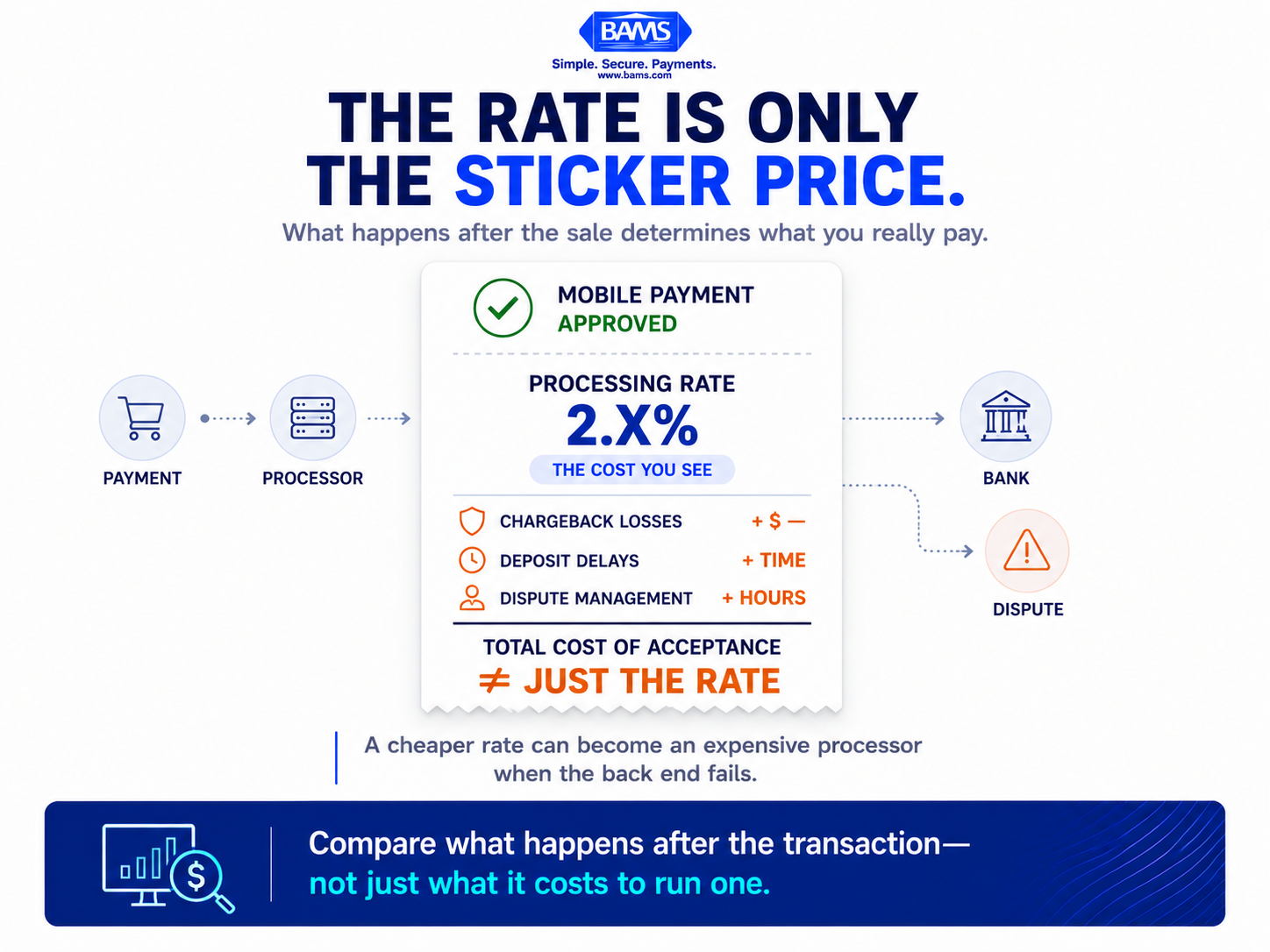
The processing rate is easy to compare. The costs created after the transaction. Chargebacks, delayed deposits, and dispute management are where margins can quietly disappear.
Here’s what we actually believe: chargeback losses on Apple Pay transactions aren’t a dispute problem. They’re a processor selection problem that compounds your true cost of accepting mobile payments. The processor you choose determines not just your per-transaction fee, but how quickly you get funded, how well you’re defended when disputes arrive, and whether your deposit delays spiral into cash flow gaps that force you into reactive decisions.
Where the Real Cost of Mobile Payments Hides
Let’s walk through how this plays out in practice.
A mid-size ecommerce brand processes $200,000 per month through Apple Pay. Their blended rate sits around 2.9% plus $0.30 per transaction, which is standard for card-not-present volume. On paper, their monthly processing cost is roughly $6,100. Competitive enough.
But here’s what the rate sheet doesn’t capture. They’re averaging 1.2% of transactions in chargebacks. On Apple Pay volume alone, that’s $2,400 per month in disputed revenue. Add the chargeback fees (typically $15 to $25 per dispute), the cost of goods already shipped, and the staff time spent compiling evidence for representment, and the real monthly cost climbs past $9,000.
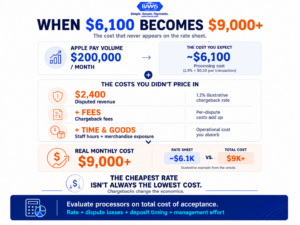
BAMS financial graphic illustrating how chargebacks and dispute costs can increase the true monthly cost of processing Apple Pay transactions beyond headline processing fees.
Now compare that to a processor relationship where proactive chargeback defense is built into the service. Alerts fire before disputes escalate. A dedicated account manager reviews dispute patterns and flags anomalies. Representment is handled with documentation support, not a generic portal and a “good luck.”
The rate might be a few basis points higher. But the total cost of processing drops because the back-end losses shrink. This is the math most eCommerce managers never run, because the industry has trained everyone to fixate on the front-end number.
Tools like BAMS address this directly.
Their model pairs next-day funding with proactive chargeback defense and dedicated account management, which means the deposit delay and dispute exposure that inflate your true cost get compressed instead of ignored. It’s one approach worth evaluating if your current processor treats chargebacks as your problem, not theirs.
There’s a structural reason dispute management still matters for Apple Pay transactions. Mobile wallet transactions are tokenized, which improves payment credential security, but tokenization doesn’t eliminate disputes such as “item not received” or “not as described.” Mastercard’s guidance on chargebacks explains how merchants can respond to disputes with supporting transaction evidence. A processor that only offers technical infrastructure without meaningful dispute support is solving only part of the problem.
Consider what accepting Apple Pay in your eCommerce store actually means operationally. You’ve added a faster checkout, you’ve reduced cart abandonment, and you’ve improved conversion on mobile. All good. But you’ve also increased your card-not-present volume, which carries higher dispute rates than in-person transactions. If your processor doesn’t adjust its support model to match that risk profile, you’re scaling revenue and risk at the same pace.
What This Means for Your Next Processor Conversation
If this thesis is right, then the questions you ask during processor evaluation need to change. Instead of “What’s your rate on Apple Pay transactions?” the better question is: “What’s your chargeback win rate for card-not-present disputes, and what do you do before a dispute becomes a chargeback?”
It also means that deposit timing deserves more weight in your decision. A processor that holds funds for 48 to 72 hours during dispute review creates a cash flow gap that compounds every month. Next-day funding isn’t a perk. It’s a cost variable. Every day your money sits in limbo is a day you can’t reinvest in inventory, marketing, or operations.
For eCommerce teams managing 10 to 50 employees, these aren’t abstract concerns. They’re the difference between a predictable month and a scramble to cover payroll because $8,000 in deposits got held up in dispute review.
A Better Lens: Total Cost of Acceptance
Stop evaluating processors on transaction fees alone. Start evaluating them on total cost of acceptance, which includes the rate, the chargeback losses your processor failed to prevent, the deposit delays that disrupted your cash flow, and the staff hours spent managing disputes without support.
Think of it this way: your processing rate is the sticker price. Your total cost of acceptance is what you actually paid to drive the car off the lot. The gap between those two numbers is where margin disappears quietly, month after month.
Understanding the fundamentals of how Apple Pay works for merchants is table stakes. Understanding what your processor does (or doesn’t do) after the transaction clears is where competitive advantage lives.
The Processor You Choose Is a Bet on Which Costs You’ll Absorb
Every processor relationship is a bet. You’re betting that the partner you choose will handle the complexity you can’t see yet. The cheapest rate wins when nothing goes wrong. But in eCommerce, things go wrong constantly. Disputes happen. Deposits get delayed. Customers file chargebacks because it’s easier than emailing your support team.
The question isn’t whether you’ll face these costs. It’s whether your processor will share the burden or leave you holding the full weight alone.
Frequently Asked Questions
Does Apple Pay charge merchants a separate fee beyond normal processing costs?
No. Apple charges card issuers a small fee (roughly 0.15% of the purchase price), not the merchant. Your Apple Pay cost is determined entirely by your processing agreement, which typically prices these transactions like standard card-not-present payments.
Why do Apple Pay transactions have higher chargeback risk than in-store payments?
Apple Pay eCommerce transactions are classified as card-not-present, which carries inherently higher dispute rates because the cardholder isn’t physically verified at the point of sale. Tokenization secures the payment credentials but doesn’t prevent fulfillment-related disputes like “item not received.”
How does next-day funding affect total processing cost?
Delayed deposits create cash flow gaps that force reactive decisions, from delayed inventory orders to missed vendor discounts. Next-day funding reduces the hidden cost of capital sitting idle during settlement and dispute review windows.