Peak Season Planning: Fix the Deposit Gap First
Last Updated on October 15, 2026 by Dimitri Akhrin
Why delayed payment deposits — not weak revenue — create the cash crunch that stalls your busiest quarter
Learn why peak season planning fails when it ignores deposit timing. This guide covers forecasting, processor configuration, fee management, and funding speed to keep cash flowing when sales surge.
TL;DR
- Peak season is a deposit-timing problem, not just a revenue problem — When processing deposits take 2 to 3 business days, your fastest-selling period is also when the most cash is trapped in transit and unavailable for restocks or ad spend.
- Start planning 90 days before peak — Build a 13-week rolling cash flow forecast based on deposit dates (not order dates) to identify the exact week your outflows will exceed available cash.
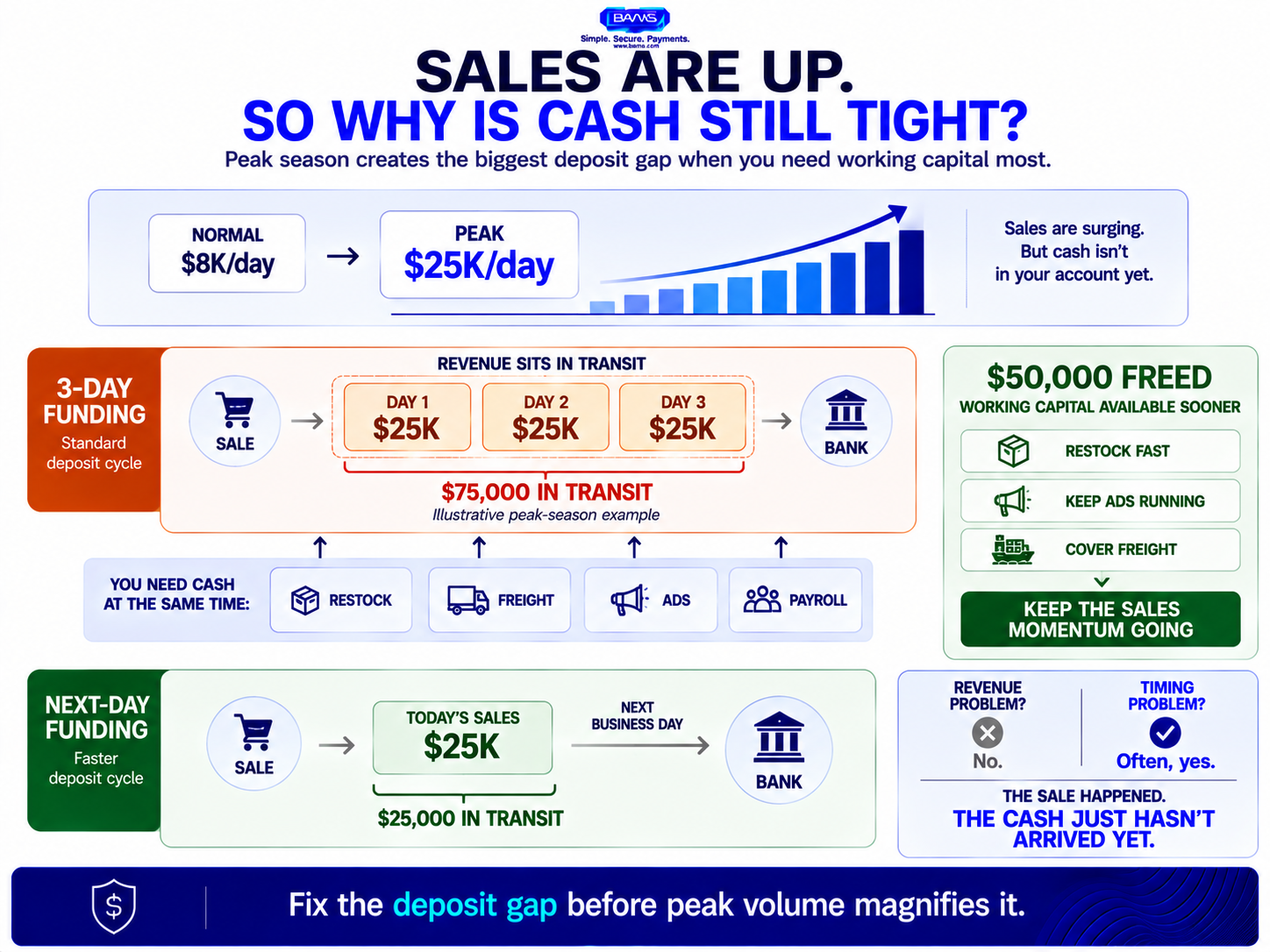
- Next-day funding is the highest-leverage fix — Shortening deposits from three days to one day frees up two full days of revenue as working capital, without increasing sales or taking on debt.
- Notify your processor early to prevent surprise holds — Automated risk systems flag sudden volume spikes. Contacting your processor 60 days out with projected volumes prevents holds and creates room to negotiate better rates.
- Audit fees and harden chargeback defenses before volume scales — Switch to interchange-plus pricing to avoid tiered rate inflation, and tighten fraud filters and billing descriptors to prevent the post-peak chargeback wave that erodes margins months later.
Guide Orientation: What This Covers and Who It’s For
This guide addresses a specific problem: the processing costs and cash flow disruptions that hit eCommerce businesses hardest during their busiest selling periods. If you manage payments for an established online business and dread the combination of spiking transaction volume and delayed deposits, this is for you.
By the end, you’ll understand why peak season planning fails when it focuses only on revenue, how deposit timing creates a hidden capital gap, and what structural changes to your payment processing strategies can reduce costs while keeping cash accessible. We cover forecasting, processor configuration, deposit timing, fee management, and chargeback prevention.
We do not cover enterprise-level treasury management, marketplace-specific payout structures (like Amazon’s 14-day holds), or general marketing tactics for peak season. This is about the money you’ve already earned reaching your bank account fast enough to fund the next wave of orders.
Why Peak Season Planning Starts With Your Payment Processor, Not Your Ad Budget
Most eCommerce managers prepare for peak season by scaling inventory, increasing ad spend, and staffing up customer support. These are revenue-side decisions. But the constraint that actually breaks peak-season execution is almost always on the cash side, specifically, how quickly your earned revenue converts into spendable capital.
Standard processing deposits typically take 2 to 3 business days, which means revenue sits in transit while you need it for restocks, freight, and ad spend. During a normal month, that lag is manageable. During a month where daily order volume doubles or triples, two days of trapped revenue can represent tens of thousands of dollars you can’t touch.
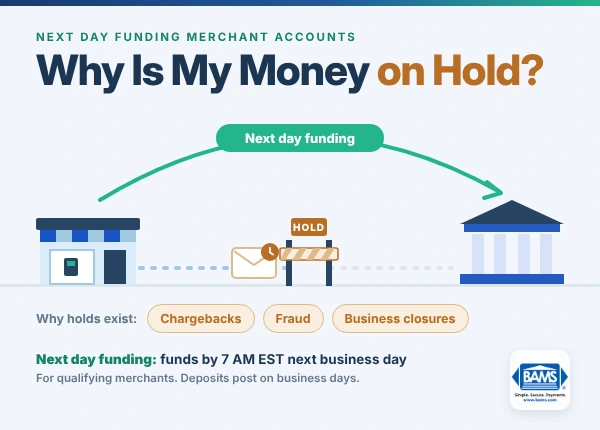
The cost of inaction is concrete. You miss restock windows, you reduce ad spend at the exact moment conversion rates are highest and you take on short-term debt to cover gaps that faster deposits would have eliminated. And because most processors also adjust risk thresholds during volume spikes, you may face surprise holds or reserve requirements that compound the problem.
Seasonal business challenges aren’t just about selling more. They’re about making sure every dollar you earn arrives in time to fund the next dollar of growth. That reframe, from revenue problem to deposit-timing problem, changes every decision downstream.
Core Concepts: The Cash Conversion Gap During Peak Season

Peak season revenue can look strong while available cash stays tight. The issue is often not sales volume, but how long those sales take to become spendable.
Deposit Timing vs. Order Timing
Your dashboard shows revenue on the day a customer places an order. Your bank account reflects that revenue two to three business days later, sometimes longer over weekends and holidays. During peak season, this gap compounds daily. If you’re doing $10,000 per day and deposits lag by two days, you have $20,000 in limbo at any given moment. At $50,000 per day, that’s $100,000 you can see but can’t spend.
Volume-Triggered Risk Flags
Merchant processors monitor changes in account activity as part of their risk management. OCC guidance directs banks to review levels and trends in merchant transactions, returns and chargebacks and to determine when reserve or holdback arrangements are appropriate. A significant seasonal change in your normal processing profile can therefore warrant additional review, which is why communicating expected volume changes with your processor in advance matters.
The Seasonal Cash Outflow Timeline
Peak-season cash gaps often start before the sales peak itself. Inventory, freight and other planned expenditures can come due before the corresponding sales revenue reaches your bank account. NetSuite Cash 360 incorporates planned expenditures, accounts payable, expected inflows and other cash movements into near-term forecasting to help businesses anticipate liquidity needs. This mismatch between outgoing cash and available revenue is the core seasonal business challenge that payment processing strategies must address.
Processing Cost Escalation
Higher volume doesn’t automatically mean proportionally higher costs, but it can. Interchange fees remain percentage-based, so they scale linearly. But chargebacks, failed transactions, and retry fees can spike disproportionately during peak periods, adding costs that don’t track with revenue. Understanding which fees scale and which spike is essential for cost reduction.
The Framework: Four Phases of Seasonal Payment Optimization

Peak-season payment planning starts well before sales spike. The earlier you forecast deposit timing and coordinate with your processor, the more room you have to prevent holds and cash shortages.
Reducing processing costs during seasonal volume spikes requires action across four phases, not just one frantic week before Black Friday. Each phase builds on the previous one.
- Phase 1: Forecast and Prepare (90 days out) — Model cash flows from deposit dates, configure processor expectations, and lock in rates.
- Phase 2: Optimize Infrastructure (60 days out) — Review payment authentication flows, update fraud rules, and stress-test checkout.
- Phase 3: Execute and Monitor (during peak) — Track deposit timing daily, manage chargebacks proactively, and adjust fraud thresholds in real time.
- Phase 4: Review and Renegotiate (post-peak) — Analyze actual costs against forecasts, renegotiate rates based on proven volume, and document lessons.
These phases are sequential but overlapping. The earlier you start Phase 1, the more leverage you have in every subsequent phase. Starting cash-flow planning about 90 days before the season begins gives you time to identify the week when outflows and available cash diverge the most.
Step-by-Step Breakdown: Reducing Processing Costs and Protecting Cash Flow
Step 1: Build a Deposit-Date Cash Flow Forecast
Objective: Know exactly which week your available cash will fall short of your committed expenses, so you can intervene before it happens.
Most eCommerce managers forecast from order dates. This overstates your spendable cash because it ignores the settlement lag between when a sale is recorded and when funds actually hit your account. Instead, build a 13-week rolling forecast that maps projected revenue to projected deposit dates, then overlay your committed outflows (inventory payments, freight, ad spend, payroll).
Use three scenarios: best case (volume exceeds last year by 30%), base case (matches last year), and worst case (falls 20% short). For each scenario, mark the specific week where outflows exceed available deposited cash. That week is your vulnerability window, and every decision you make in the next five steps should aim to shrink or eliminate it.
What to avoid: Don’t rely on platform dashboards as cash-flow tools. They show gross revenue, not net settled funds. Don’t assume last year’s deposit timing will repeat if you’ve changed processors or payment methods.
How to verify: Your forecast should show a specific dollar amount for each week’s gap or surplus. If it shows only monthly totals, it’s too coarse to be useful. NetSuite supports near-term cash forecasting based on expected inflows, planned expenditures, receivables and payables. A 13-week weekly view gives your team enough detail to identify when available cash and committed expenses begin to diverge.
Step 2: Notify Your Processor and Lock In Seasonal Terms
Objective: Prevent volume-triggered holds, negotiate better rates for anticipated volume, and confirm deposit timing before the surge begins.
Contact your payment processor at least 60 days before peak season starts. Provide your projected daily and monthly transaction volumes, average ticket size, and any planned promotions. This accomplishes two things: it prevents automated risk systems from flagging your account when volume spikes, and it gives you leverage to negotiate volume-based rate reductions.
Ask specific questions: Will my deposit timing change during high-volume periods? Is there a volume threshold that triggers a rolling reserve? Can we lock in a lower effective rate if I commit to a projected volume floor? If your processor can’t answer these questions clearly, or if they won’t commit to consistent deposit timing during peak, that’s a signal to evaluate alternatives before the season starts.
What to avoid: Don’t assume your processor will automatically accommodate a 3x volume increase. Don’t wait until you see a hold on your account to start this conversation. By then, you’ve already lost days of working capital.
How to verify: You should have written confirmation of your expected volume range, agreed-upon deposit timing, and any rate adjustments. If the terms are verbal only, they’re not terms.
Step 3: Shorten Your Funding Cycle
Objective: Convert the deposit-timing gap from a multi-day liability into a next-day process, freeing trapped working capital without taking on debt.
This is the single highest-leverage change most eCommerce businesses can make for peak season. Shortening funding from three-day to next-day can free up two days of revenue in working capital without increasing sales volume at all. For a business processing $30,000 per day during peak, that’s $60,000 in additional accessible cash, money that can go toward restocking, freight, or maintaining ad spend.
Not all processors offer next-day funding, and those that do may charge a premium or limit it to certain transaction types. BAMS offers next-day funding as a standard feature for its merchant accounts, which makes it particularly relevant for eCommerce brands whose peak-season planning depends on deposit predictability rather than credit lines.
What to avoid: Don’t confuse “next-day funding” with “next-day processing.” You want funds in your bank account the next business day, not just batched for settlement. Confirm the actual arrival time with your bank, not just your processor’s send time.
How to verify: Run a test batch and confirm the deposit lands in your account the following business day. Check whether weekends, holidays, or volume thresholds affect the timing. Consistency matters more than speed on a single transaction.
Step 4: Audit and Reduce Fee Exposure Before Volume Scales
Objective: Identify which processing fees will scale linearly with volume and which will spike disproportionately, then eliminate or reduce the latter.
Pull your last three months of processing statements and categorize every fee line. Interchange fees (set by card networks) will scale proportionally with volume. But look for fees that spike independently: PCI non-compliance fees, batch fees, statement fees, and especially chargeback fees that act as hidden costs. These fixed or semi-fixed charges become a larger drag on margins when you’re processing thousands of additional transactions.
Check your pricing model. If you’re on tiered pricing, your effective rate likely increases during peak season because more transactions fall into “mid-qualified” or “non-qualified” buckets (especially card-not-present eCommerce transactions). Interchange-plus pricing gives you visibility into actual costs and removes the processor’s ability to reclassify transactions into higher tiers. If you’re not on interchange-plus, request a switch before peak season.
What to avoid: Don’t focus exclusively on the per-transaction rate. A processor with a low rate but slow deposits, hidden fees, and no chargeback support can cost more than a processor with a slightly higher rate and transparent, all-in pricing.
How to verify: Calculate your effective processing rate (total fees divided by total volume) for the last three months. Compare it against your stated rate. If the effective rate is more than 0.3% higher than your quoted rate, you have fee leakage that will amplify during peak season.
Step 5: Harden Your Chargeback and Fraud Defenses
Objective: Prevent the chargeback and fraud spikes that accompany peak volume from eroding margins and triggering processor penalties.
Peak season brings more transactions, more first-time customers and more opportunities for fraud and disputes. Chargebacks can also arrive after the sales surge itself, extending the financial impact beyond peak season. Visa’s current Visa Acquirer Monitoring Program evaluates fraud and disputes together at both the acquirer and merchant levels. Rising dispute activity can therefore become an account-risk issue even after peak sales have ended.
Before peak season, review your fraud detection rules. Tighten velocity filters (limit the number of transactions from a single IP or card in a set timeframe). Enable AVS (Address Verification Service) and CVV matching for all transactions. Set up alerts for orders that exceed 3x your average order value. On the customer experience side, make sure your billing descriptor is recognizable so customers don’t file chargebacks simply because they don’t recognize the charge on their statement.
BAMS provides proactive chargeback defense as part of its merchant services, which includes monitoring dispute ratios and intervening before they reach penalty thresholds. For eCommerce brands processing high seasonal volume, this kind of dedicated account management can be the difference between a profitable peak season and one where chargeback fees consume your margin gains.
What to avoid: Don’t set fraud filters so aggressively that you block legitimate customers. False declines cost more in lost revenue than most fraud losses. Calibrate filters based on your actual fraud data, not fear.
How to verify: Track fraud and dispute activity weekly during and after peak season and compare it with your normal baseline, your processor’s current risk criteria and applicable card network requirements. If activity is climbing, investigate the dispute reason codes to identify whether the issue is fraud, fulfillment or billing descriptor confusion.
Step 6: Stress-Test Checkout and Payment Authentication Before the Surge
Objective: Ensure your checkout flow handles peak transaction volume without failed payments, timeouts, or unnecessary declines that cost you revenue and increase retry fees.
Every failed transaction during peak season has a compounding cost: lost revenue, a retry fee from your processor, and a customer who may not come back. Before volume spikes, test your checkout under load. Verify that your payment gateway can handle your projected peak transactions per minute. Confirm that 3D Secure or other authentication flows complete without timeouts on mobile devices (where most peak-season eCommerce traffic originates).
Review your transaction retry strategy. If a payment fails, how many times does your system retry, and at what intervals? Excessive retries generate fees and can trigger fraud flags. A single intelligent retry after 15 to 30 minutes (which allows temporary bank-side holds to clear) outperforms three rapid retries that all fail for the same reason.
What to avoid: Don’t assume last year’s checkout performance predicts this year’s capacity. If you’ve added payment methods, changed themes, or installed new apps, your checkout latency may have changed. Test with current configuration, not assumptions.
How to verify: Your payment success rate (approved transactions divided by attempted transactions) should be above 95%. If it’s below that, investigate whether declines are issuer-side (customer’s bank) or gateway-side (your configuration). Gateway-side declines are within your control to fix.
Practical Examples: How Deposit Timing Changes the Math
Scenario: A $25,000/Day Peak Season Brand
Consider an eCommerce brand averaging $8,000 per day in normal months that scales to $25,000 per day during a six-week peak season. With 3-day deposit timing, they have $75,000 in transit at any given moment during peak. With next-day funding, that drops to $25,000. The difference ($50,000) is available for inventory restocks, ad spend, or freight, without borrowing.
Now add the cost side. If their effective processing rate is 2.8% on tiered pricing versus 2.4% on interchange-plus, the difference across $1,050,000 in peak-season revenue is $4,200 in unnecessary fees. That’s money lost to pricing structure, not to the cost of accepting cards.
Scenario: The Chargeback Cascade
A brand processes 15,000 transactions during peak season. Their normal chargeback rate is 0.4%. During peak, it rises to 1.2% because of increased fraud attempts and an unrecognizable billing descriptor. That’s 180 chargebacks at $25 each ($4,500 in fees), plus the lost merchandise value, plus a processor penalty that increases their per-transaction rate by 0.15% for the next six months. A PCI compliance review and billing descriptor update before peak season would have cost a fraction of that.
Inventory lead times, planned expenditures and delays between sales and available cash can all extend the amount of time your working capital remains committed. Every day you can responsibly shorten that cycle during peak season reduces the amount of capital tied up in operations.
Common Mistakes and Pitfalls
- Treating processing as a fixed cost. Processing costs are variable, and their composition shifts during peak season. Fees that were negligible at normal volume become material at 3x volume. Review line items, not just totals.
- Waiting for a hold to contact your processor. By the time your funds are held, you’ve already lost days of working capital. Proactive communication 60 to 90 days before peak season prevents most holds entirely.
- Optimizing for rate alone. A low per-transaction rate means nothing if deposits take three days, chargebacks go unmanaged, and support is a ticketing queue during your busiest week. Evaluate total cost of processing, including timing, fees, and support quality.
- Ignoring post-peak chargeback waves. Chargebacks from peak-season purchases arrive 30 to 90 days later. If you stop monitoring in January, you’ll miss the February spike that pushes your ratio over threshold.
- Over-tightening fraud filters. False declines during peak season are more expensive than fraud in most cases. Calibrate based on data, not anxiety.
What to Do Next
Start with one action: pull your last peak season’s processing statements and calculate your effective rate, your average deposit timing, and your chargeback ratio. These three numbers tell you where you’re losing money and where faster funding or better fraud management would have the biggest impact.
Then build your 13-week cash flow forecast from deposit dates, not order dates. Mark the week where outflows exceed deposited cash. That’s your vulnerability window, and every optimization in this guide exists to shrink it.
You don’t need to overhaul your entire payment stack at once. Start with the step that addresses your biggest gap. For most eCommerce brands, that’s deposit timing. For others, it’s fee structure or chargeback exposure. Use this guide as a reference you return to each season, refining your approach as your volume and complexity grow.
Peak season should be your most profitable period, not the one where cash flow problems quietly erode the revenue you worked all year to generate.
Frequently Asked Questions
When should businesses review their payment processing setup before peak seasons?
Start at least 90 days before your anticipated volume increase. This gives you time to build a deposit-date cash flow forecast, contact your processor about expected volume, negotiate seasonal rates, and switch pricing models if needed. Waiting until 30 days out limits your options and leaves no buffer for implementation delays.
How can payment processors optimize their services for seasonal fluctuations in volume?
The most impactful optimizations are next-day funding (to reduce trapped working capital), interchange-plus pricing (to prevent rate inflation during volume spikes), proactive chargeback monitoring, and pre-authorization of expected volume ranges so automated risk systems don’t trigger holds. A processor that offers dedicated account management can coordinate all of these before peak season begins.
How can businesses use data to forecast transaction volume for seasonal planning?
Pull your last two years of monthly processing statements and identify your peak volume months, average daily transaction count, and average ticket size. Build a 13-week rolling forecast with three scenarios (best, base, worst). The critical step most brands miss is mapping projected revenue to deposit dates rather than order dates, which reveals the actual cash available each week.
What is a seasonal volume playbook in merchant services optimization?
A seasonal volume playbook is a documented plan that covers four phases: forecasting and preparation (90 days out), infrastructure optimization (60 days out), real-time execution and monitoring (during peak), and post-peak review and renegotiation. It includes specific actions like notifying your processor of expected volume, auditing fee structures, stress-testing checkout, and setting chargeback monitoring thresholds.
Why do processing costs spike disproportionately during peak season?
While interchange fees scale linearly with volume, other costs spike disproportionately. Chargeback fees increase because higher volume attracts more fraud and more first-time buyers who dispute unfamiliar charges. Failed transaction retry fees increase under load. And if your processor flags your volume increase as unusual, reserve requirements or holds can trap capital. These compounding costs often surprise brands that only planned for percentage-based fees.
Which strategies can help manage peak retail season effectively from a payments perspective?
The highest-impact strategies are: shortening deposit timing to next-day funding, switching to interchange-plus pricing to eliminate tiered rate inflation, pre-notifying your processor of expected volume to prevent holds, tightening (but not over-tightening) fraud filters, ensuring your billing descriptor is recognizable, and stress-testing checkout under peak load. Each of these addresses a specific cost or cash flow risk that compounds during high-volume periods.