
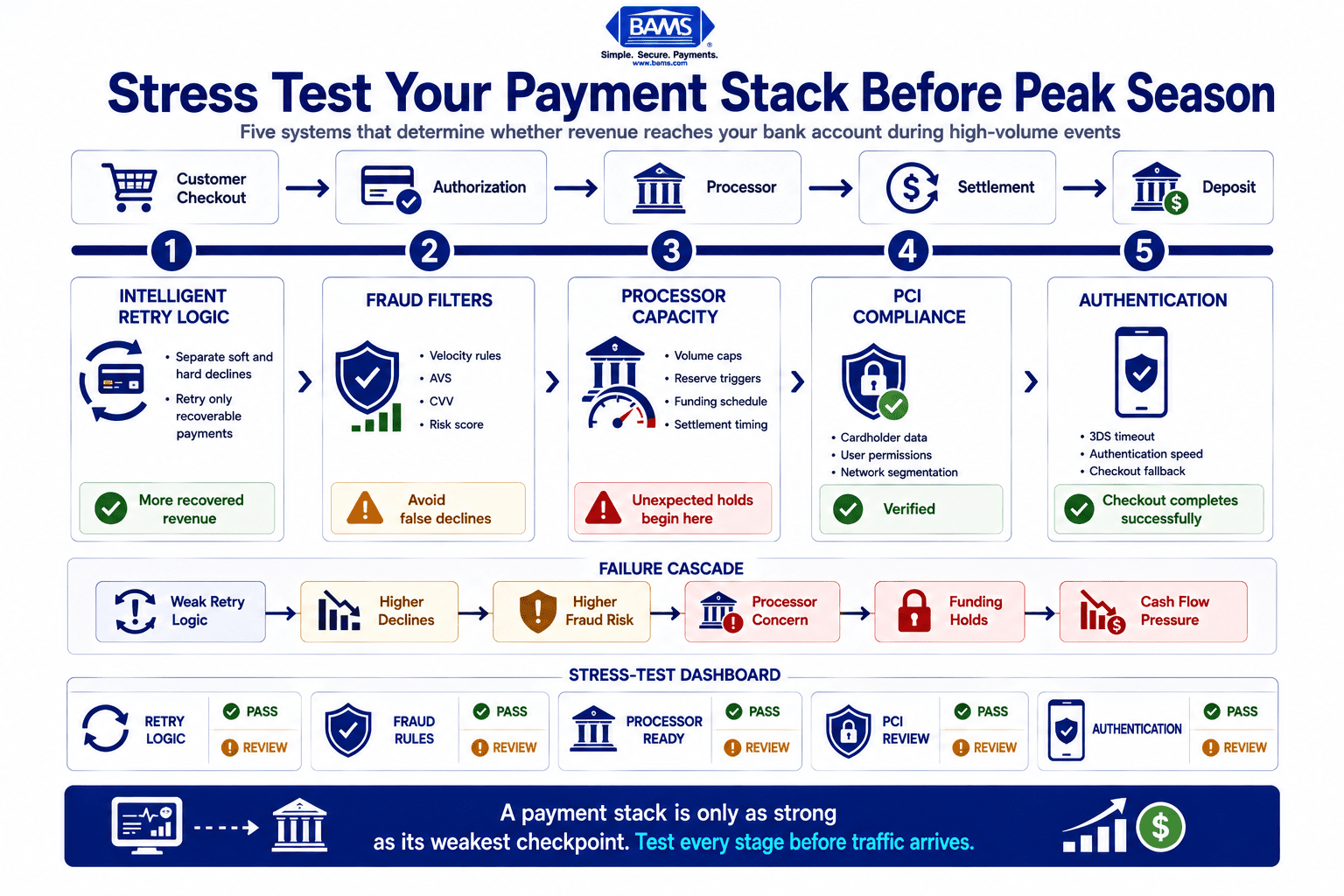
Transaction Retry Strategy: A Pre-Peak Stress Test
Last Updated on September 23, 2026 by Dimitri Akhrin
Probe your retry logic, fraud thresholds, and PCI compliance before seasonal volume breaks them
Walk through a three-part payment stress test in the exact order failures surface during live volume spikes. You’ll tune retry logic for soft vs. hard declines, adjust fraud thresholds for seasonal patterns, and verify PCI compliance configurations.
TL;DR
- Test retry logic first – Categorize your declines into soft and hard, then configure retry intervals that front-load attempts within the first 10 days. Optimized retries can recover up to 71% of failed payments versus 53% with default settings.
- Adjust fraud filters for peak behavior – Set velocity limits to 1.5x your observed peak-hour legitimate transaction rate per card. Default thresholds will false-decline your best customers during high-traffic events.
- Request processor volume cap increases 30 days early – Exceeding your approved volume without prior approval can trigger rolling reserves or funding holds at the worst possible time for your cash flow.
- Verify PCI compliance against current (not last-reviewed) configuration – Seasonal integrations, new plugins, and temporary staff access create compliance gaps that weren’t present during your last SAQ attestation.
- Extend 3DS timeout to 15 seconds – Issuer authentication servers slow down during peak periods. A default timeout of 10 seconds will drop legitimate authenticated transactions during your highest-revenue hours.
What You’ll Achieve: A Peak-Season Payment Stack That Doesn’t Bleed Revenue
By the end of this tutorial, you will have stress-tested the three systems most likely to spike your processing costs during seasonal volume surges: your transaction retry strategy, your fraud detection algorithms, and your PCI compliance review configuration. You’ll run each check in the exact order failures surface during a live volume spike, so you catch cascading problems before they cost you real money.
Your success criteria are concrete. You’ll have documented retry logic that distinguishes soft declines from hard declines, fraud thresholds tuned to seasonal purchase patterns rather than baseline averages, and a compliance configuration verified against current PCI DSS requirements. When volume hits, your payment stack will recover more failed transactions, block fewer legitimate customers, and avoid surprise holds from your processor.
Prerequisites and Setup Checklist
Before you begin, confirm you have access to the following. Missing any one of these will stall you mid-process.
- Payment gateway admin dashboard with permissions to view and edit retry rules, velocity filters, and fraud settings
- Processor merchant portal with access to your current reserve requirements, hold thresholds, and volume caps
- 12 months of transaction data exportable as CSV or accessible via API, including decline codes, approval rates, and timestamps
- Your PCI Self-Assessment Questionnaire (SAQ) from the most recent attestation cycle
- Contact information for your processor’s risk or underwriting team (you will need to call them in Step 5)
- A staging or sandbox environment for your checkout flow, if available
Time estimate: 4 to 6 hours spread across 2 to 3 working days. Some steps require waiting for processor responses. Biggest blocker: not having admin-level access to your gateway. Resolve that first.
Why This Sequence Matters
Most peak-season guides treat payment readiness as a planning exercise: review your rates, maybe upgrade your plan, hope for the best. That approach misses the three failure modes that actually spike costs during volume surges. Retry logic fails first (you lose recoverable revenue), then fraud filters over-block (you reject good customers), then compliance gaps trigger processor holds (you lose access to your own money).
This tutorial follows that failure sequence deliberately. Each step builds on the previous one, so by the time you reach compliance configuration, you’ve already fixed the upstream problems that make compliance issues harder to detect. The difficulty level is intermediate. You need comfort navigating your gateway dashboard and reading decline code reports, but you don’t need engineering support for most steps.

Peak season doesn’t create payment failures. It exposes the weak points already hidden inside your payment stack.
Step 1: Export and Categorize Your Decline Data
Action: Log into your payment gateway dashboard. Export all declined transactions from the past 12 months. Include these fields: transaction ID, decline code, decline reason, amount, timestamp, card type, and whether a retry was attempted.
Open the export in a spreadsheet. Create a new column labeled “Decline Category” and sort every row into one of three buckets: soft decline (temporary issues like insufficient funds, issuer timeout, do-not-honor without a specific reason), hard decline (expired card, invalid card number, stolen card), or unknown (codes your gateway doesn’t clearly classify).
Expected result: Soft declines represent temporary authorization failures that may succeed on a later attempt, making them an important category to distinguish from permanent declines when configuring retry strategies. If your ratio is significantly lower, your gateway may be misclassifying retryable declines as hard failures, which means you’re abandoning recoverable revenue.
Common failure: Some gateways export decline codes as raw numbers without descriptions. If you see codes like “05” or “51” without labels, cross-reference them against your card network’s decline code documentation to categorize correctly.
Step 2: Audit Your Current Transaction Retry Strategy
Action: In your gateway’s retry settings, document exactly how retries are currently configured. Record the number of retry attempts, the interval between each attempt, and whether your system differentiates retry behavior by decline type.
Compare what you find against this baseline An effective retry strategy distinguishes temporary authorization failures from permanent declines, allowing merchants to recover eligible transactions while avoiding unnecessary retry attempts. If your current setup uses a fixed schedule (for example, retry every 24 hours regardless of decline code), you’re leaving that recovery gap on the table.
Key checkpoint: Your retry logic should treat soft declines and hard declines differently. Retrying a hard decline wastes processing fees and can trigger velocity flags from card networks. Retrying a soft decline with the right timing recovers revenue. Retry schedules should prioritize early recovery attempts while limiting unnecessary retries that increase processing costs and operational complexity.
Visa provides merchant guidance on payment acceptance and transaction processing, helping businesses understand how authorization outcomes, payment flows, and operational practices affect payment performance. See Visa’s payment processing guidance.
Common failure: Retry settings are sometimes overridden by gateway-level defaults you didn’t configure. Check both your account-level settings and any platform or plugin settings that may impose their own retry rules on top of your gateway’s configuration.
Step 3: Reconfigure Retry Logic for Seasonal Volume
Action: Update your retry configuration using the decline category data from Step 1. Apply these rules:
- Soft declines (insufficient funds, issuer timeout): Retry within 4 to 6 hours for the first attempt, then again at 24 hours, then at 72 hours. The first retry attempt generally offers the highest likelihood of recovering a legitimate soft decline, making proper retry timing more important than simply increasing the number of attempts.
- Hard declines (expired card, invalid number): Do not retry. Instead, trigger a customer notification requesting updated payment information.
- Unknown declines: Retry once at 24 hours. If the second attempt fails, classify as hard decline and notify the customer.
Expected result: After saving these changes, run a test transaction in your sandbox environment using a test card that simulates a soft decline. Verify that the retry fires at the interval you configured and that the dashboard logs it correctly.
Merchants should also review Mastercard’s merchant guidance on chargebacks, since effective retry strategies should work alongside strong dispute management practices rather than treating them as separate processes.
Common failure: Some platforms cap retry attempts at a gateway level regardless of your settings. If your test retry doesn’t fire, check your gateway’s global retry policy and contact support to raise the cap if needed.
Step 4: Stress-Test Your Fraud Detection Algorithms Under Simulated Volume
Action: Pull your fraud filter configuration from your gateway dashboard. Document every active rule: velocity limits (transactions per card per hour), AVS mismatch handling, CVV failure handling, geographic restrictions, and any machine-learning risk score thresholds.
Now pull your peak-season transaction data from the previous year. Identify the hour with the highest transaction count. Calculate how many legitimate transactions per card occurred during that window (repeat customers placing multiple orders, gift purchases from a single card, etc.).
Key test: Compare your current velocity limit against that peak-hour data. If your velocity filter is set to block any card used more than 3 times per hour, but your data shows loyal customers averaging 2 to 4 transactions during flash sales, you will false-positive block paying customers during your highest-revenue hours.
Action: Adjust velocity thresholds to accommodate documented peak behavior. A practical approach is to set velocity limits at 1.5x your observed peak-hour legitimate transaction rate per card. If your peak was 4 transactions per card per hour, set the limit to 6.
Common failure: Fraud filters often have “shadow rules” enabled by default, such as blocking transactions from certain countries or flagging orders above a dollar threshold. Review every rule, not just the ones you configured. Default rules you never adjusted are the most common source of false declines during seasonal peaks.
Step 5: Contact Your Processor About Volume Caps and Reserve Triggers
Action: Call your processor’s risk or underwriting team. Ask these three questions exactly:
- “What is my current approved monthly processing volume, and what happens if I exceed it?”
- “Do you have automatic reserve or hold triggers tied to volume spikes, chargeback ratios, or ticket size changes?”
- “Can I submit a seasonal volume increase request, and how far in advance do you need it?”
Why this matters: Many processors automatically flag accounts that exceed their approved volume by 20% or more. The flags can trigger rolling reserves (where the processor holds 5% to 10% of your deposits for 6 months), funding delays, or outright account freezes. This is the failure mode that blindsides growing eCommerce brands hardest, because it hits exactly when you need cash flow most.
Expected result: You should receive a written confirmation of your approved volume cap and the process for requesting a temporary increase. If your processor can’t provide this in writing, that’s a red flag about how they’ll handle your peak season.
This is where your choice of processor makes a material difference. BAMS, for example, pairs next-day funding with dedicated account managers who proactively handle seasonal volume increases, so you avoid surprise holds during the exact period your cash flow matters most.
Common failure: Submitting a volume increase request too late. Most processors need 2 to 4 weeks to review and approve. If your peak season starts in 10 days, you may not get approval in time. Complete this step at least 30 days before your anticipated volume spike.
Step 6: Run a PCI Compliance Review Against Current Configuration
Action: Open your most recent PCI Self-Assessment Questionnaire. Compare every answer against your current system configuration. Focus on these three areas that change most frequently and cause the most seasonal problems:
- Stored cardholder data: Verify that no part of your checkout flow, order management system, or CRM stores full card numbers, CVVs, or magnetic stripe data. Seasonal integrations (pop-up shops, marketplace plugins, new fulfillment tools) often introduce storage points you didn’t authorize.
- Access controls: Check that seasonal staff, temporary contractors, or new team members added since your last SAQ don’t have access to payment system admin panels. Revoke any access that isn’t actively needed.
- Network segmentation: Confirm that your payment processing environment is still isolated from your general business network. New integrations or infrastructure changes since your last review may have created unintended connections.
Expected result: A documented list of any gaps between your SAQ answers and your current configuration. Each gap is a potential compliance violation that could result in fines, increased credit card processing fees, or forced account termination if discovered during or after peak season.
The PCI Security Standards Council provides guidance for merchants on maintaining secure payment environments, validating compliance requirements, and protecting payment data as systems evolve.
Common failure: Treating the PCI compliance review as a checkbox exercise rather than a technical audit. If you answered “yes” to a SAQ question 6 months ago, verify the control is still in place today. Systems drift, especially when you’re adding seasonal features or integrations.
Step 7: Validate Your Payment Authentication Flow Under Load
Action: In your staging environment, simulate 3D Secure (3DS) authentication for a batch of test transactions. If your gateway supports load testing, run at least 50 concurrent authentication requests. If it doesn’t, run 10 sequential tests and measure response times.
Record the average authentication response time and the failure rate. During peak season, 3DS timeouts increase because issuer authentication servers are also under higher load. If your baseline authentication takes 3 to 5 seconds, expect 5 to 8 seconds during peak. If your checkout flow times out at 10 seconds, you’ll start dropping authenticated transactions.
Action: Increase your 3DS timeout threshold to at least 15 seconds. Configure a fallback flow for authentication failures: either a retry with a different authentication method or a clear customer-facing message explaining the delay, rather than a generic error page.
Common failure: Testing 3DS only with a single card network. Visa, Mastercard, and Amex each have different 3DS implementations. Test with at least one card from each network you accept.
Configuration and Customization
Variables You Should Adjust for Your Business
The retry intervals in Step 3 (4 hours, 24 hours, 72 hours) are safe defaults for most eCommerce businesses. If you sell high-ticket items (over $500 average order value), consider extending the first retry to 12 hours, because high-value soft declines are more often tied to issuer fraud checks that take longer to clear.
The velocity multiplier in Step 4 (1.5x peak observed rate) is conservative. If you run flash sales or limited drops where customers genuinely attempt multiple rapid purchases, increase to 2x. But never remove velocity limits entirely, because that exposes you to card testing attacks, which spike during peak seasons when fraudsters know your filters are loosened.
Must-change settings: Your processor volume cap (Step 5) is not optional. Failing to update it is the single most common cause of unexpected funding holds. Your 3DS timeout (Step 7) must also be adjusted; the default is almost always too short for peak-season conditions.
Verification and Testing
Testing your payment system before peak season is far less expensive than troubleshooting failed payments during your biggest sales days.
Run this final verification sequence after completing all seven steps:
- Process a test soft-decline transaction and confirm the retry fires at your configured interval
- Process a test hard-decline transaction and confirm no retry is attempted
- Process 5 rapid test transactions from the same card and confirm your velocity filter allows them up to your new threshold, then blocks the next one
- Verify your 3DS authentication completes within your new timeout window
- Confirm in writing (email or portal screenshot) that your processor has acknowledged your seasonal volume increase request
If any of these checks fail, return to the relevant step and troubleshoot before considering your stress test complete. A partial stress test gives false confidence, which is worse than no test at all.
Common Errors and Fixes
“Retries are firing on hard declines”
Symptom: Your retry logs show attempts on decline codes like “14” (invalid card number) or “54” (expired card). Cause: Your gateway isn’t mapping decline codes to categories correctly, or a plugin is overriding your retry rules. Fix: Manually map each decline code to a category in your gateway settings. If a plugin is the issue, disable its retry feature and let your gateway handle retries exclusively.
“Fraud filter blocking repeat customers during sale events”
Symptom: Customer complaints about declined orders during flash sales, despite valid payment methods. Cause: Velocity limits are set to baseline (non-peak) thresholds. Fix: Apply the 1.5x to 2x multiplier from Step 4. If your gateway supports scheduled rule changes, set the higher threshold to activate automatically during planned sale windows.
“Processor placed a rolling reserve without warning”
Symptom: You notice 5% to 10% of your daily deposits are missing. Your processor portal shows a reserve balance you didn’t authorize. Cause: You exceeded your approved volume cap without prior notification. Fix: Call your processor immediately to negotiate reserve release terms. For future seasons, complete Step 5 at least 30 days in advance. If your processor routinely applies reserves without proactive communication, consider whether they’re the right partner for a growing business. Providers like BAMS assign dedicated account managers who flag these risks before they become holds, which is the kind of proactive support worth evaluating when choosing a payment processor.
“3DS authentication timing out during peak hours”
Symptom: Checkout completion rate drops during high-traffic hours, with 3DS timeout errors in your logs. Cause: Default timeout is too short for peak-season issuer response times. Fix: Increase timeout to 15 seconds as described in Step 7. If timeouts persist, contact your gateway about enabling fallback to frictionless 3DS for low-risk transactions.
“PCI scan flagging new vulnerabilities before peak season”
Symptom: Your quarterly ASV scan returns failures tied to services or ports you don’t recognize. Cause: Seasonal integrations (new plugins, marketplace connectors, temporary storefronts) opened network paths that weren’t present during your last scan. Fix: Disable or isolate the new integration, re-scan, and only re-enable after confirming it doesn’t compromise your cardholder data environment. Review hidden payment processing fees that can result from non-compliance surcharges.
Next Steps and Extensions
With your stress test complete, you’ve addressed the three systems that fail first under volume. Here’s where to go next:
- Build a seasonal volume forecast model. Use the 12-month transaction data you exported in Step 1 to project daily and hourly volume for your upcoming peak period. Share this forecast with your processor when requesting volume cap increases.
- Set up real-time decline monitoring. Configure alerts in your gateway dashboard that notify you when your decline rate exceeds your baseline by more than 10% in any rolling hour. This gives you time to react during peak instead of discovering problems in next-day reports.
- Explore payment gateway technology upgrades. If your current gateway doesn’t support decline-code-based retry logic, scheduled fraud rule changes, or load testing in sandbox, evaluate platforms that do. The stress test you just ran revealed exactly which capabilities you need.
Run this full stress test at least once per quarter and again 30 days before any planned promotional event. The systems you just tested are not static. They drift with every integration change, staff addition, and gateway update.
Frequently Asked Questions
When should businesses review their payment processing setup before peak seasons?
Start your payment stress test at least 30 days before your anticipated volume spike. Processor volume cap increases typically require 2 to 4 weeks for review and approval. If you also need to reconfigure retry logic and fraud thresholds, add another week for testing and verification. Waiting until the week before a major sale event is too late to fix systemic issues.
What is a seasonal volume playbook in merchant services optimization?
A seasonal volume playbook is a documented sequence of system checks and configuration changes you execute before each peak period. It covers retry logic tuning, fraud threshold adjustments, processor volume cap requests, and compliance verification. The goal is to prevent the specific failures (lost revenue from failed retries, false declines from tight fraud filters, funding holds from unapproved volume spikes) that cost eCommerce businesses the most during high-traffic periods.
How can businesses use data to forecast transaction volume for seasonal planning?
Export 12 months of transaction data from your payment gateway, including timestamps, amounts, and approval rates. Identify your highest-volume days and hours from the previous peak season. Apply a growth multiplier based on your year-over-year revenue trend. Share this forecast with your processor to justify volume cap increases and with your fraud team to set appropriate velocity thresholds.
Why do payment processors place holds or reserves during volume spikes?
Processors use automated risk models that flag accounts exceeding their approved monthly volume. A sudden spike in transaction count, average ticket size, or chargeback ratio can trigger a rolling reserve (where 5% to 10% of deposits are held for months) or a temporary funding delay. These protections exist because volume spikes look similar to fraud patterns. The fix is proactive: notify your processor before the spike and get written approval for the higher volume.
What’s the difference between soft declines and hard declines in retry strategy?
Soft declines are temporary failures (insufficient funds, issuer timeout, generic do-not-honor) where the card is still valid and a retry may succeed. Hard declines are permanent failures (expired card, invalid number, stolen card) where retrying wastes processing fees and can trigger card network penalties. Effective retry logic treats these categories differently: retry soft declines on a timed schedule, and notify the customer to update their payment method on hard declines.
How do fraud detection thresholds cause lost revenue during peak season?
Fraud filters calibrated to normal traffic patterns will over-block during peak season. For example, a velocity rule that limits a single card to 3 transactions per hour works fine on a normal Tuesday, but during a flash sale, loyal customers may legitimately attempt 4 or 5 purchases. Each blocked transaction is a false decline that costs you a sale and damages customer trust. Adjusting thresholds to 1.5x to 2x your observed peak-hour legitimate rate prevents this without removing fraud protection entirely.


