5 Apple Pay Transaction Fee Signals Your Statement Reveals
Last Updated on October 14, 2026 by Dimitri Akhrin
A diagnostic framework for eCommerce operators to audit processor markups, wallet surcharges, and hidden costs
Learn five specific fee signals hidden in your processing statements that reveal whether your payment processor is overcharging you on Apple Pay transactions. This cost audit framework helps eCommerce operators identify inflated markups and negotiate better rates.
TL;DR
- Apple charges merchants nothing – Every fee on your Apple Pay transactions comes from your processor, not Apple. If you see a “digital wallet surcharge,” your processor added it.
- Blended pricing hides overpayment – A flat rate like 2.9% + $0.30 may cost you significantly more than interchange-plus pricing on the same Apple Pay transactions. Request a side-by-side comparison.
- Deposit delays are a hidden cost – If your Apple Pay sales take 2 to 3 days to reach your bank, you’re financing your processor’s float. Next-day funding eliminates this cash flow drag.
- The “1.7% Apple fee” isn’t yours – That’s a consumer-side Apple Cash Instant Transfer charge. Don’t let it inflate your internal cost calculations for accepting Apple Pay.
- Audit all five signals together – Processors that overcharge in one area (surcharges, slow settlement, flat pricing) tend to overcharge across the board. Treat your statement as a diagnostic tool.
Your Apple Pay Transaction Fees Are Talking. Are You Listening?
You enabled Apple Pay, watched conversion rates improve, and moved on. That’s what most eCommerce operators do. But somewhere between checkout and your bank account, your payment processor is making decisions about markup tiers, settlement timing, and fee categorization that quietly erode your margins on every mobile wallet sale.
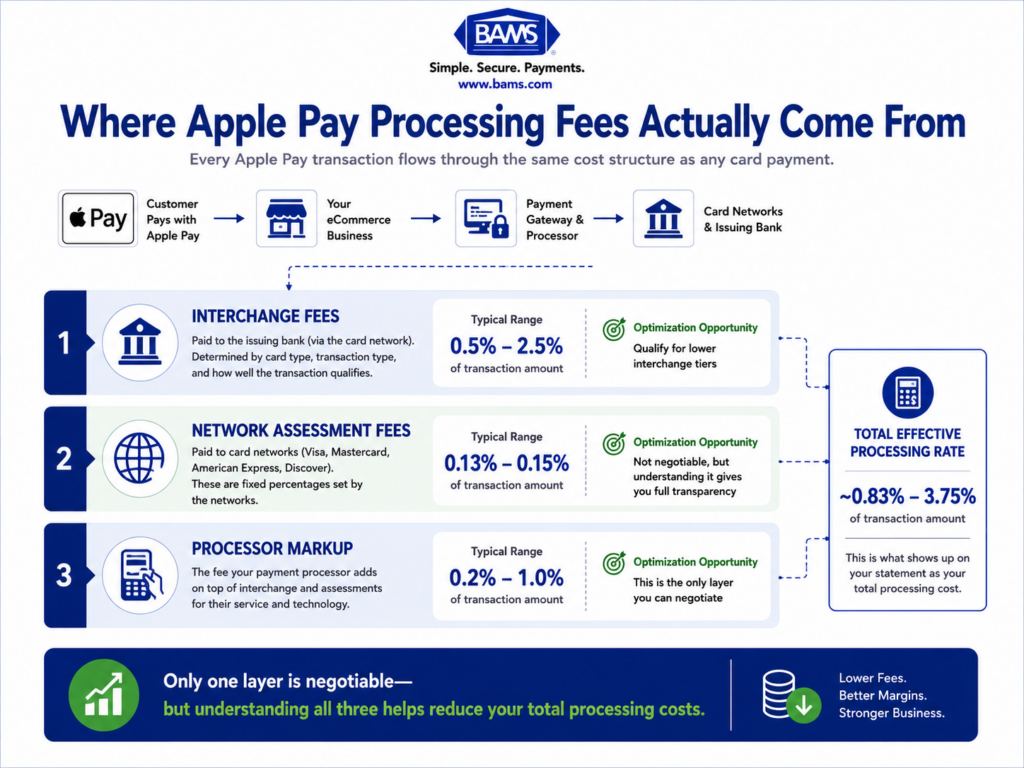
The problem isn’t Apple Pay itself. Apple charges merchants nothing to accept Apple Pay. Every dollar you pay in Apple Pay transaction fees flows to your payment processor, your acquiring bank, and the card networks. That means the cost is negotiable, auditable, and often inflated without your knowledge.
Most guides on Apple Pay focus on setup. This one focuses on what your processing statements are already telling you, if you know where to look.
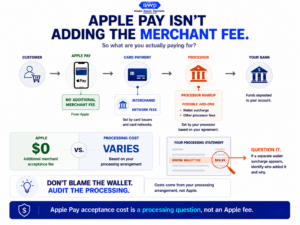
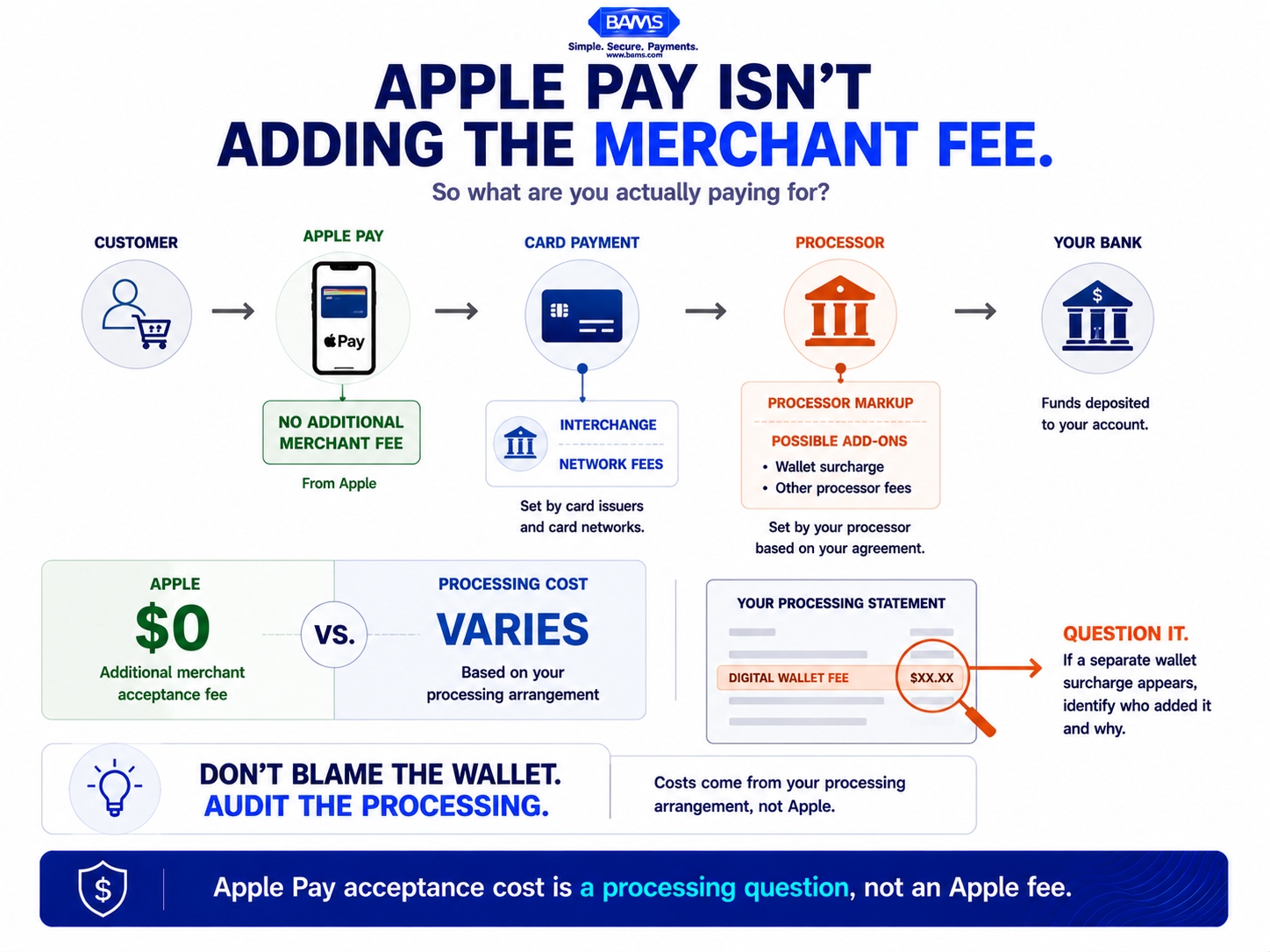
Apple Pay does not add a separate merchant acceptance fee. The costs merchants see come through the underlying card payment and their processing arrangement.
What This Diagnostic Covers (and What It Doesn’t)
This guide is for eCommerce managers at established businesses who already accept Apple Pay and want to know whether their processor is overcharging them. You don’t need a technical integration walkthrough. You need a cost audit framework.
We’re not comparing processors head-to-head. Instead, we’re isolating five specific fee signals that reveal whether your current arrangement is costing more than it should. If you’re running a store with meaningful transaction volume, even a fraction of a percent matters at scale.
How These Signals Were Selected
Each signal was chosen because it meets three criteria: it appears on standard merchant statements, it’s commonly misunderstood or overlooked, and it has a direct connection to either processing cost or cash flow timing. These aren’t theoretical. They’re line items you can verify today.
5 Apple Pay Cost Signals to Audit on Your Processing Statement
1. A Separate “Digital Wallet” or “Mobile Wallet” Line Item
Why it matters: Some processors may add a separate fee specifically for Apple Pay or digital wallet transactions. This is not a fee charged by Apple for accepting Apple Pay. Apple states that it does not charge fees when you use Apple Pay. If a separate digital wallet fee appears on your merchant statement, review your processor’s pricing agreement to determine where that charge comes from.
What it looks like today: The surcharge may appear as “digital wallet fee,” “NFC surcharge,” or a vaguely labeled per-transaction add-on that only applies to contactless payments. It typically ranges from $0.01 to $0.05 per transaction, or a small percentage markup.
How to audit it: Pull your last three statements. Filter transactions by payment method. If Apple Pay transactions carry any fee category that doesn’t appear on standard Visa or Mastercard transactions using the same card type, flag it. That surcharge is negotiable or a reason to switch.
2. Blended Pricing That Hides Interchange Variation
Why it matters: Apple Pay transactions are tokenized, card-not-present transactions. They process through the same interchange categories as regular online card payments. But under blended (flat-rate) pricing, your processor charges one rate for everything, which means you can’t see whether you’re paying inflated rates on transactions that should qualify for lower interchange tiers.
What it looks like today: A flat rate like 2.9% + $0.30 per transaction across all payment methods. Apple Pay adds no fee at checkout, so your effective cost should mirror your standard card-not-present rate. Under interchange-plus pricing, some merchants see rates closer to 1.75% + $0.25 for the same transactions.
How to audit it: Request an interchange-plus comparison from your processor. Ask them to restate your last month’s Apple Pay transactions under interchange-plus pricing. If the difference exceeds 0.3%, blended pricing is costing you real margin. For a deeper look at how interchange downgrades inflate Apple Pay costs, see this interchange fee optimization guide.
3. Deposit Timing That Doesn’t Match Your Sales Velocity
Why it matters: This is the cost signal most eCommerce operators ignore entirely because it doesn’t appear as a fee. It appears as a gap. If your Apple Pay sales settle on a T+2 or T+3 timeline, you’re financing your processor’s float with your working capital. For businesses running paid acquisition, that delay means you’re funding ad spend days before deposits land.
What it looks like today: Many processors batch Apple Pay transactions with all other card payments and settle them on a 48- to 72-hour cycle. Some hold funds longer for merchants flagged as higher risk or those with inconsistent volume patterns. The result is a cash flow drag that compounds weekly.
How to audit it: Compare the timestamp of your Apple Pay sales against the deposit date in your bank account for the last 30 days. Calculate your average settlement window. If it exceeds one business day, you’re leaving float on the table. Processors like BAMS offer next-day funding as a standard feature, which eliminates this hidden cost for merchants who qualify.
4. Misattributed Fees from Apple Cash Transfers
Why it matters: There’s a common confusion between Apple Pay acceptance fees and Apple Cash transfer fees. Apple’s documented 1.7% Instant Transfer fee (with a $0.25 minimum and $25 maximum) applies to consumer-side Apple Cash transfers, not to merchant acceptance. If your team or your processor is attributing this fee to your Apple Pay processing cost, your cost analysis is built on wrong data.
What it looks like today: Internal reports that overstate Apple Pay’s “cost” by blending consumer wallet fees with merchant processing fees. This leads to flawed decisions, such as deprioritizing Apple Pay at checkout or steering customers toward payment methods that actually cost more.
How to audit it: Confirm that your cost-per-transaction calculation for Apple Pay only includes your processor’s markup, interchange, and network assessment fees. If anyone on your team cites “Apple’s 1.7% fee” as a merchant cost, correct the record. That fee is a consumer payout charge, not your expense.
5. Chargeback and Dispute Handling Costs on Tokenized Transactions
Why it matters: Apple Pay uses tokenization and device-based authentication to help protect payment credentials, but disputes can still occur. When they do, the merchant’s processor and card network dispute procedures determine how the case is handled. Mastercard explains that merchants can challenge chargebacks by providing evidence supporting the legitimacy of the transaction. Your processor may also charge fees for handling disputes, making both your dispute frequency and per-dispute cost worth monitoring.
What it looks like today: Your chargeback fee schedule likely makes no distinction between a standard card-not-present dispute and an Apple Pay dispute. Some processors also lack proactive dispute management, which means you absorb costs that could have been deflected before they became formal chargebacks.
How to audit it: Review your chargeback rate and per-dispute fee for Apple Pay transactions specifically. Compare it against your overall dispute rate. If Apple Pay disputes are rare (as tokenization suggests they should be), but your per-dispute cost is unchanged, you’re overpaying for risk you’re not generating. Ask your processor whether they offer proactive chargeback defense that can intercept disputes before they escalate. BAMS, for example, includes proactive chargeback defense as part of its merchant services for Apple Pay acceptance.
The Pattern Across All Five Signals
These five signals share a common thread: they exploit the gap between what Apple Pay actually costs and what your processor charges you for it. Apple Pay adds zero merchant fees. The card networks set interchange. Everything above that is processor markup, and that markup hides in surcharges, blended rates, slow settlement, misattributed fees, and undifferentiated dispute costs.
When you audit these signals together, a second pattern emerges. The processors that inflate costs in one area tend to inflate them in others. A processor that charges a wallet surcharge is also likely to use blended pricing and slow settlement. These aren’t isolated issues. They’re symptoms of a pricing model designed to obscure rather than clarify.
The merchants who pay the least for Apple Pay acceptance are the ones who treat their processing statement like a diagnostic tool, not a bill to autopay.
Where to Start: Prioritizing Your Audit

Modern BAMS graphic highlighting three practical areas eCommerce merchants can inspect when auditing Apple Pay processing costs.
You don’t need to tackle all five signals at once. Start with signal 3 (deposit timing) because it has the most immediate cash flow impact and requires no negotiation, just measurement. Next, check signal 1 (wallet surcharges) because it’s the fastest to identify and the easiest to challenge.
If you’re on blended pricing (signal 2), request an interchange-plus comparison before your next contract renewal. Signals 4 and 5 are important for accuracy and long-term cost control, but they require slightly more internal coordination. The goal isn’t to overhaul everything overnight. It’s to know exactly what you’re paying, why, and whether it’s justified.
Frequently Asked Questions
Does Apple charge merchants a fee to accept Apple Pay?
No. Apple does not charge merchants any fee to accept Apple Pay. All costs come from your payment processor, acquiring bank, and the card networks. If you see an “Apple Pay fee” on your statement, it was added by your processor.
Why are my Apple Pay deposits delayed by two or three days?
Most processors batch Apple Pay transactions with all other card payments and settle on a T+2 or T+3 cycle. This isn’t specific to Apple Pay. It’s a function of your processor’s settlement schedule. Some processors offer next-day funding, which eliminates this delay and improves cash flow predictability.
What is the 1.7% Apple Pay fee I keep hearing about?
That fee applies to Apple Cash Instant Transfers, which is a consumer-side feature for moving money from an Apple Cash balance to a bank account quickly. It has nothing to do with merchant acceptance costs. Your Apple Pay processing fees are set entirely by your processor.
Should Apple Pay transactions cost more than regular credit card transactions?
No. Apple Pay transactions process through the same interchange categories as standard card-not-present transactions. If your processor charges a higher rate or adds a surcharge for Apple Pay, that’s a processor decision, not an industry standard. It’s worth questioning or renegotiating.
How do I know if my processor uses blended or interchange-plus pricing for Apple Pay?
Check your processing statement. If you see a single flat rate (like 2.9% + $0.30) applied uniformly across all transactions, you’re on blended pricing. If you see varying rates that reference specific interchange categories (like “Visa CPS Retail” or “MC Merit III”), you’re on interchange-plus. You can request a comparison from your processor to see which model costs less for your transaction mix.
Does Apple Pay reduce chargebacks for eCommerce merchants?
Apple Pay uses device-specific tokenization and biometric authentication (Face ID or Touch ID), which significantly reduces fraud compared to manually entered card numbers. This typically translates to fewer chargebacks. However, your processor’s chargeback fees and dispute handling processes still apply, so it’s worth auditing whether your per-dispute costs reflect this lower risk profile.
Sources