7 Statement Signals Hiding Your Transaction Cost Savings
Last Updated on October 7, 2026 by Dimitri Akhrin
Diagnostic markers that prove your processor is missing B2B interchange qualifications — and how to fix them
Learn to spot seven concrete red flags on your monthly processing statement that reveal unclaimed B2B interchange savings. Each signal is measurable and fixable, often without switching processors or renegotiating from scratch.
TL;DR
- Check for downgrade codes – Commercial card transactions missing Level 2/3 data fields get pushed to higher interchange tiers, costing you 0.45% to 0.60% more per transaction than necessary.
- Demand qualification-level visibility – If your statement doesn’t break out transactions by Level 1, 2, or 3 qualification, you can’t verify whether your processor is actually optimizing your B2B interchange rates.
- Move away from blended pricing – Flat-rate and tiered models mask the interchange savings available on commercial cards. Interchange-plus pricing exposes every cost layer so you can spot overcharges.
- Track your effective rate monthly – Divide total fees by total volume each month. Unexplained increases of 0.1% or more signal new fees, rising downgrades, or qualification failures that need immediate attention.
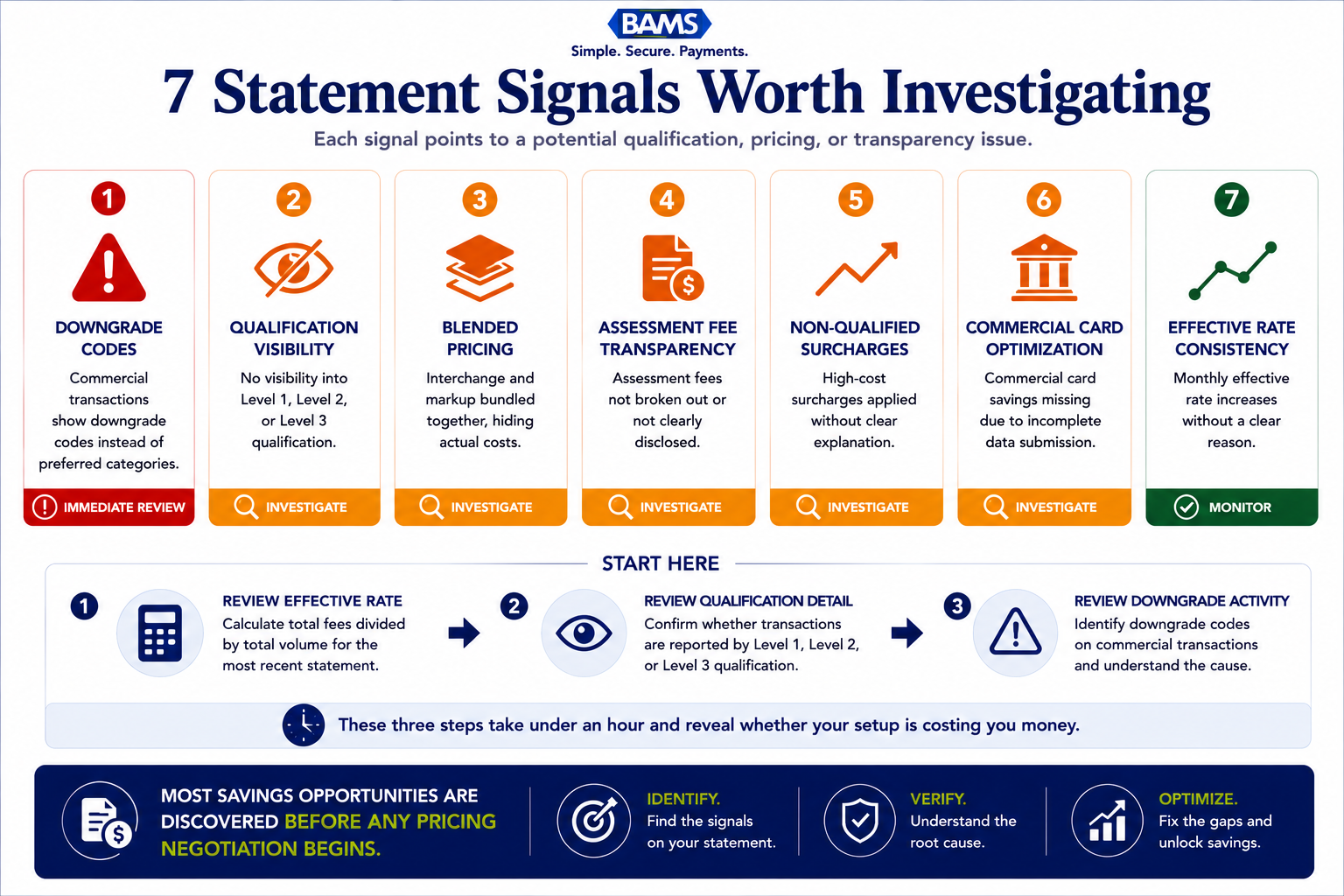
- Start with three signals, not seven – Calculate your effective rate, check for qualification-level detail, and count commercial card downgrades. These three steps take under an hour and reveal whether your setup is fundamentally costing you money.
Why Your B2B Processing Statement Is More Expensive Than It Looks
If you run an established eCommerce operation handling B2B orders, your monthly processing statement likely contains line items that quietly inflate costs by hundreds or thousands of dollars. B2B credit card processing fees often exceed 3.5%, driven by interchange, assessment fees, and processor markups. Yet most of that bloat isn’t caused by the rates you agreed to. It’s caused by what your processor isn’t doing: qualifying your transactions at the lowest available interchange tier. Visa interchange reimbursement fee schedules demonstrate how transaction qualification, card type, and data completeness directly influence interchange costs.
The real transaction cost savings in B2B processing don’t come from haggling over basis points. They come from spotting the diagnostic signals buried in your statement that prove your processor is leaving interchange savings unclaimed. These signals are specific, measurable, and fixable, often without switching platforms or renegotiating your contract from scratch.
What This Guide Covers (and What It Doesn’t)
This guide is for eCommerce managers at businesses with 10-50 employees who process a meaningful volume of commercial card transactions. If your statement includes corporate, purchasing, or government cards, the savings potential here applies directly to you.
We’re not covering general advice like “shop around for lower rates” or promoting near-zero fee solutions that don’t hold up at mid-market volumes. Instead, we focus on seven concrete signals you can find on your existing statement today. Each one points to a specific, correctable gap in how your transactions are being processed and priced.
How We Selected These Seven Signals
Each signal meets three criteria: it appears on standard merchant processing statements (not just enterprise reporting dashboards), it indicates a measurable cost gap between what you’re paying and what you could pay, and it can be addressed through data or configuration changes rather than a full platform migration. These are diagnostic markers, not negotiation tactics.
7 Statement Signals That Prove You’re Overpaying on B2B Interchange
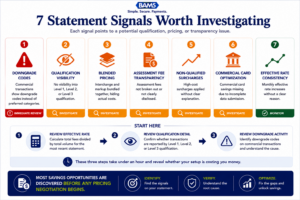
The fastest way to uncover hidden processing costs is to audit the statement you already have.
1. Downgrade Codes on Commercial Card Transactions
Why it matters: When a commercial card transaction doesn’t include the data the card networks require for preferred pricing, it gets “downgraded” to a higher interchange tier. Processing a commercial payment card without Level 2 or Level 3 data can increase costs by 0.45% to 0.60% per transaction. That’s not a rounding error. On a $5,000 B2B order, it’s $22.50 to $30 in avoidable cost.
What it looks like today: On an interchange-plus statement, look for categories labeled “EIRF” (Electronic Interchange Reimbursement Fee) or “Standard” next to transactions that should qualify at commercial data rates. These codes indicate the transaction was downgraded because required fields (tax amount, customer code, invoice number) were missing.
How to apply it: Pull your last three statements and count how many commercial card transactions carry downgrade codes. If more than 10-15% are downgraded, your gateway or payment integration likely isn’t passing the required data fields. This is a configuration issue, not a pricing issue.
2. No Distinction Between Level 1, Level 2, and Level 3 Qualification
Why it matters: Level 2 and Level 3 data qualification is where the real savings live for B2B merchants. Enhanced Level 2 and Level 3 data can unlock 0.5% to 1.5% in interchange savings on B2B card transactions. If your statement doesn’t break out transactions by qualification level, you have no way to verify whether your processor is actually optimizing anything. Mastercard commercial card acceptance research highlights the importance of enriched transaction data and commercial card optimization for merchants serving business buyers.
What it looks like today: A transparent statement on interchange-plus pricing will show each transaction’s interchange category, including whether it qualified at Level 1 (basic), Level 2 (tax and customer code included), or Level 3 (full line-item detail). If your statement shows a single blended rate or groups all commercial cards into one bucket, that distinction is being hidden from you.
How to apply it: Ask your processor for a sample statement that shows qualification levels. If they can’t or won’t provide one, that’s a signal in itself. You can also cross-reference your effective processing rate against published interchange tables to estimate how many transactions are qualifying below their potential.
3. A Blended Rate That Masks Volume-Based Pricing Tiers
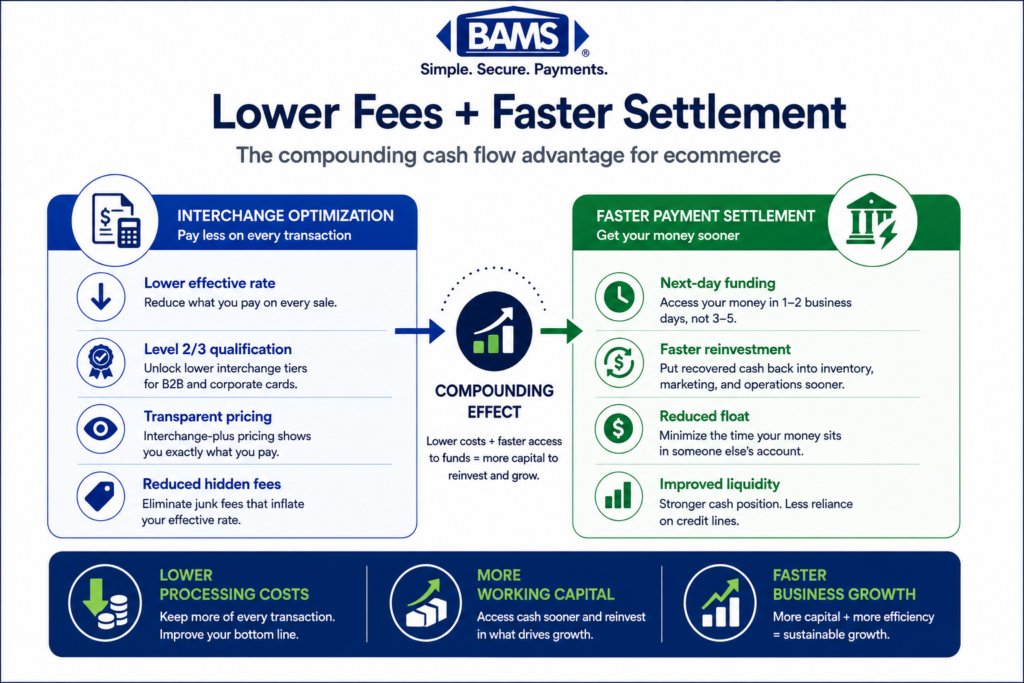
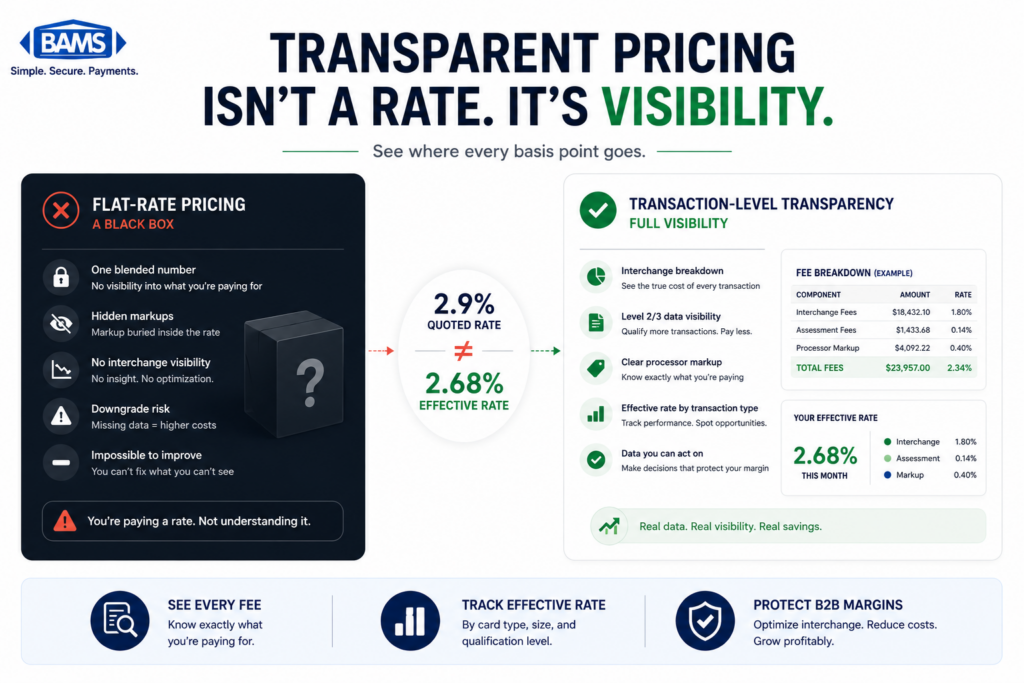
Why it matters: Blended pricing (sometimes called flat-rate or tiered pricing) bundles interchange, assessments, and processor markup into a single percentage. This makes your statement simpler to read, but it also makes it impossible to see where your money goes. Volume-based pricing tiers and interchange-plus structures exist specifically to give growing merchants visibility into each cost layer.
What it looks like today: Your statement shows one rate (say, 2.9% + $0.30) applied uniformly to all transactions, regardless of card type. A debit card transaction that should cost 0.05% + $0.22 at interchange gets priced the same as a corporate rewards card at 2.65% + $0.10. The processor pockets the difference on every low-cost transaction.
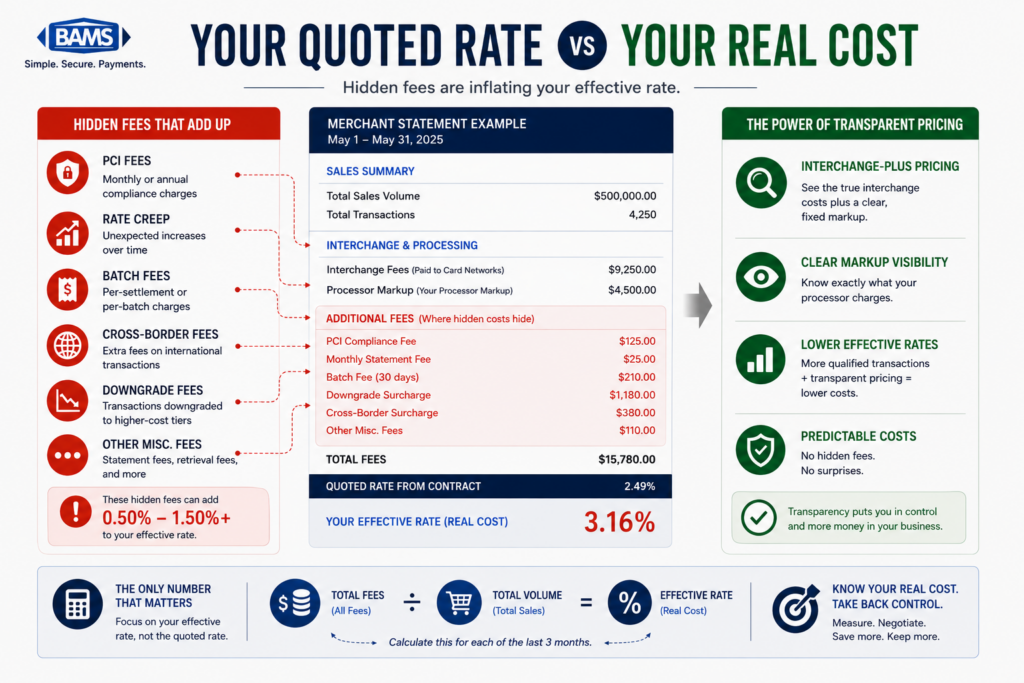
How to apply it: Calculate your effective processing rate: divide total fees by total volume. If that number is significantly higher than published interchange averages for your card mix, a blended model is costing you. Moving to interchange-plus pricing is the single most impactful structural change for mid-market B2B merchants.
4. Missing or Vague Line Items for Assessment Fees
Why it matters: Assessment fees are charged by Visa, Mastercard, and other card networks on top of interchange. They’re small (typically 0.13% to 0.15%), but they’re non-negotiable, and every processor pays them. If your statement doesn’t break them out, your processor may be bundling them into a marked-up rate and charging you more than the actual cost.
What it looks like today: Look for line items labeled “card brand fees,” “network access fees,” or “assessment fees.” If these are absent, or if they appear as a single lump sum without per-network detail, you can’t verify accuracy. Some processors also add a margin on top of assessments and label it identically.
How to apply it: Request a fee breakdown that separates interchange, assessments, and processor markup. Compare assessment charges against published card network fee schedules. Any variance above the published rate is processor markup disguised as a pass-through cost.
5. “Non-Qualified” Surcharges Without Explanation
Why it matters: In tiered pricing models, processors sort transactions into “qualified,” “mid-qualified,” and “non-qualified” buckets. The non-qualified tier carries the highest rate, and processors have wide discretion over which transactions land there. This is one of the most common hidden fees in merchant services, because the criteria for each tier are rarely disclosed.
What it looks like today: Your statement shows a growing percentage of transactions classified as non-qualified, with surcharges of 1.0% or more above your base rate. The statement provides no explanation of why those transactions were downgraded, and no indication of what data was missing.
How to apply it: If more than 20% of your transactions fall into a non-qualified tier, request the specific interchange categories driving those surcharges. In many cases, the fix is as simple as ensuring your gateway passes AVS (Address Verification Service) data or settles batches within 24 hours.
6. No Visible Savings from Commercial Card Optimization
Why it matters: If your processor claims to support Level 2/3 data optimization but your statement shows no measurable rate difference between consumer and commercial card transactions, the optimization isn’t working. A $1,000 transaction can cost $29.60 without enhanced data versus $18.60 with Level 3 data. That $11 gap, multiplied across your monthly commercial card volume, adds up fast.
What it looks like today: Your processor may have told you during onboarding that Level 2/3 is “included” or “supported.” But your statement shows commercial cards pricing at standard interchange rates (2.95% + $0.10 in common examples) instead of the optimized rates (as low as 1.90% + $0.10) that proper data qualification enables.
How to apply it: Isolate your commercial card transactions from the last three months. Compare their actual interchange rates against Visa and Mastercard’s published commercial card rate tables. If there’s no gap between your rates and the non-optimized tiers, your processor isn’t passing the enhanced data, regardless of what they claim. A partner like BAMS can run a complimentary statement analysis to identify exactly where Level 2/3 qualification is failing and quantify the savings gap.
7. Inconsistent Effective Rates Month Over Month
Why it matters: Your effective processing rate (total fees divided by total volume) should be relatively stable if your card mix and transaction sizes are consistent. Wild swings, especially upward, indicate that something is changing in how your transactions are being categorized or qualified. This is often the earliest warning sign that negotiating processing fees with your current provider is overdue.
What it looks like today: Your effective rate was 2.4% three months ago, 2.6% last month, and 2.8% this month, even though your average ticket size and card mix haven’t changed. The increase may be caused by a higher percentage of downgrades, new fees added without notification, or interchange rate increases that your processor passed through without adjusting their markup.
How to apply it: Track your effective rate monthly in a simple spreadsheet. When it rises more than 0.1% without a clear change in your business (new card types, higher average tickets, more international cards), request a line-by-line comparison from your processor. The statement analysis framework in this guide can help you structure that conversation.
The Pattern Behind These Signals
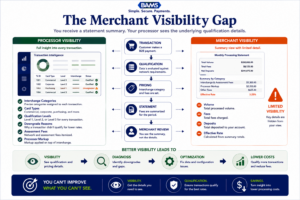
Most optimization opportunities exist because processors have more visibility into qualification data than merchants do.
All seven signals share a common root cause: information asymmetry. Your processor has full visibility into interchange categories, qualification levels, and fee structures. You see a summary. Every signal on this list exists because data that should be transparent is either missing, bundled, or obscured.
The compounding effect matters too. A merchant experiencing signals 1, 2, and 6 simultaneously (downgraded commercial cards on a blended statement with no Level 2/3 optimization) could be overpaying by 1.0% or more on every B2B transaction. B2B interchange optimization can lower costs by up to 30% when companies qualify more transactions at the correct tier. That’s not a theoretical ceiling; it’s the gap between what you’re paying and what the card networks actually charge for properly qualified transactions. Merchant Payments Coalition resources continue to highlight how interchange qualification differences and processing inefficiencies can materially increase merchant costs over time.
The second pattern: most of these fixes are data and configuration problems, not pricing problems. You don’t necessarily need a new processor. You need your current processor to pass the right data, show you the right line items, and price you on the right model.
Where to Start: Prioritizing Your Statement Audit
You don’t need to address all seven signals at once. Start with three actions that deliver the fastest clarity. First, calculate your effective processing rate for each of the last three months (signal 7). Second, check whether your statement distinguishes between interchange qualification levels (signal 2). Third, count your commercial card downgrades (signal 1).
These three steps take less than an hour and tell you whether your current setup is fundamentally sound or structurally overpaying. If you find gaps, you’ll have specific, data-backed leverage for negotiating processing fees with your provider. If you want a second opinion, BAMS offers a free statement review that maps each of these signals to dollar amounts, giving you a clear picture before any commitment.
Frequently Asked Questions
What is interchange-plus pricing and how does it work?
Interchange-plus pricing separates your processing cost into three visible layers: the interchange fee (set by card networks like Visa and Mastercard), assessment fees (also set by networks), and your processor’s markup. You see each component on your statement, which makes it possible to verify that you’re being charged correctly. This model is generally more cost-effective for B2B merchants than blended or tiered pricing because it exposes the actual interchange rate for each transaction type.
Why should businesses consider Level 2/3 optimization for B2B transactions?
Level 2 and Level 3 data includes fields like tax amount, invoice number, customer code, and line-item detail. When this data is passed with a commercial card transaction, card networks qualify it at a lower interchange rate. Without it, the same transaction prices at a higher “standard” tier. The difference can range from 0.5% to 1.05% per transaction, which on high-ticket B2B orders translates to significant annual savings.
How can companies effectively reduce their merchant service charges?
Start by calculating your effective processing rate (total fees divided by total volume) and comparing it against published interchange tables for your card mix. Look for downgrades, blended rate masking, and missing Level 2/3 qualification on your statement. These diagnostic steps often reveal correctable configuration issues that reduce costs without requiring a new processor or contract renegotiation.
When is the right time to negotiate processing fees with your merchant services provider?
The strongest time to negotiate is when you have data. After auditing your statement for the signals described above (downgrade codes, missing qualification levels, rising effective rates), you can present specific findings to your processor. This shifts the conversation from “I want lower rates” to “Here are the transactions that should qualify at lower tiers but aren’t.” That’s a much more productive negotiation.
What are common hidden fees in merchant services that businesses should watch out for?
Common hidden fees include PCI non-compliance charges, batch processing fees, statement fees, “non-qualified” surcharges with unclear criteria, and assessment fees bundled into a marked-up rate. Some processors also charge monthly minimums, early termination fees, or gateway fees that aren’t disclosed prominently during onboarding. The key is requesting a full fee schedule and comparing each line item against your actual statement.
Which payment processing model is more cost-effective for high-volume B2B transactions?
For most mid-market B2B merchants, interchange-plus pricing combined with Level 2/3 data optimization delivers the lowest effective rate. Blended or flat-rate models can be simpler, but they hide the interchange savings that B2B transactions are specifically eligible for. The higher your average ticket size and the more commercial cards you accept, the larger the gap between blended pricing and a properly optimized interchange-plus setup.