Contactless Payment Fees: Speed Up Deposits & Cut Costs
How interchange qualification and processor funding schedules shape what you pay and when you get paid
Learn how contactless payment interchange tiers, data capture practices, and processor funding schedules work together to determine your real cost per transaction and deposit speed. This guide helps ecommerce managers audit qualification gaps and reduce credit card processing fees.
TL;DR
- Interchange qualification is an important cost lever – The rate a transaction qualifies for can depend on factors such as merchant category, authorization-to-clearing timing and enhanced transaction data. Avoiding unnecessary downgrades can help reduce your effective processing cost.
- Contactless payment can lower costs, but only if configured correctly — Tokenized NFC transactions qualify for lower card-present interchange rates, but misconfigured terminals may process them at higher card-not-present tiers.
- Chargebacks compound silently — Beyond the per-dispute fee, a high chargeback ratio triggers monitoring programs, fines, and reserves that inflate your total cost of acceptance far beyond the individual dispute amount.
- Funding speed is a cash flow variable, not just a convenience — The gap between settlement and deposit creates a float cost. Next-day funding frees working capital that can be redeployed for growth.
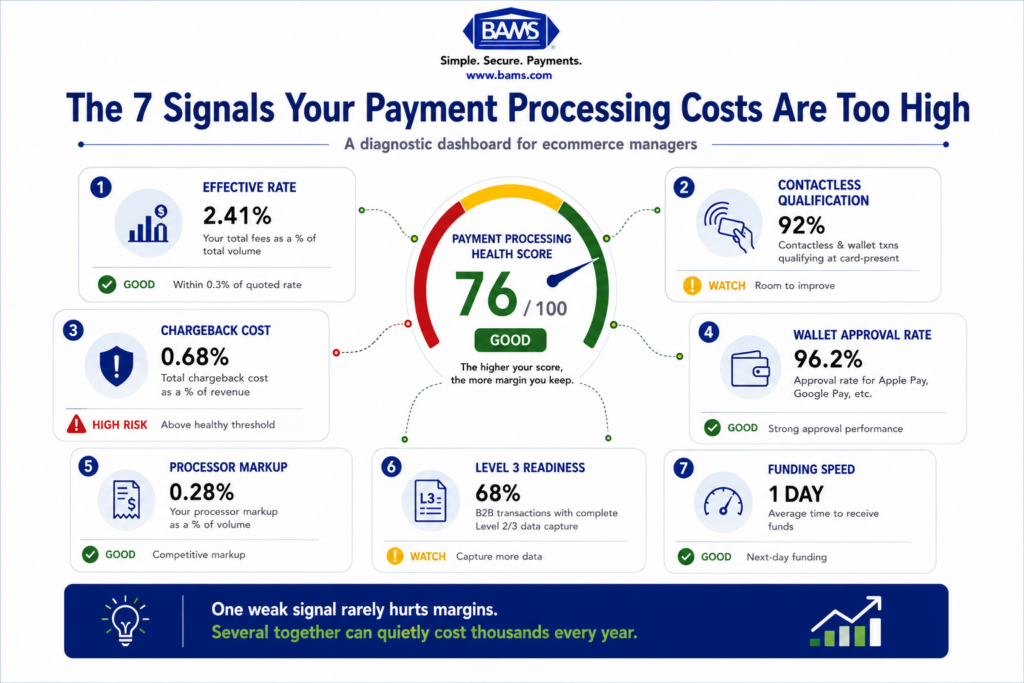
- Calculate your effective rate monthly — Divide total fees by total volume. This single metric reveals whether your interchange qualification, chargeback management, and processor relationship are actually working in your favor.
Guide Orientation: What This Guide Covers and Who It’s For
This guide connects two cost levers most ecommerce managers treat separately: interchange fees and deposit timing. You’ll learn how contactless payment qualification, data capture practices, and processor funding schedules work together to determine how much you actually pay per transaction and how fast that money reaches your bank account.
It’s written for ecommerce managers at established online businesses (10 to 50 employees) who already accept digital wallets and card payments but suspect their effective rate is higher than it should be, or that cash is sitting in limbo longer than necessary.
By the end, you’ll be able to audit your interchange qualification tier, identify where chargebacks silently inflate your credit card processing fees, and make targeted changes that convert fewer disputes into measurable savings. This guide does not cover POS hardware selection or gateway integration tutorials.
Why Interchange Fees and Funding Speed Shape Your Real Cost
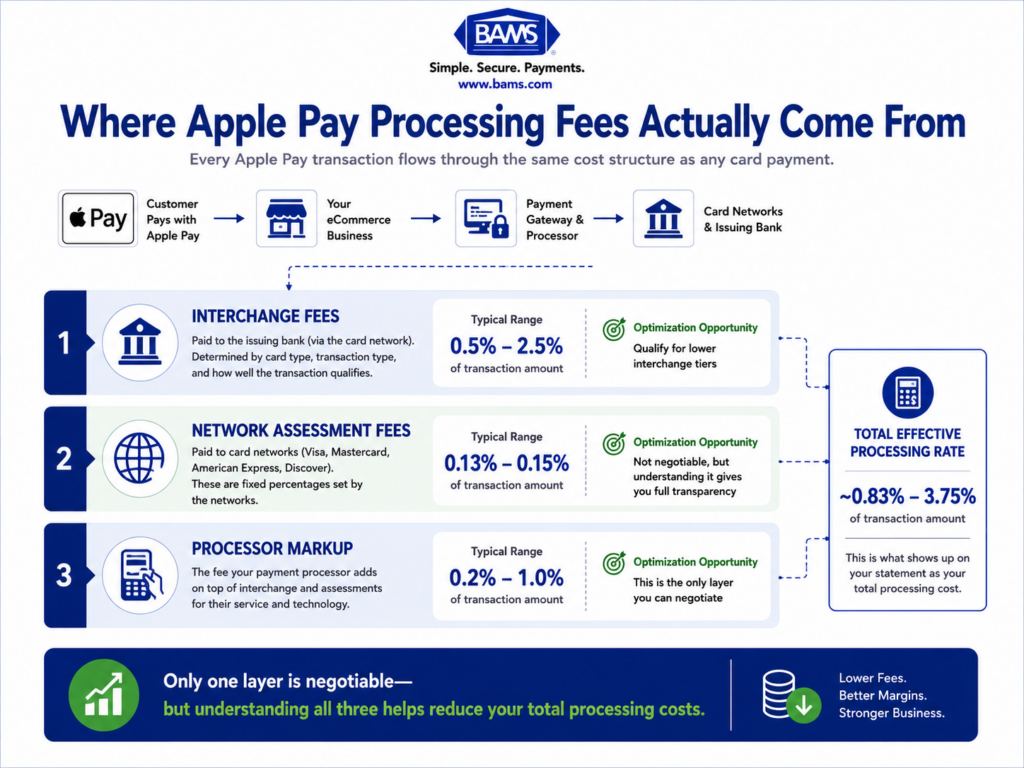
Most content about accepting Apple Pay or other contactless payment methods stops at a reassuring headline: “Apple Pay is free for merchants.” That’s technically true. Apple charges no additional fee. But the interchange, assessment, and processor markup underneath every tap still apply, and those costs vary dramatically depending on how your transactions qualify.
U.S. banks collected nearly $66 billion in interchange fees in 2025, up from $64 billion in 2024. Interchange is one of the major underlying costs in card acceptance, which makes understanding how your transactions qualify an important part of controlling your effective processing rate.
Meanwhile, the gap between when a customer pays and when you can use those funds creates a hidden carrying cost. If your processor holds funds for two or three business days, you’re effectively financing that float. Multiply that delay across thousands of monthly transactions and you have a measurable drag on working capital.
The cost of inaction compounds. Chargebacks that go uncontested don’t just cost the disputed amount. They push your dispute ratio higher, which can trigger monitoring programs, increased reserves, and even account termination. Treating chargebacks, interchange qualification, and funding speed as one connected system is what separates businesses that merely accept payments from those that optimize them.
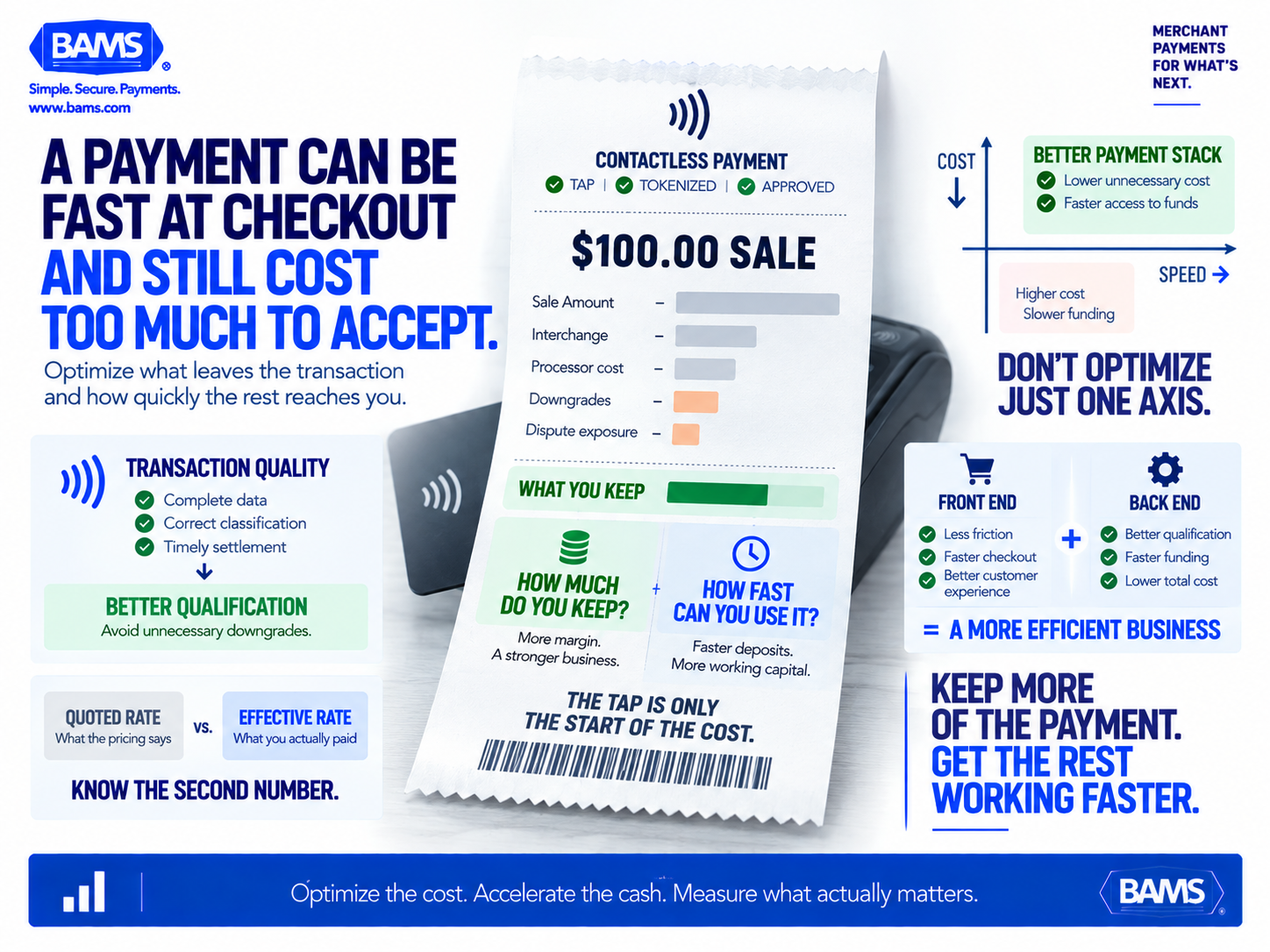
The real cost of accepting a payment is more than the processor’s quoted rate. Interchange qualification, downgrades, disputes and funding timing all influence how much value a merchant ultimately keeps and how quickly it becomes usable.
Core Concepts: The Building Blocks of Payment Cost Optimization
Interchange Tiers Are Not One Rate
Interchange is one component of the merchant discount rate associated with accepting card payments. Mastercard explains that interchange qualification can depend on factors including merchant category, the time between authorization and clearing, enhanced transaction data and transaction volume. This is why two transactions for the same dollar amount can carry different underlying acceptance costs.
Qualification vs. Downgrade
Every transaction starts at a target interchange tier. If required data fields are missing, the settlement window is too long, or authorization and capture don’t match, the transaction “downgrades” to a more expensive tier. Downgrades are the most common source of silently inflated costs. You pay more without any visible error message.
Contactless Payment and Tokenization
When a customer taps with Apple Pay or Google Pay, the transaction uses a device-specific token instead of the raw card number. This tokenization reduces fraud risk, which networks reward with slightly lower interchange rates on qualifying contactless payment transactions. The security benefit and the cost benefit are the same mechanism.
Effective Rate vs. Quoted Rate
Your quoted rate is what your processor advertises. Your effective rate is total fees divided by total volume. The gap between these two numbers reveals how much you’re losing to downgrades, hidden surcharges, and chargebacks. If you haven’t calculated your effective rate recently, these diagnostic signals can help you identify whether your credit card processing fees are inflated.
The Framework: A System for Turning Fewer Chargebacks Into Real Savings
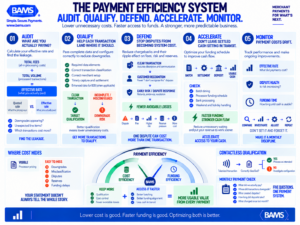
Payment efficiency comes from managing the entire system. Audit what transactions actually cost, improve qualification, reduce dispute exposure, accelerate access to settled funds and keep monitoring the results.
Payment cost optimization isn’t a single action. It’s a cycle with five interconnected stages. Each stage feeds the next, and skipping one weakens the others.
- Stage 1: Audit — Calculate your true effective rate and map where transactions downgrade.
- Stage 2: Qualify — Ensure every transaction meets the data and timing requirements for the lowest available interchange tier.
- Stage 3: Defend — Implement proactive chargeback prevention to stop disputes before they become losses.
- Stage 4: Accelerate — Align your processor’s funding schedule with your cash flow needs.
- Stage 5: Monitor — Track effective rate, chargeback ratio, and funding speed monthly to catch regressions early.
These stages are sequential for initial setup but cyclical for ongoing management. The rest of this guide walks through each one with specific actions, anti-patterns, and success indicators.
Step-by-Step Breakdown: From Audit to Ongoing Optimization
Step 1: Audit Your Effective Rate and Identify Downgrades
Objective: Know exactly what you’re paying per dollar processed, not what your contract says you should be paying.
Pull your last three monthly merchant statements. Divide total fees (interchange + assessments + processor markup + miscellaneous charges) by total processed volume. That percentage is your effective rate. Most businesses underestimate their true processing costs by 20% to 40% because they look at the quoted rate instead.
Next, look for line items labeled “non-qualified surcharge,” “mid-qualified,” or “EIRF” (Electronic Interchange Reimbursement Fee). These indicate transactions that downgraded from their target tier. Common causes include late settlement (batching out more than 24 hours after authorization), missing AVS data on card-not-present transactions, or using an incorrect merchant category code.
Anti-patterns: Don’t rely on your processor’s summary dashboard alone. Summary views often aggregate fees in ways that obscure downgrades. Request raw interchange detail if your processor doesn’t provide it automatically. Also avoid comparing your rate to industry averages without adjusting for your card mix. A business that processes mostly corporate rewards cards will naturally have a higher interchange floor than one processing regulated debit.
Success indicators: You can state your effective rate to two decimal places. You can identify which transaction categories are downgrading and estimate the dollar impact per month.
Step 2: Optimize Interchange Qualification on Every Transaction
Objective: Ensure each transaction qualifies for the lowest interchange tier available given the card type and channel.
For card-not-present (ecommerce) transactions, qualification depends heavily on data completeness. At minimum, you need to pass AVS (Address Verification Service) data, CVV, and settle within 24 hours of authorization. For B2B transactions, capturing Level 2 data (tax amount, customer code) and Level 3 data (line-item detail) can drop interchange by 0.30% to 0.60% per transaction on commercial cards.
For in-store or omnichannel businesses processing contactless payments through Apple Pay, physical contactless cards or other NFC wallets, correct transaction handling and terminal configuration still matter. Mastercard reported that contactless payments accounted for more than 75% of transactions across its network in 2025, reinforcing the importance of making sure these transactions are processed and categorized correctly.
Check that your merchant category code (MCC) accurately reflects your business. An incorrect MCC can permanently lock you out of favorable interchange tiers regardless of how clean your data is.
Anti-patterns: Don’t assume your payment gateway automatically passes all required data fields. Many default configurations omit Level 2 and Level 3 fields. Also, don’t batch settle once a day “when you remember.” Automate settlement to run within hours of authorization close.
Success indicators: Your downgrade rate drops below 5% of total transactions. Your effective rate decreases by at least 0.10% to 0.25% within 60 days.
Step 3: Build a Proactive Chargeback Defense System
Objective: Reduce chargebacks to below 0.5% of transactions and prevent the cascading costs that disputes create.
Chargebacks cost more than the disputed transaction amount. Each one carries a fee ($20 to $100 depending on your processor), consumes staff time, and raises your dispute ratio. Once your ratio crosses the network threshold (typically 1% for Visa, 1.5% for Mastercard), you enter a monitoring program with additional fines and potential account restrictions.
The most effective chargeback defense happens before the dispute is filed. Use order confirmation emails with clear merchant descriptors so customers recognize the charge. Enable real-time fraud screening that flags high-risk orders for manual review instead of auto-declining them. Implement Visa’s Compelling Evidence 3.0 framework, which allows you to submit prior transaction history to automatically reverse certain fraud disputes.
For a detailed comparison of how chargeback costs stack up against interchange, this breakdown of chargeback fees versus interchange fees provides a decision framework for which to prioritize based on your dispute rate and volume.
Merchants working with BAMS get proactive chargeback defense built into their account management, which means disputes are flagged and responded to before they escalate. This is particularly valuable for ecommerce managers who don’t have a dedicated payments team.
Anti-patterns: Don’t ignore chargebacks because each individual one seems small. The compounding effect on your dispute ratio and processor relationship is the real danger. Don’t use generic merchant descriptors that customers won’t recognize on their statements.
Success indicators: Your chargeback ratio stays below 0.5%. You respond to 100% of disputes within the network’s deadline. Your chargeback-related fees decrease month over month.
Step 4: Accelerate Funding Without Sacrificing Cost Control
Objective: Get settled funds into your operating account within one business day of batch settlement.
Funding speed is determined by three factors: when you batch settle, your processor’s funding schedule, and your bank’s deposit processing window. Most processors offer standard two-day funding. Some offer next-day or same-day funding, sometimes at a premium, sometimes as a standard feature depending on your risk profile and volume.
The cash flow impact is real. If you process $500,000 per month and your funds are delayed by two days instead of one, you’re floating roughly $33,000 at any given time. That’s capital you can’t deploy for inventory, payroll, or marketing.
To maximize funding speed, batch settle early in the day (before your processor’s cutoff, typically 4 PM to 6 PM ET). Ensure your bank account is set up for ACH same-day processing. And choose a processor whose funding schedule aligns with your operational needs. BAMS, for example, offers next-day funding as a standard feature for qualifying merchants, eliminating the float penalty that most processors impose.
Anti-patterns: Don’t pay a premium for faster funding without first calculating whether the float cost justifies the fee. For a business processing $50,000/month, the difference between one-day and two-day funding may be negligible. For $500,000/month, it’s significant. Also avoid processors that advertise fast funding but impose rolling reserves that effectively delay access to 5% to 10% of your volume anyway.
Success indicators: Funds from yesterday’s batch appear in your account by the next business morning. Your rolling reserve (if any) is less than 3% of monthly volume.
Step 5: Monitor, Benchmark, and Adjust Monthly
Objective: Catch cost regressions within 30 days and continuously improve your effective rate.
Payment costs drift. Card networks update interchange schedules twice a year (typically April and October). Your customer card mix shifts as you acquire new segments. Processor markups can change with contract renewals. Without monthly monitoring, optimizations you implemented six months ago may have already eroded.
Build a simple monthly dashboard tracking three metrics: effective rate (total fees / total volume), chargeback ratio (disputes / total transactions), and average funding delay (hours from batch to deposit). Compare each metric to the prior month and to your 90-day rolling average.
When your effective rate rises by more than 0.05% without a corresponding change in card mix, investigate. Common culprits include a gateway update that stopped passing Level 2 data, a new product category triggering a different MCC, or a processor quietly adding a new line-item fee.
Mastercard notes that interchange is only one component of the merchant discount rate and that different qualification criteria can affect the rate applied to a transaction. If your effective rate rises without a corresponding change in card mix or transaction profile, review your interchange qualification, processor markup and additional account fees.
Anti-patterns: Don’t set and forget. The most common failure mode in payment optimization is treating it as a one-time project rather than an ongoing discipline. Don’t ignore small rate increases because they seem trivial. A 0.10% increase on $1 million in annual volume is $1,000 in pure margin loss.
Success indicators: You review your three core metrics every month. Your effective rate trends downward or holds steady over each quarter. You can explain any month-over-month variance.
Practical Examples: Seeing the System in Action
Scenario A: The Ecommerce Brand Losing Money on B2B Orders
A specialty food distributor sells both direct-to-consumer and to restaurants (B2B). Their effective rate was 3.2%. After auditing, they discovered that B2B orders processed on corporate purchasing cards were downgrading because their gateway wasn’t passing Level 2 or Level 3 data. After enabling those fields, their effective rate on B2B transactions dropped from 2.95% to 2.40%, saving approximately $6,600 annually on $1.2 million in B2B volume.
Scenario B: The Retailer With a Hidden Chargeback Problem
An omnichannel apparel brand processed 70% of in-store transactions via contactless payment (Apple Pay and Google Pay). Their interchange on those transactions was competitive. But their ecommerce channel had a 1.3% chargeback ratio, which triggered Visa’s dispute monitoring program. The resulting fines and increased scrutiny added $14,000 in annual costs. By implementing better order confirmation emails, clearer billing descriptors, and a pre-dispute alert service, they reduced their ratio to 0.4% within four months, eliminating the monitoring program fees entirely.
Scenario C: The Float That Nobody Measured
A home goods ecommerce store processing $800,000/month was on a three-day funding schedule. They assumed this was standard. After switching to a processor offering next-day funding, they freed up approximately $80,000 in working capital that had been perpetually in transit. They used that capital to take advantage of early-payment discounts from suppliers, saving an additional 2% on inventory costs.
Common Mistakes and Pitfalls in Reducing Credit Card Processing Fees
The most predictable failure is focusing exclusively on the processor’s markup while ignoring interchange qualification. Markup is negotiable, but interchange is the larger cost component. Reducing downgrades often saves more than renegotiating markup by a few basis points.
Another common mistake is treating chargebacks as a customer service problem rather than a financial one. Every uncontested dispute is a direct hit to margin, and the ratio effects compound over time. Even businesses with low dispute volumes should have a documented response process.
Many ecommerce managers also overlook the interaction between funding speed and cost. Faster funding isn’t just a convenience feature. It’s a cash flow decision that affects your ability to reinvest, meet payroll, and manage seasonal inventory swings. Evaluate funding as a financial variable, not a nice-to-have.
Finally, don’t assume that accepting contactless payment or digital wallets automatically means lower costs. The cost benefit depends on correct terminal configuration, proper transaction flagging, and your specific card mix. Verify, don’t assume.
What to Do Next
Start with the audit. Pull your last three merchant statements and calculate your effective rate. That single number will tell you whether your current setup is competitive or quietly draining margin.
If your effective rate is above 2.8% and you’re not processing primarily high-reward or corporate cards, there’s likely room to improve through better interchange qualification alone. If your chargeback ratio is above 0.5%, address that before optimizing anything else, because the compounding costs of disputes will overwhelm savings from rate optimization.
Treat this guide as a reference you revisit quarterly, especially after network interchange updates in April and October. Payment optimization is incremental. Small, consistent improvements in qualification, dispute prevention, and funding speed compound into meaningful annual savings. The businesses that win at payments aren’t the ones that found a single hack. They’re the ones that built a system.
Frequently Asked Questions
What fees do merchants actually pay when accepting Apple Pay?
Apple charges merchants nothing for Apple Pay acceptance. However, the standard interchange fees, network assessment fees, and processor markup still apply to every transaction. The total cost depends on the card type the customer loaded into Apple Pay, your merchant category code, and how the transaction qualifies at the interchange level. Because Apple Pay uses tokenization, qualifying transactions may receive slightly lower interchange rates compared to manually keyed card-not-present transactions.
How does contactless payment affect interchange rates?
Contactless payment via NFC (Apple Pay, Google Pay, physical tap cards) typically qualifies at card-present interchange rates, which are lower than card-not-present rates. This is because tokenized, device-authenticated transactions carry lower fraud risk. However, this benefit only applies if your terminal and gateway correctly flag the transaction as card-present and contactless. Misconfigured systems may process these at higher card-not-present tiers, negating the cost advantage.
Why do some transactions cost more than others even with the same processor?
Interchange rates vary by card type (debit, credit, rewards, corporate), merchant category, transaction channel (in-store, online, phone), and data completeness. A consumer debit card might incur interchange of 0.80%, while a corporate rewards card on the same transaction could cost 2.95%. When required data fields are missing or settlement is delayed, transactions “downgrade” to even more expensive tiers. This is why two transactions for the same dollar amount can have very different processing costs.
How can reducing chargebacks lower my overall processing costs?
Chargebacks carry direct fees ($20 to $100 each), but the indirect costs are larger. A high dispute ratio can trigger network monitoring programs with additional monthly fines, increased processor reserves, and even account termination. Reducing chargebacks keeps your dispute ratio low, avoids these penalties, and preserves your negotiating position with processors. Fewer disputes also mean less staff time spent on responses and less revenue permanently lost to uncontested claims.
What is the difference between effective rate and quoted rate?
Your quoted rate is the percentage your processor advertises or includes in your contract (e.g., “interchange plus 0.20%”). Your effective rate is what you actually pay: total fees divided by total processed volume. The gap between these two numbers reflects downgrades, miscellaneous fees, PCI compliance charges, and other costs that don’t appear in the headline rate. Calculating your effective rate monthly is the single most important diagnostic step in payment cost management.
How much does funding speed actually matter for ecommerce businesses?
It depends on your volume. For a business processing $100,000/month, a one-day delay in funding means roughly $3,300 is perpetually in transit. At $500,000/month, that number rises to $16,500 or more. This isn’t a fee you see on a statement, but it’s real capital you can’t use for inventory, marketing, or payroll. Businesses with tight margins, seasonal demand, or supplier early-payment discounts benefit most from next-day funding.