Peak Season Planning: Prevent Processor Holds
Last Updated on October 14, 2026 by Dimitri Akhrin
A step-by-step guide to pre-season processor communication, volume forecasting, and cost control for eCommerce teams
Learn how to prevent costly processor holds and fee spikes before peak season hits. This guide gives eCommerce managers a concrete playbook for volume forecasting, proactive processor communication, and margin protection during high-volume months.
TL;DR
- Processor holds are preventable, not inevitable – They’re triggered by volume spikes that exceed your approved account thresholds. A single pre-season conversation with your processor can eliminate the most common and costly peak-season disruption.
- Start your peak-season prep 60 to 90 days out – Audit your current processing profile, build a week-by-week volume forecast, and formally request adjusted volume caps from your processor’s underwriting team before the rush begins.
- Small rate inefficiencies compound at peak volume – A 0.15% pricing gap costs $75 on $50K in monthly volume but $300 or more when volume triples. Confirm you’re on interchange-plus pricing and optimize fraud screening before transactions multiply.
- Cash flow timing matters more than rate savings – A 3-day deposit delay during your highest-spending period can force short-term borrowing. Next-day funding and confirmed reserve release schedules keep capital accessible when you need it most.
- Peak season costs extend into Q1 – Chargebacks from holiday purchases arrive 30 to 90 days later. Archive delivery confirmations, document your chargeback response process, and budget for Q1 processing costs based on Q4 volume.
Guide Orientation: What This Covers and Who It’s For
This guide addresses a specific, costly problem: the processing cost spikes and account holds that hit eCommerce businesses during peak season. If you manage payments for an established online store doing meaningful volume, you already know that November and December bring a revenue surge. What catches most teams off guard is how that surge triggers risk flags, delayed deposits, and reserve requirements from their processor.
This is written for eCommerce managers at businesses with 10 to 50 employees who have been through at least one peak season and felt the sting of delayed funds or unexpected fees. By the end, you’ll have a concrete, step-by-step playbook for pre-season communication with your processor, volume forecasting that prevents holds, and cost reduction strategies that protect your margins when transaction counts climb.
What this guide does not cover: enterprise-level payment orchestration, multi-gateway routing architectures, or generic checkout optimization tips. The focus here is operational: how to keep your processing costs predictable and your cash flowing during the exact weeks your business needs it most.
Why Peak Season Planning for Merchant Services Matters Now
Seasonal transaction volume can move significantly above normal operating levels, which is why peak planning should start with your own historical sales patterns rather than a universal holiday multiplier. NetSuite’s demand-planning documentation incorporates historical demand, seasonal trends and forward sales forecasts when projecting future needs. A meaningful change in transaction volume doesn’t just stress your warehouse and support team. It can also change how your payment activity looks to your processor’s risk team.
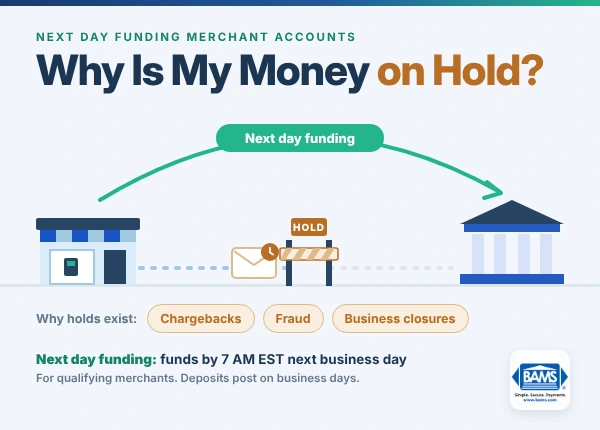
Here’s what most eCommerce managers don’t realize: processors use automated risk models that flag sudden volume increases as potential fraud or business instability. When your transaction count doubles in a week without prior notice, those systems can trigger rolling reserves (where the processor withholds a percentage of your deposits), funding holds (where deposits are delayed by days or weeks), or outright account freezes. This happens at the worst possible time, when you need capital to restock inventory, pay seasonal staff, and fund advertising.
The financial risk extends well beyond staffing and fulfillment. OCC merchant-processing guidance recognizes holdbacks as reserves against future exposure or existing chargebacks, and risk controls can also affect the timing of merchant settlement. During a period when inventory, advertising and staffing costs are already elevated, unexpected restrictions on available funds can create a serious cash flow problem.
The good news: nearly all of this is preventable. Processor holds don’t appear out of nowhere. They’re triggered by volume spikes your account team never saw coming. The fix is proactive communication and structured preparation, not reactive scrambling after the damage is done.
Peak-season volume is not the problem by itself. The risk comes when your processor sees a sudden spike it was never prepared for.
Core Concepts: Understanding What Drives Seasonal Cost Spikes
How Processor Risk Models Work Against You
Payment processors assign every merchant account a risk profile based on historical transaction data. This profile includes your average monthly volume, average ticket size, chargeback ratio, and industry classification. When your actual activity deviates significantly from this profile, automated systems flag the account for review. During peak season, a sudden doubling of volume looks identical to a compromised account or fraudulent activity from the processor’s perspective.
The Difference Between Rate Increases and Cost Spikes
Processing cost spikes during peak season rarely come from your processor raising rates. Instead, they come from three sources most merchants overlook. First, interchange category downgrades: when transaction volume overwhelms your fraud screening or causes authorization issues, transactions settle at higher interchange tiers. Second, reserve holds: funds withheld by the processor that effectively become an interest-free loan from your business. Third, chargeback fees that spike 4 to 6 weeks after peak season when customers dispute holiday purchases.
The Cash Flow Timing Problem
Standard processing timelines mean deposits arrive 2 to 3 business days after a sale. During peak season, when you’re spending aggressively on inventory and ads, that 2 to 3 day gap becomes a cash flow chasm. If your processor adds a hold or reserve on top of that standard delay, you can find yourself sitting on record sales with no accessible capital. This is the specific problem that next-day funding solves, and it’s the reason timing matters as much as rates.
What a Seasonal Volume Playbook Actually Is
A seasonal volume playbook is a documented plan you share with your processor before peak season. It includes projected transaction volumes by week, expected changes in average ticket size, planned promotional events (flash sales, product launches), and any anticipated geographic or channel shifts. This document gives your processor’s risk team the context they need to approve higher volume thresholds without triggering automated holds.
The Framework: From Reactive Surprise to Proactive Clearance
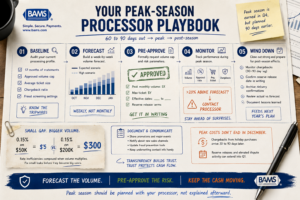
Peak-season processor risk becomes much easier to manage when your expected volume, ticket size and promotions are documented before the surge begins.
The method for reducing seasonal processing costs follows a five-phase cycle. Each phase builds on the previous one, and the entire cycle should begin 60 to 90 days before your first peak-season promotional event.
Phase 1: Baseline Audit. Establish your current processing profile, including rates, volume thresholds, and contract terms. Phase 2: Volume Forecasting. Build data-driven projections for peak season transaction volume and ticket size. Phase 3: Pre-Season Communication. Formally notify your processor and negotiate adjusted thresholds. Phase 4: In-Season Monitoring. Track actual volume against projections and address deviations in real time. Phase 5: Post-Season Review. Analyze costs, chargebacks, and holds to refine next year’s playbook.
These phases are sequential but cyclical. Each post-season review feeds directly into next year’s baseline audit. The businesses that execute this cycle consistently are the ones that stop getting surprised by holds and start treating peak season processing as a predictable, manageable cost.
Step-by-Step Breakdown: Your Seasonal Business Challenges Playbook
Step 1: Conduct a Baseline Processing Audit (60-90 Days Before Peak)
Objective: Establish a clear picture of your current processing profile so you know exactly what your processor expects from your account.
Start by pulling your monthly processing statements from the past 12 months. Document your average monthly transaction count, average ticket size, total monthly volume in dollars, and your current chargeback ratio. Then review your merchant agreement for two critical numbers: your approved monthly volume cap and your approved maximum ticket size. These are the thresholds that, when exceeded, trigger risk reviews.
Most eCommerce managers have never checked these numbers. They were set during onboarding, often based on projections that are now outdated. If your business has grown 30% since you signed your agreement but your approved volume cap hasn’t changed, you’re walking into peak season with a tripwire already set.
While you’re reviewing statements, check your effective rate (total fees divided by total volume) for each month. Look for months where the effective rate spiked. These spikes often indicate interchange downgrades or hidden fees that will compound during high-volume periods.
Anti-patterns: Don’t skip this step because you “know” your rates. The rate on your contract and the rate you actually pay are often different, especially if you’re on a tiered pricing model. Don’t rely on your processor to proactively tell you about volume caps.
Success indicators: You can state your approved monthly volume cap, your current effective rate, and your chargeback ratio from memory. You have a spreadsheet comparing all 12 months of processing data.
Step 2: Build a Data-Driven Volume Forecast
Objective: Create a week-by-week projection of peak season transaction volume that your processor’s risk team can use to pre-approve higher thresholds.
Transaction volume forecasting for seasonal planning doesn’t need to be complicated, but it does need to be specific. Start with last year’s peak season data as your baseline. Then layer in three adjustment factors: year-over-year growth rate (use the average of the last two years if possible), planned promotional events that didn’t exist last year (new product launches, expanded ad spend, influencer campaigns), and any channel expansions (new marketplace listings, international shipping).
Use your own historical transaction data as the primary baseline, then adjust it for known changes in promotions, customer acquisition and sales channels. NetSuite supports demand planning based on historical demand, seasonal patterns and forward-looking sales forecasts. These inputs give you a stronger basis for peak projections than applying a single industry-wide percentage to every business.
Break your forecast into weekly increments, not monthly. Processors care about velocity (how fast volume ramps), not just total volume. A gradual 3x increase over six weeks is very different from a sudden 3x spike in a single week around Black Friday. Your forecast should show both the peak number and the ramp pattern.
Anti-patterns: Don’t build your forecast on hope. If you’re planning a major promotion you’ve never run before, model both an optimistic and conservative scenario. Don’t stop the forecast on December 31. Post-season returns, disputes and other transaction activity can continue affecting your payment operations after holiday sales slow down.
Success indicators: You have a week-by-week volume projection for October through January. You can explain the assumptions behind each number. You’ve modeled at least two scenarios (expected and high).
Step 3: Initiate Pre-Season Communication With Your Processor
Objective: Get your processor’s risk and underwriting team to formally acknowledge and approve your projected peak season volume before the first transaction hits.
This is the step that prevents holds. It’s also the step most eCommerce businesses skip entirely. Pre-season communication with your processor is not a casual heads-up. It’s a formal request to adjust your account parameters. You need to send your volume forecast (from Step 2) to your account representative with a specific ask: “Please adjust our approved monthly volume cap to $X for the months of November and December, and our approved maximum single-transaction amount to $Y.”
If your processor doesn’t have a dedicated account manager assigned to your business, this is where the process breaks down. Submitting a volume increase request through a generic support ticket or call center means it may not reach the underwriting team in time, or at all. This is one of the concrete advantages of working with a processor that provides dedicated account management. BAMS, for example, assigns dedicated account managers who handle these pre-season adjustments directly with their underwriting team, turning what would be a multi-week back-and-forth into a single conversation.
In your communication, include: your current approved volume, your projected peak volume by week, the business rationale (promotional calendar, historical growth), and any supporting documentation (prior year sales data, marketing spend plans). The more context you provide, the less likely the risk team is to default to conservative limits.
Anti-patterns: Don’t wait until November to make this call. Underwriting reviews take time, and peak season is when every merchant on the processor’s platform is making the same request. Don’t assume verbal confirmation is sufficient. Get the adjusted volume cap in writing, ideally as an amendment or formal email confirmation.
Success indicators: You have written confirmation from your processor that your approved monthly volume cap has been adjusted for peak season. You know the name of the person who approved it.
Step 4: Optimize Your Rate Structure Before Volume Multiplies
Objective: Ensure your processing rate structure is optimized so that cost inefficiencies don’t compound when transaction volume doubles or triples.
A 0.15% rate inefficiency on $50,000 in monthly volume costs you $75. That same inefficiency on $200,000 in peak-season volume costs you $300. Small rate problems become big cost problems at scale. Before peak season, review three specific areas.
First, confirm you’re on interchange-plus pricing rather than tiered or flat-rate pricing. Interchange-plus passes through the actual card network cost and adds a fixed markup. Tiered pricing bundles transactions into categories with opaque markups that tend to push more transactions into the most expensive tier during high-volume periods. If you’re not sure what your merchant services provider is charging you and why, that’s a problem to solve before peak season, not during it.
Second, review your fraud screening thresholds. Overly aggressive fraud filters decline legitimate transactions, which costs you sales. Overly permissive filters let fraudulent transactions through, which costs you chargebacks 30 to 60 days later. Adjust your payment authentication flow based on your peak-season customer profile (more new customers, more gift purchases, more mobile transactions).
Third, if you accept American Express, confirm you’re enrolled in the Amex OptBlue program, which routes Amex transactions through your existing processor at lower rates than a standalone Amex merchant agreement.
Anti-patterns: Don’t switch processors in September for a November peak season. Migration issues during your highest-volume period create more risk than the rate savings justify. Don’t ignore card-not-present surcharges that apply specifically to eCommerce transactions.
Success indicators: You can identify your pricing model by name. You’ve reviewed and adjusted fraud screening thresholds. You’ve confirmed your Amex routing and any card-brand-specific programs.
Step 5: Implement In-Season Monitoring and Rapid Response
Objective: Track actual volume against your forecast in real time so you can address deviations before they trigger processor intervention.
Once peak season begins, your forecast becomes a living document. Set up a simple daily tracking process: compare actual daily transaction count and dollar volume against your weekly projection. If you’re running more than 20% above your forecast in any given week, contact your account manager immediately to request a further threshold adjustment. Don’t wait for the processor to notice the discrepancy.
Monitor three real-time analytics indicators daily during peak season. First, authorization decline rate: if this spikes, it may indicate your processor is throttling approvals due to volume concerns, or that your fraud filters are catching too many legitimate orders. Second, average ticket size: a sudden increase (common during gift-buying season) can trigger risk flags independent of transaction count. Third, chargeback notifications: these are leading indicators of post-season cost spikes.
Visa’s current Visa Acquirer Monitoring Program monitors fraud and dispute activity at both the acquirer and merchant levels. During peak season, tracking these indicators alongside transaction volume gives you a clearer picture of whether growth is creating additional payment risk. Proactive communication also gives your processor context when your activity moves materially above its normal pattern.
Anti-patterns: Don’t set up monitoring and then ignore it during the busiest weeks. Assign a specific person on your team to own this daily check. Don’t treat authorization declines as a “payment team problem” while your marketing team keeps driving traffic. Cross-functional team collaboration between marketing, operations, and finance is essential during peak season.
Success indicators: You have a daily tracking spreadsheet or dashboard. You know your authorization approval rate within 24 hours. You’ve established a communication protocol with your processor for mid-season adjustments.
Step 6: Manage Post-Season Chargeback and Reserve Wind-Down
Objective: Prevent the post-peak chargeback wave from eroding your Q4 profits and triggering processor penalties in Q1.
Peak season doesn’t end on December 31. Disputes associated with peak-season transactions can continue affecting your payment operations after sales volume returns to normal. Visa’s current monitoring framework evaluates fraud and disputes on an ongoing basis at both the acquirer and merchant levels, which makes continued post-season monitoring important even after the sales surge has ended.
Prepare for this by tightening your order confirmation and shipping notification processes during peak season. Clear communication about delivery timelines, return policies, and product descriptions reduces “item not as described” and “item not received” disputes. Archive all tracking numbers and delivery confirmations. These become your evidence in chargeback representment.
If your processor placed a rolling reserve on your account during peak season, confirm the release schedule in writing. Some processors hold reserves for 90 to 180 days after the volume spike ends. Knowing the exact release date lets you plan your Q1 cash flow accurately. If the reserve seems excessive relative to your actual chargeback ratio, negotiate. This is another area where having a dedicated account manager (rather than a call center queue) makes a material difference.
Anti-patterns: Don’t assume chargebacks will match your normal ratio. New customers acquired during peak season dispute at higher rates than returning customers. Don’t ignore reserve holds because the amount seems small. Those funds compound when held for months.
Success indicators: You have a chargeback response process documented before peak season begins. You know your reserve release date. You’ve archived delivery confirmation data for every peak-season order.
Practical Examples: How This Plays Out in Real Scenarios
Scenario A: The Blindsided Growth Brand
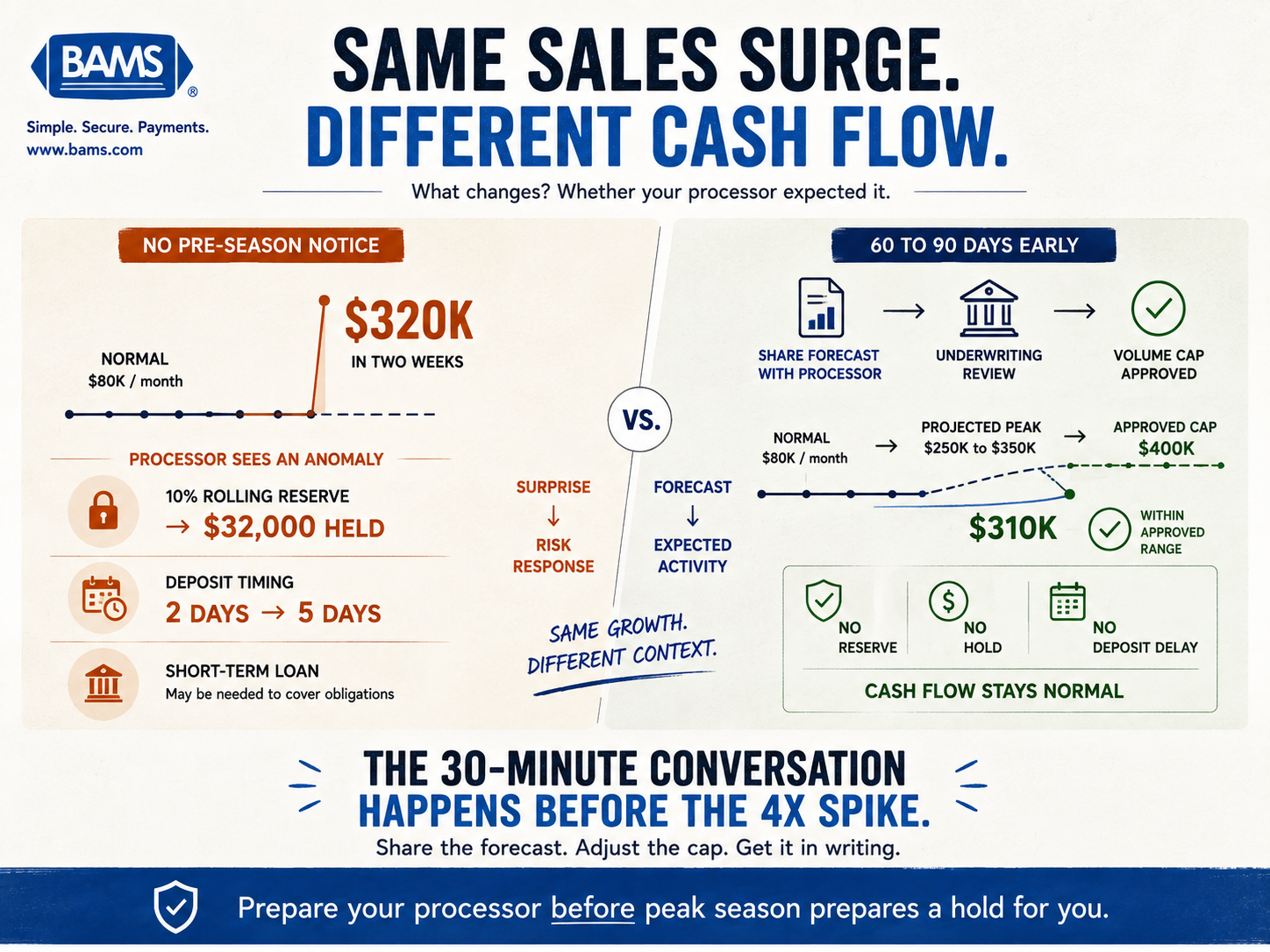
An eCommerce brand averaging $80,000 per month in processing volume runs a successful influencer campaign in November. Volume jumps to $320,000 in the first two weeks. Their processor’s risk system flags the 4x increase. A rolling reserve of 10% is placed on all transactions, and deposit timing shifts from 2 days to 5 days. The brand now has $32,000 held in reserve and an additional 3-day delay on all deposits, right when they need to reorder inventory for the December push. By the time the reserve is released in March, the brand has already taken on a short-term loan to cover the gap.
Scenario B: The Prepared Operator
A similar brand averaging $80,000 per month contacts their processor in September with a forecast showing projected volume of $250,000 to $350,000 in November based on planned promotions and prior-year growth. The processor’s underwriting team reviews the forecast, adjusts the approved volume cap to $400,000, and notes the account for expedited review if volume exceeds that threshold. When November volume hits $310,000, the system recognizes it as within approved parameters. No reserve, no hold, no deposit delay. The brand’s cash flow operates normally through the entire peak period.
The difference between these two scenarios isn’t luck or size. It’s a 30-minute phone call in September and a one-page forecast document. That’s the entire intervention.
Common Mistakes and Pitfalls
Treating your processor as a utility instead of a partner. Electricity doesn’t care about your business plan. Your payment processor does, because your risk profile directly affects their exposure. The merchants who communicate proactively get better treatment during volume spikes. The ones who don’t get automated risk responses.
Optimizing rates but ignoring timing. Saving 0.10% on your processing rate means nothing if your deposits are held for an extra 3 days during the week you need to restock. Cash flow timing is often more valuable than rate reduction during peak season.
Forgetting the post-season tail. Peak season costs don’t end when sales slow down. Chargebacks, reserve holds, and interchange adjustments continue arriving for months. Budget for Q1 processing costs based on Q4 volume, not Q1 volume.
Making changes too late. Switching processors, renegotiating rates, or requesting volume cap increases in October for a November peak is risky. Start 60 to 90 days out. Underwriting teams move slowly, and migration issues during peak season can be catastrophic.
What to Do Next
Start with Step 1. Pull your last 12 months of processing statements this week. Find your approved volume cap and compare it to your projected peak-season volume. If there’s a gap, you now know exactly what conversation to have with your processor and when to have it.
You don’t need to execute all six steps simultaneously. The highest-leverage action is Step 3: the pre-season conversation with your processor. If you do nothing else from this guide, that single step will prevent the most common and most expensive peak-season processing problem.
Save this guide and revisit it after peak season ends. Your post-season data (actual volume vs. forecast, chargeback rates, reserve amounts) becomes the foundation for next year’s playbook. Each cycle gets more precise, and each peak season becomes more predictable. That’s the goal: turning your highest-revenue period from a cash flow gamble into a planned, managed operation.
Frequently Asked Questions
What is a seasonal volume playbook in merchant services optimization?
A seasonal volume playbook is a documented plan you share with your payment processor before peak season. It includes week-by-week transaction volume projections, expected average ticket sizes, a promotional event calendar, and any planned channel expansions. The purpose is to give your processor’s risk and underwriting team enough context to pre-approve higher volume thresholds, preventing automated holds or reserves from being triggered during your busiest selling period.
When should businesses review their payment processing setup before peak seasons?
Start 60 to 90 days before your first peak-season promotional event. For most eCommerce businesses targeting the holiday season, that means beginning your audit and processor communication in August or early September. Underwriting reviews take time, and waiting until October or November puts you at risk of not getting adjusted thresholds approved before volume spikes begin.
Why do payment processors place holds on accounts during peak season?
Processors use automated risk models that flag sudden volume increases as potential fraud or business instability. When your transaction count or dollar volume significantly exceeds your approved monthly cap without prior notice, the system treats it as an anomaly. The processor may respond with rolling reserves (withholding a percentage of deposits), funding delays, or account freezes. These are risk management responses, not punitive actions, and they’re almost entirely preventable through pre-season communication.
How can businesses use data to forecast transaction volume for seasonal planning?
Start with last year’s peak-season data as your baseline. Then adjust for three factors: your year-over-year growth rate (average the last two years if possible), any new promotional events or marketing campaigns planned for this year, and channel expansions like new marketplace listings or international shipping. Break your forecast into weekly increments rather than monthly totals, since processors care about how fast volume ramps, not just the total number.
What’s the difference between a rate increase and a processing cost spike?
Rate increases come from your processor raising their markup. Cost spikes during peak season typically come from three other sources: interchange category downgrades (where transactions settle at higher card network rates due to authorization or data issues), reserve holds (where the processor withholds funds from your deposits), and post-season chargeback fees that arrive 30 to 90 days after holiday purchases. You can have the same rate and still see dramatically higher costs.
How does next-day funding help during peak season specifically?
Standard processing deposits arrive 2 to 3 business days after a sale. During peak season, when you’re spending heavily on inventory, advertising, and seasonal staff, that delay creates a cash flow gap. If your processor adds a hold or reserve on top of the standard delay, the gap widens further. Next-day funding compresses the deposit timeline so you have access to revenue within one business day, giving you the working capital to reinvest during your highest-demand period without taking on debt.