7 Signals You’re Overpaying on Level 2 Processing
Last Updated on May 28, 2026 by Dimitri Akhrin
How to read your processing statement like a diagnostic tool and stop losing interchange savings
Learn to spot seven hidden signals on your processing statement that reveal missed Level 2 processing savings. Each sign points to data qualification gaps costing eCommerce merchants thousands in avoidable interchange fees.
TL;DR
- Your processing statement summarizes costs but hides causes – It won’t tell you that missing data fields are pushing your commercial card transactions to higher interchange tiers.
- Commercial cards in your transaction mix mean savings potential – Even 10% to 15% commercial card volume justifies investigating Level 2 and Level 3 data optimization, which can save 0.50% to 0.80% per transaction.
- The data you need already exists in your eCommerce platform – Tax amounts, line items, and PO numbers are captured at checkout. The problem is that this data often isn’t being forwarded to your payment gateway.
- Visa’s legacy Level 2 program is gone – Level 3 data (via the CEDP program) is now the primary path to interchange savings on Visa commercial cards.
- Start with three free actions – Request a BIN analysis, confirm you’re on interchange-plus pricing, and audit your tax field transmission. These will tell you within a week if you have a real savings opportunity.
Your Processing Statement Has Blind Spots
You review your processing statement every month. You check the totals, glance at the effective rate, and move on. But that statement is designed to summarize, not diagnose. It tells you what you paid. It rarely tells you why you paid it.
For eCommerce merchants processing a mix of consumer and commercial card transactions, the gap between what your statement shows and what’s actually happening at the interchange level can cost you thousands annually. The culprit is often data qualification: your transactions are settling at a higher interchange tier because the right data fields aren’t being passed to the card networks. This is the core of Level 2 processing and Level 3 data optimization, and most small-to-midsize online businesses don’t realize it applies to them.
Your statement won’t flag this. But these seven signals will.
Who This Is For (and What We’re Skipping)
This guide is for eCommerce operators at established online businesses who process between $50K and $2M monthly and suspect their credit card processing fees are higher than they should be. You don’t need an ERP system or a procurement department to benefit from what follows.
We’re not covering the technical field-by-field spec for Level 3 data submission. We’re not targeting enterprise B2G contractors. Instead, we’re focused on the practical, statement-level clues that tell you money is leaking from your processing costs, and what to do about each one.
How We Selected These Seven Signals
Each signal meets three criteria: it’s visible (or conspicuously absent) on a standard processing statement, it directly correlates with interchange rate reduction opportunities, and it’s actionable without a full technology overhaul. We prioritized signals that eCommerce merchants can investigate today, using the statements they already receive.
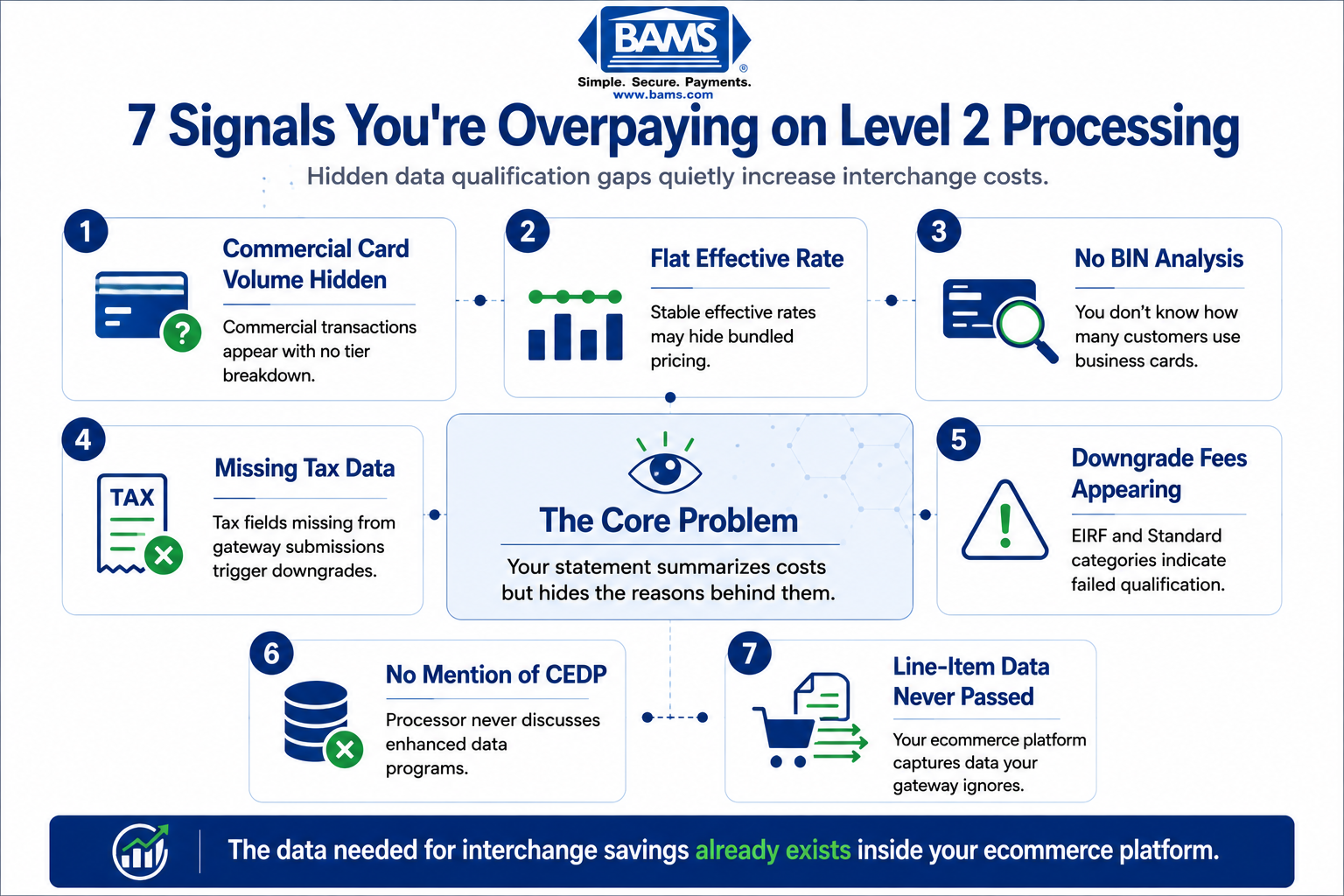
7 Signals Your Statement Is Hiding Interchange Savings
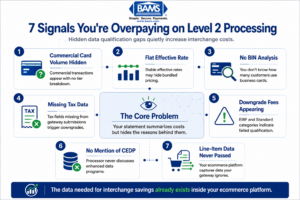
Most ecommerce merchants already collect the data needed for interchange savings. The issue is that the data never reaches the payment gateway correctly.
1. You See “Commercial” or “Corporate” Card Types but No Tier Breakdown
Why it matters: Commercial cards (corporate, purchasing, and business cards) qualify for lower interchange rates when enhanced data is submitted. Without a tier breakdown, you can’t tell whether those transactions settled at the reduced rate or the default card-not-present rate. Mastercard merchant insights continue to emphasize the importance of transaction visibility and payment data quality for merchants managing complex card mixes.
What it looks like today: Your statement groups all Visa or Mastercard transactions into broad buckets. You see “Visa Credit” as a single line, with no distinction between consumer rewards cards and corporate purchasing cards.
How to apply it: Ask your processor for a transaction-level report that separates card types. If you see commercial card volume, you have interchange savings potential. Even a small percentage of commercial orders adds up at scale.
2. Your Effective Rate Doesn’t Change Month to Month
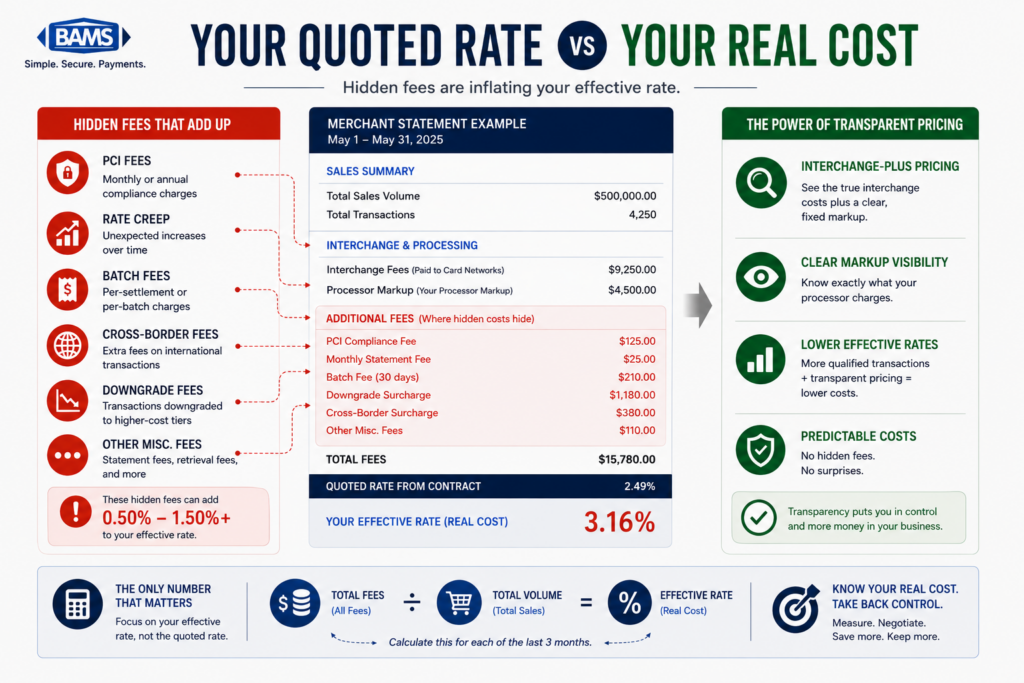
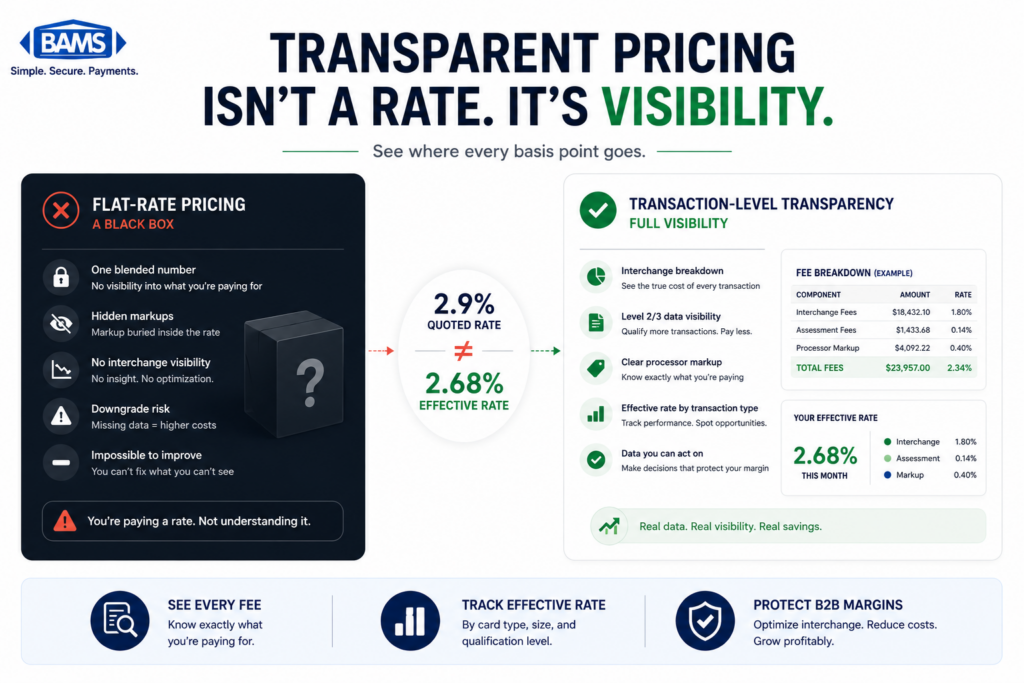
Why it matters: Interchange rates vary by card type, transaction method, and data quality. If your effective rate is suspiciously flat across months where your order mix changed, it likely means you’re on a bundled or tiered pricing model that obscures the actual interchange costs. You can’t optimize what you can’t see.
What it looks like today: You calculate your effective rate (total fees divided by total volume) and it hovers at the same number, say 2.85%, regardless of whether you had a surge in B2B orders or a shift in average ticket size.
How to apply it: Request interchange-plus pricing from your processor. This separates the network’s interchange fee from the processor’s markup, giving you visibility into which transactions are qualifying at which tier. That visibility is the prerequisite for every other signal on this list.
3. You Have No Idea How Many of Your Customers Pay with Business Cards
Why it matters: Most eCommerce merchants assume their customers are all consumers. In reality, if you sell office supplies, equipment, SaaS subscriptions, or anything businesses purchase, a meaningful slice of your transactions may come from commercial cards. Those cards carry higher default interchange rates, but also qualify for the steepest discounts when enhanced data is passed.
What it looks like today: Your checkout flow treats every card identically. Your processor doesn’t flag commercial card transactions in your reporting. You have no way to estimate the revenue impact.
How to apply it: Ask your processor for a BIN (Bank Identification Number) analysis of the past three months. This will reveal the percentage of commercial versus consumer cards hitting your gateway. Even 10% to 15% commercial card volume justifies investigating Level 2 and Level 3 processing optimization.
4. Tax Amount Is Missing or Incorrect on Transactions
Why it matters: Passing the correct tax amount is a core requirement for Level 2 qualification. If your gateway isn’t transmitting tax data, or if tax-exempt transactions aren’t flagged properly, every one of those transactions downgrades to a higher interchange tier. Visa payment rules and merchant guidance continue to emphasize the importance of accurate transaction data submission for qualification and compliance.
What it looks like today: Your eCommerce platform calculates tax for the customer-facing receipt but doesn’t pass that data to the payment gateway in the required format. Or you sell to tax-exempt organizations and leave the tax field blank instead of explicitly setting it to zero.
How to apply it: Audit your gateway settings. Confirm that the tax amount field is populated on every transaction. For tax-exempt orders, verify that the field is set to $0.00 with the exempt indicator, not simply omitted.
5. You See Downgrade Fees but Don’t Know What Triggered Them
Why it matters: Downgrades happen when a transaction fails to meet the data or processing requirements for its target interchange category. Federal Reserve interchange fee data continues to demonstrate how qualification differences materially affect merchant processing costs over time. On a $1,000 order, even small downgrade penalties create meaningful avoidable expense.
What it looks like today: Your statement may list “EIRF” (Electronic Interchange Reimbursement Fee) or “Standard” categories. These are penalty tiers. They mean your transaction didn’t qualify for the rate it could have received, but your statement rarely explains which data field was missing.
How to apply it: Flag every transaction that settles at EIRF or Standard tier. Cross-reference with your gateway logs to identify the pattern. Common culprits: missing customer code (PO number), missing tax amount, or settling the transaction more than 24 hours after authorization.
6. Your Processor Has Never Mentioned Visa’s CEDP or Mastercard’s Enhanced Data Program
Why it matters: Visa retired its legacy Level 2 program and consolidated interchange savings under the Commercial Enhanced Data Program (CEDP). Mastercard offers similar rate reductions through its enhanced data programs. If your processor has never raised these programs with you, they may not be optimizing your transactions, or they may be pocketing the savings on a bundled pricing model.
What it looks like today: You’ve never heard the terms “CEDP,” “Level 3 data,” or “enhanced data” from your current processor. Your statements show no evidence that commercial card transactions are being treated differently from consumer transactions.
How to apply it: Ask your processor directly: “Are you submitting enhanced data on my commercial card transactions?” If the answer is vague, or if they can’t show you qualification rates by tier, it’s time to evaluate alternatives. BAMS provides transparent statement reporting and can run a cost analysis that identifies exactly where your transactions are qualifying and where they’re downgrading.
7. Line-Item Detail Exists in Your Cart but Never Reaches Your Gateway
Why it matters: Level 3 data requires invoice-quality detail: item descriptions, quantities, unit costs, commodity codes, and more. Your eCommerce platform already captures this data for every order. The disconnect happens between your cart and your payment gateway. If that data isn’t being forwarded, you’re sitting on interchange savings you’ve already earned the right to claim.
What it looks like today: Your Shopify, WooCommerce, or custom cart stores complete line-item detail for fulfillment and accounting. But your payment integration only sends the total amount, card number, and expiration date to the processor. The richest data in your system never touches the transaction.
How to apply it: Check whether your payment gateway supports Level 3 data fields. Many modern gateways do, but the feature may require activation or a middleware layer. For merchants on platforms with limited native support, a processor like BAMS can help bridge the gap between your B2B merchant processing needs and your existing tech stack without requiring a full replatform.
The Pattern Behind These Signals
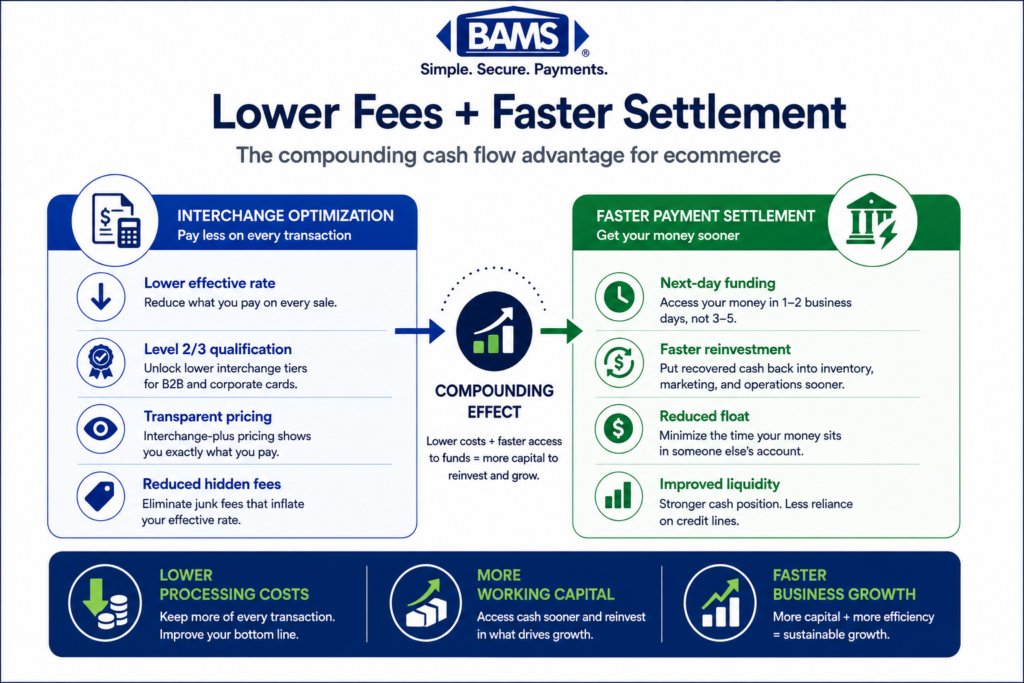
All seven signals share a root cause: your processing statement is a financial summary, not a diagnostic tool. It shows you the cost of each transaction after the fact but hides the reason behind that cost. The interchange system rewards data richness. The more transaction detail you pass, the lower your rate. But most processors have no incentive to surface this, especially on bundled pricing models where they keep the spread.
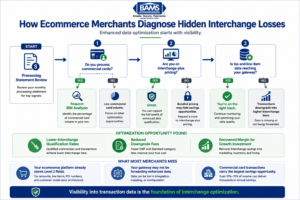
Level 2 and Level 3 optimization is not about collecting new data. It is about routing existing eCommerce data correctly.
The second pattern is that the data you need already exists. Your eCommerce platform captures tax amounts, line items, PO numbers, and shipping details. The optimization isn’t about generating new data. It’s about routing existing data to the right place at the right time. That’s a configuration and partnership problem, not a technology problem.
Where to Start Without Overwhelming Your Team
You don’t need to tackle all seven signals at once. Start with three moves that deliver the fastest clarity:
- Request a BIN analysis to quantify your commercial card volume (Signal 3).
- Switch to interchange-plus pricing if you’re not already on it (Signal 2).
- Audit your tax field transmission in your payment gateway settings (Signal 4).
These three actions cost nothing, require no new software, and will tell you within a week whether you have a meaningful interchange rate reduction opportunity. From there, you can decide whether Level 3 data submission is worth pursuing based on actual numbers, not guesswork.
Frequently Asked Questions
What is Level 3 data in merchant services?
Level 3 data refers to detailed, invoice-quality transaction information submitted to card networks during payment processing. It includes fields like item descriptions, quantities, unit costs, commodity codes, tax amounts, and shipping details. When this data is passed correctly on eligible commercial card transactions, the card networks reward you with lower interchange rates because the enhanced detail reduces fraud risk and simplifies corporate reconciliation.
Do Level 2 and Level 3 data benefits apply to small eCommerce businesses, or only large B2B enterprises?
They apply to any merchant processing commercial card transactions, regardless of size. If even a portion of your customers pay with corporate, purchasing, or business cards, you’re eligible for reduced interchange rates by passing enhanced data. Most existing content focuses on large enterprises, but a small eCommerce store selling to businesses can benefit just as much on a per-transaction basis.
Which types of transactions qualify for Level 3 interchange rates?
Transactions made with commercial cards (corporate cards, purchasing cards, and business cards) from Visa and Mastercard are the primary candidates. Consumer credit and debit cards do not qualify for Level 2 or Level 3 rate reductions. The key is identifying which of your incoming transactions use commercial card BINs, which a BIN analysis from your processor can reveal.
What specific data fields are required for Level 2 and Level 3 processing?
Level 2 requires a customer code (often a PO number) and the tax amount. Level 3 adds line-item detail: item description, product code, quantity, unit of measure, unit cost, commodity code, and discount amount. Your eCommerce platform likely captures most of this data already for fulfillment purposes. The challenge is routing it through your payment gateway to the processor.
What happened to Visa’s Level 2 program?
Visa retired its legacy Level 2 interchange program and consolidated commercial card savings under the Commercial Enhanced Data Program (CEDP). This means Level 3 quality data is now the primary path to interchange savings on Visa commercial cards. Merchants who were relying on Level 2 submissions alone for Visa transactions need to upgrade their data submission to maintain reduced rates.
How much can I actually save with enhanced data processing?
Savings depend on your commercial card volume and current qualification rates. On Visa commercial transactions, passing Level 3 data can lower interchange from 2.70% + $0.10 to as low as 1.90% + $0.10, a savings of roughly 0.80% per transaction. On a $1,000 order, that’s about $8 to $11 in savings on a single transaction. Mastercard merchants can see 0.75% to 0.80% savings per transaction when enhanced data is submitted correctly.