
9 Gateway Defaults That Quietly Raise Your Decline Rate
Last Updated on October 15, 2026 by Dimitri Akhrin
The processor configuration settings silently inflating your fees, triggering holds, and killing conversions at scale
Learn which payment gateway defaults are optimized for your processor’s risk tolerance instead of your revenue. This targeted audit surfaces the specific settings that inflate merchant processing fees, spike declines during promotions, and expose you to funding holds.
TL;DR
- Processor defaults protect the processor, not your revenue – Factory settings on fraud filters, batch timing, and risk scoring are calibrated to minimize the processor’s exposure, often at the cost of your approval rates and cash flow.
- Batch settlement timing and billing descriptors are quick wins – Aligning your batch cutoff to your actual sales window and updating your statement descriptor to your customer-facing brand name can improve funding speed and reduce friendly fraud disputes within days.
- Fraud filters compound when left at default – AVS hard declines, low velocity limits, and conservative risk scores interact to reject legitimate customers, especially during promotions. Audit them as a system, not individually.
- Chargeback alert services should be active from day one – Without alerts, you only learn about disputes after they’re filed. Enabling Ethoca or Verifi CDRN alerts gives you a window to refund proactively and protect your chargeback ratio.
- Request your volume thresholds in writing – Funding holds triggered by sales spikes are one of the most disruptive surprises in payment processing. Know your thresholds and notify your processor before any planned volume increase.
The Defaults That Cost You Money Before You Process a Single Transaction
Every payment processor ships with a set of gateway configuration defaults. They’re presented as neutral starting points, but they’re not neutral at all. They’re optimized for the processor’s risk tolerance, not your revenue.
For eCommerce businesses running promotions, scaling volume, or processing higher-ticket orders, these defaults create a quiet drag on profitability. They inflate your merchant processing fees, trigger unnecessary declines, and expose you to funding holds right when cash flow matters most. Chargebacks continue to represent a significant operational and financial challenge for eCommerce businesses, particularly as transaction volumes grow and fraud tactics evolve.
According to the Federal Reserve’s 2025 Small Business Credit Survey, managing operating expenses and cash flow remains a significant challenge for many businesses, increasing the importance of optimizing payment acceptance and funding processes.
This isn’t a general setup checklist. This is a targeted audit of the specific defaults that quietly erode your margins.
Who This Is For and What It Covers
This guide is for eCommerce managers at established online businesses who have already launched their payment processing but haven’t revisited their gateway configuration since onboarding. If your team is between 10 and 50 people, you’re running regular promotions, and you’ve noticed unexplained fee increases or deposit delays, these items apply directly to your operation.
We’re not covering POS hardware setup, in-store EMV compliance, or basic onboarding steps. We’re focused exclusively on the configuration layer: the settings inside your gateway, processor dashboard, and merchant account that silently shape your costs, your approval rates, and your funding speed.
How These Defaults Were Selected
Each item below was chosen based on three criteria: it ships as a default on most major processors, it directly impacts either cost or cash flow for eCommerce merchants, and it’s rarely flagged during onboarding. The evaluation lens is financial exposure, meaning how much money or operational stability each default puts at risk when left unchanged.
9 Processor Setup Defaults That Quietly Raise Your Costs

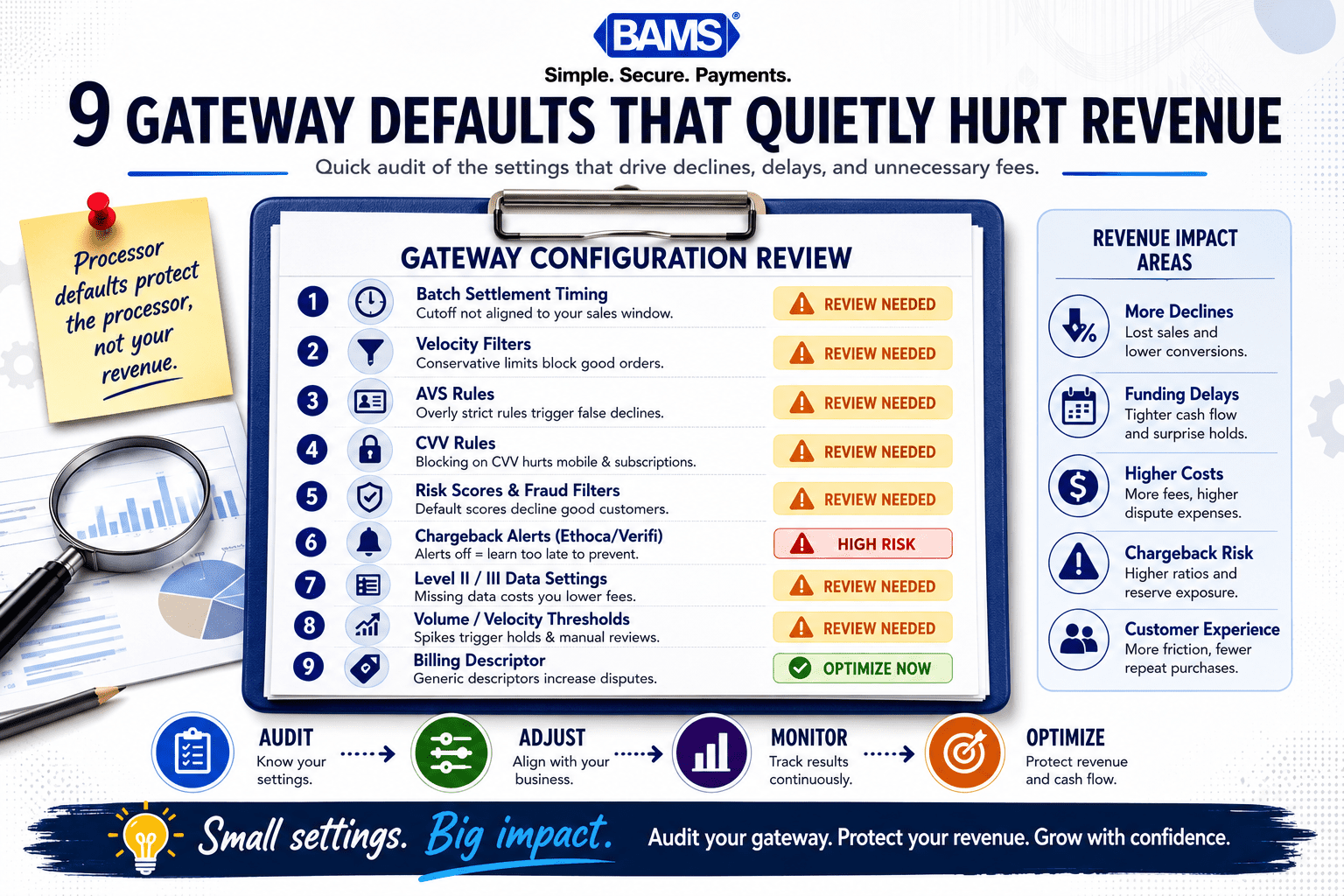
Professional infographic showing common payment gateway default settings that increase declines, delays, and chargeback risk.
1. Batch Settlement Timing Set to End-of-Day Processor Time
Why it matters: Most gateways default batch settlement to the processor’s local time zone, not yours. If your cutoff is 11 PM Eastern but your processor settles at 8 PM Pacific, transactions placed in your peak evening hours roll into the next business day. That’s an extra 24 to 48 hours before funds hit your account.
What it looks like today: Many processors allow you to set a custom batch cutoff time in your gateway dashboard, but the default is almost always their internal schedule. During promotions or flash sales, this misalignment compounds.
How to apply it: Log into your gateway settings and locate the batch settlement or cutoff time configuration. Align it to 30 minutes after your typical last-order window. Then verify deposits actually arrive on the expected timeline for three consecutive business days. For a detailed walkthrough, see this guide on online payment gateway setup for faster deposits.
2. Velocity Filters Set Too Low for Promotional Traffic
Why it matters: Velocity filters limit how many transactions a single card or IP address can attempt within a time window. Defaults are typically set for steady-state traffic patterns. When you run a sale and order volume spikes, these filters start declining legitimate customers.
What it looks like today: Gateway fraud modules often ship with thresholds like 3 to 5 transactions per card per hour. During a promotion, a corporate buyer placing multiple orders or a customer correcting a shipping address can easily trigger a block.
How to apply it: Review your fraud filter dashboard before every planned promotion. Temporarily raise velocity thresholds by 2x to 3x for the promotion window, then reset them afterward. Track your decline rate before and after the adjustment to measure the impact on approved revenue.
3. AVS Mismatch Set to Hard Decline
Why it matters: Address Verification Service (AVS) checks compare the billing address a customer enters against what the issuing bank has on file. Visa’s payment processing guidance highlights the importance of transaction validation, authentication, and fraud prevention controls throughout the payment lifecycle. Many processors default to declining any transaction where the address doesn’t match exactly. This catches typos, apartment numbers, and recently moved customers, all of whom are legitimate buyers.
What it looks like today: A hard AVS decline means lost revenue and a frustrated customer who may not retry. While chargebacks help protect consumers, overly restrictive fraud controls can sometimes reject legitimate transactions and reduce revenue.
How to apply it: Switch AVS responses from hard decline to flag-and-review for partial mismatches (ZIP match but address mismatch, for example). Reserve hard declines only for complete no-match responses. This preserves chargeback risk management while recovering sales you’d otherwise lose.
4. CVV Enforcement Disabled on Recurring Transactions
Why it matters: Some gateways disable CVV requirements on stored-card and recurring transactions by default, since the CVV isn’t supposed to be stored after the initial authorization. But skipping CVV on the first transaction of a new subscription or on a card-on-file update removes a key fraud signal.
What it looks like today: Friendly fraud remains a significant challenge for eCommerce merchants because disputes often originate from legitimate purchases that cardholders later fail to recognize or recall. Without CVV on the initial charge, your representment case weakens significantly.
How to apply it: Require CVV on every initial authorization, even for subscriptions. For subsequent recurring charges, ensure your gateway is passing the correct recurring transaction indicator to the card network. This shifts liability and strengthens your dispute evidence if a chargeback occurs. For more on protecting your business, read about how your payment processing tool handles chargebacks.
5. Risk Scoring Thresholds Left at Factory Settings
Why it matters: Many gateways include a built-in risk scoring engine that assigns a numerical score to each transaction. The default threshold for auto-decline is set conservatively, often flagging international cards, high-value orders, or first-time customers as risky.
What it looks like today: If you sell products above $150 or ship internationally, the default risk score cutoff may be declining 5% to 15% of your legitimate orders without any manual review step in between.
How to apply it: Pull a report of all auto-declined transactions from the past 90 days. Categorize them by decline reason. If a significant portion are risk-score declines on orders that match your typical customer profile, raise the auto-decline threshold by 10 to 15 points and route borderline transactions to manual review instead of outright rejection.
6. Chargeback Alert Services Not Enabled
Why it matters: Most processor accounts don’t come with chargeback alert services turned on. That means you learn about a dispute only after it’s been formally filed, at which point you’ve already lost the window to issue a proactive refund and avoid the chargeback entirely.
What it looks like today: Many merchants invest heavily in dispute prevention, chargeback mitigation, and fraud management programs to protect profitability and maintain acceptable dispute ratios. A significant portion of that spend goes toward representment, which is reactive. Alert services let you resolve disputes before they become chargebacks, reducing both costs and your chargeback ratio.
How to apply it: Ask your processor or merchant services partner whether Ethoca or Verifi CDRN alerts are available on your account. Enable them. Set up an internal workflow so that when an alert arrives, your team can issue a refund within the required response window (typically 24 to 72 hours). Partners like BAMS include proactive chargeback defense as part of their merchant services, which can simplify this process significantly.
7. Interchange Qualification Left Unoptimized
Why it matters: Card networks assign interchange rates based on how much transaction data you pass with each authorization. Default gateway configurations often send the minimum required fields, which means your transactions qualify at higher (more expensive) interchange tiers.
What it looks like today: Level II and Level III data (tax amount, purchase order number, line-item detail) can reduce interchange costs on B2B and corporate card transactions by 0.30% to 0.60% per transaction. Most gateways support these fields but leave them blank by default.
How to apply it: If you process any volume of corporate, purchasing, or government cards, enable Level II/III data fields in your gateway. Populate tax amount and customer code at minimum. Then audit your next monthly statement to confirm transactions are qualifying at the lower rate. For a deeper look at reducing processing fees through hidden cost audits, review your effective rate versus your quoted rate.
8. Funding Hold Thresholds You Never Agreed To
Why it matters: Processors set internal thresholds for transaction volume and ticket size. When your sales exceed those thresholds (often during a successful promotion), the processor can place a hold on your funds, sometimes for days or weeks, without advance notice.
What it looks like today: These thresholds are buried in your merchant agreement, not in your gateway dashboard. They’re based on your initial application data, which may reflect last year’s sales volume, not your current trajectory. A 2x spike in daily volume during a holiday sale can trigger a reserve or funding delay.
How to apply it: Request your current volume and ticket-size thresholds in writing from your processor. Before any planned promotion, notify your processor of expected volume increases. If your processor can’t or won’t adjust thresholds proactively, that’s a signal to evaluate whether your merchant services partner is actually built for growing eCommerce businesses.
9. Descriptor Defaults That Invite Chargebacks
Why it matters: Your billing descriptor is what appears on your customer’s credit card statement. Many processors default this to your legal business name or a truncated version of it. If your customers know you as “BrightLeaf Outdoor” but their statement says “BRGTLF LLC,” they don’t recognize the charge and file a dispute. Mastercard’s merchant guidance on chargebacks emphasizes the importance of clear transaction information and effective dispute management practices.
What it looks like today: Unrecognized charges are one of the top drivers of friendly fraud. Unrecognized billing descriptors remain one of the most preventable causes of customer disputes and unnecessary chargebacks. A clear descriptor won’t eliminate all disputes, but it removes one of the most preventable causes.
How to apply it: Update your billing descriptor to match your customer-facing brand name. Include a phone number or URL if your processor supports dynamic descriptors. Test by making a small purchase on your own card and checking how it appears on your statement. This is one of the simplest and highest-impact changes you can make for chargeback risk management.
The Pattern Behind These Defaults
Every approved transaction passes through dozens of configuration decisions.
Every item on this list shares a common trait: the default protects the processor, not the merchant. Conservative fraud filters reduce the processor’s exposure to disputes. Late batch times simplify the processor’s settlement operations. Low volume thresholds limit the processor’s risk on newer accounts. None of these priorities align with your goal of maximizing approved revenue and accelerating cash flow.
The second pattern is that these defaults interact. A low velocity filter combined with a hard AVS decline and a conservative risk score threshold can compound your decline rate far beyond what any single setting would cause alone. Treating them as an integrated system, rather than isolated toggles, is what separates a functional payment processing setup from an optimized one.
The third pattern: none of these are disclosed as costs. They don’t appear on your monthly statement. They show up as lost sales, delayed deposits, and rising chargeback ratios, which are harder to trace back to a single configuration screen.
Where to Start Without Overwhelming Your Team
You don’t need to tackle all nine at once. Start with the three that have the most immediate financial impact: batch settlement timing (item 1), billing descriptors (item 9), and chargeback alerts (item 6). These three changes can improve funding speed, reduce friendly fraud disputes, and give you early warning on disputes, all within a week.
Once those are in place, schedule a quarterly review of your fraud filter settings (items 2, 3, and 5) timed to your promotional calendar. Address interchange optimization (item 7) and funding hold thresholds (item 8) during your next processor contract review or account audit. The goal is steady, measurable improvement, not a single overhaul that stalls under its own weight.
Frequently Asked Questions
What documents do I need before switching merchant service providers?
Gather your current processing statements (at least three months), your merchant agreement including any addenda about reserve requirements, your gateway login credentials, and your current batch settlement schedule. Having your average ticket size, monthly volume, and chargeback ratio documented will speed up underwriting with your new provider.
Why should I keep my old merchant account open during a transition?
Chargebacks can arrive 60 to 120 days after the original transaction. If you close your old account immediately, you lose access to dispute response tools for transactions processed on that account. Keep it open until you’re past the chargeback window for your last batch of transactions.
How do I verify that my new processor’s funding speed actually matches what was promised?
After going live, process a small test transaction and record the exact time of batch settlement. Track when the deposit appears in your bank account. Do this for at least three consecutive business days. If deposits consistently arrive later than promised, escalate with your account manager and document the discrepancy.
Which pricing model works for eCommerce businesses with variable transaction sizes?
Interchange-plus pricing is generally the most transparent model for eCommerce. It separates the card network’s interchange fee from the processor’s markup, so you can see exactly what you’re paying. Tiered and flat-rate models often bundle costs in ways that obscure how much you’re overpaying on certain card types.
How often should I review my gateway fraud filter settings?
At minimum, review fraud filters quarterly. Additionally, review and adjust them before any planned promotion, product launch, or seasonal sales event. After the event, reset thresholds to their standard levels. Track your decline rate and chargeback rate before and after each adjustment to measure effectiveness.
Can processor defaults actually cause my funds to be held?
Yes. Processors set internal volume and ticket-size thresholds based on your initial application. If your sales exceed those thresholds (common during promotions or growth periods), the processor can place a reserve or delay funding. These thresholds are rarely surfaced in your dashboard and require a direct request to your account manager to review or adjust.


