Hidden Fees in Merchant Services: A Line-by-Line Guide
Last Updated on July 1, 2026 by Dimitri Akhrin
How to audit your merchant statement at the transaction level and close the gap between your quoted rate and effective processing rate
Learn how to read your merchant statement line by line to uncover the specific markups inflating your processing costs. This guide walks eCommerce managers through calculating their true effective processing rate and eliminating the hidden merchant service charges mid-market businesses consistently miss.
TL;DR
- Your effective processing rate is the only number that matters — Divide total fees by total volume to find your real cost. The gap between this and your quoted rate is where margin disappears.
- Audit at the line-item level, not the monthly summary — Hidden fees like PCI non-compliance charges, gateway surcharges, and “network access” fees are processor markup disguised as pass-through costs.
- B2B transaction downgrades are the biggest silent cost — If your processor isn’t submitting Level 2/3 data on purchase card orders, you’re paying 0.5% to 1.0% more per transaction than necessary.
- Move to interchange-plus pricing — Tiered pricing gives your processor control over what you pay. Interchange-plus makes every component visible and negotiable.
- Build a monthly monitoring habit — A one-time audit saves money for a few months. Tracking your effective rate monthly prevents fee creep permanently.
Guide Orientation: What This Covers and Who It’s For
This guide teaches you how to find and eliminate hidden fees in merchant services that silently inflate your B2B processing costs. It’s built for eCommerce managers at established online businesses (roughly 10 to 50 employees) who suspect their effective processing rate doesn’t match the rate they were quoted.
By the end, you’ll be able to read your merchant statement at the transaction level, identify specific markups your processor hasn’t explained, calculate your true effective processing rate, and take concrete steps to reduce your merchant service charges.
This guide does not cover enterprise-level multi-acquirer strategies or consumer-facing retail POS optimization. It focuses squarely on the mid-market eCommerce segment where B2B and high-ticket orders create the largest gap between quoted rates and actual costs.
Why Hidden Fees in Merchant Services Deserve Your Attention Now
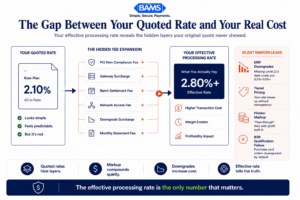
Most eCommerce businesses do not overpay because of interchange. They overpay because markup layers quietly compound around it.
Merchant Payments Coalition resources continue to highlight how interchange and swipe fees remain one of the largest operating costs for eCommerce businesses. For mid-market eCommerce companies, processing fees typically rank just behind payroll and inventory in total spend.
The problem isn’t that processing costs exist. The problem is that the gap between your quoted rate and your effective processing rate widens over time through incremental charges that don’t appear in your original agreement. Federal Reserve Small Business Survey data continues to show that rising operational costs and cash flow pressure remain major concerns for growing businesses.
The cost of inaction compounds. Every month you don’t audit your statement is another month where margin leaks go undetected. And because most processor contracts auto-renew with rate escalation clauses, the fees you ignore today become your baseline tomorrow. The good news: this is a solvable problem, and the solution starts with reading your statement differently.
Core Concepts: The Language of Processing Costs
Effective Processing Rate vs. Quoted Rate
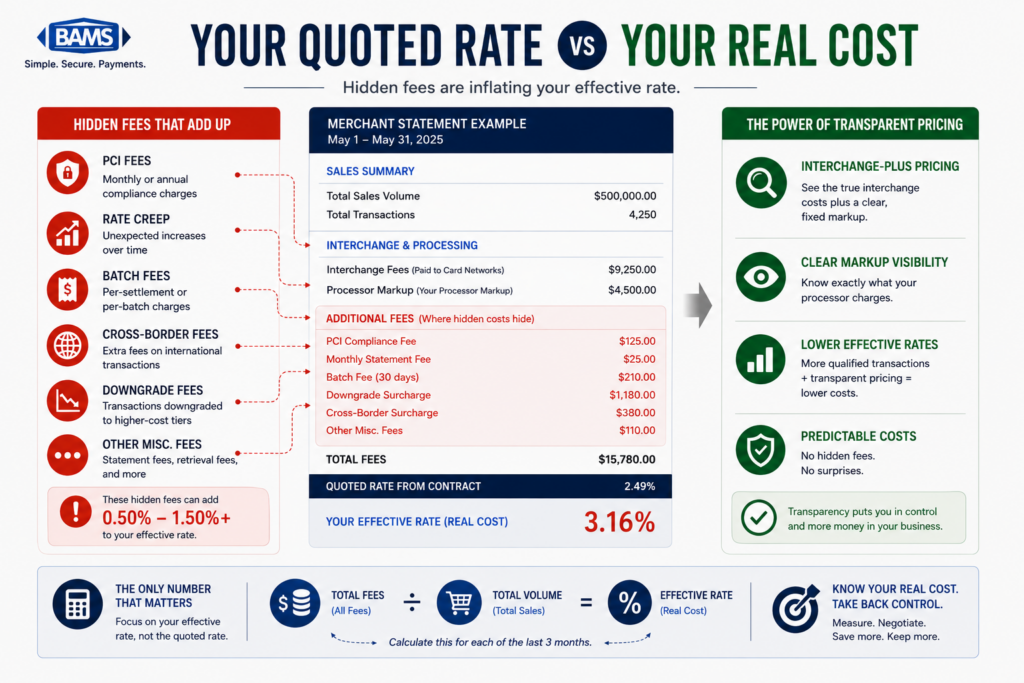
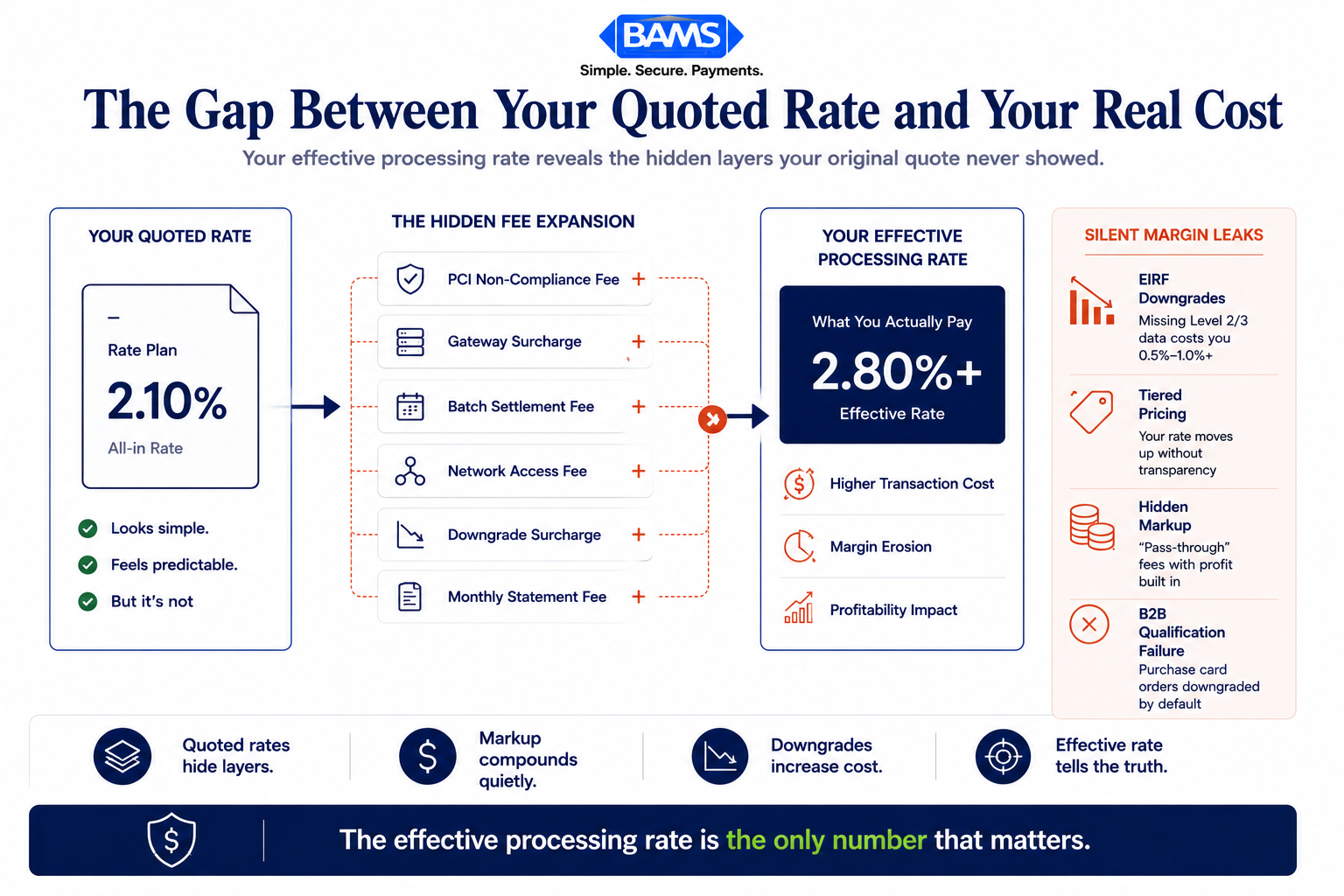
Your quoted rate is the number your processor gave you during onboarding. Your effective processing rate is what you actually pay. Calculate it by dividing your total processing fees (every line item) by your total processing volume for the same period. If your quoted rate is 2.1% but your effective rate is 2.9%, that 0.8% gap represents hidden or unexplained costs.
This single metric is the most important number in your payment processing relationship. It tells the truth when your statement doesn’t.
Interchange, Assessments, and Processor Markup
Every card transaction involves three cost layers. Interchange goes to the card-issuing bank. Assessments go to the card network (Visa, Mastercard). Processor markup goes to your payment processor. Only the markup is negotiable. Understanding this structure is essential because many hidden fees disguise processor markup as interchange or assessment costs. For a deeper breakdown, see this guide to credit card processing fees for eCommerce.
Level 2 and Level 3 Data Qualification
When you process B2B or government purchase card transactions, the card networks offer lower interchange rates if you submit additional transaction data (tax amount, customer code, line-item detail). Level 2 includes basic purchase data. Level 3 includes full line-item detail. If your processor isn’t passing this data, your B2B transactions get “downgraded” to higher, more expensive interchange categories. This is one of the most common and costly hidden charges for mid-market eCommerce businesses.
Tiered Pricing vs. Interchange-Plus Pricing
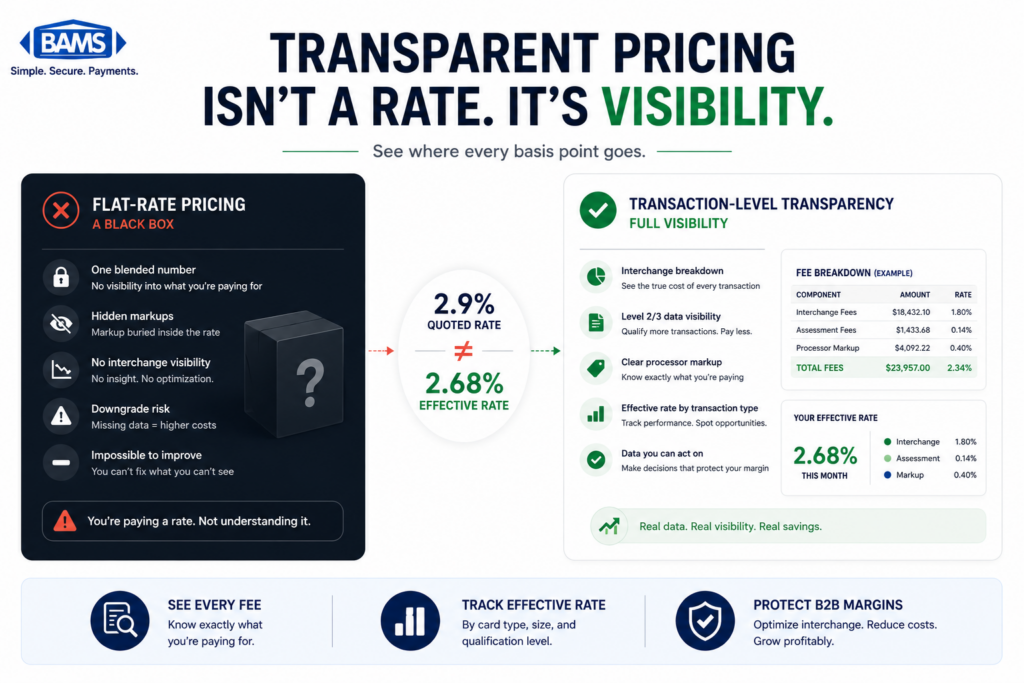
Tiered pricing bundles transactions into categories (qualified, mid-qualified, non-qualified) with opaque markup. Interchange-plus pricing passes the actual interchange cost through to you and adds a fixed, visible markup. Tiered pricing is where most hidden fees live, because your processor decides which tier each transaction falls into, and that decision is rarely transparent.
The Audit Framework: Five Phases of Fee Elimination
Eliminating hidden processing costs follows a repeatable five-phase process. Each phase builds on the previous one, moving from measurement through identification, qualification, negotiation, and ongoing monitoring.
- Phase 1: Measure — Calculate your true effective processing rate
- Phase 2: Map — Identify every fee category on your statement
- Phase 3: Qualify — Ensure B2B transactions hit the lowest interchange tier
- Phase 4: Negotiate — Use data to renegotiate or switch processors
- Phase 5: Monitor — Build a recurring audit cadence to prevent fee creep
These phases work as a cycle, not a one-time project. Processing costs shift as card networks update interchange tables, your transaction mix evolves, and processors introduce new fee categories. The businesses that keep costs lowest are the ones that audit regularly.
Step-by-Step: How to Find and Eliminate Hidden Merchant Service Charges
Step 1: Calculate Your True Effective Processing Rate
Objective: Establish a single, honest number that represents your real cost of payment processing.
Pull your last three monthly merchant statements. For each month, add up every fee charged (not just the discount rate line, but every line item including batch fees, statement fees, PCI fees, and any other charges). Divide that total by your gross processing volume for the same period. Multiply by 100 to get a percentage.
For example, if you processed $420,000 last month and paid $12,180 in total fees, your effective rate is 2.9%. If your quoted rate was 2.2%, you now have a quantified gap of 0.7% to investigate. On $5 million in annual volume, that gap costs you $35,000 per year.
Anti-patterns: Don’t use the rate shown on your processor’s dashboard or summary page. These often exclude ancillary fees. Don’t average across card types without also looking at the breakdown by card brand and transaction type, because B2B cards and rewards cards carry significantly different interchange costs.
Success indicator: You have a three-month trend of your effective rate, calculated from raw statement data, and you can articulate the gap between your quoted and actual rate in dollar terms.
Step 2: Map Every Fee on Your Statement, Line by Line

Hidden processing costs become visible only when statements are audited at the line-item level instead of the monthly summary.
Objective: Create a complete inventory of what you’re being charged and categorize each fee as interchange, assessment, or processor markup.
Merchant statements are designed to be difficult to read. That’s not an accident. Start by listing every unique fee name on your statement. Common hidden charges include PCI non-compliance fees (charged when your PCI questionnaire lapses), batch processing fees (charged per settlement batch), gateway fees (charged per transaction on top of processing), statement fees, account maintenance fees, and “regulatory” or “network access” fees that are pure processor markup disguised as pass-through costs.
Federal Reserve interchange fee data continues to demonstrate how interchange qualification differences materially affect merchant processing costs over time. But interchange itself is set by the card networks and is generally non-negotiable. Your leverage exists primarily in the markup layer.
Anti-patterns: Don’t accept fee names at face value. A “network access fee” of $0.03 per transaction sounds like a card network charge, but it’s often a processor-added surcharge. Don’t skip small per-transaction fees. At 50,000 transactions per month, even $0.02 per transaction adds $12,000 per year.
Success indicator: You have a spreadsheet with every fee name, its monthly cost, its per-transaction or percentage basis, and a column marking it as interchange, assessment, or markup. The markup column total should closely match the gap you identified in Step 1.
Step 3: Audit B2B Transaction Qualification Levels
Objective: Verify that your B2B and high-ticket transactions are qualifying at Level 2 or Level 3 interchange rates, not being downgraded to the most expensive tier.
This is where mid-market eCommerce businesses lose the most money without realizing it. When a corporate purchasing card or government card is used on your site, the card networks offer significantly reduced interchange rates if you submit enhanced transaction data. Level 2 data includes the sales tax amount and customer purchase order number. Level 3 data adds line-item detail (product descriptions, quantities, unit costs).
The difference between a Level 3 qualified transaction and a standard (non-qualified) transaction can be 0.5% to 1.0% or more per transaction. On a $10,000 B2B order, that’s $50 to $100 in savings on a single transaction. If B2B orders represent even 20% of your volume, the annual impact is substantial.
Here’s the critical audit question: is your processor actually submitting Level 2/3 data, or just claiming to? Check your statement for “downgrade” surcharges or transactions categorized as “EIRF” (Electronic Interchange Reimbursement Fee) or “standard” interchange. These codes indicate your transactions failed to qualify at the lower rate. If you see them on B2B card types, your enhanced data isn’t being passed correctly.
Anti-patterns: Don’t assume your payment gateway or shopping cart automatically passes Level 2/3 data. Most don’t without specific configuration. Don’t confuse having the capability with actually using it. Ask your processor for a qualification report showing what percentage of transactions hit each interchange tier.
Success indicator: You have a qualification breakdown showing the percentage of transactions at each interchange level, and you’ve identified the dollar value of transactions currently being downgraded.
Step 4: Eliminate Non-Essential Fees and Renegotiate Markup
Objective: Remove fees that serve no purpose and reduce the markup on fees that remain.
Armed with your fee map and qualification data, you now have leverage. Start with outright elimination. PCI non-compliance fees disappear when you complete your annual PCI SAQ (Self-Assessment Questionnaire). Statement fees can often be waived by switching to electronic statements. Early termination fee clauses can be negotiated out at renewal.
Next, address your pricing model. If you’re on tiered pricing, request a switch to interchange-plus. Choosing a processor based solely on the lowest advertised rate often backfires because tiered models allow processors to route transactions to higher-cost tiers at their discretion. Interchange-plus gives you visibility into exactly what you’re paying and why.
About 65% of merchants who negotiate their processing fees successfully lower at least one fee. The key is arriving at the negotiation with specific data: your effective rate, the gap from your quoted rate, the dollar value of downgrades, and the specific markup fees you’ve identified. This transforms the conversation from “your fees are too high” to “here are the seven line items that account for the 0.7% gap between my quoted and effective rate.”
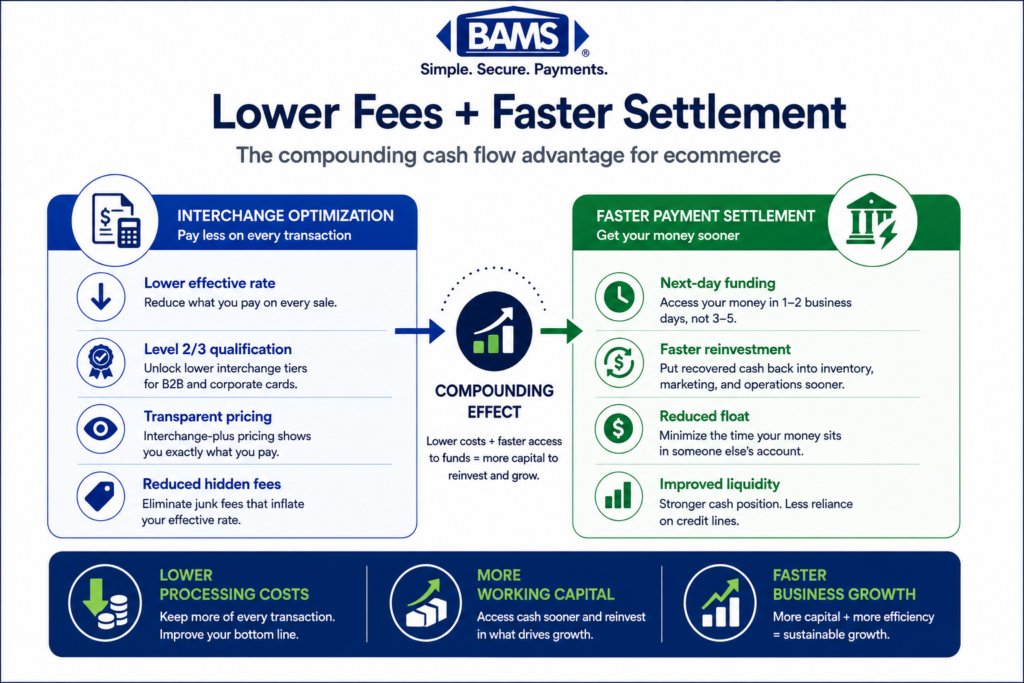
For businesses that find their current processor unwilling to provide transparent interchange-plus pricing or Level 2/3 data optimization, BAMS offers interchange-plus pricing with dedicated account management that helps mid-market ecommerce businesses close the gap between quoted and effective rates.
Anti-patterns: Don’t negotiate without data. Vague complaints get vague responses. Don’t accept a lower quoted rate that still uses tiered pricing, because the same hidden fees will reappear. Don’t sign a new long-term contract without removing auto-renewal and rate escalation clauses.
Success indicator: You’ve eliminated at least two non-essential fees, moved to interchange-plus pricing (or confirmed you’re already on it), and have a written confirmation of your new rate structure with no ambiguous fee categories.
Step 5: Optimize Transaction Routing and Settlement Timing
Objective: Reduce costs at the transaction level by ensuring each payment takes the least expensive path and settles as quickly as possible.
Transaction routing affects cost in ways most eCommerce managers don’t consider. Debit card transactions routed through PIN debit networks often cost less than signature debit routed through Visa or Mastercard. If your gateway supports debit routing optimization, enable it.
Settlement timing also matters, though not in the way most people think. Faster settlement doesn’t reduce interchange, but it directly improves cash flow, which reduces your reliance on credit lines and working capital loans. If your current processor holds funds for 2 to 3 business days, the interest cost on that float is a hidden fee that never appears on your merchant statement. BAMS, for instance, offers next-day funding that eliminates this invisible cost for eCommerce businesses managing tight cash cycles.
Additionally, review your authorization and capture practices. Transactions that are authorized but not captured within 24 hours often get downgraded to a higher interchange tier. If your fulfillment workflow creates delays between authorization and capture (common in B2B where orders ship days later), consider using delayed capture strategies that still meet the card network’s qualification windows.
Anti-patterns: Don’t batch-settle once a week to save on batch fees. The interchange downgrades from delayed settlement will cost far more. Don’t ignore debit routing if debit cards represent a meaningful share of your transactions.
Success indicator: You’ve confirmed your debit routing settings, your authorization-to-capture window is within 24 hours for standard orders, and you’ve calculated the cash flow benefit of faster settlement against your current funding timeline.
Step 6: Build a Monthly Monitoring System
Objective: Prevent fee creep by establishing a recurring audit process that catches new or increased charges within 30 days.
Fee elimination is not a one-time project. Card networks update interchange tables twice a year (April and October). Processors introduce new fee categories regularly. Your transaction mix shifts seasonally. Without a monitoring system, the savings you achieved in Steps 1 through 5 will erode within 6 to 12 months.
Create a simple monthly tracking spreadsheet (or use your accounting software) with three metrics: total processing fees, total processing volume, and effective processing rate. Plot these monthly. Any month where your effective rate increases by more than 0.05% without a corresponding change in your transaction mix deserves investigation.
Set calendar reminders for interchange table updates. When Visa or Mastercard publishes new rates, compare them against your statement the following month to verify your processor passed through the actual new rates rather than padding them. Also monitor for new line items. Processors rarely announce new fees proactively. They appear as a new line on your statement, and if you don’t catch them in the first month, they become your new normal.
Anti-patterns: Don’t delegate statement review entirely to your processor. Their incentive is to maximize revenue from your account, not to minimize your costs. Don’t assume stable effective rates mean nothing has changed; your transaction mix may have shifted in a way that should have lowered your rate.
Success indicator: You have a monthly tracking system in place, you’ve identified your next interchange table update date, and you’ve assigned a specific person (or yourself) to review the statement within five business days of each monthly close.
Practical Example: The 0.8% Gap
Consider a mid-market eCommerce business processing $350,000 per month with a quoted rate of 2.15%. Their monthly statement shows $9,450 in total fees, which puts their effective rate at 2.70%. That’s a 0.55% gap, costing $23,100 per year.
A line-by-line audit reveals the following: $175/month in PCI non-compliance fees (they hadn’t completed their annual SAQ), $0.10 per transaction gateway fee on 8,000 transactions ($800/month) that wasn’t in their original quote, and roughly $950/month in interchange downgrades on B2B purchase card orders that weren’t passing Level 2 data.
After completing the SAQ, negotiating the gateway fee down to $0.05, and configuring their gateway to pass Level 2 data, their effective rate dropped to 2.28%. Annual savings: approximately $17,640. The entire audit and remediation process took two weeks.
The lesson here isn’t that every business will find the same fees. It’s that the gap between quoted and effective rates always has a specific, identifiable cause, and the cause is almost always in the markup layer, not in interchange or assessments.
Common Mistakes and Pitfalls
Focusing on the quoted rate instead of the effective rate. A low quoted rate with high ancillary fees costs more than a slightly higher quoted rate with no hidden charges. Always evaluate total cost. Opaque billing practices from major processors have led to class-action settlements for exactly this reason.
Assuming your processor handles Level 2/3 optimization automatically. Most don’t. You need to verify with a qualification report, not a sales promise.
Negotiating without data. Walking into a rate negotiation saying “your fees are too high” gets you a token concession. Walking in with a fee map, effective rate calculation, and downgrade analysis gets you structural change.
Auditing once and stopping.Visa small business payment resources continue to emphasize the importance of understanding transaction mix, interchange qualification, and operational payment costs when evaluating merchant processing performance.
Signing long-term contracts with auto-renewal and rate escalation clauses. These lock in your current fee structure and allow your processor to increase rates without your explicit approval. Always negotiate these terms out.
What to Do Next
Start with Step 1. Pull your last three merchant statements tonight and calculate your effective processing rate. That single number will tell you whether this guide is a theoretical exercise or an urgent priority for your business.
If your effective rate is within 0.1% of your quoted rate, you’re in good shape. Monitor monthly and revisit this guide when your transaction mix changes. If the gap is larger, work through Steps 2 through 4 systematically. Don’t try to fix everything at once. Identify the three largest line items in your markup column and address those first.
This guide is a reference, not a checklist. Bookmark it. Return to it quarterly. The businesses that consistently pay the lowest processing costs aren’t the ones with the best initial deal. They’re the ones who audit relentlessly and never let a fee go unquestioned.
Frequently Asked Questions
What is interchange-plus pricing and how does it work?
Interchange-plus pricing separates the actual interchange fee (set by card networks and paid to the issuing bank) from your processor’s markup. You see both numbers on your statement. This transparency lets you verify that your processor is passing through actual interchange costs rather than bundling them into opaque tiers. It’s the most cost-effective and transparent pricing model for mid-market eCommerce businesses.
What are the most common hidden fees in merchant services?
The fees that catch most eCommerce businesses off guard include PCI non-compliance fees (typically $20 to $100/month), batch settlement fees, gateway per-transaction fees not disclosed at signing, “network access” or “regulatory” fees that are actually processor markup, annual account fees, and interchange downgrade surcharges on B2B transactions that fail to pass Level 2 or Level 3 data.
Why should businesses consider Level 2/3 optimization for B2B transactions?
Card networks offer significantly lower interchange rates when merchants submit enhanced transaction data on B2B and government purchase card orders. Level 2 data includes tax amount and purchase order number. Level 3 adds line-item detail. The difference can be 0.5% to 1.0% per transaction. For a business processing $100,000/month in B2B orders, that’s $6,000 to $12,000 in annual savings.
How can I tell if my processor is actually qualifying transactions at Level 2 or Level 3?
Request a qualification report from your processor that shows the interchange category for each transaction. Look for codes like “EIRF” or “standard” on B2B card types. These indicate downgrades, meaning enhanced data wasn’t submitted correctly. If your processor can’t provide this report, that itself is a red flag.
When is the best time to negotiate processing fees?
The best time is when your contract is approaching renewal, because you have the most leverage. The second-best time is now, armed with data. Calculate your effective rate, map your fees, and present specific findings. About 65% of merchants who negotiate successfully reduce at least one fee. Your data quality matters more than your timing.
Which payment processing model is more cost-effective for high-volume transactions?
Interchange-plus pricing is almost always more cost-effective for businesses processing significant volume. Tiered pricing gives your processor discretion over which tier each transaction falls into, which consistently results in higher costs. The higher your volume, the more that per-transaction markup differences compound, making interchange-plus transparency essential.