7 Missing L3 Fields That Inflate Your Effective Processing Rate
Last Updated on June 2, 2026 by Dimitri Akhrin
A diagnostic checklist connecting each empty data field to the interchange downgrade draining your margins
Learn which specific Level 3 data gaps — from blank tax fields to missing freight charges — trigger costly interchange downgrades on eCommerce transactions. Use this field-by-field checklist to audit your own statements and lower your effective processing rate.
TL;DR
- Missing fields, not rising markups, cause most interchange cost creep – Blank tax, freight, and customer code fields trigger automatic downgrades that silently inflate your effective processing rate by 0.30% to 0.80% per transaction.
- The data exists but isn’t mapped – Your eCommerce platform captures tax and shipping amounts, but these fields often don’t flow through to the payment gateway’s Level 2/3 data payload. The fix is an integration mapping audit, not a storefront settings change.
- Tax amount and freight are the highest-priority fixes – These two fields are the most commonly unpopulated and trigger the most frequent downgrades. Start here before tackling line-item detail or commodity codes.
- Level 3 savings only apply to commercial cards – Know your card mix before investing in full L3 integration. Consumer card transactions benefit from Level 2 data, while B2B merchants processing corporate or purchasing cards unlock the deepest savings from Level 3.
- Interchange-plus pricing makes downgrades visible – You can only diagnose and fix field gaps if your statement shows the actual interchange category per transaction. Flat-rate pricing hides these signals entirely.
The Silent Leak: Why Missing L3 Fields Inflate Your Effective Processing Rate
Somewhere between your eCommerce platform and your acquiring bank, a tax field goes blank. A freight charge never populates. The transaction clears, the customer gets their order, and nothing looks wrong. But on your monthly statement, that transaction just slid into a higher interchange tier, quietly inflating your effective processing rate by 30 to 80 basis points.
This is the reality for eCommerce merchants on interchange-plus pricing. Your processor markup stays fixed, but the interchange component (the largest slice of every transaction) fluctuates based on the data you pass with each sale. When tax or freight fields are missing, the card networks reclassify your transaction into a costlier category. Visa calls these “downgrades.” Mastercard uses similar tiered qualification logic. Either way, the result is the same: you pay more for the same sale.
The frustrating part? Most merchants never trace the cost back to a specific empty field. They see a blended rate creep upward and assume it’s a card-mix issue or a rate increase from their processor. It’s often neither.
What This Checklist Covers (and What It Doesn’t)
This guide is for eCommerce managers running established online businesses who already use interchange-plus pricing and want to understand exactly which missing data fields trigger interchange downgrades on card-not-present transactions. If you’re still on flat-rate pricing, this breakdown of credit card processing fee structures is a better starting point.
We’re not covering PCI compliance, gateway selection, or general fee negotiation here. This is a diagnostic checklist: each item maps a specific tax or freight field to the downgrade it causes when absent, so you can audit your own statement data against concrete signals. The goal is to turn vague “my rates seem high” suspicion into a precise, fixable problem list.
How We Selected These Fields
Each field below was chosen based on three criteria. First, it directly affects interchange qualification under current Visa or Mastercard enhanced data programs (including Visa’s Commercial Enhanced Data Program). Second, it’s commonly left unpopulated by default in major eCommerce platforms. Third, its absence triggers a named, identifiable downgrade category visible on an interchange-plus statement.
7 Tax and Freight Field Gaps That Trigger Interchange Downgrades on eCommerce Orders
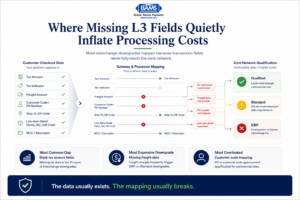
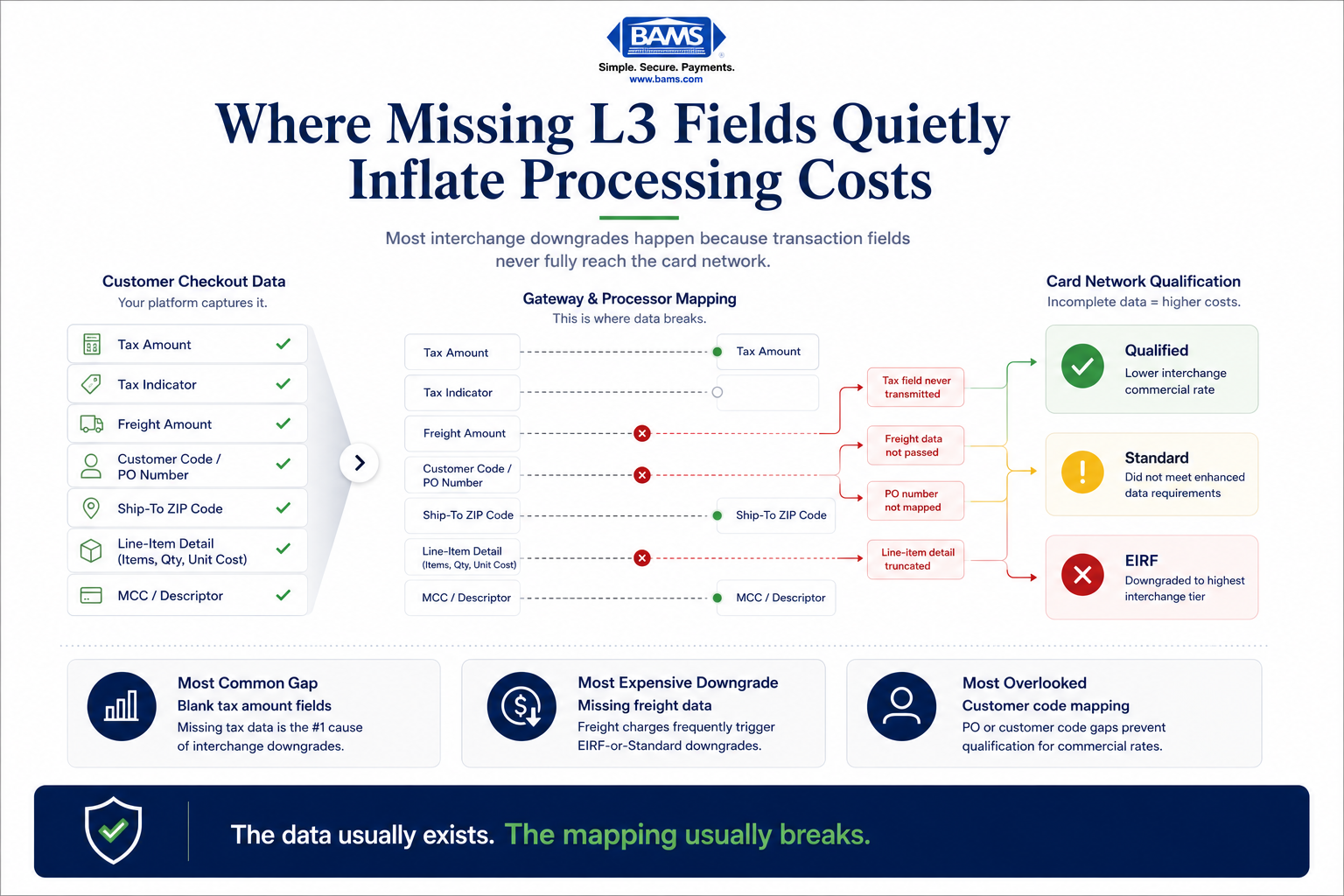
Most interchange downgrades happen because important transaction fields never reach the card networks correctly.
1. Tax Amount Field: The Most Expensive Zero
Why it matters: When the tax amount field is submitted as blank (or zero on a taxable transaction), Visa and Mastercard cannot validate that the transaction includes proper tax reporting. This alone can push a transaction from a qualified commercial rate into the Standard or EIRF (Electronic Interchange Reimbursement Fee) downgrade bucket, adding 0.30% to 0.80% per transaction.
What it looks like today: Many eCommerce platforms calculate tax correctly for the customer receipt but fail to pass the tax amount through to the payment gateway’s Level 2 data fields. Shopify, WooCommerce, and BigCommerce each handle this differently. Some require a plugin or gateway-specific configuration to map the tax total into the authorization message.
How to apply it: Pull a recent batch report from your gateway. Look for the “tax amount” or “tax_amt” field. If it shows 0.00 on orders where tax was collected, your platform isn’t passing it downstream. Fix the mapping at the gateway integration level, not the storefront tax settings.
2. Tax Indicator / Tax-Exempt Flag
Why it matters: Even when you legitimately collect no tax (tax-exempt buyer, non-taxable jurisdiction), you still need to tell the card network why. The tax indicator field distinguishes “tax was zero because the buyer is exempt” from “tax data is missing.” Without it, the network treats the transaction as data-deficient.
What it looks like today: Most eCommerce platforms don’t expose a tax indicator toggle in their standard checkout. It’s typically a gateway-level or processor-level field. Merchants selling to resellers, nonprofits, or across state lines where no tax applies are especially vulnerable here.
How to apply it: Ask your payment processor whether your gateway integration supports the tax indicator field (sometimes labeled “tax_status” or “tax_exempt_flag”). If your processor doesn’t support it, that’s a sign your current setup can’t qualify for enhanced data rates regardless of what other fields you fix.
3. Freight / Shipping Amount
Why it matters: For Level 3 qualification on commercial and purchasing card transactions, the freight amount is a required field. Submitting it as blank or zero when shipping charges exist causes an automatic downgrade. Federal Reserve interchange fee data continues to demonstrate how qualification differences materially affect merchant processing costs over time, especially for commercial card transactions carrying enhanced data requirements.
What it looks like today: eCommerce platforms typically display shipping costs to the buyer and include them in the order total, but the freight amount often isn’t broken out as a separate field in the payment authorization. It gets lumped into the total charge, making it invisible to the card network’s qualification engine.
How to apply it: Check whether your gateway sends a discrete “shipping_amount” or “freight_amt” field. If your platform only sends a single total, you’ll need middleware or a gateway plugin that parses the order and maps shipping into its own field before authorization.
4. Customer Code / Purchase Order Number
Why it matters: On B2B and corporate card transactions, the customer code (or PO number) is a Level 2 requirement. Its absence is one of the most common reasons commercial card transactions downgrade from the Commercial Data Rate to Standard. If you sell to other businesses online, this field alone can account for a significant portion of your interchange overspend.
What it looks like today: Standard eCommerce checkouts don’t include a PO number field. B2B merchants who added one to their storefront often store it in the order management system but never pass it to the payment gateway. The field exists in the order record but not in the authorization message.
How to apply it: Add a PO or customer reference field to your checkout flow. Then verify it maps through your gateway to the “customer_code” field in the Level 2 data payload. Test with a live transaction and confirm the field appears in your gateway’s transaction detail report.
5. Ship-To Postal Code
Why it matters: For Level 3 qualification, the destination postal code must be included. This is separate from the billing ZIP used for AVS (Address Verification Service). When the ship-to ZIP is absent, the transaction can’t meet enhanced data requirements, even if every other L3 field is populated correctly.
What it looks like today: eCommerce platforms capture shipping addresses as part of fulfillment, but the ship-to postal code often isn’t forwarded to the payment processor. It sits in the order record, used by the warehouse, invisible to the payment data flow.
How to apply it: Map the shipping address postal code from your order data into the gateway’s “ship_to_zip” or “dest_postal_code” field. For digital goods or services where no shipping address exists, work with your processor to determine the correct default value that avoids triggering a downgrade.
6. Line-Item Detail (Commodity Code, Quantity, Unit Cost)
Why it matters: Level 3 data requires itemized line-item detail: product description, commodity code, quantity, unit of measure, and unit cost. This cluster of fields is what separates Level 2 from Level 3 qualification. Without it, you cap your interchange savings at the Level 2 tier, leaving the deeper Level 3 discount on the table for every qualifying commercial card transaction.
What it looks like today: Passing line-item detail requires your eCommerce platform, gateway, and processor to all support L3 data. Many popular gateways accept Level 2 fields but truncate or ignore line-item arrays. Even when supported, commodity codes (standardized product classification codes) are rarely mapped in default eCommerce setups.
How to apply it: Start by confirming your processor and gateway both support Level 3 line-item data. Then map each SKU in your catalog to a commodity code. Tools like BAMS can help eCommerce merchants identify which transactions are eligible for L3 rates and where field gaps exist, so you prioritize the SKUs and card types with the highest savings potential.
7. Merchant Descriptor and MCC Alignment
Why it matters: Your Merchant Category Code (MCC) and transaction descriptor influence which interchange program a transaction qualifies for. If your MCC doesn’t match your actual business type, or your descriptor is generic, certain enhanced data programs won’t apply. This isn’t a “field” in the traditional sense, but it’s a data element that gates access to lower interchange tiers.
What it looks like today: MCC is set during merchant account onboarding and rarely revisited. eCommerce merchants who’ve evolved their product mix (from retail goods to subscriptions, or from B2C to B2B) may be operating under an MCC that no longer reflects their primary transaction type. Visa updates interchange schedules twice a year (April and October), and MCC eligibility for specific programs can shift with each update.
How to apply it: Review your MCC on your current merchant statement or ask your processor directly. Compare it against your actual sales mix. If you’ve shifted toward B2B or added new product categories, request an MCC review. A misaligned MCC can disqualify you from enhanced data programs before any other field even matters.
The Pattern: Data Completeness Is a System, Not a Checklist Item
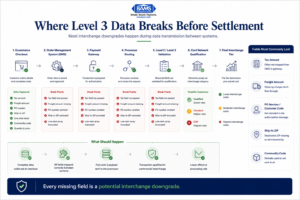
Level 3 data failures usually happen during field mapping between systems, not at checkout itself.
Look across all seven fields and a theme emerges: the data usually exists somewhere in your tech stack. Tax is calculated. Shipping is charged. PO numbers are collected. Postal codes are captured. The problem is almost never missing information. It’s missing mapping.
Your eCommerce platform, order management system, payment gateway, and processor each hold a piece of the puzzle, but the fields don’t automatically flow from one layer to the next.
Every gap between systems is a potential downgrade. This means the fix isn’t a single setting change. It’s an integration audit that traces each field from storefront to settlement. Modern Treasury payment operations resources continue to emphasize how fragmented reconciliation and incomplete transaction visibility create avoidable operational inefficiencies for merchants processing complex payment flows.
The second pattern: not every field matters equally for every merchant. If you sell exclusively to consumers, Level 3 line-item detail won’t unlock savings because consumer cards don’t qualify for L3 rates. Your priority is the tax and freight fields that prevent Level 2 downgrades. If you process commercial or purchasing cards, the full L3 field set becomes the high-value target. Knowing your card mix determines where to focus.
Where to Start: Prioritizing Your Audit
You don’t need to fix all seven gaps at once. Start with three steps. First, calculate your effective processing rate to establish a baseline. Second, pull a sample of 20 to 30 recent transactions from your gateway and check which of the seven fields above are populated versus blank. Third, focus on the tax amount and freight fields first, as these are the most common downgrade triggers and typically the easiest to fix.
If your statement shows persistent downgrades to EIRF or Standard categories, and your hidden processing costs keep climbing despite stable volume, the root cause is likely sitting in these unpopulated fields. A transparent processor on interchange-plus pricing should be able to show you exactly which transactions downgraded and why. If yours can’t, that’s a different problem worth solving first.
Frequently Asked Questions
What are Level 2 and Level 3 data in payment processing?
Level 2 and Level 3 refer to additional transaction data fields (tax amount, freight, line-item detail, PO numbers) submitted alongside a payment authorization. Card networks like Visa and Mastercard use this data to qualify transactions for lower interchange rates. Level 2 includes fields like tax amount and customer code. Level 3 adds itemized line-item detail such as commodity codes, quantities, and unit costs.
Why is interchange-plus pricing more beneficial than flat-rate pricing for identifying downgrades?
Interchange-plus pricing separates the interchange fee (set by card networks) from your processor’s markup. This transparency lets you see exactly which interchange category each transaction lands in, making downgrades visible on your statement. With flat-rate pricing, downgrades still happen, but the cost is hidden inside the flat percentage, so you can’t diagnose or fix the underlying data gaps.
How does optimizing transaction data affect processing fees?
When you pass complete tax, freight, and line-item data with each transaction, card networks can qualify that transaction for lower interchange tiers. For commercial and purchasing cards, the difference between a downgraded transaction and a fully qualified Level 3 transaction can be 0.30% to 0.80% or more per sale. Over hundreds or thousands of monthly transactions, this directly reduces your effective processing rate.
Do Level 3 data savings apply to consumer credit card transactions?
No. Level 3 interchange rates are designed for commercial, corporate, and purchasing card transactions. Consumer cards can benefit from Level 2 data (primarily the tax amount and customer code fields), which helps them qualify at the best available consumer interchange tier. Knowing your card mix helps you decide whether to prioritize Level 2 or Level 3 field mapping.
How can I audit my payment processing statements for interchange downgrades?
On an interchange-plus statement, look for transaction categories labeled EIRF (Electronic Interchange Reimbursement Fee), Standard, or “Data Rate I” versus “Data Rate II/III.” If a significant percentage of transactions fall into EIRF or Standard, those are downgrades. Cross-reference those transactions with your gateway’s batch reports to check which data fields (tax, freight, customer code) were blank at the time of authorization.
Which eCommerce platforms support Level 2 and Level 3 data passthrough?
Platform support varies significantly. Shopify, WooCommerce, BigCommerce, and Magento each handle enhanced data fields differently. Some support Level 2 natively through specific gateway integrations, while Level 3 often requires plugins, middleware, or a processor that can enrich the data post-authorization. The key is to verify support at every layer: platform, gateway, and processor.