Deposit Reconciliation for Ecommerce: A Daily Guide
Last Updated on October 6, 2026 by Dimitri Akhrin
How to close the gap between your dashboard revenue and your actual bank balance every single day
Learn why your bank balance never matches your eCommerce dashboard and how to build a daily deposit reconciliation system that catches discrepancies in minutes. Understand timing variance, settlement gaps, and when a missing deposit signals a real problem.
TL;DR
- The mismatch is usually timing, not missing money — Card batch settlements lag 1 to 3 business days behind transaction dates, so your bank balance on any given day will almost never match your dashboard’s sales total.
- Reconcile daily, not monthly — A 15-minute daily habit of comparing your dashboard, processor settlement report, and bank deposits catches problems while they’re still fixable and prevents small discrepancies from compounding into real losses.
- Map every processor’s settlement window — Each payment channel (cards, PayPal, Amazon) settles on a different timeline. Build a reference table so your team stops treating normal delays as emergencies.
- Separate timing variances from real exceptions — Only investigate deposits that are missing beyond the expected settlement window. Timing variances resolve themselves; exceptions need immediate attention.
- Your true cash position is none of the numbers you’re looking at — It’s your confirmed bank balance plus in-transit deposits minus pending refunds, chargebacks, and committed expenses. Build this rolling view daily for confident spending decisions.
Guide Orientation: What This Covers and Who It’s For
This guide walks you through the specific reasons your bank balance doesn’t match your eCommerce dashboard and gives you a repeatable system for deposit reconciliation that catches discrepancies daily, not at month-end. It’s built for eCommerce managers at established online businesses who process enough volume that a few thousand dollars in limbo creates real operational stress.
By the end, you’ll understand exactly where money hides between “sale confirmed” and “cash in bank,” how to build a daily matching rhythm that takes minutes instead of hours, and how to distinguish a harmless timing variance from a genuine problem that demands investigation.
This guide does not cover enterprise-level ERP reconciliation, multi-currency treasury management, or accounting software implementation. It focuses on the practical gap between what your processor says you earned and what your bank says you have.
Why Deposit Reconciliation Is a Cash Flow Problem, Not a Bookkeeping Task
Daily deposit reconciliation transforms scattered payment data into a clear view of available cash.
Most eCommerce operators treat reconciliation as something their bookkeeper handles once a month. That’s a mistake. The gap between your dashboard and your bank balance isn’t an accounting curiosity. It’s a cash flow visibility problem that directly affects your ability to reorder inventory, fund ad spend, and make payroll on time.
Card settlement timing varies by processor, funding arrangement, weekends, and bank holidays. Understanding your processor’s settlement schedule is essential for accurate daily deposit reconciliation.. That means on any given Tuesday, your dashboard might show $47,000 in weekend sales while your bank shows $12,000. Neither number is wrong. But if you’re making spending decisions based on either number in isolation, you’re flying blind.
The cost of this blindness is measurable. Settlement delays reduce the amount of immediately available working capital, making it more difficult to fund inventory purchases, payroll, marketing, and other operating expenses without relying on additional financing. For smaller operators, the damage shows up differently: missed early-pay discounts with suppliers, conservative ad budgets because you’re unsure what’s actually available, or overdraft fees because a deposit you expected on Friday didn’t clear until Tuesday.
The businesses that treat deposit matching as a daily operational habit (rather than a monthly chore) consistently make faster, more confident decisions. This isn’t about being meticulous. It’s about knowing where your money is today.
Core Concepts: The Language of the Gap
Timing Variance vs. Actual Discrepancy
The single most important distinction in this entire guide is the difference between a timing variance and an actual discrepancy. A timing variance means the money is real and in transit, but it hasn’t landed in your bank yet. An actual discrepancy means money is missing, duplicated, or incorrectly calculated. Timing differences are the most common cause of reconciliation breaks in payment operations, and most of the panic eCommerce managers feel comes from confusing the two.
Settlement Timing
Settlement timing refers to the delay between when a transaction is authorized and when the funds actually arrive in your bank account. Batch settlements typically lag 1 to 3 business days behind transaction dates. This lag is not a bug. It’s how card networks, processors, and banks coordinate the movement of money. But if you don’t account for it, your books will never balance on any given day. Businesses that also accept ACH payments should review the latest settlement guidance published by NACHA, as ACH settlement timelines differ from card payments.
Gross vs. Net Deposits
Your dashboard usually shows gross sales. Your bank receives net deposits (gross minus processing fees, chargebacks, and refunds). This difference is predictable but surprisingly easy to overlook when you’re scanning numbers quickly. Fee reconciliation is the process of verifying that the gap between gross and net matches your merchant agreement terms exactly.
Batch Timing and Cutoffs
Most processors batch transactions at a specific cutoff time each day. If your batch closes at 10 PM EST, a sale at 10:01 PM rolls into the next day’s batch. This shifts settlement timing by a full business day and is one of the most common sources of “where did that deposit go?” confusion.
The Daily Reconciliation Framework
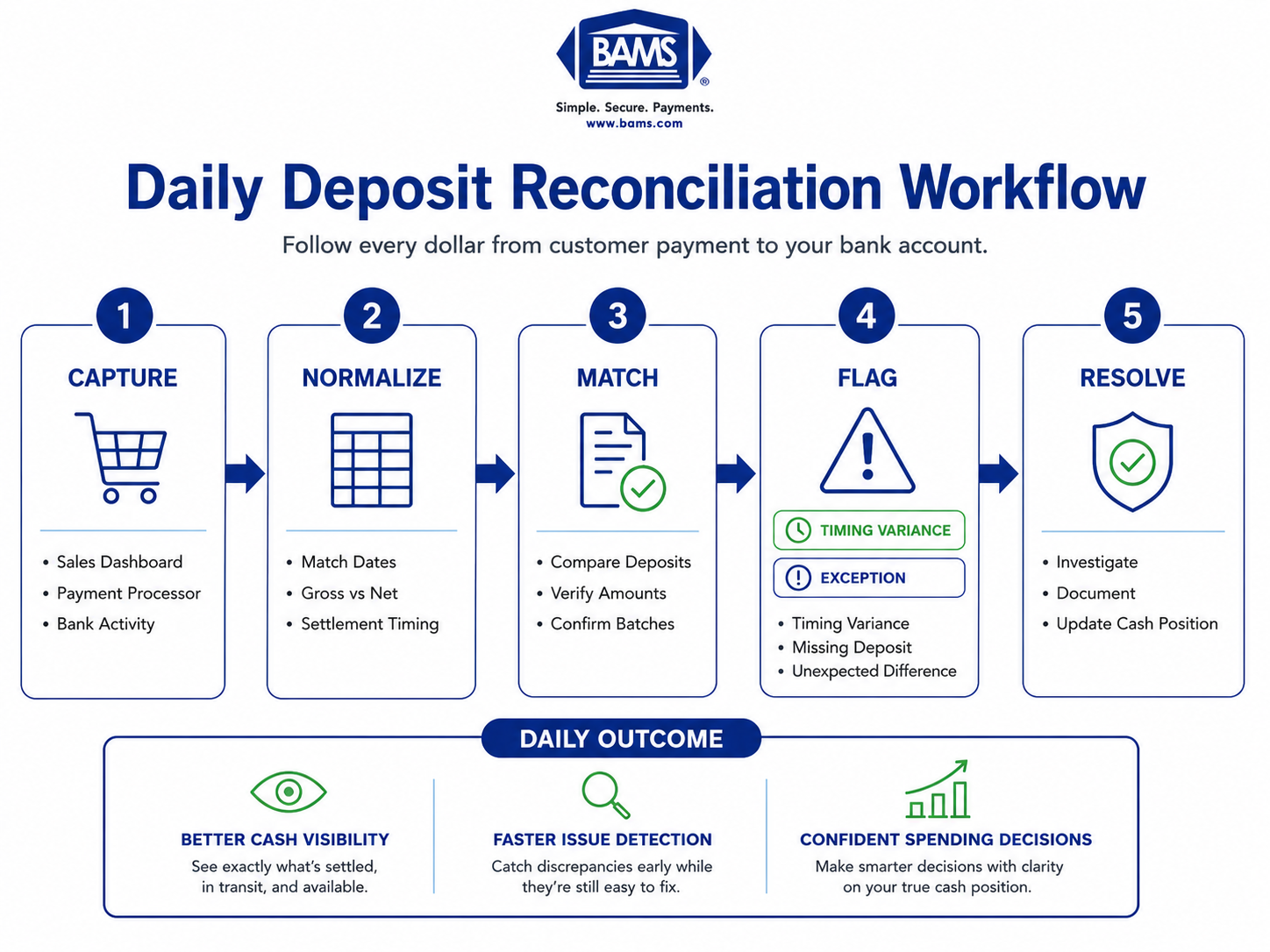
The method for closing the gap between your dashboard and your bank follows a five-stage cycle designed to run daily in 15 to 30 minutes. The stages build on each other, and skipping any one of them creates blind spots that compound over time.
- Stage 1: Capture — Pull the raw numbers from every source (dashboard, processor, bank).
- Stage 2: Normalize — Align dates, convert gross to net, and account for known timing lags.
- Stage 3: Match — Compare expected deposits against actual bank entries.
- Stage 4: Flag — Identify unmatched items and categorize them (timing variance vs. exception).
- Stage 5: Resolve — Investigate exceptions, document findings, and update your cash position.
This cycle is sequential, but it becomes faster each day as you build familiarity with your processor’s patterns. Daily reconciliation dramatically reduces the amount of investigation required compared with resolving an entire month’s worth of unmatched transactions at once, but that benchmark reflects full-scope monthly reconciliation. Your daily check should be a fraction of that because you’re catching issues in real time instead of untangling a month’s worth of mystery.
Step-by-Step Breakdown: Diagnosing and Fixing the Mismatch
Step 1: Build Your Source-of-Truth Spreadsheet
Objective: Create a single document that captures daily transaction totals from every revenue source, your processor’s settlement report, and your bank’s posted deposits, so you always have three numbers to compare.
Start by listing every channel where you collect payments: your primary eCommerce platform, any marketplace channels, and any secondary processors (PayPal, buy-now-pay-later providers, etc.). For each channel, record three columns daily: gross sales reported by the platform, expected deposit amount (after fees), and actual bank deposit received.
This doesn’t need to be sophisticated. A Google Sheet works. The critical requirement is that you record the date the transaction occurred and the date the deposit is expected as separate fields. Without this separation, you’ll never isolate timing variances from real problems. Your processor’s settlement report should tell you the expected deposit date. If it doesn’t, that’s a red flag about your processor’s transparency.
Anti-patterns: Don’t rely solely on your eCommerce platform’s “payouts” tab. It often shows initiated payouts, not confirmed bank deposits. Don’t combine multiple processors into a single line item. Each one has different settlement timing, For more information on payment settlement infrastructure and payment system operations, refer to the Federal Reserve Payments System. and lumping them together makes it impossible to identify which processor is causing a discrepancy.
Success indicators: You can look at any date in the past 30 days and see, within 60 seconds, what was sold, what was expected in the bank, and what actually arrived.
Step 2: Map Your Settlement Windows
Objective: Know the exact settlement timeline for every payment method and channel you accept, so you can predict when money should arrive and stop treating normal delays as emergencies.
Different processors and payment methods settle on wildly different timelines. PayPal payments may settle immediately for established accounts but can take 3 to 5 days for newer merchants. Amazon Marketplace can withhold funds for 14 days after shipment confirmation. Your primary card processor likely settles in 1 to 3 business days, but “business days” excludes weekends and bank holidays.
Create a reference table that lists each payment channel, its standard settlement window, its batch cutoff time, and any known exceptions (holiday schedules, reserve holds, volume thresholds that trigger delayed funding). Post this where your team can see it. When someone asks “where’s the money from Saturday’s sales?” the answer should be immediately available, not a guessing game.
This is also where you evaluate whether your current settlement timing is costing you. If your processor holds funds for 2 to 3 days as standard practice, consider whether a provider offering next-day funding would meaningfully improve your cash position. BAMS, for example, offers next-day funding as a standard feature, which compresses the timing variance window and makes daily reconciliation significantly simpler because there’s less in-transit cash to track.
Anti-patterns: Don’t assume all card brands settle at the same speed through your processor. Don’t ignore weekend and holiday stacking, which can create 4- to 5-day gaps that look alarming but are completely normal.
Success indicators: For any given sale, you can predict the deposit date within one business day of accuracy, and you stop investigating normal settlement delays.
Step 3: Perform Daily Transaction Matching
Objective: Compare your expected deposits against actual bank entries every morning, categorizing each item as matched, timing variance, or exception.
Each morning, pull your bank’s posted transactions from the previous business day. Compare each deposit against the expected deposits from your source-of-truth spreadsheet (Step 1), using the settlement windows you mapped (Step 2). Every deposit should fall into one of three categories:
- Matched: The deposit amount matches the expected amount within a reasonable tolerance (processor fees can cause small rounding differences).
- Timing variance: The deposit hasn’t arrived yet, but it’s within the normal settlement window for that processor.
- Exception: The deposit is missing beyond the expected window, or the amount doesn’t match what was expected.
The key discipline here is not to investigate timing variances. They resolve themselves. Your energy goes entirely to exceptions. For processors that settle on a next-business-day cycle, an unmatched item that hasn’t resolved after 2 business days warrants investigation. For processors with longer windows, adjust accordingly.
Anti-patterns: Don’t try to match individual transactions to individual bank deposits. Processors batch transactions, so you’re matching batch totals, not line items. Don’t skip days. Two skipped days creates a backlog that turns a 15-minute task into a 2-hour headache.
Success indicators: Your exception list on any given day contains fewer than 5 items, and you can explain every timing variance by referencing your settlement window map.
Step 4: Investigate Exceptions Systematically
Objective: Resolve every exception item by identifying its root cause and documenting the resolution, so patterns become visible over time.
When you find a genuine exception (a deposit that’s late, short, or missing), work through this diagnostic sequence:
- Check for chargebacks or refunds. Your processor may have deducted a chargeback or refund from the batch deposit without a separate notification. Pull your chargeback and refund reports for the relevant dates and see if the difference matches.
- Check for fee adjustments. Monthly fees, PCI compliance fees, or statement fees are sometimes deducted from a daily deposit rather than billed separately. Compare the shortfall against your merchant agreement terms.
- Check for holds or reserves. Some processors place rolling reserves on accounts, especially after volume spikes. Check your processor dashboard for any reserve or hold notifications.
- Contact your processor. If none of the above explains the discrepancy, contact your processor’s support team with the specific batch date and expected amount. A good processor will resolve this within hours, not days.
Document every exception and its resolution in your spreadsheet. After 30 days, review the log. You’ll start seeing patterns: maybe chargebacks consistently hit on Wednesdays, or a specific payment method always settles a day late. These patterns become the basis for refining your settlement window map and improving your cash flow forecast accuracy.
Anti-patterns: Don’t write off small discrepancies without investigating. A $12 shortfall that repeats daily is $4,380 per year. Don’t wait until month-end to investigate exceptions. The longer you wait, the harder it is to get resolution from your processor.
Success indicators: Every exception in the past 30 days has a documented root cause. You can identify your top 3 recurring exception types.
Step 5: Reconcile Fees Against Your Merchant Agreement
Objective: Verify that the fees deducted from your deposits match the rates and terms in your merchant agreement, catching overcharges before they compound. Merchants should also review the settlement and reporting documentation provided by Visa to better understand how payment activity flows through the card ecosystem.
Your processor deducts fees before depositing funds. This is normal. What’s not always normal is the amount deducted. Fee reconciliation means comparing the actual fees charged (visible in your processor’s monthly statement or daily settlement reports) against the rates specified in your merchant agreement.
Focus on three categories: per-transaction fees (typically a percentage plus a flat per-transaction amount), monthly fixed fees (statement fees, PCI fees, gateway fees), and incidental fees (chargeback fees, batch fees, early termination fees). Calculate what your fees should be based on your transaction volume and compare against what was actually charged.
This step catches two common problems. First, rate creep: some processors quietly increase rates or add new fee line items. Second, misclassification: transactions processed at a higher interchange tier than expected, resulting in higher costs. If your payment gateway lacks transparency into fee breakdowns, this step becomes nearly impossible, which is itself a diagnostic finding about your processor relationship.
Anti-patterns: Don’t assume your effective rate is the same as your quoted rate. Interchange-plus pricing means your actual cost varies by card type. Don’t skip this step because the numbers are “close enough.” A 0.1% overcharge on $500,000 in monthly volume is $6,000 per year.
Success indicators: Your calculated fees match your actual fees within 1% tolerance. You can identify every fee line item on your processor statement and tie it to a term in your agreement.
Step 6: Update Your Rolling Cash Position
Objective: Maintain a real-time view of your actual available cash (not your dashboard total, not your bank balance, but the true number that accounts for in-transit funds).
After completing your daily match, update a simple rolling cash position that shows: confirmed bank balance, plus expected deposits in transit (with expected arrival dates), minus pending refunds and chargebacks, minus committed expenses. This gives you a forward-looking view of cash availability that neither your bank nor your dashboard provides on its own.
This is where the daily reconciliation habit pays its biggest dividend. Instead of making spending decisions based on your bank balance (which understates your position by the amount in transit) or your dashboard (which overstates it by including unsettled sales), you’re working from a number that reflects reality. You can confidently approve an inventory reorder on Monday because you know $23,000 in settled deposits will hit your account by Wednesday.
If you find that your in-transit balance is consistently large relative to your daily operating needs, that’s a signal your cash gaps may be a timing problem rather than a revenue problem. Compressing your settlement window (by switching to a processor with next-day funding, for example) directly reduces the size of this float and simplifies your cash management.
Anti-patterns: Don’t treat your rolling cash position as a static document. It changes every day and needs daily updates to remain useful. Don’t forget to subtract committed but not-yet-debited expenses (payroll, supplier payments, ad spend auto-charges).
Success indicators: Your rolling cash position accurately predicts your bank balance 2 to 3 days out, within 5% tolerance. You stop being surprised by your bank balance.
Practical Examples: What This Looks Like in the Real World
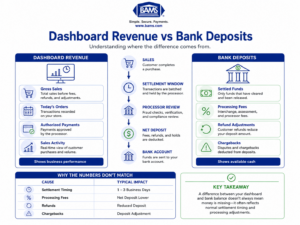
Not every difference is a missing payment—many are simply part of the settlement process.
Scenario 1: The Weekend Stacking Effect
An eCommerce store does $8,000 in sales on Friday, $12,000 on Saturday, and $9,000 on Sunday. Their processor batches daily but only settles on business days with a 2-day lag. On Monday morning, their dashboard shows $29,000 in weekend sales. Their bank shows $0 in new deposits from those sales. The manager panics and calls their processor.
In reality, Friday’s batch will settle Tuesday. Saturday’s batch settles Wednesday. Sunday’s batch settles Thursday. Nothing is wrong. The manager wasted 45 minutes on a call that a settlement window map would have prevented in 10 seconds.
Scenario 2: The Hidden Chargeback Deduction
A store expects a $6,200 deposit based on Monday’s sales. The bank shows $5,850. The $350 difference matches exactly to two chargebacks ($150 + $175) plus two $12.50 chargeback fees. The processor deducted these from the daily batch rather than billing them separately. Without daily transaction matching, this shortfall would have gone unnoticed until month-end, and the chargeback response window might have closed.
Scenario 3: The Multi-Channel Timing Maze
A business sells through Shopify (card processor settles next day), Amazon (settles every 14 days), and PayPal (settles in 1 to 3 days). On any given day, the bank balance reflects a mix of deposits from sales that occurred 1 to 14 days ago across three different channels. Without a source-of-truth spreadsheet that tracks each channel separately, the daily bank balance is essentially uninterpretable. With the spreadsheet, each deposit maps cleanly to a specific channel and date range.
Common Mistakes and Pitfalls
Treating the dashboard as the bank. Your eCommerce platform’s revenue dashboard shows gross sales at the moment of purchase. It is not a bank statement. Decisions made from dashboard numbers alone will consistently overestimate available cash.
Reconciling monthly instead of daily. Monthly reconciliation means you discover problems 15 to 30 days after they occur. By then, chargeback response windows have closed, processor support tickets are harder to resolve, and you’ve already made spending decisions based on incorrect assumptions.
Ignoring small discrepancies. A $15 unexplained shortfall per day is $5,475 per year. Small, recurring discrepancies almost always indicate a systematic issue (fee miscalculation, recurring chargeback pattern, or batch timing error) that compounds silently.
Blaming the bank. In most cases, the bank posts exactly what the processor sends. The discrepancy originates upstream, in how the processor calculates and transmits the deposit. Direct your investigation to the processor first.
What to Do Next
Start tomorrow morning. Pull yesterday’s bank deposits, your processor’s settlement report, and your platform’s sales summary. Put them side by side. You don’t need a perfect spreadsheet on day one. You need the habit of looking at three numbers together instead of one number in isolation.
After a week of daily matching, you’ll know your processor’s settlement pattern well enough to predict deposits accurately. After 30 days, you’ll have an exception log that reveals whether your current processor relationship is costing you money through hidden fees, slow settlement, or poor transparency.
Use this guide as a reference, not a one-time read. Return to the settlement window map when your processor changes terms. Revisit the fee reconciliation step quarterly, especially if your volume changes significantly. The goal isn’t perfection. It’s the confidence that comes from knowing exactly where your money is, every single day.
Frequently Asked Questions
What is deposit reconciliation in merchant services?
Deposit reconciliation is the process of matching the sales your eCommerce platform reports against the actual deposits your payment processor sends to your bank. It accounts for processing fees, chargebacks, refunds, and settlement timing to verify that every dollar you earned actually arrives in your account. Think of it as a daily proof that your processor is paying you correctly and on time.
Why does my bank balance never match my dashboard total?
Three factors create the gap. First, settlement timing: your processor batches and settles transactions 1 to 3 business days after the sale, so recent sales haven’t arrived yet. Second, fee deductions: your processor subtracts processing fees, chargebacks, and refunds before depositing funds, so you receive less than your gross sales total. Third, batch cutoffs: sales made after your processor’s daily cutoff roll into the next day’s batch, shifting the expected deposit date.
How often should I reconcile my merchant deposits?
Daily. Monthly reconciliation is the industry default, but it means discovering problems weeks after they occur. A daily check takes 15 to 30 minutes once you have a system in place and catches discrepancies while they’re still easy to investigate and resolve. The earlier you spot an issue, the more options you have to fix it.
Which factors affect the timing of merchant service deposits?
The main factors are your processor’s settlement cycle (next-day vs. 2 to 3 day), batch cutoff times, weekends and bank holidays (no settlements process on non-business days), the payment method used (credit cards, PayPal, and marketplace payouts all settle differently), and any holds or reserves your processor places on your account due to volume spikes or risk triggers.
When should a missing deposit become a concern?
If your processor settles on a next-business-day cycle, an unmatched deposit that hasn’t appeared after 2 full business days warrants investigation. For processors with longer standard settlement windows, add 1 business day beyond the stated window before escalating. Always check for chargeback deductions and fee adjustments before contacting your processor, as these are the most common explanations.
What are common challenges during deposit reconciliation?
The most frequent challenges are distinguishing timing variances from actual discrepancies, tracking multiple payment channels with different settlement schedules, identifying fee deductions that processors bundle into batch deposits without clear itemization, and maintaining the daily discipline required to keep the process effective. Multi-channel sellers face additional complexity because each platform (Shopify, Amazon, PayPal) reports and settles on its own timeline.