Interchange Fees: Optimize Apple Pay for Lower Tiers
Last Updated on October 6, 2026 by Dimitri Akhrin
How tokenized transactions unlock interchange qualification tiers most eCommerce managers overlook
Learn how Apple Pay’s tokenized transaction flow interacts with interchange tier qualifications to reduce processing costs. This guide covers auditing your current tier placement and building systems that consistently capture lower rates.
TL;DR
- Apple Pay isn’t automatically cheaper — Its tokenized transaction structure can qualify for lower interchange tiers, but only if your gateway correctly passes DPAN, cryptogram, and authentication data to the card network.
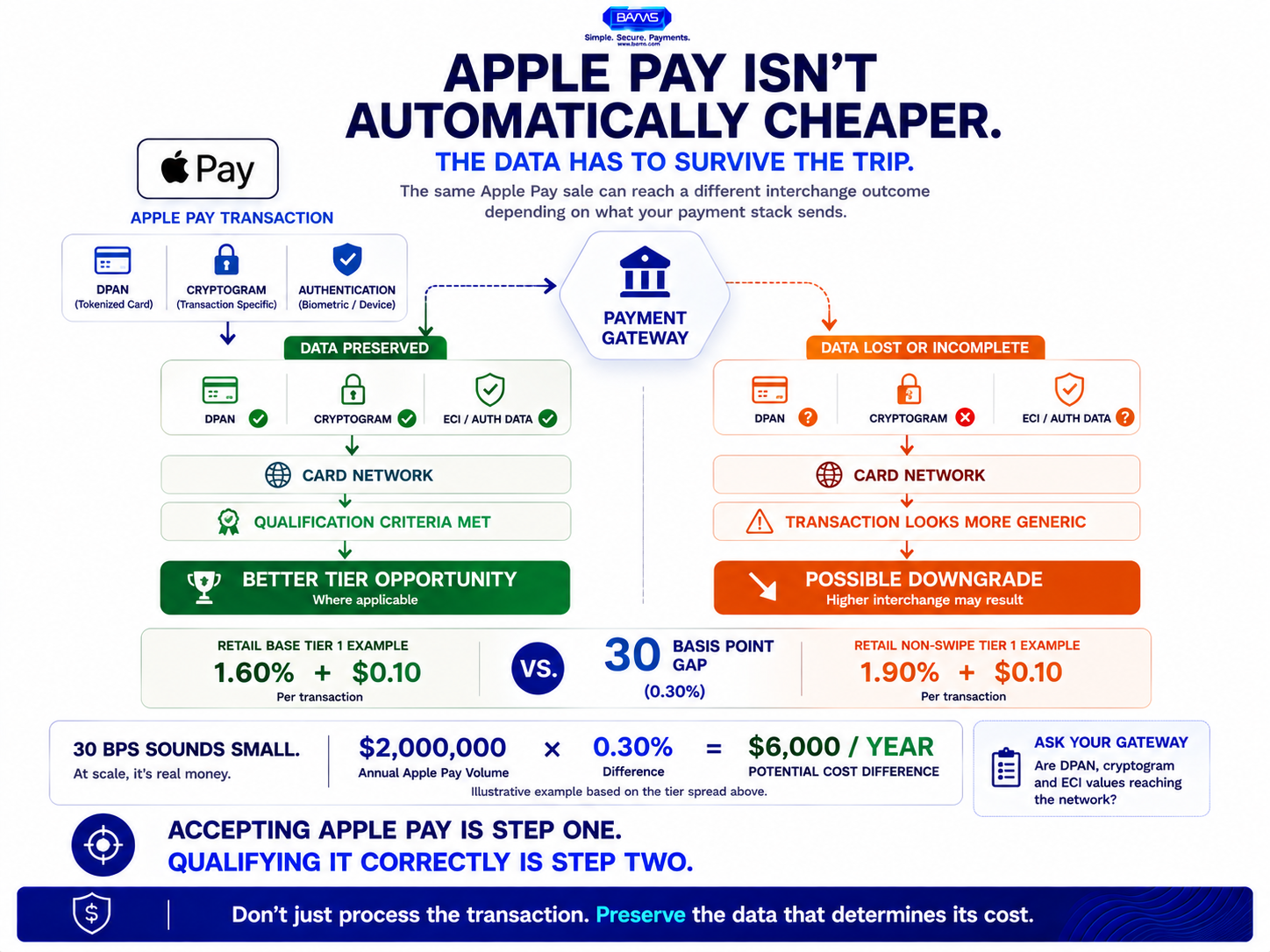
- The gap is measurable — Published interchange tables show a 30 basis point spread between base and non-swipe tiers. On meaningful Apple Pay volume, that translates to thousands in annual savings.
- Data enrichment compounds the advantage — Combining Apple Pay’s authentication signals with Level 2/3 data submission (tax, line items, shipping) pushes transactions into the lowest available interchange tier.
- Chargebacks and settlement timing are connected to interchange — High chargeback ratios trigger risk-based pricing, and late settlement causes automatic downgrades. Both silently inflate your effective processing rate.
- Start with an audit — Pull your processing statement, isolate Apple Pay transactions, and check which interchange tiers they’re qualifying for. Most eCommerce managers find at least one category of transactions consistently downgrading.
Guide Orientation: What This Covers and Who It’s For
This guide shows eCommerce managers how to turn Apple Pay’s tokenized transaction structure into a concrete interchange fee advantage. Most teams treat digital wallet payments as a fixed cost. They aren’t. The way Apple Pay routes transactions through card networks creates opportunities to qualify for lower interchange tiers, reduce chargebacks, and recapture margin that silently leaks on every order.
This is written for eCommerce managers at established online businesses (roughly 10 to 50 employees) who already accept Apple Pay but haven’t examined how it affects their processing costs at the interchange level. By the end, you’ll understand how tokenization changes interchange qualification, how to audit your current tier placement, and how to build a system that consistently captures lower rates.
This guide does not cover how to add Apple Pay to your checkout for the first time. It assumes you already accept it and want to optimize what happens after the tap.
Why Interchange Fees on Apple Pay Deserve Your Attention Now
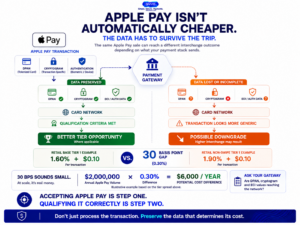
Apple Pay brings stronger authentication signals into the transaction, but those signals only matter if the payment stack preserves the data the network needs for qualification.
Interchange is the largest single component of your credit card processing fees, typically 70% to 80% of total cost. Yet most eCommerce managers never look past the blended rate their processor quotes. That’s a problem, because interchange isn’t one rate. It’s a matrix of dozens of tiers, and the tier your transaction lands in depends on variables you can actually influence: data richness, transaction type, tokenization status, and fraud indicators.
Apple Pay changes several of these variables simultaneously. Its device-specific tokenization uses a DPAN (Device Primary Account Number) instead of the cardholder’s real card number. That token, combined with a transaction-specific cryptogram, signals to the card network that this payment carries stronger authentication than a typical eCommerce transaction. In theory, that should earn you better interchange treatment. In practice, it often doesn’t, because your gateway configuration or data submission gaps cause the transaction to downgrade.
The cost of poor interchange qualification is measurable, but the exact difference depends on the card product, merchant category, transaction type, and data submitted with the transaction. That is why Apple Pay performance should be audited at the interchange-category level instead of assuming every tokenized transaction automatically receives a lower rate.
Interchange qualification can also depend on the data associated with the transaction. Visa identifies separate qualification indicators for Commercial Card Level 2 and Level 3 Enhanced Data interchange rates. For merchants accepting eligible commercial cards, passing the required enhanced data can therefore affect interchange qualification.
Core Concepts: What You Need to Understand Before Optimizing
Interchange Qualification Is Not a Fixed Rate
Every card transaction is evaluated against qualification criteria set by Visa, Mastercard, and other networks. These criteria determine which interchange tier the transaction falls into. Factors include whether the card was present, what data fields were submitted, how quickly settlement occurred, and whether the transaction used tokenization. Miss a criterion and your transaction “downgrades” to a more expensive tier.
Tokenization Changes the Transaction Profile
When a customer pays with Apple Pay, the payment network receives a DPAN and a one-time cryptogram rather than the raw card number. The network de-tokenizes this data and sends the real PAN to the issuer for authorization. This means Apple Pay still runs on standard card rails, but the token layer adds authentication signals that can influence how the network classifies the transaction.
The 30 Basis Point Spread
The cost of poor interchange qualification is measurable, but the exact difference depends on the card product, merchant category, transaction type, and data submitted with the transaction. That is why Apple Pay performance should be audited at the interchange-category level instead of assuming every tokenized transaction automatically receives a lower rate.
Chargebacks as a Cost Multiplier
Chargebacks don’t just cost you the disputed amount. They trigger fees ($20 to $100 per incident), increase your effective processing rate through risk-based pricing adjustments, and can push your chargeback ratio past network thresholds that trigger monitoring programs. Reducing chargebacks isn’t just about fraud prevention. It’s a direct lever on your interchange costs and overall processing economics.
The Framework: A System-Level Approach to Interchange Optimization
Treating interchange as a system-level cost lever means addressing four interconnected layers rather than chasing individual rate reductions. Each layer compounds the others:
- Layer 1: Transaction Authentication — Ensuring Apple Pay’s tokenization signals are correctly passed through your gateway so networks recognize the stronger authentication.
- Layer 2: Data Enrichment — Submitting the Level 2 and Level 3 data fields that qualify transactions for lower interchange tiers.
- Layer 3: Chargeback Reduction — Lowering dispute rates to avoid risk-based pricing penalties and keep your merchant account in good standing.
- Layer 4: Settlement and Funding — Aligning settlement timing with interchange qualification windows and optimizing cash flow through faster funding.
These layers aren’t sequential in the traditional sense. You can work on all four simultaneously. But each one depends on accurate data flowing from the previous layer, which is why we’ll walk through them in order.
Step-by-Step Breakdown: Turning Apple Pay’s Structure Into Real Savings
Step 1: Audit Your Current Interchange Tier Placement
Objective: Identify which interchange tiers your Apple Pay transactions are actually qualifying for, versus where they should be landing.
Start by pulling your most recent processing statement and isolating Apple Pay transactions. If your processor provides interchange-level detail (not all do on default statements), look for the specific tier codes assigned to each transaction. You’re looking for downgrades: transactions that should have qualified for a base or preferred tier but landed in a non-qualified or mid-qualified bucket instead.
The most common pattern is Apple Pay transactions being classified the same as standard card-not-present (CNP) transactions, even though the tokenization and cryptogram should signal stronger authentication. If you see your Apple Pay volume sitting at the same interchange rate as manually keyed orders, something in your data submission chain is stripping the token indicators before they reach the network.
What to avoid: Don’t rely on your blended processing rate to assess this. Blended rates hide interchange detail by design. You need line-item interchange data. If your current processor doesn’t provide it, that’s the first conversation to have. For a deeper look at what to watch for on your statements, this guide on processing statement analysis walks through five specific signals of margin leakage.
Success indicator: You can identify the exact interchange tier code for at least 90% of your Apple Pay transactions and compare them against the network’s published qualification criteria.
Step 2: Verify Your Gateway Is Passing Tokenization Data Correctly
Objective: Confirm that Apple Pay’s DPAN, cryptogram, and authentication indicators are reaching the card network intact.
Apple Pay generates a device-specific token and a one-time cryptogram for every transaction. These data elements tell the card network that the payment was authenticated through biometric verification (Face ID or Touch ID) on the customer’s device. When this data reaches the network correctly, it can qualify the transaction for interchange tiers that reward strong authentication.
The problem is that many payment gateway configurations strip or fail to map these fields during the authorization request. This happens most often with off-the-shelf eCommerce plugins that weren’t designed with interchange optimization in mind. The gateway sends the transaction as a generic CNP payment, and the network prices it accordingly.
Contact your gateway provider and ask specifically: “Are we passing the DPAN, cryptogram, and ECI (Electronic Commerce Indicator) values for Apple Pay transactions?” If the answer is uncertain, request a test transaction with full field-level logging so you can verify what the network actually receives.
What to avoid: Don’t assume your gateway handles this automatically because Apple Pay is listed as a supported payment method. “Supported” means the gateway can process the transaction. It doesn’t mean the gateway is optimizing the data it sends.
Success indicator: You have written confirmation from your gateway provider (or test transaction logs) showing that tokenization and authentication fields are being transmitted for Apple Pay authorizations.
Step 3: Enrich Transactions With Level 2 and Level 3 Data
Objective: Submit the additional data fields that card networks use to qualify transactions for lower interchange tiers.
Level 2 data includes fields like sales tax amount, customer code, and merchant postal code. Level 3 data adds line-item detail: product descriptions, quantities, unit costs, and freight amounts. Visa and Mastercard offer reduced interchange rates for transactions that include this enriched data, particularly for commercial and purchasing cards.
For eCommerce, this means your checkout and order management system need to capture and pass these fields through your gateway to your processor. Most default eCommerce platform configurations don’t do this. The data exists in your system (you know the tax amount, the line items, the shipping cost) but it never reaches the card network because nobody configured the gateway to send it.
This is where Apple Pay’s tokenized flow intersects with data enrichment for maximum effect. When you combine Apple Pay’s strong authentication signals with complete Level 2/3 data, you’re presenting the network with a transaction that checks every qualification box. The result is consistent placement in the lowest available interchange tier for that card type.
What to avoid: Don’t try to implement Level 3 data submission without first confirming your processor and gateway both support it. Some processors accept the data but don’t pass it to the network. Others charge additional fees for Level 3 processing that may offset the interchange savings for smaller merchants. Run the math on your specific volume before investing in implementation.
Success indicator: Your processing statement shows transactions qualifying for Level 2 or Level 3 interchange tiers, and the rate difference is visible compared to your previous statements.
Step 4: Build a Chargeback Reduction System That Protects Your Interchange Position
Objective: Keep your chargeback ratio low enough to avoid risk-based pricing adjustments and network monitoring programs.
Apple Pay’s tokenization already reduces certain types of fraud. Because the real card number is never exposed to the merchant or transmitted during the transaction, stolen card data from a breach can’t be used to make fraudulent Apple Pay purchases. This structural advantage should naturally lower your fraud-related chargebacks.
But fraud isn’t the only source of chargebacks. “Friendly fraud” (customers disputing legitimate charges), subscription billing confusion, and delivery disputes account for a significant share of eCommerce chargebacks. These won’t decrease just because you accept Apple Pay.
Build a proactive defense system: clear billing descriptors that match your brand name, automated delivery confirmation emails with tracking, transparent refund policies visible before checkout, and rapid response to dispute notifications. Every chargeback you prevent saves you the direct fee, protects your chargeback ratio, and preserves your eligibility for preferred interchange treatment. Merchant services partners like BAMS offer proactive chargeback defense as part of their account management, which can be particularly valuable if you lack a dedicated payments team to monitor and respond to disputes in real time.
What to avoid: Don’t treat chargebacks as an inevitable cost of doing business. Every uncontested chargeback trains the system (and the customer) that disputes are easy and consequence-free. Respond to every dispute with documentation, even if the amount seems small.
Success indicator: Your fraud and dispute activity remains stable or declines over time, and your monitoring process reflects Visa’s current approach of evaluating fraud and disputes together rather than relying on a single universal chargeback percentage.
Step 5: Align Settlement Timing With Interchange Qualification Windows
Objective: Settle transactions within the timeframes required by card networks to avoid timing-based downgrades.
Card networks impose settlement windows. If you authorize a transaction but don’t settle (capture) it within the required timeframe (typically 24 to 48 hours for eCommerce), the transaction may downgrade to a higher interchange tier. This is one of the most common and least visible sources of interchange leakage.
eCommerce businesses that hold authorizations until shipment are particularly vulnerable. If your warehouse takes three days to ship, and you don’t capture the payment until the tracking number generates, you’ve likely missed the settlement window. The fix is to capture at the time of order confirmation and handle refunds separately if needed, or to use a split-capture workflow that settles within the network’s window.
Settlement timing also connects directly to cash flow. Faster settlement means faster funding, and faster funding means more predictable cash flow for inventory, marketing, and operations. BAMS offers next-day funding for settled transactions, which aligns naturally with the tight settlement windows that interchange qualification requires.
What to avoid: Don’t batch-settle once a day at midnight if your orders are spread across time zones. A transaction authorized at 11:55 PM and settled at 12:05 AM the next day may technically fall within the window, but batching delays can push borderline transactions past the cutoff. Settle as close to authorization as your workflow allows.
Success indicator: Your average authorization-to-settlement time is under 24 hours, and your processing statement shows zero timing-based downgrades.
Step 6: Segment Apple Pay Performance and Benchmark Against Other Methods
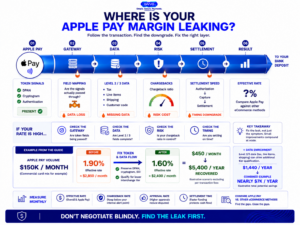
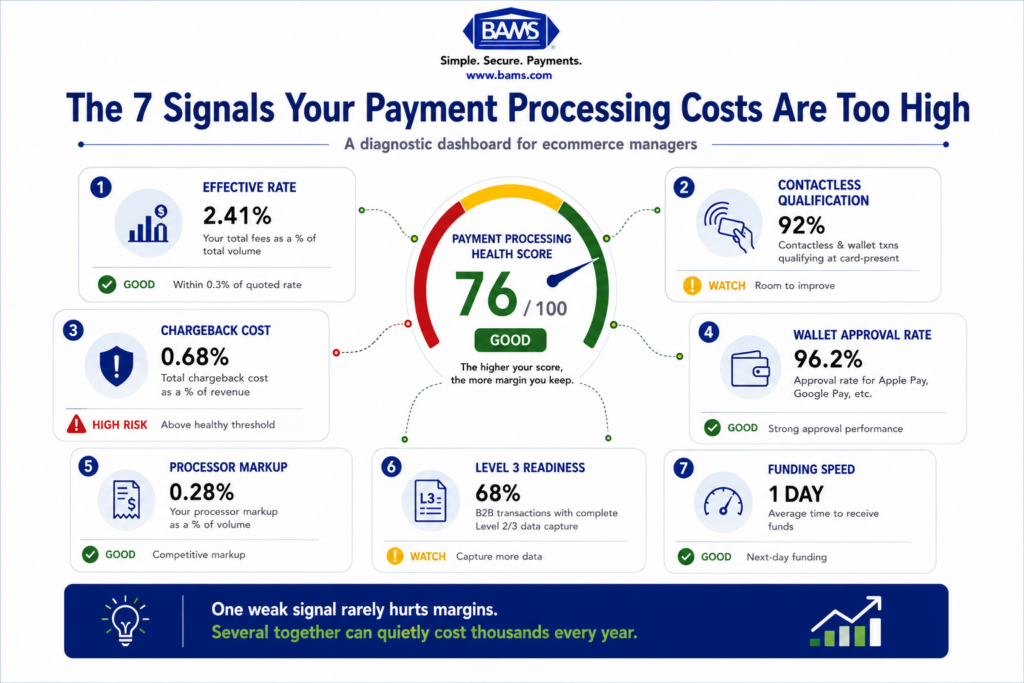
Modern BAMS diagnostic graphic showing where Apple Pay transactions can lose interchange qualification and how merchants can identify margin leakage.
Objective: Isolate Apple Pay’s cost profile so you can make data-driven decisions about promoting it to customers.
Once you’ve optimized the previous layers, you need to measure the results. Pull your processing data and segment it by payment method: Apple Pay, other digital wallets, traditional card-not-present, and (if applicable) card-present. For each segment, calculate the effective rate (total fees divided by total volume), the chargeback rate, and the average authorization-to-settlement time.
If your optimization work is functioning correctly, Apple Pay should show a lower effective rate than standard CNP transactions due to better interchange qualification. It should also show a lower chargeback rate due to tokenization’s fraud reduction benefits. These two advantages compound: lower chargebacks improve your risk profile, which helps maintain preferred interchange treatment over time.
Use this data to decide whether to actively promote Apple Pay at checkout. If Apple Pay transactions cost you 25 to 40 basis points less than standard card payments after optimization, there’s a clear financial incentive to make it the most prominent payment option. Consider checkout UX changes that surface Apple Pay first for customers on supported devices.
What to avoid: Don’t benchmark Apple Pay against card-present (in-store tap) rates. The interchange structures are different, and the comparison will mislead your optimization efforts. Compare Apple Pay against other eCommerce payment methods only.
Success indicator: You have a monthly report showing Apple Pay’s effective rate, chargeback rate, and approval rate compared to your other payment methods, and you can identify the cost advantage (or disadvantage) with precision.
Practical Example: The 30 Basis Point Recovery
Consider an online retailer processing $150,000 per month in Apple Pay transactions. Before optimization, their Apple Pay transactions are landing in the retail non-swipe tier at 1.90% + $0.10 because their gateway isn’t passing tokenization indicators. Their monthly interchange cost on this volume is approximately $2,850 plus per-transaction fees.
After verifying gateway data transmission (Step 2) and confirming that DPAN and cryptogram fields are reaching the network, their Apple Pay transactions begin qualifying for the retail base tier at 1.60% + $0.10. Monthly interchange drops to approximately $2,400. That’s $450 per month, or $5,400 per year, recovered without changing processors, adding new technology, or altering the customer experience.
Now add Level 2 data submission (Step 3) for the portion of their volume that comes from business purchasing cards. If 20% of their Apple Pay volume involves commercial cards, and Level 2 qualification saves an additional 40 basis points on that segment, they recover another $1,440 annually. Combined savings: nearly $7,000 per year from a single payment method.
This example doesn’t include the indirect savings from chargeback reduction or the cash flow benefit of faster settlement. When you factor those in, the total economic impact of treating interchange as a system-level optimization, rather than a fixed cost, becomes even more significant.
Common Mistakes and Pitfalls
Treating all digital wallets identically. Apple Pay, Google Pay, and other wallets have different tokenization architectures and different interchange implications. Optimizing for “digital wallets” as a category misses the specific advantages of Apple Pay’s DPAN structure. Understanding the layered fee structure behind Apple Pay specifically is where the real savings live.
Optimizing interchange without monitoring chargebacks. You can qualify for the best interchange tier on every transaction and still lose money if your chargeback ratio triggers risk-based pricing adjustments. The two systems are connected. Optimize both simultaneously.
Assuming your processor is handling this for you. Most processors are in the business of processing transactions, not optimizing your interchange qualification. Unless your processor agreement specifically includes interchange optimization as a service, the responsibility sits with you.
Making changes without a baseline. If you don’t know your current effective rate by payment method, you can’t measure improvement. Audit first, optimize second. For a structured approach to diagnosing interchange downgrades on Apple Pay, start with a systematic review of your current qualification data.
What to Do Next
Start with Step 1. Pull your most recent processing statement and identify whether it provides interchange-level detail for Apple Pay transactions. If it does, check which tiers those transactions are qualifying for. If it doesn’t, contact your processor and request interchange-level reporting.
This single action will tell you whether you have an optimization opportunity worth pursuing or whether your current setup is already performing well. Most eCommerce managers who do this audit for the first time discover at least one category of transactions that’s consistently downgrading.
You don’t need to implement all six steps at once. Each step delivers independent value. But the compounding effect of addressing authentication, data enrichment, chargeback defense, and settlement timing together is where the real margin recovery happens. Revisit this guide as you complete each layer, and use your monthly benchmarking data (Step 6) to confirm that changes are producing measurable results.
Frequently Asked Questions
What fees do merchants incur when accepting Apple Pay?
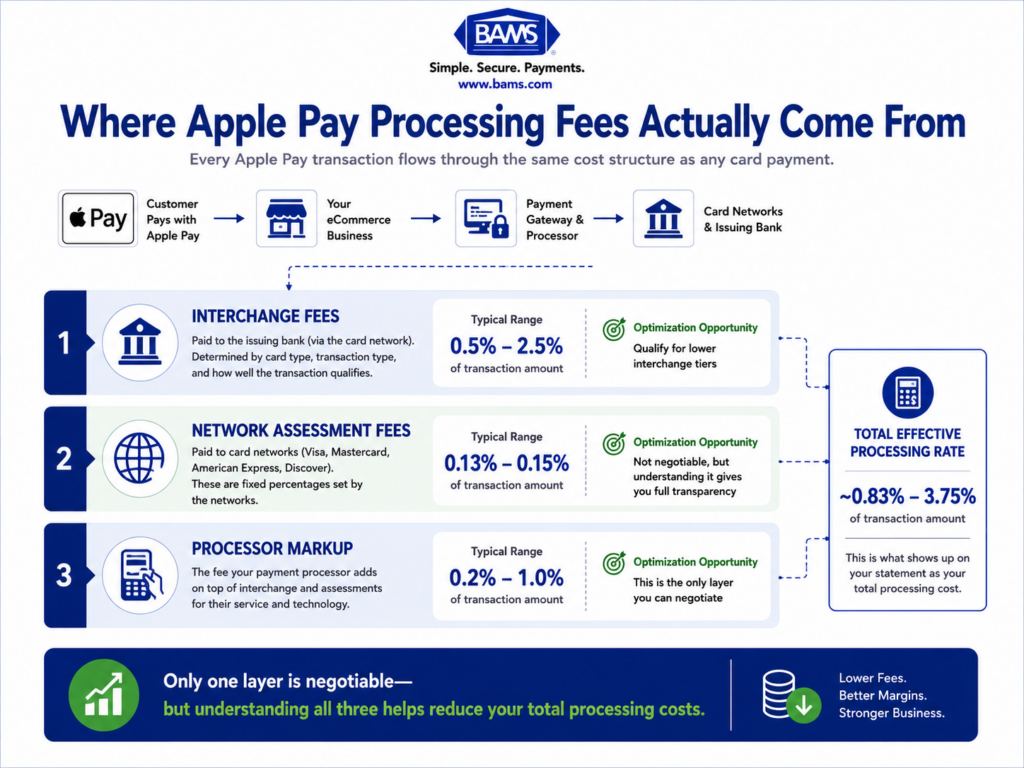
Apple itself charges merchants nothing for Apple Pay acceptance. However, every Apple Pay transaction still runs through card network rails, which means you pay interchange fees, network assessment fees, and your processor’s markup, just like any other card transaction. The key difference is that Apple Pay’s tokenized structure can qualify transactions for different (potentially lower) interchange tiers if your gateway and processor are configured correctly.
How does Apple Pay compare to traditional credit card processing fees?
Apple Pay transactions use the same interchange rate tables as traditional card transactions, but the tokenization and biometric authentication can influence which tier your transaction qualifies for. When properly configured, Apple Pay eCommerce transactions may qualify for lower interchange rates than standard card-not-present transactions because the DPAN and cryptogram signal stronger authentication to the card network.
Why is Apple Pay beneficial for reducing fraud and chargeback costs?
Apple Pay replaces the real card number with a device-specific token (DPAN) and generates a one-time cryptogram for each transaction. This means stolen card data can’t be used to make fraudulent Apple Pay purchases. The biometric authentication (Face ID or Touch ID) adds another layer. Together, these features reduce fraud-related chargebacks, which protects your chargeback ratio and helps maintain favorable interchange treatment.
How can merchants optimize costs when using Apple Pay?
Focus on four areas: verify your gateway is passing Apple Pay’s tokenization data to the card network, submit Level 2 and Level 3 data fields for interchange qualification, build a proactive chargeback defense system, and settle transactions within the network’s required timeframes. Each of these independently reduces costs, and they compound when implemented together.
When should businesses actively promote Apple Pay to customers?
Promote Apple Pay when your benchmarking data shows it delivers a lower effective processing rate and lower chargeback rate than your other payment methods. For most optimized eCommerce setups, this means surfacing Apple Pay as the primary payment option for customers on supported devices, since every transaction that shifts from standard card-not-present to Apple Pay can save you 25 to 40 basis points in interchange.
Which payment processors support Apple Pay interchange optimization for merchants?
Most major processors can accept Apple Pay transactions, but not all pass the tokenization and authentication data needed for optimal interchange qualification. Ask your processor specifically whether they transmit DPAN, cryptogram, and ECI values to the card network. If they can’t confirm this, or if your processing statements show Apple Pay transactions at the same rate as standard CNP transactions, your processor may not be supporting full optimization.