Level 3 Data: A Guide to Hidden Processing Costs
Last Updated on August 7, 2026 by Dimitri Akhrin
How transaction qualification levels silently inflate your interchange fees — and what midsize merchants can do about it
Learn how Level 3 data (invoice-quality data) affects what you pay per transaction and why your processor never shows you. This guide helps eCommerce merchants identify hidden costs on commercial card orders and take practical steps toward better qualification.
TL;DR
- Your processing statement hides qualification data – Monthly statements show totals and fees but don’t reveal which transactions qualified at reduced interchange tiers and which silently downgraded to the most expensive rates.
- Level 3 (invoice-quality) data saves real money – Submitting complete line-item details with commercial card transactions can reduce interchange rates by roughly 1.05 percentage points, translating to thousands in annual savings for merchants with even modest commercial card volume.
- This isn’t just for enterprise B2B companies – Any eCommerce business processing orders from businesses, schools, nonprofits, or government agencies likely handles commercial cards without realizing it. The savings opportunity exists regardless of company size.
- Start with visibility, not implementation – Request a transaction-level report from your processor showing interchange categories and card types. That single report tells you whether you have a qualification gap worth fixing.
- Visa now requires Level 3 for any interchange discount – Visa retired its Level 2 program, making full Level 3 data submission the only path to reduced rates on Visa commercial cards. The industry is moving toward more data requirements, not fewer.
Guide Orientation: What This Covers and Who It’s For
This guide examines why your monthly processing statement fails to show you the transaction qualification levels that directly determine what you pay per transaction. Specifically, it explains how Level 3 data (also called invoice-quality data) creates a hidden cost gap that most small-to-midsize eCommerce merchants never see, let alone fix.
This is for eCommerce managers at established online businesses processing a mix of consumer and commercial card transactions. If you sell to other businesses, government agencies, or organizations that use corporate purchasing cards, this applies to you, even if B2B isn’t your primary channel.
By the end, you’ll understand how transaction-level evaluation works behind the scenes, how to identify whether you’re overpaying on commercial card orders, and how to take practical steps toward qualification without overhauling your tech stack. This guide does not cover PCI compliance, gateway selection, or consumer card reward optimization.
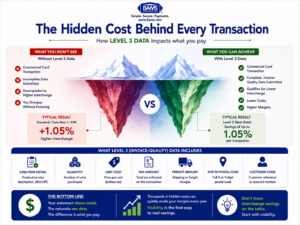
Most eCommerce platforms already collect the information needed for Level 3 qualification. The real opportunity is ensuring your payment processor automatically captures and transmits that data to unlock lower interchange rates.
Why Transaction Qualification Transparency Matters
Every card transaction your business processes is evaluated and assigned a qualification level by the card networks. That level determines the interchange rate you pay.
Commercial card transactions that include complete enhanced transaction data are more likely to qualify for preferred interchange categories than transactions submitted with only basic authorization data. The actual savings depend on the merchant’s processor, card mix, and qualification rates.
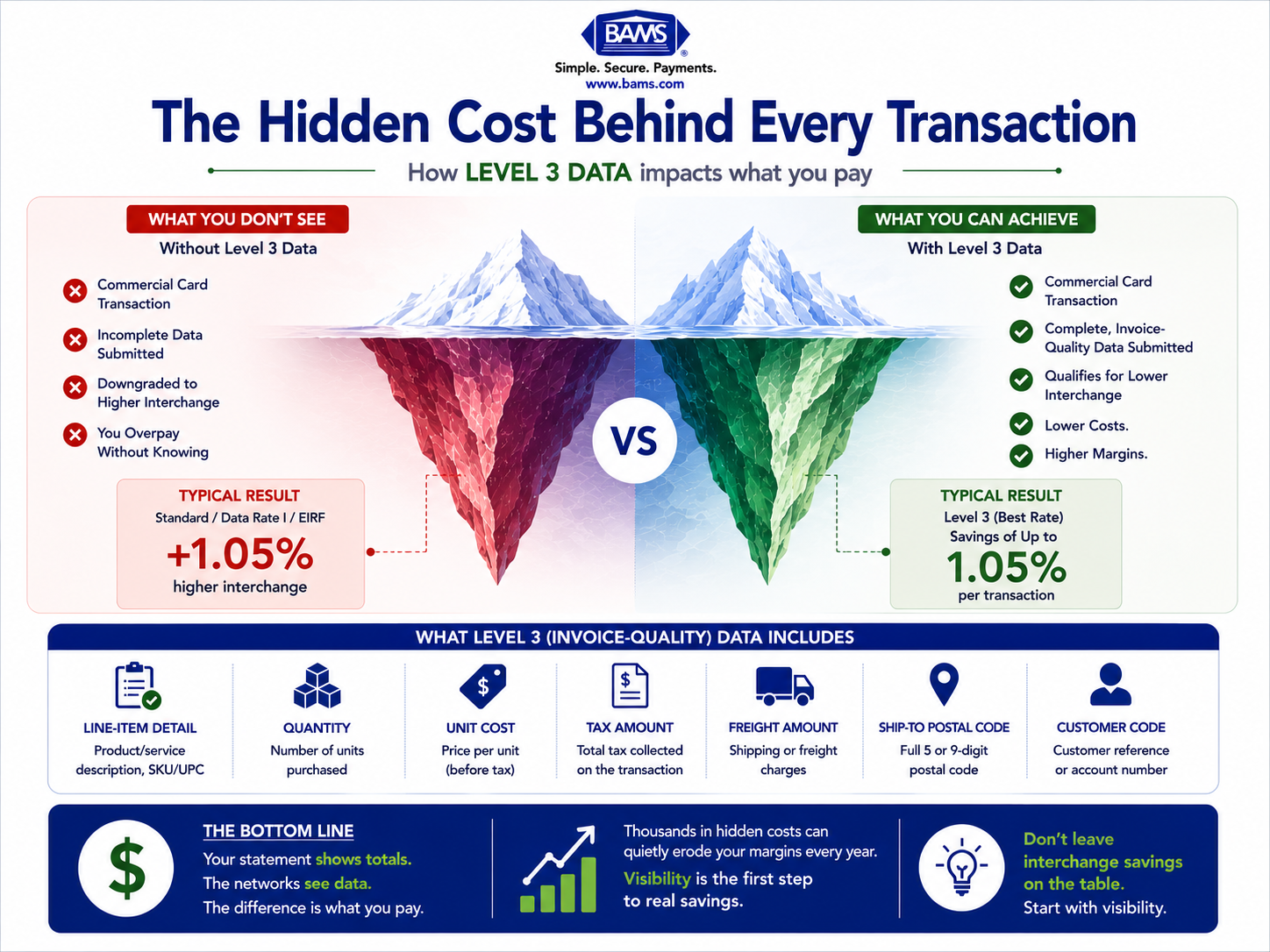
A transaction that qualifies at the highest level (Level 3) can cost as much as 1.05 percentage points less than the same transaction processed without enhanced data. On a $500 commercial card order, that’s a $5.25 difference. Multiply that across hundreds or thousands of orders per month, and the gap becomes significant.
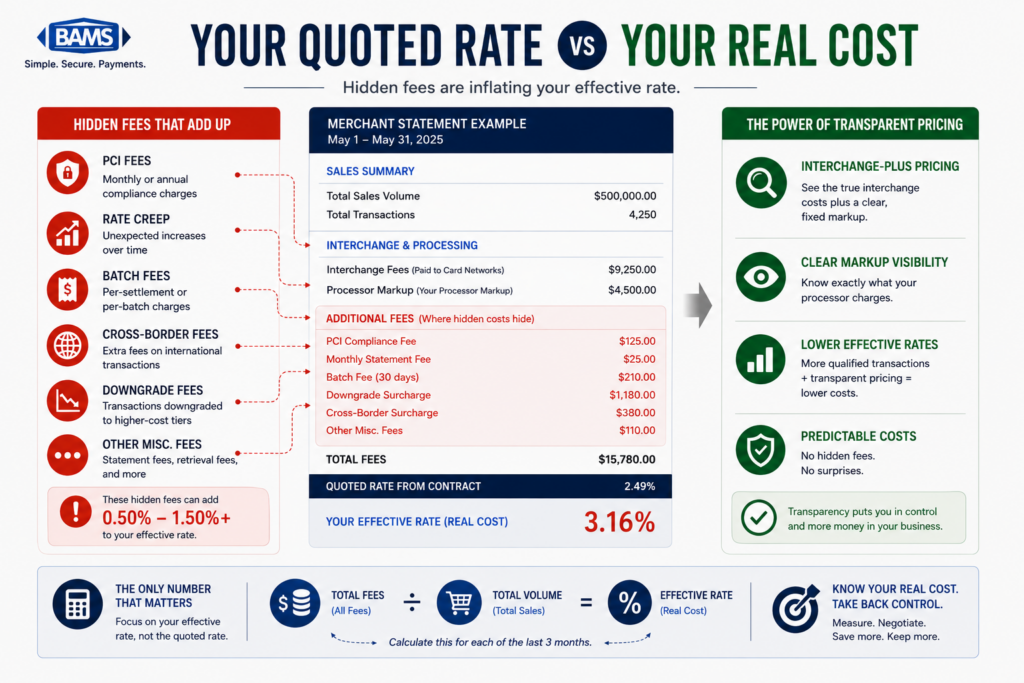
The structural problem is that most processing statements don’t show you which transactions qualified at which level. You see a total, a fee, maybe a rate. You don’t see that 15% of your transactions came from corporate purchasing cards and quietly downgraded to the most expensive interchange tier because your system didn’t pass the right data fields.
This isn’t a niche concern for enterprise procurement teams. Any eCommerce business that occasionally processes commercial cards (and many do without realizing it) is exposed to this cost. The card networks don’t distinguish between a Fortune 500 company and a 20-person online retailer when assigning interchange categories. If the data isn’t there, the rate goes up. Period.
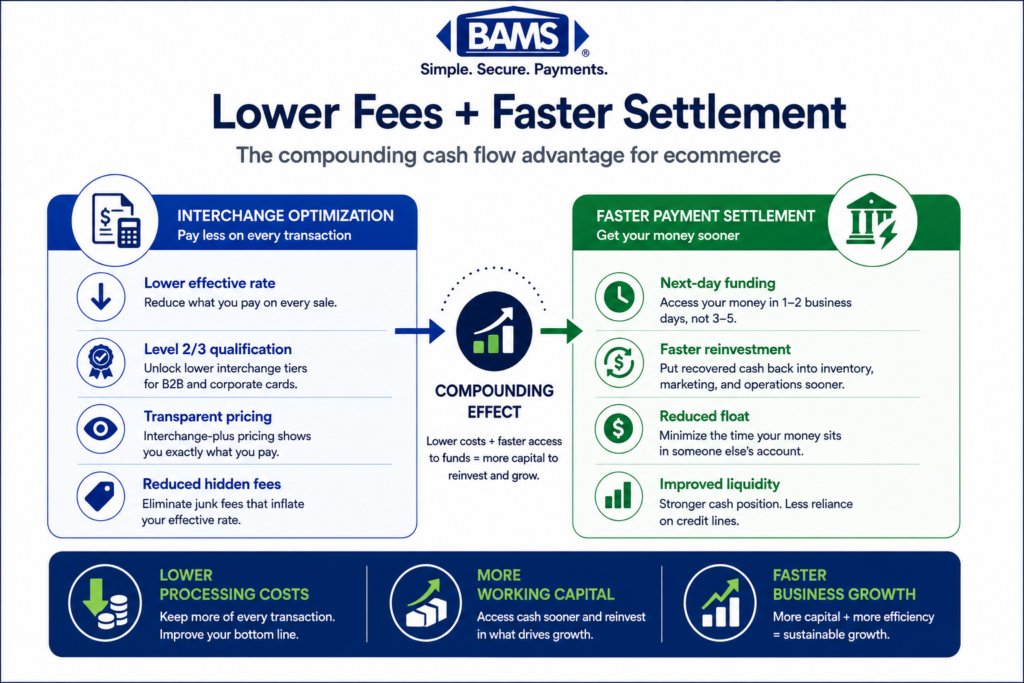
The cost of inaction isn’t dramatic. It’s slow. It’s the kind of margin erosion that compounds quietly across thousands of transactions, invisible on your monthly statement because the statement was never designed to show it to you.
According to the Federal Reserve’s 2025 Small Business Credit Survey, controlling operating expenses remains one of the top priorities for businesses. Improving visibility into payment processing costs is one way merchants can protect margins without increasing prices.
Core Concepts: How Transaction-Level Evaluation Actually Works
What Are Qualification Levels?
When a card transaction is processed, the card networks (Visa, Mastercard) evaluate the data submitted with that transaction and assign it to an interchange category. The more complete and structured the data, the lower the interchange rate. There are three tiers:
- Level 1: Basic authorization data (card number, expiration, amount). This is what most consumer transactions submit. It’s the default.
- Level 2: Adds merchant tax ID, customer code, and sales tax amount. This qualifies some commercial card transactions for a reduced rate.
- Level 3: Adds line-item detail: product descriptions, quantities, unit prices, invoice numbers, shipping costs. This effectively provides detailed line-item transaction information that supports commercial payment processing, reconciliation, and enhanced transaction qualification. Mastercard Developers provides technical documentation covering commercial payment integrations and enhanced transaction data.
Why “Invoice-Quality Data” Is a Better Name
The term “Level 3 data” sounds technical and enterprise-grade. In practice, it’s the same information you’d put on a standard invoice: what was sold, how many, at what price, with what tax and shipping. If you already generate invoices for orders, you likely have most of this data. The gap isn’t in the data itself; it’s in whether that data gets passed to the card network at the moment of transaction.
The Critical Distinction: Card Type Determines Eligibility
Only commercial cards (corporate, business, and purchasing cards) qualify for Level 2 and Level 3 interchange rates. Consumer cards are ineligible regardless of how much data you submit. This is why understanding your transaction mix matters: you need to know which of your orders are coming in on commercial cards before you can estimate the savings opportunity.
The Authorize.Net API Reference documents the enhanced transaction fields that gateways can submit for eligible commercial card transactions.
The Framework: From Invisible to Actionable
Fixing this problem follows a four-stage process. Each stage builds on the previous one, and you don’t need to complete all four to start saving money.
- Stage 1: Visibility. Get access to transaction-level data that shows qualification levels and card types.
- Stage 2: Assessment. Identify your commercial card volume and calculate the cost of current downgrades.
- Stage 3: Data Alignment. Ensure the required data fields are populated and passed correctly at the point of transaction.
- Stage 4: Verification. Confirm that transactions are actually qualifying at the expected levels and monitor for regressions.
This isn’t a one-time project. It’s an ongoing operational discipline, similar to monitoring your effective processing rate. But the initial setup is where most of the value unlocks.
Step-by-Step: How to Uncover and Fix Your Qualification Gap
Step 1: Request Transaction-Level Reporting
Objective: Move from summary-level statements to data that shows interchange qualification per transaction.
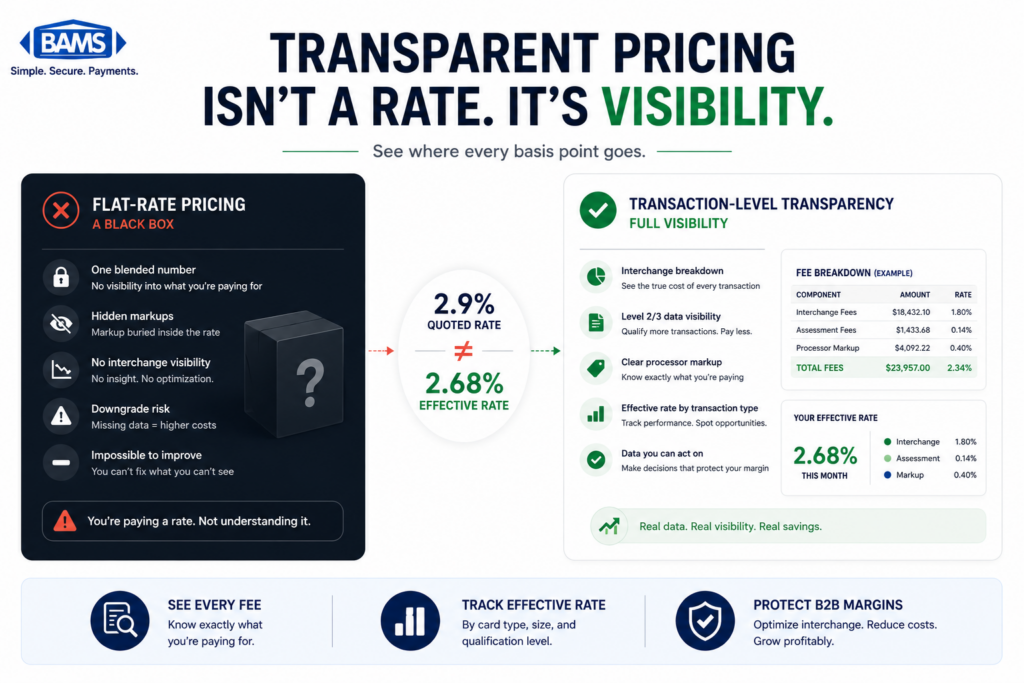
Your monthly processing statement is a summary document. It shows totals, aggregate fees, and maybe a breakdown by card brand. What it almost never shows is the interchange category each individual transaction qualified at. This is the single biggest visibility gap in merchant services, and it’s where the story your statement tells starts to break down.
Contact your processor and request a transaction-level report that includes the interchange category or qualification level for each transaction. Ideally, this report should also include the Bank Identification Number (BIN) for each card, which tells you whether the card is consumer, commercial, business, or purchasing. Some processors provide this through an online portal; others require a specific request.
If your processor cannot or will not provide this data, that’s a significant red flag about what your statement isn’t showing you. Transparency at the transaction level isn’t a premium feature. It’s baseline information you need to manage your costs.
Anti-pattern: Accepting a “detailed statement” that simply breaks fees into more line items without showing per-transaction interchange categories. More lines doesn’t mean more insight.
Success indicator: You can open a report and see, for any given transaction, the interchange tier it qualified at and whether the card was consumer or commercial.
Step 2: Identify Your Commercial Card Volume
Objective: Determine what percentage of your transactions come from commercial, corporate, or purchasing cards.
Most ecommerce merchants assume their transactions are overwhelmingly consumer cards. For many, that’s true. But if you sell products that businesses buy (office supplies, equipment, software, bulk goods, professional services), you likely process more commercial cards than you think. Businesses and government agencies often use purchasing cards for online orders, and those cards look identical to consumer cards at checkout.
Using the transaction-level report from Step 1, filter for transactions that came in on commercial, corporate, or business card BINs. Calculate the total volume and dollar amount. Even if commercial cards represent only 5-10% of your transactions, the interchange savings on those transactions can be substantial because commercial card rates are higher by default and have more room to drop with better data.
For context, Level 3 qualifying transactions can receive rates as low as 1.90% + $0.10, compared to non-qualified commercial card rates that run significantly higher. If your commercial card transactions are currently qualifying at Level 1 (the default), you’re paying the maximum rate on every one of them.
Anti-pattern: Dismissing commercial card optimization because you “don’t do B2B.” If any business, school, nonprofit, or government office has ever ordered from your website, you’ve processed commercial cards.
Success indicator: You have a clear number: X% of your transactions (representing $Y in monthly volume) come from commercial cards, and you know their current qualification level.
Step 3: Map Your Data Fields Against Level 3 Requirements
Objective: Identify which required data fields your system already captures and which are missing.
Level 3 qualification requires specific data fields to be passed with each transaction. These include line-item details such as product name/description, quantity, unit price, unit of measure, commodity code, discount amount, and extended amount, along with transaction-level fields like invoice number, order date, shipping amount, duty amount, and destination zip code.
The good news: if you run an eCommerce platform, you already capture most of this data. Your cart knows what was ordered, how many, at what price, and where it’s shipping. The gap is usually in whether this data gets formatted and transmitted to the payment processor in the structure the card networks require.
Audit your current checkout and payment integration. Check whether your payment gateway supports Level 3 data passthrough. Many modern gateways do, but the feature may not be enabled by default. Check whether your eCommerce platform populates the required fields automatically or whether custom configuration is needed.
Data must be complete, accurate, and correctly structured to qualify. Partially populated fields or incorrectly formatted data won’t earn the reduced rate, and you won’t get an error message telling you it failed. The transaction simply processes at a higher tier, silently.
Anti-pattern: Assuming your gateway “handles it.” Unless you’ve specifically confirmed Level 3 data passthrough is active and verified qualification on test transactions, assume it’s not happening.
Success indicator: You have a checklist of required fields, you know which ones your system currently passes, and you’ve identified the specific gaps that need configuration.
Step 4: Configure Data Passthrough Without Overhauling Your Stack
Objective: Enable Level 3 data submission using your existing eCommerce and payment infrastructure.
This is where most guides lose small-to-midsize merchants. They describe ERP integrations, custom API development, and enterprise middleware, none of which is practical for a 20-person eCommerce team. The reality is more accessible than the industry makes it sound.
Start with your payment processor. Ask specifically: “Do you support Level 3 data passthrough for my gateway and platform combination?” If yes, ask for the configuration documentation. Many processors can enable enhanced data submission through a settings change or a minor integration update, not a platform migration.
If your current processor doesn’t support Level 3 data or makes it prohibitively complex, this is a legitimate reason to evaluate alternatives. BAMS, for example, works with small-to-midsize eCommerce merchants to identify qualification gaps and enable enhanced data passthrough as part of their account setup, rather than treating it as an add-on feature reserved for enterprise clients.
For merchants on platforms like Shopify, WooCommerce, or BigCommerce, check whether Level 3 data plugins or extensions exist for your specific gateway. Some platforms support automated data capture natively for certain processors. The key question is always whether the data makes it from your cart to the card network, not just to your processor’s system.
Anti-pattern: Spending months building a custom integration when a processor switch or plugin could solve the problem in days. Prioritize speed to qualification over architectural perfection.
Success indicator: You’ve enabled Level 3 data passthrough for at least one transaction type and confirmed with your processor that the data is being submitted correctly.
Step 5: Verify Qualification and Monitor Ongoing Performance
Objective: Confirm that transactions are actually qualifying at Level 3 and establish a monitoring cadence.
Enabling data passthrough is necessary but not sufficient. You need to verify that transactions are actually qualifying at the expected interchange tier. This requires going back to the transaction-level reporting from Step 1 and checking qualification levels after your configuration changes.
Run a comparison: pull transaction-level data for a sample period before and after your changes. Look specifically at commercial card transactions. Did they move from Level 1 to Level 3? Did the interchange rate drop? Calculate the actual dollar savings on those transactions and extrapolate across your monthly commercial card volume.
Be aware that qualification can regress. A platform update, a gateway configuration change, or a shift in how your cart formats order data can silently break Level 3 passthrough. Build a quarterly review into your operations: pull the transaction-level report, spot-check commercial card qualification levels, and verify that savings are holding.
This is also where understanding your effective processing rate becomes critical. Your effective rate is the single best metric for detecting silent cost increases, including interchange downgrades you didn’t cause and didn’t notice.
Anti-pattern: Setting up Level 3 data once and never checking again. Qualification is not a permanent state; it’s a data quality outcome that requires maintenance.
Success indicator: You have before-and-after interchange data showing rate reductions on commercial card transactions, and you’ve scheduled recurring reviews to catch regressions.
Step 6: Understand the Regulatory Direction and Prepare Accordingly
Objective: Align your data practices with where the card networks are heading, not just where they are today.
Visa retired its legacy Level 2 program in January 2026, consolidating enhanced data requirements under its Commercial Electronic Data Program (CEDP). This means Level 3 (now called Product 3 data under CEDP) is the only path to reduced interchange rates for Visa commercial cards. Level 2 alone no longer earns a discount on Visa transactions.
This shift has practical implications for merchants who were previously submitting Level 2 data and receiving a partial discount. That partial discount is gone for Visa. If you want interchange savings on Visa commercial cards, you need full Level 3 data submission. Mastercard maintains its own enhanced data programs with similar requirements, though the timeline and naming differ.
The direction is clear: card networks are moving toward more data, not less. Investing in Level 3 data capability today isn’t just about current savings. It’s about maintaining cost competitiveness as the networks tighten requirements. Merchants who wait will face both higher current costs and a more urgent (and expensive) migration later.
Anti-pattern: Treating Level 2 data submission as “good enough.” For Visa commercial cards, it no longer earns any interchange reduction.
Success indicator: Your data passthrough meets current CEDP requirements for Visa and equivalent standards for Mastercard, and you’re monitoring network announcements for future changes.
Practical Examples: What This Looks Like in Real Scenarios
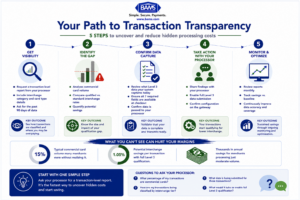
Recovering Level 3 interchange savings doesn’t require rebuilding your technology stack. It starts with visibility, continues with processor configuration, and ends with ongoing monitoring.
Scenario A: The Office Supply eCommerce Store
A 30-person eCommerce business sells office supplies and furniture online. About 25% of their orders come from small businesses and school districts using purchasing cards. Their monthly commercial card volume is $120,000. At a non-qualified rate, they’re paying roughly 2.95% + $0.10 per transaction on those orders. With Level 3 qualification, that drops to approximately 1.90% + $0.10. That’s a savings of roughly $1,260 per month, or over $15,000 annually, on the same transactions with the same customers.
Their eCommerce platform already captured all the required data. The fix was configuring their payment gateway to pass line-item details and enabling Level 3 support with their processor. Total implementation time: about two weeks.
Scenario B: The Specialty Equipment Retailer
A mid-size online retailer sells specialized equipment. They assumed all their customers were consumers. After requesting transaction-level reporting, they discovered that 8% of their transactions came from corporate cards. Their average commercial card order was $1,200. On $85,000 in monthly commercial volume, the qualification gap was costing them roughly $890 per month. Not transformative, but $10,000+ per year recovered without changing a single product, price, or marketing strategy.
The Key Takeaway from Both Scenarios
Neither merchant knew they had a problem. Their processing statements showed fees, totals, and rates that looked normal. The cost was invisible because the statement was never designed to surface it. Visibility came first; savings followed.
Common Mistakes and Pitfalls
Assuming this is only for large enterprises. The card networks don’t care about your company size. They care about data completeness. A 15-person eCommerce shop qualifies for the same interchange reduction as a Fortune 500 company if the data is right.
Confusing your processor’s statement with the full picture. Your statement is a billing document, not a diagnostic tool. It tells you what you paid, not why you paid it. Auditing hidden fees requires going deeper than the summary.
Submitting partial data and expecting qualification. Level 3 is pass/fail. Missing one required field on one line item can downgrade the entire transaction. Accuracy and completeness matter more than effort.
Treating this as a one-time fix. Platform updates, gateway changes, and product catalog modifications can all break data passthrough silently. Ongoing verification is essential.
Ignoring the opportunity because the percentage seems small. A 1% interchange reduction sounds modest until you calculate it against six or seven figures in annual commercial card volume. Small percentages on large numbers are real money.
What to Do Next
Start with one action: request a transaction-level report from your processor that shows interchange qualification categories and card types. Don’t try to fix anything yet. Just look. Understand what percentage of your transactions are commercial cards and what qualification level they’re currently hitting.
That single data point will tell you whether this is a $500/year problem or a $50,000/year problem for your business. From there, the steps are incremental. Map your data fields, talk to your processor about Level 3 support, and verify results.
This guide is a reference, not a checklist to rush through. Revisit it as your transaction volume changes, as you add new product lines, or as you evaluate new processor relationships. The card networks will continue evolving their data requirements. Your awareness of what’s happening beneath your processing statement is the foundation for every cost decision that follows.
Frequently Asked Questions
What is Level 3 data in merchant services?
Level 3 data is detailed, line-item transaction information submitted to card networks at the time of purchase. It includes product descriptions, quantities, unit prices, invoice numbers, tax amounts, and shipping details. Think of it as attaching a complete digital invoice to every transaction. When this data is submitted correctly for commercial card transactions, the card networks reward the merchant with a lower interchange rate.
Do I need to be a B2B company to benefit from Level 3 data?
No. Any eCommerce business that processes commercial, corporate, or purchasing cards can benefit. Even if your primary customers are consumers, businesses, schools, nonprofits, and government agencies may be placing orders on your site using purchasing cards. You may not realize these transactions are happening because the cards look identical to consumer cards at checkout. Requesting transaction-level reporting reveals your actual commercial card volume.
Why doesn’t my processing statement show transaction qualification levels?
Most processing statements are summary billing documents designed to show totals and fees, not diagnostic data. Showing per-transaction interchange categories would require a different reporting format, and many processors don’t offer it unless you specifically ask. This lack of transparency means merchants can’t see which transactions are qualifying at reduced rates and which are silently downgrading to higher tiers.
What specific data fields are required for Level 3 processing?
Level 3 requires both transaction-level and line-item-level data. Transaction-level fields include invoice number, order date, shipping amount, duty amount, and destination postal code. Line-item fields include product description, commodity code, quantity, unit of measure, unit price, discount amount, and extended amount. All fields must be complete, accurate, and correctly structured for the transaction to qualify.
Will Level 2 data submission still earn interchange discounts?
For Visa, no. Visa retired its legacy Level 2 program and now requires full Level 3 (Product 3) data under its Commercial Electronic Data Program (CEDP) to earn reduced interchange rates on commercial cards. Mastercard maintains its own programs, but the industry direction is clearly toward requiring more data, not less. Merchants relying on Level 2 alone should plan to upgrade their data submission.
How much can I realistically save with Level 3 data qualification?
Savings depend on your commercial card volume and current qualification levels. Level 3 qualifying transactions can receive rates as low as 1.90% + $0.10, which is roughly 1.05 percentage points below non-qualified commercial card rates. On $100,000 in monthly commercial card volume, that translates to approximately $1,050 per month in interchange savings. Even merchants with modest commercial card volume (5-10% of transactions) often find meaningful annual savings.
Sources