

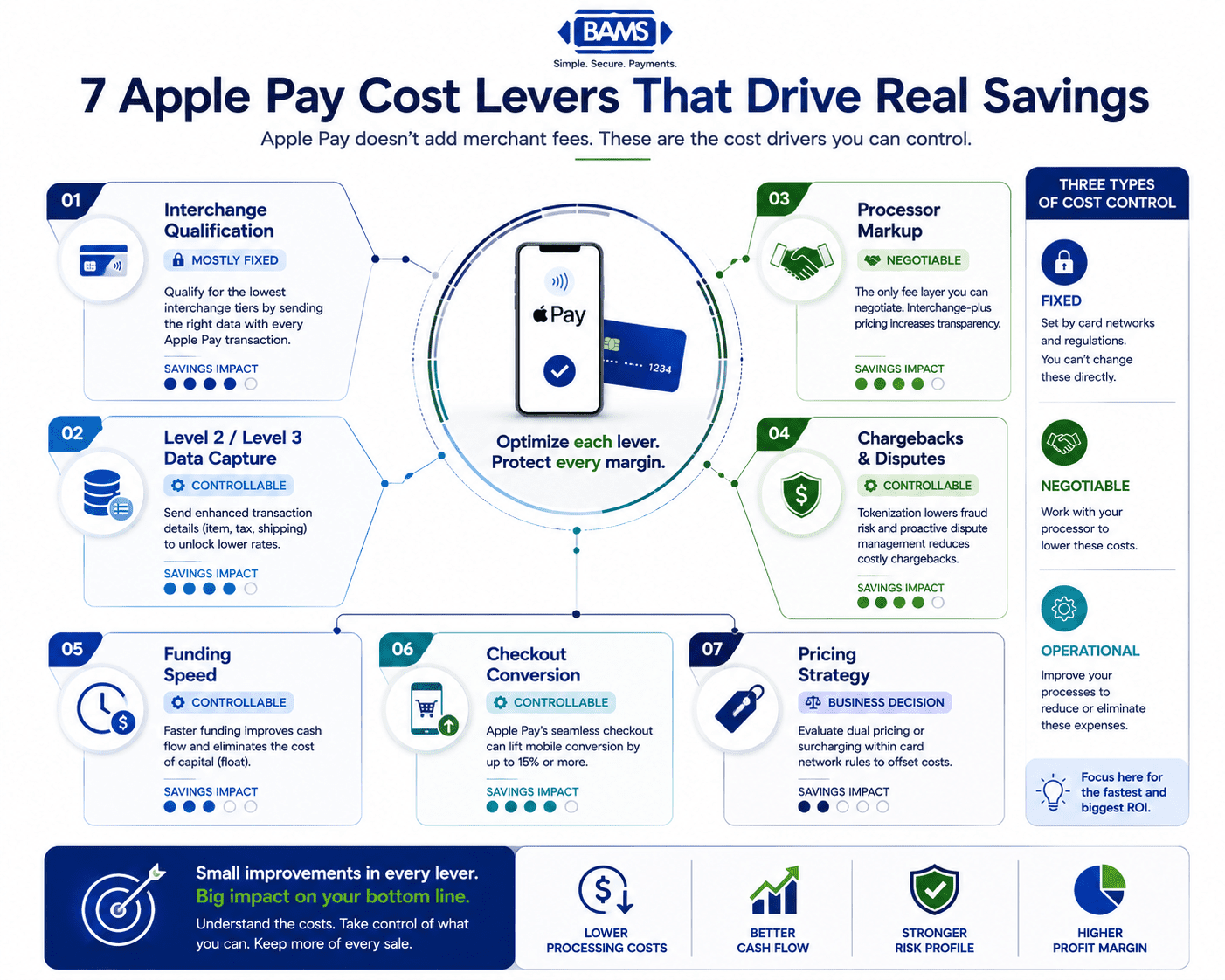
7 Apple Pay Transaction Fee Levers Most Managers Miss
Last Updated on October 6, 2026 by Dimitri Akhrin
Which costs are fixed, which are negotiable, and which ones you can eliminate entirely
Learn to break down Apple Pay’s blended rate into seven distinct cost drivers you can actually control. Discover which transaction fees are set by card networks, which are negotiable with your processor, and where operational changes can recover thousands in annual margin.
TL;DR
- Apple Pay costs you nothing extra on top of standard card fees – Apple charges issuers 0.15%, not merchants. Your costs come from interchange, processor markup, and operational factors like chargebacks and settlement timing.
- Interchange qualification is your biggest savings lever – Check your statements for downgrades. Missing data fields push Apple Pay transactions into higher-cost tiers unnecessarily.
- Processor markup is the only truly negotiable fee layer – Request interchange-plus pricing to isolate and negotiate the markup component, especially if you process over $50K monthly.
- Apple Pay’s tokenization reduces chargebacks – Lower fraud rates mean fewer dispute fees and better interchange qualification over time. Segment your chargeback data by payment method to quantify the savings.
- Funding speed and conversion lift are hidden cost levers – Next-day funding eliminates float costs, and Apple Pay’s streamlined checkout can boost mobile completion rates by up to 15%, reducing your effective cost per acquisition.
The Hidden Cost Levers Behind Every Apple Pay Transaction
Most eCommerce managers treat Apple Pay as a flat cost. You see a blended rate on your monthly statement, shrug, and move on. But that single number hides at least six distinct cost drivers, some fixed by card networks, some negotiable with your processor, and some you can eliminate entirely through operational changes.
The real opportunity isn’t switching away from Apple Pay. It’s understanding that Apple charges card issuers roughly 0.15% per transaction, not you. Your costs sit in the layers underneath: interchange qualification, processor markup, chargeback fees, and funding speed. When you treat each layer as a separate signal, cost optimization stops being a guessing game and becomes a diagnostic exercise with measurable outcomes. According to the Federal Reserve Bank of St. Louis, interchange fee revenue collected by U.S. banks continues to grow alongside increasing card payment activity, making interchange optimization increasingly important for merchants.
Apple does not charge merchants an additional fee for accepting Apple Pay. Merchants continue to pay their standard payment processing costs, while Apple Pay serves as the authentication and tokenization layer on top of existing card network infrastructure.
Apple’s Apple Pay documentation explains how Apple Pay works with existing payment networks and merchant payment processors.
What This Guide Covers (and What It Doesn’t)
This is for eCommerce managers running established online businesses who already accept Apple Pay and want to reduce per-transaction costs without sacrificing checkout conversion. You won’t find a setup tutorial here, and we won’t rehash the basics of contactless payment acceptance.
Instead, you’ll get a breakdown of seven specific transaction fee levers, organized by how much control you actually have over each one. Some save you pennies per transaction. Others can recover thousands in annual margin. The goal is to help you prioritize where to spend your optimization energy first.
How We Selected These Levers
Each item was evaluated on three criteria: whether it applies specifically to Apple Pay or digital wallet transactions, whether the eCommerce manager (not the CFO or CTO) can act on it, and whether the savings are measurable within 60 days. We excluded levers that require renegotiating card network contracts or building custom payment infrastructure.

Apple Pay itself doesn’t add merchant fees. Understanding these seven cost levers helps businesses identify where processing costs can be reduced and margins improved.
7 Apple Pay Cost Levers That Drive Real Savings
1. Interchange Tier Qualification: The Biggest Variable You’re Ignoring
Why it matters: Interchange fees account for 70-80% of your total processing cost. Apple Pay transactions can qualify for lower interchange tiers because they use tokenized credentials and device-level authentication. But qualification isn’t automatic. Missing data fields or incorrect merchant category codes push transactions into higher, more expensive tiers.
What it looks like today: Your processor receives each Apple Pay transaction with a Merchant Payment Account Number (MPAN) and device-specific token. If your gateway passes the right data (transaction amount, item details, shipping info), the transaction qualifies for the lowest applicable interchange rate. If it doesn’t, you pay more for the same sale.
How to apply it: Pull your last three processing statements and look for “downgrade” or “non-qualified” line items. If more than 5% of your Apple Pay volume falls into higher tiers, your gateway configuration likely needs adjustment. For a deeper look at reading these signals, see this guide to identifying margin leaks on processing statements.
2. Level 2/3 Data Capture: Not Just for B2B
Why it matters: Most eCommerce managers assume Level 2 and Level 3 data enrichment only applies to B2B orders with purchasing cards. That’s partially true for the deepest discounts, but even consumer Apple Pay transactions benefit from passing enhanced data. Card networks reward transactions that include tax amounts, item descriptions, and customer codes with lower interchange rates.
What it looks like today: Many payment gateways now support automatic Level 2 data capture (tax amount, merchant postal code) without custom development. Level 3 (line-item detail) requires more integration work but unlocks the steepest interchange reductions, especially on commercial cards.
How to apply it: Check whether your gateway auto-populates Level 2 fields on Apple Pay transactions. If you sell to businesses alongside consumers, evaluate whether routing high-ticket B2B orders through ACH makes more sense than optimizing card interchange for those specific transactions.
3. Processor Markup: The Only Truly Negotiable Layer
Why it matters: Interchange is set by card networks. Assessment fees are set by Visa and Mastercard. But your processor’s markup? That’s a business decision, and it’s negotiable. Many eCommerce businesses accept their initial rate without revisiting it as volume grows.
What it looks like today:Standard processing fees for Apple Pay transactions typically range from 2% to 2.6% plus $0.10 to $0.30 per transaction. The spread within that range depends almost entirely on your processor’s margin, your monthly volume, and your average ticket size.
How to apply it: If you process more than $50,000 monthly, request an interchange-plus pricing breakdown from your processor. Compare the markup component (not the blended rate) against at least one alternative quote. Even a 0.10% reduction on the markup layer compounds across thousands of monthly transactions. Here’s a practical framework for lowering credit card processing fees through pricing model changes.
4. Chargeback Costs: Where Apple Pay Already Saves You Money
Why it matters: Every chargeback costs you the transaction amount, a $20-$100 dispute fee, and operational time to respond. Apple Pay’s tokenization and biometric authentication (Face ID, Touch ID) make fraudulent transactions significantly harder to execute. This means fewer chargebacks, which means fewer fees and less revenue lost to fraud.
What it looks like today: Because Apple Pay replaces the actual card number with a device-specific token, stolen card numbers can’t be replayed through Apple Pay. Banks accept the roughly $0.10 per $100 cost of Apple Pay transactions in part because fraud rates drop substantially. For merchants, this translates to lower chargeback ratios, which can also improve your interchange qualification over time.
How to apply it: Segment your chargeback data by payment method. If Apple Pay transactions show a measurably lower dispute rate, use that data to negotiate with your processor. A merchant services partner like BAMS offers proactive chargeback defense that pairs well with Apple Pay’s built-in fraud reduction, helping you catch disputes before they escalate and keeping your chargeback ratio low enough to avoid penalty fee tiers.
5. Funding Speed: The Cost You Don’t See on Your Statement
Why it matters: Delayed settlement isn’t listed as a “fee,” but it costs you real money. When your Apple Pay revenue takes 2-3 business days to hit your bank account, you’re effectively extending an interest-free loan to your processor. For businesses with tight cash flow cycles, that delay forces reliance on credit lines or delays vendor payments.
What it looks like today: Most processors batch Apple Pay transactions with all other card payments and settle on a T+2 or T+3 schedule. Some merchant services providers, including BAMS, offer next-day funding that gets your Apple Pay revenue into your account the following business day.
How to apply it: Calculate your average daily Apple Pay revenue. Multiply by your current settlement delay (in days). That’s the float your processor holds at any given time. If that number exceeds $5,000, the cost of switching to a next-day funding provider likely pays for itself through improved cash flow alone.
6. Checkout Conversion Lift: The Cost Lever That Works in Reverse
Why it matters: This isn’t a fee reduction. It’s a cost-per-acquisition reduction. When Apple Pay shortens your checkout flow from 30+ seconds of manual card entry to a single biometric confirmation, fewer customers abandon their carts. eCommerce merchants using Apple Pay report up to 15% higher checkout completion rates compared to traditional card entry.
What it looks like today: Apple Pay on mobile web and in-app purchases eliminates form fields entirely. The customer authenticates with their face or fingerprint, and the transaction completes. No typing, no address lookup, and no “where’s my card” friction.
How to apply it: Measure your checkout completion rate for Apple Pay sessions versus non-Apple Pay sessions. If Apple Pay converts meaningfully better, consider promoting it more prominently during checkout, especially on mobile. The incremental revenue from recovered abandoned carts often exceeds any per-transaction cost savings you’d get from other optimizations.
7. Dual Pricing and Surcharging: The Nuclear Option
Why it matters: Some merchants offset credit card processing fees by passing a portion of the cost to customers through surcharges or by offering cash/debit discounts (dual pricing). This is legal in most U.S. states for card transactions, but applying it to Apple Pay requires careful implementation because Apple Pay can process both credit and debit cards.
What it looks like today: Dual pricing programs display two prices: a card price and a cash/debit price. When a customer pays with Apple Pay using a linked credit card, the card price applies. When they use Apple Pay with a linked debit card, the discounted price should apply. Not all POS and gateway configurations handle this distinction correctly.
How to apply it: Before implementing surcharging or dual pricing on Apple Pay transactions, confirm your POS system can differentiate between credit and debit funding sources within Apple Pay. Misapplying a surcharge to a debit transaction violates card network rules and can result in fines. This lever works, but only with the right technical setup.
The Pattern Across All Seven Levers
Not every Apple Pay processing cost can be negotiated. Focus first on the areas merchants can control for the fastest return on investment.
Three themes connect these cost drivers. First, the most impactful savings come from data quality (interchange qualification, Level 2/3 enrichment), not from switching processors or payment methods. Second, Apple Pay’s security features (tokenization, biometric authentication) create downstream savings in chargebacks and fraud that rarely show up in a simple rate comparison. Third, indirect cost levers like funding speed and conversion lift often outweigh direct fee reductions in total dollar impact.
The eCommerce managers who save the most don’t chase the lowest blended rate. They treat their processing costs as a system of interconnected signals, where improving one input (like data quality) improves outcomes across multiple cost layers simultaneously.
Where to Start: Prioritizing Your First Moves
You don’t need to tackle all seven levers at once. Start with three actions this month: audit your processing statement for interchange downgrades (Lever 1), segment your chargeback data by payment method (Lever 4), and calculate the cash flow cost of your current settlement delay (Lever 5). These three exercises take a few hours total and will tell you exactly where your biggest savings opportunities sit.
Once you have that diagnostic baseline, the remaining levers become easier to prioritize based on your specific transaction volume, average order value, and customer payment preferences. The goal isn’t to optimize everything. It’s to optimize the right things first.
Frequently Asked Questions
What fees do merchants incur when accepting Apple Pay?
Apple does not charge merchants directly for Apple Pay transactions. Instead, Apple charges card issuers approximately 0.15% of the purchase price. Merchants pay the same standard card processing fees they’d pay for any Visa or Mastercard transaction, typically ranging from 2% to 2.6% plus $0.10 to $0.30 per transaction. The actual rate depends on your interchange qualification, processor markup, and pricing model.
How does Apple Pay compare to traditional credit card processing fees?
Apple Pay processing fees are functionally identical to standard card-not-present fees for eCommerce. However, Apple Pay transactions can sometimes qualify for lower interchange tiers because of tokenization and strong customer authentication. The net cost may be slightly lower than manual card entry when you factor in reduced chargebacks and higher approval rates from tokenized credentials.
Why does Apple Pay help reduce fraud and chargeback costs?
Apple Pay replaces actual card numbers with device-specific tokens and requires biometric authentication (Face ID or Touch ID) for every transaction. This makes it extremely difficult for fraudsters to replay stolen card data through Apple Pay. Merchants who accept a high proportion of Apple Pay transactions typically see lower chargeback ratios, which can reduce dispute fees and even improve their interchange qualification over time.
Can merchants negotiate lower processing fees for Apple Pay transactions?
You can’t negotiate interchange rates (set by card networks) or assessment fees (set by Visa/Mastercard). But you can negotiate your processor’s markup, which is the variable portion of your total rate. Merchants processing over $50,000 per month have the strongest leverage. Requesting an interchange-plus pricing breakdown is the first step to understanding exactly how much of your rate is negotiable.
When should businesses actively promote Apple Pay to customers?
Promote Apple Pay most aggressively on mobile checkout flows, where it delivers the biggest conversion lift by eliminating manual card entry. If your analytics show that mobile users have a higher cart abandonment rate than desktop users, surfacing Apple Pay as the primary payment option on mobile can recover a meaningful percentage of those lost sales. The indirect savings from higher conversion often exceed direct fee reductions.
Does Apple Pay work with interchange-plus pricing models?
Yes. Apple Pay transactions flow through the same card network rails as any other Visa or Mastercard payment, so they work with interchange-plus, tiered, and flat-rate pricing models. Interchange-plus is generally the most transparent option because it lets you see exactly which interchange tier each Apple Pay transaction qualifies for, making it easier to identify and fix costly downgrades.


