7 Chargeback Risk Management Gaps Hiding in Setup
Last Updated on October 1, 2026 by Dimitri Akhrin
The processor migration defaults that quietly inflate dispute rates—and the configuration fixes that prevent them
Learn seven account-setup defaults that silently build chargeback exposure during processor migrations. This guide maps each configuration gap to the specific fix that reduces dispute vulnerability before your first transaction posts.
TL;DR
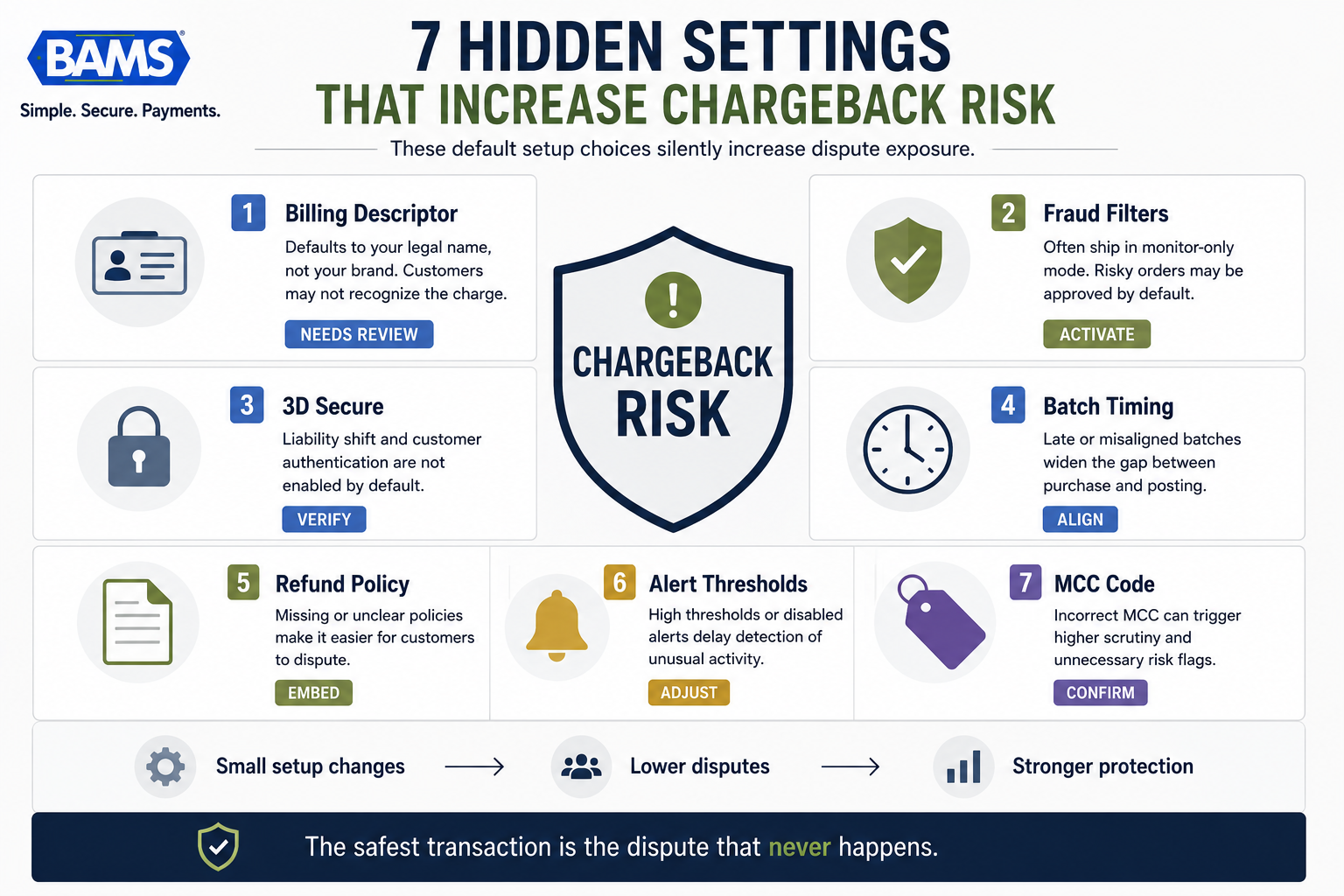
- Billing descriptors default to your legal name, not your brand – Customers who don’t recognize a charge call their bank. Set your descriptor to match your storefront name and verify it on a real card statement before launch.
- Fraud filters often ship in monitor-only mode – Your processor may flag risky orders without blocking them. Activate AVS, CVV, and velocity filters before your first live transaction.
- 3D Secure and alert thresholds require manual activation – Liability shift and early-warning alerts are opt-in during setup. Enroll in both during onboarding, not after your first dispute spike.
- Batch timing and MCC codes silently affect dispute rates – Misaligned settlement windows widen the gap between purchase and posting, and a wrong MCC triggers inappropriate fraud scrutiny. Verify both within your first 30 days.
- Start with three fixes, not seven – Descriptor accuracy, fraud filter activation, and alert thresholds cover the widest risk surface with the least setup effort. Layer in the remaining configurations over 60 days.
The Setup Defaults That Quietly Build Chargeback Exposure
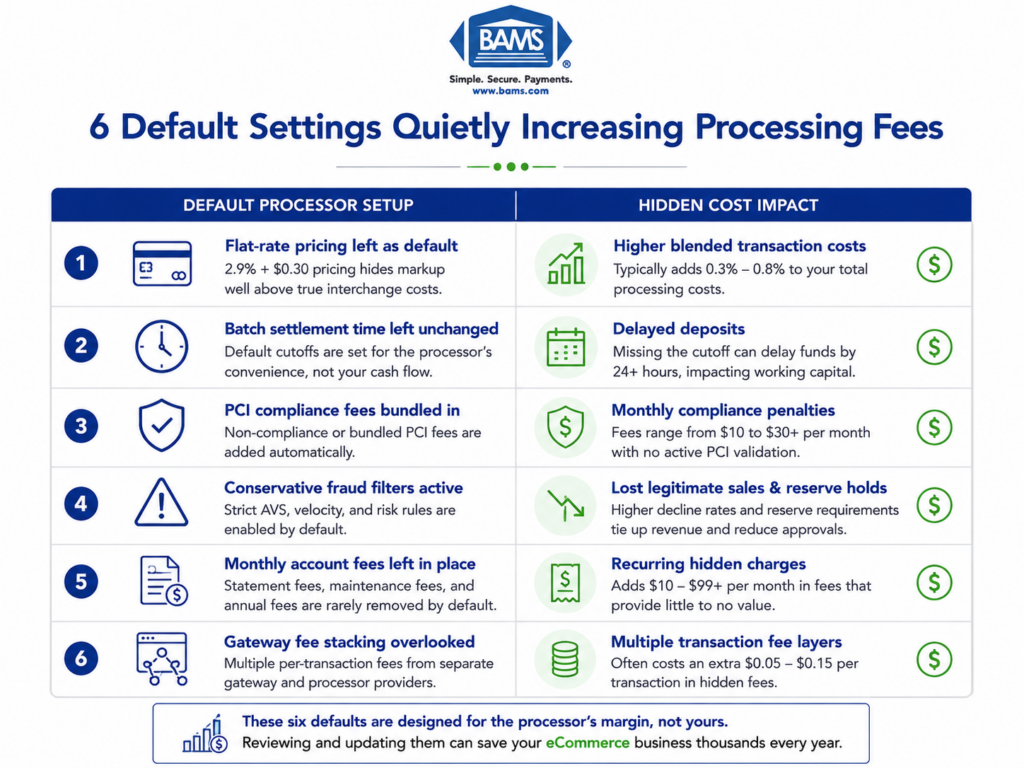
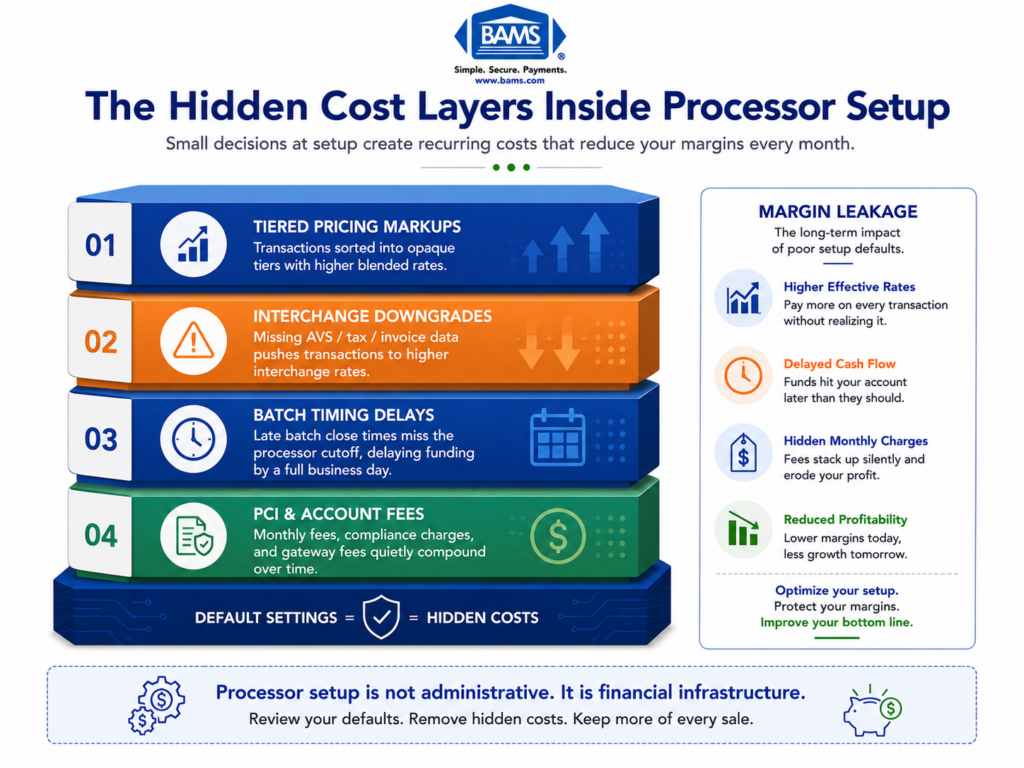
Every processor migration starts with a promise: lower rates, faster deposits, better support. But the real risk rarely lives in the pricing agreement. It lives in the default settings your new processor applies to your merchant account setup before you process a single transaction.
These defaults govern how your transactions authenticate, how your billing descriptor appears on customer statements, when your batches settle, and how aggressively fraud filters screen orders. When they are wrong, they create transaction patterns that look suspicious to card networks, confuse customers into filing disputes, and trigger holds that freeze your cash flow. Chargeback exposure continues to be a growing operational concern for eCommerce businesses. According to the Federal Reserve’s 2025 Small Business Credit Survey, managing operating expenses and protecting cash flow remain significant challenges for many businesses, increasing the importance of dispute prevention. Most of that growth will not come from sophisticated fraud. It will come from preventable configuration mistakes compounding over thousands of transactions.
This is a chargeback risk management problem disguised as an onboarding checklist.
What This Guide Covers (and What It Doesn’t)
This guide is for eCommerce managers at established online businesses who are migrating processors or renegotiating existing accounts. You already understand interchange categories and PCI requirements. What you may not have audited are the account-level configuration choices that silently inflate dispute rates.
We are not covering general fraud prevention strategy, POS hardware setup, or card-present environments. We are focused exclusively on seven processor setup signals that create chargeback exposure in card-not-present eCommerce, and the specific configuration fix for each one.
How These Seven Signals Were Selected
Each signal was chosen because it meets three criteria: it originates from a default setting (not a policy decision), it is invisible on your processing statement, and it directly increases dispute probability or reduces your ability to win representment. If a configuration choice only affects cost without touching dispute risk, it is not on this list.
7 Merchant Account Setup Signals That Build Chargeback Exposure
Many chargeback problems are configuration problems.
1. Your Billing Descriptor Defaults to a Legal Entity Name Customers Don’t Recognize
Why it matters: The single most common trigger for “friendly fraud” chargebacks is a customer who does not recognize a charge on their statement. When your processor sets up your account, the billing descriptor often defaults to your legal business name or a truncated version of it. If your LLC is registered as “Greenfield Digital Holdings” but your storefront is “Evergreen Supply Co.,” customers see a charge they cannot place and call their bank instead of you.
What it looks like today: Most processors allow a static descriptor (your business name) and a dynamic descriptor (order-specific detail). The default is usually just the static descriptor, often pulled from your application paperwork without review.
How to fix it: Before your first transaction posts, set your static descriptor to match your customer-facing brand name exactly. Enable dynamic descriptors that append order numbers or product categories. Then place a test transaction and verify the descriptor renders correctly on a real card statement, not just in your processor dashboard.
2. Fraud Filters Are Set to Monitor-Only Instead of Active Decline
Why it matters: New accounts frequently ship with fraud screening tools in “shadow mode” or “monitor-only” by default. The filters flag suspicious transactions in reports, but they do not block them. You process every order, including the ones that will become chargebacks in 45 days. Preventing chargebacks before they happen is the highest-leverage part of dispute management. Strong fraud filter configuration reduces the number of high-risk transactions that ever reach the settlement process. That prevention starts at the filter configuration level.
What it looks like today: Gateway-level tools like velocity checks, AVS mismatch rules, and CVV requirements exist on nearly every modern processor. But their default state varies. Some processors enable them aggressively (risking false declines). Others leave them passive to minimize onboarding friction.
How to fix it: During setup, request a full list of available fraud filters and their current states. Activate AVS and CVV matching as minimum requirements. Set velocity limits based on your average order frequency. Review flagged transactions weekly for the first 60 days, then adjust thresholds based on your actual transaction patterns.
3. 3D Secure Enrollment Is Not Activated or Is Set to Frictionless-Only
Why it matters: 3D Secure (3DS) shifts chargeback liability from you to the card issuer for authenticated transactions. Visa’s payment processing guidance highlights the importance of authentication and transaction validation throughout the payment lifecycle. But many processor migrations leave 3DS unenrolled or default to “frictionless-only” mode, which skips the challenge step for most transactions. This means you lose the liability shift on the exact orders that carry the most risk: high-value purchases, new customers, and cross-border transactions. 80% of chargebacks are fraud-related, and 3DS is the primary mechanism for deflecting those disputes before they reach your account.
What it looks like today: 3DS2 is supported by all major card networks and most modern gateways. But enrollment requires explicit activation during account setup, and the challenge threshold (the dollar amount or risk score that triggers a customer authentication step) is a separate configuration.
How to fix it: Confirm 3DS enrollment during processor onboarding. Set challenge thresholds based on your average order value: transactions above 1.5x your AOV should trigger a challenge. Monitor authentication success rates. If your challenge completion rate drops below 85%, your thresholds may be too aggressive and need adjustment.
4. Batch Settlement Timing Creates a Gap Between Purchase and Posting
Why it matters: When your batch cutoff time does not align with your peak sales hours, transactions sit in an unsettled state for 24 to 48 hours longer than necessary. This delay widens the window between when a customer buys and when the charge appears on their statement, increasing the chance they forget the purchase and dispute it. It also delays your funding, compounding cash flow problems.
What it looks like today: Most processors default batch settlement to a fixed time, often late evening Eastern time. If your peak sales happen in the afternoon Pacific time, those orders may not settle until the following business day’s batch. For a detailed walkthrough of how batch cutoff timing affects deposit speed, the configuration steps are more granular than most merchants realize.
How to fix it: Set your batch cutoff to close within two hours after your daily sales peak. If your processor supports multiple daily batches, enable them. Verify that settlement timing aligns with your bank’s deposit processing window so that next-day funding actually means next day. BAMS, for example, offers next-day funding as a standard feature, but the batch cutoff still needs to be configured correctly on your end for that speed to hold.
5. Refund and Return Policy Text Is Not Embedded in the Transaction Flow
Why it matters: Card networks evaluate whether a customer had clear access to your refund policy before completing a purchase. If your policy exists only on a standalone page that is not linked during checkout, you lose a critical piece of evidence during representment. Stripe’s payments risk team has noted that many chargebacks stem from avoidable confusion around return and refund terms, making policy disclosure a setup-level concern rather than a legal afterthought.
What it looks like today: Processors and gateways do not automatically inject your refund policy into the checkout flow. That configuration lives in your cart or checkout plugin. During migration, the policy link often breaks or is not recreated in the new environment. If you use a platform like Shopify, be aware that transaction fee policies on refunds vary by provider, which changes the cost calculus of issuing refunds proactively.
How to fix it: Embed a clickable refund policy link on the checkout page, the order confirmation page, and the confirmation email. Require a checkbox acknowledgment for high-value orders. Screenshot the checkout flow after migration and store it as representment evidence. This takes 30 minutes to configure and can change the outcome of every dispute you fight.
6. Alert and Notification Thresholds Are Left at Processor Defaults
Why it matters: Every processor provides chargeback alerts and ratio monitoring, but the default notification thresholds are often set at the network penalty level (1% chargeback ratio) rather than at an actionable warning level. By the time you receive an alert, you are already in a monitoring program or facing account restrictions. Many providers consider 1% the maximum tolerated rate, meaning your first alert arrives at the point of maximum damage.
What it looks like today: Processors track your chargeback-to-transaction ratio monthly. The default alert fires at or near the 1% threshold. Some processors offer early-warning services (like Ethoca or Verifi alerts) that notify you of disputes before they become formal chargebacks, but these are opt-in and often carry a per-alert fee that is not included in standard setup.
How to fix it: Set internal alert thresholds at 0.5% (half the penalty threshold). Enroll in early-warning alert networks during onboarding, not after your first dispute spike. Budget $25 to $40 per alert as a cost of prevention. For a deeper look at how chargeback protection tools integrate with your processing stack, review what your new processor includes versus what requires separate enrollment.
7. MCC Code Assignment Does Not Match Your Actual Transaction Profile
Why it matters: Your Merchant Category Code (MCC) determines how card networks classify your business, which directly affects interchange rates, fraud screening intensity, and chargeback thresholds. During migration, the MCC is assigned based on your application, and processors sometimes default to a broad category that does not reflect your specific product mix. A mismatched MCC can trigger higher fraud scrutiny, incorrect interchange pricing, and dispute rules that do not align with your actual business model.
What it looks like today: MCC assignment happens once during onboarding and is rarely revisited. If your business sells both physical goods and digital subscriptions, the MCC for one category may not cover the risk profile of the other. This mismatch creates transaction patterns that look inconsistent to issuing banks.
How to fix it: Request your assigned MCC in writing during setup. Compare it against your product mix and average ticket size. If you sell across categories, ask whether a split MCC or secondary MID is appropriate. Verify that your interchange qualification aligns with the assigned code by reviewing your first full statement. For merchants looking to reduce processing fees tied to hidden costs, MCC misalignment is one of the most overlooked sources of overcharges.
The Pattern Across All Seven Signals
Every signal on this list shares a common structure: a default setting that optimizes for onboarding speed at the expense of dispute resilience. Processors are incentivized to get you live quickly. They are not incentivized to configure your account for the lowest possible chargeback rate, because chargebacks generate fees that flow back to them.
The second pattern is that each fix is a one-time configuration task, not an ongoing operational burden. These are not strategies that require weekly meetings or new hires. They are settings you verify once, test once, and document. The compounding benefit comes from the disputes that never happen, the representment cases you win because evidence was built into the flow, and the monitoring programs you never enter.
Together, these seven choices form a configuration layer that sits between your fraud policy and your daily operations. Get this layer right, and both sides work better.
Where to Start: Prioritizing Your First Three Fixes
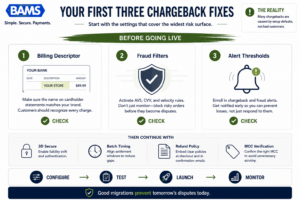
Start with the settings that cover the widest risk surface.
You do not need to address all seven signals before going live. If you are mid-migration or reviewing an existing account, start with three: billing descriptor accuracy (Signal 1), fraud filter activation (Signal 2), and alert threshold adjustment (Signal 6). These three deliver the widest coverage with the least technical complexity.
If you have engineering resources available, add 3D Secure enrollment (Signal 3) and batch timing optimization (Signal 4) in the first 30 days. MCC verification (Signal 7) and policy embedding (Signal 5) can follow within 60 days. The goal is not perfection at launch. The goal is eliminating the configuration gaps that generate 80% of preventable disputes before your transaction volume reaches steady state.
Frequently Asked Questions
What documents do I need to gather before switching merchant service providers?
At minimum, prepare your current processing statements (last three to six months), your business registration and EIN documentation, a voided check or bank letter for the deposit account, and your current chargeback and refund history. Having your existing MCC code, batch settlement schedule, and fraud filter settings documented will also speed up configuration on the new processor and prevent default settings from overriding your preferences.
Why is it important to keep my old merchant account open during the transition?
Chargebacks can arrive 120 days or more after the original transaction. If you close your old account immediately, you lose the ability to respond to disputes on transactions processed through that account. Keep it open for at least 180 days after your last transaction posts, and confirm that your old processor will still forward chargeback notifications to you during that window.
How can I ensure my new processor coordinates effectively with my eCommerce platform?
Request a sandbox or staging environment from your new processor and run test transactions through your full checkout flow before going live. Verify that billing descriptors render correctly, that 3D Secure challenges trigger at the right thresholds, and that refund policy links survive the migration. Test on both desktop and mobile, and confirm that webhook or API callbacks for order status updates still function.
When should I conduct testing before going live with a new payment processor?
Run end-to-end testing at least five to seven business days before your planned go-live date. This gives you time to identify descriptor errors, batch timing misalignments, and fraud filter misconfiguration without the pressure of live customer transactions. Process test transactions across multiple card brands and verify that each one settles and deposits on the expected timeline.
Which pricing model reduces chargeback-related cost exposure?
Interchange-plus pricing gives you the most visibility into how chargebacks and downgrades affect your effective rate. Flat-rate and tiered models often absorb chargeback fees into opaque categories, making it harder to see the true cost of disputes. If your chargeback ratio is below 0.5%, interchange-plus typically delivers lower total cost and clearer data for optimizing your setup.
How does batch settlement timing affect my chargeback rate?
A longer gap between purchase and statement posting increases the chance a customer forgets the transaction and files a dispute. If your batch settles 24 to 48 hours after the sale, the charge may not appear for three or more business days. Aligning your batch cutoff with your peak sales window shortens this gap and reduces “I don’t recognize this charge” disputes, which are among the most common and hardest to fight.