Enhanced Data Programs: A Practical Guide for Merchants
Last Updated on October 7, 2026 by Dimitri Akhrin
How to qualify for lower interchange rates on commercial cards without replacing your tech stack
Learn how enhanced data programs can reduce your commercial card processing costs. This guide shows eCommerce merchants how to identify hidden commercial volume and fix processor-side data submission gaps using your existing payment gateway.
TL;DR
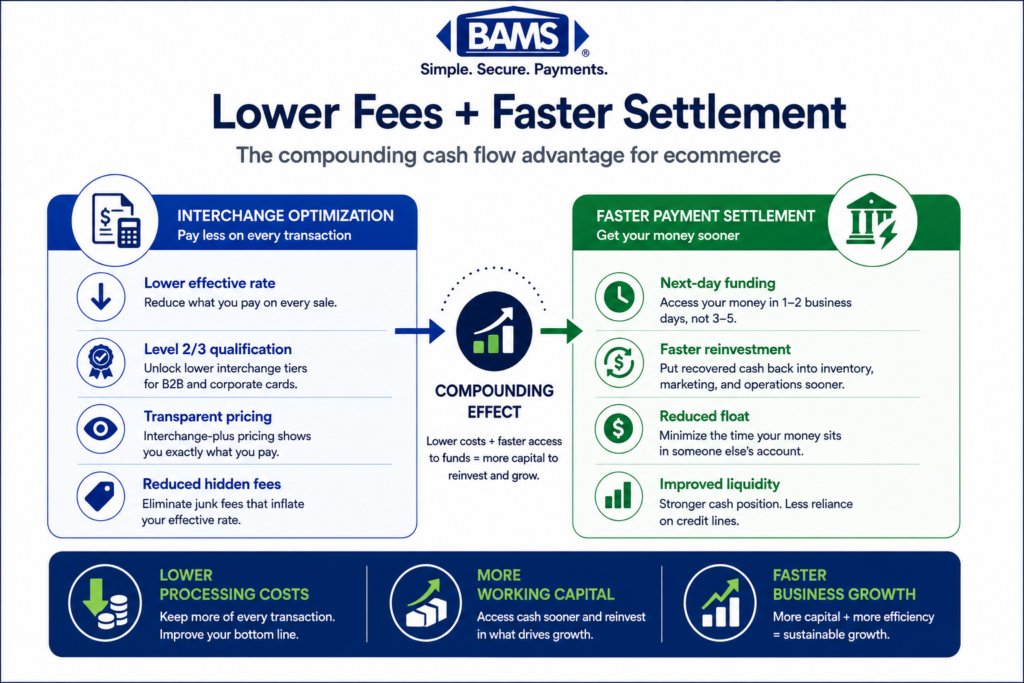
- Your processing statement hides commercial card costs — Commercial cards from business customers are likely in your transaction mix, and if your processor isn’t submitting enhanced data fields, those transactions default to higher interchange tiers (2.65% to 2.95% vs. 1.75% to 2.05%).
- Your gateway probably already supports the required data fields — Most modern eCommerce gateways can pass Level 2/Level 3 data. The gap is usually on the processor side, where fields go unsubmitted because nobody configured them.
- Visa’s CEDP makes data quality a direct cost driver — The old Level 2/Level 3 structure has been replaced. Visa retired Level II discounts by April 2026, and now data accuracy directly determines your interchange rate on every commercial card transaction.
- The fix is a conversation, not a tech project — Ask your processor whether they’re submitting enhanced data fields for interchange qualification. If they can’t answer clearly or show you proof, that tells you everything you need to know.
- Monitor quarterly, not once — Card network rules evolve, your transaction mix shifts, and qualification can regress. Build a regular review into your operations to protect the savings over time.
Guide Orientation: What This Covers and Who It’s For
Your monthly processing statement shows totals, rates, and fees. What it doesn’t show is whether your processor is submitting the right data fields to qualify your commercial card transactions for lower interchange rates. This guide examines why enhanced data programs matter for eCommerce merchants, how your existing payment gateway support likely handles the required fields already, and what to do when the gap between what you’re paying and what you should be paying lives on your processor’s side, not yours.
This is for eCommerce managers at established online businesses (roughly 10 to 50 employees) who process a mix of consumer and commercial card transactions. If you’ve ever looked at your statement and felt like the numbers didn’t add up, or if you’ve been told you need an expensive integration to reduce costs, this guide is for you.
By the end, you’ll understand how to identify commercial card volume hiding in your transaction mix, why your processor’s data submission practices directly affect your costs, and how to take action without replacing your tech stack. We won’t cover ERP integration strategies or enterprise-level procurement card programs. This is about practical, merchant-side decisions.
Why Enhanced Data Programs Matter Right Now
The rules governing how card networks price commercial transactions have changed. Visa’s Commercial Enhanced Data Program (CEDP) modernized how commercial card transactions are evaluated for interchange qualification. The Visa Commercial Enhanced Data Program highlights how enhanced transaction data supports commercial card qualification and data validation. By April 2026, Visa had retired Level II discounts for Purchasing and Corporate cards entirely. This isn’t a future concern. It’s already reshaping what merchants pay.
The financial impact is real and measurable. One large U.S. manufacturer saw annual card acceptance costs rise by roughly $8 million after Visa eliminated certain Level II rates in January 2026. That’s an extreme example, but the underlying dynamic applies to any merchant processing commercial cards: if your transactions aren’t submitted with complete, validated data, they fall into higher-cost pricing tiers automatically.
For eCommerce businesses, the cost of inaction is silent. You don’t get a notification when a transaction downgrades. You don’t see a line item labeled “money you left on the table.” Your statement shows a blended rate or a category code, and the overpayment hides inside those numbers. The merchants who act on this now gain a structural cost advantage. Those who wait absorb margin erosion that compounds with every commercial card order.
Core Concepts: What Your Statement Isn’t Explaining
Commercial Cards Are Already in Your Transaction Mix
Many eCommerce managers assume commercial cards (corporate purchasing cards, business credit cards, government procurement cards) are a B2B phenomenon. In reality, employees at companies of all sizes use corporate cards for online purchases. If you sell office supplies, software, equipment, or professional services online, a meaningful percentage of your orders likely come from commercial cards. Your statement won’t break this out clearly.
Interchange Qualification Is Not Binary
Interchange isn’t a single rate. It’s a matrix. The rate your transaction receives depends on the card type, the merchant category, and critically, the data submitted with the transaction. Under Visa’s CEDP, verified transactions generally qualify for more favorable interchange treatment than transactions submitted without complete data. The Visa Commercial Enhanced Data Program emphasizes that data quality and enhanced transaction details play a direct role in commercial card qualification.
The Processor Submits the Data, Not You
Here’s the misconception that costs merchants the most: many believe that qualifying for better interchange rates requires them to build new integrations or install new software. In most cases, the data fields required for enhanced qualification (line-item detail, tax amounts, customer codes) are already supported by modern payment gateways. The question is whether your processor is configured to capture and submit those fields on your behalf. This is a processor configuration issue, not a merchant infrastructure problem.
“Automated Data Capture” Means Your Processor Does the Work
Automated data capture refers to the process by which your processor extracts the required data fields from your transaction and submits them to the card network for validation. When this works correctly, you don’t touch anything. When it doesn’t, your transactions silently downgrade to more expensive interchange categories.
The Framework: Where the Breakdown Happens
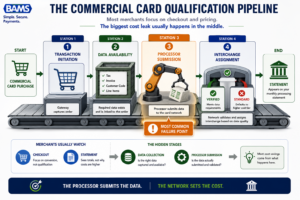
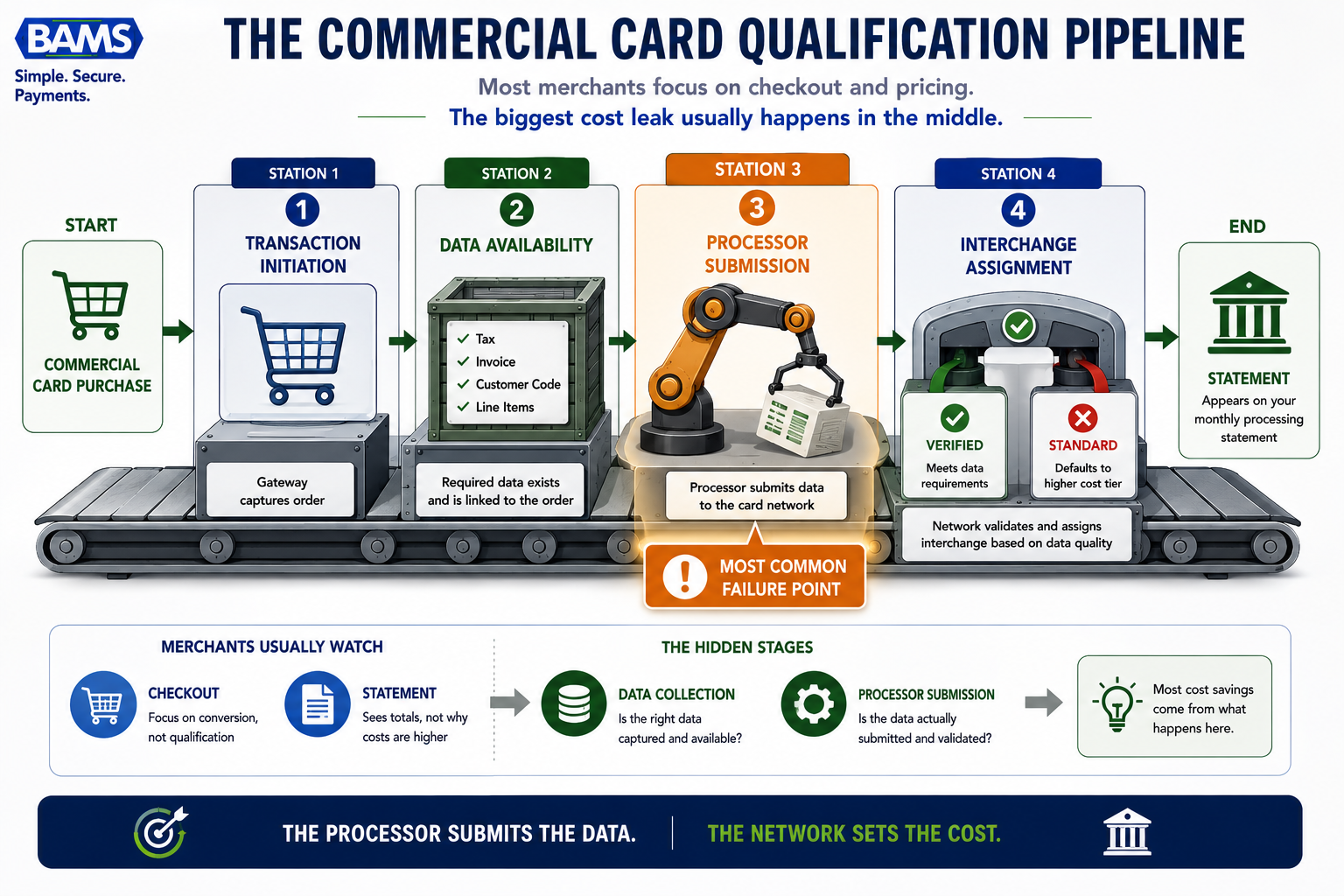
Most merchants focus on checkout and pricing. The biggest cost leak usually happens in the middle.
Think of every commercial card transaction as moving through four stages. The breakdown that costs you money can happen at any one of them, but the most common failure point is stage three, where most merchants have no visibility.
- Stage 1: Transaction Initiation — Your customer checks out using a commercial card. Your gateway captures the order data.
- Stage 2: Data Field Availability — Your gateway makes enhanced data fields (line items, tax, customer code) available for submission.
- Stage 3: Processor Submission — Your processor takes those fields and submits them to the card network. This is where qualification is determined.
- Stage 4: Interchange Assignment — The card network evaluates the submitted data and assigns an interchange rate.
Most merchants focus on Stage 1 (the checkout experience) and Stage 4 (the rate on their statement). Stages 2 and 3 are invisible, and that’s exactly where money leaks. The rest of this guide walks through how to diagnose and fix each stage.
Step-by-Step: How to Stop Overpaying on Commercial Card Orders
Step 1: Identify Commercial Card Volume in Your Transaction Mix
Objective: Determine what percentage of your transactions come from commercial, corporate, or purchasing cards.
Your processing statement likely groups transactions by card brand (Visa, Mastercard) and sometimes by card category (debit, credit, rewards). What it rarely shows is whether a credit card transaction was made with a consumer card or a commercial card. This distinction matters because commercial cards are eligible for enhanced data qualification, and the interchange spread between qualified and unqualified commercial transactions is significant.
Start by requesting a transaction-level report from your processor. You need the BIN (Bank Identification Number) data or card type classification for each transaction. If your processor can’t or won’t provide this, that’s your first red flag. Transaction-level payment analytics should be a baseline capability, not a premium feature.
Anti-patterns: Don’t assume commercial cards are irrelevant because you sell to consumers. Don’t rely on your statement’s summary categories to tell you the full story. Don’t accept “we don’t break that out” as a final answer from your processor.
Success indicators: You have a clear number (or reliable estimate) of monthly transactions processed on commercial cards, and you can calculate the revenue volume those transactions represent.
Step 2: Audit What Your Gateway Already Supports
Objective: Confirm whether your current payment gateway can pass the data fields required for enhanced interchange qualification.
Most modern eCommerce gateways (Authorize.Net, Stripe, Braintree, NMI, and others) already support the submission of Level 2 and Level 3 data fields. These include tax amount, customer code, invoice number, line-item descriptions, quantities, and unit prices. The fields exist in the gateway’s API. The question is whether anyone has turned them on.
Check your gateway’s documentation for “Level 2” or “Level 3” data support, or for references to enhanced data fields. If you’re on a hosted checkout or a simplified integration, you may need to confirm whether your specific integration method passes these fields through. In many cases, the payment gateway support is already there, sitting unused because nobody configured it.
Anti-patterns: Don’t assume you need a new gateway. Don’t let a sales rep convince you that enhanced data requires a platform migration. Don’t confuse “our gateway supports it” with “our processor is submitting it.” These are two different things.
Success indicators: You have documentation confirming your gateway supports enhanced data fields, and you know which integration method you’re using (API, hosted, plugin) and whether it passes those fields.
Step 3: Determine Whether Your Processor Is Actually Submitting Enhanced Data
Objective: Find out if your processor is capturing the available data fields and submitting them to the card network for interchange qualification.
This is the step most merchants skip, and it’s where the real money hides. Your gateway may support enhanced data fields. Your shopping cart may populate them. But if your processor isn’t configured to take those fields, validate them, and submit them as part of the authorization and settlement message, the card network never sees them. Your transaction defaults to the standard (higher-cost) interchange tier.
Ask your processor directly: “For commercial card transactions, are you submitting enhanced data fields for interchange qualification?” If the answer is vague, conditional, or involves upselling you to a different plan, pay attention. A processor committed to automated data capture will have a clear answer and can show you qualification reports that prove it.detail.
As commercial card programs continue to evolve, accurate transaction data has become increasingly important for interchange qualification. Visa’s payment processing guidance emphasizes the importance of complete and accurate transaction information throughout the payment lifecycle.
Anti-patterns: Don’t assume your processor handles this automatically. Don’t accept “we optimize your rates” as a specific answer. Don’t confuse your processor’s pricing model (interchange-plus, flat rate, tiered) with whether they’re actually qualifying your transactions at the best available interchange level.
Success indicators: You have a written confirmation from your processor about their enhanced data submission practices, or you have a qualification report showing the interchange categories your commercial card transactions are hitting.
Step 4: Read Your Statement for Downgrade Evidence
Objective: Identify signs that your commercial card transactions are being processed at higher-than-necessary interchange rates.
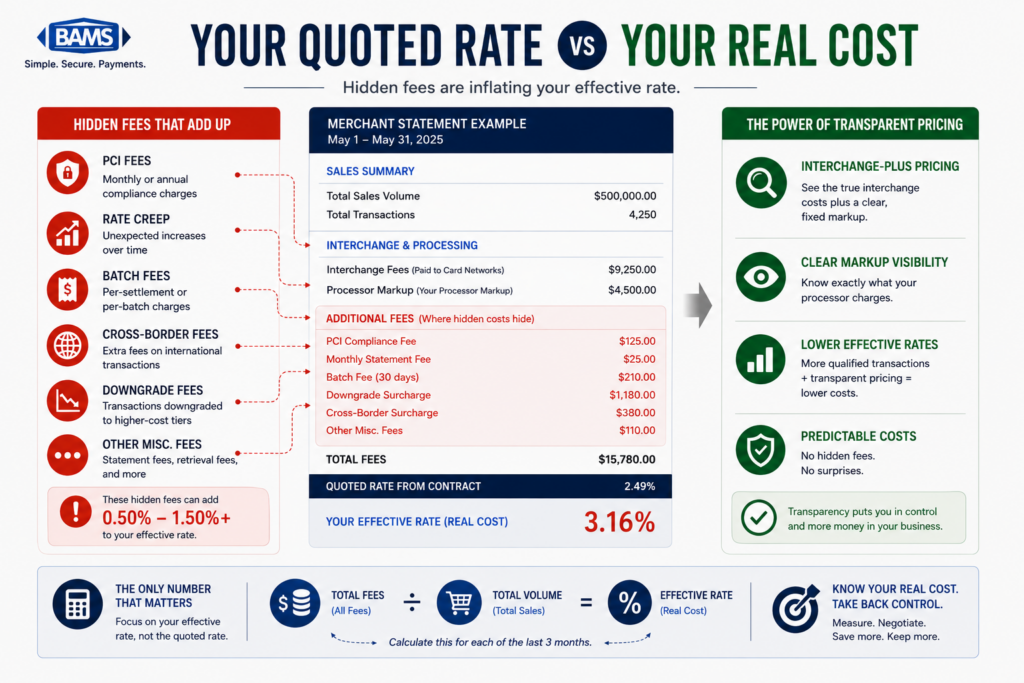
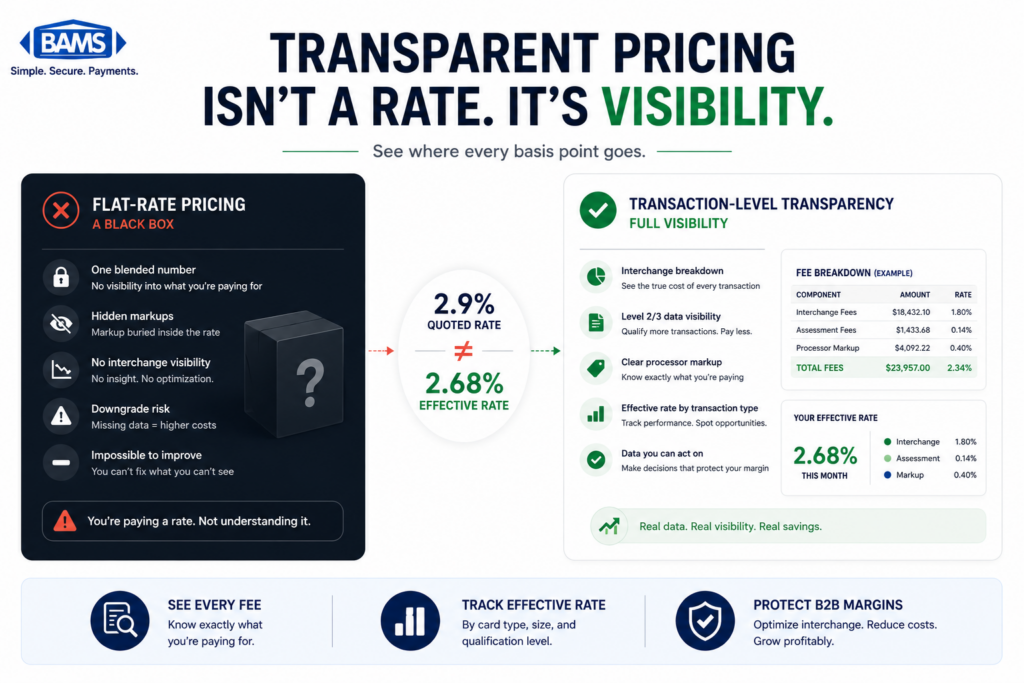
Even without transaction-level analytics, your statement contains clues. Look for interchange categories with words like “Standard,” “Non-Qualified,” or “EIRF” (Electronic Interchange Reimbursement Fee). These indicate transactions that failed to meet the data requirements for a lower tier. If you’re on interchange-plus pricing, these categories will be visible. If you’re on a flat-rate or tiered model, the downgrades are hidden inside your blended rate, which makes them harder to spot but no less costly.
For a detailed walkthrough of how to decode these line items, this line-by-line audit guide breaks down exactly what to look for. The key metric is your effective rate on commercial card transactions specifically. If it’s above 2.3% to 2.5% on Visa commercial volume, there’s likely room to improve through better data submission.
Anti-patterns: Don’t look only at your overall effective rate. A low blended rate can mask expensive commercial card processing. Don’t ignore small volumes of commercial cards; even a few hundred transactions per month at an 80-basis-point spread adds up over a year.
Success indicators: You can identify which interchange categories your commercial card transactions are landing in, and you have a rough estimate of the cost difference between current and optimal qualification.
Step 5: Have the Right Conversation with Your Processor
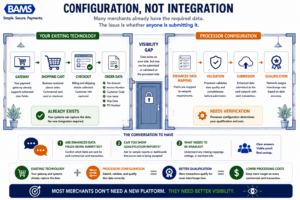
Many merchants already have the required data. The issue is whether anyone is submitting it.
Objective: Get your processor to either enable enhanced data submission or give you a clear reason why they can’t.
Armed with the information from steps 1 through 4, you’re now in a position to have a specific, productive conversation. Don’t ask “can you lower my rates?” Instead, ask: “I have X% of my volume on commercial cards. My gateway supports Level 2/Level 3 fields. Are you submitting those fields for interchange qualification, and if not, what needs to change?”
This reframes the conversation from a negotiation to a configuration request. A good processor will either confirm they’re already doing it (and show you proof), explain what needs to be enabled on their side, or acknowledge they don’t support it. If the answer is the third option, you’ve identified a structural limitation that no amount of rate negotiation can fix.
This is where the choice of processor becomes a practical business decision. BAMS, for example, pairs interchange-plus pricing with dedicated account management that includes reviewing your transaction data for qualification opportunities. That combination of transparent pricing and proactive support means you’re not left guessing whether your data is being submitted correctly.
Anti-patterns: Don’t lead with threats to switch processors. Don’t accept a generic rate reduction as a substitute for proper data qualification (a small rate cut doesn’t fix a systemic submission gap). Don’t assume the first person you talk to at your processor understands enhanced data programs; ask for a technical or interchange specialist.
Success indicators: You have a clear action plan from your processor (enable specific fields, adjust configuration, provide qualification reporting) or you have a clear understanding that your current processor can’t meet this need.
Step 6: Verify Results and Monitor Ongoing Qualification
Objective: Confirm that changes are working and build a system for ongoing monitoring.
After your processor enables or confirms enhanced data submission, the proof is in the next statement cycle. Request a qualification report (sometimes called an interchange detail report) that shows which interchange categories your commercial card transactions are hitting post-change. You should see a shift from Standard/Non-Qualified categories toward the verified or enhanced tiers.
Verified transactions can deliver a 7% to 10% reduction in interchange costs versus non-verified processing, even after Visa’s 0.05% participation fee. For a merchant processing $500,000 annually in commercial card volume, that’s $3,500 to $5,000 in annual savings from a configuration change, not a technology overhaul.
Build a quarterly review cadence. Card network rules change. New card products launch. Your transaction mix shifts as your business grows. What qualifies today may need adjustment tomorrow. A processor that provides ongoing transaction-level payment analytics makes this review straightforward rather than painful.
Anti-patterns: Don’t assume one fix is permanent. Don’t stop monitoring after the first improved statement. Don’t rely solely on your blended effective rate as a success metric; track commercial card qualification rates specifically.
Success indicators: Your commercial card transactions are consistently hitting lower interchange categories. Your effective rate on commercial volume has decreased measurably. You have a reporting mechanism to catch regressions.
Practical Example: The Invisible $12,000
Consider an online office supply retailer processing $1.2 million in annual card volume. Their statement shows an effective rate of 2.45%, which seems competitive. But buried in that number is $300,000 in commercial card volume (corporate purchasing cards from business customers) processing at an average interchange of 2.80%.
Their gateway (Authorize.Net) supports Level 2 and Level 3 data fields. Their shopping cart populates line-item detail, tax, and invoice numbers. But their processor isn’t configured to submit those fields for interchange qualification. Every commercial card transaction defaults to the standard tier.
If those transactions qualified at 2.00% instead of 2.80%, the annual savings would be $2,400 on interchange alone. Scale that to a merchant with $1 million in commercial card volume, and the gap grows to $8,000 or more. Over three years, that’s the cost of a full-time employee’s benefits package, lost to a configuration oversight.
The retailer didn’t need new software. They didn’t need an ERP integration. They needed their processor to submit data fields their gateway was already generating. The fix took a conversation and a configuration change, not a technology project.
Common Mistakes and Pitfalls
Assuming flat-rate pricing protects you. Flat-rate processors absorb interchange variation, but they price for the worst case. If your commercial card volume is significant, you’re likely overpaying more on flat-rate than you would on interchange-plus with proper qualification.
Confusing rate negotiation with interchange optimization. Your processor’s markup is only part of your cost. Interchange is typically 70% to 80% of total processing cost. Negotiating a lower markup while ignoring interchange qualification is like haggling over shipping while ignoring the price of the product.
Treating this as a one-time project. Visa’s CEDP is an evolving program. Commercial card qualification programs continue to evolve, making periodic reviews of processor configuration and transaction data quality an important operational practice.
Ignoring small commercial card volumes. Even 5% to 10% of your transactions on commercial cards can represent meaningful savings when properly qualified. Don’t dismiss the opportunity because the volume seems small.
What to Do Next
Start with Step 1. Pull your transaction data and find out how much commercial card volume you’re actually processing. If your processor can’t tell you, that’s the answer to a question you didn’t know you were asking.
You don’t need to overhaul anything. You need visibility into what’s happening between your gateway and the card network. Once you have that visibility, the path forward becomes clear: either your processor is handling enhanced data submission properly, or they’re not. Both answers are useful.
Revisit this guide quarterly as your business grows and card network rules evolve. Treat it as a reference for conversations with your processor, not a one-time checklist. The merchants who build this review into their operations recover margin consistently. Those who don’t keep paying a tax they can’t see on their statement. According to the Federal Reserve’s 2025 Small Business Credit Survey, managing operating expenses remains a significant challenge for many businesses, increasing the value of controlling payment acceptance costs wherever possible.
Frequently Asked Questions
What is Level 3 data in merchant services?
Level 3 data refers to detailed transaction information (line-item descriptions, quantities, unit prices, tax amounts, invoice numbers) submitted to card networks during processing. When this data is included, commercial card transactions can qualify for lower interchange rates. Visa’s newer CEDP framework has replaced the traditional Level 2/Level 3 structure with a standardized validation system, but the core principle remains: more complete data means lower costs. For a deeper explanation, see this overview of Level 3 credit card processing.
Which types of transactions are eligible for enhanced interchange rates?
Commercial card transactions are the primary beneficiaries. This includes corporate purchasing cards, business credit cards, and government procurement cards. Consumer credit and debit card transactions are not eligible for enhanced data qualification because they already have their own interchange structures. The key is identifying how much commercial card volume exists in your transaction mix, which many eCommerce merchants underestimate.
Do I need to replace my payment gateway to qualify for lower interchange on commercial cards?
In most cases, no. Modern eCommerce gateways (Authorize.Net, Stripe, Braintree, NMI, and others) already support the data fields required for enhanced interchange qualification. The issue is usually on the processor side: whether your processor is configured to capture and submit those fields to the card network. This is a processor configuration question, not a gateway replacement question.
How do I know if my transactions are being downgraded?
Look at your processing statement for interchange categories labeled “Standard,” “Non-Qualified,” or “EIRF.” These indicate transactions that didn’t meet data requirements for lower tiers. If you’re on interchange-plus pricing, these categories are visible. On flat-rate or tiered pricing, downgrades are hidden inside your blended rate. Requesting a qualification report or interchange detail report from your processor is the most reliable way to check.
What is Visa’s CEDP and how does it affect my processing costs?
Visa’s Commercial Enhanced Data Program (CEDP) is a replacement for the older Level 2/Level 3 interchange structure. It standardizes how transaction data is validated and ties interchange cost directly to data quality. Under CEDP, verified transactions generally qualify at 1.75% to 2.05% interchange, while non-verified transactions range from 2.65% to 2.95%. Visa retired Level II discounts for Purchasing and Corporate cards by April 2026, making enhanced data submission more important than ever.
How much can I actually save by submitting enhanced data?
Savings depend on your commercial card volume and current qualification rates. Estimates suggest verified transactions can deliver a 7% to 10% reduction in interchange costs compared to non-verified processing. For a merchant processing $500,000 annually in commercial card volume, that translates to roughly $3,500 to $5,000 in annual savings. The savings come from a processor configuration change, not a technology investment.