7 Statement Signals Your Effective Processing Rate Is Too High
Last Updated on July 1, 2026 by Dimitri Akhrin
How missing tax and freight fields quietly push your transactions into costly interchange downgrades
Learn to read your monthly processing statement as a diagnostic tool, not just a billing summary. This guide maps the specific tax and freight fields that determine your interchange tier across major eCommerce platforms, helping you reduce your effective processing rate and recover margin hidden in configuration failures.
TL;DR
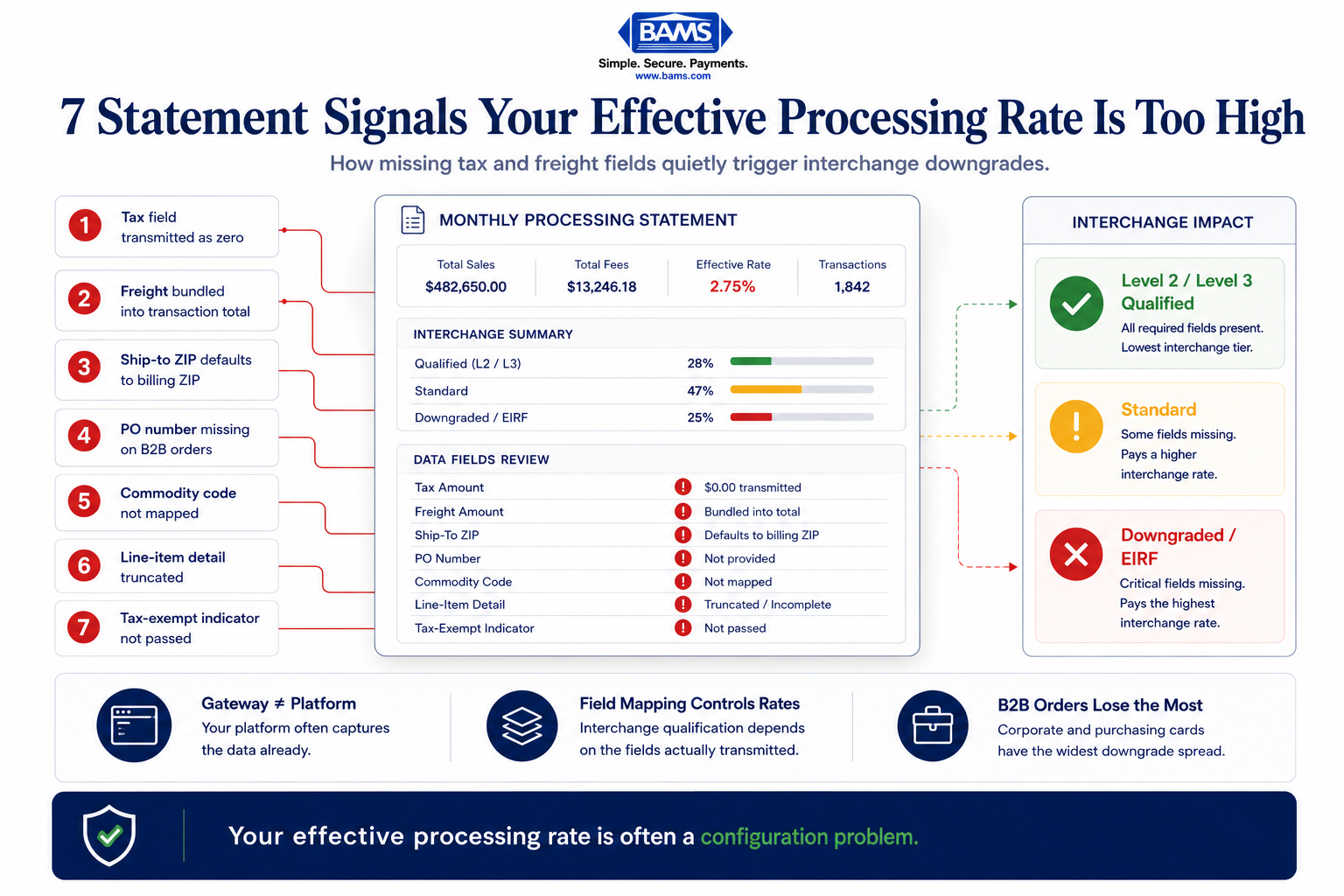
- Your gateway, not your platform, is likely the problem – eCommerce platforms usually collect tax, freight, and line-item data, but gateway integrations often fail to transmit these fields in the payment authorization, causing interchange downgrades.
- Seven specific fields control your interchange tier – Tax amount, freight amount, tax-exempt indicator, commodity codes, line-item detail, ship-to postal code, and PO number each independently affect whether your transactions qualify for lower rates.
- B2B and high-ticket orders are hit hardest – Corporate and purchasing card transactions have the widest rate gap between qualified and downgraded tiers, often 0.5% to 0.8% per transaction.
- Start with tax amount and ship-to zip code – These two fields are the most common causes of Level 2 downgrades and typically require only a configuration change, not custom development.
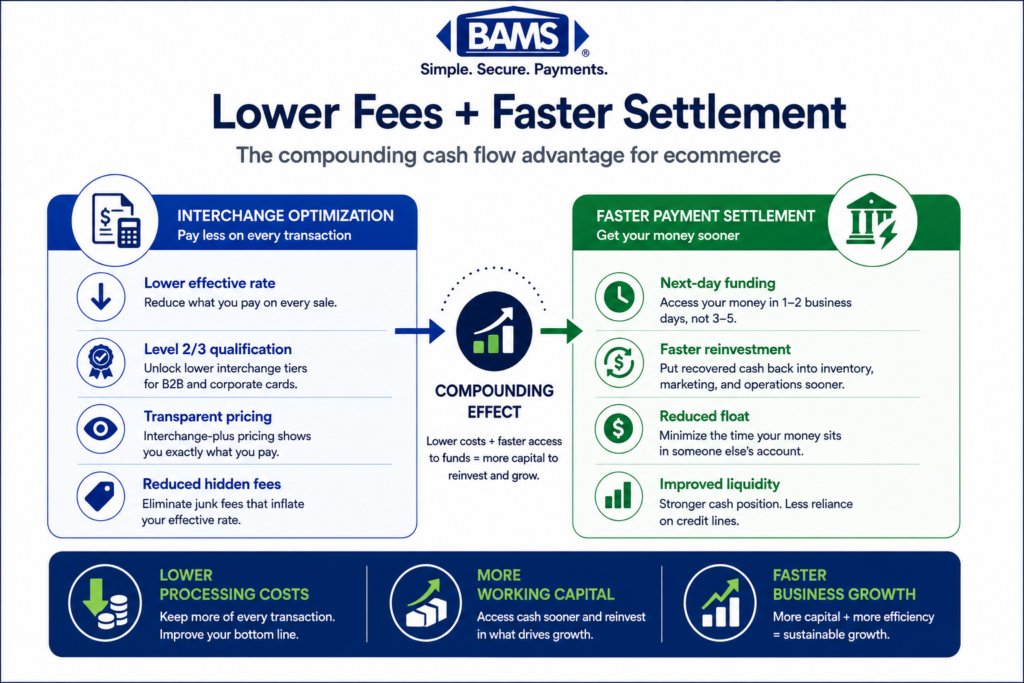
- Fix data fields before negotiating rates – Proper field mapping reduces the interchange layer (the largest portion of your fees), while rate negotiation only affects the smaller processor markup.
Why Your Statement Doesn’t Show You the Whole Story
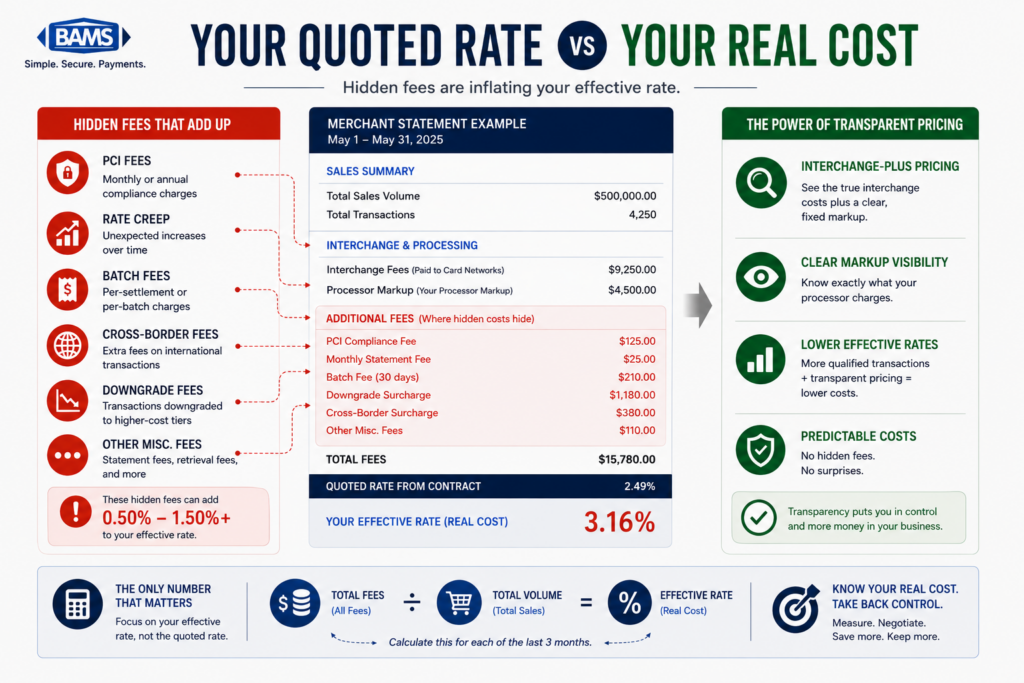
Your monthly processing statement tells you what you paid. It does not tell you why you paid it. That distinction costs eCommerce merchants thousands of dollars a year in avoidable fees. The root cause often hides in plain sight: tax and freight fields that your gateway either passes incorrectly, passes incompletely, or skips entirely.
When transaction data reaches card networks missing key fields (line-item tax amounts, freight charges, product codes), those transactions fail to qualify for lower interchange tiers. The result is a quietly inflated effective processing rate that looks normal on a flat statement but signals a configuration failure under the surface. Visa’s interchange qualification tables explicitly require enriched data for their lowest commercial card rates, and Mastercard follows the same logic.
Merchant Payments Coalition resources continue to highlight the growing financial pressure interchange and swipe fees place on merchants processing eCommerce and B2B transactions. Even fractional qualification improvements compound quickly across large transaction volumes.
Who This Is For and What It Covers
This is written for eCommerce managers running established online businesses on platforms like Shopify, WooCommerce, Magento, or BigCommerce, processing enough volume that a 0.3% to 0.8% rate reduction translates to real margin recovery. If your monthly statement shows an effective rate above 2.5% and you accept corporate or purchasing cards, this applies directly to you.
This list does not cover in-store POS configuration, card-present tap-to-pay optimization, or general fee negotiation tactics. It focuses narrowly on the data fields (Level 2 and Level 3) that control interchange qualification for card-not-present transactions. The goal: show you exactly which fields are missing, where they break across platforms, and how to fix them.
How These Items Were Selected
Each item below targets a specific field-mapping failure that causes interchange downgrades in eCommerce environments. Selection criteria included: frequency of occurrence across common gateway and platform combinations, dollar impact per transaction, and whether the fix is actionable without a full platform migration. Items are ordered from most universally applicable to most platform-specific.
7 Tax and Freight Field Failures That Inflate Your Effective Processing Rate
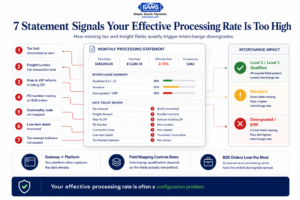
Your processing statement shows the total fees. These hidden field failures explain why the rate is higher than it should be.
1. Tax Amount Field Passed as Zero or Null
Why it matters: Visa and Mastercard require a non-zero tax amount (or an explicit tax-exempt indicator) for Level 2 qualification. When your gateway sends “0.00” or leaves the field empty, the transaction defaults to the standard interchange tier, even if you collected tax at checkout. This single field is the most common reason eCommerce transactions fail to reach Level 2 rates.
What it looks like today: Many Shopify and WooCommerce stores calculate tax correctly on the storefront but rely on a payment plugin that strips the tax field before transmitting to the processor. The checkout page shows tax. The gateway authorization does not.
How to apply it: Pull a sample of recent transactions from your gateway’s reporting dashboard. Compare the tax amount your platform calculated against what the gateway actually transmitted. If there is a mismatch, your plugin or API integration needs a field-mapping update. Ask your processor for a Level 2/Level 3 data transmission report to confirm.
2. Freight/Shipping Amount Missing from the Authorization
Why it matters: Level 3 interchange qualification requires a separate freight amount field. When shipping costs are bundled into the total without a discrete freight value, the transaction cannot qualify for Level 3 rates. For merchants selling to businesses or government buyers, this is where the largest rate gap sits: often 0.5% to 0.8% per transaction.
What it looks like today: Most eCommerce platforms calculate shipping as a separate line item internally. But many gateway integrations combine the order total into a single amount field and discard the freight breakdown. BigCommerce and Magento both support freight field passthrough, but only if the gateway connector is configured to map it.
How to apply it: Check whether your gateway API call includes a distinct “freight_amount” or “shipping_amount” parameter. If your connector uses a single “amount” field, you need either a middleware solution or a gateway that natively supports Level 3 field mapping. Document your current shipping logic and share it with your processor’s integration team.
3. Tax Indicator Set Incorrectly for Tax-Exempt Transactions
Why it matters: When a B2B buyer provides a tax exemption certificate, your platform zeroes out the tax. But the gateway still needs to send a tax indicator value of “exempt” (not “zero” or “not provided”). The distinction matters. Card networks treat “tax not provided” as incomplete data and downgrade the transaction. “Tax exempt” with a zero amount qualifies normally.
What it looks like today: WooCommerce stores using tax exemption plugins often set the tax to $0.00 without updating the tax indicator flag. Shopify’s native checkout does not expose this field at all without a custom integration. The result: every tax-exempt B2B order you process likely downgrades.
How to apply it: Audit your tax-exempt order flow end to end. Confirm that your gateway receives a “tax_indicator” value of “Y” (tax included), “N” (tax exempt), or equivalent, not just a zero dollar amount. If your platform does not expose this field, raise it with your processor. This is a configuration fix, not a platform migration.
4. Product/Commodity Codes Not Mapped to Line Items
Why it matters: Level 3 data requires commodity codes (typically NAICS or UNSPSC codes) at the line-item level. Without them, even transactions with correct tax and freight fields cap out at Level 2 qualification. For merchants with average order values above $200, the rate difference between Level 2 and Level 3 can exceed 0.4% per transaction.
What it looks like today: Almost no eCommerce platform maps commodity codes to products by default. Magento supports custom product attributes that can hold these codes, but the data must be explicitly passed to the gateway. Shopify requires a third-party app or custom API work. Most merchants do not know this field exists.
How to apply it: Start with your top 20 SKUs by revenue. Assign UNSPSC commodity codes to each (free lookup tools exist at unspsc.org). Then work with your gateway provider or processor to ensure those codes transmit with each line item. If you work with a merchant services partner like BAMS, their account management team can help identify which transactions are failing Level 3 qualification and guide the field mapping.
5. Line-Item Detail Truncated or Aggregated
Why it matters: Level 3 qualification requires individual line-item detail: description, quantity, unit of measure, unit price, and extended amount for each product in the order. When your gateway aggregates a multi-item order into a single line, the transaction cannot qualify. This is one of the most common hidden fees in processing because it affects every multi-item order silently.
What it looks like today: Gateways that were built for simple retail transactions often accept only a single line-item record. Even gateways that support multiple line items may truncate after 10 or 20 items. If your average order contains more than a handful of products, check whether your gateway imposes a line-item cap.
How to apply it: Request a sample Level 3 data payload from your gateway for a recent multi-item order. Count the line items transmitted versus the line items in the original order. If they do not match, you have a truncation problem. Prioritize fixing this for orders from corporate purchasing cards, where the interchange gap is widest.
6. Ship-To Postal Code Missing or Defaulting to Billing Zip
Why it matters: Both Visa and Mastercard require a destination postal code (ship-to zip) for Level 2 and Level 3 qualification. When the field is missing, some gateways silently substitute the billing zip code. Others leave it blank. Either scenario can cause a downgrade, especially when the card network’s validation logic flags the mismatch.
What it looks like today: Shopify and BigCommerce both capture shipping addresses at checkout. But the gateway integration may only pull the billing address fields for the authorization request. This is a mapping oversight, not a platform limitation. The data exists; it just is not being sent to the right field.
How to apply it: Compare the ship-to zip code in your order management system against what your gateway transmits. If your gateway defaults to billing zip or omits the field, update the field mapping in your connector settings. Most modern gateways expose this as a configurable parameter. If yours does not, that is a sign your gateway integration needs an upgrade. For a detailed walkthrough on identifying these kinds of statement-level discrepancies, see this guide on how to calculate your merchant discount rate.
7. Purchase Order Number Field Left Empty on B2B Transactions
Why it matters: For commercial, corporate, and government purchasing cards, the purchase order number is a required field for Level 2 qualification. Without it, these transactions, which often carry the highest ticket values, default to the most expensive interchange tier. A single missing PO field on a $5,000 B2B order can cost you $15 to $40 in unnecessary fees.
What it looks like today: Most B2C-focused eCommerce platforms do not include a PO number field at checkout by default. If you sell to businesses, you may collect PO numbers via email or a custom form field, but that data rarely flows into the payment authorization. It sits in your order notes, disconnected from the transaction.
How to apply it: Add a PO number field to your checkout flow for B2B customers. Then confirm your gateway maps that field to the “customer_reference” or “purchase_order” parameter in the authorization request. WooCommerce supports this through checkout field editor plugins. Shopify requires checkout extensibility or a custom app. The payoff is immediate: every B2B transaction with a valid PO number drops to a lower interchange tier.
The Pattern Behind These Failures
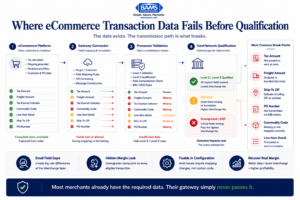
Most interchange downgrades happen because transaction fields break during transmission, not because the data is missing entirely.
Every item on this list shares a common structure: your eCommerce platform collects the data, but your gateway does not transmit it. The problem is not missing information. It is broken field mapping between systems that were never designed to talk to each other at the Level 2/Level 3 detail level.
This creates a compounding cost. Each missing field independently causes a downgrade, and multiple missing fields on the same transaction do not “stack” into a single penalty. They simply confirm the downgrade that the first missing field already triggered. Fixing one field may not move the needle if three others are also broken. The leverage comes from mapping all required fields in a single integration pass.
The second pattern: these failures disproportionately affect B2B and high-ticket transactions, exactly the orders where your margin sensitivity is highest. A 0.5% rate reduction on a $50 consumer order saves $0.25. The same reduction on a $2,000 corporate purchase card order saves $10. Your effective processing rate is an average, and the transactions dragging it up are often the ones with the most fixable data gaps.
Where to Start Without Overhauling Everything
You do not need to fix all seven items at once. Start with the two that deliver the fastest return: the tax amount field (#1) and the ship-to postal code (#6). These are the most common causes of Level 2 downgrades and typically require only a configuration change, not custom development.
If you process B2B orders, add the PO number field (#7) next. If your average order value exceeds $200 and you want Level 3 rates, tackle commodity codes (#4) and line-item detail (#5) together, since they require the same integration work. For a broader look at payment processing strategies that reduce costs, pair these field-mapping fixes with a statement audit to quantify exactly how much each downgrade is costing you.
The goal is not perfection on day one. It is making your transaction data match what the card networks already require, so your rates reflect the qualification tier you actually deserve.
Frequently Asked Questions
What are Level 2 and Level 3 data in payment processing?
- Level 2 and Level 3 refer to enriched transaction data that card networks (Visa, Mastercard) use to determine interchange qualification.
- Level 2 includes fields like tax amount, ship-to postal code, and customer reference number.
- Level 3 adds line-item detail: product descriptions, quantities, unit prices, commodity codes, and freight amounts. Passing this data correctly unlocks lower interchange rates, especially on commercial and purchasing card transactions.
How can I audit my payment processing statements for hidden fees?
Start by calculating your effective processing rate: divide total fees by total processing volume for the month. If the result exceeds 2.5%, pull a sample of individual transactions and check their qualification level (typically labeled as “qualified,” “mid-qualified,” or “downgraded” on interchange-plus statements). Transactions that downgraded despite being standard eCommerce sales usually indicate missing data fields. Ask your processor for a qualification summary report to pinpoint which fields are causing downgrades.
How does optimizing transaction data affect processing fees?
When your gateway transmits complete Level 2 and Level 3 data, transactions qualify for lower interchange tiers set by Visa and Mastercard. The rate difference between a standard card-not-present transaction and a fully qualified Level 3 transaction can range from 0.3% to 0.8%. On high-ticket or B2B orders, this translates to significant savings per transaction without changing your pricing, your platform, or your processor.
Why is interchange-plus pricing more beneficial than flat-rate pricing for seeing these issues?
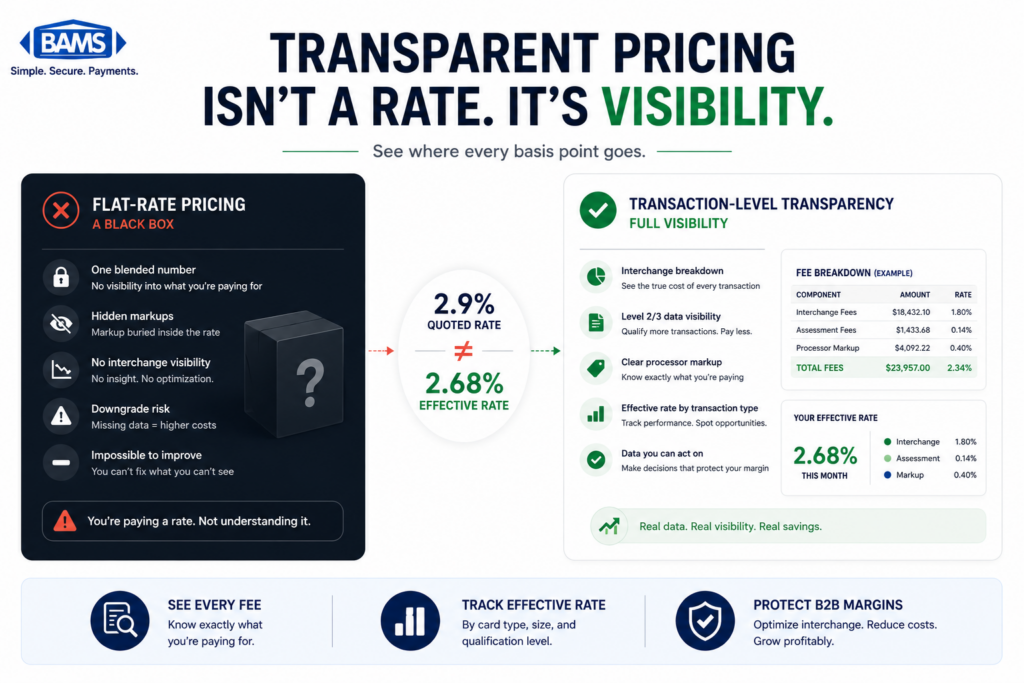
Flat-rate pricing bundles all fees into a single percentage, which hides interchange downgrades entirely. You pay the same rate whether your data qualifies at Level 3 or defaults to the most expensive tier. Interchange-plus pricing separates the interchange cost from the processor’s markup, making downgrades visible on your statement. This transparency is essential for diagnosing and fixing field-mapping problems.
Which eCommerce platforms support Level 3 data passthrough?
Magento and WooCommerce offer the most flexibility for Level 3 field mapping through custom attributes and API configurations. BigCommerce supports freight and tax fields natively but may require gateway-specific connectors for full line-item detail. Shopify’s standard checkout has the most limitations, often requiring third-party apps or checkout extensibility features to pass Level 2 and Level 3 fields to the gateway.
When should I negotiate my processing rates versus fix my data fields?
Fix your data fields first. Negotiating a lower processor markup saves you basis points on the markup layer only, which is typically 0.1% to 0.3% of your total rate. Fixing interchange qualification through proper field mapping can reduce the interchange layer by 0.3% to 0.8%, which represents a much larger portion of your total cost. Once your transactions qualify correctly, then negotiate the markup on top of your newly lower interchange base.