
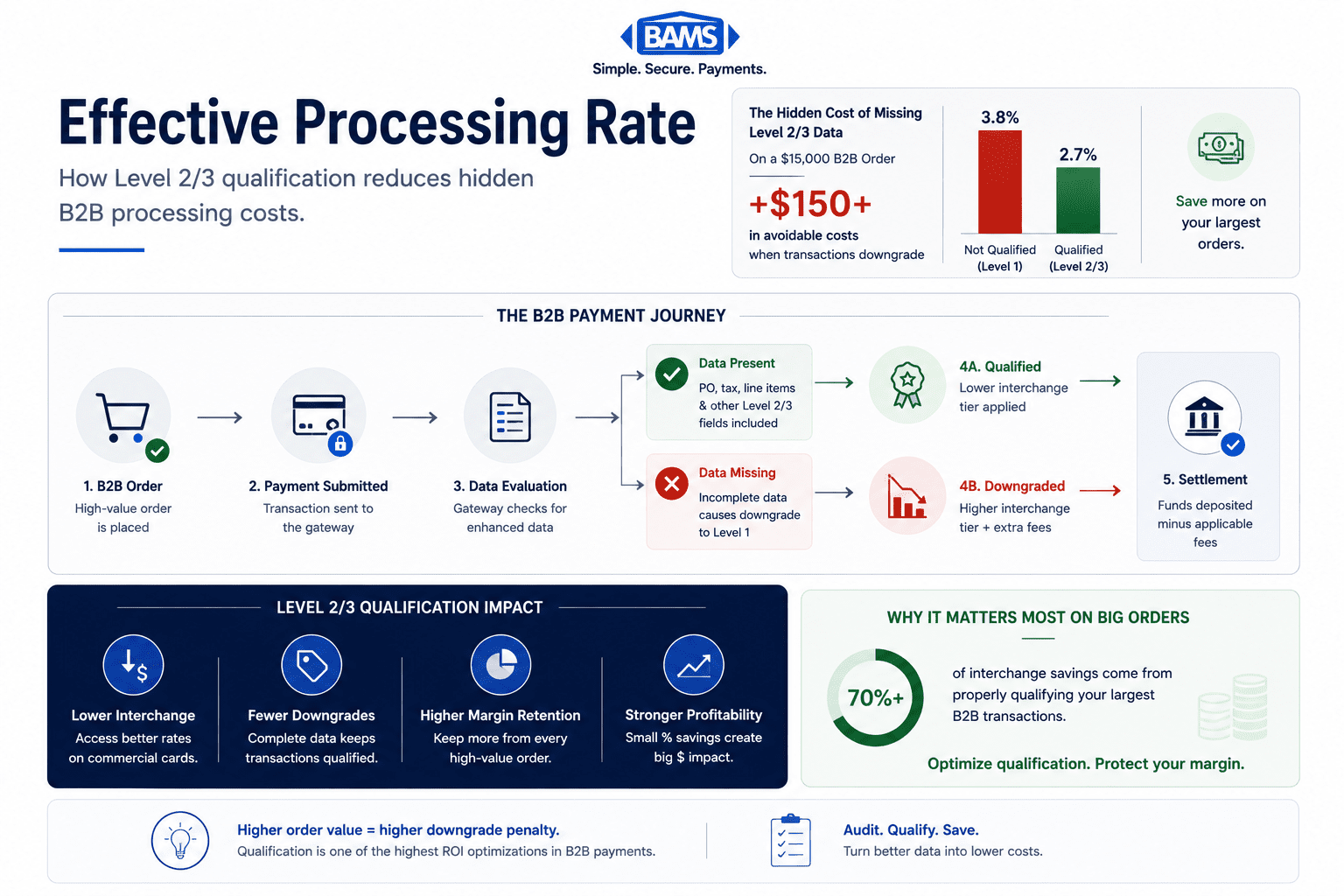
Effective Processing Rate: A B2B Qualification Guide
Last Updated on October 14, 2026 by Dimitri Akhrin
How missed Level 2/3 qualification silently inflates costs on your highest-value B2B orders
Learn how interchange qualification failures drive up your effective processing rate on large B2B orders. This guide walks you through auditing your processor’s Level 2/3 data handling and reclaiming margin where it matters most.
TL;DR
- Your largest B2B orders cost the most to process — Interchange downgrades from missing Level 2/3 data hit hardest on high-ticket transactions, where the percentage penalty translates to significant dollar amounts per order.
- Effective rate is the only honest metric — eCommerce merchants average 3.2% to 3.8% effective rates versus advertised rates of 2.9%. Calculate yours by dividing total fees by total volume on your raw merchant statement.
- Level 2/3 data qualification reduces interchange on B2B cards — Passing enhanced data (tax amounts, PO numbers, line-item details) with transactions triggers lower interchange rates from card networks. Start with Level 2 fields, then add Level 3.
- Your pricing model determines whether savings reach you — Interchange-plus pricing passes qualification savings through automatically. Tiered and flat-rate pricing may absorb the savings, making your optimization work invisible on your statement.
- Monthly monitoring protects your gains — Interchange tables update twice yearly, platforms change, and card mixes shift. Track your effective rate and qualification percentage monthly to catch regressions early.
Guide Orientation: What This Covers and Who It’s For
This guide examines how missed Level 2/3 data qualification silently inflates your effective processing rate on the B2B orders that matter most to your bottom line. It’s written for eCommerce managers at established online businesses (10 to 50 employees) who sell to other businesses and suspect their processing costs don’t match what they were promised.
By the end, you’ll understand exactly how Level 2/3 qualification works, why your largest orders are likely your most expensive to process, and how to audit your current setup to identify where margin is leaking. You’ll also have a step-by-step method for verifying whether your processor actually qualifies transactions at the optimal level or just claims to.
This guide does not cover consumer-only payment optimization, enterprise-scale multi-acquirer strategies, or platform migration. It focuses on the specific, high-impact intersection of B2B merchant services, interchange qualification, and order-level economics.
Why Effective Processing Rate Erosion Matters Now

Level 2 and Level 3 qualification reduce interchange costs by passing enhanced transaction data with B2B commercial card payments.
If you process B2B transactions through your eCommerce platform, your largest orders are almost certainly your most expensive on a per-dollar basis. Not because of volume, but because of how interchange qualification works behind the scenes. When a $15,000 purchase order downgrades from Level 3 to Level 1 qualification, the interchange rate difference can exceed 1% of the transaction value. On that single order, that’s $150 in avoidable cost.
The problem is structural. eCommerce merchants experience real effective rates of 3.2% to 3.8%, compared to advertised rates of 2.9%. That 0.3% to 0.8% gap isn’t a rounding error. It’s a collection of hidden fees, qualification failures, and assessment charges that compound on every transaction. For B2B eCommerce merchants processing high-ticket orders, the gap is often wider because the interchange penalty for missing Level 2/3 data is proportionally larger on bigger transactions.
The cost of inaction is not abstract. Every month you process B2B orders without proper data qualification, you’re paying a premium that your competitors who have optimized are not. Ignoring it means accepting margin erosion as a fixed cost when it’s actually a solvable problem.
According to Federal Reserve interchange fee data, interchange costs remain one of the largest drivers of total processing expenses for eCommerce merchants, especially on high-ticket B2B transactions.
Core Concepts: Understanding Level 2/3 Optimization and Interchange Qualification
What Interchange Actually Is
Every card transaction carries three cost layers: interchange (paid to the card-issuing bank), assessment fees (paid to the card network), and processor markup (paid to your payment processor). Interchange is the largest component, typically representing 70% to 80% of your total processing cost. Understanding this three-part fee structure is essential before you can identify where hidden costs live.
Visa interchange fees range from 1.30% to 2.60% per transaction, with Mastercard at 1.45% to 2.90% and American Express at 1.80% to 3.25%. The specific rate your transaction receives depends on multiple factors, including card type, merchant category, and critically, the data level submitted with the transaction.
What Level 2 and Level 3 Data Means
Card networks define three tiers of transaction data. Level 1 is the baseline: card number, expiration, transaction amount, and date. Level 2 adds tax amount, customer code, and merchant postal code. Level 3 goes further, requiring line-item detail such as product descriptions, quantities, unit costs, and commodity codes.
When you submit Level 3 data with a B2B transaction, the card network recognizes it as a lower-risk, higher-transparency purchase and assigns a lower interchange rate. When you submit only Level 1 data (which most default eCommerce configurations do), the transaction “downgrades” to a higher interchange tier. The card networks designed this system to incentivize detailed reporting, but the practical effect is that merchants who don’t pass enhanced data pay a penalty on every qualifying transaction. Visa payment processing resources explain how enhanced transaction data improves authorization transparency and qualification handling for commercial card transactions.
Why “Effective Rate” Is the Only Metric That Matters
Your effective processing rate is your total processing cost divided by your total processing volume. It captures every fee, surcharge, and downgrade penalty in a single number. Advertised rates and quoted interchange-plus spreads can obscure the true cost. Your effective rate cannot. If your processor quotes you interchange-plus 0.20% but your effective rate is 3.5%, the gap tells you exactly how much you’re losing to hidden fees and qualification failures.
The Framework: Order-Level Margin Analysis
Most advice about reducing merchant service charges focuses on aggregate volume. That approach misses the core problem for B2B eCommerce: your cost distribution is not uniform. A handful of large orders often carry disproportionate processing costs because interchange downgrades hit hardest on high-ticket transactions.
This guide uses a four-phase framework built around order-level economics rather than monthly totals:
- Phase 1: Baseline Audit — Calculate your true effective rate and identify the gap between quoted and actual costs.
- Phase 2: Order-Level Diagnosis — Isolate which transactions are downgrading and quantify the per-order cost impact.
- Phase 3: Data Qualification — Implement the specific data fields required for Level 2/3 qualification on your B2B transactions.
- Phase 4: Verification and Monitoring — Confirm that transactions are actually qualifying at the intended level and build ongoing oversight.
Each phase builds on the previous one. Skipping the audit and jumping to implementation is the most common mistake merchants make, because without a baseline, you can’t measure whether changes actually reduced costs.
Step-by-Step: Eliminating Hidden Fees Through Level 2/3 Qualification
Step 1: Calculate Your True Effective Processing Rate
Objective: Establish an accurate baseline that captures all processing costs, not just the quoted rate.
Pull your last three months of merchant statements. For each month, divide total fees charged (including interchange, assessments, monthly fees, PCI compliance fees, batch fees, and any other line items) by total card processing volume. The result is your effective rate. If your processor quotes interchange-plus 0.25% and your effective rate is 3.6%, you have a 0.85% or greater gap that represents hidden or misunderstood costs.
Compare your result against industry benchmarks. If you’re at the high end or above, qualification failures and hidden fees are likely contributing factors. For a detailed walkthrough of this calculation, this guide to lowering credit card processing fees breaks down each fee category.
Anti-patterns: Don’t rely on your processor’s summary dashboard for this calculation. Many dashboards exclude assessment fees, PCI fees, or monthly minimums. Use the raw statement data. Also avoid averaging across card types. Separate your Visa/Mastercard B2B transactions from consumer transactions, because the downgrade penalty structure differs significantly.
Success indicators: You have a single, defensible effective rate number for each of the last three months. You can identify the gap between your quoted rate and your actual rate. You know which fee categories contribute most to the gap.
Step 2: Identify Which Orders Are Downgrading
Objective: Pinpoint the specific transactions that are failing Level 2/3 qualification and quantify the cost per order.
Request a transaction-level interchange qualification report from your processor. This report shows the interchange category assigned to each transaction. Look for categories labeled “Standard,” “EIRF” (Electronic Interchange Reimbursement Fee), or “Data Rate II” versus “Commercial Level 2” or “Commercial Level 3.” Transactions in the first group have downgraded, meaning you paid a higher interchange rate than necessary.
Focus your analysis on orders above $1,000. A 1% interchange downgrade on a $200 consumer purchase costs you $2. The same downgrade on a $10,000 B2B purchase order costs $100. This is why order size, not transaction volume, determines the true impact of qualification failures. Sort your downgraded transactions by dollar value, and you’ll likely find that your top 20% of orders by size account for a disproportionate share of your total downgrade costs.
Anti-patterns: Don’t assume all B2B transactions automatically qualify for Level 2/3 rates. Many processors advertise Level 2/3 support but don’t actually pass the required data fields. The qualification report is the only way to verify. Also avoid treating all downgrades as equivalent. Some downgrades result from missing data fields (fixable), while others result from card type restrictions (not fixable).
Success indicators: You have a list of downgraded transactions with dollar amounts. You can calculate the total monthly cost of downgrades. You know whether the downgrades are concentrated in B2B/commercial card transactions.
Step 3: Map Required Data Fields to Your Platform
Missing transaction data can downgrade commercial card payments into more expensive interchange categories.
Objective: Determine exactly which data fields your eCommerce platform needs to pass for Level 2/3 qualification, and identify gaps in your current configuration.
Level 2 qualification requires: tax amount, customer code (often the PO number), and merchant postal code. Level 3 qualification requires everything in Level 2 plus line-item detail: product description, product code, quantity, unit of measure, unit cost, commodity code, discount amount, and freight/shipping amount. The specific field requirements vary slightly between Visa and Mastercard, so check both networks’ specifications.
Audit your current checkout and order management system. Most eCommerce platforms capture some of this data natively (tax amount, shipping cost) but don’t pass it to the payment gateway in the required format. The gap is usually in the gateway integration, not the platform itself. Common missing fields include commodity codes, unit of measure, and customer reference codes. Work with your payment gateway’s documentation to identify which Level 3 fields are supported and which require custom configuration.
Anti-patterns: Don’t attempt to pass all Level 3 fields simultaneously without testing. Incorrect or malformed data can cause transactions to downgrade further rather than qualify. Start with Level 2 fields (which are simpler and still deliver meaningful savings), verify qualification, then layer in Level 3 data. Also avoid assuming your developer or platform plugin handles this automatically. Verify field mapping at the gateway level.
Success indicators: You have a complete field-by-field gap analysis comparing required data versus what your platform currently passes. You have a prioritized implementation plan starting with Level 2 fields. You know which fields require custom development versus configuration changes.
Step 4: Implement Data Qualification and Test
Objective: Configure your payment integration to pass Level 2/3 data and confirm that transactions qualify at the intended interchange tier.
Work with your development team or payment gateway provider to implement the data field mapping from Step 3. For Level 2, this is typically a configuration change in your gateway settings. For Level 3, it often requires modifying your checkout flow or order processing API calls to include line-item detail in the authorization and settlement messages.
Run a controlled test with 10 to 20 B2B transactions across different card types (Visa commercial, Mastercard corporate, purchasing cards). After settlement, pull the interchange qualification report for these specific transactions and verify they received Level 2 or Level 3 interchange rates. If any transactions still downgraded, check the specific reason code. Common causes include missing tax indicators, incorrect decimal formatting on amounts, or commodity codes that don’t match the network’s accepted values.
This is where working with a processor that provides transaction-level visibility matters. BAMS, for example, offers dedicated account management that can help mid-market merchants identify qualification failures and verify that Level 2/3 data is being passed correctly, without requiring you to interpret raw interchange reports alone.
Anti-patterns: Don’t declare success based on a single test transaction. Different card types (purchasing cards, corporate cards, business cards) have different qualification requirements. Test across the card types your B2B customers actually use. Also don’t skip the verification step. Some gateways accept Level 3 data in the API call but don’t forward it to the processor in the correct format.
Success indicators: Test transactions show Level 2 or Level 3 interchange categories on the qualification report. You can calculate the per-transaction savings compared to the downgraded rate. You have a documented process for ongoing data submission.
Step 5: Audit Your Pricing Model for Hidden Markups
Objective: Ensure your processor’s pricing model actually passes interchange savings through to you, rather than absorbing them into a blended rate.
Level 2/3 qualification reduces the interchange rate on qualifying transactions. But this savings only reaches your bottom line if your processor uses interchange-plus pricing (sometimes called cost-plus). Under this model, you pay the actual interchange rate plus a fixed markup. When interchange drops due to Level 2/3 qualification, your cost drops proportionally.
If your processor uses tiered pricing or flat-rate pricing, the interchange savings from Level 2/3 data may never reach you. Under tiered pricing, your processor assigns transactions to “qualified,” “mid-qualified,” or “non-qualified” buckets at rates they define. Even if a transaction qualifies at Level 3 interchange, your processor might still charge you the “qualified” tier rate, pocketing the difference. Under flat-rate pricing (common with simplified processors), you pay the same percentage regardless of interchange tier.
Review your merchant agreement to confirm your pricing model. If you’re on tiered or flat-rate pricing and processing significant B2B volume, switching to interchange-plus is likely the single highest-impact change you can make. This breakdown of hidden payment processing costs explains how to identify whether your current model is costing you.
Anti-patterns: Don’t assume “interchange-plus” on your contract means you’re actually receiving interchange-plus pricing on every transaction. Some processors use hybrid models that apply interchange-plus to some transactions and tiered pricing to others. Check your statement line items against published interchange tables to verify. Also don’t focus exclusively on the markup percentage. A processor charging interchange-plus 0.15% with $200 in monthly fees may cost more than one charging interchange-plus 0.25% with no monthly fees, depending on your volume.
Success indicators: You can confirm your pricing model from your merchant agreement. You’ve compared at least five statement line items against published interchange rates to verify pass-through accuracy. You understand the total cost structure, including fixed monthly fees, per-transaction fees, and percentage markups.
Step 6: Build Ongoing Monitoring Into Your Operations
Objective: Create a sustainable process for catching qualification failures and fee changes before they erode margin over time.
Optimization is not a one-time project. Card networks update interchange tables twice per year (April and October). Your product catalog changes. New card types enter circulation. Any of these can cause previously qualifying transactions to downgrade without warning.
Set a monthly cadence for reviewing your effective processing rate. If the rate increases by more than 0.1% month-over-month without a corresponding change in your transaction mix, investigate immediately. Pull the interchange qualification report and look for new downgrades. Common triggers include platform updates that reset gateway configurations, new product SKUs without commodity codes, or changes in your customer base’s card mix.
Build a simple tracking spreadsheet or dashboard that plots three metrics monthly: effective rate, percentage of transactions qualifying at Level 2/3, and total downgrade cost. This takes 30 minutes per month and provides early warning of problems that would otherwise compound silently for quarters. If your processor offers automated reconciliation tools, use them, but verify their accuracy against your own calculations quarterly.
PCI Security Standards Council guidance also recommends ongoing monitoring and operational oversight to maintain secure and efficient payment processing environments.
Anti-patterns: Don’t rely solely on your processor to alert you to qualification changes. Their incentive structure doesn’t always align with yours. Also don’t over-engineer the monitoring. A simple spreadsheet updated monthly is more sustainable than a complex dashboard that nobody maintains after the first quarter.
Success indicators: You have a documented monthly review process with a specific owner. Your effective rate trend is visible over time. You can identify and investigate rate changes within 30 days of occurrence.
Practical Example: The $50,000 Monthly B2B Merchant
Before Optimization
Consider a mid-market eCommerce merchant processing $50,000 per month in B2B orders, with an average order value of $2,500 across 20 transactions. On tiered pricing, their effective rate is 3.6%, costing $1,800 per month in processing fees. Their largest orders ($5,000 to $8,000) are all downgrading to Level 1 interchange because their platform doesn’t pass tax amount or line-item data.
After Optimization
After switching to interchange-plus pricing and implementing Level 2/3 data qualification, the same merchant sees their effective rate drop to 2.7%. Monthly processing costs fall to $1,350, saving $450 per month ($5,400 annually). The savings are concentrated in the largest orders, where the interchange reduction from Level 3 qualification is most significant. A $7,500 order that previously cost $270 to process now costs $195.
The Compounding Effect
At $50,000 monthly volume, $5,400 in annual savings is meaningful but not transformative. However, B2B eCommerce merchants in the growth phase often see volume increase 20% to 40% year over year. Without optimization, processing costs scale linearly with volume. With Level 2/3 qualification locked in, the per-transaction savings compound as volume grows, creating an increasing margin advantage over competitors who haven’t optimized.
Pairing this with faster payment settlement (such as guaranteed next-day funding) amplifies the cash flow benefit. The $450 monthly savings arrives a day sooner, improving working capital timing on both the revenue and cost sides of the equation.
Common Mistakes and Pitfalls
Trusting your processor’s claims without verification. Many processors advertise Level 2/3 support. Fewer actually pass the data correctly. Always verify with interchange qualification reports, not marketing materials.
Optimizing for volume instead of order value. If you process 200 consumer transactions at $50 and 20 B2B transactions at $2,500, the B2B transactions represent the same dollar volume but far more savings potential per transaction. Prioritize accordingly.
Implementing Level 3 before Level 2. Level 2 qualification requires fewer fields, is easier to implement, and still delivers significant savings. Start there, verify it works, then add Level 3 data.
Ignoring the pricing model. All the Level 2/3 optimization in the world won’t help if your processor uses tiered or flat-rate pricing that absorbs the interchange savings. Fix the pricing model first.
Setting and forgetting. Interchange tables change, platforms update, and card mixes shift. Monthly monitoring is the only way to protect your optimization gains over time.
What to Do Next
Start with Step 1. Calculate your effective processing rate for the last three months using your raw merchant statements. This single number tells you whether you have a problem worth solving and roughly how large it is. The calculation takes 20 minutes and requires no technical changes, no vendor conversations, and no commitments.
If your effective rate exceeds 3.0% and you process B2B orders above $1,000, you almost certainly have qualification failures costing you money. From there, work through the steps sequentially. Each one builds on the previous and produces measurable results you can verify independently.
Keep this guide as a reference. Revisit the monitoring framework quarterly, especially after interchange table updates in April and October. Processing optimization is not a project with a finish line. It’s an operational discipline that protects margin as your business grows.
Frequently Asked Questions
What is interchange-plus pricing and how does it work?
Interchange-plus pricing separates your processing cost into two components: the actual interchange rate set by the card network (Visa, Mastercard) and a fixed markup charged by your processor. You pay the real interchange cost plus a transparent percentage and per-transaction fee. This matters for Level 2/3 optimization because when interchange drops due to enhanced data qualification, your cost drops automatically. Under tiered or flat-rate pricing, the processor may keep the savings.
Why should businesses consider Level 2/3 optimization for B2B transactions?
Card networks charge lower interchange rates when merchants submit detailed transaction data (tax amounts, PO numbers, line-item details) because the additional data reduces fraud risk and simplifies reconciliation for the card-issuing bank. B2B transactions on commercial, purchasing, and corporate cards are specifically designed to benefit from this system. Without Level 2/3 data, these transactions downgrade to the highest interchange tier, and the penalty is proportional to the transaction amount. On a $5,000 order, the difference between Level 1 and Level 3 interchange can exceed $50 per transaction.
How can I tell if my processor is actually qualifying transactions at Level 3?
Request an interchange qualification report (sometimes called an interchange detail report) from your processor. This report shows the specific interchange category assigned to each transaction after settlement. Look for categories containing “Commercial III,” “Level 3,” or similar designations on your B2B transactions. If you see “Standard,” “EIRF,” or “Data Rate I” on commercial card transactions, those orders downgraded and you’re paying a premium. If your processor cannot or will not provide this report, that itself is a red flag.
What are the common hidden fees in merchant services that businesses should watch out for?
Beyond interchange downgrades, common hidden fees include PCI non-compliance fees (charged monthly if you haven’t completed your PCI questionnaire), batch processing fees (charged per daily settlement), statement fees, account maintenance fees, and IRS reporting fees. Assessment fees from card networks also add costs that don’t appear in quoted rates. The most reliable way to identify all fees is to calculate your effective rate and compare it to your quoted rate. The gap represents the sum of all hidden and miscategorized charges.
When is the best time to negotiate processing fees with your merchant services provider?
The best time to negotiate is after you’ve completed your own effective rate analysis and have specific data showing qualification failures or fee gaps. Armed with your actual effective rate, a list of downgraded transactions, and competitive quotes, you have leverage to request interchange-plus pricing, lower markups, or fee removals. Contract renewal periods are natural negotiation windows, but most merchant services agreements allow renegotiation at any time. Don’t wait for a renewal if your analysis shows significant overpayment.
Which payment processing model is more cost-effective for high-ticket B2B transactions?
Interchange-plus pricing is almost always more cost-effective for B2B merchants processing high-ticket orders. Flat-rate pricing (e.g., a fixed 2.9% on all transactions) simplifies billing but eliminates any benefit from Level 2/3 qualification. Tiered pricing obscures the actual interchange cost and allows processors to absorb savings from qualification improvements. With interchange-plus, every reduction in interchange from enhanced data flows directly to your bottom line, making it the only model where Level 2/3 optimization produces measurable, verifiable savings.


