Level 3 Data: A Guide for eCommerce Merchants
How commercial card transactions quietly inflate your processing costs — and what you can do about it
Learn what Level 3 data is, why your processing statement hides costly commercial card transactions, and how to stop overpaying on qualifying orders without overhauling your tech stack.
TL;DR
- Your processing statement hides a costly blind spot – It doesn’t show which transactions used commercial cards or what interchange tier they qualified at, so you can’t see what you’re overpaying.
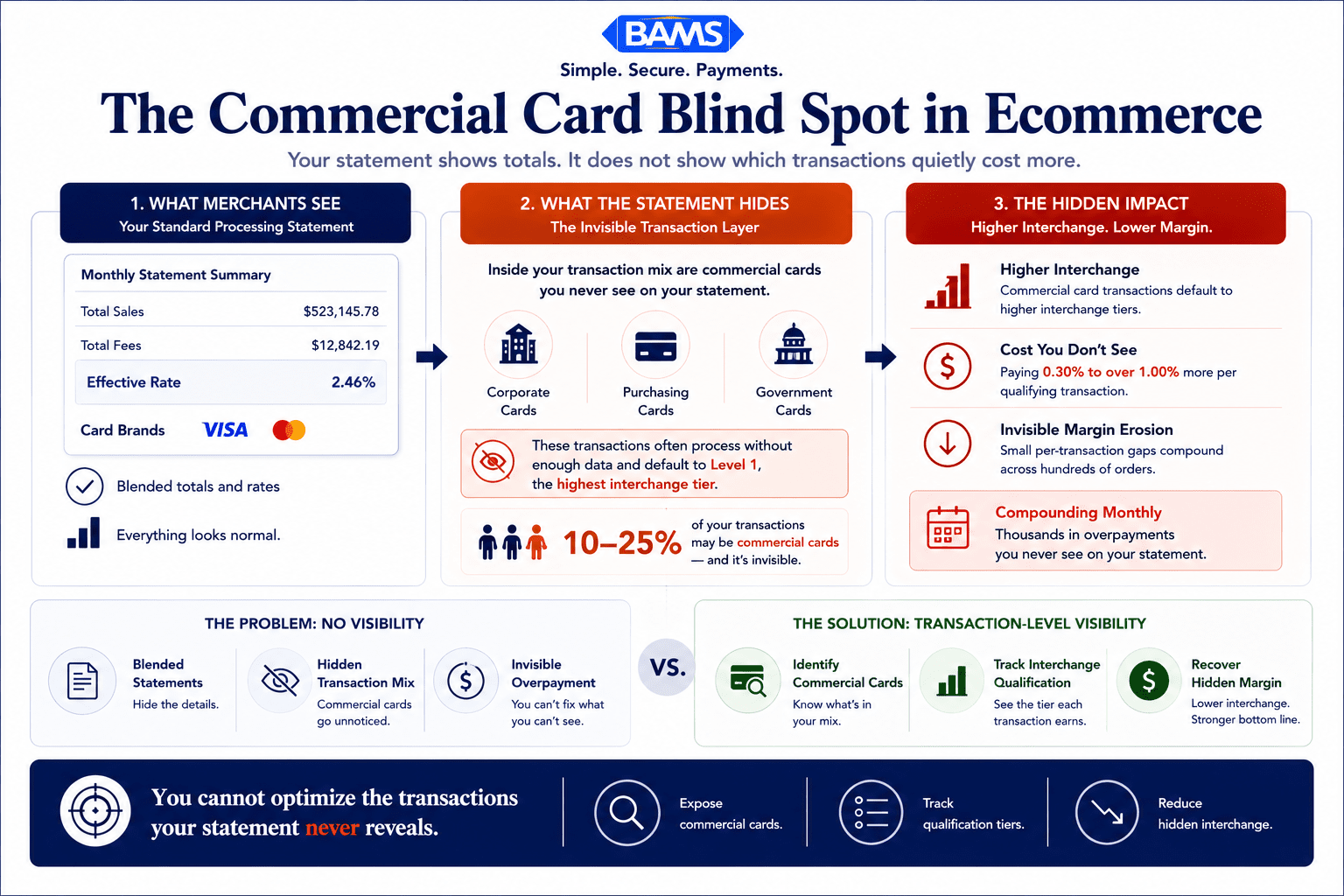
- Commercial cards are in your mix, even if you’re B2C – Business buyers, school districts, and companies use corporate cards on consumer-facing stores. Many eCommerce merchants find 10-25% of their transactions are commercial.
- Level 3 data unlocks the lowest interchange rates – Submitting line-item detail (product codes, quantities, prices, tax, freight) with commercial card transactions can reduce interchange costs by 0.30% to over 1.00% per transaction.
- Your eCommerce platform already has the data – The required fields (product info, tax, shipping) exist in your order system. The fix is mapping them to your payment gateway, not collecting new information from buyers.
- Start by requesting a transaction-level interchange report – Ask your processor for a report showing interchange categories per transaction. That single document reveals whether you have a commercial card cost problem and how large it is.
Guide Orientation: What This Covers and Who It’s For
Your processing statement shows you totals, rates, and fees. What it doesn’t show you is which of your orders were placed with commercial cards, what interchange tier those transactions actually qualified at, and how much you overpaid as a result. This guide closes that gap.
It’s written for eCommerce managers at established online businesses who process a mix of consumer and business orders. If you manage a store doing steady volume but have never looked beyond the summary line on your monthly statement, this is for you.
By the end, you’ll understand how Level 3 data affects your payment processing costs, how to identify whether commercial card transactions are hiding in your order flow, and what concrete steps you can take to stop overpaying on qualifying orders without overhauling your tech stack. This guide does not cover ERP integration or government procurement card compliance. It focuses on practical awareness and action for mid-market eCommerce.
Why Your Processing Statement Doesn’t Tell the Whole Story

Most eCommerce merchants already process commercial cards. The problem is their statements never show the hidden cost clearly.
Most eCommerce merchants treat their processing statement the way they treat a utility bill: scan the total, confirm it’s roughly what you expected, file it. The problem is that a processing statement is not a utility bill. It’s a summary of hundreds or thousands of individual transactions, each of which was evaluated and priced by the card networks based on criteria your statement never surfaces.
One of the most consequential pricing factors is whether a transaction involved a commercial card (a corporate purchasing card, a business credit card, or a government procurement card) and whether your system submitted enough data to qualify for the lowest available interchange rate on that transaction. Mastercard’s 2025 commercial card acceptance report warns that businesses not optimizing for commercial card payments risk falling behind competitors who offer faster, more efficient payment options.
This isn’t a niche concern. Merchant Payments Coalition resources continue to highlight how interchange complexity, commercial card growth, and payment processing inefficiencies increase operating costs for merchants processing B2B transactions. Even if you think of yourself as a B2C store, a meaningful portion of your orders may come from buyers using company-issued cards. Every one of those transactions that processes without the right data attached costs you more than it should.
The cost of not knowing is cumulative. It doesn’t show up as a single alarming charge. It shows up as a slightly higher effective rate, month after month, compounding across every commercial card order you process. And your statement will never flag it for you.
Core Concepts: Interchange Tiers, Commercial Cards, and the Data Gap
Interchange Is Not a Flat Rate
Interchange is the fee the card-issuing bank charges on every transaction. It’s the largest component of your processing cost, and it’s not a single number. Visa and Mastercard maintain hundreds of interchange categories, each with different rates. Visa payment rules and merchant guidance continue to emphasize how transaction type, card category, and enhanced payment data determine interchange qualification outcomes. The category your transaction lands in depends on multiple factors: the type of card used, how the transaction was processed, and how much data your system submitted with the authorization.
What Makes a Card “Commercial”
A commercial card is any card issued to a business entity rather than an individual consumer. This includes corporate purchasing cards, business credit cards, fleet cards, and government procurement cards. From the outside, they look identical to consumer cards. Your checkout page can’t tell the difference. But the interchange rate on a commercial card transaction can be significantly higher than a consumer card, especially when the transaction doesn’t include enhanced data.
The Three Data Levels
Card networks define three tiers of transaction data.
- Level 1 is basic: card number, transaction amount, date.
- Level 2 adds tax amount, customer code, and merchant postal code.
- Level 3 adds invoice-quality data: line-item detail, product codes, quantities, freight amounts, and more. Each tier unlocks progressively lower interchange rates on eligible commercial card transactions.
The critical misconception: most eCommerce merchants assume their payment gateway handles this automatically. It usually doesn’t. Without explicit configuration, your transactions default to Level 1 data submission, and your commercial card orders qualify at the highest possible interchange tier. Your effective processing rate reflects this, even if you’ve never noticed it.
The Awareness Problem
The real issue isn’t technical complexity. It’s visibility. Your processing statement aggregates all transactions together. It doesn’t flag which ones were commercial cards. It doesn’t tell you which tier they qualified at. And it doesn’t calculate how much you would have saved with better data. This is the gap that costs mid-market eCommerce merchants thousands of dollars annually without ever appearing as a line item.
The Framework: Identify, Quantify, Qualify, Verify
Solving this problem follows a four-stage process. Each stage builds on the previous one, and none of them requires you to replace your payment gateway or rebuild your checkout.
- Identify: Determine whether commercial cards are present in your transaction mix.
- Quantify: Calculate the actual cost difference between what you’re paying and what you could be paying on those transactions.
- Qualify: Configure your data submission to meet Level 2 and Level 3 requirements for eligible transactions.
- Verify: Confirm that your transactions are landing at the correct interchange tier on an ongoing basis.
This is not a one-time project. It’s a recurring practice, because your transaction mix changes, card network rules evolve, and processor behavior isn’t always transparent. The framework gives you a repeatable system for managing a cost most merchants don’t know they have.
Reducing commercial card costs is not a one-time fix. It is a repeatable operational process.
Step-by-Step: How to Uncover and Fix the Commercial Card Blind Spot
Step 1: Audit Your Transaction Mix for Commercial Cards
Objective: Determine what percentage of your orders are placed with commercial, corporate, or purchasing cards.
Start by requesting a transaction-level report from your processor, not the summary statement you receive monthly. You need a report that includes the Bank Identification Number (BIN) for each transaction, or at minimum, the interchange category each transaction qualified at. Interchange category names like “Commercial Data Rate I” or “Purchasing Card” reveal that a transaction involved a commercial card.
If your processor won’t provide this level of detail, that’s itself a signal. Transparent processors make this data accessible. If yours doesn’t, you may want to ask why. Many eCommerce merchants are surprised to find that 10-25% of their transactions involve commercial cards, especially if they sell products commonly purchased by businesses (office supplies, equipment, bulk consumables, software, or professional services).
Anti-pattern: Don’t rely on your monthly statement summary. It aggregates everything into blended rates that hide the commercial card premium. Don’t assume that because you’re “B2C,” commercial cards aren’t in your mix. Buyers use business cards for personal purchases, and business buyers shop on consumer-facing stores.
Success indicator: You can state, with data, what percentage of your monthly transactions involve commercial cards and what interchange categories they’re qualifying at.
Step 2: Calculate the Cost of Your Current Data Gap
Objective: Put a dollar figure on the difference between your current interchange costs on commercial card transactions and what you’d pay at Level 2 or Level 3 rates.
Once you know which transactions are commercial, compare their actual interchange rate to the rate they would have qualified at with enhanced data. The difference between a standard commercial card rate and a Level 3 optimized rate can range from 0.30% to over 1.00% per transaction. On a $500 order, that’s $1.50 to $5.00 per transaction. Multiply that across hundreds of orders per month, and you’re looking at meaningful margin recovery.
Use your processing statement audit to isolate these transactions. Group them by interchange category, calculate the aggregate overpayment, and annualize it. This number is your business case for action. It’s also the number your current processor has no incentive to show you, because the overpayment flows through their system without triggering any alert.
Anti-pattern: Don’t estimate based on your blended rate. The blended rate masks the commercial card premium inside a weighted average. You need transaction-level math to see the real number. Also, don’t ignore small percentages. A 0.50% savings on a high-volume store with $200K in monthly commercial card volume is $12,000 per year.
Success indicator: You have a specific annual dollar figure representing the interchange savings available from better data submission on your commercial card transactions.
Step 3: Understand What Data Fields You’re Missing
Objective: Identify the specific data elements your system needs to submit to qualify transactions at Level 2 and Level 3 interchange rates.
Level 2 data requires your system to pass the sales tax amount and a customer code (often the purchase order number or customer reference) with each transaction. Most modern payment gateways can handle Level 2 if configured correctly. Many merchants are already halfway there without realizing it.
Level 3 data is more detailed. It requires line-item data for each product in the order: item description, product or commodity code, quantity, unit of measure, unit price, extended price, and discount amount. It also requires order-level fields like freight amount, duty amount, and destination postal code. This is sometimes called invoice-quality data because it mirrors what you’d include on a detailed invoice.
The good news: your eCommerce platform already captures most of this information. Product descriptions, quantities, prices, tax, and shipping are standard order fields. The challenge is getting that data passed through your payment gateway to your processor in the correct format at the time of authorization. This is a configuration task, not a data collection task.
Anti-pattern: Don’t assume you need to collect new information from customers. Level 3 data comes from your order management system, not from the buyer. Also, don’t conflate Level 3 data with PCI compliance data. These are separate concerns with separate requirements.
Success indicator: You have a clear list of which Level 2 and Level 3 fields your current system already captures and which ones need to be mapped to your payment submission.
Step 4: Evaluate Your Gateway and Processor Capabilities
Objective: Determine whether your current payment gateway and processor support Level 2 and Level 3 data submission, and what changes (if any) are needed.
Not all payment gateways support Level 3 data transmission. Some support Level 2 but not Level 3. Some support both but only for specific card networks. Contact your gateway provider and ask explicitly: “Does your gateway support Level 3 data submission for Visa and Mastercard commercial card transactions?” Get the answer in writing.
Then ask your processor the same question. Even if your gateway can transmit the data, your processor needs to accept it and pass it to the card networks for interchange qualification. Some processors quietly accept the data but don’t apply it to interchange optimization, meaning you submit the data but still pay the higher rate. This is where transparency matters. A processor committed to honest cost reduction will show you, transaction by transaction, whether your enhanced data resulted in a lower interchange category.
For merchants who discover their current setup doesn’t support Level 3 data, BAMS offers merchant services with transparent pricing and dedicated account management that can help identify which transactions qualify for interchange savings and ensure the right data reaches the card networks.
Anti-pattern: Don’t assume your gateway “handles everything.” Many gateways default to Level 1 data submission unless you explicitly enable enhanced data fields. Don’t accept vague reassurances from your processor. Ask for a sample transaction report showing interchange qualification levels.
Success indicator: You have written confirmation from your gateway and processor about their Level 2/Level 3 capabilities, and you know exactly what configuration changes are required.
Step 5: Implement Data Mapping and Test Qualification
Objective: Configure your system to submit the required data fields and verify that test transactions qualify at the intended interchange tier.
Work with your developer or eCommerce platform specialist to map the required Level 2 and Level 3 fields from your order management system to your payment gateway’s API. For Level 2, this is typically straightforward: pass the tax amount and a customer reference code. For Level 3, you’ll need to map line-item arrays that include product codes, descriptions, quantities, and pricing.
Run a small batch of test transactions using a known commercial card (your own business card works well for this). After settlement, check the interchange qualification report from your processor. The transactions should appear in a lower interchange category than your previous commercial card transactions. If they don’t, something in the data chain is broken, and you’ll need to troubleshoot which field is missing or malformed.
Automated data capture tools built into some payment platforms can simplify this process. The key is ensuring the data flows end-to-end: from your cart, through your gateway, to your processor, and ultimately to the card network’s interchange qualification engine.
Anti-pattern: Don’t deploy to production without testing. A single missing field can cause the entire transaction to fall back to Level 1 qualification, negating your work. Don’t test with consumer cards. Only commercial cards are eligible for Level 2/Level 3 interchange rate reduction, so consumer card tests won’t reveal qualification issues.
Success indicator: Your test transactions appear in Level 2 or Level 3 interchange categories on your processor’s qualification report, at rates lower than your previous commercial card transactions.
Step 6: Monitor Qualification Rates Monthly
Objective: Establish an ongoing review process that catches qualification failures before they accumulate into significant cost overruns.
Level 3 data optimization is not a set-and-forget configuration. Gateway updates, platform migrations, product catalog changes, and processor-side adjustments can all break your data submission without warning. Build a monthly check into your operations: review your interchange qualification report, calculate the percentage of commercial card transactions qualifying at Level 2 or Level 3, and compare it to the previous month.
If your qualification rate drops, investigate immediately. Common causes include a gateway update that reset your API parameters, a new product added to your catalog without a commodity code, or a processor-side change in how they handle enhanced data fields. The five signals of statement margin leakage provide a useful checklist for identifying where breakdowns occur.
Track your savings over time. Knowing that you recovered $8,000 in interchange costs over six months creates internal buy-in for maintaining the process and justifies the time spent on monthly reviews. Payment analytics don’t need to be complex. A simple spreadsheet comparing commercial card volume, qualification rates, and effective rates month-over-month is sufficient.
Anti-pattern: Don’t assume that because it worked last month, it’s working this month. Don’t delegate monitoring entirely to your processor without independent verification. Trust, but verify.
Success indicator: You have a monthly report showing commercial card qualification rates, and your Level 2/Level 3 qualification rate remains above 90% of eligible transactions.
Practical Examples: What This Looks Like in Real Ecommerce
Scenario 1: The Office Supply Store That Didn’t Know
An online office supply retailer processing $150,000 per month assumed nearly all orders were consumer purchases. After auditing their transaction data, they discovered that 18% of their volume came from commercial purchasing cards, mostly from small businesses and school districts ordering in bulk. Every one of those transactions had been processing at Level 1 data rates.
The interchange difference on their average commercial card order of $320 was approximately 0.65%. That’s $2.08 per transaction. Across roughly 85 commercial card orders per month, they were overpaying about $176 monthly, or over $2,100 per year. After configuring Level 3 data submission through their existing gateway, their effective processing rate on commercial card transactions dropped by the expected amount within the first billing cycle.
Scenario 2: The B2C Brand With a Wholesale Side Channel
A consumer skincare brand also sold to spas and salons through their website. These wholesale buyers used business credit cards, but the brand’s eCommerce manager had never distinguished between consumer and commercial orders in their payment data. When they pulled a BIN-level report, they found that wholesale orders (averaging $850 each) were qualifying at the highest commercial interchange tier.
By submitting Level 2 data (tax amount and customer code) on these transactions, they achieved an immediate rate improvement. Adding Level 3 line-item data pushed savings further. The total annual recovery exceeded $4,500, enough to fund a part-time customer service hire. No platform migration was required. The changes were API-level configurations in their existing payment gateway.
Before and After: The Statement View
Before optimization, a typical processing statement shows all transactions blended together. The effective rate reads 2.85%, and there’s no indication that 15% of transactions are commercial cards paying 3.15% or higher. After optimization, the same statement shows the same blended rate at 2.68%. The difference is invisible unless you look at transaction-level detail, which is exactly why most merchants never catch it.
Common Mistakes and Pitfalls
The most common mistake is assuming this doesn’t apply to you because you’re a “B2C business.” Commercial cards are used across every type of online store. If you sell anything a business might buy, you’re processing commercial cards.
Another frequent error is trusting your processor’s assurance that your rates are “already optimized.” Without transaction-level qualification data, that claim is unverifiable. Ask for proof, not promises.
Some merchants invest in Level 3 data configuration but never monitor it afterward. A single platform update can silently break your data submission, and you’ll revert to Level 1 pricing without any notification. Treat this like any other operational metric: review it regularly.
Finally, don’t let perfect be the enemy of good. Even if you can only implement Level 2 data right now, that still represents meaningful interchange savings over Level 1. You can add Level 3 fields incrementally as your technical capacity allows.
What to Do Next
Start with one action: request a transaction-level interchange qualification report from your processor. Not a summary statement. A report that shows, for each transaction, the interchange category it qualified at and the card type (consumer vs. commercial). If your processor can’t or won’t provide this, that tells you something important about their commitment to transparency.
Once you have that report, scan for commercial card transactions. If they exist (and they likely do), calculate the cost gap using the method in Step 2. That number will tell you whether this is a $500 problem or a $15,000 problem, and it will determine how urgently you move through the remaining steps.
This isn’t a one-weekend project, and it doesn’t need to be. Move through the framework at a pace that fits your operations. The savings compound from the moment you start qualifying transactions correctly, and every month you wait is another month of overpayment that your processing statement will never flag for you.
Frequently Asked Questions
What is Level 3 data in merchant services?
Level 3 data is the most detailed tier of transaction information you can submit to card networks like Visa and Mastercard. It includes line-item details such as product descriptions, commodity codes, quantities, unit prices, freight amounts, and tax breakdowns. When submitted with commercial card transactions, Level 3 data qualifies those transactions for the lowest available interchange rates, reducing your per-transaction cost.
How do I know if my eCommerce store is processing commercial cards?
You can’t tell from your standard monthly processing statement. You need a transaction-level report from your processor that includes either the BIN (Bank Identification Number) for each transaction or the interchange category each transaction qualified at. Categories with names like “Commercial Data Rate” or “Purchasing Card” indicate commercial card usage. Many eCommerce merchants discover that 10-25% of their transactions involve commercial cards.
Which types of transactions are eligible for Level 3 interchange rates?
Only transactions made with commercial, corporate, purchasing, or government procurement cards are eligible for Level 3 interchange rate reductions. Consumer credit and debit cards are not eligible. This is why identifying commercial cards in your transaction mix is the essential first step. Without knowing which transactions qualify, you can’t target your optimization efforts.
Why is it important for businesses to transition from Level 2 to Level 3 data processing?
Level 2 data submission unlocks moderate interchange savings on commercial card transactions, but Level 3 data unlocks the deepest available discounts. The difference between Level 2 and Level 3 rates can be 0.20% to 0.50% per transaction. For businesses with significant commercial card volume or high average order values, that gap adds up to thousands of dollars annually. Additionally, card networks are increasingly incentivizing richer data submission.
What specific data fields are required for Level 3 processing?
Level 3 requires order-level fields (customer code, tax amount, freight amount, duty amount, destination postal code) and line-item fields for each product (item description, product/commodity code, quantity, unit of measure, unit price, extended price, and discount amount). Most eCommerce platforms already capture this information in their order management systems. The challenge is mapping these fields to your payment gateway’s API for transmission at authorization time.
Do I need to change my payment processor or gateway to submit Level 3 data?
Not necessarily. Many modern payment gateways support Level 2 and Level 3 data submission, but the feature often needs to be explicitly enabled and configured. Start by asking your current gateway and processor whether they support Level 3 data for Visa and Mastercard commercial transactions. If they do, the work is primarily configuration and data mapping. If they don’t, you may need to evaluate alternative providers that offer this capability.
Sources
- Mastercard Commercial Card Acceptance Research
- Federal Reserve Interchange Fee Data
- Visa Payment Rules and Merchant Guidance


