Transaction Batching: Control When Deposits Hit
Last Updated on October 1, 2026 by Dimitri Akhrin
Align your batch schedule to your processor’s funding window and stop chargebacks from stalling cash flow
Learn how to configure your transaction batching schedule to match your processor’s deposit window, build a chargeback buffer strategy, and verify the full chain from batch submission to bank deposit in minutes.
TL;DR
- Batch timing is the biggest controllable lever – Missing your processor’s daily cutoff adds a full business day to your funding delay. Set an internal deadline 60 minutes before the cutoff and capture all pending orders before it.
- Map your actual deposit gap – Track 30 days of batch close dates versus bank deposit dates. Your real funding speed may differ from what your processor advertises, especially on weekends and holidays.
- Buffer against chargeback deductions – Processors deduct chargebacks from future deposits without warning. Hold back 1.5x your average monthly chargeback volume as a rolling buffer so deductions do not stall supplier payments or inventory orders.
- Align outgoing payments to confirmed deposits – Schedule supplier invoices and inventory buys for one business day after your deposits typically arrive. Stop spending expected revenue and start spending confirmed revenue.
- Verify deposits daily – A 5-minute morning check comparing batch totals to bank deposits catches chargebacks, fee deductions, and holds within 24 hours instead of at month-end.
What You Will Achieve: Predictable Cash Flow Despite Chargebacks
By the end of this tutorial, you will have a working system that protects your cash flow predictability from chargeback disruptions by controlling your transaction batching schedule, aligning it to your processor’s deposit window, and building a buffer strategy that keeps chargebacks from derailing your purchasing timeline. You will know exactly when to batch, how to verify your funding arrived, and how to restructure downstream spending decisions around a reliable deposit schedule.
Your success criteria are simple: deposits land in your bank account on the same day each week, your inventory and supplier payments never stall because of a surprise chargeback hold, and you can verify the entire chain from batch submission to deposit arrival in under five minutes.
Prerequisites and Setup Checklist
Before you start, confirm you have the following in place. Missing any one of these will create a blocker partway through.
- Active merchant account with a processor that supports configurable batch cutoff times
- Admin access to your eCommerce platform (Shopify, WooCommerce, BigCommerce, or equivalent)
- Access to your processor’s merchant portal where you can view batch reports, deposit history, and chargeback activity
- A business bank account with online access so you can verify deposit timestamps
- A spreadsheet or cash flow tool (Google Sheets, Excel, or your accounting software) for mapping deposit timing to outgoing obligations
- Estimated time: 2 to 3 hours for initial setup, then 15 minutes per day for the first two weeks of monitoring
Potential blocker: If your processor does not allow you to configure batch cutoff times or view batch-level reporting, you may need to contact your account manager or consider a processor that offers this transparency.
Why Transaction Batching Is the Lever You Control
Most eCommerce managers treat payment processing speed as something their processor dictates. In reality, the biggest controllable variable is when you close your daily batch. As BAMS notes in their stage-by-stage guide, missing your processor’s daily cutoff automatically adds a full business day to your funding delay. That is not a processor problem. That is an operational timing problem you can fix.
The gap between when your platform captures transactions and when your processor actually moves money to your bank is where cash gets stuck. Standard card funding typically takes 2 to 3 business days. Next-day funding compresses that to 1 business day. But even next-day funding only works if your batch closes before the cutoff. This tutorial treats batch timing as a workflow decision, not a fixed setting, and connects it to every downstream dollar you spend.
Visa explains that digital payment processing moves through several distinct stages, including payment capture, authorization, processing, and settlement into the merchant account. Understanding where your batch enters this lifecycle makes it easier to identify whether a delay originates with transaction capture, the processor, or final settlement. See Visa’s payment processing guidance.

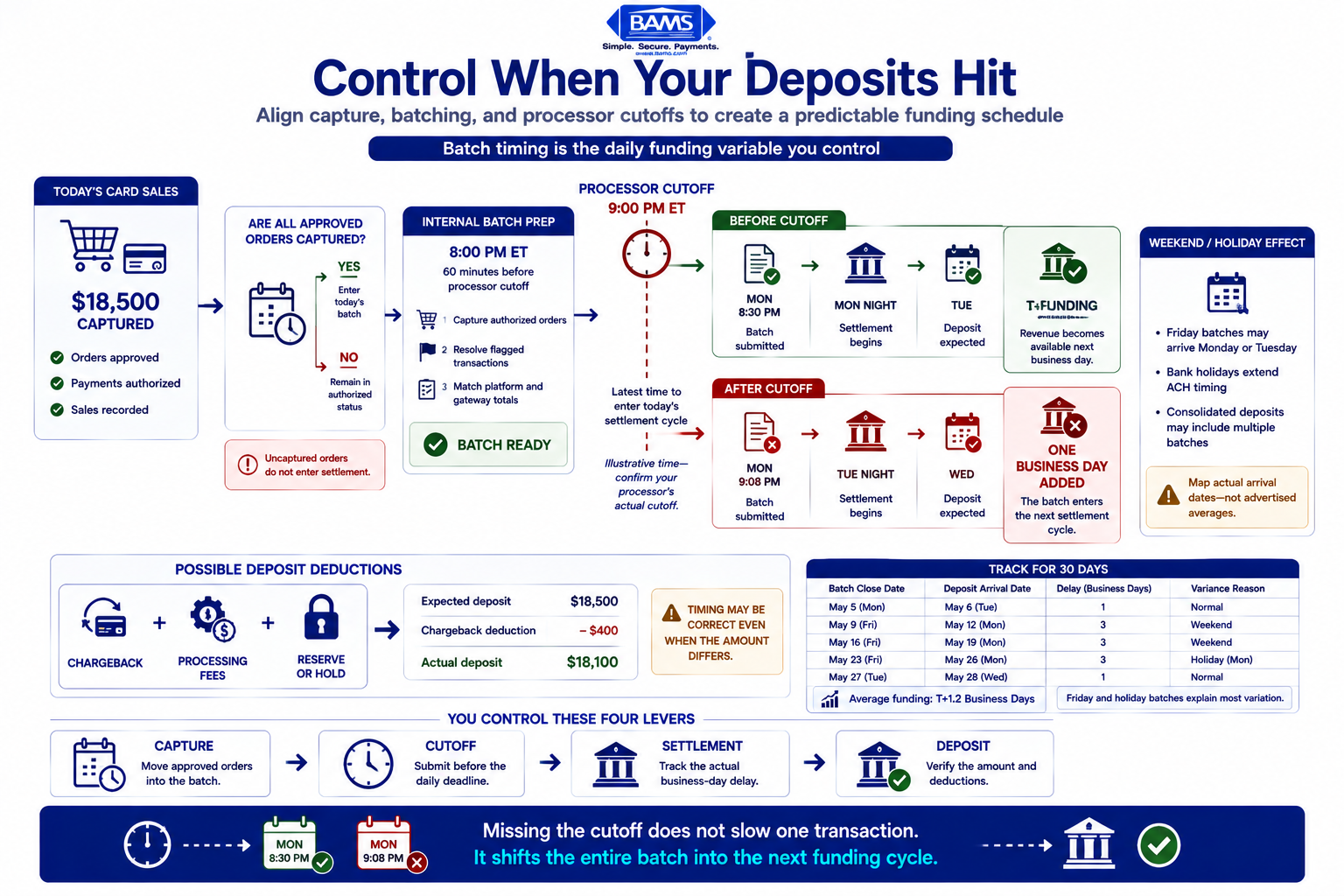
The processor’s funding speed only works when transactions are captured and batched before the daily cutoff.
Step 1: Identify Your Processor’s Exact Cutoff Time
Action: Log into your processor’s merchant portal and locate the batch settlement or funding schedule documentation. Look for the daily cutoff time, often listed as a specific hour in Eastern Time.
If the cutoff is not visible in the portal, call your processor’s support line and ask: “What is the daily batch cutoff time for settlement, and does it differ on weekends or holidays?” Write down the exact time and any exceptions.
Expected result: You have a single timestamp (for example, 9:00 PM ET) that represents the latest moment a transaction can be included in that day’s batch. Processors offering next-day funding sometimes have later cutoffs, which gives you more room.
Common failure: Some processors have different cutoffs for different card networks (Visa vs. Amex). If yours does, record each one separately. Using the earliest cutoff as your planning baseline is safest.
Step 2: Audit Your Platform’s Current Batch Behavior
Action: Open your eCommerce platform’s payment settings and determine whether your platform batches automatically at a fixed time or whether it sends transactions in real time to your gateway for batching there.
- Shopify: Transactions are typically captured at the time of order (or when you manually capture them if set to manual capture). Shopify Payments batches daily.
- WooCommerce: Depends on your gateway plugin. Check the plugin settings for “capture” or “settlement” options.
- BigCommerce: Similar to Shopify; check your payment gateway configuration under Store Setup > Payments.
Expected result: You know whether your platform auto-captures at checkout or delays capture, and you know the time window in which captured transactions are grouped for settlement.
Common failure: If your platform is set to “authorize only” (manual capture), transactions do not enter the batch until you capture them. Orders sitting in “authorized” status are invisible to your processor’s settlement queue. Check for uncaptured orders daily.
Step 3: Map the Gap Between Batch Close and Deposit Arrival
Action: Pull your last 30 days of deposit records from your bank account. In a spreadsheet, create three columns: Batch Date, Deposit Date, and Delay (Business Days). Match each deposit to its corresponding batch using your processor’s batch reports.
Calculate the average delay. For most merchants, this will be T+1 (one business day after batch close) or T+2. Standard funding delays of 2 to 3 business days are common, but the actual number may vary by day of the week.
Expected result: A clear pattern showing how many business days elapse between your batch closing and cash arriving. You will likely notice that Friday batches do not deposit until Monday or Tuesday, creating a weekend gap.
Checkpoint: If your average delay exceeds T+2 consistently, flag this. It may indicate a rolling reserve hold or a risk flag on your account that you need to address with your processor.
Step 4: Restructure Your Batch Timing to Hit the Cutoff Consistently
Action: Based on your processor’s cutoff time (from Step 1), set a daily internal deadline that is at least 60 minutes before the cutoff. This is your “batch prep” time. During this window, do the following:
- Capture any orders still in “authorized” status
- Resolve any flagged or held transactions in your gateway
- Verify that your day’s transaction total in the gateway matches your platform’s order total
If your platform supports scheduled auto-capture, configure it to run before your processor’s cutoff. If it does not, set a recurring calendar reminder for your team.
Expected result: Every day’s transactions are captured and included in that day’s batch, not pushed to the next day. This alone can eliminate one full business day of delay from your funding cycle.
Common failure: Late-evening orders placed after your batch prep window may not be captured until the next day. This is acceptable. The goal is consistency, not perfection. Know which orders fall into tomorrow’s batch and plan accordingly.
Step 5: Build a Chargeback Impact Buffer Into Your Cash Flow Calendar
Action: Chargebacks do not just cost you the disputed amount. They disrupt your deposit predictability because the processor deducts the chargeback from a future batch deposit, sometimes without warning. To protect against this, create a chargeback reserve line in your cash flow spreadsheet.
Review your chargeback history for the last 90 days. Calculate your average monthly chargeback volume in dollars. Multiply by 1.5 to create a buffer. This is the amount you should hold back from each week’s deposits before allocating funds to inventory or supplier payments.
The Office of the Comptroller of the Currency’s Merchant Processing Handbook provides additional context on merchant settlement risk, chargebacks, reserve arrangements, and the risk controls used within merchant acquiring relationships.
Example: If your average monthly chargeback total is $2,000, your weekly buffer is roughly $750 ($3,000 monthly buffer divided by 4). That $750 stays liquid until the following week confirms no unexpected deductions.
Expected result: When a chargeback deduction hits your deposit, it comes out of the buffer rather than out of money already committed to a supplier payment or ad spend. Your chargeback risk management becomes a cash flow planning exercise, not a crisis.
Step 6: Align Supplier Payments and Inventory Buys to Your Deposit Schedule
Action: Now that you know your reliable deposit day (batch close + your consistent delay), schedule your outgoing payments to land one business day after your deposit typically arrives. This is where predictable deposits become a competitive advantage.
- Supplier invoices: Negotiate payment terms that align with your deposit cycle. If deposits arrive on Tuesdays and Thursdays, schedule supplier payments for Wednesdays and Fridays.
- Inventory purchases: Place restock orders on deposit days, not before. This eliminates the need for short-term credit lines to bridge timing gaps.
- Ad spend: If your ad platform bills daily, ensure your deposit buffer covers at least 3 days of ad spend to absorb any deposit delay.
Expected result: Your outgoing cash never exceeds confirmed incoming deposits. You stop borrowing against expected revenue and start spending confirmed revenue. Merchants using next-day funding with a late cutoff (such as 9 PM) can tighten this alignment even further, often eliminating the need for any credit bridge.
Step 7: Set Up a Daily Deposit Verification Routine
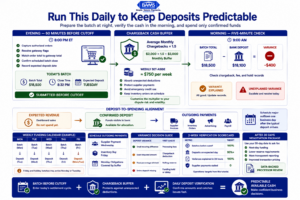
A short daily routine turns deposit timing, chargeback deductions, and supplier payments into a controlled cash-flow process.
Action: Each morning, spend 5 minutes confirming that yesterday’s expected deposit arrived and matches the batch total from your processor’s portal. Use this three-point check:
- Batch total (from processor portal): What was submitted?
- Deposit amount (from bank account): What arrived?
- Variance: If the deposit is lower than the batch total, check for chargeback deductions, processing fees, or held transactions.
Expected result: You catch discrepancies within 24 hours instead of discovering them at month-end reconciliation. A variance greater than your expected fee percentage signals a chargeback deduction or a hold that needs immediate investigation.
Common failure: Skipping this check on Mondays. Weekend batches often consolidate, and Monday deposits may include Friday, Saturday, and Sunday activity. The totals will look larger and harder to match. Break them out by batch date in your spreadsheet.
Step 8: Negotiate Processor Terms Based on Your Batch Data
Action: After 30 days of tracking, you now have data showing your batch consistency, chargeback rate, and deposit reliability. Use this data to negotiate better terms with your processor. Specifically, ask about:
- Reducing or eliminating rolling reserves if your chargeback rate is low
- Moving to next-day funding if you are currently on T+2 or T+3
- Lowering per-transaction fees based on your consistent volume
If your current processor cannot accommodate these requests, this data also serves as a ready-made comparison package for evaluating alternatives. BAMS, for example, offers next-day funding with a 9 PM cutoff and no additional fees, along with proactive chargeback defense, which directly addresses both the timing and disruption problems this tutorial solves.
Expected result: Either improved terms with your current processor or a clear, data-backed case for switching to one that better supports your cash flow goals.
Configuration and Customization
Key Variables to Adjust for Your Business
Not every eCommerce operation runs the same schedule. Here are the settings you should customize based on your specific situation:
- Batch prep time buffer: 60 minutes before cutoff is a safe default. High-volume stores processing 500+ orders per day should extend this to 90 minutes to allow time for manual captures and flagged order resolution.
- Chargeback buffer multiplier: The 1.5x multiplier works for businesses with a chargeback rate under 1%. If your rate is higher, increase to 2x until you bring it down.
- Deposit verification frequency: Daily is ideal. If your team cannot support daily checks, a minimum of Monday, Wednesday, and Friday catches most variances within 48 hours.
- Supplier payment offset: One business day after deposit arrival is the default. If your supplier offers an early-payment discount (such as 2/10 net 30), you may want to tighten this to same-day to capture the savings.
Verification and Testing
Test procedure: Run your new batch timing and deposit verification routine for two full weeks. At the end of week two, answer these questions:
- Did every batch close before the processor’s cutoff? (Target: 100%)
- Did deposits arrive on the expected day? (Target: 95% or higher, allowing for bank holidays)
- Were all deposit variances explained within 24 hours? (Target: 100%)
- Did any supplier payment or inventory purchase stall due to missing funds? (Target: zero)
If you hit all four targets, your system is working. If you miss any, review the specific failure against the common errors below.
Common Errors and Fixes for Transaction Batching Issues
Error 1: Deposit Amount Does Not Match Batch Total
Symptom: Bank deposit is $200 to $500 less than the batch total in your processor portal.
Cause: A chargeback was deducted from the deposit, or processing fees were netted out before funding.
Fix: Check your processor’s chargeback notifications and fee statements. Most portals show deductions on the deposit detail page. Adjust your chargeback buffer if deductions are frequent.
Error 2: Deposit Arrives One Day Later Than Expected
Symptom: You expected funds on Tuesday but they arrived Wednesday.
Cause: Your batch closed after the processor’s cutoff, pushing settlement to the next business day.
Fix: Review the batch timestamp in your processor portal. If it shows a close time after the cutoff, move your batch prep window earlier. Transactions captured after the cutoff are pushed to the next batch, adding a full business day of delay.
Error 3: Orders Stuck in “Authorized” Status
Symptom: Revenue from recent orders is not appearing in batch totals.
Cause: Your platform is set to manual capture, and no one captured the orders before batch close.
Fix: Switch to auto-capture if your business model allows it. If you need manual capture (for made-to-order products, for example), add an order capture step to your daily batch prep checklist.
Error 4: Weekend Sales Create a Monday Cash Crunch
Symptom: Friday through Sunday sales do not deposit until Tuesday or Wednesday, but Monday obligations (payroll, ad spend) require cash.
Cause: ACH settlement currently follows banking-day schedules. The ACH Network does not currently settle payments on weekends or federal holidays, so weekend batches may not reach final bank settlement until the next available banking day.
Fix: Build your chargeback buffer large enough to also cover the weekend gap. Alternatively, shift Monday obligations to Tuesday or Wednesday to align with your actual deposit schedule.
Error 5: Chargeback Spike Triggers a Rolling Reserve
Symptom: Your processor begins holding a percentage of each deposit in reserve, reducing your available cash.
Cause: Your chargeback rate crossed the processor’s internal threshold (often 1% of transactions).
Fix: Address the root cause of chargebacks (unclear billing descriptors, slow shipping, poor product descriptions). Use your processor’s chargeback prevention tools or alerts to resolve disputes before they escalate. Once your rate drops, request that the reserve be reduced or removed.
Next Steps and Extensions
Now that your batch timing is optimized and your cash flow is buffered against chargeback disruptions, consider these extensions:
- Automate reconciliation: Connect your processor’s API to your accounting software to eliminate manual deposit checks. Most modern processors and platforms like QuickBooks or Xero support this.
- Negotiate early-payment supplier discounts: With predictable daily deposits, you can reliably commit to faster supplier payments in exchange for 1% to 2% discounts, turning your eCommerce funding solutions into margin improvement.
- Expand chargeback prevention: Move beyond reactive buffers to proactive alerts and prevention services that stop chargebacks before they reach your processor, keeping your deposit stream clean and your reserve requirements low.
Each of these builds on the foundation you just created. Predictable deposits are not the end goal. They are the starting point for every financial decision your business makes.
Frequently Asked Questions
What is next-day funding in merchant services?
Next-day funding means your processor deposits the cash from your daily batch into your bank account by the next business day. Standard funding takes 2 to 3 business days. With next-day funding, transactions captured before the processor’s cutoff time settle on a T+1 schedule, giving you access to revenue roughly 24 hours after the batch closes.
How can I optimize my batch timing for faster funding?
Start by identifying your processor’s exact daily cutoff time. Then set an internal deadline at least 60 minutes before that cutoff to capture all pending orders, resolve flagged transactions, and verify totals. Consistently closing your batch before the cutoff eliminates the most common cause of extra-day delays. If your platform uses manual capture, make sure all orders are captured during this prep window.
How do chargebacks disrupt cash flow even when deposit timing is fast?
Processors deduct chargeback amounts from your future deposits, often without advance warning. This means a deposit you expected to be $5,000 might arrive as $4,600 because a chargeback from a previous batch was netted out. If you have already committed that $5,000 to a supplier payment or inventory order, the shortfall creates an immediate cash gap. Building a chargeback buffer into your cash flow plan prevents this from cascading into missed obligations.
Why is next-day funding better for eCommerce businesses than same-day funding?
Same-day funding sounds faster, but it often comes with earlier cutoff times (sometimes as early as noon), higher fees, and limited card network support. Next-day funding with a late cutoff (such as 9 PM) captures a full day of sales, including evening orders, and deposits the total the following business day. For most eCommerce businesses, this delivers a better balance of speed, coverage, and cost.
Which factors influence the speed of funding in merchant services?
The primary factors are your processor’s cutoff time, your batch submission timing, your chargeback rate (which can trigger rolling reserves or holds), your bank’s ACH processing schedule, and whether your account is flagged for any risk review. Of these, batch submission timing is the factor you have the most direct control over on a daily basis.
When should a business consider switching to next-day funding?
Consider switching if your current funding delay is T+2 or longer, if you are using short-term credit lines to bridge deposit gaps, if weekend sales create Monday cash crunches, or if chargebacks are causing unpredictable deposit amounts. If your processor cannot offer next-day funding or transparent batch reporting, that is also a strong signal to evaluate alternatives.