Merchant Service Provider Coordination Guide
Last Updated on October 7, 2026 by Dimitri Akhrin
Align your gateway settings, batch windows, and risk thresholds with real sales patterns to stop silent revenue loss
Learn how to audit default processor settings that create hidden fees and declined transactions. This guide walks you through reconfiguring your payment stack so every transaction clears predictably and settles fast.
TL;DR
- Default processor settings protect the processor, not your revenue — Every fraud filter, batch window, and routing rule ships configured for the broadest possible merchant profile, which means they’re almost never optimized for your specific sales patterns.
- Sandbox tests don’t catch configuration problems — A passing test confirms your integration works, but it doesn’t apply fraud scoring, velocity limits, or batch timing. Production-mirror testing with realistic traffic patterns is the only way to validate your live setup.
- Soft declines are your biggest invisible cost — Transactions blocked by overly aggressive default fraud filters look like hard declines to customers but are entirely recoverable with proper retry logic and recalibrated thresholds.
- Batch timing directly controls your cash flow — If your batch cutoff doesn’t align with your peak sales hours, you’re adding an extra business day to every deposit cycle. Adjusting this single setting can accelerate funding significantly.
- Quarterly recalibration prevents configuration drift — Your transaction profile changes as your business grows. Processor defaults can also change without notice. A recurring review process catches new hidden costs before they accumulate into meaningful revenue loss.
Guide Orientation: What This Covers and Who It’s For
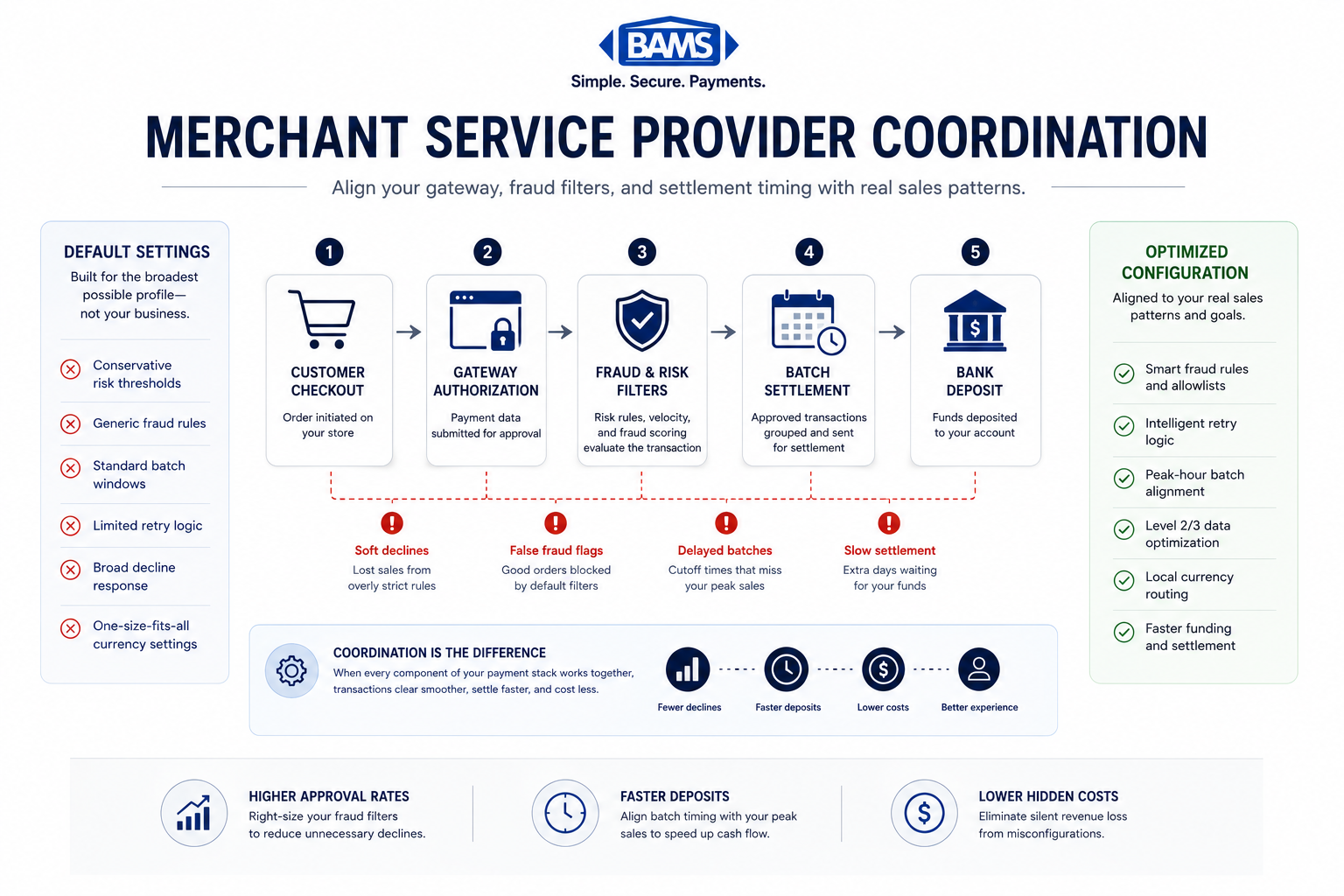
Proper merchant service provider coordination aligns gateway settings, fraud filters, and settlement timing to reduce hidden fees and improve approval rates.
This guide is about the hidden fees and misconfigurations buried in default processor settings that silently drain revenue from your eCommerce operation. Effective merchant service provider coordination goes far beyond passing a sandbox test. It requires aligning every gateway setting, batch window, and risk threshold with your actual sales patterns.
This is written for eCommerce managers at established online businesses (roughly 10 to 50 employees) who already process transactions but suspect their current setup is costing more than it should. By the end, you’ll understand how to audit your processor defaults, identify the specific settings that create hidden costs, and reconfigure your payment stack so that every transaction clears predictably and settles fast.
What this guide does not cover: initial merchant account applications, POS hardware selection for brick-and-mortar, or choosing between payment processors from scratch. We assume you already have a processor and a gateway. The goal is to make them actually work together.
Why Eliminating Hidden Fees in Processor Defaults Matters Now

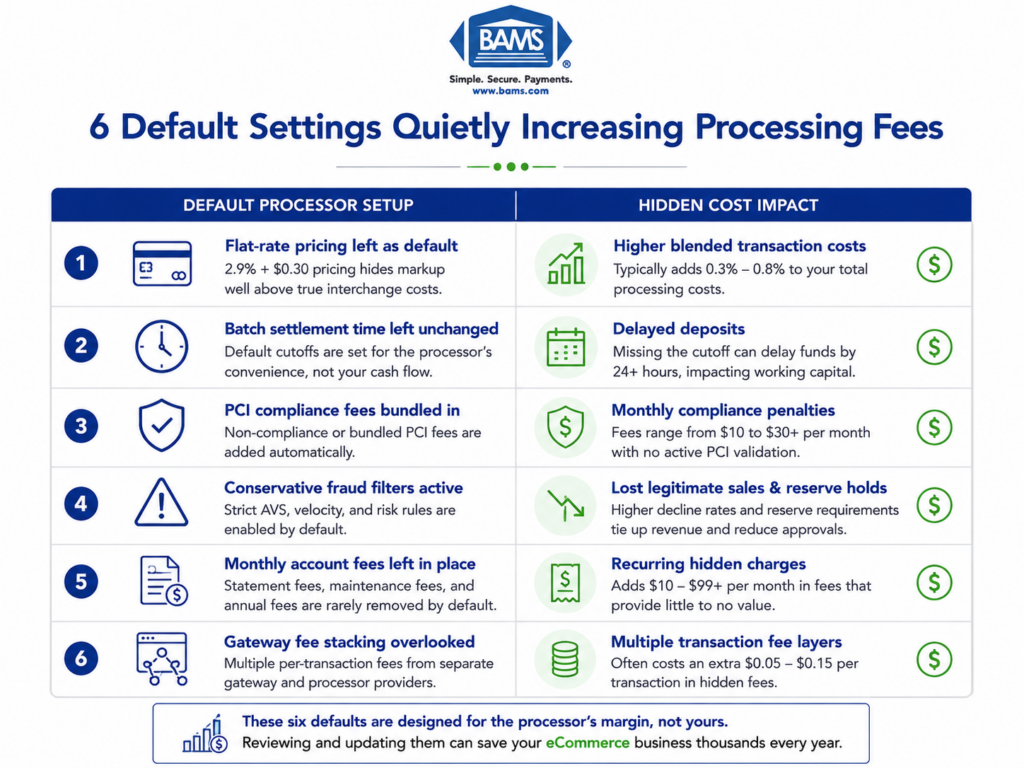
Default processor settings can silently reduce approval rates, delay funding, and increase hidden processing costs.
Majority of consumers now buy directly from a merchant’s website. That means your checkout is your storefront, and every default setting your processor shipped with is a potential point of friction, decline, or unnecessary cost. The stakes are not theoretical.
The payment processing landscape has grown more complex. Many global consumers use digital payment methods, and cross-border payment flows continue to surge. Each of these trends introduces configuration variables that most processors handle with conservative defaults. Those defaults protect the processor, not your margin. According to Visa payment processing resources, payment infrastructure and authorization efficiency directly affect transaction approval and settlement performance for eCommerce businesses.
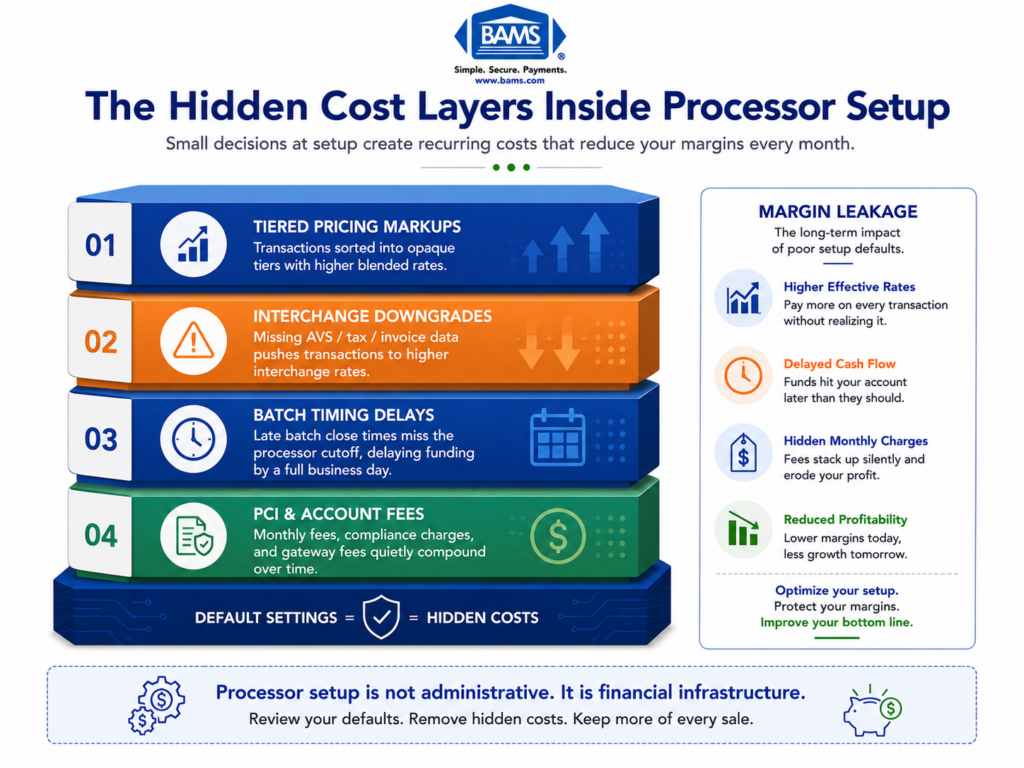
Conservative risk thresholds decline legitimate transactions. Mismatched batch timing delays your deposits by a full business day. Currency settings that don’t reflect your customer base trigger conversion fees you never agreed to. And because these costs are baked into default configurations, they don’t appear on a single invoice line item. They show up as lower approval rates, slower funding, and higher effective processing costs.
The cost of inaction is compounding. Every month you operate on default settings, you absorb fees and declines that erode both revenue and customer trust. Almost all financial institutions report rising compliance costs, and those costs get passed downstream through tighter risk controls and more aggressive default parameters. If you don’t actively manage your configuration, someone else’s risk model is managing your money.
Core Concepts: Understanding What’s Actually Hidden
Default Settings vs. Optimized Settings
Every payment processor ships your account with a set of default configurations. These include fraud velocity filters, batch settlement windows, currency handling rules, and authorization retry logic. Defaults are designed for the broadest possible merchant profile, which means they are almost never optimized for your specific transaction volume, average ticket size, or customer geography.
The Testing Gap
A gateway that passes sandbox testing confirms that the technical integration works. It does not confirm that your processor will approve a $247 order from a returning customer using a saved card at 11:42 PM on a Friday during a flash sale. Transaction testing procedures that only validate connectivity miss the configuration layer entirely. The gap between “test passed” and “transaction cleared” is where hidden fees live.
Batch Timing and Funding Speed
Settlement is not instant. Your processor collects authorized transactions into batches, and those batches are submitted to the acquiring bank on a schedule. The default batch window is often set to a time that doesn’t align with your sales peaks, which can push an entire day’s revenue into the next settlement cycle. This is the most common reason eCommerce managers experience delayed deposits without understanding why.
Risk Thresholds and Soft Declines
Processors apply fraud scoring and velocity checks before authorizing transactions. Default thresholds are set conservatively. A “soft decline” (where the processor blocks a transaction that the card issuer would have approved) looks identical to a hard decline from the customer’s perspective. You lose the sale, and the customer loses trust. These are not fees on your statement. They are revenue that never arrives.
PCI Security Standards Council guidance emphasizes the importance of balancing fraud prevention controls with a smooth customer payment experience.
The Framework: Five Layers of Processor Configuration
Hidden fees and unnecessary declines don’t come from one misconfigured setting. They emerge from the interaction of five configuration layers, each of which needs to reflect your actual sales pattern rather than a processor’s generic defaults.
- Layer 1: Authorization Settings — How your processor decides whether to approve or decline a transaction before it reaches the card network.
- Layer 2: Fraud and Risk Filters — The velocity limits, geographic blocks, and scoring thresholds that silently reject legitimate orders.
- Layer 3: Settlement and Batch Timing — When your authorized transactions are submitted for clearing and how quickly funds reach your account.
- Layer 4: Currency and Regional Configuration — How your processor handles multi-currency transactions, cross-border fees, and local payment method routing.
- Layer 5: Compliance and Reporting Defaults — The PCI scope, chargeback response windows, and reporting granularity that determine your operational overhead.
Each layer compounds the others. A tight fraud filter (Layer 2) combined with a late batch window (Layer 3) doesn’t just decline some transactions and delay others. It creates a pattern where your best customers during peak hours are the most likely to be affected. The step-by-step breakdown below walks through each layer with specific actions.
Step-by-Step: Auditing and Reconfiguring Your Processor Setup
Step 1: Map Your Actual Transaction Profile
Objective: Build a factual picture of your sales patterns so you can measure every default setting against reality, not assumptions.
Pull 90 days of transaction data from your processor dashboard or reporting API. You need: average ticket size, peak transaction hours (by day of week), geographic distribution of customers, payment method mix (credit, debit, digital wallet, ACH), and your current approval rate broken down by card type.
Most eCommerce managers have a general sense of these numbers but have never mapped them against their processor’s configuration assumptions. Your processor onboarded you with an estimated monthly volume and average ticket. If your business has grown or shifted (more mobile orders, higher average order value, new international customers), those original estimates are now misaligned with your defaults.
Anti-patterns: Don’t rely on your eCommerce platform’s analytics alone. Platform data shows attempted orders. Processor data shows what actually happened at the authorization level. The discrepancy between the two is where hidden costs accumulate. Also avoid averaging your data across the full 90 days without segmenting by time of day and day of week. Peaks matter more than averages.
Success indicators: You can state your peak transaction hour, your approval rate by card type, and the percentage of your revenue that comes from international cards. If you can’t, you’re not done with this step.
Step 2: Audit Authorization and Retry Logic
Objective: Identify transactions your processor is declining that the card issuer would have approved, and reconfigure retry logic to recover lost revenue.
Request your processor’s decline reason code report. Separate hard declines (stolen card, closed account) from soft declines (insufficient funds at moment of attempt, processor timeout, velocity limit triggered). Soft declines are recoverable. Default retry logic on most processors either doesn’t exist or retries at the wrong interval.
For subscription and recurring billing businesses, this step is critical. A default “no retry” setting on a soft decline means you lose a subscriber over a temporary bank hold. Configure intelligent retry windows: 4 hours after the initial soft decline, then 24 hours, then 48 hours. This alone can recover 10 to 15% of otherwise lost recurring revenue.
Anti-patterns: Don’t retry hard declines. This increases your decline ratio with card networks and can trigger monitoring programs. Don’t set retry intervals too aggressively (every 30 minutes), as issuers interpret this as suspicious activity. Avoid treating all decline codes identically in your logic.
Success indicators: Your soft decline rate drops measurably within 30 days. You can identify the top three decline reason codes by volume and have a specific response configured for each.
Step 3: Recalibrate Fraud Filters to Match Your Customer Base
Objective: Reduce false positives (legitimate orders blocked by overly aggressive fraud settings) without increasing actual fraud exposure.
Default fraud filters are the single largest source of invisible revenue loss for established eCommerce businesses. Processors set velocity limits (maximum transactions per card per hour), geographic restrictions (blocking entire countries), and AVS (Address Verification Service) strictness levels based on industry-wide risk profiles, not your specific customer behavior.
Using the transaction profile from Step 1, compare your actual customer geography against your processor’s blocked regions. Many global consumers say local currency pricing influences their purchase decision. If you sell internationally but your processor blocks or flags transactions from your top customer countries, you’re paying for a fraud filter that’s filtering out revenue.
Adjust AVS settings to match your risk tolerance. “Exact match required” is the default on many processors, but it declines every transaction where the customer’s billing address has a minor formatting difference from what the issuer has on file. Switching to “partial match accepted” for zip code verification retains most of the fraud protection with significantly fewer false declines.
Anti-patterns: Don’t disable fraud filters entirely. Recalibrate them. Don’t make changes during a peak sales period. Adjust filters during a low-volume window and monitor for 7 to 14 days before your next peak. Avoid setting velocity limits based on your average order volume; set them based on your peak-hour volume plus a 20% buffer.
Success indicators: Your approval rate increases without a corresponding increase in chargebacks. Your false positive rate (legitimate transactions flagged or blocked) decreases measurably.
Pairing optimized fraud thresholds with proactive chargeback defense tools helps reduce false declines without increasing operational risk.
Step 4: Align Batch Timing with Your Sales Peaks and Funding Needs
Objective: Ensure your authorized transactions settle as quickly as possible and deposits arrive on the schedule your cash flow requires.
Your processor’s default batch cutoff time determines when the day’s transactions are submitted for clearing. If your batch closes at 5:00 PM Eastern but 40% of your daily revenue comes in between 6:00 PM and midnight, those evening transactions don’t settle until the following day’s batch. That’s a full extra business day before you see the funds.
Contact your processor and request a batch cutoff time that captures your peak sales window. For most eCommerce businesses, a late-night cutoff (11:00 PM or midnight in your primary customer time zone) captures the maximum number of transactions in each settlement cycle. Some processors offer multiple daily batch submissions, which can further accelerate funding.
This is also where your choice of merchant services partner directly impacts cash flow. Providers like BAMS offer next-day funding as a standard feature, which means the batch timing optimization described here translates directly into getting your money a full business day sooner than processors that settle on a two-day or three-day default cycle.
Anti-patterns: Don’t assume your batch timing is already optimized because deposits “seem” to arrive regularly. Pull your actual settlement reports and compare the authorization timestamp to the deposit timestamp for transactions at different times of day. Don’t overlook weekend and holiday settlement gaps; some processors hold weekend batches until Monday.
Success indicators: Your average time from authorization to deposit decreases. Transactions authorized before your new cutoff time consistently settle in the next funding cycle. You can predict your deposit amounts accurately based on the previous day’s sales.
Step 5: Configure Currency, Regional Routing, and Payment Method Support
Objective: Eliminate unnecessary cross-border fees and ensure your processor routes transactions through the most cost-effective network for each payment type.
If you sell to international customers, your processor’s default currency handling is almost certainly costing you money. Default configurations typically convert all transactions to your base currency at the processor’s exchange rate (which includes a markup) rather than allowing you to price and settle in the customer’s local currency. Federal Reserve interchange fee data also highlights how routing structure and transaction handling directly influence total processing costs.
Review your processor’s multi-currency options. Enabling local currency pricing where available reduces conversion fees and improves the customer payment experience simultaneously. Customers who see prices in their own currency directly influences purchase decisions.
For domestic transactions, check whether your processor supports intelligent routing. Some processors default all transactions through a single acquiring path, even when routing through a different network (for example, routing debit cards through the debit network rather than the credit network) would result in lower interchange fees. This is a setting, not a feature request. It exists in your processor’s configuration panel, and the default is almost always the more expensive route.
Anti-patterns: Don’t enable every currency and payment method simultaneously. Start with the currencies and methods that represent your top 80% of international volume. Don’t assume your gateway’s currency conversion is the same as your processor’s. They may apply separate markups that stack. Avoid ignoring digital wallet routing; with over 70% digital payment adoption, wallet transactions deserve their own routing optimization.
Success indicators: Your effective processing cost per international transaction decreases. Customers in your top international markets see local currency at checkout. Your interchange costs for debit transactions decrease after enabling debit network routing.
Step 6: Stress-Test with Production-Mirror Traffic
Objective: Validate that your reconfigured settings perform under conditions that match your actual sales patterns, not just sandbox conditions.
Standard transaction testing procedures use test card numbers in a sandbox environment. This confirms your integration works. It tells you nothing about how your processor handles a burst of 200 orders in 15 minutes during a promotional event, or how your fraud filters respond to a sudden spike in international orders.
Build a production-mirror test that replicates your peak conditions. Use your transaction profile from Step 1 to define the test parameters: transaction volume per minute at peak, mix of card types and payment methods, geographic distribution, and average ticket size. Run this test in your production environment (with real cards belonging to your team or a controlled test group) during a low-traffic window.
Monitor three things during the test: approval rate, average authorization response time, and whether any fraud filters trigger unexpectedly. If your approval rate drops under load, your velocity filters need adjustment. If response times spike, your gateway may need connection pooling or timeout configuration changes.
Anti-patterns: Don’t test with a single card number repeatedly. This triggers velocity filters and gives you false results. Don’t test only during business hours if your peak sales happen in the evening. Don’t skip this step because your sandbox tests passed. The sandbox doesn’t apply your fraud rules, batch settings, or risk scoring.
Success indicators: Your approval rate under simulated peak load matches or exceeds your current daily approval rate. No legitimate test transactions are flagged or declined by fraud filters. Authorization response times remain under 2 seconds.
Step 7: Establish Ongoing Monitoring and Quarterly Recalibration
Objective: Prevent configuration drift by building a recurring review process that catches new hidden costs before they accumulate.
Processor settings are not “set and forget.” Your business changes. Seasonal patterns shift your transaction profile. New product lines change your average ticket size. Processor updates modify default parameters without notification.
Set a quarterly calendar reminder to re-run the transaction profile analysis from Step 1 and compare it against your current configuration. Specifically check: Has your approval rate changed? Has your average time to deposit shifted? Have any new decline codes appeared in volume? Has your processor updated any default settings?
If you work with a merchant services partner that provides dedicated account management (as BAMS does with its proactive chargeback defense and dedicated account managers), leverage that relationship for these quarterly reviews. A good account manager will flag configuration drift before you notice it in your revenue.
Anti-patterns: Don’t wait for a revenue dip to investigate your processor settings. By the time the impact is visible in your top line, you’ve already absorbed weeks or months of unnecessary costs. Don’t treat processor statements as the only data source; cross-reference with your gateway logs and eCommerce platform data. Avoid skipping the review because “nothing changed.” Something always changes.
Success indicators: You have a documented baseline for approval rate, settlement speed, and effective processing cost. Quarterly reviews consistently identify at least one setting that needs adjustment. Your effective processing cost trends downward over time, not upward.
Practical Examples: Before and After Configuration
Scenario: Mid-Size Apparel eCommerce Store
A direct-to-consumer apparel brand processing $180,000 per month discovered that 12% of their transactions were soft-declined by default velocity filters. Their peak sales window (7 PM to 11 PM) generated rapid-fire orders during email campaigns, and the processor’s default limit of 10 transactions per card per hour was flagging repeat customers browsing and buying multiple items.
After mapping their transaction profile, they raised the velocity limit to 25 transactions per card per hour and adjusted the batch cutoff from 5 PM to 11:30 PM. Result: approval rate increased from 86% to 94%, and average deposit timing improved by one full business day. The revenue recovered from those previously declined transactions exceeded $19,000 per month.
Scenario: Subscription Box Service with International Customers
A subscription box company with 30% international subscribers was losing an average of 8% of recurring charges each month to soft declines. Their processor had no retry logic enabled (the default) and blocked transactions from three countries where they had legitimate subscribers. Their currency conversion was handled at the processor’s markup rate rather than at the network rate.
After enabling intelligent retry logic (4-hour, 24-hour, 48-hour intervals for soft declines), unblocking the three countries, and enabling local currency pricing for their top five international markets, monthly recurring revenue recovery improved by 11%. Currency conversion costs dropped by 0.4% per international transaction. Over a year, this represented over $40,000 in recovered revenue and reduced fees.
Common Mistakes and Pitfalls
Treating setup as a one-time event. The most expensive mistake is assuming that once your processor is live and transactions are clearing, the configuration is correct. Defaults change. Your business changes. The gap between the two widens silently.
Optimizing for the wrong metric. Many eCommerce managers focus on the per-transaction processing rate while ignoring approval rates, settlement speed, and currency conversion markups. A processor with a rate 0.1% lower but a 5% higher decline rate costs you far more. Choosing based solely on the lowest price without examining the full configuration is a reliable way to pay more in hidden costs.
Testing only in sandbox. Sandbox environments don’t apply fraud filters, risk scoring, or batch timing. A passing sandbox test tells you your code works. It tells you nothing about whether your customers’ transactions will clear.
Ignoring soft declines. Because soft declines don’t generate error messages visible to your operations team, they accumulate unnoticed. The customer sees “payment failed,” leaves, and you never know the transaction was recoverable.
What to Do Next
Start with Step 1. Pull your last 90 days of processor data and build your transaction profile. This single action gives you the foundation for every optimization that follows. You don’t need to reconfigure everything at once.
If you find that your current processor makes it difficult to access decline reason codes, adjust batch timing, or modify fraud thresholds, that difficulty is itself a signal. The quality of your merchant services partner’s support directly determines how quickly you can close the gap between default settings and optimized ones.
Revisit this guide quarterly as your transaction profile evolves. Each review cycle will surface new adjustments. The businesses that treat processor configuration as an ongoing practice rather than a completed task are the ones that consistently pay less and collect faster.
Frequently Asked Questions
What documents do I need to gather before switching merchant service providers?
At minimum, you need your current processing statements (at least 3 months), your gateway credentials and API documentation, your chargeback history, and your current contract terms including any early termination clauses. You’ll also want your transaction profile data (volume, average ticket, peak hours, geographic mix) so your new provider can configure your account correctly from day one rather than relying on generic defaults.
Why should I keep my old merchant account open during a processor transition?
Chargebacks can arrive up to 120 days (and sometimes longer) after a transaction. If you close your old account, you lose the ability to respond to disputes on transactions processed through that account. Keep it open for at least 6 months after your last transaction clears through it. This also gives you a fallback if your new processor’s configuration needs adjustment during the transition period.
How can I ensure my new processor coordinates effectively with my existing gateway?
Request a technical integration call between your gateway provider and your new processor before going live. Confirm that your gateway passes all required data fields (AVS data, CVV, Level 2/3 data for B2B transactions) to the new processor. Run production-mirror tests that simulate your peak traffic patterns, not just single test transactions. Verify that fraud filters, retry logic, and batch timing are configured on the processor side, not just the gateway side.
When should I conduct testing before going live with a new payment processor?
Run sandbox integration tests first to confirm connectivity. Then run production-mirror tests during a low-traffic window at least 7 days before your planned go-live date. This gives you time to identify and fix configuration issues. If you have a known peak event (sale, product launch), complete all testing at least 14 days before that event. Never go live during a peak period.
Which pricing model is best for my eCommerce business?
For most established eCommerce businesses processing over $10,000 per month, interchange-plus pricing offers the most transparency and typically the lowest effective cost. Flat-rate pricing is simpler but almost always more expensive at volume. Tiered pricing is the least transparent and most likely to contain hidden markups. Regardless of the model, the processor’s default configuration settings (fraud filters, batch timing, routing) will impact your total cost more than the rate difference between pricing models.
How do I verify that my deposits are actually arriving on time?
Build a simple reconciliation process: compare the total authorized transaction amount for each batch against the deposit amount and timestamp in your bank account. Track the hours between batch close and deposit arrival. If you see inconsistencies (deposits arriving a day later than expected, or deposit amounts that don’t match batch totals after fees), your batch timing or settlement configuration needs attention. Do this weekly for the first month after any processor change, then monthly.
Sources