Transaction Data Optimization: A Field-Mapping Guide
Last Updated on October 7, 2026 by Dimitri Akhrin
How to pass Level 2 and Level 3 data so commercial card orders qualify for the lowest interchange rates
Learn which tax, freight, and product-code fields card networks require for Level 2 and Level 3 interchange qualification. This guide walks you through auditing your checkout, gateway, and ERP to fix the missing data that silently inflates your B2B processing costs.
TL;DR
- Missing tax and freight fields cost you real money — Commercial card transactions that lack Level 2 and Level 3 data automatically downgrade to higher interchange rates, adding 0.45% to 0.60% in extra cost per transaction.
- This is a checkout configuration problem, not a pricing problem — Most eCommerce plugins don’t pass enriched data fields to the processor by default. You need to audit, map, and configure the data flow between your cart, gateway, and processor.
- Tax and freight fields are qualification requirements — Card networks require a non-zero tax amount (or a tax-exempt indicator) and a separate freight amount. Blank, zero, or bundled values trigger downgrades even when other data is present.
- Savings are significant and measurable — On a $1,000 Visa commercial transaction, Level 3 data reduces the interchange cost from $29.60 to $18.60. Merchants processing $10M+ in B2B card volume can see six-figure annual savings.
- Start with an audit of your processing statement — Look for downgrade categories on commercial card transactions. That single step tells you how much you’re overpaying and where the field gaps are.
Guide Orientation: What This Covers and Who It’s For
This guide explains how to map tax, freight, and product-code fields across your eCommerce platforms so that commercial card transactions qualify for the lowest available interchange rates. Effective transaction data optimization is a structural checkout problem, not a pricing negotiation, and this guide treats it that way.
It’s written for eCommerce managers at established online businesses (roughly 10 to 50 employees) who accept B2B or B2G orders on commercial purchasing cards. If your store processes even a modest share of corporate or government card volume, this applies to you.
By the end, you’ll understand exactly which data fields card networks require for Level 2 and Level 3 qualification, how to audit your current checkout and gateway for missing fields, and how to map those fields across your cart platform, ERP, and payment gateway so they actually reach the processor. We won’t cover consumer-card optimization, PCI compliance procedures, or gateway selection. The focus is purely on the field-mapping work that turns the same order into a cheaper transaction.
Why Transaction Data Optimization Matters Right Now
B2B and B2G card transactions carry the steepest interchange rates in the Visa and Mastercard fee schedules. They also carry the steepest discounts, if you pass the right data. The gap between those two outcomes is significant: Enhanced Level 2 and Level 3 transaction data can help qualifying commercial card transactions access more favorable interchange categories. The Visa Commercial Enhanced Data Program highlights the role of enhanced transaction data in commercial card qualification.
Most ecommerce checkouts aren’t built to claim those discounts. Default cart plugins and gateway configurations were designed for consumer transactions. They strip or ignore the enriched fields (tax amount, freight charges, line-item product codes) that card networks require to grant lower rates. The result is automatic interchange downgrades on your most expensive orders.
Missing Level 2 and Level 3 data can cause commercial card transactions to qualify for more expensive interchange categories, increasing payment acceptance costs over time. Visa’s payment processing guidance emphasizes the importance of complete and accurate transaction data. For merchants processing higher volumes, companies with $10 million or more in annual B2B card volume can realize six-figure savings from this single optimization.
The cost of inaction isn’t a one-time hit. It compounds on every transaction, every month. According to the Federal Reserve’s 2025 Small Business Credit Survey, managing operating expenses remains a significant challenge for many businesses, making payment cost optimization an important operational priority. And because the fees are buried inside interchange line items on your processing statement, most eCommerce managers never see them clearly enough to act. That changes here.
Core Concepts: Interchange Levels, Downgrades, and Field Requirements
What Are Level 1, Level 2, and Level 3 Data?
Card networks (Visa and Mastercard) classify every transaction into one of three data tiers. Level 1 is the baseline: merchant name, transaction amount, date. Every card swipe or online purchase sends Level 1 data automatically. Level 2 adds tax amount, merchant postal code, and customer reference or PO number. Level 3 adds granular line-item detail: product codes, item descriptions, quantities, unit costs, and freight amounts.
Each tier unlocks a lower interchange rate category for commercial cards (purchasing, corporate, and government cards). Level 3 qualification includes more detailed transaction information than Level 2 and can provide additional interchange optimization opportunities for qualifying commercial card transactions.
What Is an Interchange Downgrade?
A downgrade happens when a transaction fails to meet the data or settlement requirements for its best possible rate category. The card network automatically reassigns it to a more expensive tier. Downgrades are silent. Your gateway doesn’t flag them. Your cart doesn’t warn you. They appear only as higher-than-expected line items on your monthly processing statement.
The Misconception: “My Gateway Handles This”
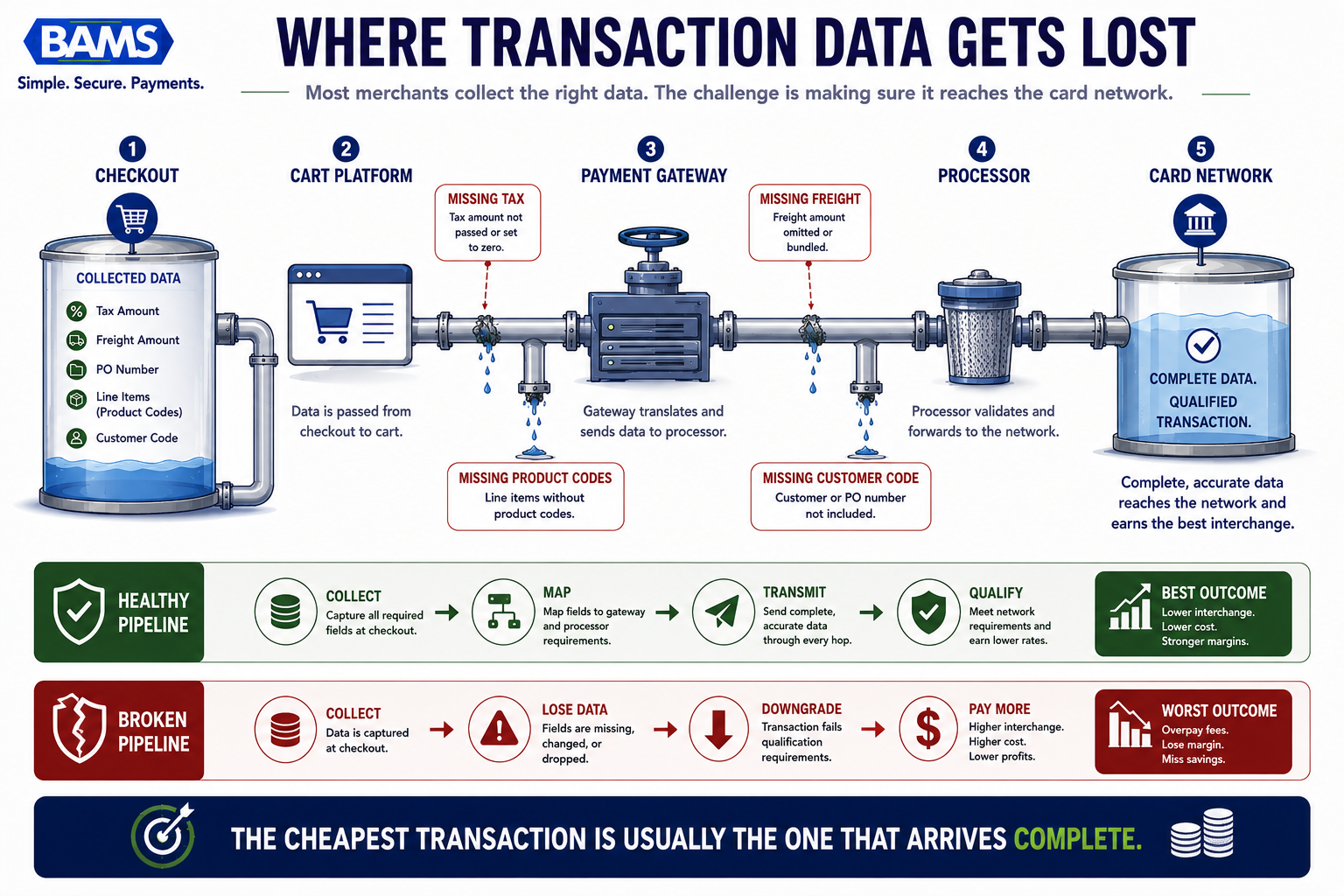
Most eCommerce managers assume their payment gateway or cart plugin automatically passes all available data to the processor. It doesn’t. Gateways transmit only the fields your checkout collects and maps. If your cart doesn’t capture a freight amount as a separate field, or your gateway integration doesn’t map your tax field to the processor’s expected parameter, that data never reaches the card network. The transaction downgrades, and you pay more. This is a payment gateway integration problem, not a pricing problem.
Key Distinction: Tax and Freight as Interchange Levers
Tax and freight fields aren’t just accounting details. They are qualification requirements. Card networks require a non-zero tax amount (or a tax-exempt indicator) and a separate freight/shipping amount to grant Level 2 and Level 3 rates. If these fields are missing, blank, or incorrectly formatted, the transaction fails qualification regardless of what other data you send.
The Framework: A Four-Phase Field-Mapping Process
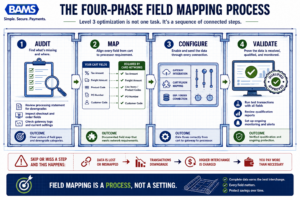
Level 3 optimization is not one task. It’s a sequence of connected steps.
Mapping tax and freight fields across platforms follows a four-phase structure. Each phase builds on the previous one, and skipping a phase almost always produces incomplete results.
- Phase 1: Audit — Identify which Level 2 and Level 3 fields your checkout currently captures and which ones are missing or misformatted.
- Phase 2: Map — Create a field-by-field mapping document that connects your cart platform’s data fields to your gateway’s expected parameters and your processor’s qualification requirements.
- Phase 3: Configure — Implement the mappings in your gateway integration, cart plugins, and (if applicable) ERP or order management system.
- Phase 4: Validate — Run test transactions on commercial cards and verify that the data reaches the processor correctly, then monitor your processing statements for downgrade elimination.
These phases are sequential. Attempting to configure fields before completing a thorough audit is the most common reason L3 optimization projects fail.
Step-by-Step: Mapping Tax and Freight Fields Across Your Platforms
Step 1: Audit Your Current Data Flow
Objective: Identify every gap between what your checkout collects and what card networks require for Level 2 and Level 3 qualification.
Start by pulling your most recent processing statement and looking for downgrade categories. Common Visa downgrade labels include “Standard” and “EIRF” (Electronic Interchange Reimbursement Fee). Mastercard uses labels like “Standard” and “Merit III.” If you see commercial card transactions landing in these categories, you have field gaps. For a detailed diagnostic, review the five signals that indicate margin leakage on your statement.
Next, document the data your checkout currently captures at the point of sale. Open a test order in your cart platform’s admin and check whether these fields exist and are populated:
- Tax amount (as a separate, non-zero numeric field)
- Tax-exempt indicator (if applicable)
- Freight/shipping amount (as a separate numeric field)
- Customer code or PO number
- Ship-to postal code
- Line-item product codes (commodity codes or UPC)
- Line-item descriptions, quantities, and unit prices
Then check your gateway’s transaction log for the same order. Compare the fields your cart captured to the fields your gateway actually transmitted. This is where most gaps appear: the cart has the data, but the gateway integration doesn’t pass it.
Anti-pattern: Assuming your cart and gateway are aligned without checking. Many cart plugins silently drop fields that the gateway API supports but the plugin doesn’t map.
Success indicator: You have a written list of every required L2/L3 field, its current status (present, missing, or misformatted), and the specific system where the gap occurs.
Step 2: Build a Cross-Platform Field Map
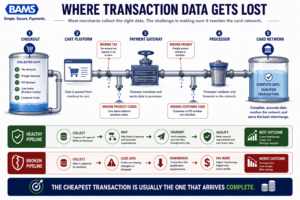
Most merchants collect the right data. The challenge is making sure it reaches the card network.
Objective: Create a single reference document that connects every required interchange field to its exact location in your cart, gateway, and processor.
This is the core of the work. Open a spreadsheet with four columns: Required Field (the card network’s name for the data element), Cart Field (where this data lives in your eCommerce platform), Gateway Parameter (the API field name your gateway expects), and Processor Requirement (format, data type, and any validation rules).
For tax fields, the mapping often looks like this: your cart stores “Tax Total” as a currency value. Your gateway API expects a parameter like tax_amount or taxAmt as an integer in cents (not dollars). Visa requires the field to be non-zero for taxable transactions, or a specific tax-exempt indicator code if the buyer is exempt. Each of these details matters. A tax amount of $0.00 on a taxable transaction will trigger a downgrade even though the field is technically present.
For freight, the pattern is similar. Your cart’s “Shipping” field must map to the gateway’s freight parameter. Some gateways label this shipping_amount, others use freight_amount or duty_amount. If your cart bundles shipping into the order total without breaking it out, you’ll need to restructure how the checkout calculates and stores that value.
For line-item data (Level 3), each product in the order needs its own set of fields: commodity code, description, quantity, unit of measure, unit cost, and extended amount. Map each of these from your product catalog and order object to the gateway’s line-item array format.
Anti-pattern: Building the map from memory or documentation alone. Always verify field names against your actual gateway API responses and cart database schema. Documentation can be outdated.
Success indicator: A completed spreadsheet where every required L2/L3 field has a confirmed source in your cart and a confirmed destination in your gateway, with format conversion notes where needed. You can review the seven most commonly missing L3 fields to cross-check your map for completeness.
Step 3: Configure Your Gateway Integration
Objective: Implement the field mappings so that every commercial card transaction automatically sends complete Level 2 and Level 3 data to the processor.
How you implement depends on your integration type. If you use a hosted or plugin-based gateway integration (Shopify, WooCommerce, BigCommerce plugins), your options may be limited by what the plugin exposes. Many standard plugins don’t pass L2/L3 fields at all. In that case, you have three options: switch to a plugin that supports enhanced data, use the gateway’s direct API with custom code, or work with your merchant services provider to enable L3 passthrough.
If you use a direct API integration, the work is more straightforward. Add the mapped fields to your payment authorization and settlement API calls. Pay close attention to the settlement step: some gateways accept L2/L3 data at authorization but require you to resubmit or confirm it at settlement. Missing the settlement step is a common cause of downgrades even when the auth call looks correct.
For tax fields specifically, implement logic that distinguishes between taxable and tax-exempt transactions. Taxable orders must include a non-zero tax amount. Tax-exempt orders must include the appropriate indicator code (varies by gateway). Sending a zero tax amount without the exempt flag is the single most common tax-field error.
For freight, ensure your checkout separates shipping charges from handling fees and product prices. The freight field should contain only the shipping cost. Bundled or zero-value freight fields will not satisfy Level 3 requirements.
A provider like BAMS can help identify which fields your current integration is dropping and work with you to configure the passthrough correctly, particularly if your gateway supports L3 but your plugin doesn’t expose it.
Anti-pattern: Hardcoding test values (like a $0.01 tax amount) to “pass” validation. Card networks audit field values, and artificial data can trigger compliance flags or fail to produce the expected rate reduction.
Success indicator: Your gateway’s transaction detail view shows all L2/L3 fields populated with accurate, order-specific values for a test commercial card transaction.
Step 4: Handle Platform-Specific Edge Cases
Objective: Resolve the formatting, timing, and data-structure mismatches that cause field-mapping failures on specific platforms.
Every eCommerce platform has quirks that affect L3 data flow. Here are the most common edge cases and how to handle them:
Tax-inclusive pricing: If your store displays prices with tax included (common in international B2B), you must still break out the tax amount as a separate field for the gateway. Calculate and pass the tax component explicitly, even if the customer sees a single price.
Multiple tax jurisdictions: Card networks expect a single tax amount per transaction. If your cart calculates state, county, and city taxes separately, sum them into one value before mapping to the gateway’s tax field.
Free shipping promotions: When you offer free shipping, the freight field should be $0.00. However, some gateways treat a zero freight value as “missing.” Check your gateway’s documentation. You may need to pass a minimal value or a specific indicator.
Subscription and recurring orders: Recurring transactions often bypass the checkout flow entirely, which means L2/L3 fields from the original order may not carry forward. Ensure your subscription engine repopulates all required fields on each rebill.
ERP and order management sync: If your ERP modifies orders after checkout (adding line items, adjusting tax, splitting shipments), those changes must propagate to the payment record before settlement. A mismatch between the settled amount and the L3 line-item total will cause a downgrade.
Anti-pattern: Treating all platforms the same. A mapping that works on WooCommerce with a direct API integration will not work identically on Shopify with a hosted checkout. Test per platform.
Success indicator: You have documented and resolved every edge case specific to your platform, and test transactions covering each scenario (taxable, exempt, free shipping, multi-item) all pass with complete data.
Step 5: Validate with Live Commercial Card Transactions
Objective: Confirm that real-world commercial card transactions qualify for Level 2 and Level 3 interchange rates after your configuration changes.
Test mode and sandbox environments don’t verify interchange qualification. You need live transactions on actual commercial cards to validate. Run at least three to five test purchases using a corporate purchasing card or business credit card. Vary the order types: single-item, multi-item, taxable, tax-exempt, and orders with shipping.
After each transaction settles (typically 24 to 48 hours), check two things. First, review the transaction detail in your gateway dashboard to confirm all L2/L3 fields were transmitted. Second, review your processing statement or ask your processor for the interchange qualification report on those specific transactions. You’re looking for the transactions to land in commercial Level 2 or Level 3 rate categories instead of “Standard” or “EIRF.”
The financial impact of enhanced data qualification can become meaningful as commercial card volume grows. Businesses that consistently submit complete transaction data are generally better positioned to qualify for lower interchange categories and reduce overall processing costs.
Anti-pattern: Validating only once and assuming ongoing compliance. Platform updates, plugin upgrades, and gateway API changes can break field mappings silently. Schedule quarterly validation checks.
Success indicator: Your test transactions appear in Level 2 or Level 3 interchange categories on your processing statement, and the effective rate on those transactions is measurably lower than before.
Step 6: Monitor, Maintain, and Measure Savings
Objective: Build an ongoing process that catches regressions and quantifies the financial impact of your field-mapping work.
Create a monthly review cadence. Each month, pull your processing statement and check the percentage of commercial card transactions qualifying at Level 2 or Level 3. Track this as a metric alongside your effective processing rate. A healthy target is 90% or higher qualification on commercial card volume.
When you spot downgrades, trace them back to the specific order and identify which field was missing or malformed. Common regression causes include: cart platform updates that rename or relocate data fields, gateway plugin updates that reset custom configurations, new product types added without commodity codes, and seasonal promotions that alter tax or shipping calculations.
Measure savings by comparing your average interchange cost on commercial cards before and after implementation. Use the formula: (previous average rate minus current average rate) multiplied by monthly commercial card volume. This gives you a concrete dollar figure to justify the ongoing maintenance effort.
For businesses that also accept high-ticket B2B orders, consider whether some of that volume could route through ACH instead of card networks for even greater cost reduction. L3 optimization and payment method routing work together as complementary strategies.
Anti-pattern: Treating L3 optimization as a one-time project. Interchange qualification is an ongoing operational requirement, not a set-and-forget configuration.
Success indicator: You have a monthly dashboard showing commercial card qualification rates and dollar savings, and you catch regressions within one billing cycle.
Practical Example: Before and After Field Mapping
Scenario: A Mid-Size Industrial Supplies Store
Consider an eCommerce merchant selling industrial supplies with $80,000 per month in commercial card volume. Before optimization, their WooCommerce checkout collected tax and shipping amounts but their gateway plugin didn’t map those fields to the processor’s L2/L3 parameters. Every commercial card transaction landed at the standard commercial rate.
After auditing, they discovered three critical gaps: the tax amount wasn’t being passed (the plugin sent it as part of the total but not as a separate field), the freight amount was missing entirely, and no line-item data was transmitted. Their field map revealed that the gateway’s API supported all L3 fields, but the off-the-shelf plugin only passed Level 1 data.
They switched to a direct API integration, mapped all required fields, and worked with their merchant services provider (BAMS, in this case) to validate that transactions were qualifying correctly. Within one billing cycle, 87% of their commercial card transactions qualified at Level 3.
The result: their average interchange cost on commercial cards dropped from approximately 2.95% to approximately 1.85%. On $80,000 monthly volume, that’s a savings of roughly $880 per month, or over $10,500 annually. The implementation took two weeks of developer time and one billing cycle to validate.
Scenario Comparison: Tax-Exempt vs. Taxable Orders
A common failure point is tax-exempt orders. One B2G merchant passed tax amounts correctly on taxable orders but sent a blank tax field on government (tax-exempt) purchases. Those transactions, which were their highest-value orders, all downgraded. The fix was simple: populate the tax field with $0.00 and set the tax-exempt indicator flag to “Y” in the gateway API call. This single change recovered an estimated 0.50% on their government card volume.
Common Mistakes and Pitfalls
Assuming your plugin “just works.” The most expensive mistake is never checking. Default cart plugins rarely pass L2/L3 data without custom configuration. Verify, don’t assume.
Passing tax as zero on taxable orders. A $0.00 tax amount without a tax-exempt indicator tells the card network the data is missing, not that the tax is zero. This triggers an immediate downgrade.
Ignoring the settlement step. Some gateways accept L3 data at authorization but require it again at settlement. If your integration only sends it once, the data may not reach the processor.
Mapping fields once and forgetting. Platform updates, plugin changes, and new product categories can break your mappings without warning. Quarterly checks prevent silent regressions.
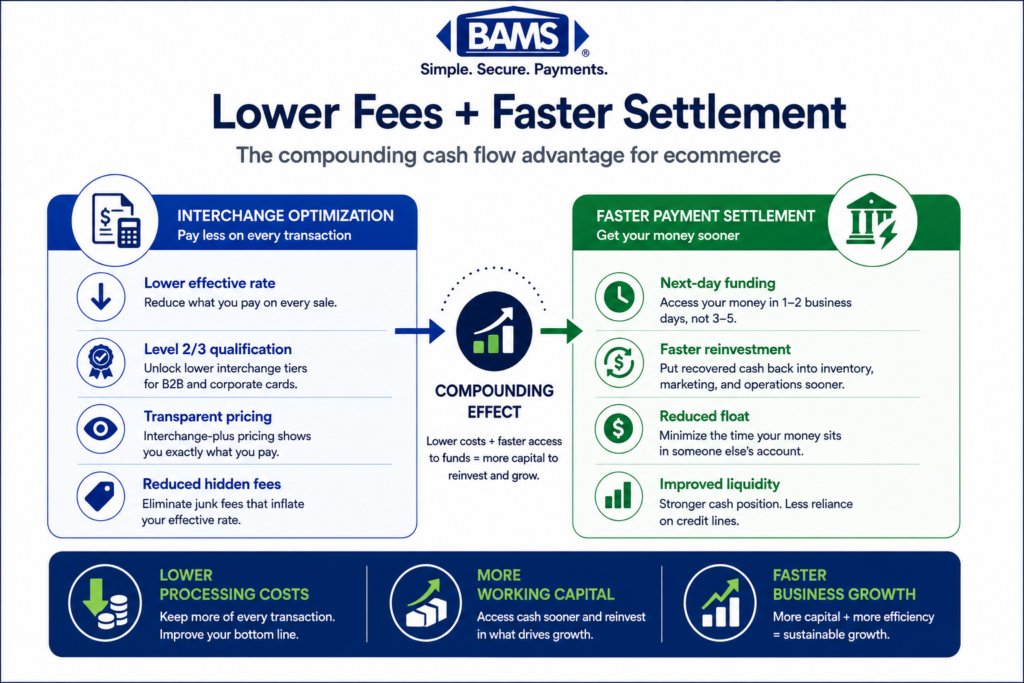
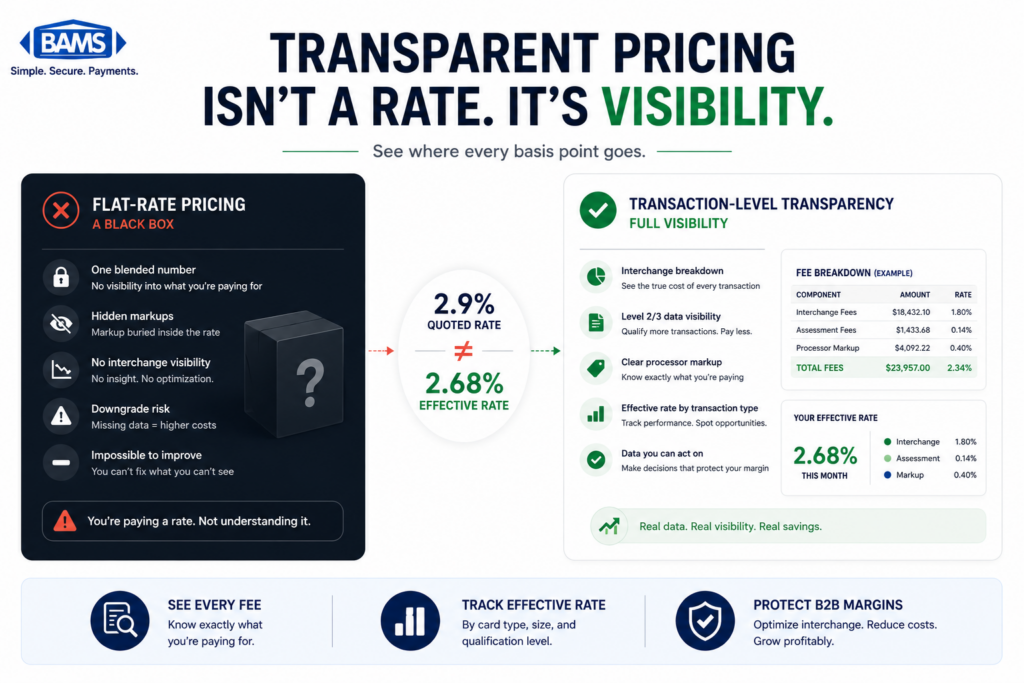
Optimizing before understanding your pricing model. L3 savings are most transparent when merchants use interchange-plus pricing because the underlying interchange costs remain visible rather than being absorbed into a blended rate structure.
What to Do Next
Start with the audit. Pull your most recent processing statement and look for commercial card transactions in downgrade categories. That single step tells you whether this optimization applies to your business and roughly how much you’re leaving on the table.
If you find downgrades, open a test order in your cart admin and compare the fields it captures to the Level 2 and Level 3 requirements listed in Step 1. Document the gaps. That document becomes your project brief.
You don’t need to map every field in one sprint. Level 2 fields (tax, customer code, merchant ZIP) are simpler to implement and still deliver meaningful savings. Get those working first, validate them, then layer in Level 3 line-item data as a second phase.
Revisit this guide as your platform evolves. New cart versions, gateway updates, and changes in your product catalog can all affect field mapping. Treat this as a living reference, not a one-time checklist.
Frequently Asked Questions
What are the best strategies to reduce payment processing fees?
The most impactful strategy for B2B and B2G merchants is ensuring your checkout passes complete Level 2 and Level 3 transaction data (tax amounts, freight, line-item details) so commercial card transactions qualify for lower interchange rates. Beyond that, confirm you’re on interchange-plus pricing so those savings flow through to you, review your processing statements monthly for downgrades, and consider routing high-ticket orders through ACH where appropriate.
How does optimizing transaction data affect processing fees?
Card networks like Visa and Mastercard offer lower interchange rate tiers for transactions that include enriched data fields. When your checkout passes complete Level 2 data (tax amount, customer code) and Level 3 data (line-item details, freight, commodity codes), commercial card transactions qualify for reduced rates. The savings range from 0.5% to 1.5% per transaction, which compounds significantly across your monthly volume.
Why is interchange-plus pricing more beneficial than flat-rate pricing?
Interchange-plus pricing passes the actual interchange cost to you with a fixed markup on top. This means when you optimize your transaction data and qualify for lower interchange tiers, your costs go down directly. With flat-rate or blended pricing, your processor charges the same percentage regardless of interchange qualification, so they pocket the savings from your L2/L3 data instead of passing them to you.
How can I audit my payment processing statements for hidden fees?
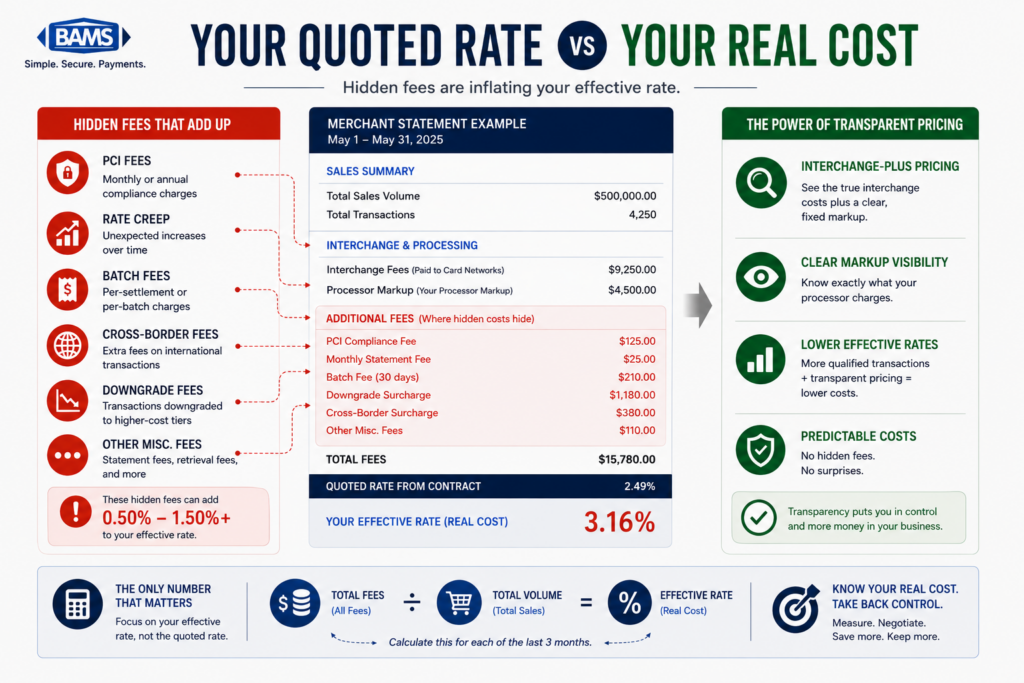
Look for transactions categorized in downgrade tiers like “Standard,” “EIRF” (Visa), or “Merit III” (Mastercard). These indicate transactions that failed to meet data or settlement requirements and were reassigned to more expensive rate categories. Calculate your effective processing rate (total fees divided by total volume) and compare it to your expected rate. A significant gap suggests downgrades or other hidden costs are inflating your fees.
Do all payment gateways support Level 3 data?
No. Many gateways support Level 2 and Level 3 data at the API level but their standard eCommerce plugins don’t expose those fields. Before investing in field mapping, confirm that your gateway’s API accepts L2/L3 parameters and that your specific integration method (plugin, hosted checkout, or direct API) can transmit them. If your current plugin can’t pass enhanced data, you may need a direct API integration or a different plugin.
How long does it take to implement Level 3 field mapping?
For a typical mid-size eCommerce store with developer resources, expect one to two weeks for the audit and mapping phases, one to two weeks for configuration and testing, and one billing cycle (roughly 30 days) to validate results on your processing statement. Starting with Level 2 fields only can cut implementation time in half while still delivering meaningful savings, with Level 3 line-item data added as a second phase.