
Merchant Processing Fees: Why Your Rate Cut Didn’t Save Money
Last Updated on October 1, 2026 by Dimitri Akhrin
The processor setup defaults you never questioned are quietly rebuilding the costs you thought you eliminated
Learn why switching processors for lower merchant processing fees often fails to reduce actual costs. Discover how gateway defaults, batch timing, and payment method routing silently erode the savings your rate sheet promised.
TL;DR
- Rate savings mean nothing without configuration review – Default gateway settings on batch timing, payment routing, and risk thresholds can quietly erase the savings your new contract promised.
- Batch cutoffs and routing logic are where hidden costs live – Missed batch windows delay your cash by days, and default routing pushes transactions through more expensive channels than necessary.
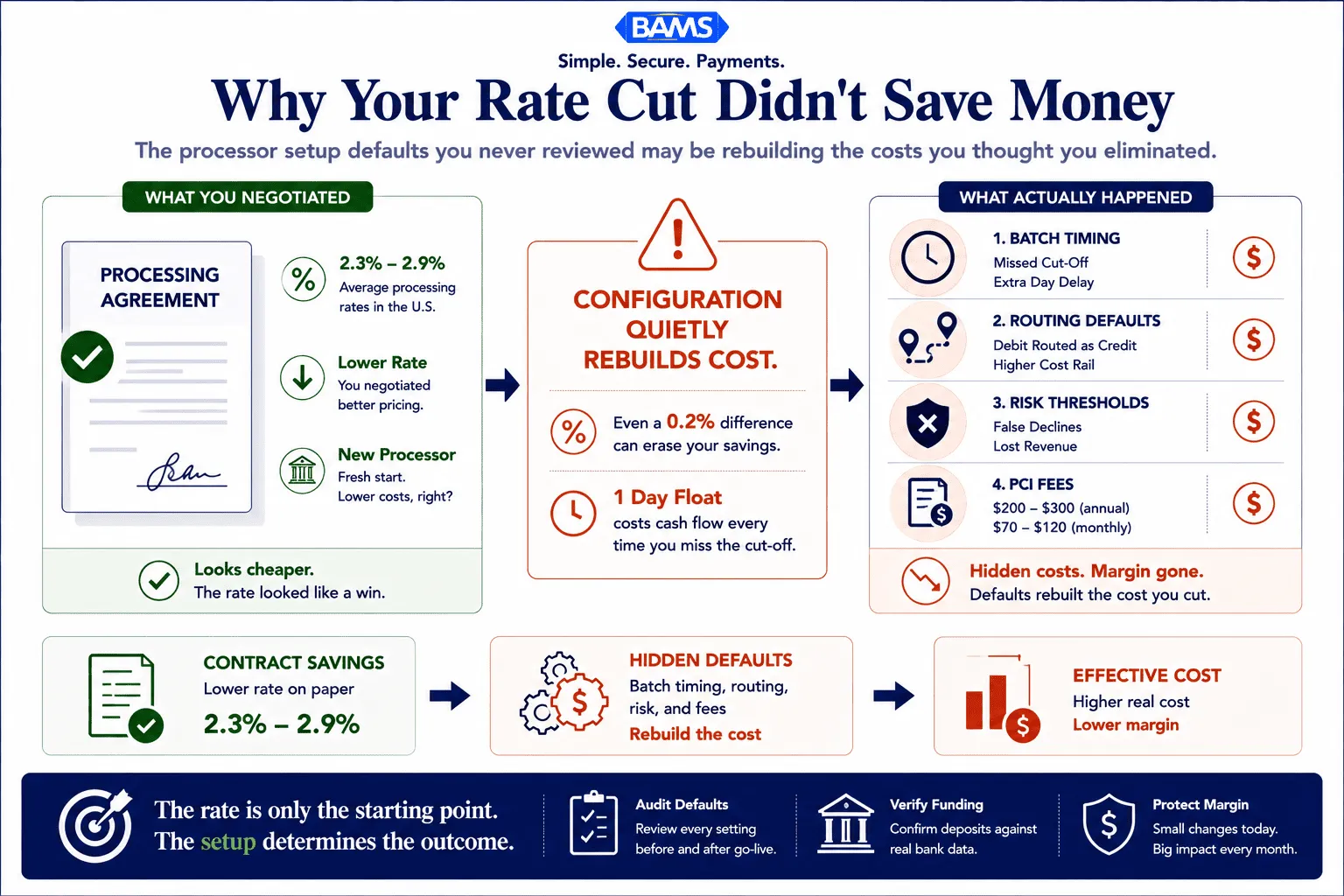
- Think of processor cost as a system, not a rate – Two merchants with identical rates can pay wildly different effective costs based purely on how their processor setup is configured.
- Treat every migration as a configuration project – Audit defaults, verify deposit timing against real bank data, and revisit risk thresholds regularly to capture the margin improvement you actually negotiated.
You Switched Processors. Your Merchant Processing Fees Didn’t Actually Drop.
Every eCommerce manager has lived this moment: you negotiate a better rate, sign with a new processor, celebrate the savings on paper, and then watch your monthly statements tell a completely different story. The numbers don’t lie, but the rate sheet did. Something between the quoted price and the actual cost went sideways.
That something is almost always hiding in the processor setup defaults you never thought to question.
The Rate-Shopping Trap Everyone Falls Into
The conventional approach to cutting payment processing costs is straightforward: compare rates, pick the lowest one, migrate. It makes intuitive sense. Federal Reserve interchange fee data continues to demonstrate how interchange qualification and transaction type materially affect merchant costs, making even small percentage differences meaningful at scale.
The problem is that rate comparison has become table stakes. Every processor can show you a competitive number. What they don’t show you is what happens after you sign: the gateway defaults that route transactions through more expensive channels, the batch timing that delays your deposits by days, the risk thresholds calibrated for someone else’s business. These aren’t bugs. They’re the processor’s margin, rebuilt into your configuration.
You solved the rate problem. You inherited a setup problem.
The Real Cost Lives in Your Configuration, Not Your Contract
Here’s what we believe: the processor setup defaults you accept on day one determine more of your actual cost than the rate you negotiated. Migration without configuration review is just moving your money through a different set of hidden fees.

Most merchants focus on the contract. The hidden costs usually come from the configuration.
Where Merchant Processing Fees Actually Hide
Let’s trace how this plays out in practice.
Batch Timing: The Silent Cash Flow Tax
Most processors ship with a default batch cutoff time, often set to 10 or 11 PM Eastern. If your business runs on Pacific time, or if your peak sales happen in the evening, you’re routinely missing the cutoff. Every missed cutoff pushes your deposit back by a full business day. Over a month, that’s potentially five or six extra days your cash sits in limbo. FedNow Service resources continue to demonstrate how payment infrastructure improvements are reshaping merchant expectations around funding speed and cash flow access.
This isn’t a fee on your statement. It’s a fee on your cash flow. And most merchants never adjust it because they don’t know it’s adjustable.
Configuring your online payment gateway for optimal batch cutoff timing is one of the highest-leverage changes you can make during a migration. It costs nothing. It just requires someone to actually do it.
Payment Method Routing: Defaults That Favor the Processor
Your payment acceptance methods matter far more than most merchants realize. Not all transactions cost the same to process. A keyed-in card-not-present transaction costs more than a tokenized wallet payment. A rewards card costs more than a standard debit card. Your gateway’s default routing logic determines which path each transaction takes.
When you migrate to a new processor and accept their default gateway configuration, you’re often accepting routing rules optimized for the processor’s risk model, not your margin. Debit transactions that could route through lower-cost networks get pushed through credit rails instead. Digital wallet payments that qualify for lower interchange rates get processed as standard card-not-present transactions.
U.S. swipe fees hit $187.2 billion in 2024, up from $172 billion the year before. A meaningful slice of that growth comes not from rate increases, but from transactions being routed through more expensive channels by default. As Penny Lee of the Financial Technology Association put it, these fees function as “a tax on commerce.” But the tax rate depends on your configuration.
Risk Thresholds: When “Protection” Becomes a Fee
New processor accounts typically launch with conservative fraud and risk settings. That’s reasonable for onboarding. What’s not reasonable is leaving those settings in place six months later when your chargeback rate is well below industry average.
Overly aggressive risk thresholds decline legitimate transactions. Every false decline is lost revenue that never shows up as a line item on your processing statement. It’s invisible margin erosion. And because the processor benefits from lower risk exposure, they have no incentive to remind you those thresholds are adjustable.
Understanding your actual risk profile and auditing your full fee breakdown should be part of any post-migration review. The savings you negotiated on paper only materialize if your configuration lets them.
PCI Compliance: The Setup Fee Nobody Audits
Here’s a quieter example. Many processors bundle PCI compliance fees into their default setup, charging $200, $300, or more per year for services that should cost a fraction of that. During migration, merchants focus on transaction rates and overlook these recurring charges entirely. Knowing what PCI compliance fees should actually cost ($70 to $120 per year for most businesses) is a quick diagnostic for whether your new processor is being straight with you.
What This Means for Your Next Migration
If this argument holds, then the entire way most eCommerce businesses evaluate processor switches needs to change. Rate comparison becomes necessary but insufficient. The real due diligence happens in the configuration layer: batch timing, routing logic, risk thresholds, compliance fees, funding speed verification.
This is where a partner like BAMS can shift the equation. Their approach pairs transparent pricing with dedicated account management that actually walks through setup defaults with you, configuring batch cutoffs for next-day funding and reviewing routing to match your specific transaction patterns. It’s the difference between a processor that hands you a login and one that hands you a configuration built for your business.
The cost of ignoring this isn’t dramatic. It’s incremental. It’s the 0.2% here, the extra day of float there, the declined transaction you never knew about. Over a year, across thousands of transactions, it compounds into the savings gap between what your contract promised and what your bank account actually received.
Treat every processor migration as a configuration project, not just a contract change.
A Better Way to Think About Processor Cost
Stop thinking of processor cost as a rate. Start thinking of it as a system.
A rate is a single number on a contract. A system is the full chain of decisions that determines what you actually pay: how transactions route, when batches close, what gets flagged, how fast funds land. Two merchants with identical rates and identical sales volume can have wildly different effective costs based purely on how their processor setup is configured.
The question isn’t “what rate did you get?” The question is “what did your configuration do to that rate after you signed?”
The Default Is Never Neutral
Every default setting in your payment stack was chosen by someone. It just wasn’t chosen by you. And the entity that chose it had different incentives than you do. That’s not a conspiracy. It’s just business.
The merchants who actually capture the savings they negotiate are the ones who treat migration as a configuration project, not a contract swap. They audit every default. They verify deposit timing against real bank statements. They revisit risk thresholds quarterly.
Your rate is the starting line. Your setup determines where you finish.
Frequently Asked Questions
What documents do I need to gather before switching merchant service providers?
Prepare your current processing statements (at least three months), your gateway credentials, any existing PCI compliance documentation, and your bank account details for deposit verification. Having your current batch cutoff times and routing configurations documented will also prevent you from blindly accepting new defaults.
Why should I keep my old merchant account open during a processor transition?
Open chargebacks and pending transactions still need to settle through your original processor. Closing the account prematurely can result in frozen funds, unresolved disputes, and gaps in your transaction records that complicate reconciliation.
How can I verify that my new processor’s setup actually delivers faster funding?
Run a small batch of test transactions before going fully live and track exactly when deposits appear in your bank account. Compare the actual deposit timing against the processor’s stated funding speed to confirm your batch cutoff and bank verification settings are correctly configured.


