7 Signals Your Processing Statement Hides Fees
Last Updated on October 6, 2026 by Dimitri Akhrin
How interchange downgrades from missing L3 data silently inflate your eCommerce processing costs
Learn to read the specific line items on your processing statement that reveal interchange downgrades. This guide gives eCommerce merchants a concrete audit framework to spot hidden fees in processing caused by missing tax, freight, and product data.
TL;DR
- Missing tax and freight fields cause interchange downgrades – Your eCommerce platform collects this data, but most gateway integrations don’t pass it to the processor, so card networks charge you higher rates.
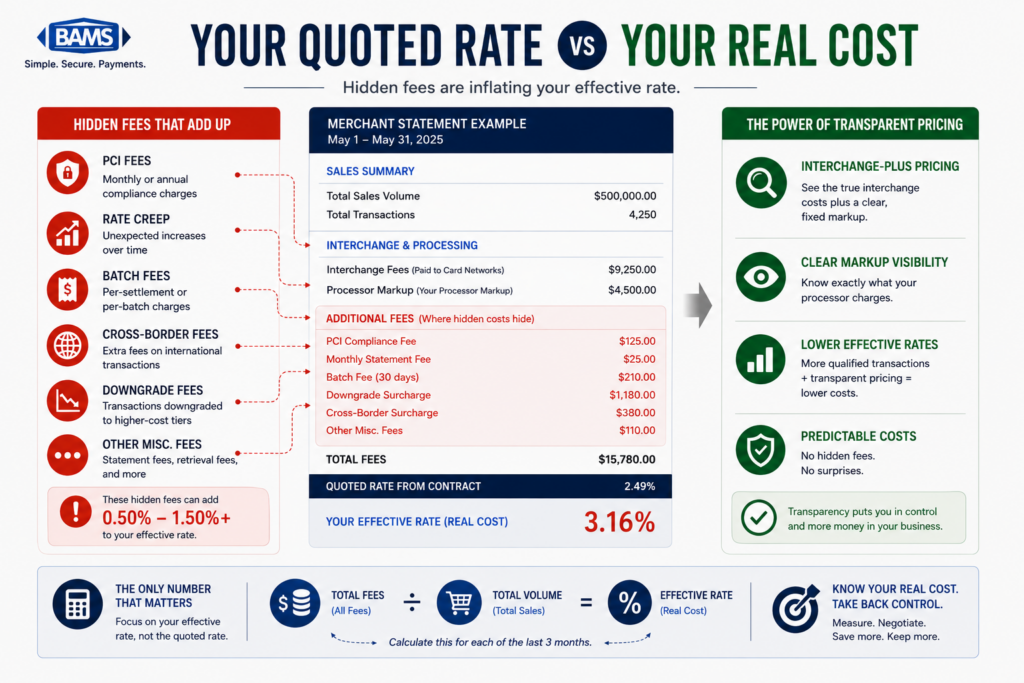
- Your effective rate is the diagnostic starting point – Divide total fees by total volume each month. Upward drift without changes in card mix signals systematic downgrade problems.
- Look for EIRF, Standard, or downgrade surcharge line items – These labels on your interchange-plus statement confirm that transactions are settling at higher-cost categories due to missing data fields.
- Level 3 data (freight, commodity codes, line items) unlocks the lowest rates on commercial cards – The savings range from 0.30% to 0.60% per qualifying transaction, which compounds across your entire B2B volume.
- Start with three actions – Calculate your six-month effective rate trend, check whether tax amounts pass correctly on transaction detail reports, and request a qualification rate breakdown from your processor.
The Signals on Your Processing Statement That Prove You’re Overpaying
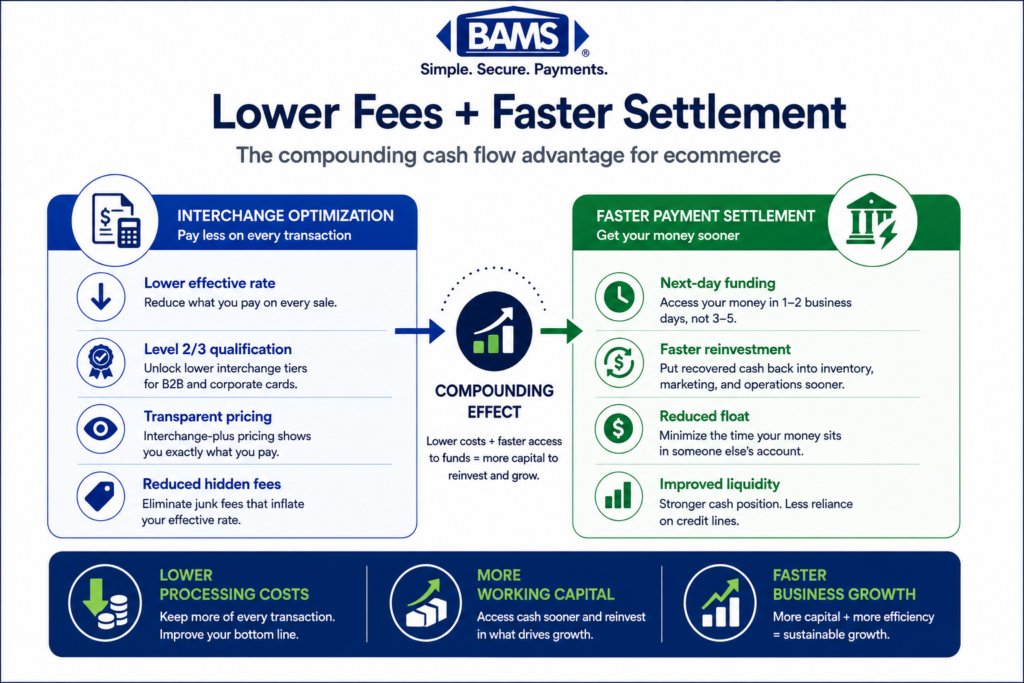
Somewhere between your eCommerce platform and your payment processor, tax and freight data is getting lost. That missing data is quietly triggering interchange downgrades, and the result is hidden fees in processing that inflate your costs on every qualifying transaction. Merchant Payments Coalition resources continue to highlight how interchange complexity and payment inefficiencies quietly increase merchant operating costs.
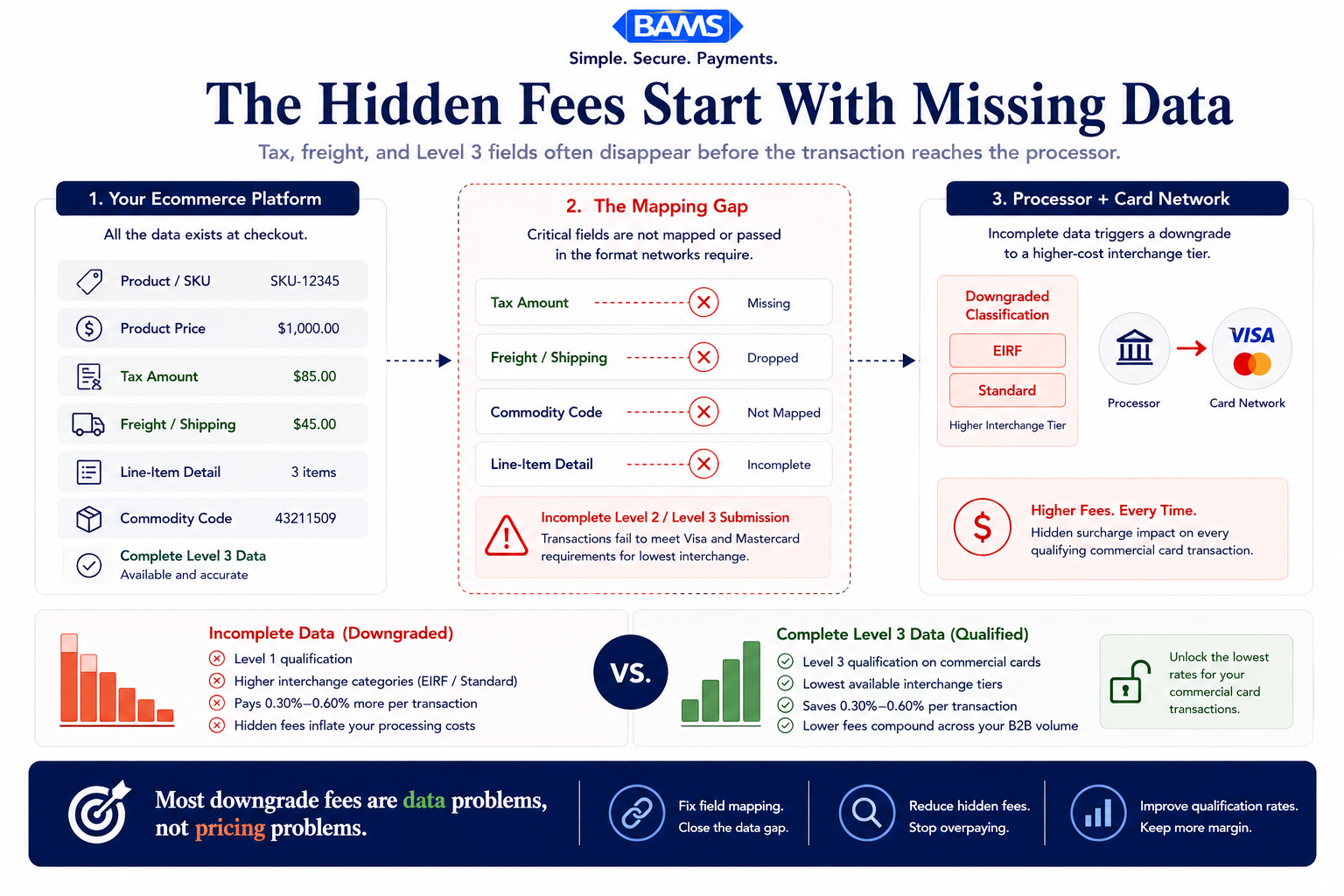
The root cause isn’t greed from the card networks. It’s a technical gap: your gateway isn’t passing enriched transaction data (tax amounts, freight charges, product codes) to the processor in the format Visa and Mastercard require for lower interchange tiers. The card networks reward merchants who send complete data. When fields are missing or malformed, your transactions get reclassified to a higher, more expensive rate category. That reclassification is called a downgrade, and it shows up on your statement if you know where to look.
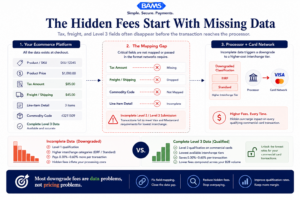
The problem usually is not the processor markup itself. It is the transaction data that never reaches the card network correctly.
Who This Guide Is For (and What It Doesn’t Cover)
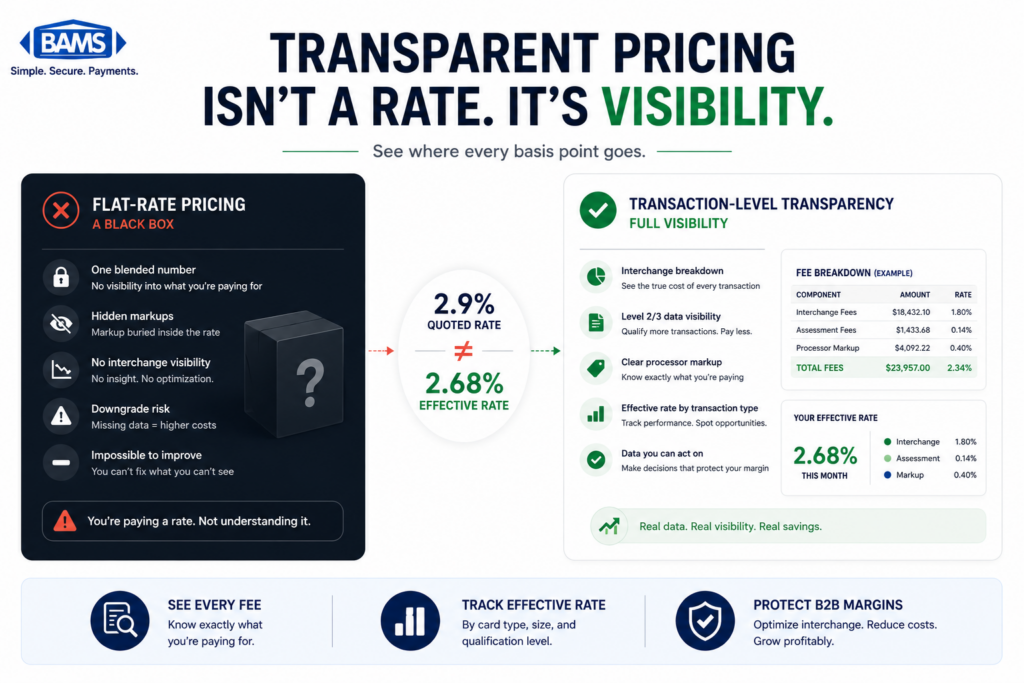
This guide is for eCommerce managers at established online businesses processing meaningful card volume who suspect their processing costs are higher than necessary but can’t pinpoint why. If you’re on interchange-plus pricing, you already have the statement visibility to act on this. If you’re on flat-rate pricing, your first step is switching to a model that shows you what you’re actually paying.
This is not a general list of ways to reduce processing costs. We’re focused on one specific, underserved problem: how unmapped tax and freight fields between your eCommerce platform and your processor cause interchange downgrades, and how to diagnose that from your statement. We won’t cover negotiating markup rates, switching card brands, or chargeback prevention.
How We Selected These Diagnostic Signals
Each signal below was chosen because it’s visible on a standard interchange-plus processing statement, directly tied to Level 2 or Level 3 data qualification failures, and actionable without requiring you to change processors. These are the indicators that separate a routine statement review from a real audit of your transaction fees and eCommerce margins.
7 Statement Signals That Reveal Interchange Downgrades from Missing Tax and Freight Data
1. EIRF or Standard Interchange Categories Appearing on B2B Transactions
Why it matters: When you sell to another business using a commercial or purchasing card, Visa and Mastercard offer significantly lower interchange rates if you pass Level 2 data (tax amount, customer code) and Level 3 data (line-item detail including freight, product codes, unit costs). If your statement shows transactions settling at “EIRF” (Electronic Interchange Reimbursement Fee) or “Standard” instead of “Commercial Level 2” or “Commercial Level 3,” those transactions were downgraded because required fields were missing.
What it looks like today: On your interchange-plus statement, look at the rate category column. B2B transactions that should qualify at rates around 1.90% + $0.10 may instead appear at 2.65% + $0.10 or higher. The difference on a $500 transaction is $3.75 per sale, compounding across your monthly volume.
How to apply it: Pull your last three statements. Filter for transactions tagged with commercial card BINs. If any settle at EIRF or Standard, your gateway is not passing the tax amount field at minimum. Flag these for your processor and ask which specific data fields failed qualification.
2. Your Effective Rate Drifts Upward Month Over Month
Why it matters: Your effective processing rate (total fees divided by total processing volume) is the single most honest metric for what you actually pay. Federal Reserve interchange fee data continues to demonstrate how qualification differences materially affect merchant processing costs over time. When tax and freight fields intermittently fail to pass, your effective rate rises without any obvious new fee appearing on the statement.
What it looks like today: You might see your effective rate move from 2.15% in January to 2.28% in March with no change in your card mix or average ticket size. That 13-basis-point drift on $200,000 in monthly volume costs you $260 per month, or over $3,100 per year.
How to apply it: Calculate your effective rate for each of the past six months. If it trends upward without a corresponding shift in card types or transaction sizes, interchange downgrades from data field failures are a likely cause. Cross-reference the months where the rate spiked with any platform updates or gateway changes you made.
3. The “Surcharge” or “Downgrade” Line Item You’ve Been Ignoring
Why it matters: Some processors explicitly label interchange downgrades as a surcharge or downgrade fee. Others bury them inside a “miscellaneous” or “other fees” category. Either way, this line item represents the difference between the rate your transaction should have qualified for and the rate it actually received. It’s a direct tax on incomplete data, and it’s one of the most common hidden fees in merchant services draining your margins.
What it looks like today: Look for line items labeled “Interchange Downgrade Surcharge,” “Non-Qualified Surcharge,” “DNQF,” or similar. On tiered pricing statements, these may appear as the gap between “qualified” and “non-qualified” rates. On interchange-plus statements, they show up as individual transactions settling at higher interchange categories than expected.
How to apply it: Total these surcharges for the last quarter. If the number exceeds 0.10% of your volume, you have a systemic data-passing problem, not a one-off glitch. Bring this total to your processor and ask them to identify which missing fields triggered each downgrade.
4. Tax Amount Shows as $0.00 on Transaction Detail Reports
Why it matters: Level 2 interchange qualification requires, at minimum, a non-zero tax amount (or a tax-exempt indicator) and a customer code. Many eCommerce platforms collect sales tax from the buyer but don’t pass that amount through the payment gateway to the processor. The tax gets charged to the customer and remitted to the state, but the processor never sees it. The card network sees a missing tax field and downgrades the transaction.
What it looks like today: If your processor provides transaction-level detail (and on interchange-plus pricing, they should), check the “Tax Amount” field. If it reads $0.00 on transactions where you clearly collected tax, your platform-to-gateway integration is dropping this field. This is especially common with Shopify, WooCommerce, and BigCommerce when using third-party gateway plugins that weren’t configured for Level 2/3 passthrough.
How to apply it: Request a transaction detail report from your processor for one month. Compare the tax amounts shown in your eCommerce platform’s order records against what the processor received. Any mismatch confirms a field-mapping gap. The fix is usually a gateway configuration change or a middleware solution that enriches the transaction before it reaches the processor.
5. Freight/Shipping Charges Are Absent from Line-Item Data
Why it matters: Level 3 data qualification (which unlocks the lowest interchange rates on commercial and government cards) requires line-item detail that includes freight amount, commodity codes, unit quantities, and unit costs. Freight is one of the most commonly unmapped fields because eCommerce platforms calculate shipping separately from the product total, and most default gateway integrations don’t include it in the authorization message.
What it looks like today: Your customer pays $450 for product plus $25 for shipping. Your platform charges $475 total. But the data sent to the processor shows a single line item of $475 with no freight breakout. The card network can’t validate the Level 3 fields, so the transaction settles at Level 2 (or worse, Level 1), costing you 0.30% to 0.60% more than necessary.
How to apply it: Ask your processor whether they receive freight amounts on your transactions. If they don’t, work with your gateway provider to map the shipping field from your platform’s order data into the Level 3 submission. Tools like BAMS can help identify exactly which fields your current setup is dropping and provide the account-level support to close those gaps, since their dedicated account managers review statement data proactively rather than waiting for you to notice the problem.
6. Commodity Codes and Unit-of-Measure Fields Are Empty
Why it matters: Beyond tax and freight, Level 3 qualification requires commodity codes (similar to product category codes), unit of measure, and unit cost for each line item. These fields exist in your eCommerce catalog but rarely flow through to the payment authorization. When they’re empty, even transactions with correct tax and freight data still fail full Level 3 qualification.
What it looks like today: Your statement may show transactions qualifying at “Commercial Level 2” but never reaching “Commercial Level 3.” The rate difference between L2 and L3 can be 0.20% to 0.50% per transaction. On a $1,000 B2B order, that’s $2 to $5 left on the table, per order, every time.
How to apply it: Map your product catalog’s SKU or category data to standard commodity codes (UNSPSC codes are the most widely accepted). Then work with your gateway or middleware provider to include these fields in the Level 3 data submission. This is a one-time configuration effort that pays dividends on every future qualifying transaction.
7. Your Processor Claims to “Optimize” L2/L3 but Your Rates Don’t Reflect It
Why it matters: Some processors advertise Level 2 and Level 3 optimization as a feature but don’t actually pass the enriched data to the card networks. They may populate a tax field with a calculated estimate or insert placeholder values that fail network validation. The result: you think you’re getting optimized rates, but your statement tells a different story. This is one of the most deceptive ways a low advertised rate can lie about your real cost.
What it looks like today: Your processor’s marketing says “L3 optimization included.” But when you check your interchange qualification breakdown, fewer than 30% of eligible transactions actually settle at Level 3 rates. The rest fall to Level 2 or Level 1, and the processor has no explanation beyond “card mix.”
How to apply it: Ask your processor for a qualification rate report showing what percentage of commercial card transactions settled at each interchange tier (Level 1, Level 2, Level 3) over the past three months. If Level 3 qualification is below 70% on eligible cards, the optimization isn’t working. Compare the fields your platform sends against the fields the network requires, and close each gap individually.

Most downgrade fees are already visible on your statement. Merchants just were never taught where to look.
The Pattern Behind These Signals
Every signal above traces back to the same structural problem: your eCommerce platform, your payment gateway, and your processor operate as three separate systems with no shared obligation to pass complete data. Your platform knows the tax and freight amounts and your gateway knows how to format an authorization. Your processor knows what the card networks require. But nobody owns the mapping between them.
The merchants who reduce processing costs most effectively treat field mapping as infrastructure, not an afterthought. They audit the data pipeline once, configure it correctly, and then monitor their effective rate and qualification breakdown monthly to catch regressions. The savings compound because every transaction that moves from Level 1 to Level 3 earns back margin permanently.
The tradeoff is real: this requires technical coordination between your eCommerce team, your gateway, and your processor. But the financial impact of ignoring it (often 0.30% to 0.60% of total volume on qualifying cards) dwarfs the one-time effort to fix it.
Where to Start: A Prioritized Audit Path
You don’t need to fix all seven signals at once. Start with three steps. First, calculate your effective rate for the past six months and look for drift. Second, pull a transaction detail report and check whether tax amounts are passing correctly. Third, ask your processor for a qualification rate breakdown on commercial cards.
Those three actions will tell you whether you have a data-mapping problem, how severe it is, and which fields to fix first. Federal Reserve Small Business Survey data continues to show that operational visibility and cash flow predictability remain top priorities for growing businesses.
Frequently Asked Questions
How can I audit my payment processing statements for hidden fees?
Start by calculating your effective processing rate: divide your total monthly fees by your total monthly processing volume. Do this for at least three consecutive months. If the rate trends upward without changes to your card mix or average order size, interchange downgrades are likely inflating your costs. Then review transaction-level detail for downgrade surcharges, non-qualified fees, or transactions settling at EIRF or Standard interchange categories instead of commercial Level 2 or Level 3.
How does optimizing transaction data affect processing fees?
Visa and Mastercard offer lower interchange rates to merchants who submit enriched transaction data, including tax amounts, freight charges, commodity codes, and line-item detail. When this data is missing or malformed, transactions get downgraded to higher-cost interchange categories. Passing complete Level 2 and Level 3 data can reduce interchange rates by 0.30% to 0.60% per qualifying transaction, which adds up significantly on B2B and government card volume.
Why is interchange-plus pricing more beneficial than flat-rate pricing for spotting downgrades?
Interchange-plus pricing separates the card network’s interchange fee from your processor’s markup, giving you line-by-line visibility into how each transaction was classified. Flat-rate pricing bundles everything into a single percentage, making it impossible to see whether transactions are being downgraded. You can’t fix a problem you can’t see, which is why interchange-plus is the prerequisite for any meaningful statement audit.
What are the most common fields that eCommerce platforms fail to pass to processors?
Tax amount is the most frequently dropped field, followed by freight/shipping charges, commodity codes, unit of measure, and unit cost. Most eCommerce platforms (Shopify, WooCommerce, BigCommerce) collect this data from customers but don’t include it in the payment authorization message sent through the gateway. The gap is usually a configuration issue in the gateway plugin or a lack of middleware to enrich the transaction data before submission.
How do I know if my processor’s Level 2/Level 3 optimization is actually working?
Request a qualification rate report from your processor showing what percentage of commercial card transactions settled at Level 1, Level 2, and Level 3 interchange tiers over the past three months. If Level 3 qualification on eligible cards is below 70%, the optimization is underperforming. Cross-check by reviewing transaction detail reports to see whether tax, freight, and commodity code fields contain real values or placeholders.
What’s the difference between Level 2 and Level 3 data, and does it matter for all card types?
Level 2 data includes the sales tax amount and a customer/purchase order code. Level 3 data adds line-item detail: product descriptions, commodity codes, quantities, unit costs, and freight amounts. The lower interchange rates for Level 2 and Level 3 primarily apply to commercial, corporate, purchasing, and government cards. Consumer cards generally don’t benefit from enhanced data, so the ROI of L3 optimization depends on your percentage of B2B and government card volume.